FailSafe — Safety layer for AI coding agents
Prevent runaway AI edits, hallucinated dependencies, and destructive refactors before they break your codebase.
FailSafe runs locally inside VS Code and Cursor. It monitors what AI agents do, applies deterministic policy checks at the editor boundary, and gives you full visibility into every decision — before code ships.
FailSafe turns the editor into a governance hub for the tools your AI agents actually use. Every integration is local-first, opt-in, and routed through the same deterministic policy engine that guards your edits — so connecting a tool never widens your attack surface or sends data anywhere by default.
Govern the agents themselves — run a headless coding agent through FailSafe and gate what it does:
| Integration |
What it does |
Why it matters |
🤖 Continue (cn) governed wrapper |
Run a Continue headless prompt with a tool allowlist; the produced diff is risk-classified and L3-risk changes route to human approval (FailSafe: Run Continue (governed)). |
argv-form (no shell), the API key never leaves the child env, and a shell/write allowlist is escalated before it can act. |
| 🔧 Aider git-gate wrapper |
Run Aider with auto-commit off, capture the uncommitted diff, route high-risk changes to L3 (FailSafe: Run Aider (governed)). |
A dirty worktree is refused so the captured diff is unambiguously the agent's — your commit gate, not the agent's. |
| 👁️ OpenHands run observer |
Map an exported OpenHands run into FailSafe transparency records, version-gated and read-only (FailSafe: Import OpenHands Run (observe)). |
See what a full agent-loop runtime did, scored by risk — without ever mutating a live run. |
| 🔎 Cline / Roo / Kilo policy audit |
Scan workspace MCP/tool config and flag risky posture — remote MCP, wildcard auto-approval, shell-capable tools (FailSafe: Audit Agent MCP Policy). |
Catch an over-permissioned agent before it bites; secrets in the config are redacted before any finding is recorded. |
Connect your issue tracker, security, and team tooling:
| Integration |
What it does |
Why it matters |
| 📥 Linear / Jira issue import |
Resolve a Linear or Jira issue URL/key to an uncommitted intent preview — read-only (FailSafe: Import Linear/Jira Issue (preview)). |
Your tracker is the intent source; FailSafe pulls the ticket context so you never retype it — nothing is created or synced without you. |
| ✅ GitHub PR checks |
Publish FailSafe SHIELD verdicts (PASS/WARN/VETO) as GitHub Check Runs at the merge gate (FailSafe: Publish SHIELD Verdict to GitHub Check). |
Your governance verdict shows up where the merge happens; fork PRs degrade to local-only. |
| 🐞 Sentry regression correlation |
Pull a Sentry project's unresolved issues into the risk register as runtime-regression risks (FailSafe: Import Sentry Regressions). |
Production failures become governed risk records tied to project / environment / release — no raw event payloads stored. |
| 🛡️ SARIF security ingestion |
Import Semgrep / CodeQL / any SARIF 2.1.0 scanner output into the risk register (FailSafe: Import SARIF Findings). |
Your security scanner stops being a separate silo — every finding becomes a governed risk in the same audit trail as agent decisions. |
| 📣 Slack / Microsoft Teams notifications |
Post VETO / L3-approval / drift events to a Slack or Teams webhook. Notify-only, off by default. |
Governance becomes a team signal — the right people see a blocked action or a queued approval in their channel. |
| 🧮 MCP Registry risk scoring |
Score any MCP server locally — read-only, with field sanitization — before you trust it. |
Adopt MCP servers on evidence, not vibes — a supply-chain admission check at the door. |
| 📦 MCP Catalog installers |
One-click, risk-scored installs of Context7, Mermaid Chart, and Playwright MCP into your .mcp.json (FailSafe: Install MCP Integration (governed)). |
Governed installs of tools that make your agents measurably better, with the trust check built in. |
| 🧠 Bicameral MCP |
Detect, connect, and ratify architecture decision records and their drift inline. |
Every Bicameral tool call passes through FailSafe's universal interceptor. |
| 🎨 Open Design |
Observe Open Design agent runs and act on them via the L3-gated create_artifact. |
Design tooling gets the same human-in-the-loop guarantee as everything else FailSafe touches. |
| 🧰 Agent Governance Toolkit installer |
Auto-detect your workspace environment and serve the matching, registry-verified AGT installer. |
One governed entry point to instrument whatever stack you actually run. |
Each integration ships with its own README and its external API names are back-cited to official docs. A Tier 1 supply-chain CI baseline (least-privilege tokens, SHA-pinned Actions, dependency review, CODEOWNERS) hardens the repository itself.
Everything above is disabled by default and runs locally — no network call until you turn one on. Open the Integrations tab to connect.
Current Release: v6.0.5 (2026-09-04)

What's New in v6.0.5
- Screen readers now hear why a Shadow Genome node failed, not just that it did — failure nodes carry their severity in the accessible name.
- A status row that lied when it couldn't reach upstream. The Bicameral panel reported "0 open issues" whether the upstream was empty or unreachable. Those now look different.
- The Audit Log records which engine verified an entry, so an existence check is no longer indistinguishable from a content check.
- A voice glitch that blocked unrelated updates is gone. A timing check measured itself against a stopwatch that could round the wrong way, so it failed at random and held up routine dependency updates.
- Generated test screenshots stop landing in the repository. An ignore rule pointed at a folder path that does not exist, so it never took effect.
- The system-state document tells the truth again. It reported v5.9.0 as current while v6.0.4 was shipping, and nothing checked it. Something does now.
- The governance index distinguishes "deliberately private" from "missing" — and one entry turned out to point at a file that has never existed in this repository.
- Security:
qs and fast-uri dependency updates.
Under the hood this is a governance-integrity release. Five checks were found reporting success while inspecting nothing at all; each now has a test that proves it can fail. Four issues were filed upstream against Qor-logic.
What's New in v6.0.4
- "Install / Refresh Skills" now actually upgrades a stale install. The button promised to bring qor-logic up to the required version, but it only checked whether the package was present - so an install sitting below the floor was treated as fine, and the next step ran against the outdated CLI while reporting success.
- Commit checks are faster on large repositories. The workspace snapshot behind the pre-commit guard read and parsed the governance ledger five times per build - 8.7MB and 477ms cold, on the path that blocks your commit. It now reads once.
- Development Tracker phase chips are readable by screen readers. Each chip's status is announced rather than conveyed by colour alone.
- Audit Log records commit to the content they judged. A warning or block now carries a hash of the exact content the verdict was made against, so a later decision can prove it refers to the same bytes.
- The governance ledger cannot silently fork. A new pre-merge check fails CI when concurrent work would write conflicting ledger entries.
What's New in v6.0.3
- The Observe-to-Enforce upgrade notice now actually appears. v6.0.0 changed the governance-mode default and shipped a one-time notice to tell existing installs their behavior had changed. That notice could never fire, so every install predating 6.0.0 that had never explicitly picked a mode moved to Enforce silently. Fixed, and the detection now uses the same technique first-run onboarding already relied on.
- The Development Tracker stays responsive on large repositories. Its PR-cadence read ran an unbounded
git log on every dashboard load — over a second and past the output buffer on a 150k-commit repository, where it failed silently. It is now bounded, and says so when the window truncates instead of degrading invisibly.
- Voice synthesis cannot wedge the Mind Map. A stalled speech-synthesis call is now bounded and surfaces as an error rather than leaving the voice controls stuck.
- Mind Map tells you how dense the graph is. A live
N nodes · N edges readout, including when duplicate edges were merged.
- The ACP proxy notices if its registry entry is rewritten. That registry is user-writable, so an outside change could quietly route around governance while still showing the governed name. Activation now distinguishes intact, tampered, missing, and malformed registries — and never blocks activation if the check itself fails.
- Audit Log entries link to their resolution. A warning or block now records the exact ledger row a later decision resolves, by id rather than by guessing from path and timestamp.
What's New in v6.0.2
- The Monitor works without a mouse. The sentinel warning banner, critical-blockers graphic, error-budget readout, the five workspace-health metric cards, and governance-alert rows are all keyboard-reachable with visible focus rings and screen-reader names; Enter opens the explanation or details modal, and Escape returns focus to where you were — even when a live refresh rebuilt the list underneath the modal.
- Audit Log records now say what, where, and why. A sentinel verdict used to render as bare identity JSON; records now name the triggering file, the human summary, and which heuristics fired. A severity chip row — All levels · Issues · Warn · Block — isolates what needs attention, and the CSV export is a real RFC-4180 CSV with the columns you triage by (it was previously unparseable).
- Corrupt files are preserved instead of destroyed. If the risk register, adapter config, or marketplace state exists but is unreadable, the original is set aside as a
.corrupt-<timestamp>.bak before anything overwrites it. Previously the first write replaced the file and the data was gone.
- The risk register no longer absorbs your backlog. Adding or importing a risk on a fresh workspace used to durably persist the entire
BACKLOG.md projection as if you had authored every row; mutations now touch only the durable store, and backlog-derived rows are shown read-only.
- Sharper governance signals. The PR-linkage check reports accurate reasons (a pull-request number is named as one, and unverifiable references warn instead of falsely failing), the governance webhook's payload is provably what was signed and fails closed when oversized, credential redaction covers passwords containing
@, and sidebar Monitor modals draw their proper overlay chrome.
What's New in v6.0.1
- The Monitor's warning banner is now a working link. Clicking "N issue(s) detected" opens the Console's governance Audit Log focused on the triggering verdict — from the embedded sidebar (a webview-safe relay replaces the sandboxed
window.open, which used to silently do nothing) and from browser-served Monitors alike. Verdict events carry their own timestamp through the checkpoint and transparency logs so the deep link lands on the exact record, and verdict deep links bypass the Audit Log's default same-day date filter. The blockers and error-budget click-throughs use the same relay.
What's New in v6.0.0
- The pre-commit guard is real. The commit-check endpoint ships (it was documented but never implemented), the hook's port tracks the live Console server, and installing from a git worktree governs every worktree of the repo.
- Guided Agents-window setup.
FailSafe: Configure VS Code Agents Window Governance walks the opt-in, worktree commit-hook install, and governed MCP integration installs.
- Repository-scoped first-run. Each repository gets its own governance-mode decision; an explicitly configured mode anywhere suppresses re-prompting.
- Accessible Mind Map. The graph carries an accessible name and a LIST VIEW toggle renders real node/edge tables — same pattern as the Shadow Genome table view.
- Integration hardening + a 69% smaller package. MCP installs can no longer destroy an unparseable
.mcp.json; SARIF/Sentry imports are malformed-proof and never silently drop findings; the PR-linkage check paginates (no more false findings); build intermediates and governance scan outputs can never ship in the VSIX.
- Enforce is now the default governance mode. New and never-configured installs gate writes out of the box (intent-gated saves, L3 approvals). Observe and Assist are unchanged and one command away (
FailSafe: Set Governance Mode); a one-time notice on upgrade offers the mode picker. Unresolvable mode values and a missing ACP mode mirror now fail closed to enforce.
- Enforcement works on every tier. The editor enforcement path no longer consults any feature gate.
- Enforce-mode Create Intent flow. Creating an intent in enforce mode first selects the plan it serves, with an explicit switch-mode escape; the writes-blocked dialog offers
Set Governance Mode.
- Cleaner product surface. The observe-mode advisory banner and settings hint are removed, and
/api/v1/status now reports the true governance mode.
- Agent Skills marketplace category. Install the MIT-licensed mattpocock/skills packs (Wayfinder decision-ticket planning + engineering/productivity companions) as governed, risk-scored marketplace entries.
- Mind Map view prefs survive reload on any machine. Fixed a view-preferences identity race caught by the release gate.
- More fail-closed hardening + accessibility. GovernanceRouter verdict faults now block instead of silently allowing; malformed verdict payloads escalate instead of silently PASSing; a malformed META_LEDGER reads as damaged, not idle; L3 escalation-queue failures fail visibly; ACP mirror-write and fs no-client paths fail closed; real ARIA tab semantics on the Command Center nav and sub-view pills; Space push-to-talk guarded against focused controls.
What's New in v5.9.0
- 📌 The Development Tracker stays put — no more reloads when live data refreshes, it fills the available space, and you can export it as a clean PDF.
- 🌱 The Mind Map starts from your repo — an empty map preloads a knowledge graph projected from your governance history, kept distinct from your own brainstorm work.
- 🗂️ Workspace › Taxonomy editor — review and edit the tracker's programs, verticals, and agent mappings; Save writes a governed
tracker-config.yaml the assistant is directed to consult on its next cycle.
- 🧬 Shadow Genome tells the truth — the summary card now reads "Graph Nodes" (not "Failure Nodes"), "Observed" can no longer contradict the failure count, and dense graphs open in a readable table.
Previous releases
The full release-by-release history (v5.x and earlier) lives in CHANGELOG.md. Skills are sourced from the qor-logic PyPI package.
Quick Start
- Install FailSafe from the VS Code Marketplace or Open VSX.
- Open a workspace in VS Code or Cursor.
- Run
FailSafe: Open Command Center (Browser Popout) or press Ctrl+Alt+F.
- Run
FailSafe: Set Up Agent Governance to inject governance rules into detected agents.
- Run
FailSafe: Audit Current File to generate a governance verdict for the active editor.
- If you want commit-time guardrails, run
FailSafe: Install Commit Hook inside a git workspace with curl available on the path.
Bundled Documentation
docs/COMPONENT_HELP.md - every shipped surface, metric group, and governance component in one placedocs/PROCESS_GUIDE.md - setup, audits, commit hooks, provenance, break-glass, replay, rollback, and troubleshooting flows
Core Commands
| Command |
Purpose |
FailSafe: Open Command Center (Browser Popout) |
Open the main governance console in a browser window |
FailSafe: Open Command Center (Editor Tab) |
Open the governance console in an editor tab |
FailSafe: Audit Current File |
Run a manual audit on the active file |
FailSafe: Set Governance Mode |
Switch between observe, assist, and enforce |
FailSafe: Set Up Agent Governance |
Detect supported agents and inject governance rules |
FailSafe: Install Commit Hook |
Add the authenticated pre-commit governance hook to the current repository |
FailSafe: Remove Commit Hook |
Remove the FailSafe pre-commit governance hook and token file |
FailSafe: Activate Break-Glass Override |
Start a time-limited emergency override |
FailSafe: Replay Verdict (Audit) |
Re-run a prior governance decision for comparison |
FailSafe: Revert to Checkpoint (Time-Travel) |
Restore a recorded governance checkpoint |
What FailSafe Does
FailSafe separates system awareness from system control.
The Monitor provides real-time visibility into system health, governance posture, and operational risk. The Command Center is the primary control surface for planning, audits, checkpoints, and agent governance.
- Save-time intent gate that can block writes outside an active intent
- Sentinel daemon for file-change audits in
heuristic, llm-assisted, and hybrid modes
- SOA ledger with local audit history and checkpoint summaries
- MCP server support for external tools that need audit and ledger hooks
QorLogic: The Governance Layer
QorLogic is the deterministic governance engine that enforces safety policies at the editor boundary. It operates on a fundamental principle: governance decisions are made by code, not by asking an LLM to follow rules.
Prompt Guidelines vs. Deterministic Governance
| Aspect |
Prompt-Based Safety |
QorLogic Deterministic Governance |
| Decision Maker |
LLM interprets rules |
TypeScript code executes rules |
| Consistency |
Varies with context, temperature, model |
Identical output for identical input |
| Auditability |
Opaque reasoning chain |
Explicit code path, logged decisions |
| Bypass Risk |
LLM can ignore or reinterpret |
Code cannot be persuaded |
| Speed |
Network latency + inference |
Sub-millisecond local execution |
How QorLogic Works
Risk Classification — Files are classified as L1 (low), L2 (medium), or L3 (high) risk based on:
- File path triggers (e.g.,
auth/, payment/, credential → L3)
- Content triggers (e.g.,
DROP TABLE, api_key, private_key → L3)
- Configurable via
.failsafe/config/policies/risk_grading.json
Policy Evaluation — Each risk grade has deterministic requirements:
- L1: Heuristic check, 10% sampling, auto-approve
- L2: Full Sentinel pass, no auto-approve
- L3: Formal verification + human approval required
Ledger Recording — Every governance decision is recorded to an append-only SOA ledger with:
- Agent identity and trust score
- Artifact path and risk grade
- Timestamp and decision rationale
Trust Dynamics — Agent trust scores evolve based on outcomes:
- Approved L3 actions → trust increase
- Rejected or failed actions → trust decrease
- Trust scores influence future routing decisions
Why Deterministic Matters
When an LLM is asked to enforce safety rules, it can:
- Reinterpret rules based on context
- Produce inconsistent decisions across similar inputs
- Be influenced by prompt engineering attacks
QorLogic avoids these risks by executing deterministic TypeScript code at the governance boundary. The policy engine uses simple string matching and path analysis—no LLM inference required for governance decisions.
Example: A file containing api_key will always trigger L3 classification. No prompt can persuade the code to ignore this trigger.
Safety Alert
FailSafe Blocked: AXIOM 1 VIOLATION: No active Intent exists.
Remediation: Create an Intent before modifying files.

[Create Intent] [View Active Intent]
Features
1. Governance Modes
FailSafe now supports three governance modes to match your workflow needs:
| Mode |
Behavior |
Best For |
| Enforce |
Default. Full control, intent-gated saves, L3 approvals. |
Governed development, compliance |
| Assist |
Smart defaults, auto-intent creation, gentle prompts. |
Lighter-touch workflows |
| Observe |
No blocking, just visibility and logging. Zero friction. |
Exploration, learning |
Switch modes via:
- Command:
FailSafe: Set Governance Mode
- Settings:
failsafe.governance.mode
2. Save-Time Governance Gate
FailSafe evaluates save operations against the active Intent and can block writes when no active Intent exists or when a file is out of scope.
3. Sentinel Monitoring and Audits
- File watcher queues audits for code changes
- Manual audits via command
- Modes:
heuristic, llm-assisted, hybrid (LLM uses the configured endpoint)
4. SOA Ledger and L3 Queue
- Append-only ledger database for audit entries
- L3 approvals surfaced in the UI
5. UI Screens
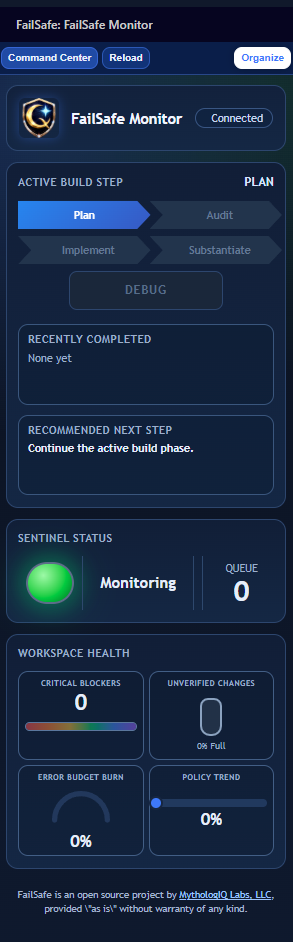
- FailSafe Monitor (compact view)
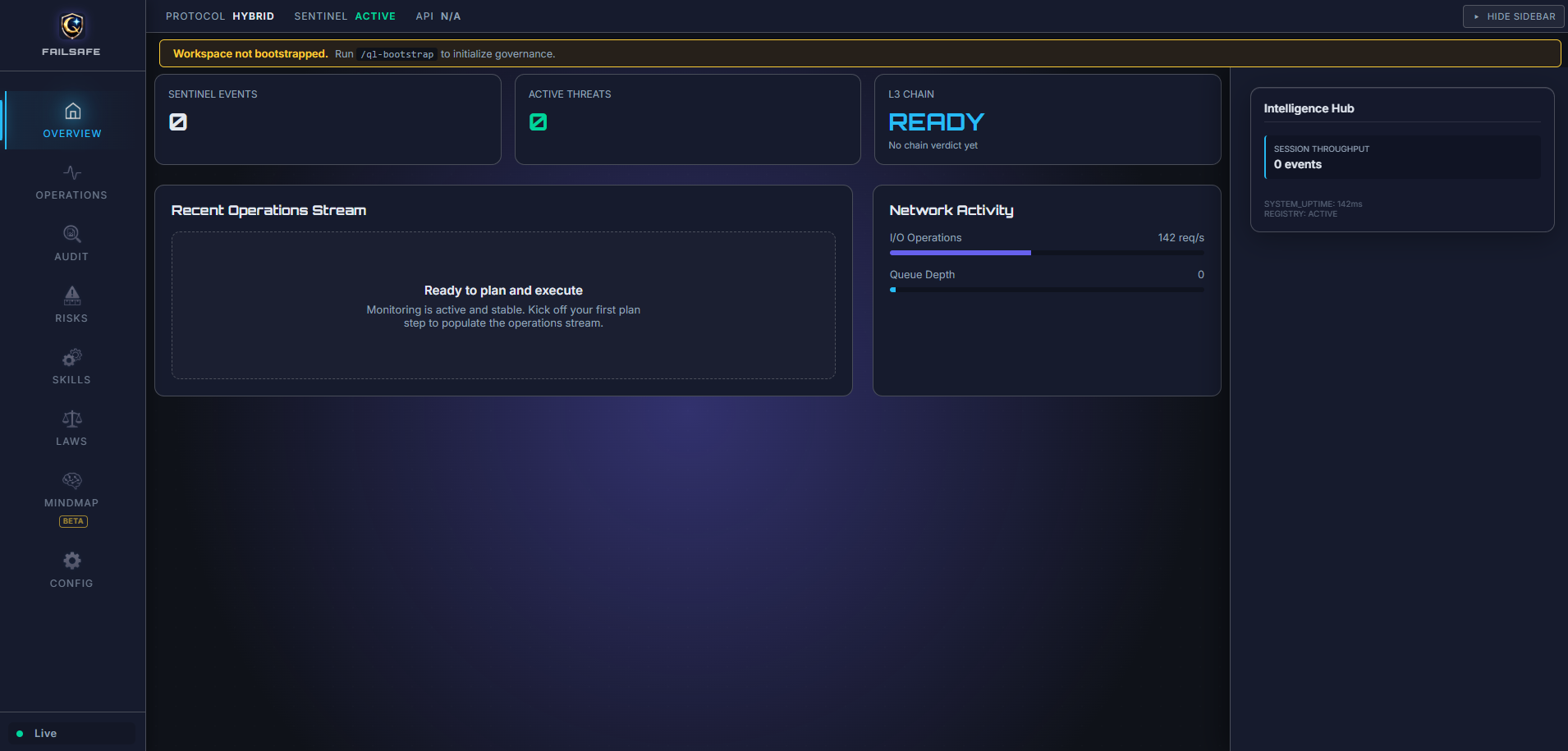
- FailSafe Command Center (extended popout/editor view)
- Skills view now includes
Recommended, All Relevant, All Installed, and Other Available to keep full skill visibility.
FailSafe Monitor UI
6. Command Center UX
- Compact
FailSafe Monitor webpanel (UI-02) provides phase status, prioritized feature counters, Sentinel state, and workspace health at-a-glance.
Open FailSafe Command Center opens the extended popout console for deeper workflow views (Overview, Operations, Audit, Risks, Skills, Laws, Mindmap, Config).- Branding is consistent across shell surfaces, including FailSafe icon usage in header and favicon contexts.
- Optional external Qore runtime integration can display live runtime state, policy version, endpoint, and latency in the compact monitor.
UI Positioning Model
- Monitor and Command Center roles are defined in the Solution summary above; this model maps those roles to FailSafe architecture.
- Narrative alignment:
Genesis -> BuildQorLogic -> GovernSentinel -> WatchCommand Center -> Build + GovernMonitor -> Watch
7. Skill Governance and Provenance
- Installed skills are discovered from FailSafe workspace roots (
FailSafe/VSCode/skills, .agent/skills, .github/skills) with project-first precedence.
- Phase-aware relevance ranking returns
recommended, allRelevant, and otherAvailable groupings.
- Skill metadata includes provenance fields (creator, source repo/path, source type/priority, admission state, trust tier, version pin).
SOURCE.yml metadata is ingested to preserve attribution and authorship for bundled and imported skills.
8. Checkpoint Reliability Backbone
- Checkpoint events are stored in a local SQLite ledger (
failsafe_checkpoints) with typed events and parent-chain integrity checks.
- Hub APIs expose checkpoint summaries and recent checkpoint history for UI transparency.
9. Feedback Capture
- Generate, view, and export feedback snapshots
10. QorLogic Propagation
Supported via internal sync flows when enabled by workspace governance configuration.
11. Break-Glass Protocol (v4.1.0)
Emergency governance overrides for time-sensitive situations. Activate via FailSafe: Activate Break-Glass Override with a justification (min 10 chars) and duration (15–240 minutes). Auto-reverts on expiry. Full audit trail recorded in the SOA ledger.
12. Verdict Replay (v4.1.0)
Re-execute past governance decisions for audit verification via FailSafe: Replay Verdict (Audit). Compares current policy hash and artifact hash against the original decision to detect drift.
13. Commit Governance (v4.3.0)
FailSafe: Install Commit Hook writes a thin hook client and per-session token into .git/.- The hook calls
GET /api/v1/governance/commit-check and only enforces the server's allow decision.
- If the local API is unreachable or no token is present, the hook fails open by design. This is an operator guardrail, not a hard security boundary.
14. AI Provenance Tracking (v4.3.0)
- Save events can emit
PROVENANCE_RECORDED ledger entries with artifact path, detected agent type, confidence, and active intent.
- Provenance is observational. It does not mutate source files or inject comments.
- History is queryable through the governance API and visible in local ledger data.
15. Multi-Agent Governance Fabric (v4.2.0)
FailSafe detects and governs multiple AI coding assistants in your workspace:
- Runtime Detection — Identifies Claude CLI, Copilot, Codex CLI, and Agent Teams via terminal and config scanning.
- Per-Agent Config Injection — Writes governance rules into each agent's native format (
.github/copilot-instructions.md, .kilocode/rules/, codex.md, .claude/agents/).
- Governance Ceremony — Single command (
FailSafe: Set Up Agent Governance) to inject or remove governance across all detected agents.
- Coverage Dashboard — Console view showing which agents are detected, governed, and compliant.
- First-Run Onboarding — Guides new users through multi-agent governance setup on first activation.
16. Intent Schema v2 (v4.2.0)
Intents now carry schemaVersion, agentIdentity (which agent created the intent and via which workflow), and planId references. Legacy v1 intents are auto-migrated on read.
Commands
| Command |
Description |
| FailSafe: Open Command Center (Browser Popout) |
Main governance popout |
| FailSafe: Open Command Center (Browser) |
Browser launch alias |
| FailSafe: Open Command Center (Editor Tab) |
Compact monitor in editor |
| FailSafe: Token Economics Dashboard |
Open token economics and ROI dashboard |
| FailSafe: Audit Current File |
Manual file audit |
| FailSafe: Secure Workspace |
Apply workspace hardening baseline |
| FailSafe: Panic Stop |
Stop active monitoring and guard actions |
| FailSafe: Resume Monitoring |
Resume Sentinel monitoring |
| FailSafe: Set Governance Mode |
Switch between Observe/Assist/Enforce |
| FailSafe: Open Project Overview |
Project-level governance summary |
| FailSafe: Open Risk Register |
Open the risk tracking panel |
| FailSafe: Add Risk |
Add a new risk entry |
| FailSafe: Revert to Checkpoint (Time-Travel) |
Revert workspace to a governance checkpoint |
| FailSafe: Activate Break-Glass Override |
Emergency time-limited governance bypass |
| FailSafe: Revoke Break-Glass Override |
Manually revoke an active break-glass session |
| FailSafe: Replay Verdict (Audit) |
Re-execute a past governance decision |
| FailSafe: Undo Last Attempt |
Rollback to a specific checkpoint |
| FailSafe: Set Up Agent Governance |
Inject governance into detected AI agents |
| FailSafe: Install Commit Hook |
Add pre-commit governance hook to current repo |
| FailSafe: Remove Commit Hook |
Remove FailSafe pre-commit hook and token |
| FailSafe: Agent Health Status |
View composite agent health and risk level |
| FailSafe: Agent Execution Timeline |
Step-by-step agent action timeline |
| FailSafe: Shadow Genome Debugger |
Browse and debug failure patterns |
| FailSafe: Agent Run Replay |
Replay recorded agent execution traces |
Configuration
Open Settings and search for FailSafe:
| Setting |
Default |
Description |
failsafe.governance.mode |
enforce |
Governance mode: observe, assist, or enforce |
failsafe.genesis.livingGraph |
true |
Enable Living Graph visualization |
failsafe.genesis.cortexOmnibar |
true |
Enable Cortex Omnibar |
failsafe.genesis.theme |
starry-night |
Genesis UI theme |
failsafe.sentinel.enabled |
true |
Enable Sentinel monitoring |
failsafe.sentinel.mode |
heuristic |
Sentinel operating mode |
failsafe.sentinel.localModel |
phi3:mini |
Ollama model for LLM-assisted mode |
failsafe.sentinel.ollamaEndpoint |
http://localhost:11434 |
Ollama API endpoint |
failsafe.sentinel.ragEnabled |
true |
Persist Sentinel observations to local RAG store |
failsafe.qorelogic.ledgerPath |
.failsafe/ledger/soa_ledger.db |
Ledger database path |
failsafe.qorelogic.strictMode |
false |
Block on all warnings |
failsafe.qorelogic.l3SLA |
120 |
L3 response SLA (seconds) |
failsafe.qorelogic.externalRuntime.enabled |
false |
Enable external FailSafe-Qore runtime integration in monitor |
failsafe.qorelogic.externalRuntime.baseUrl |
http://127.0.0.1:7777 |
Base URL for external FailSafe-Qore runtime API |
failsafe.qorelogic.externalRuntime.apiKey |
`` |
Optional API key used for runtime calls |
failsafe.qorelogic.externalRuntime.apiKeyEnvVar |
QORE_API_KEY |
Environment variable fallback for runtime API key |
failsafe.qorelogic.externalRuntime.timeoutMs |
4000 |
Timeout for runtime API calls in milliseconds |
failsafe.bootstrap.autoInstallGit |
true |
Auto-install Git (if missing) and initialize repo during bootstrap |
failsafe.feedback.outputDir |
.failsafe/feedback |
Feedback output directory |
If .failsafe/config/sentinel.yaml exists, it overrides settings. The initializer seeds it with mode: hybrid unless you change it.
Commit-time governance is available through the local FailSafe API on http://127.0.0.1:7777 when the optional git hook is installed.
Workspace Files
FailSafe seeds a .failsafe/ directory in your workspace for configuration, ledger, and feedback output. The primary workspace config is .failsafe/config/sentinel.yaml. Optional policy overrides can be placed at:
.failsafe/config/policies/risk_grading.json.failsafe/config/policies/citation_policy.json
Privacy
- Heuristic mode runs locally
- LLM-assisted and hybrid modes call the configured endpoint
Requirements
- VS Code 1.90.0 or later
- Node.js 18+ (for development)
curl (required only if you install the commit hook)- Ollama (optional, for LLM-assisted mode)
We'd love your review! If FailSafe is useful to you, please leave a review on the VS Code Marketplace or Open VSX. Your feedback helps other developers discover FailSafe and directly shapes its roadmap. Bug reports and feature requests welcome on GitHub Issues.
Contributing
Contributions are welcome via GitHub issues and pull requests.
Terms and Conditions (Beta)
FailSafe is a beta product. It is provided "as is" without warranties of any kind, and may contain bugs, incomplete features, or breaking changes.
By using this software, you acknowledge that it is experimental and agree to use it at your own risk. MythologIQ is not liable for any loss of data, downtime, or other damages arising from use of this beta release.
License
Apache License 2.0 - See LICENSE.
Links
Publishing
Releases are automated via GitHub Actions. Tag pushes trigger the CI/CD pipeline which builds, tests, and publishes to both VS Code Marketplace and Open VSX.
UI Snapshot
Checkpoint Integrity and Local Memory
FailSafe tracks more than Git state. It records governance checkpoints as signed metadata records, then stores Sentinel observations in a local retrieval store so operators can recover the what, why, and how of runtime decisions.
Process Reality
- Git readiness is enforced at bootstrap (
ensureGitRepositoryReady), including optional auto-install and git init when needed.
- Governance events are checkpointed into
failsafe_checkpoints with run/phase/status context and deterministic hashes.
- Each checkpoint carries
git_hash, payload_hash, entry_hash, and prev_hash so chain integrity can be recomputed.
- Hub and API surfaces expose both summary and recent checkpoint records for operational visibility.
- Sentinel writes local memory records to
.failsafe/rag/sentinel-rag.db (or JSONL fallback), including payload_json, metadata_json, and retrieval text.
Technical Advantages
- Tamper evidence via hash-chained checkpoint records.
- Git-linked governance state for repository-correlated audit trails.
- Local-first memory retention for security and low-latency recall.
- Deterministic fallback paths when SQLite is unavailable.
Claim-to-Source Map
| Claim |
Status |
Source |
v4.3.0 ships commit hook install/remove commands. |
implemented |
FailSafe/extension/src/extension/main.ts, FailSafe/extension/package.json |
v4.3.0 ships commit-check and provenance API routes. |
implemented |
FailSafe/extension/src/api/routes/governanceRoutes.ts |
v4.3.0 exports governance context in release CI. |
implemented |
.github/workflows/release.yml, tools/export-governance-context.sh |
| Bundled operator docs ship inside the VSIX. |
implemented |
FailSafe/extension/.vscodeignore, FailSafe/extension/docs/COMPONENT_HELP.md, FailSafe/extension/docs/PROCESS_GUIDE.md |
Checkpoints persist in failsafe_checkpoints with typed governance fields. |
implemented |
FailSafe/extension/src/roadmap/RoadmapServer.ts:1533-1556 |
Checkpoint records include hash-chain material (payload_hash, entry_hash, prev_hash). |
implemented |
FailSafe/extension/src/roadmap/RoadmapServer.ts:1689-1695 |
| Each checkpoint captures current Git head/hash context. |
implemented |
FailSafe/extension/src/roadmap/RoadmapServer.ts:1647 |
| Checkpoint history and chain validity are exposed over API. |
implemented |
FailSafe/extension/src/roadmap/RoadmapServer.ts:331 |
Hub snapshot includes checkpointSummary and recentCheckpoints. |
implemented |
FailSafe/extension/src/roadmap/RoadmapServer.ts:742-743 |
| Sentinel local RAG persists observation payload + metadata + retrieval text. |
implemented |
FailSafe/extension/src/sentinel/SentinelRagStore.ts:60-81 |
| Sentinel RAG can fall back to JSONL when SQLite is unavailable. |
implemented |
FailSafe/extension/src/sentinel/SentinelRagStore.ts:85-91 |
RAG writes are controlled by failsafe.sentinel.ragEnabled (default true). |
implemented |
FailSafe/extension/src/sentinel/SentinelDaemon.ts:339-341 |
| Checkpoint and Sentinel RAG tables are independent (no foreign-key link). |
false |
Confirmed: failsafe_checkpoints (ledger DB) and sentinel_observations (RAG DB) are in separate databases with no shared keys. evidenceRefs is always []. |
| |

