MEGA Code
Every Click Makes You Smarter — A learning companion for Claude Code that turns every AI-assisted coding session into a deliberate upskilling opportunity.



Why MEGA Code?
AI coding assistants are powerful — but the more they automate, the less you understand what's actually happening. Commands run, files change, code ships. But did you learn anything?
MEGA Code bridges the gap between AI-driven productivity and genuine skill growth. It monitors your Claude Code sessions in real time and transforms every command into a personalized learning moment — explaining not just what happened, but why it matters and how to direct AI better next time.
By the time AI finishes its work, you should be smarter than when it started.
Features
Two-Tier Learning System
Tier 1 — Every command gets a "why" summary. No matter how routine, you see a contextual one-line explanation. Not "npm install express" restated, but "Adding Express as the HTTP routing framework for the REST API we're building."
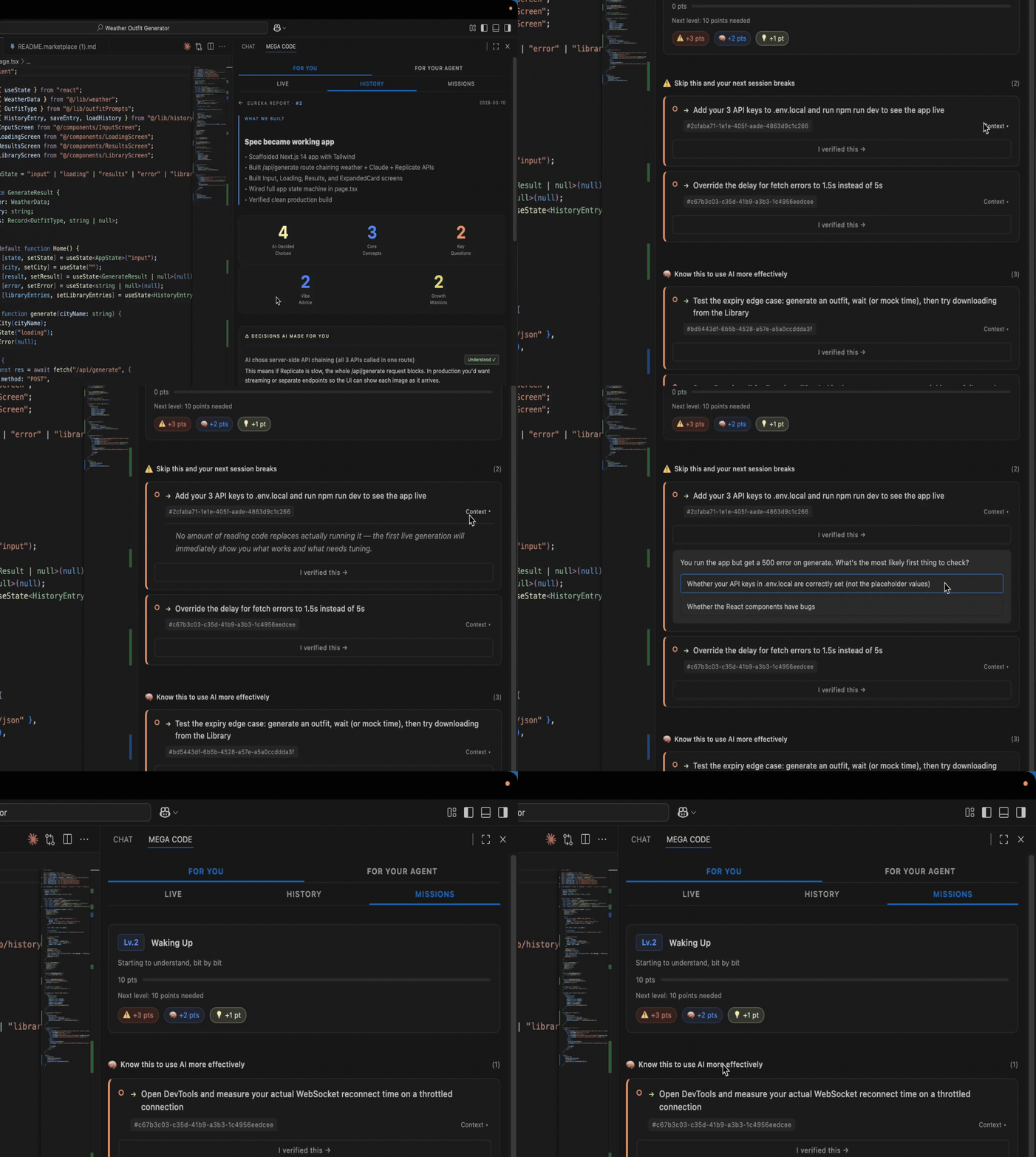
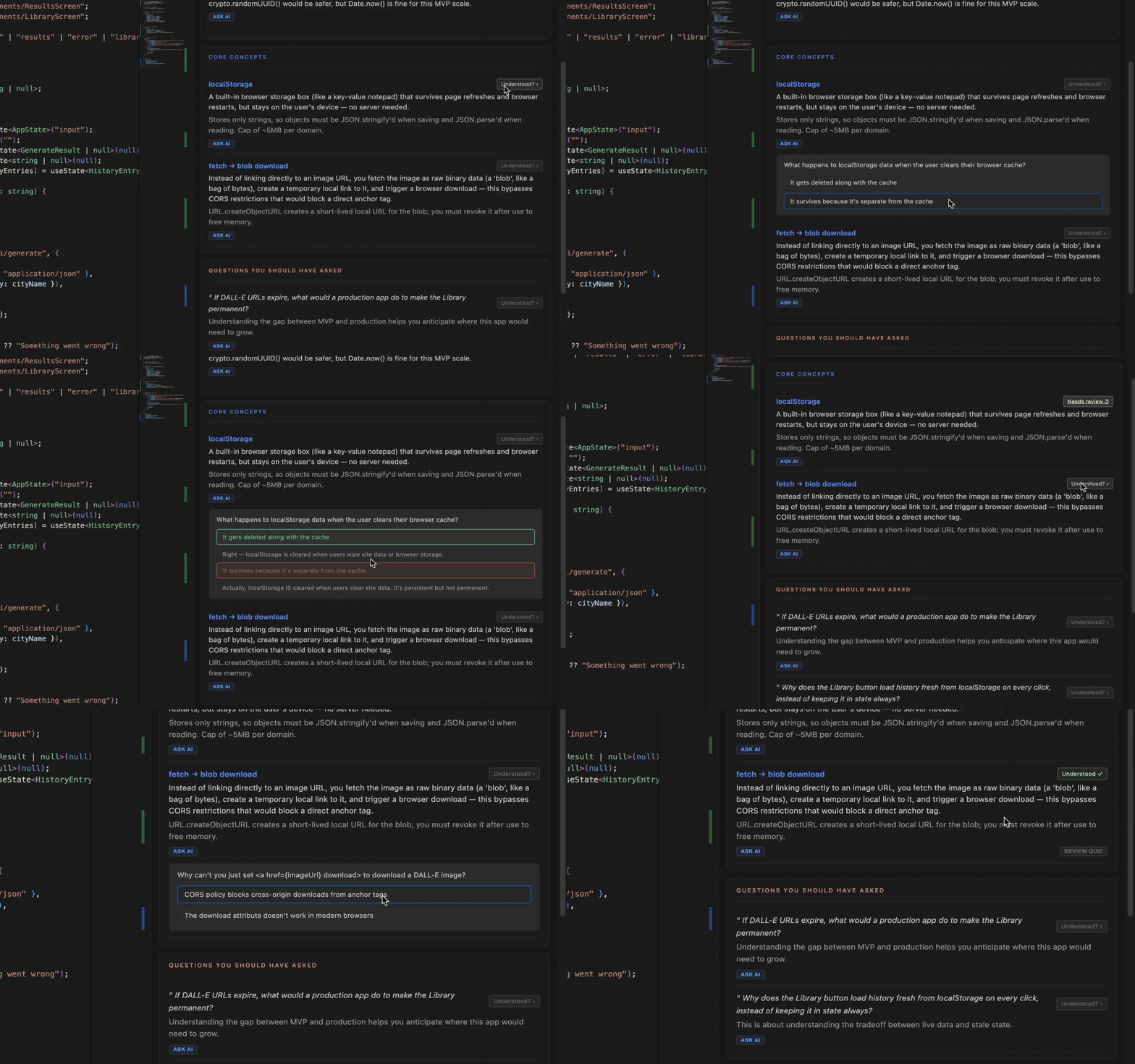
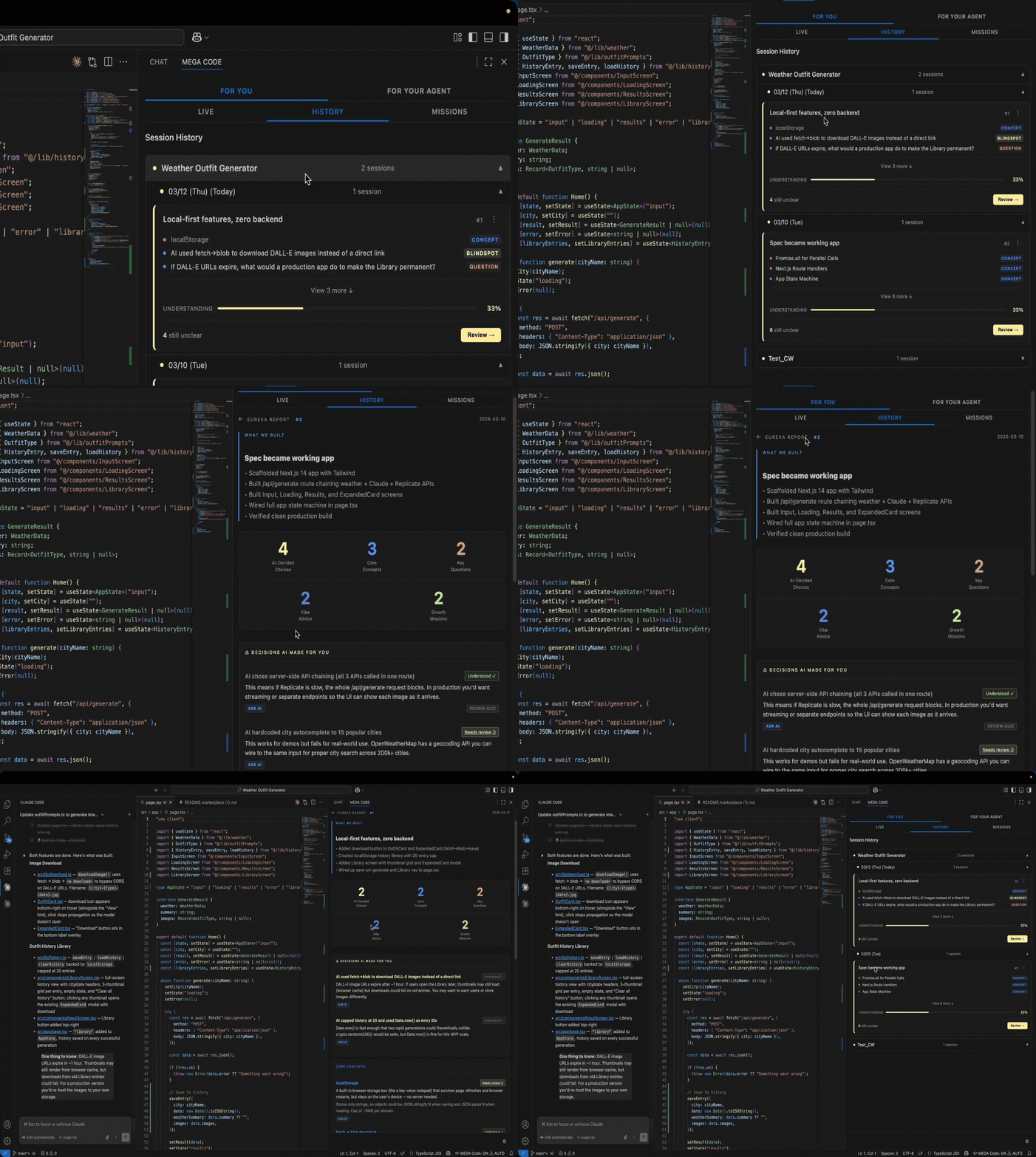
Tier 2 — Key moments get interactive learning cards. When Claude identifies a teachable moment — architecture decisions, important patterns, risky operations — a rich learning card appears with:
| Section |
What You Learn |
| What We Built |
Summary of completed work |
| Blind Spots |
Decisions AI made for you that you should understand |
| Concepts |
Technical terms explained at your level |
| Critical Thinking |
Questions that make you think, not just read |
| Missions |
Concrete next steps to solidify your learning |
| Vibe Advice |
Better prompts for similar tasks next time |
Adaptive Learning Levels
| Level |
For |
Style |
| Basic |
Beginners |
Analogies, inline definitions, no assumptions |
| Standard |
Intermediate |
Trade-off focused, brief explanations |
| Advanced |
Experienced |
Edge cases, architecture implications |
23 Languages
Learn in your native language. Supported: Arabic, Chinese (Simplified & Traditional), Danish, Dutch, English, Finnish, French, German, Hindi, Indonesian, Italian, Japanese, Korean, Norwegian, Polish, Portuguese, Russian, Spanish, Swedish, Thai, Turkish, Vietnamese.
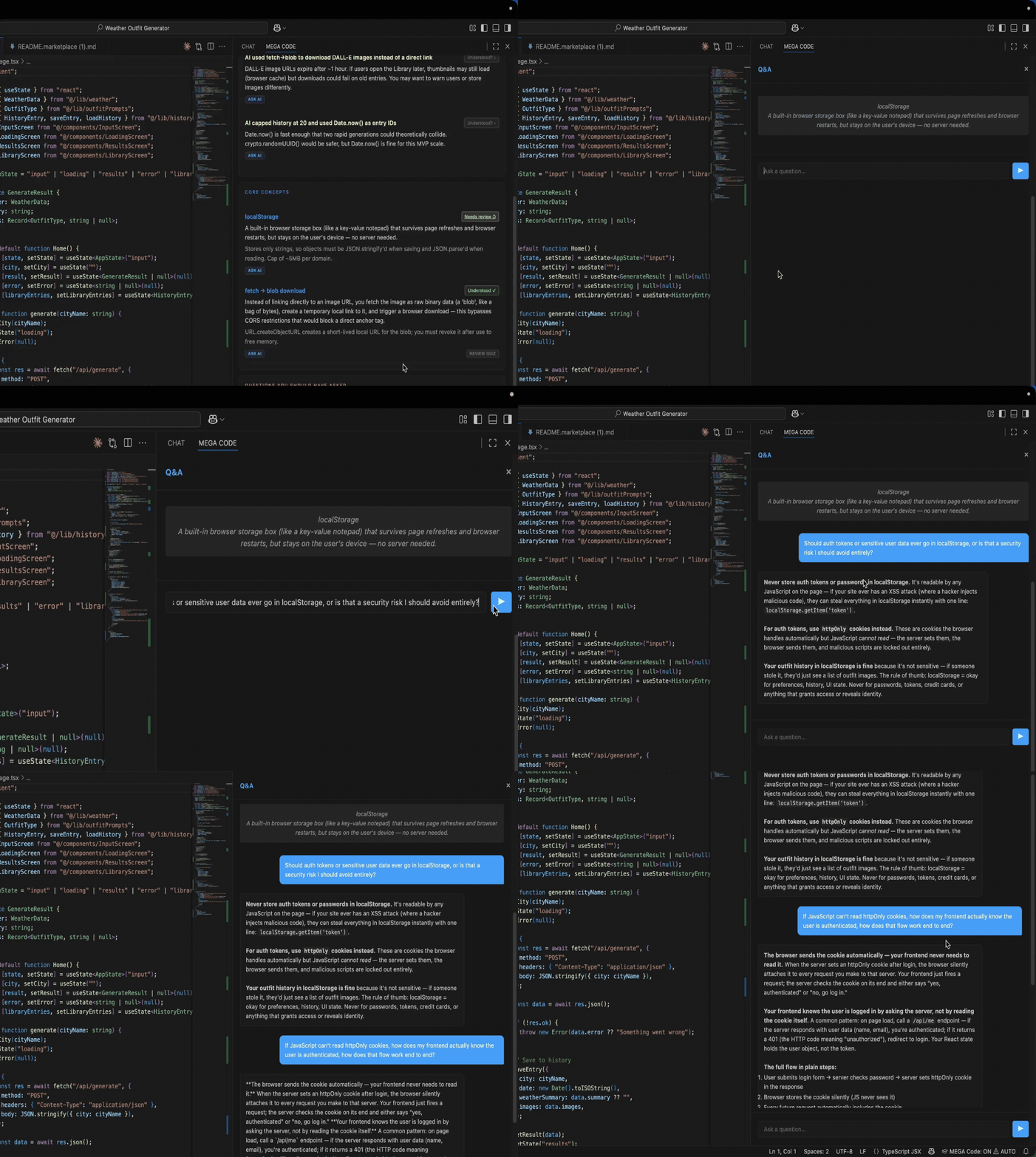
Ask Follow-Up Questions
Built-in Q&A chat lets you ask follow-up questions about any learning card. Responses are streamed in real time with full markdown rendering.
Export Learning Journeys
Capture your growth as Markdown documents:
- Manual export — Drag to reorder, remove cards you don't need, then export a curated report
- Auto export — Automatically save when each Claude Code session ends
- Eureka documents — Narrative reflections that read like a mentor looking back on a pair-programming session
Security-First
Credentials never leak into learning cards. API keys, Bearer tokens, AWS credentials, passwords, and other secrets are automatically masked.
Quick Start
- Install the extension from the VS Code Marketplace
- Open the Command Palette (
Ctrl+Shift+P / Cmd+Shift+P) and run MEGA Code: Setup Claude Code Hooks
- Configure your profile — Search
megacode in Settings to set your language, level, and learning goals
- Start using Claude Code — Every command now appears in the MEGA Code sidebar with learning insights
- Click the MEGA Code icon in the Activity Bar to open the learning dashboard
That's it. No configuration files to edit, no API keys to manage.
Requirements
| Requirement |
Version |
| VS Code |
1.97.0+ |
| Claude Code (CLI) |
Latest |
| Node.js |
18+ |
Note: Claude Code must be installed separately. MEGA Code connects to it via its hook system.
Commands
| Command |
Keybinding |
Description |
| MEGA Code: Toggle MEGA Code |
Ctrl+Shift+L / Cmd+Shift+L |
Enable or disable the extension |
| MEGA Code: Setup Claude Code Hooks |
— |
Connect MEGA Code to Claude Code |
| MEGA Code: Export Report |
— |
Export learning journey as Markdown |
| MEGA Code: Clear History |
— |
Clear the sidebar event history |
| MEGA Code: Toggle Auto Permission |
— |
Auto-approve bash command execution |
| MEGA Code: Sign In |
— |
Sign in with Google or GitHub |
| MEGA Code: Sign Out |
— |
Sign out of your account |
Extension Settings
This extension contributes the following settings:
| Setting |
Default |
Description |
megacode.enabled |
true |
Enable or disable MEGA Code |
megacode.language |
English |
Language for learning content (23 options) |
megacode.level |
Standard |
Learning depth: Basic, Standard, or Advanced |
megacode.eureka |
true |
Enable interactive learning cards |
megacode.goals |
[] |
Personal learning goals (e.g.,["TypeScript", "testing", "Docker"]) |
megacode.autoExport |
false |
Auto-export when Claude Code sessions end |
megacode.historySize |
20 |
Number of events shown in the sidebar |
megacode.debounceMs |
300 |
Event batching delay (ms) |
megacode.dataRoot |
— |
Custom data storage path (default:~/.local/mega-code) |
How It Works
You use Claude Code as usual
        ↓
MEGA Code hooks capture every bash command
        ↓
Your learning profile is injected into Claude's context
        ↓
Claude generates explanations tailored to your level
        ↓
The sidebar updates in real time
        ↓
Export your learning journey when ready
MEGA Code uses Claude Code's hook system to observe — never modify or block — your workflow. Your learning profile (language, level, goals) is automatically injected into Claude's context, so every explanation is personalized without any manual setup.
Claude is the intelligence engine. There are no heuristic classifiers or template generators. Claude decides when a learning moment exists and generates all content — questions, insights, concepts — guided by your profile.
The MEGA Code sidebar is organized into two zones:
USER Zone
- Live — Real-time command feed with explanations and learning cards
- Focus — Curate and reorder learning cards for export
- Flow — Review past sessions and generate narrative reflections
AGENT Zone
- Gen — Generate skills and strategies from your sessions
- Skill — View auto-extracted skill patterns
- Strategy — View auto-generated workflow strategies
A Settings panel (gear icon) lets you edit your learning profile directly from the sidebar.
Known Issues
- Claude Code CLI must be installed separately — this extension does not bundle it
- Node.js 18 or later is required for hook scripts to function — download it from https://nodejs.org if not already installed
- Auto-export saves to
.eureka-reports/ in the workspace root
- First activation requires running "Setup Claude Code Hooks" once
Release Notes
0.1.0 — Initial Release
- Real-time learning dashboard with two-tier system
- Interactive learning cards (blind spots, concepts, missions, quizzes)
- 23-language support with 3 adaptive learning levels
- Built-in Q&A chat for follow-up questions
- Session export as Markdown learning journeys
- Eureka narrative reflection documents
- Automatic credential and secret masking
- Claude Code hook integration with description quality validation
- Draggable card reordering for curated exports
Privacy
MEGA Code processes all data locally within your VS Code environment. Learning cards and session data are stored on your machine. The extension communicates with Claude Code through local hook scripts — no command data is sent to external servers beyond what Claude Code itself handles.
Feedback & Contributing
Stop being a passenger in your own codebase. Start learning from every command.

