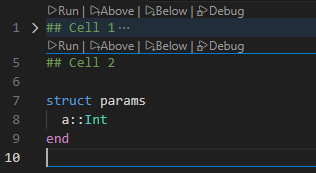
The Julia Language Extension provides the definition of cells of code by means of the syntax ## or #%% at the begining of a line. This extension enhances cells allowing to fold them.
Features
Cell Folding: Automatically provides folding ranges for cells defined by your Julia cell delimiters.
Native-like Structural Folding: Because registering a custom folding provider overrides VS Code's default behavior, this extension integrates a fast indentation-based folding. It mimics VS Code's native fallback, ensuring that your loops, functions, and standard code blocks remain perfectly foldable alongside your cells.
Keyboard Shortcuts
This extension registers Julia cells as native VS Code folding regions (specifically, "Marker Regions"). Therefore, you can use VS Code's default folding commands to easily collapse or expand them. Some of the defaults are
Fold all regions Ctrl+K Ctrl+8
Unfold all Regions Ctrl+K Ctrl+9
Fold all except selected Ctrl+K Ctrl+-
Unfold all Ctrl+K Ctrl+J
You can customize these shortcuts anytime by opening the Keyboard Shortcuts menu (Preferences: Open Keyboard Shortcuts)
Known Issues
Indentation Dependency: Structural folding relies strictly on code indentation rather than syntax parsing. If a script has inconsistent or incorrect indentation, the code blocks might not fold as expected. Using a code formatter (like JuliaFormatter.jl) will ensure optimal folding behavior.
Multiple Folding Providers Overlap: If another extension (or a future update to the official Julia extension) registers a custom syntax-based folding provider, VS Code will merge its ranges with the indentation ranges provided by this extension. This could lead to redundant or slightly overlapping folding regions.