QMDC — QMD.md Language Support
The VS Code extension for the QMDC toolchain. Provides language support for QMD.md files — a format for human-readable structured data in Markdown.
Screenshots
A .qmd.md file open with the QMDC live preview beside it:
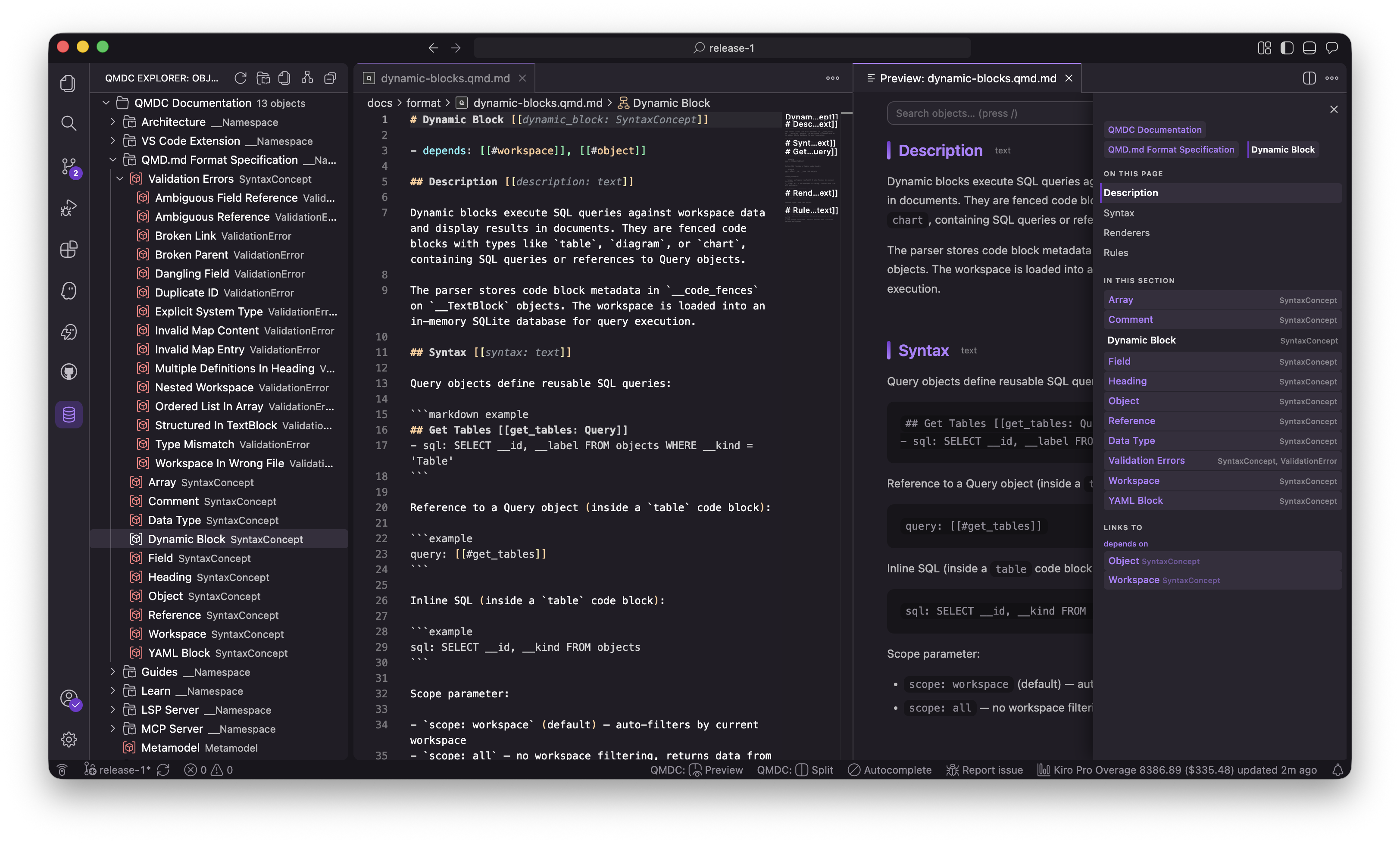
Syntax highlighting — object ids, Kinds, references, and fields are color-coded:
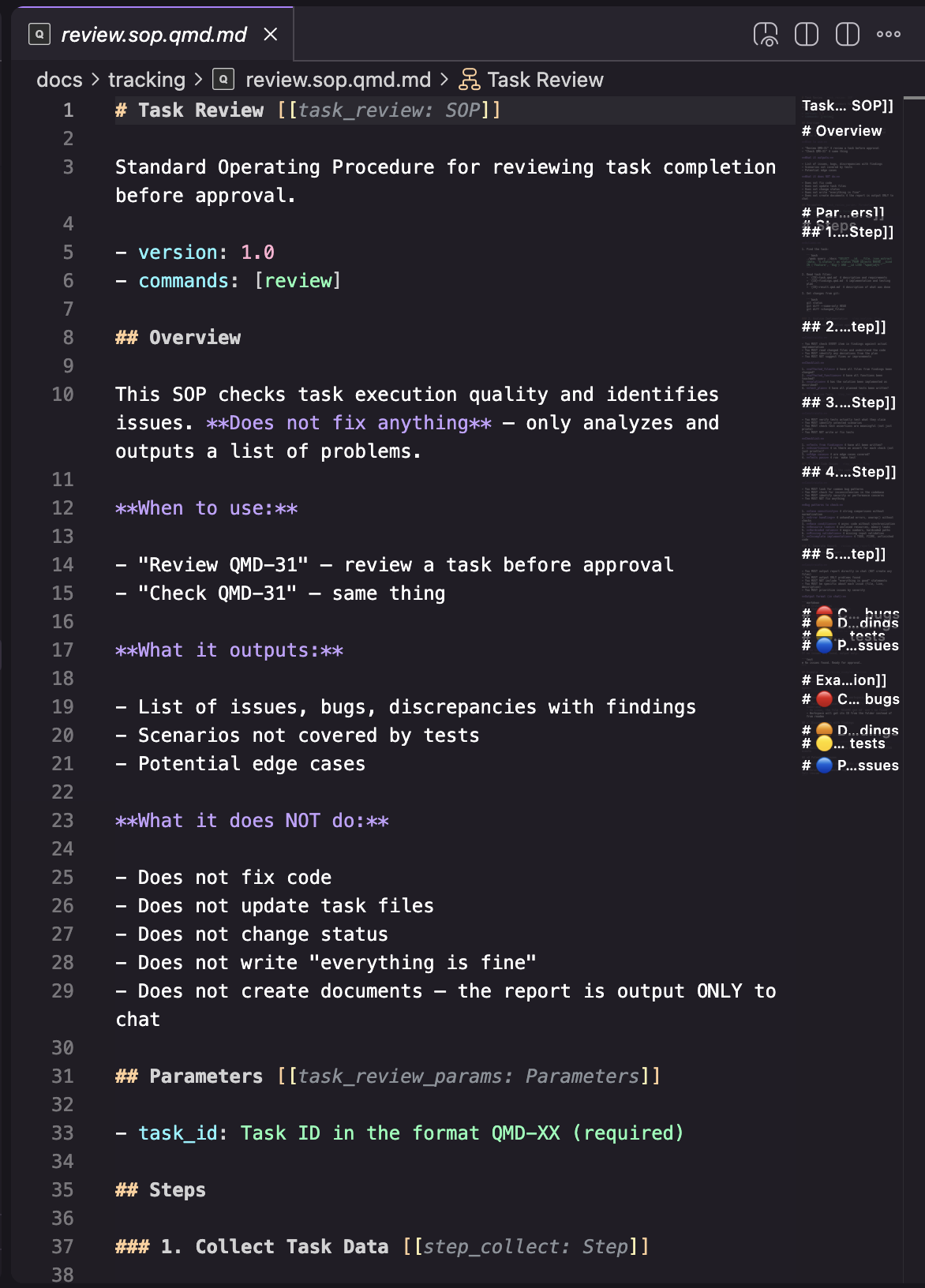
Reference autocomplete — type [[# to get every object id in the workspace:
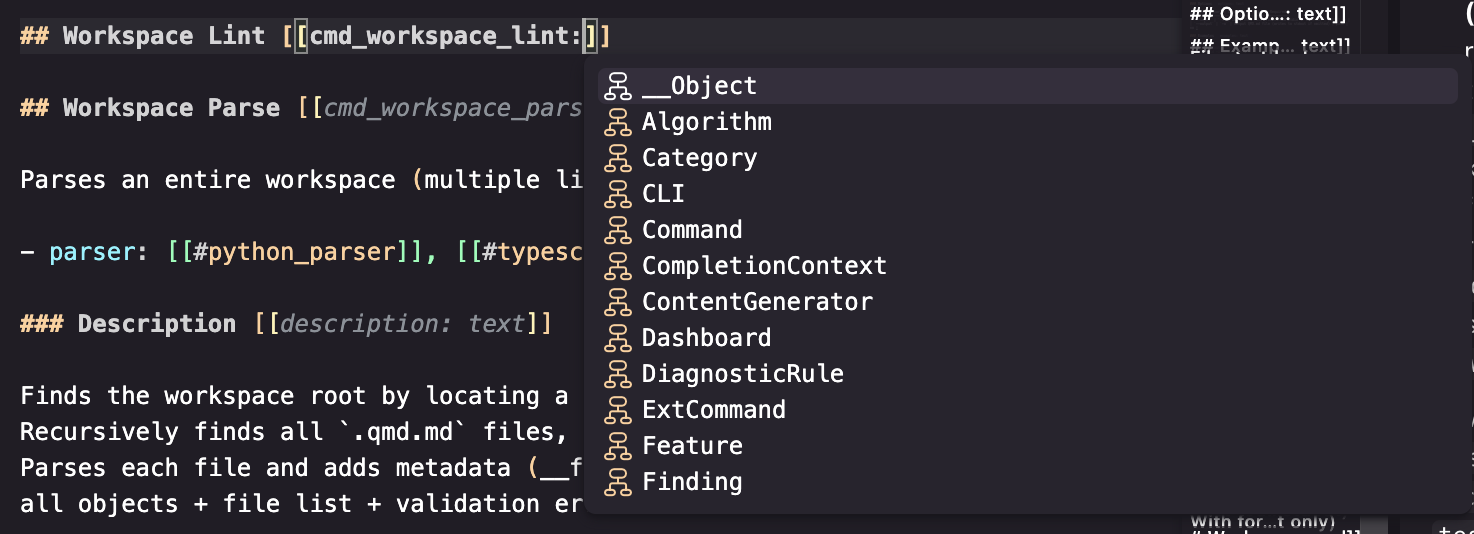
Inline diagnostics — broken links and duplicate ids are flagged as you type:
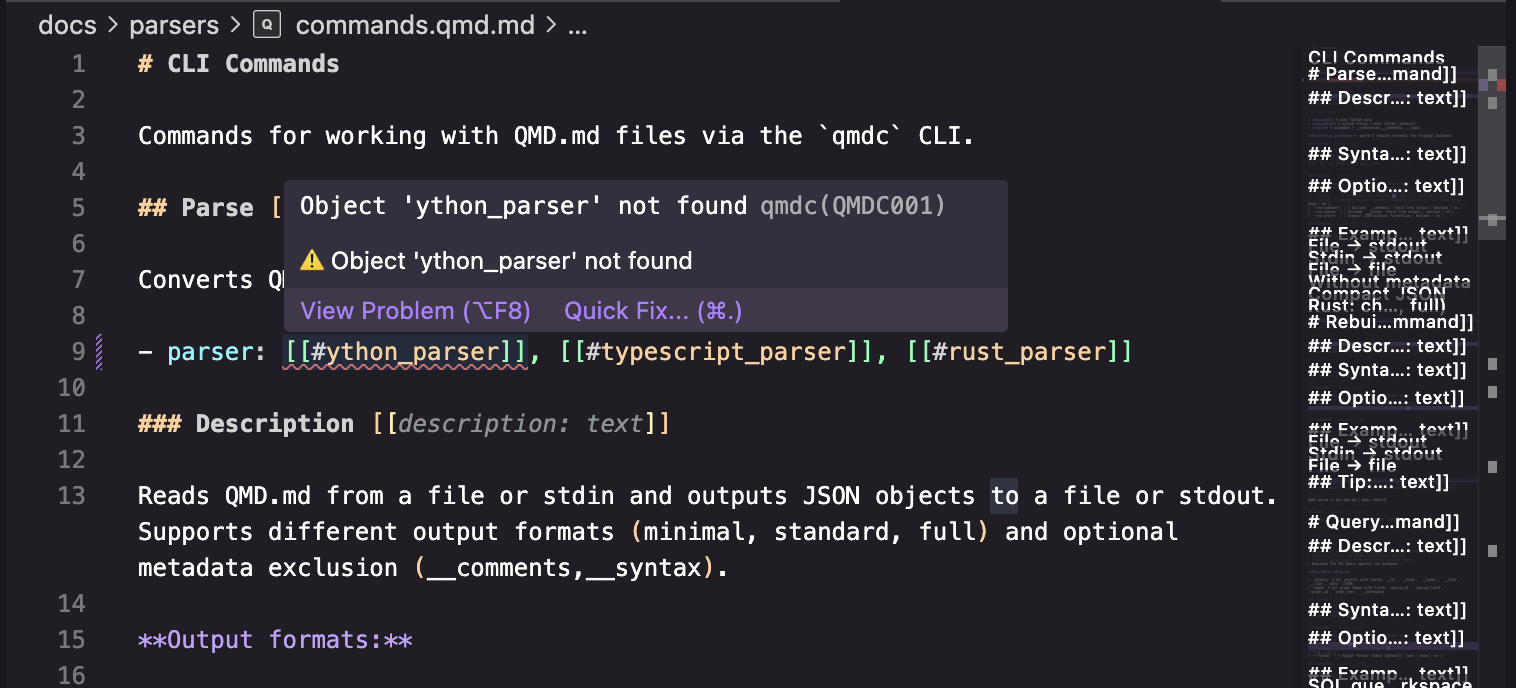
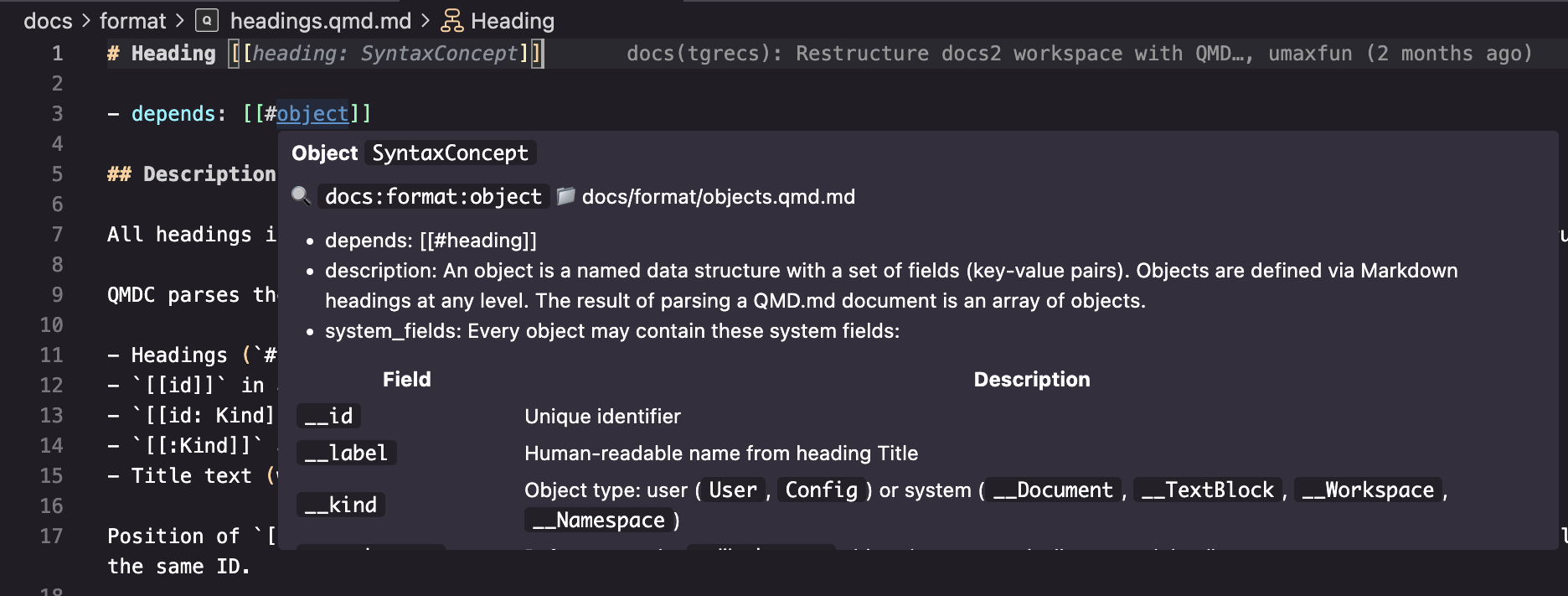
Hover — see an object's label, Kind, file, and fields on any [[#ref]]:
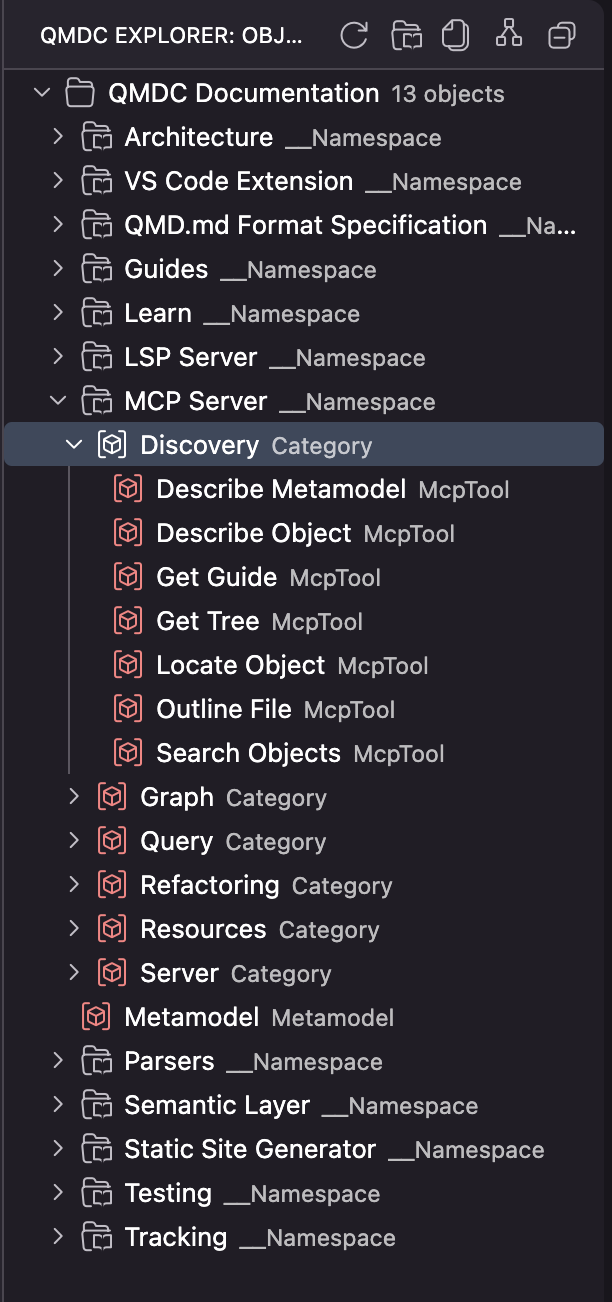
QMDC Explorer — browse all workspaces, namespaces, and objects:
Features
Language Support
- Syntax Highlighting for
.qmd.md files
- Autocompletion for object IDs, Kinds, namespaces, and references
- Hover preview of object definitions with fields
- Go to Definition (
Cmd+Click / F12) for references [[#id]]
- Find All References (
Shift+F12) for objects across workspace
- Document Symbols (
Cmd+Shift+O) — outline with object hierarchy
- Workspace Symbols (
Cmd+T) — search objects across all files
- Rename Symbol (
F2) — rename object ID and update all references
- Diagnostics — broken links, duplicate IDs, validation errors
Enhanced Navigation
- Click on ID in definition — shows all references to this object
- Click on Kind in definition — shows all objects of this Kind
Workspace Support
- Multi-file projects with automatic indexing
- Multi-root workspace support — multiple QMDC workspaces in one folder
- QMDC Explorer — tree view with workspaces, namespaces, and objects
- Namespaces (
__Namespace) for organizing objects
- Cross-file references with namespace qualifiers
- SQL Queries — execute SQL queries against workspace objects
Requirements
None — the extension bundles the qmdc language server (the native binary) for your platform, so it works out of the box after install.
To point at a custom qmdc build (e.g. for development), set its path in settings:
{
  "qmdc.server.path": "/path/to/qmdc"
}
Commands
| Command |
Keybinding |
Description |
QMDC: Go to Object... |
Cmd+Shift+O |
Quick picker to jump to any object in workspace |
QMDC: Show References |
Shift+F12 |
Find all references to object under cursor |
QMDC: Run SQL Query |
— |
Execute SQL query against workspace objects |
QMDC: Parse Workspace |
— |
Re-parse all QMD.md files in workspace |
QMDC: Validate Workspace |
— |
Check all files for errors and show Problems panel |
QMDC: Restart Language Server |
— |
Restart the LSP server |
QMDC Explorer
The QMDC Explorer sidebar shows a hierarchical view of your workspace:
- 📁 Workspaces — all QMDC workspaces in the project (supports multi-root)
- 📂 Namespaces — logical groupings of objects
- 📄 Objects — all QMD.md objects with their kinds
Click on any item to navigate to its definition. The explorer automatically updates when files change.
Extension Settings
| Setting |
Default |
Description |
qmdc.server.path |
"" |
Path to qmdc binary. If empty, searches in PATH and workspace. |
qmdc.trace.server |
"off" |
Traces LSP communication (off, messages, verbose). |
qmdc.dimMetadata |
true |
Dim [[id]] and [[id: Kind]] metadata for better readability. |
By default, QMDC metadata ([[id]], [[id: Kind]]) is dimmed for better readability. To customize colors, add this to your settings.json:
{
  "editor.tokenColorCustomizations": {
    "textMateRules": [
      {
        "scope": [
          "punctuation.definition.tag.begin.qmd.md",
          "punctuation.definition.tag.end.qmd.md"
        ],
        "settings": {
          "foreground": "#6a737d55"
        }
      },
      {
        "scope": [
          "entity.name.tag.qmd.md",
          "entity.name.type.qmd.md",
          "keyword.operator.auto-id.qmd.md"
        ],
        "settings": {
          "foreground": "#6a737d88",
          "fontStyle": "italic"
        }
      }
    ]
  }
}
This makes [[id]] and [[id: Kind]] appear gray and italic, so they don't distract from the main content.
SQL Queries
You can execute SQL queries against your workspace objects using the QMDC: Run SQL Query command:
-- Find all services
SELECT __id, __label, __file FROM objects WHERE __kind = 'Service'

-- Count objects by kind
SELECT __kind, COUNT(*) as count FROM objects GROUP BY __kind

-- Find all references to a specific object
SELECT source_id, target_id, field_name FROM edges WHERE target_id = 'auth'
Available tables:
objects — all objects with columns: __id, __kind, __label, __file, __line, data (JSON)edges — all references with columns: source_id, target_id, field_name
The extension automatically loads all workspaces recursively and maintains an in-memory SQLite database.
QMD.md Syntax Quick Reference
Object Definition
# My Project [[my_project:__Workspace]]
- description: Project root

## Users Table [[users:Table]]
- name: users
- columns: [id, name, email]

## Orders [[orders]]
- user_ref: [[#users]]
# Title [[id]]           # ID at end
# [[id]] Title           # ID at start
# Title [[:Kind]]        # Auto-generated ID with Kind
# Title [[id:Kind]]      # Explicit ID and Kind
References
- local: [[#users]]                      # Local reference
- with_kind: [[#Table:users]]            # Kind-qualified
- namespace: [[#storage:users]]          # Cross-namespace
- workspace: [[#proj:storage:users]]     # Cross-workspace
Field Types
- name: API Service       # String
- port: 8080              # Number
- enabled: true           # Boolean
- tags: [api, backend]    # Array
- ref: [[#auth]]          # Reference
Multiline Text (YAML pipe syntax)
## Config [[config]]
- description: |
    This is a multiline
    description field.
Workspace Structure
my-project/
├── readme.qmd.md              # [[my_project:__Workspace]]
├── users.qmd.md
├── storage/
│   ├── readme.qmd.md          # [[storage:__Namespace]]
│   └── tables.qmd.md
└── api/
    ├── readme.qmd.md          # [[api:__Namespace]]
    └── endpoints.qmd.md
Installation
Install from your editor's marketplace — search QMDC (publisher mikilabs):
Or sideload a .vsix: grab the build for your platform from the releases, then run Extensions: Install from VSIX… (Cmd+Shift+P) and pick the file. The qmdc language server is bundled — nothing else to install.
Development
cd qmdc-vscode
npm install
npm run compile
Press F5 to launch Extension Development Host.
To build for all platforms (Mac, Linux, Windows), install these tools:
# 1. Zig (for cross-compilation)
brew install zig

# 2. cargo-zigbuild (Rust cross-compiler using Zig)
cargo install cargo-zigbuild

# 3. MinGW (for Windows x64)
brew install mingw-w64

# 4. Rust targets
rustup target add \
  x86_64-apple-darwin \
  aarch64-apple-darwin \
  x86_64-unknown-linux-gnu \
  aarch64-unknown-linux-gnu \
  x86_64-pc-windows-gnu \
  aarch64-pc-windows-gnullvm
⚠️ Make sure you're using rustup Rust, not Homebrew Rust. Check with which cargo — should be ~/.cargo/bin/cargo.
Available Scripts
| Script |
Description |
npm run compile |
Compile TypeScript |
npm run watch |
Watch mode for development |
npm run build |
Quick build for current Mac (dev) |
npm run clean |
Remove build artifacts |
npm run package:all |
Build for all 6 platforms |
npm run bump-version |
Bump patch version (default) |
npm run bump-version minor |
Bump minor version |
npm run bump-version major |
Bump major version |
| Script |
Platform |
npm run package:darwin-arm64 |
macOS Apple Silicon (M1/M2/M3) |
npm run package:darwin-x64 |
macOS Intel |
npm run package:linux-x64 |
Linux x64 |
npm run package:linux-arm64 |
Linux ARM64 |
npm run package:win32-x64 |
Windows x64 |
npm run package:win32-arm64 |
Windows ARM64 |
Release Workflow
One path, from the repo root:
make ext-bump       # bump the version (a registry won't accept the same version twice)
make ext-release    # build all 6 platforms + publish: Open VSX always, Marketplace if VSCE_PAT
Quick Local Build (Mac only)
npm run build
code --install-extension qmdc-vscode-0.2.1.vsix
Links
License
AGPL-3.0-or-later © mikilabs

