Worldbook Workbench
Edit SillyTavern worldbooks in VS Code or Cursor, then inspect where every activated entry lands in the final system/user/assistant message order.
Worldbook Workbench is a standalone companion to the SillyTavern extension. It works directly with exported worldbook JSON files and does not require a running SillyTavern instance.
New to the Workbench? Open the ? help button or read the 简体中文使用手册.
Install
Install from your editor's marketplace to receive normal extension updates. Manual .vsix installation is intended for local testing; Microsoft Visual Studio Code disables automatic updates for that extension by default.
Highlights
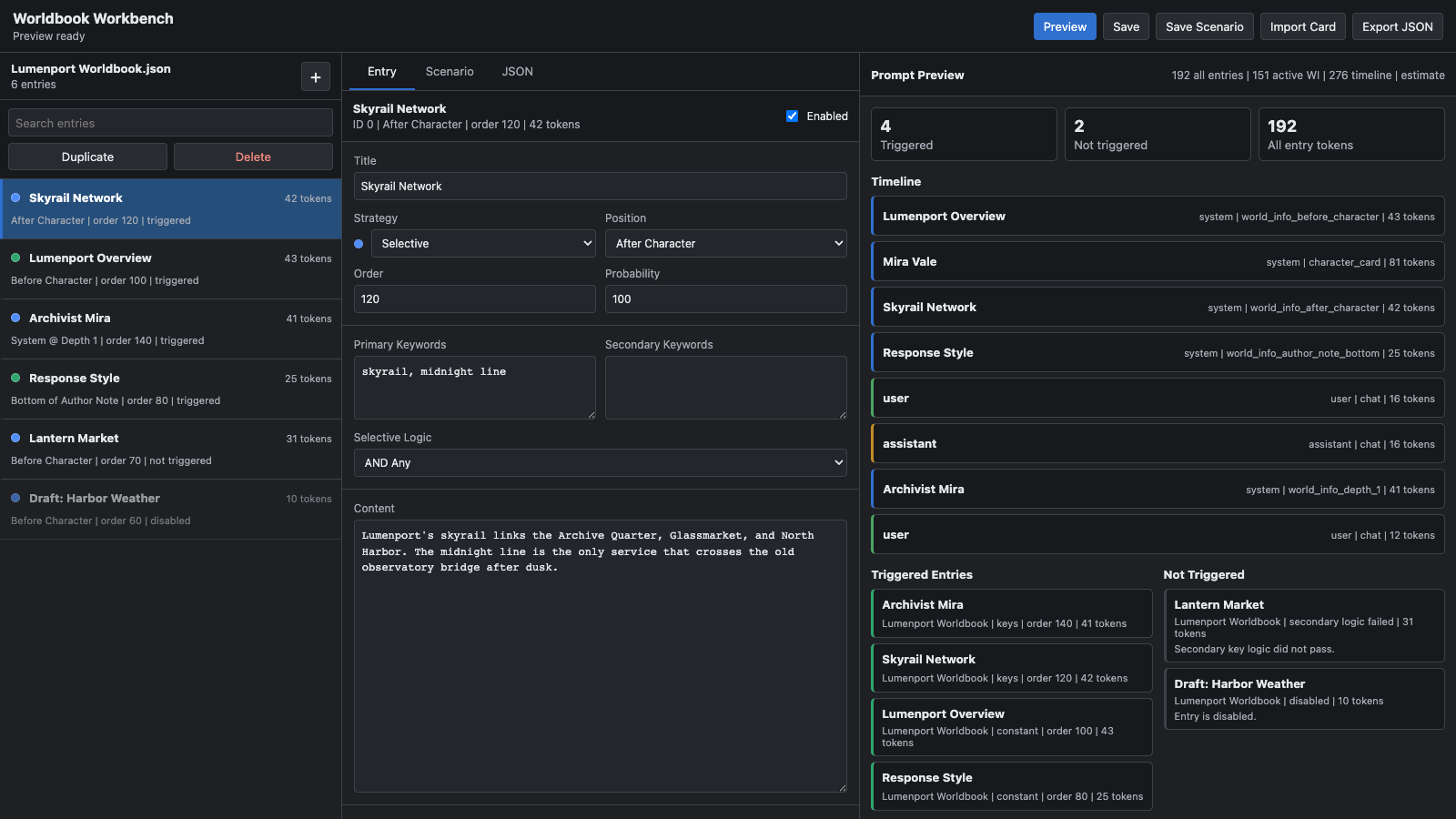
- Browse worldbook entries in a compact, searchable list.
- Collapse the entry filter and multi-select tools when more room is needed for the entry list.
- Select multiple entries to enable, disable, delete, or copy them into any other worldbook JSON file.
- Find, replace, or delete matching text across titles, keywords, and content in one batch.
- Undo or redo up to 80 in-session worldbook edits, including entry actions, batch changes, and applied Raw JSON.
- Use English, Simplified Chinese, or the default language mode that follows VS Code or Cursor.
- Edit title, native entry status, position, order, probability, depth, role, keywords, optional-filter logic, and content.
- Open the collapsed advanced editor for per-entry overrides, recursion, groups, timed effects, character and generation filters, and additional matching sources.
- See constant, normal keyword-triggered, vectorized, disabled, triggered, and not-triggered states at a glance.
- Preview ST-style world-info placement as a system/user/assistant timeline.
- See why each entry activated or did not activate.
- Display token estimates for every entry, all entries, active world info, and the complete timeline.
- Edit chat messages as ordered system/user/assistant rows and inspect the synchronized full preview-setup JSON.
- Save reusable preview setups beside the worldbook while keeping
{{user}} portable.
- Create snapshots and named experiments, compare them in VS Code's native Diff editor, and restore earlier versions.
- Preserve unknown worldbook fields and the original object/array shape of
entries.
Quick Start
- Open a folder containing an exported SillyTavern worldbook JSON file.
- Right-click the JSON file and select Worldbook Workbench: Open Worldbook Workbench.
- Select an entry to edit it, then choose Save to write changes back to the worldbook.
- Choose Preview to inspect activation results and prompt order.
The same commands are available from the Command Palette. This is useful when an editor or file explorer context menu is not visible.
Language
The language menu in the Workbench toolbar offers Follow VS Code/Cursor, English, and Simplified Chinese. Follow mode is the default: Chinese editor locales use the Simplified Chinese interface, while other locales fall back to English. The same preference is available as Worldbook Workbench: Language in editor settings, and changing it updates an open Workbench without discarding edits.
Prompt Preview
The preview combines the selected worldbook and local Preview Setup. It shows the resulting message skeleton without pretending to reproduce a provider-specific API request wrapper.
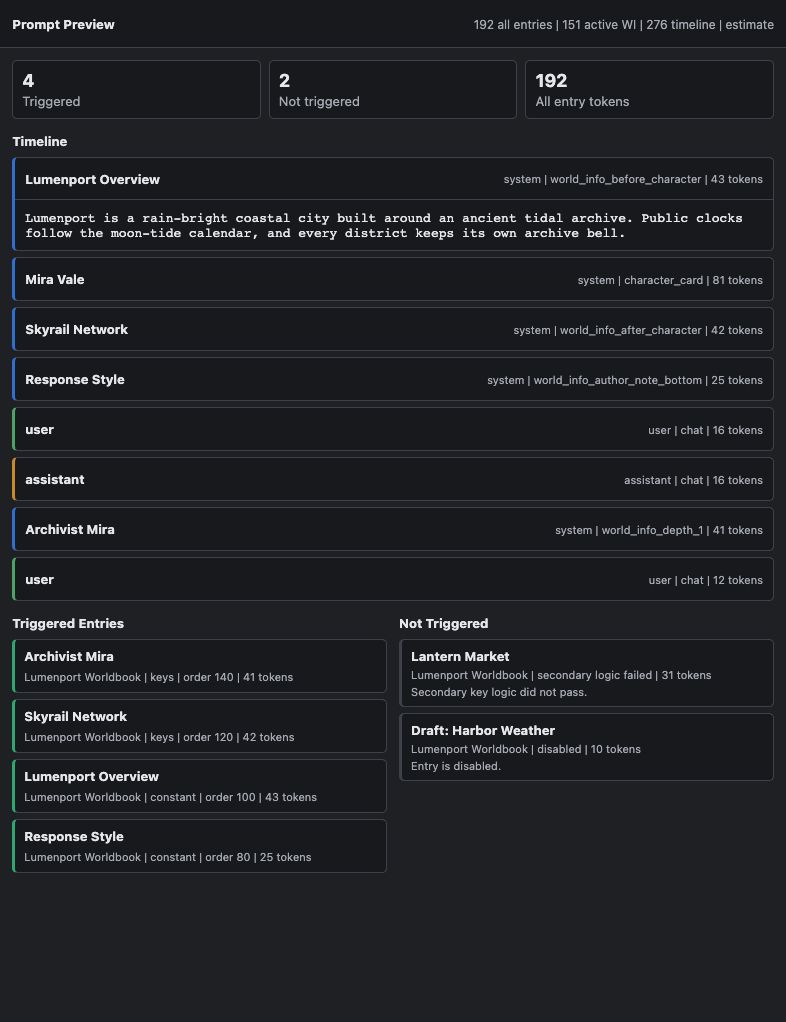
Status indicators use familiar worldbook states:
- Blue: constant entry
- Green: normal keyword-triggered entry
- Chain: vectorized entry
Optional Filter is independent from entry status, matching SillyTavern's Selective field. Disabled entries are shown with reduced opacity.
Token profiles identify whether their result is exact for the selected tokenizer or an estimate. Unknown and unavailable tokenizers fall back to a clearly labeled estimate.
Preview Setup Files
The Preview Setup tab is a local test environment stored next to the worldbook as <worldbook>.wbh.json. It can include:
- ordered system, user, and assistant chat messages
- an optional last human message appended as the current user turn
- the portable
{{user}} macro
- preview generation type
- deterministic probability seed
- world-info scan depth, recursion limits, and minimum activations
- optional context-budget experiments and matching behavior
- character/global lore insertion strategy
- optional persona description, Character's Note, sticky state, and cooldown state
- tokenizer profile
- manually forced entry IDs
The sidecar file does not modify or add workbench metadata to the worldbook itself. Unknown preview-setup and message fields are retained when the structured editor updates the file.
History Files
Snapshots and experiments are stored beside the worldbook as <worldbook>.wbh-history.json. Open them from Experiments in the top toolbar or the History tab. New experiment captures the baseline, and Save result captures the edited result for Diff or Restore. The history file also contains automatic before/after records for saves and cross-worldbook copies.
History never adds workbench fields to the worldbook JSON. Restoring a snapshot saves the current draft to history before writing the selected version, so the restore itself remains reversible.
The toolbar Undo and Redo controls cover unsaved worldbook edits during the current Workbench session. Continuous typing in one field is grouped into one step, while create, duplicate, enable/disable, delete, batch replace, and Apply JSON actions each form a single step. Saving or restoring clears the in-session stack because durable snapshots take over at that point.
Compatibility Notes
The prompt engine is a clean-room compatibility implementation of common SillyTavern world-info behavior. It supports world-info positions, order, depth and role, keyword logic, probability, groups, recursion, scan depth, and timed activation state.
Vector search, automation hooks, and external outlet runtimes require SillyTavern or another host. The workbench identifies those entries and lets you force them active for placement inspection, but it does not make external runtime calls.
Commands
Worldbook Workbench: Open Worldbook WorkbenchWorldbook Workbench: Open Prompt PreviewWorldbook Workbench: Save Preview SetupWorldbook Workbench: Export Worldbook JSONWorldbook Workbench: Open User Guide
Privacy
Worldbooks, preview setups, and previews are processed locally. The extension does not upload their contents.
Support
Report problems or request features in the GitHub issue tracker.
Worldbook Workbench is released under the MIT License.
Development
npm install
npm run check
npm run package:openvsx
npm run package:microsoft
See the publishing guide for the dual-market release workflow.

