🐳 DeepAgent
Run Claude Code, OpenAI Codex and GitHub Copilot on the DeepSeek, DeepInfra or Together AI key you choose, or as your own subscription — one panel to add your keys, switch any agent between the two, and watch what each has left.
🎯 Better together: BullseyeUber
DeepAgent works on its own, and it gains the most inside BullseyeUber — one install puts it with FleetView, BullseyeBacklog, DeepAgent, BullseyeSync and BullseyeNotify in a single Bullseye Control tab. Installing BullseyeUber pulls in any member you are missing, and each keeps its own listing and updates.
- Your keys and routes sit next to the fleet they pay for. Inside Bullseye Control the DeepAgent Control Center is one tab and FleetView is the next; the ↔️ Side layout shows your per-agent BYOK / Subscription mode beside the roster, so a switch and its token cost are on one screen.
- The numbers agree. FleetView's usage ledger files requests under the account that paid for them, and DeepAgent reads its subscription counts back from that ledger.
- Fanout picks a provider with room. FleetView's fanout asks DeepAgent which agent provider still has room, the same answer its
provider_room tool gives your AI.
👉 Get BullseyeUber on the Marketplace
✨ What it does
- 🔑 One list of keys and subscriptions — add a DeepSeek, DeepInfra or Together AI key, or sign in to Anthropic, OpenAI or GitHub Copilot. Settings Sync carries the list to your other machines.
- 🔀 Pick a key or an account and the agent moves — Claude Code, Codex or Copilot runs on 🔌 BYOK (a key) or ⏏️ Subscription (your own account), and a read-only badge always shows the mode it is really in. Reinstall and 🧪 Test are always enabled: Reinstall repairs the agent to the chosen mode and Test proves it with a real prompt. Nothing is granted or revoked on the provider side, so switching back never asks you to sign in again.
- 💰 The status bar shows what is left — each key's balance and each subscription's 5-hour and weekly room (a monthly figure where the account has one), re-read every 30 seconds. A figure that could not be read says so, and a held figure shows how old it is — never a false 0. A reloaded window paints the last figures at once.
- 🤖 Auto, all or nothing — one Auto box per agent picks the mode, the account and the key at once (the subscription with the most room now; a key only when every subscription is spent) and keeps re-deciding every 30 seconds. While it is on, everything else for that agent is locked and drawn orange.
- 🧭 The live route is held to your picks — on every refresh DeepAgent checks what each agent is really running on, fixes any drift from what you chose and says so; a login you changed outside the panel is followed.
- 🎁 A free limits reset is taken for you — a Claude subscription's free reset offer is checked every 30 minutes and claimed when the account hits its limit.
- 🩺 Health checks the wiring — every agent's settings, files, routes and model lists as the panel opens: green, or red naming the exact check that failed with one click to re-apply.
- 📝 A whale button writes your commit message — above the Source Control commit box. Pick who writes it (Claude Code, OpenAI Codex, GitHub Copilot, or one of your keys directly), the model and one Time allowance — everything else is worked out from it. One AI request, the model's own reasoning off, and no changed file ever dropped: a tight allowance trims a file's detail, never its presence. The subject comes first, with the emoji you asked for, and the card shows an estimate (learned only from successful runs) before it sends. Staged changes only, or every pending change (untracked files included) when nothing is staged.
- 🤖 Your AI can ask — a read-only
allowed_models tool tells any MCP-capable agent which models it may dispatch, and on which key.
- 💬 Chat:Utility is back — Chat:Utility and Inline Chat can follow the key's Flash model, so commit messages and small edits never fall back to the included model that nags you to upgrade.
- ♻️ Your originals are snapshotted before anything is touched, and every apply or restore reads the real files back before it says ✓ verified.
🚀 Start
Click the DeepAgent status-bar item → 🔑 Keys → ➕ Add a key → 🔀 Providers → 🔌 BYOK beside an agent → 🧪 Test. Three clicks, and Claude Code, Codex or Copilot is running on your key. Then talk to your AI as you always do.
What you do, and what your AI does
| You |
Your AI |
| Add a key or sign in to a subscription (panel, once) |
Runs on whichever one you picked for it — Claude Code, Codex and Copilot each have their own pick |
| Click BYOK or Subscription beside an agent |
Switches with no re-sign-in; open Claude Code tabs restart on the new identity and resume the conversation |
| Tick Auto |
Picks mode, account and key itself — the subscription with the most room, a key only when all are spent — and locks every other control for that agent |
| — |
Asks DeepAgent in plain words which models it may dispatch, and on which key |
Examples — copy these
1. Ask your AI what it may run on
Paste into Claude Code, Copilot Chat or any MCP-capable agent:
Which models may I dispatch my subagents on, and on which key?
DeepAgent answers through its read-only allowed_models tool: every key and subscription you own, the models each may run, and the ones its own setting says it may not. A key shows only its last four characters, never the key.
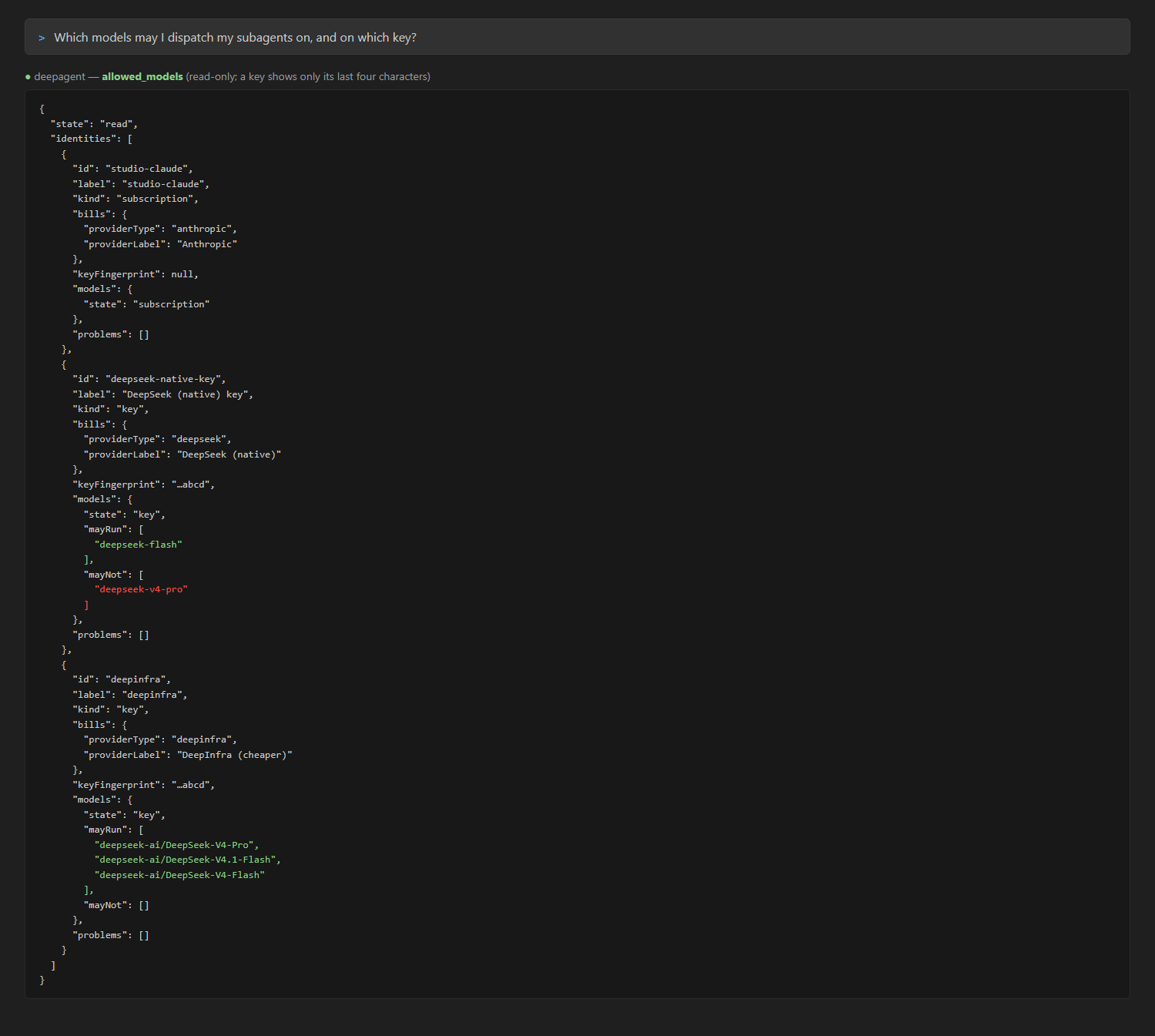
The sentence above, and the real answer of the allowed_models tool — over invented accounts. The DeepSeek key may run Flash only (Pro is excluded by that key's own setting); the DeepInfra key may run all three.
2. Give a key to your AI
Not a prompt — one step in the panel: Keys → ➕ Add a key, paste it, save. The key's models appear as the provider returns them, with its balance and, for DeepSeek, whether it is billing 💸 2× peak or 🪙 ½ off-peak and when that flips. Claude Code's four tiers (Fable, Opus, Sonnet, Haiku) map to the most-complex, moderate and least-complex models you choose, so when you tell Claude Code "review this diff with three subagents" each one buys the model its job deserves.
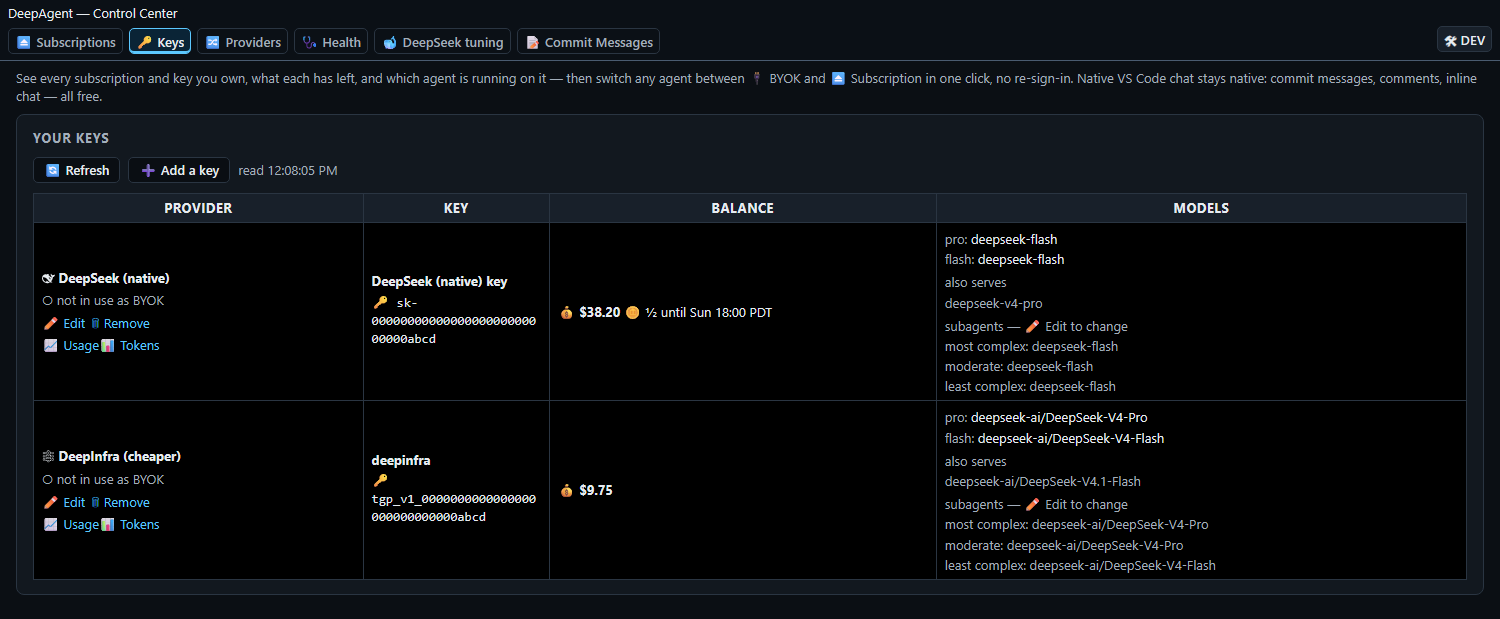
Keys tab — each key's balance, its models, the peak/off-peak clock, the three subagent tiers, and a Tokens button beside Usage.
3. Move an agent between your key and your account
Providers — pick the key or account beside Claude Code, OpenAI Codex or GitHub Copilot. The switch writes every file that agent owns, moves the live account and re-reads usage — then 🧪 Test sends a real prompt and tells you it went through. Tick Auto (Claude Code, Codex and Copilot alike; off by default) and DeepAgent picks the mode, the account and the key at once — the subscription with the most room, a key only when every subscription is spent — and keeps re-deciding every 30 seconds; while it is on, every other control for that agent is locked and drawn orange, and the key to fall back to is the one it goes onto first. Pick by hand with Auto off and DeepAgent reads the route back and says Verified, or that it did not take; an Auto move decided a moment before your pick is dropped. On every refresh it also checks the live route against your picks and fixes any drift. DeepAgent also notices when Copilot or Codex refuses a prompt for quota and reacts to that, not only to the usage reading.
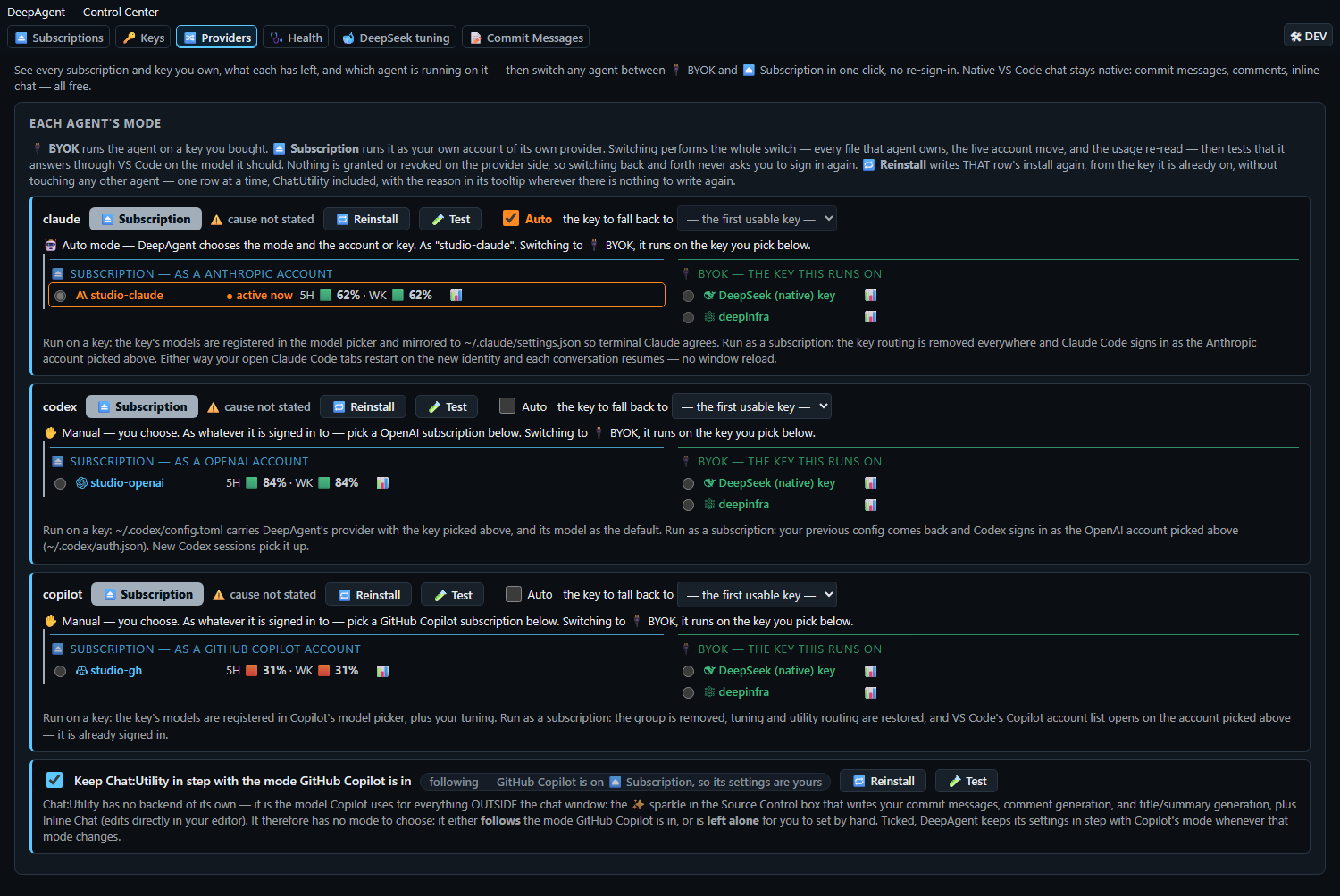
Providers tab — each agent's mode, the pick behind it, Reinstall, Test and the one Auto box (Claude Code on Auto: its row drawn orange).
4. See what each subscription has left
Subscriptions lists every account you signed in to with its five-hour and weekly room — plus a monthly figure where the account has one, which names the span it covers ("month to date", "last N days") — re-read every 30 seconds, with the same figures on the status bar and a per-account tooltip.
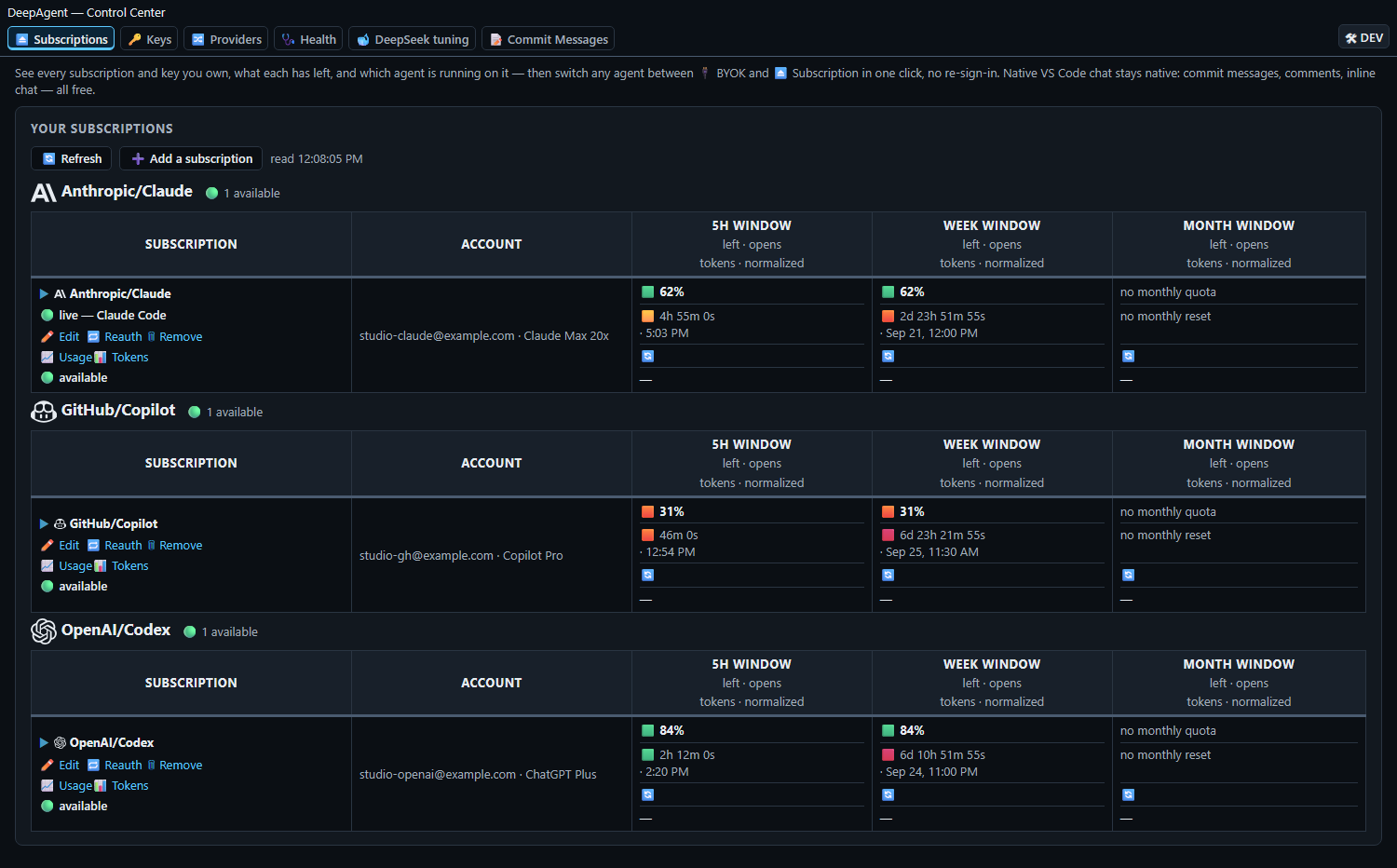
Subscriptions tab — each account's 5-hour, weekly and monthly room, when each window opens, and the tokens it served.
5. Check that everything is wired
Health checks every agent's settings, files, routes and model lists as the panel opens — green means it checks out, red names the exact check that failed and offers one click to re-apply.
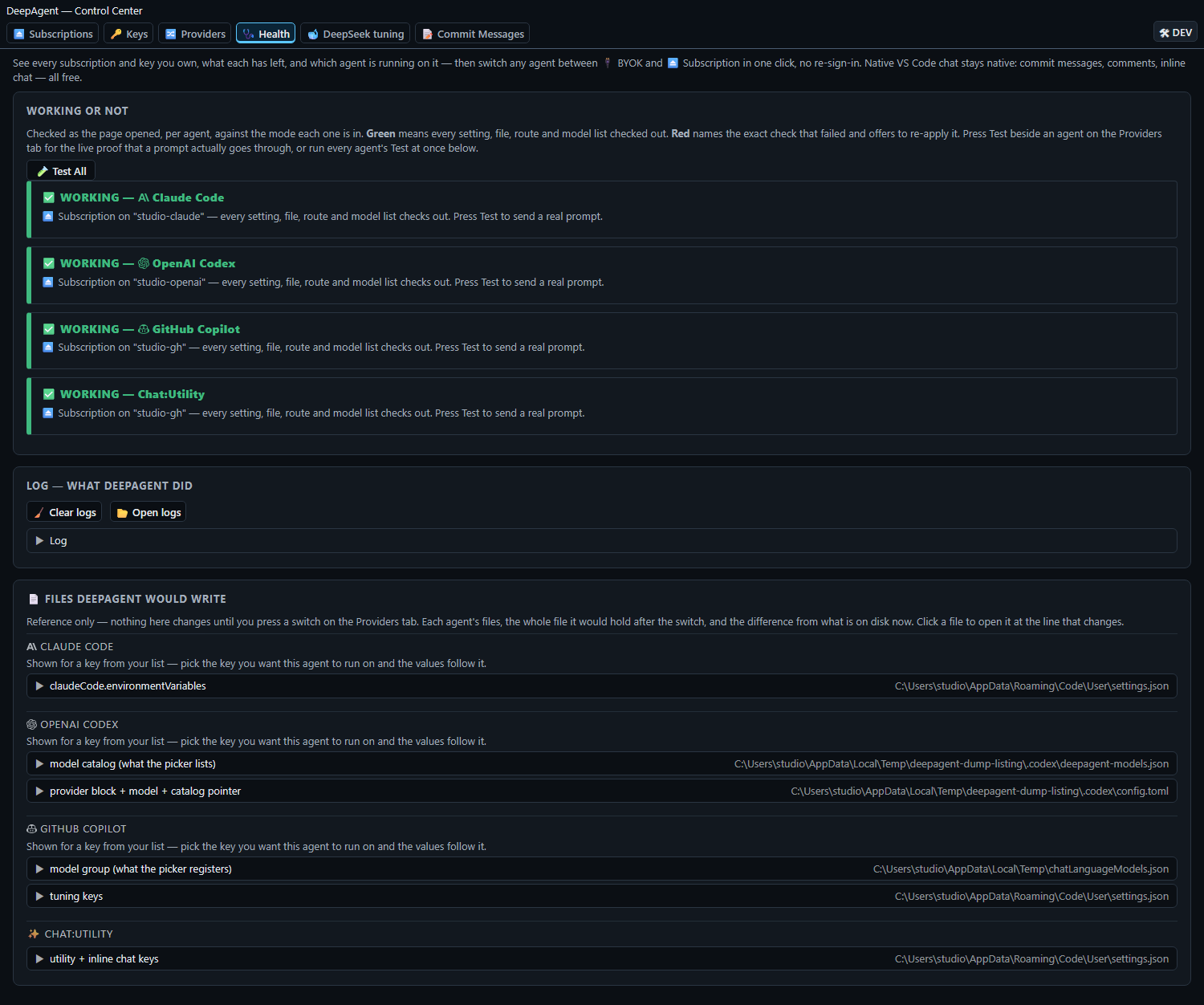
Health tab — every agent checked, and the files DeepAgent would write.
All six pictures are rendered from the shipped panel (and the real allowed_models server) over an invented state — no real account, balance, key, path or host in them.
What else it does
- Copilot stays 100% native in the VS Code chat — the ✨ commit-message button, comment generation, inline chat and edits all keep working, because the routing happens inside Copilot's own BYOK support.
- Claude Code keeps its full power on a key — through DeepSeek's Anthropic-compatible endpoint, mirrored to
~/.claude/settings.json so terminal Claude agrees. On a BYOK turn the 🚫 Artifact tool is switched off, and restored on Subscription.
- OpenAI Codex is routed through
~/.codex/config.toml with the key's provider (Responses wire API).
- Chat:Utility and Inline Chat can follow the key's Flash model, so commit messages and small edits never fall back to the included model that nags you to upgrade.
- Switching an agent back to ⏏️ Subscription restores your originals — Claude's full OAuth sign-in included — because they were snapshotted before the key routing went in, and every apply or restore reads the real files back before it says
✓ verified.
- Vision works on both routes — DeepSeek's flash model accepts images, so there is nothing extra to pick.
- Accounts follow the real login — the account an agent is running on is read from that agent's own file (Claude Code's credentials, Codex's auth.json, Copilot's sign-ins), so the live mark is true, and a newer Codex login the CLI wrote to disk replaces the older one. The Codex switch also works with no VS Code window open.
- Auto-detects each target (extension or CLI), turns an account you are already signed in to into a row by itself, and carries the whole list to your other machines through Settings Sync.
- Providers: DeepSeek (native,
platform.deepseek.com), DeepInfra (the same models cheaper, deepinfra.com) or Together AI (api.together.ai).
6. Let the whale write your commit message
On the 📝 Commit Messages tab choose the provider, the model and a Time allowance (5, 10, 20, 30, 60 or 120 seconds; 20 by default) — that is the only knob, and the live estimate sits beside it. Optionally add Your style rules ("Use Conventional Commits", "Mention the ticket id"); they never change which files are shown or how long the reply may be. Then press the whale above the Source Control commit box: it reads the staged changes (or every pending change when nothing is staged) once, sends one AI request with the model's reasoning off, and the message lands in the box. No file is dropped: when the allowance is tight a file loses detail — every changed line, then only the changed lines, then an outline, then its line counts — but is still named. A bigger allowance trims less, and a generous one sends the whole change and asks for the detailed message. The card shows ≈ N s of 20 s on <model> and how many files went in at each level before it sends, then the real time. The whale spins while it works; an Enabled checkbox hides the button, and a refused save or a failed run shows its failure instead of falling back to another provider.
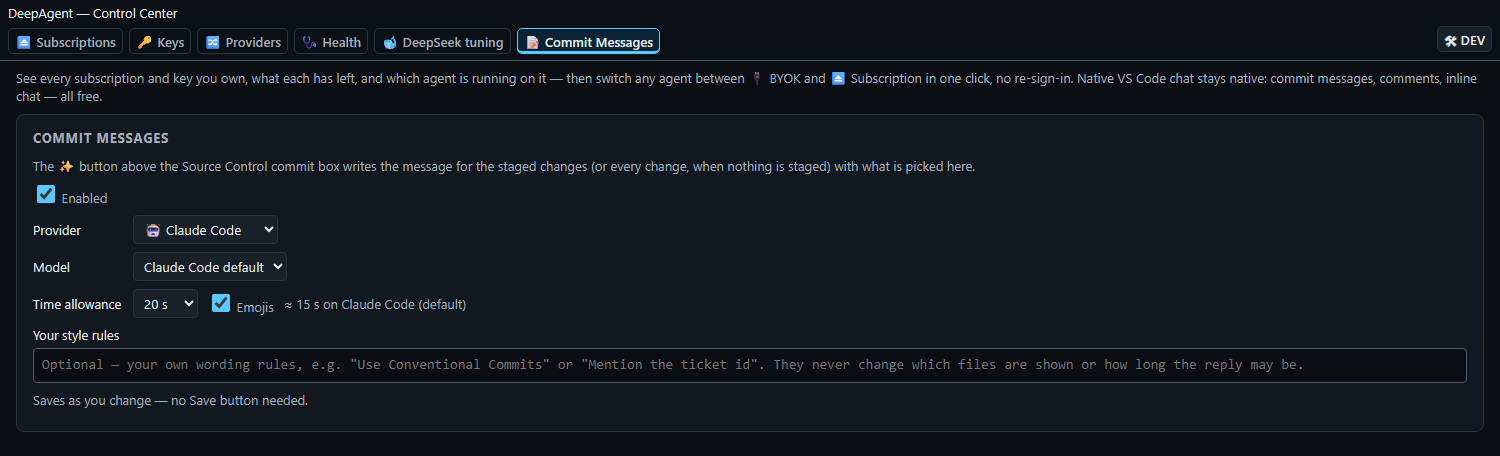
Commit Messages tab — provider, model, Time allowance with its live estimate, and your own style rules.
Open it
Click the DeepAgent status-bar item — a provider mark and a balance once something is running on it, plus a percent while a subscription is — or run DeepAgent: Open Control Center.
Providers
A key is bought from one of these; a subscription is signed in to Anthropic, OpenAI or GitHub, and is what an agent runs as when it is not running on a key.
| Provider |
Your key from |
Models |
Serves |
| DeepSeek (native) |
platform.deepseek.com |
preconfigured: Pro and Flash |
Claude Code, OpenAI Codex, GitHub Copilot |
| DeepInfra (cheaper) |
deepinfra.com |
preconfigured: Pro and Flash |
Claude Code, OpenAI Codex, GitHub Copilot |
| Together AI |
api.together.ai |
read from Together's own model listing as you save the key |
Claude Code, OpenAI Codex, GitHub Copilot |
| Target |
What happens under the hood |
| Keys and subscriptions |
one list, stored as deepagent.identities, so Settings Sync carries it to your other machines |
| Claude Code |
claudeCode.environmentVariables gets the base URL, the key, the main model, the small-and-fast model and all four model tiers, each labelled — so Claude Code's /model picker lists your models instead of Claude's — and every tier declares the image capability, because the model a session runs is the one that takes images; mirrored to ~/.claude/settings.json. Original values snapshotted and restored when the agent goes back to ⏏️ Subscription |
| OpenAI Codex |
~/.codex/config.toml gets a [model_providers.<provider>] block (Responses wire API), the model DeepAgent routes it to, and a model_catalog_json pointer to the model catalog DeepAgent writes beside it. Previous config restored when the agent goes back to ⏏️ Subscription |
| GitHub Copilot |
the provider's group (its models + key + base URL) is registered in Copilot's model picker via VS Code's built-in BYOK command; tuning (temperature, thinking) written to the native Copilot settings |
| Your AI's questions |
a read-only MCP server (allowed_models) is offered to VS Code chat automatically; any other MCP client can run dist/mcp-server.js from the install folder. It reads the same deepagent.identities and never writes |
| Commit messages |
the whale button above the Source Control commit box runs the picked provider on the diff; settings are deepagent.commitMessage.* |
| Chat:Utility models |
Commit messages, the small background tasks and Inline Chat all → the key's Flash model, so nothing falls back to Copilot's included model and nags you to upgrade when its usage runs out (deepagent.utilityModels mirrors the checkbox) |
Settings
Everything is set in the Control Center; these live in settings so Settings Sync carries them to your other machines.
| Setting |
Default |
Meaning |
deepagent.identities |
[] |
Your keys and subscriptions, in one list. |
deepagent.key.claude / .codex / .copilot |
— |
Which key that agent runs on when installed. |
deepagent.subscription.claude / .codex / .copilot |
— |
Which subscription that agent runs as when uninstalled. |
deepagent.registeredModels |
["pro","flash"] |
Which of a provider's models DeepAgent registers on every agentic provider — both by default, cleared per model in the 🐋 DeepSeek tuning tab. |
deepagent.temperature |
0.7 |
Sampling temperature applied to Copilot's agent model. |
deepagent.deepseekEffort |
high |
The one effort setting: DeepSeek's reasoning effort (none/low/high/max), written where Copilot reads it when it builds a model request; it also turns Copilot Inline Chat's thinking toggle on, and off only for none. |
deepagent.utilityModels |
false |
Route Chat:Utility and Inline Chat → Flash. |
deepagent.commitMessage.enabled |
true |
Show the whale button above the commit box. |
deepagent.commitMessage.provider / .key / .model |
claude |
Who writes the message (claude, codex, copilot or key), the key a key provider sends with, and the model (empty = the provider's own default). |
deepagent.commitMessage.timeAllowance |
20 |
The seconds you will wait for a message: 5, 10, 20, 30, 60 or 120. The detail each file is sent at and the length of the reply are worked out from it; no file is dropped. |
deepagent.commitMessage.styleRules |
empty |
Your own wording rules, added as their own block; they never change the files shown or the reply length. |
An older DeepAgent kept a single key in deepagent.apiKey, with deepagent.endpoint, deepagent.modelMode, deepagent.proModel and deepagent.flashModel beside it. Those are read once, when deepagent.identities is not there yet, to carry that key into the list — from then on the list is the only place they live.
Everything in the panel auto-saves as you change it — no Save button.

