BullseyeBacklog
There is no Add button, no new-story form and no create dialog. You tell your AI what you want — "file a story: …", "ship #12", "what's left on the export bug?" — and it writes the board through this extension.
The panel is where you watch it happen: every story with its % and what is LEFT, a receipt on everything that shipped, your AI's questions waiting on the story they are about, and the agent working each story.
🎯 Better together: BullseyeUber
BullseyeBacklog works on its own, and it gains the most inside BullseyeUber — one install puts it with FleetView, BullseyeBacklog, DeepAgent, BullseyeSync and BullseyeNotify in a single Bullseye Control tab. Installing BullseyeUber pulls in any member you are missing, and each keeps its own listing and updates.
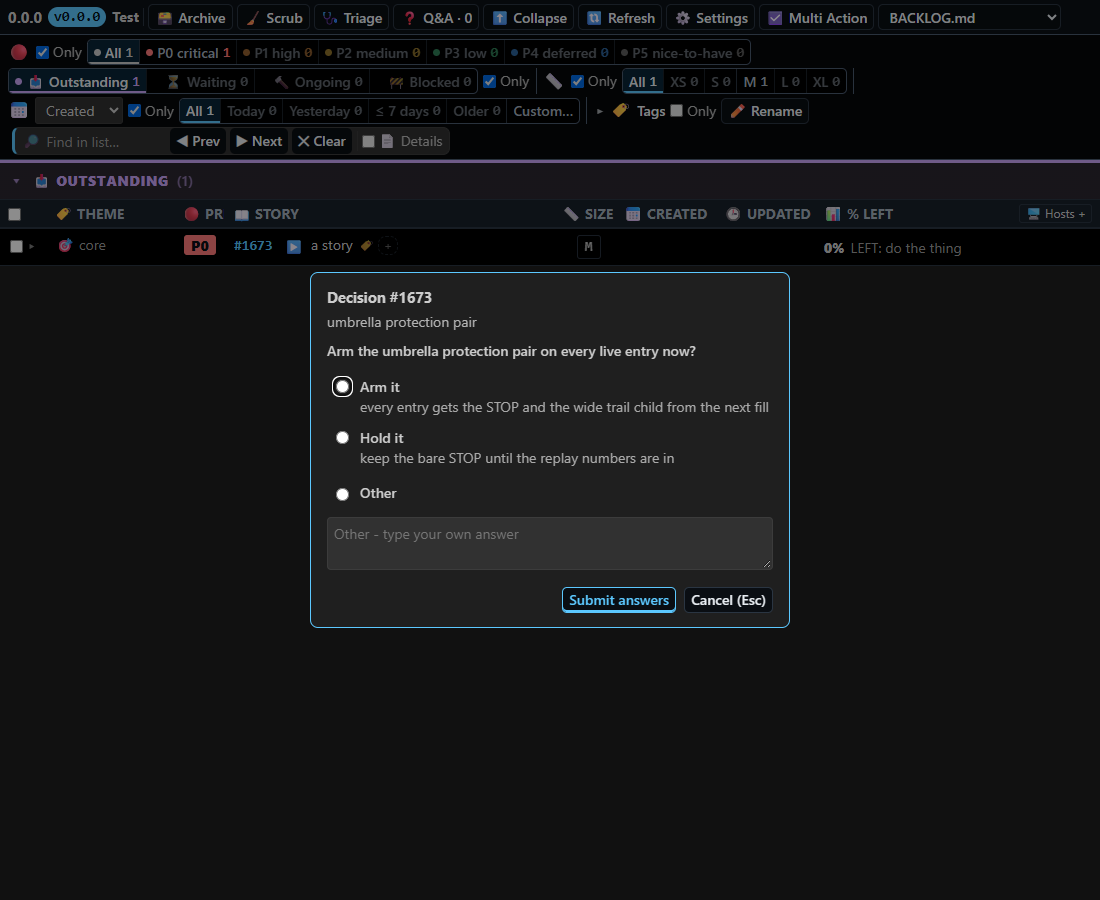
- The ▶🚢 Start agents button is live. With FleetView hosted beside it, a story row's ▶️ Start and the ▶🚢 press hand stories to FleetView's agent queue, and the agent icon on the row blinks with that agent's own progress and ETA.
- Board over fleet. The 🎯🚢 Pair layout puts this board on top and the FleetView roster below, so story #419 and the agent on it are on one screen.
- One tab, one reload, one dialog. The board opens in Bullseye Control as soon as it is ready, survives the shared safe reload with its state parked, and shows your AI's questions in the same dialog card as every other member.
👉 Get BullseyeUber on the Marketplace
✨ What is new, most important first
- Start is one press and one honest row. Every story row always shows ▶️ Start or a blinking 🤖; a press reads 🎫 Queued the instant you click it, and clicking 🎫 opens FleetView's agent queue on that story.
- Your AI's questions arrive as one card. A decision opens in the board's own form (options plus a free-text Other); no VS Code toast, no banner, and a decision already asked is never asked again.
- Q&A threads are answered by an agent that has read the code, and a thread stays open until you ack it.
- Nothing hides a story from you. A new story your filters hide is named on the board, and Refresh says what it read.
- Stories have owners and tags — each belongs to one machine; tags filter and rename.
- Faster, steadier editing: focus leaving an inline editor closes it, and a missed write is caught within a second.
Full list, per version: the Changelog tab on this listing.
How you use it — type a sentence to your AI
Install it and open a project that has a BACKLOG.md. The extension wires its tools into Claude Code (it writes the workspace .mcp.json) and into VS Code agent mode / Copilot (it registers an MCP server) — any MCP-capable AI can drive it. Then just talk. Copy any of these into your AI's chat:
| Say this |
What the board does |
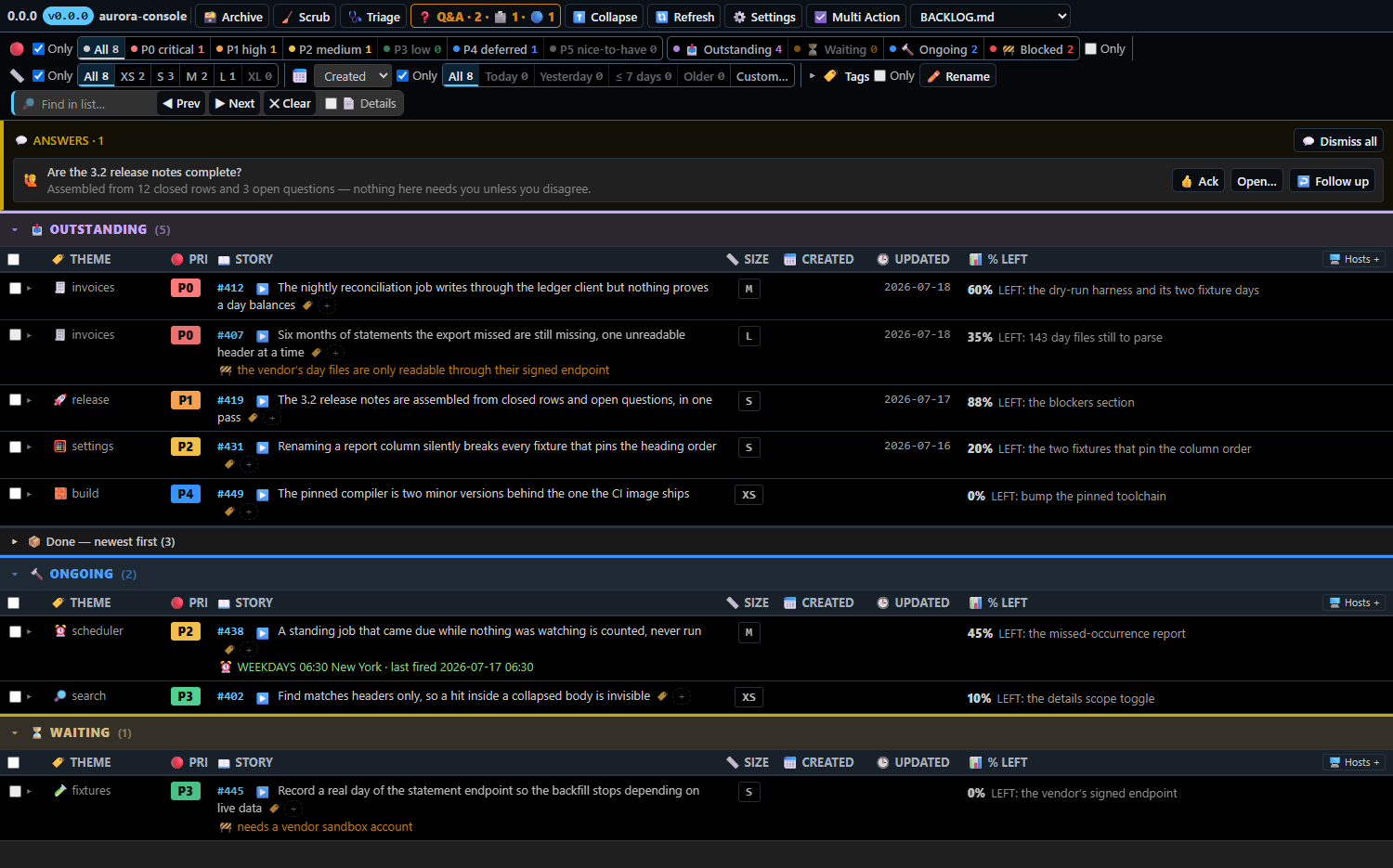
File a story: the nightly export drops every row of a statement that has no header. P1, small. |
A new row appears, numbered by the engine, with its priority, size and scope. |
Ship #419 — the release notes are published, prove it with the notes command. |
The story leaves the open lanes and a dated DONE receipt, with its proof, takes its place. |
What's left on the vendor statements story? |
Your question is filed on that story; the answer lands in the thread beside it, waiting for your ack. |
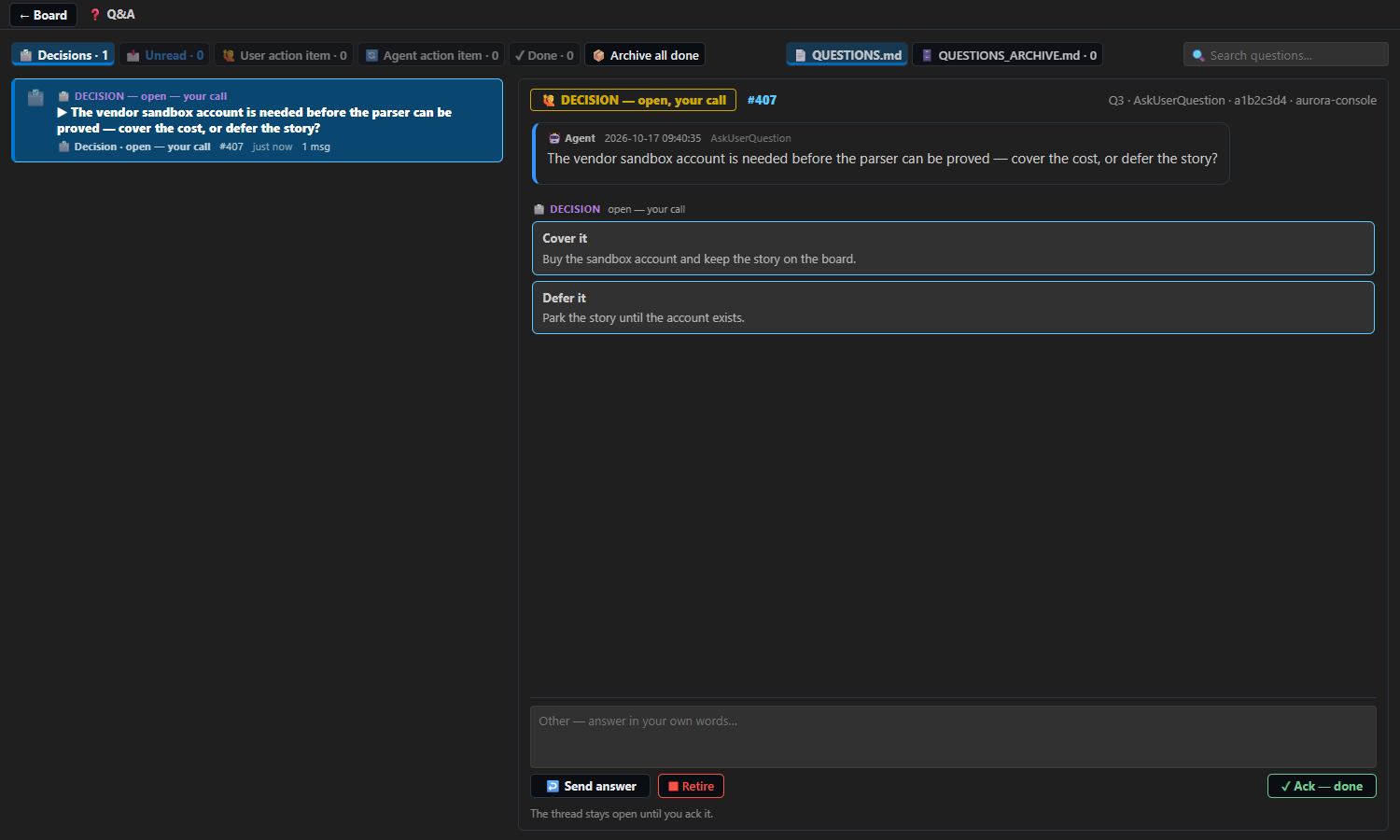
Before you touch #407, ask me whether we buy the vendor sandbox account. |
A question card appears on the story, with options and a free-text box, until you answer. |
Start an agent on every story that has none. |
With FleetView installed: one agent per free story, each shown on its own row with its progress. |
Before you touch #407, I need a ruling on the vendor sandbox account. |
A decision opens in the board's own form — one choice per option, a free-text Other, Submit — and your ruling lands on the story. |
The new row is on the board, in priority order, with its scope written in the body — nobody opened a form.
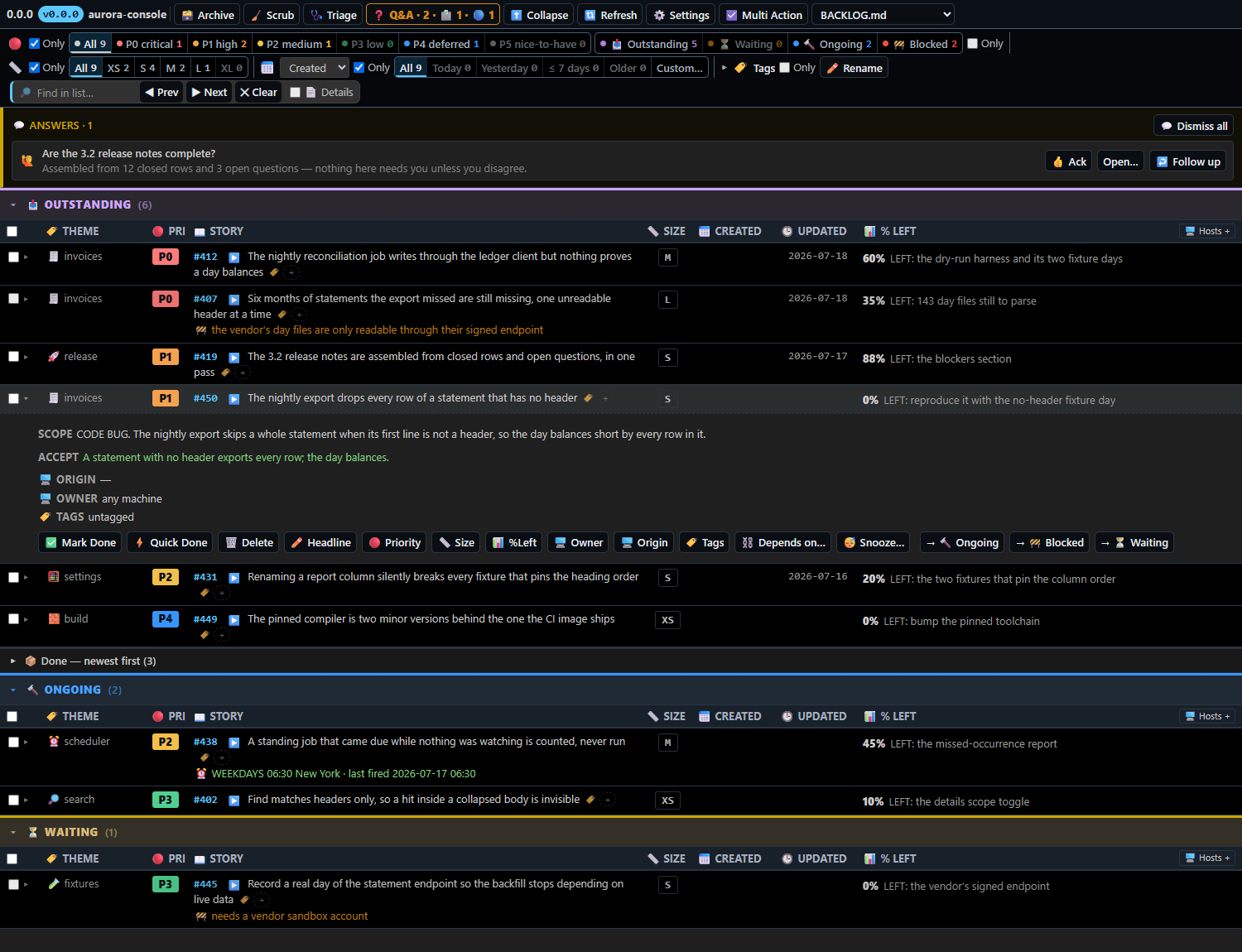
2 — "Ship #419 — the release notes are published, prove it with the notes command."
A story cannot be closed without proof: the receipt carries the command that was run and what it printed.
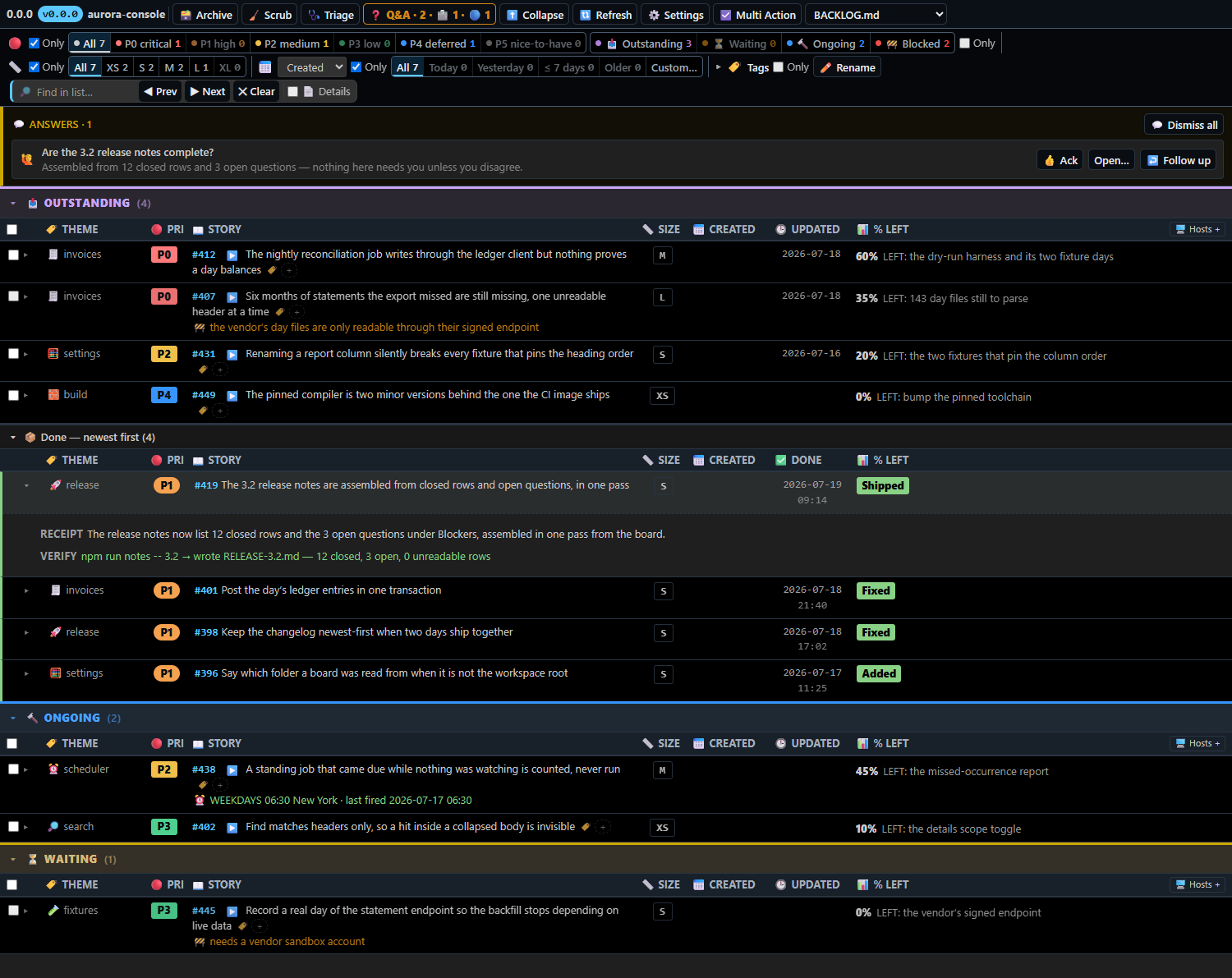
3 — "What's left on the vendor statements story?"
Questions you type are captured onto the story they are about, not left in a chat that scrolls away. Your AI answers in the thread; the thread stays open until you ack it, and you can reply in it to push the answer further. The same queue carries the questions your AI asks you. Capturing a question you type needs Claude Code — the extension installs its capture hook into Claude Code's user settings when it activates; questions your AI asks you arrive through the MCP tools in any client.
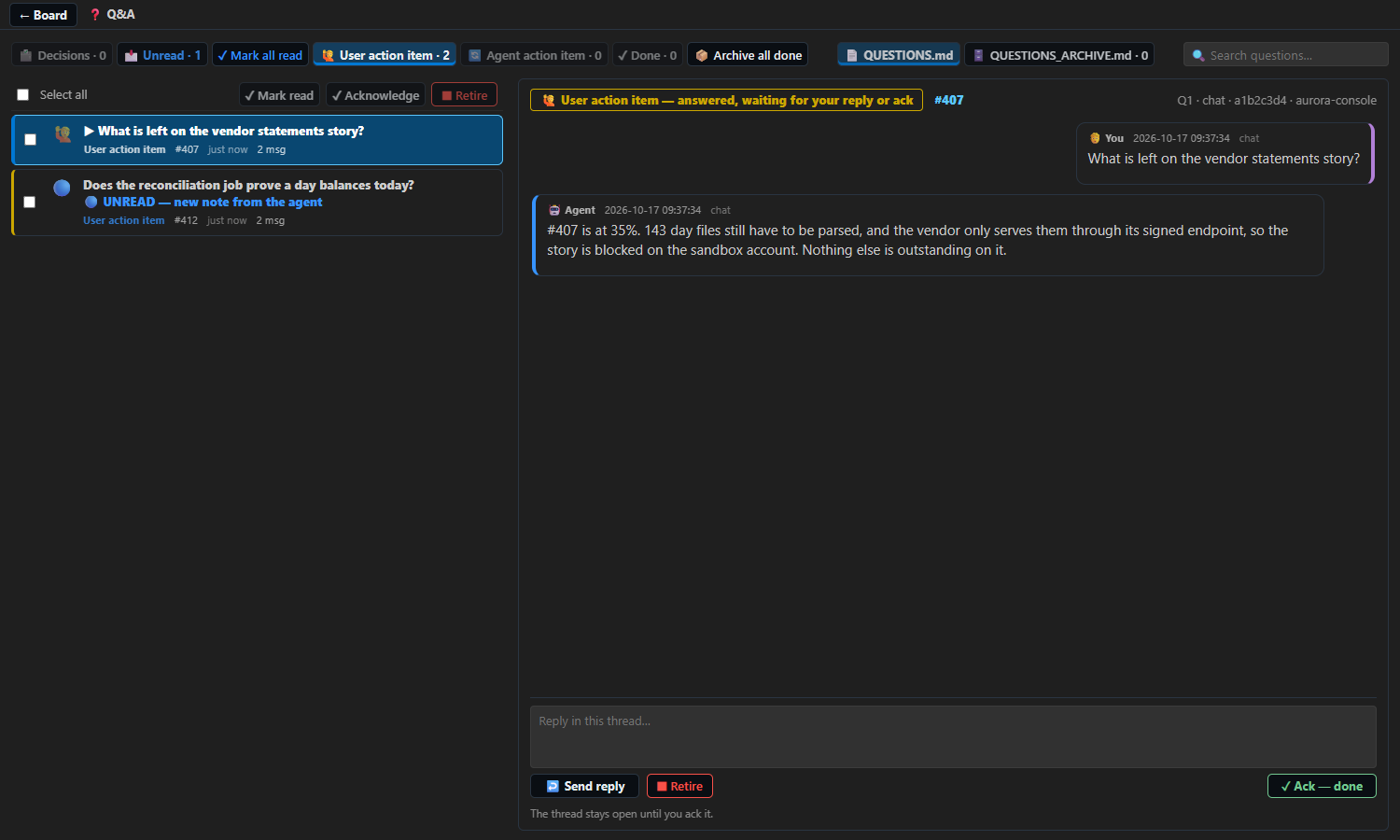
4 — "Before you touch #407, ask me whether we buy the vendor sandbox account."
Your AI's questions, findings and documents go onto the story. A free-text box is always there beside the options, and what you type is what is recorded.
5 — "Start an agent on every story that has none."
Where FleetView is installed, every story row carries exactly one agent icon, always drawn — ▶️ Start, or 🤖 blinking while an agent works the story, its details on the card you rest the pointer on — and ⋯ Multi Action → ▶🚢 Start agents hands every story you ticked to FleetView's agent queue in a single press, P0→P4 then XS→XL; a row's ▶️ puts its story at the front. The queue hands each story straight to your live main session, which dispatches its own subagent on it — the board starts no session of its own, so every agent is one your main session spawned and can be spoken to. With no main session open the press waits, the row says so, and the story is handed over the moment you open one; a story that already has a lane is revived or left alone, never handed a second agent.
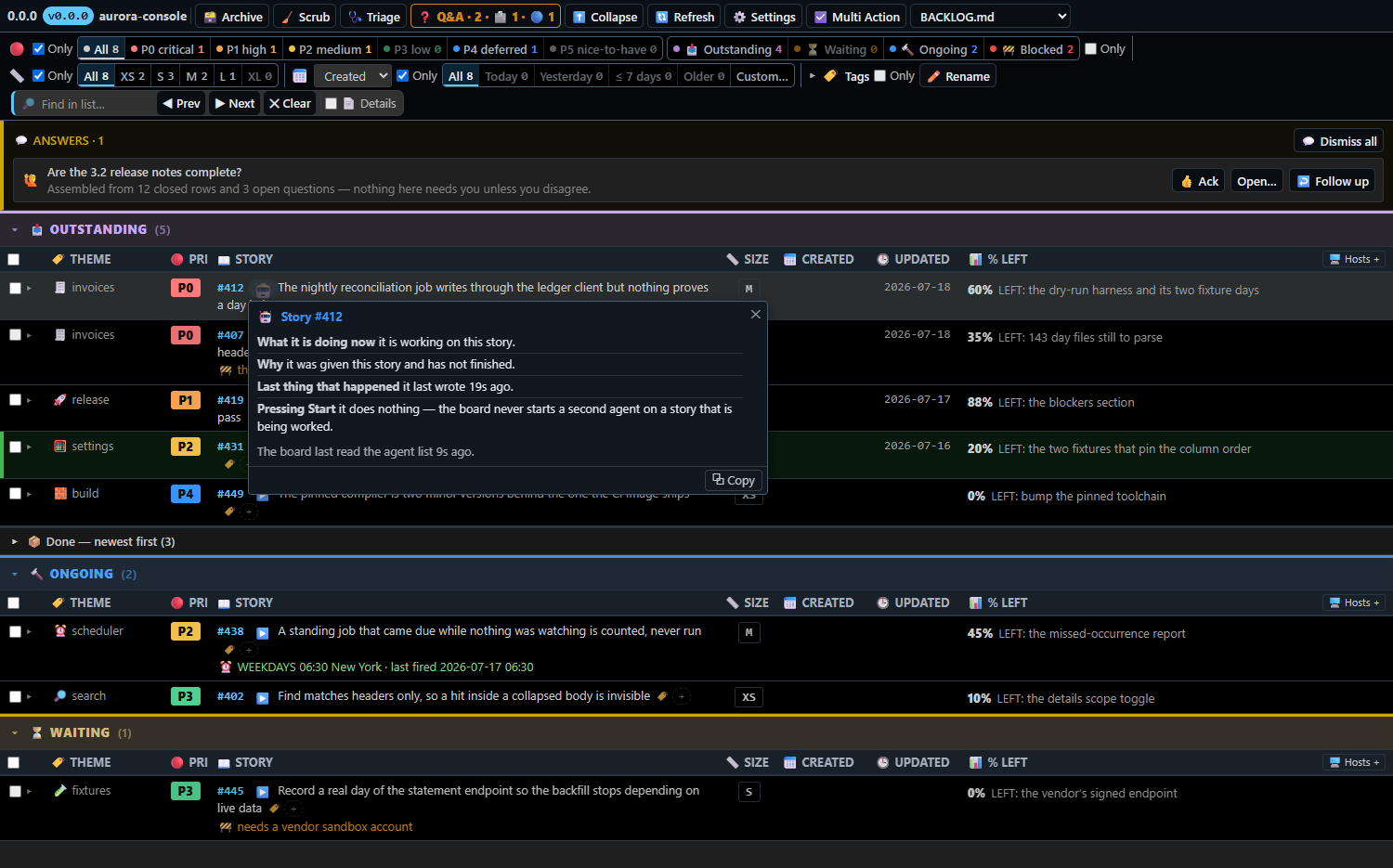
6 — "Before you touch #407, I need a ruling on the vendor sandbox account."
A decision only you can make opens as a form in the board itself: the question, one choice per option with what picking it means, a free-text Other (its own radio — what you type rules it), Submit answers, Esc to cancel. Your answer is recorded on the story as your ruling, shown back in your own words with the plan that follows, and a decision already asked is never asked again. Where Claude Code is the client, the same decision can instead open as its own question dialog (tick boxes when you may pick several).
The two-way link with FleetView
| On the board |
On FleetView's roster |
Each story row carries the agent working it; hover it for the live card (the agent's own % and what it says is left), click it to jump to that agent's row in FleetView. |
Each agent row carries its story — headline, priority and the board's own % — hover it for the card, click it to jump to the story's row on the board. |
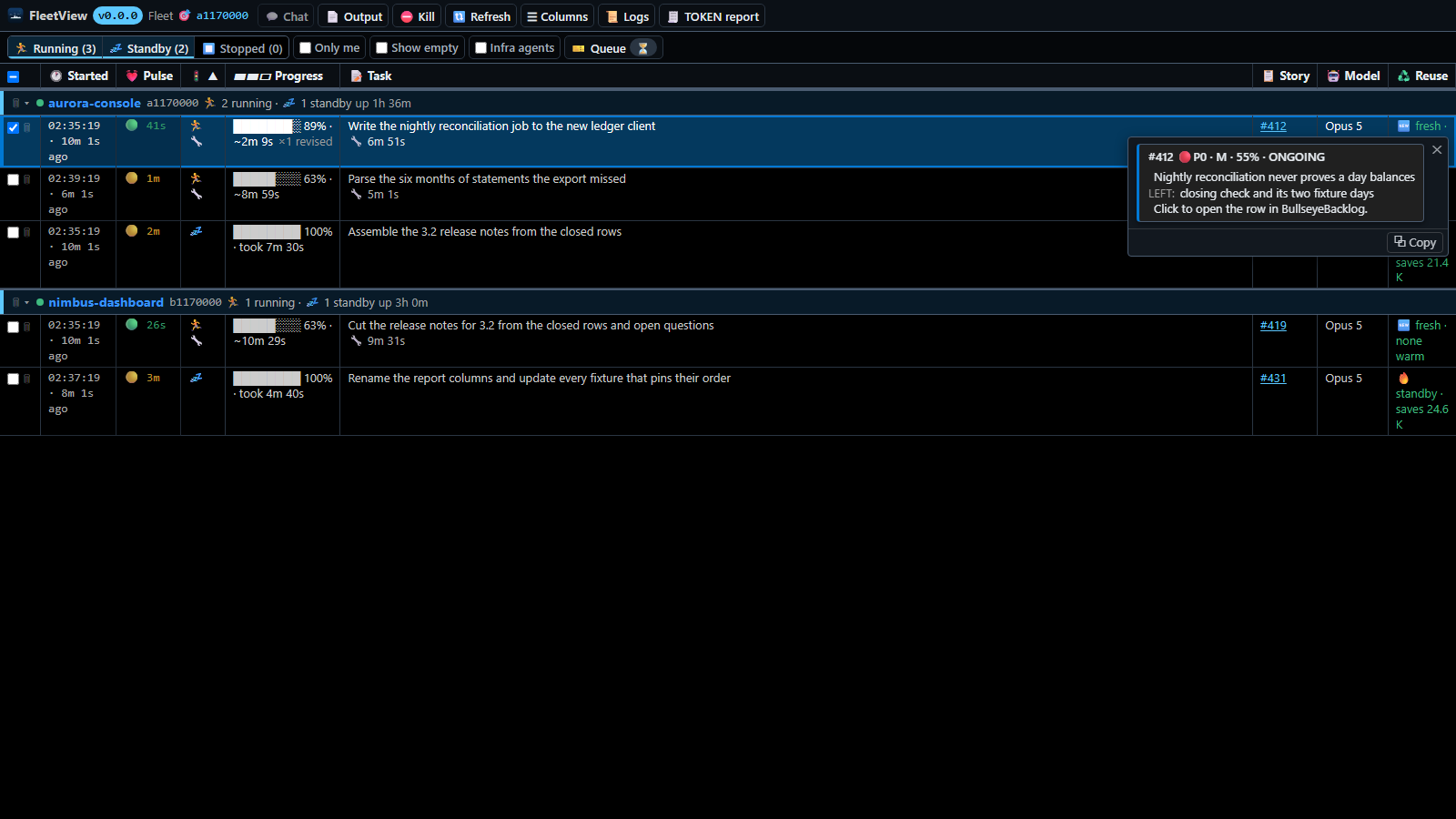
The picture above is FleetView's side of the link; the one under prompt 5 is the board's side.
Find it, filter it, watch it load
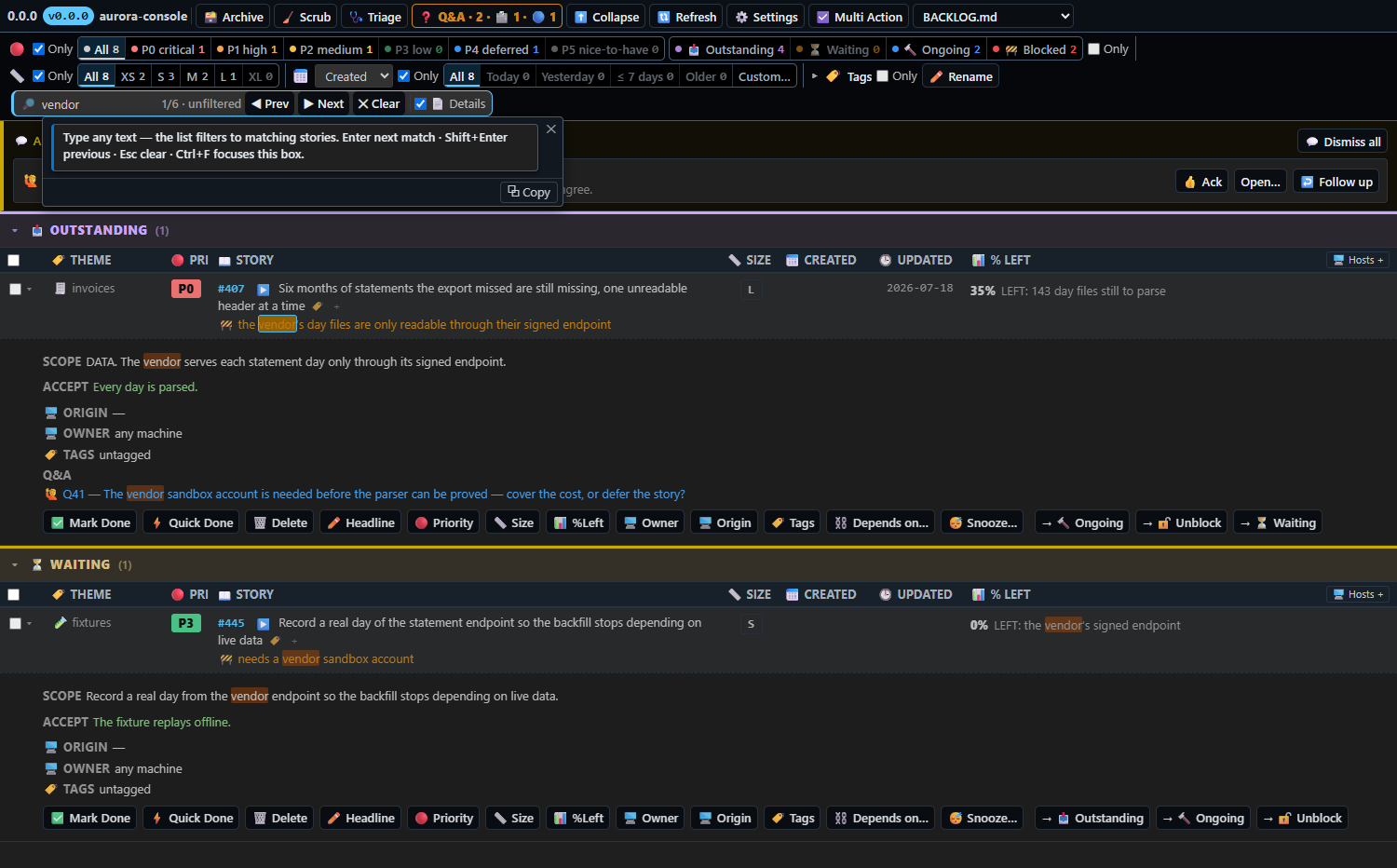
Find (Ctrl/Cmd+F) narrows the board as you type and marks every hit; 📄 Details also searches inside story bodies and opens the ones that match. One filter row narrows by priority, lane, size, tag and date.
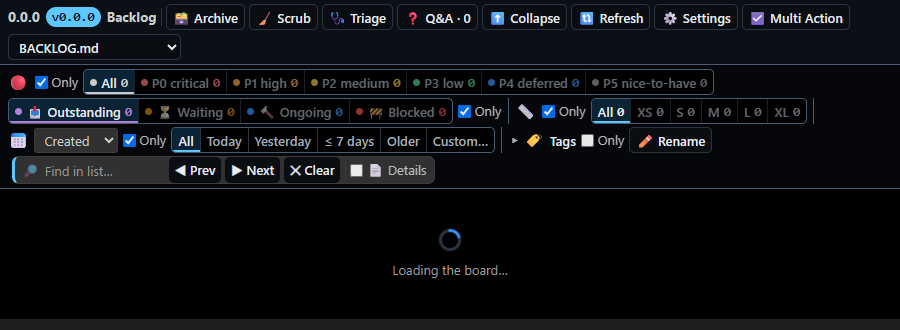
While the board is being read the panel says so, instead of showing an empty table:
One-press actions, for when you would rather click
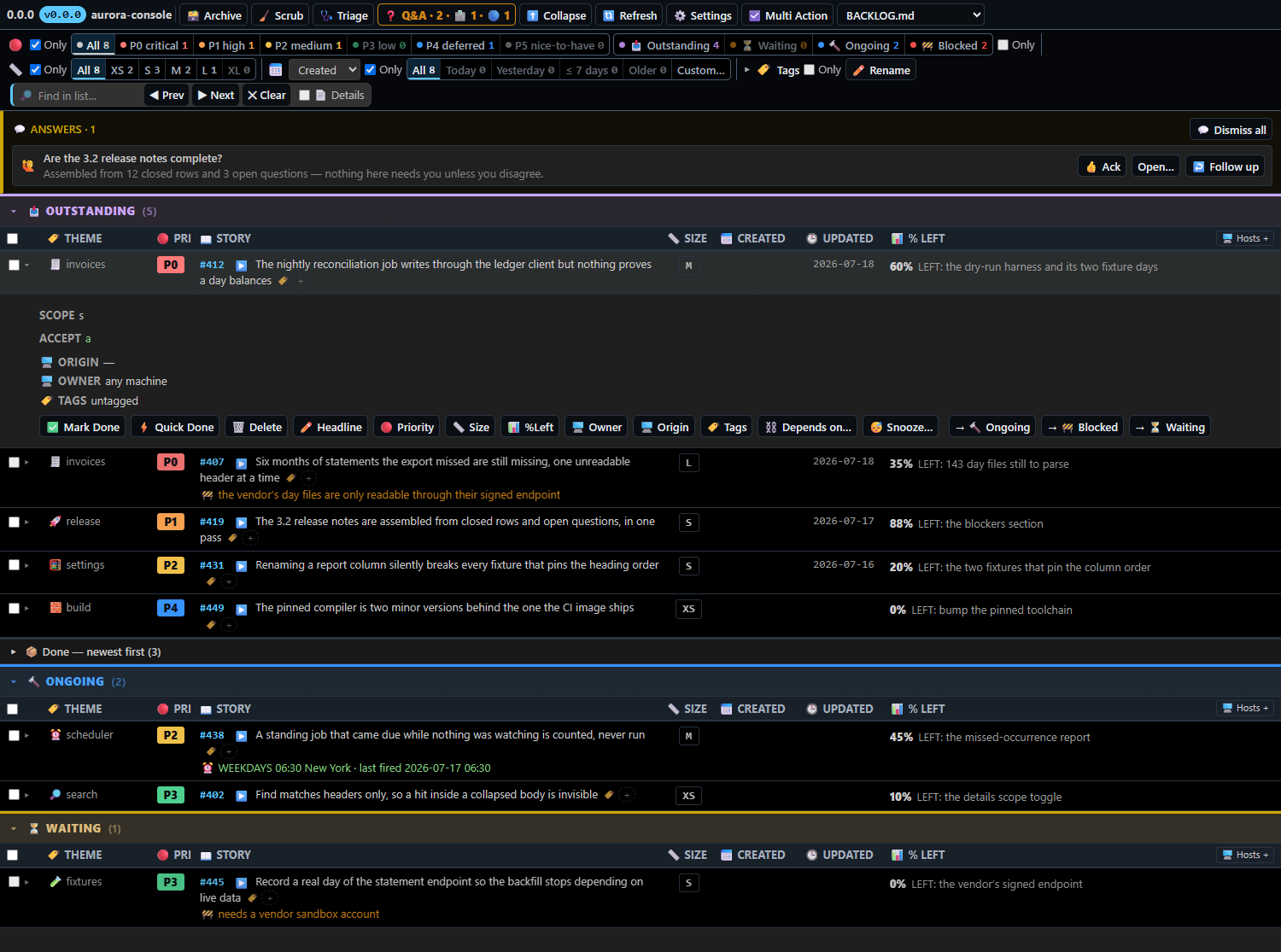
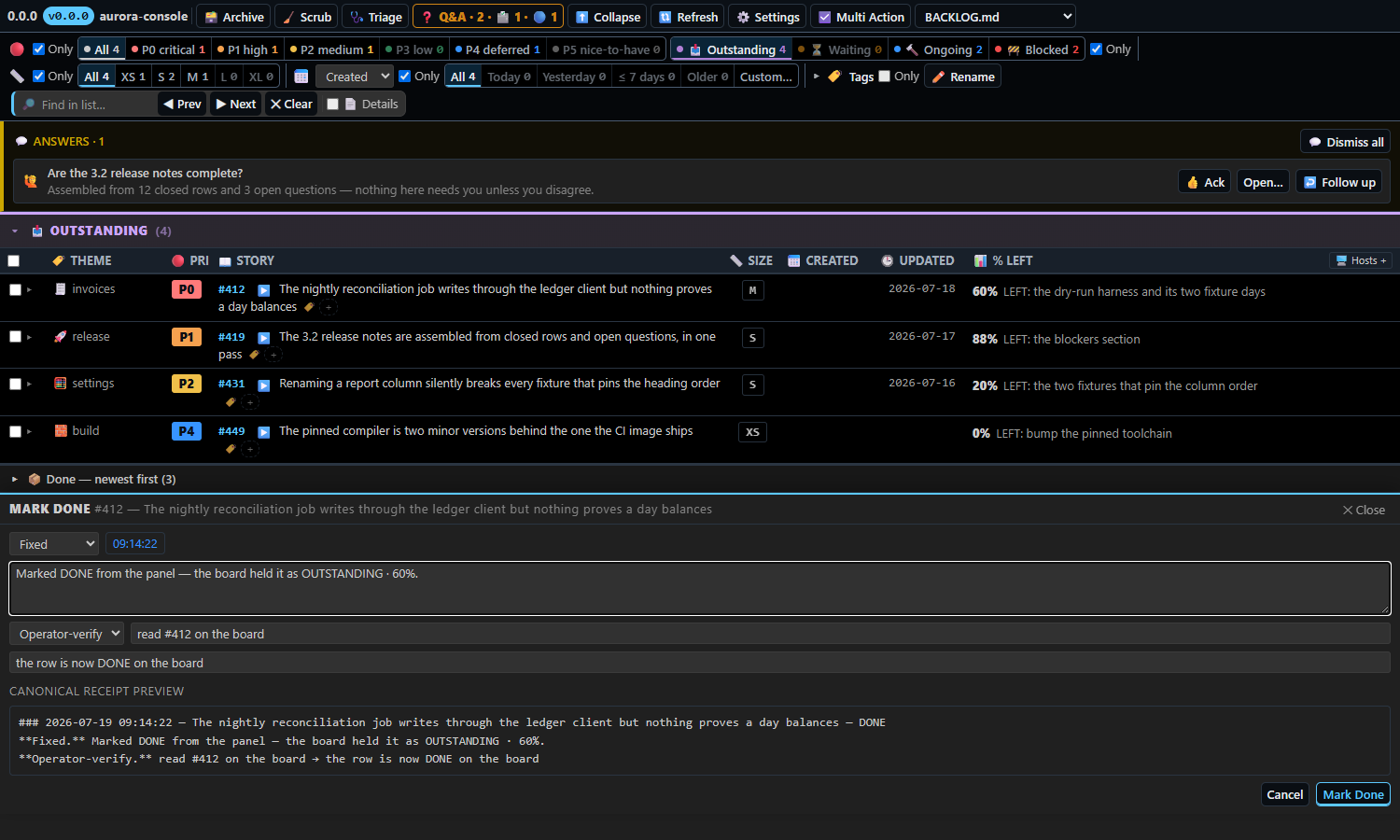
The same engine has buttons for the quick things — Mark Done, Quick Done, Delete, Headline, Priority, Size, % and LEFT, Depends on, Snooze, and the lane moves — and none of them asks you to type a reason. They are the shortcut; the sentence to your AI is the main way in.
Scrub and Settings
Scrub rewrites the file canonically and asks your model the calls the engine refuses to fake — is this % honest, is this blocker real, is anything ready to ship.
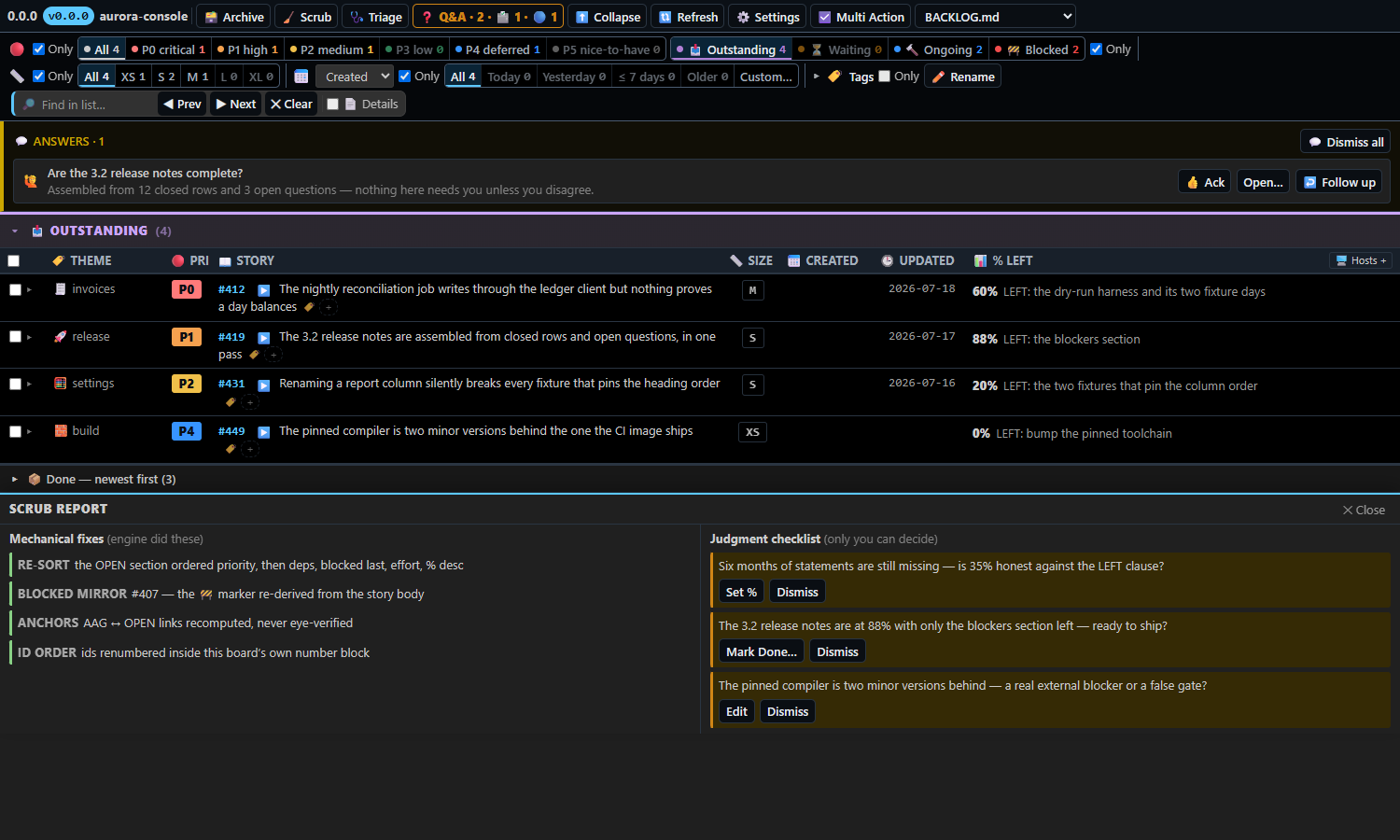
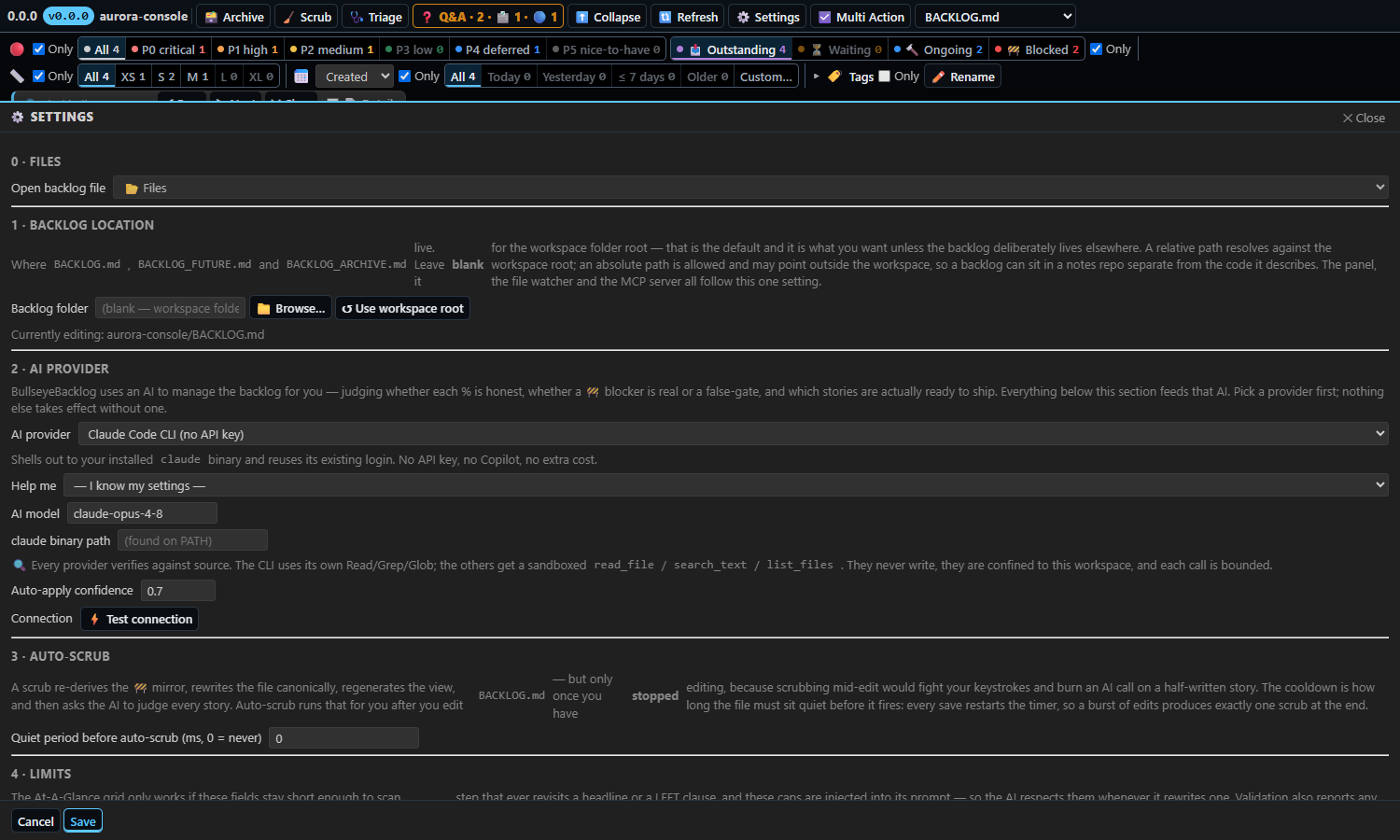
Every picture is rendered from the shipped panel in a headless browser over an invented board — no real story, path, host or name in it.
What it is underneath
A backlog whose source of truth is a plain Markdown file. BACKLOG.md sits in your repo, git-versioned and hand-editable — read it raw, edit it in vim or on GitHub, diff it like any other file. Every change — your AI's or yours — goes through one engine that re-serializes it to a canonical form, so there is no state you cannot open in an editor. Nothing lives in a database and nothing is proprietary.
The three files
| File |
What it holds |
BACKLOG.md |
The AT-A-GLANCE table, the OPEN story bodies, and today's DONE receipts. |
BACKLOG_ARCHIVE.md |
DONE receipts moved out of the backlog, newest-first. Append-only history. |
BACKLOG_FUTURE.md |
Deferred proposals — one per ### heading. |
They live in the workspace root by default, or wherever bullseyeBacklog.folder points — the panel, the file watcher and the MCP server all read that one setting, so they cannot disagree about which backlog is real. Missing files are seeded from the canonical renderer (src/templates.ts), not from hand-kept text, so a fresh file is byte-identical to what a mutation would write. Stale-format files are migrated on open (src/extension.ts).
Writes are atomic — temp file, fsync, rename — under a per-backlog cross-process writer lock keyed to the absolute path, so the extension and a running MCP server never interleave writes (../engine/src/api.ts).
The panel
Opens as an editor tab (a webview panel), not an Activity Bar view. It appears automatically when the workspace has a backlog; otherwise use BullseyeBacklog: Open in Editor Tab, or click the status-bar item.
Status bar
A $(target) N item sits immediately right of the git branch indicator, showing open-story count and a $(warning) N badge for Q&A threads still waiting on you. Clicking it opens the panel. Hovering gives a Markdown card with the logo, the running version, lane counts, a per-priority open/blocked table, and clickable Open · Refresh · Scrub · Triage · Archive · Q&A links (src/extension.ts).
At-A-Glance grid
Stories are grouped by lane (OUTSTANDING / SCHEDULED / WAITING), each lane collapsible, with a separate collapsed 📦 Done strip. Columns: THEME · PRI · STORY · SIZE · CREATED · UPDATED · % LEFT; 🖥️ Hosts + adds the Origin host and Owner host columns — a story is owned by one machine, and the board refuses a write to it from another.
- Sort by clicking a column header — three states per column: ascending → descending → no longer a key. Clicking a second header adds it as the next sort key, and each active header shows ▲ or ▼ plus its position when more than one key is in play, so a multi-key order is visible rather than guessed at. With no key set the order is exactly what
BACKLOG.md renders (priority, then deps, blocked last, effort, % desc). The chosen sort produces one flat list with nothing hoisted out of it — blocked rows stay marked by their own styling rather than being pulled into a section that breaks the order you just asked for.
- Resize any column by dragging its header edge; widths persist.
- Filter row — one row holding every way to narrow the list. The Priority band carries a chip per priority with its live open count (All clears it), and beside that band the three lane buckets: ⏳ Waiting, 🔄 Scheduled, 🚧 Blocked. A Size ledger does the same for XS–XL, a Tag row filters by the tags your AI put on each story (every tag with its open count, Untagged, and Rename to retag every story at once), and the date field narrows by when a story was raised or completed — All · Today · Yesterday · Week · Older, or a date you pick.
- Find (
Ctrl/Cmd+F) narrows the list to matching stories as you type and marks every match inside them; Enter / Shift+Enter step through the marks, Esc clears. 📄 Details widens the search into story bodies and opens the collapsed body of every hit. Text not found in the open list is searched in BACKLOG_ARCHIVE.md and BACKLOG_FUTURE.md with surrounding context.
- Expand / Collapse all, and per-story carets.
Per-story actions
Expand a story to see Scope, Mandate, Files, Accept, Remaining, Deps and its Q&A threads, plus buttons: ✅ Mark Done (opens the ship composer), 🚧 Blocked / 🔓 Unblock, ✏️ Headline (validated against the 80-char / 20-word cap as you type), a 🔴 Priority picker, a 📏 Size picker, and 😴 Snooze… to park the story in WAITING and have it return by itself at the wake time — a story already snoozed offers Wake now and Change snooze… in its place, and when a snooze elapses its dialog offers 🚀 DO IT NOW. Then the lane moves (→ OUTSTANDING / → SCHEDULED / → WAITING — human-only by design; the MCP move tool refuses without humanConfirmed).
Click the % LEFT cell to edit percent and the LEFT clause inline. A bare — is rejected: a percent with no honest LEFT clause is the classic dishonest-progress tell.
One strip, left to right:
| Control |
What it does |
| 🗃️ Archive |
Moves every DONE receipt into BACKLOG_ARCHIVE.md, newest-first. Archiving is yours to command: the MCP archive and rollDone refuse an agent without your word, and every archived block records who did it. |
| ✨ Scrub |
Rewrites BACKLOG.md canonically, then runs the AI judge — see Scrub. |
| 🎯 Triage |
Re-rules every open story's priority from your triage file — see Triage. |
| 📋 Scrub |
Appears once a scrub has run, and reopens that scrub's report. |
| ⬇️ Expand |
Expands or collapses every story body. |
| ⋯ More |
Opens the status readouts below. |
| 🔄 Refresh |
Re-reads the backlog from disk. |
| ⚙️ Settings |
Opens the settings panel. |
| ⚙️ Multi Action |
Tick stories, then apply one action to all of them at once. |
| DEV |
Development entries — reinstall · bump · publish · restart — plus this extension's own session keywords: 🌊 WAVE (every story on the board), 📡 FANOUT (the same press as ⋯ Multi Action → ▶🚢 Start agents), Scrub, Triage, Next, AUTO, Parallel, Archive, Shutdown, Resume, Status, CPU, Recon, Postmortem trade, Commit. The panel draws this control only when the window has some to offer. |
WAVE and Start agents differ in what they cover. WAVE takes the whole board and runs the WAVE keyword; ⋯ Multi Action → ▶🚢 Start agents skips the keyword and hands the ticked stories to FleetView's agent queue.
Status readouts
Behind ⋯ More: canonical (the file on disk is byte-identical to what the engine would write) · MCP (whether an agent can reach this backlog's tools) · scrub (the last scrub set against the file on disk now) · ⚠ N drifted (stories whose referenced files changed after the row last said anything — the code moved on and the row did not, see src/drift.ts) · ❓ N Q&A threads still waiting on you · 🔀 merge when the last git merge left a record.
Panels
📜 Log — every message the panel sent and what the engine did with it, replayed into a reopened panel. 🔀 Merge — the last merge, story by story. ❓ Q&A — every thread, as a conversation, with unread and waiting counts; a thread you have read stays read across tabs and restarts. ⚙️ Settings — every setting with a folder browser, live model discovery, provider presets and a real connection test. Ship composer — verb, engine-stamped HH:MM:SS in machine-local time, receipt body, Verify / Operator-verify clause, and a canonical receipt preview before you commit.
The panel live-reloads on any write to the backlog (fs.watch on the file, plus every directory containing a file referenced by a story's filePaths).
Scrub
Two halves, one button.
Mechanical (../engine/src/api.ts) — re-derives the 🚧 blocked mirror, re-sorts, rewrites BACKLOG.md canonically, and regenerates the AT-A-GLANCE view. The AAG↔OPEN bijection, the anchors, the --- separators and the id ordering are recomputed, never eye-verified.
Judgment — the calls the engine refuses to fake: is this percent honest given the LEFT clause and the remaining scope, is this blocker a real external dependency or a false gate, is this story actually shippable. There is no keyword list; keyword matching got blockers wrong in both directions. The judge sees the whole backlog in one conversation, which is what surfaces the duplicate story, the story another one silently finished, and the dependency that already shipped.
The judge gets read-only Read / Grep / Glob over the workspace and is told the story's own fields are the claim, not the evidence. Your repo's own CLAUDE.md is deliberately not auto-discovered, so it cannot colour a backlog verdict.
What gets applied without asking: setPercent and unblock verdicts at or above ai.confidenceThreshold; ship verdicts are applied regardless of confidence. The reasoning is that the file is git-versioned — a wrong ship is one git diff away from being seen and one revert away from being gone — and the panel lists everything it did, with per-story confidence, reasoning and the full prompt/response trace. keep verdicts and below-threshold verdicts are reported and not written.
The judge is a live, cancellable run with per-story cards, a timer, projected cost, and measured token usage (null, not zero, when the provider cannot report). Auto-scrub on file change is off by default because that judgment is a paid model call over the whole backlog — see autoScrubCooldownMs.
A backlog file that will not parse is offered to the same provider for structural repair, under a prompt that may only fix broken table rows, malformed headings and duplicate ids — never user-authored text — and the result is rejected outright if it loses the AAG markers (src/corruptionFixer.ts).
AI providers
Four, no auto-probe — you choose, and an unset provider is an error that names the fix (src/llm/registry.ts):
| Provider |
What it needs |
vscode-lm |
A model already registered with VS Code — Copilot, or any BYOK key added in the Chat model picker. BYOK needs no Copilot subscription. |
claude-cli |
Your installed claude binary, reusing its existing login. No API key, no extra cost. |
anthropic-api |
Your own Anthropic API key. ai.baseUrl can point it at an Anthropic-compatible host. |
openai-compatible |
Any /chat/completions endpoint — Ollama, LM Studio, OpenRouter, DeepSeek. |
All four can audit against the source tree: the CLI through its own tools under --add-dir, the other three through a shared read-only tool box.
Triage
Triage has no mechanical half. Priority is a judgment about how close a story sits to the money, and nothing in the file can compute it — so 🎯 Triage clears the panel and hands the whole open list to the model.
- The policy is a file you write, and it is the only policy.
ai.triageDefinitionFile (default triage.md at the workspace root) is injected verbatim into every triage prompt; ai.triageGuidance is the editable half that says how to apply it. There is no second, hidden idea of priority.
- Miss that file and triage refuses. It does not fall back to a built-in ranking you never agreed to — it stops, names the path it wanted, and says what to provide.
- Every open story is judged in one conversation, against every other, so the verdict is a ranking rather than a series of independent guesses. Priorities move both ways — a stale P0 is corrected down as readily as a buried one is lifted.
- Each verdict lands as
setPri on its story, and the report lists every one with its reasoning and the full prompt/response trace. The run is live and cancellable, with a timer, projected cost and measured token usage — null, not zero, when the provider cannot report a number.
Ship and archive
Ship closes a story into ## DONE with a stamped receipt: verb, title, body, and a Verify: or Operator-verify: clause. Theme, priority and size travel with it. A close without proof is refused — a receipt that names no file or test and states no verify clause carries nothing, so the engine will not file it. Partial ship (MCP) lands a piece: a DONE receipt for what landed, plus a rewritten row for the rest.
Remove is the other direction: it takes a never-shipped story off the board and writes why onto the board itself, newest first beside the ids line. The row leaves and the reason stays, so a deliberate removal can never be read later as a row that went missing.
Archive moves every DONE receipt into BACKLOG_ARCHIVE.md, newest-first, one click. Id generation is archive-aware, so ids never reset onto a number the archive is already holding. rollDone (MCP) keeps only the most recent working day in DONE.
A refusal says so. An archive that moved nothing and an archive that was refused both leave DONE unchanged, so the two are never conflated: a refusal is stated in the panel and in the log, naming what stopped it, rather than reporting a success with nothing behind it.
Ask and answer — Q&A
Your AI's questions and findings open a thread in QUESTIONS.md, tied to the story, not a chat transcript that scrolls away. A choice carries options; a finding carries its conclusion and, when it rests on a file, a link drawn in the thread with a thumbnail. The expanded story lists its threads.
- Free text is mandatory. A thread may offer 2–4 options, but every one also renders a free-text box, and what you type is what gets recorded. The engine refuses an agent's own "Other" placeholder as a choice.
- A thread is a conversation. Answer or follow up, and the agent owes you the next word — a follow-up is answered by a real read-only agent (two standby
claude instances, one ask each, cleared between threads) that has read the code and logs, and a request for work is handed to your main session, which claims it onto a story; pendingQuestions tags each thread owes: OWNER or owes: AGENT.
- Only your ack closes a thread. Acked threads move to
QUESTIONS_ARCHIVE.md.
MCP server — for agent-mode AI
The same engine, exposed as MCP tools, over two faces that can never advertise different backlog sources for the same workspace:
- VS Code agent mode / Copilot — registered at activation via
vscode.lm.registerMcpServerDefinitionProvider (VS Code 1.101+), launched with the resolved backlog folder as its cwd (src/mcpProvider.ts).
- Claude Code — the extension writes the workspace's
.mcp.json on activation, owning only the bullseye-backlog key and carrying every other server's key through untouched (src/claudeWiring.ts). A malformed .mcp.json is reported and never clobbered. The entry resolves the server bundle at run time across Code / Insiders / VSCodium, so it survives extension upgrades.
The server ships the lifecycle contract as MCP instructions, so it reaches Cursor, Copilot and anything else driving the backlog — create before you write code, move the percent after each chunk, ship the same turn the work is done, unblock anything the owner could simply do, and never leave a question only in prose.
39 registered, in the order the server declares them.
| Tool |
What it does |
create |
Open a story before writing code. Several asks in one message means several calls. |
get |
Read one story by id as a structured object. Never writes. |
list |
List stories as structured objects, filtered by pri / lane / blocked / theme / percent range; a story another machine owns is flagged. |
update |
Edit any field except id and lane (tags and owner host included); row and body reflow together. |
knownTags |
Every tag the open stories carry, with counts — read it so a story reuses the board's own spelling. |
renameTag |
Rename one tag on every open story that carries it, in one write. |
addDependency / removeDependency |
Make a story wait for another (held 🚧 while it is open) or stop waiting. |
remove |
Delete a story that was never shipped, with a reason that lands on the board beside the ids line. Shipped work goes through ship. |
ship |
Close a story with a stamped receipt, the same turn the work becomes done. Refused without proof — a receipt that names no file or test and states no verify clause carries nothing. On an id that already carries a receipt it refuses again unless the caller pins the board hash it read. |
getReceipt |
Read back what a story's DONE receipt(s) say, from the DONE section and the archive. Never writes. |
amendReceipt |
Correct a mistake in the newest receipt in place, without delete-and-reship. Refuses if the board moved since the caller read it. |
partial |
Land a piece: DONE receipt for what landed, rewritten row for the rest. |
setPercent |
Update % with a LEFT clause naming the true next step. Bare — rejected. |
block |
Mark a story blocked by a real external dependency. |
unblock |
Clear a blocker. |
declareBlock |
State, once, which block of story numbers this board mints inside. Refused when the board already carries rows outside the range. |
snooze |
Park a story out of its bucket until a wake time, then it returns by itself. One-off: waking consumes it. |
wake |
The one door out of a snooze — back to its bucket now. |
schedule |
Put a story on a recurring clock — SCHEDULED, coming due at every occurrence, forever. Not a snooze: firing never consumes the rule and never moves the story. |
unschedule |
Drop the recurring rule. The story stays SCHEDULED, because it is still standing work, just no longer on a clock. |
due |
Every scheduled story owed an occurrence right now, how many earlier ones were missed with nobody running them, and the whole census of standing work. Never writes. |
fire |
Advance a story's watermark past the occurrence you are about to run, before doing the work. Refused when nothing is owed, so calling it twice is a harmless no-op. |
ask |
Open a thread on a story in QUESTIONS.md — options for a choice, conclusion (+ link) for a finding, progress while the work is still ours. |
rule |
Record your ruling on a story's decision, verbatim, when you gave it somewhere other than the board's form. |
handoff / claim |
Hand your Q&A request for work to the main session; the main session claims it onto a story and lane. |
pendingQuestions |
Every open thread, tagged owes OWNER or AGENT. Never writes. |
respond |
Answer a thread that owes the agent the next word. |
move |
Move lane. Requires humanConfirmed: true. |
scrub |
Mechanical scrub + a judgment checklist for the calling AI to rule on. |
archive |
Move all DONE receipts to BACKLOG_ARCHIVE.md. Refused for an agent without the owner's word. |
rollDone |
Keep only the most recent working day in DONE; older receipts roll off. |
status |
Assembled AAG print + counts + 🚧 blockers + 🅿️ parking lot. Never writes. |
validate |
Invariant audit, per story PASS or FAIL with rule and reason. Never writes. |
repairRows |
Put back a row's raise date, last movement and body text from the board's own git history. Nothing is invented: a row no commit names is left undated, and a field no commit ever held text in is reported as such. |
findLostStories |
Replay the allocator over the board's git history and report every id a commit once claimed that the board no longer honours. Never writes. |
next |
Select the top non-blocked OUTSTANDING story this machine owns; reports those another machine owns. Selection only. |
render |
The whole backlog as canonical markdown — the exact bytes a write produces. Never writes. |
Source: ../mcp/src/server.ts. Mutation results are slimmed on the wire — the full diff and story echo exist for the panel, which renders both; an agent can render neither, and the diff alone was 87–91% of every payload.
scrub over MCP does not spend a second model: it hands the calling AI a checklist, on the reasoning that the agent already holds the working set and reading the code costs it almost nothing, while a server-side judge would pay a model to rebuild that context.
Semantic git merge driver
Two machines editing one BACKLOG.md is the normal case, and git's line merge shreds it — a table where every row is a story and every story has a body is exactly the shape line-level three-way merging gets wrong. So the extension registers a per-story merge driver (../engine/src/mergeDriver.ts, src/mergeWiring.ts):
- The
.gitattributes half is committed and travels with the clone. The merge.bullseye.driver half lives in .git/config, which is never cloned — so the extension writes it on every activation, idempotently, on every machine that installs it.
- All three files are covered.
BACKLOG.md merges story by story with the AAG table recomputed; BACKLOG_ARCHIVE.md merges as a per-receipt union, so a receipt archived independently on each host is kept under both rather than chosen between; BACKLOG_FUTURE.md merges per proposal, and two hosts editing the same proposal get both blocks back to back rather than one silently dropped.
- It never writes a conflict marker and always resolves. An unmerged backlog is a defeat however well the content merged — it lands in Merge Changes asking you which of your own two machines to discard, which is the one question you cannot answer.
- A shipped receipt can never be deleted by a merge. Deletability is a property of the entity: only an open story can go, because
remove() demands a reason for it.
- Two tripwires stop a merge, and only these: an id present on a side that reached neither the merged file nor a documented departure, and a merged file that does not read back as itself through parse→render. Either throws, leaving your file untouched.
- Every merge writes a record into the repository's own git directory — local, never cloned, never committed — categorising each id as ADDED / SHIPPED / EDITED / ARCHIVED / DELETED / KEPT / RENUMBERED / UNTOUCHED / RECONCILED. The panel's 🔀 Merge button reads it back, so "what did the last merge do to my backlog" is answerable hours later, on the machine that was not looking when it happened.
Commands
Every command is under the BullseyeBacklog category in the Command Palette.
| Command |
Title |
Notes |
bullseyeBacklog.open |
Open in Editor Tab |
Opens (or reveals) the panel. |
bullseyeBacklog.createBacklog |
Create Backlog |
Palette entry hidden once a backlog exists. Seeds the three files and wires MCP + the merge driver. |
bullseyeBacklog.refresh |
Refresh |
Re-reads the backlog from disk. Palette entry requires a backlog. |
bullseyeBacklog.scrub |
Scrub (mechanical fixes + judgment checklist) |
Mechanical scrub, then the AI judge. Palette entry requires a backlog. |
bullseyeBacklog.triage |
Triage (re-rule every story's priority from your triage file) |
Opens the panel and runs triage — the same press as the 🎯 Triage button. Palette entry requires a backlog. |
bullseyeBacklog.wave |
WAVE (every story on the board — ignores your filters) |
Runs WAVE over the whole board. The scope is the panel's to decide, so this asks the panel to run its own button rather than re-deriving one here. Palette entry requires a backlog. |
bullseyeBacklog.archive |
Archive DONE |
Moves DONE receipts to BACKLOG_ARCHIVE.md. Palette entry requires a backlog. |
bullseyeBacklog.safeReload |
🔄 Reload |
The shared Restorable Reload flow: it asks every extension in this window what a reload would cost it, says so, parks the running work, then reloads. One action, not a choice between two — the two kinds both park and save identically, so offering them as a choice would only ever be answered wrong. |
bullseyeBacklog.resolveConflicts |
Resolve Merge Conflicts with AI |
Finishes a merge git could not: every path git left unmerged is read, resolved by the configured provider, then written and staged. A resolution that does not look like a resolution is refused and the file is left exactly as git wrote it — a wrong merge that looks finished is worse than one that still says it needs attention. Runs by itself after a merge, and on demand from here. |
bullseyeBacklog.showAiConfig |
Show AI Configuration |
Opens the exact assembled scrub and triage prompts — your policy text plus the locked role framing and JSON contract — read-only. |
bullseyeBacklog.testModel |
Test AI Connection |
Sends a real ping to the configured provider and reports which model answered and how long it took. |
bullseyeBacklog.focusQuestions |
Show Q&A |
Opens the panel on Q&A. Palette entry requires a backlog; also reachable from the status-bar hover and the ❓ Q&A button. |
bullseyeBacklog.revealStory |
Reveal Story |
Not in the palette — it needs an argument the palette cannot supply. The contract another extension calls to jump to one story: executeCommand("bullseyeBacklog.revealStory", story, folder?). story is the id — a number, a numeric string, or one prefixed with # (443, "443" and "#443" all work). folder is optional: a workspace-folder path or a backlog-folder path (one that already holds BACKLOG.md), used to disambiguate which board when it isn't the one already open; omit it to use the same bullseyeBacklog.folder resolution the panel itself uses. Opens (or reveals) the panel scrolled to that story's row with a brief highlight, clearing whatever filter or lane-collapse was hiding it. An id not on the resolved board shows a warning naming both the id and the folder searched — it never opens the panel on nothing. Always resolves, never throws or rejects, even on a bad id or a bad folder. |
MeniHillel.bullseye-backlog.dev.menu |
DEV |
The entries behind the panel's DEV control, reachable from the palette too. The id is derived from this extension's own publisher.name, so it cannot collide with a sibling extension's DEV entries in the same window. |
Settings
All under bullseyeBacklog.* (package.json).
| Setting |
Type |
Default |
What it does |
folder |
string |
"" (workspace root) |
Directory holding the three backlog files. Relative resolves against the workspace root; absolute paths are allowed, including outside the workspace; ~ expands. The panel, watcher and MCP server all follow it, and changing it re-points them with no reload. A folder that does not exist falls back to the workspace root and says so. |
ai.provider |
enum |
"" |
vscode-lm · claude-cli · anthropic-api · openai-compatible. Unset is an error, not a silent probe. |
ai.model |
string |
"" |
Model family (vscode-lm) or complete model id (everything else). Blank uses the provider default. |
ai.anthropicApiKey |
string |
"" |
Key for anthropic-api. Plain text in settings.json, carried by Settings Sync — keep it in User settings. |
ai.openAiApiKey |
string |
"" |
Key for openai-compatible. Blank for local servers. Same plain-text caveat. |
ai.baseUrl |
string |
"" |
Endpoint for openai-compatible; host override for anthropic-api. Ignored by the other two. |
ai.claudeCommand |
string |
"" |
Path to the claude binary. Blank finds it on PATH. |
ai.confidenceThreshold |
number |
0.7 |
Minimum confidence for a setPercent or unblock verdict to be written. |
autoScrubCooldownMs |
number |
0 (off) |
Milliseconds of quiet after the last write to BACKLOG.md before a scrub fires. Each write restarts the countdown, so a burst produces one scrub. Off by default because a scrub is a paid model call over the whole backlog and every agent mutation counts as a write. |
limits.headlineWords |
number |
20 |
Word cap on a story headline. |
limits.leftWords |
number |
10 |
Word cap on the LEFT: clause. A bare — is rejected regardless of this number. |
limits.themeWords |
number |
4 |
Word cap on the Theme / Epic cell; the emoji prefix does not count. |
ai.doneDefinition |
string |
"" |
What must be true before the judge may recommend ship. Injected verbatim into the scrub prompt. Blank uses the built-in default. |
ai.blockedDefinition |
string |
"" |
What counts as a genuine external blocker versus a false gate. This text is the entire blocked policy — there is no keyword list. Injected verbatim. |
ai.scrubGuidance |
string |
"" |
How to audit progress and phrase a replacement LEFT clause. The word caps above are appended automatically. Injected verbatim. |
ai.triageDefinitionFile |
string |
triage.md |
The file holding your priority policy — what makes a story P0 rather than P1, and so on. Its contents are injected verbatim into every triage prompt and they are the entire policy. Missing or unreadable, triage refuses and names the path. Resolved against the workspace root; an absolute path is allowed. |
ai.triageGuidance |
string |
"" |
How to apply that policy — the editable half of the triage prompt, injected verbatim after the file's contents. Blank uses the built-in default. |
The prompt boxes are yours; the role framing and the JSON output contract the verdict parser depends on are locked and read-only. Show AI Configuration prints the assembled scrub and triage prompts.
The word caps exist so the grid stays scannable. Scrub is the only step that ever rewrites a headline or a LEFT clause, and these numbers go into its prompt; validate also reports any story already over a cap.
Requirements
VS Code 1.101 or later. An AI provider is required for scrub, triage, corruption repair and conflict resolution, and claude-cli needs neither an API key nor a Copilot subscription. Everything else — the grid, inline edits, ship, archive, Q&A, the MCP server and the merge driver — works with no AI configured at all.
Getting started
- Open a folder. If it has no
BACKLOG.md, run BullseyeBacklog: Create Backlog.
- The panel opens as an editor tab.
.mcp.json and the git merge driver are wired in the same breath.
- Pick a provider in ⚙️ Settings and press ⚡ Test connection.
- Press ✨ Scrub.
License: MIT.

