 
Language: English | 简体中文 | 繁體中文-台灣 | 繁體中文-香港 | 日本語
Empower your VS Code Activity Bar with real-time rendering, scroll-sync, and zoom controls. Supports a wide range of formats covering Markdown, LaTeX, Mermaid, JSON, JSONL, YAML, TOML, XML, CSV, and TSV.
Why do you need it?
In the age of AI-driven development, documentation is now a first-class citizen, processed locally and versioned directly in-repo. With the secondary sidebar becoming a mainstream hub for AI workflows, conventional previewing feels cramped and clunky. Enter Sidebar Previewer: it delivers real-time rendering in your sidebar, allowing you to fluidly switch between coding and previewing, with an added presentation mode to cover your entire workflow.
Project Repository
GitHub: https://github.com/wuzhao/vscode-sidebar-previewer
Screenshots
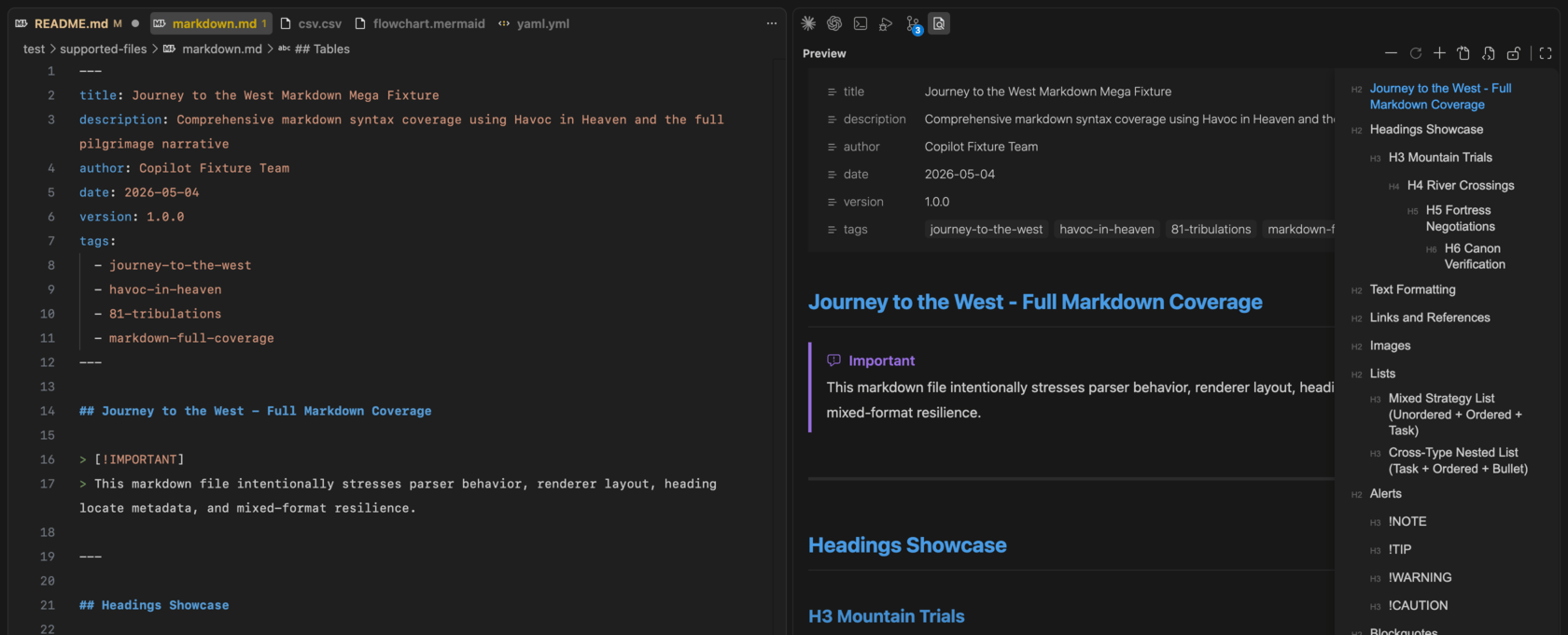
Markdown / LaTeX
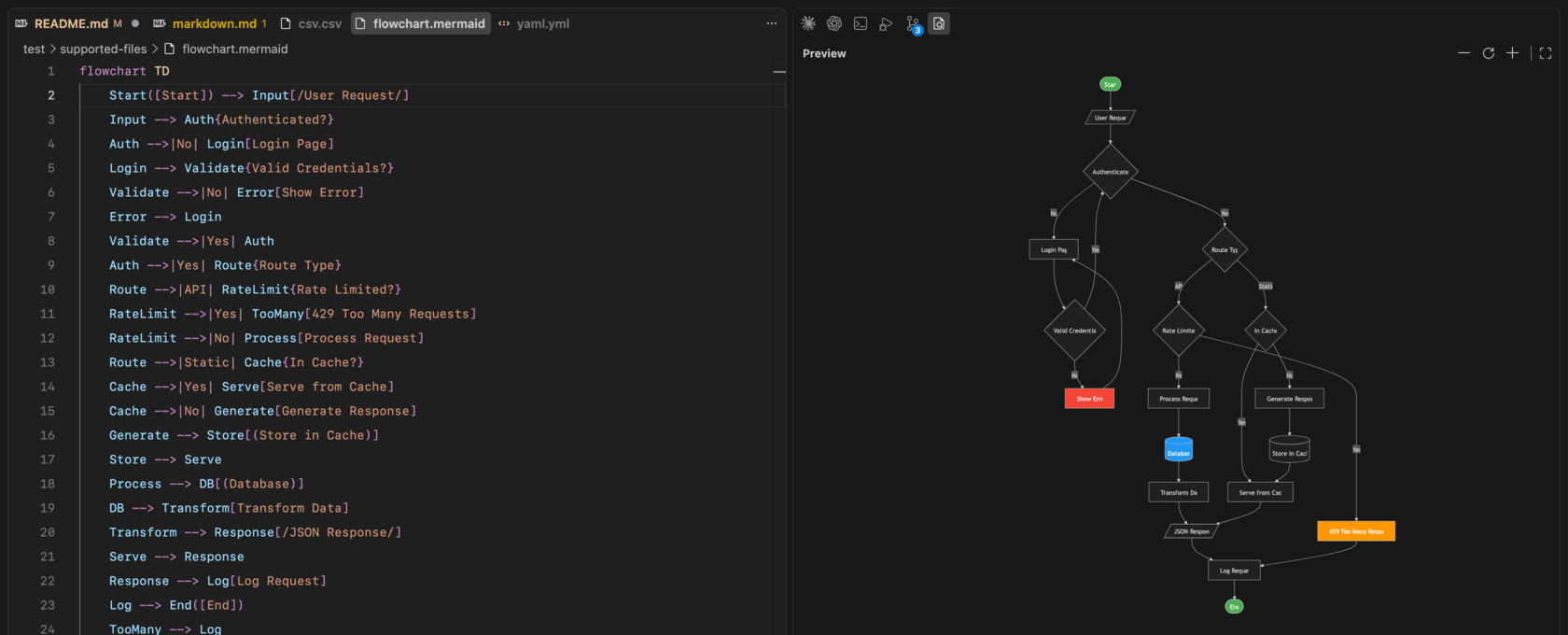
Mermaid
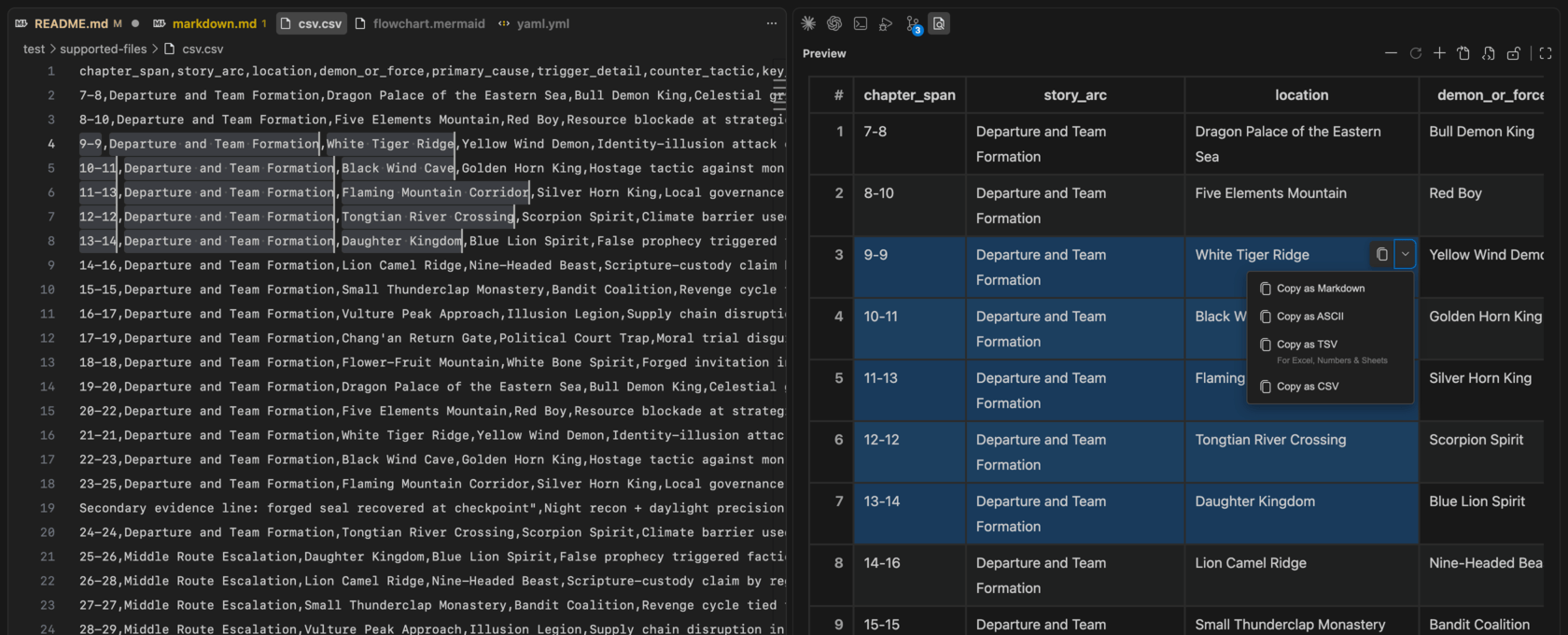
CSV / TSV
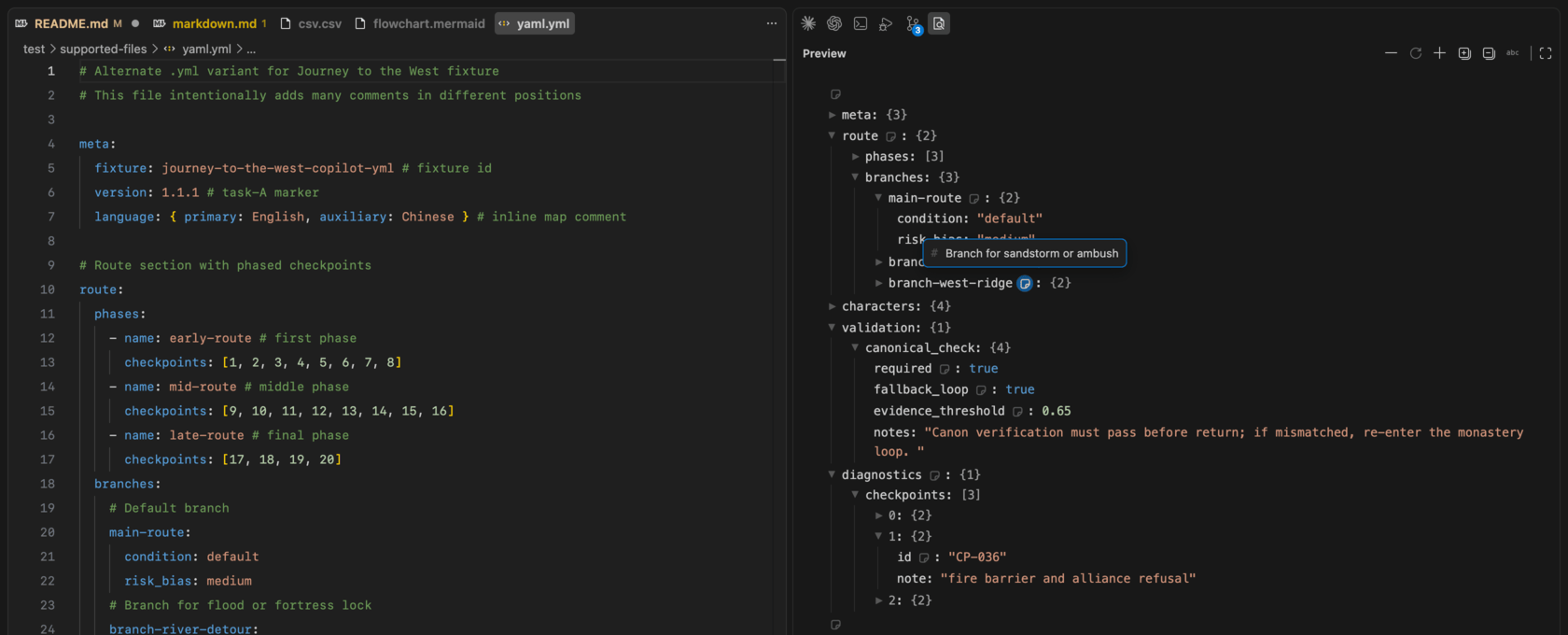
JSON / JSONL / YAML / TOML / XML
Supported Files
| Type |
Extensions |
| Markdown |
.md, .markdown |
| LaTeX |
.tex, .katex, .latex |
| Mermaid |
.mmd, .mermaid |
| JSON |
.json, .jsonc |
| JSONL |
.jsonl |
| YAML |
.yml, .yaml |
| TOML |
.toml |
| XML |
.xml |
| CSV |
.csv |
| TSV |
.tsv |
Feature Overview
Markdown
- Front matter table with single-line tags and formatted structured values
- GitHub alert block rendering
- Skeleton Outline with a hover table of contents
- Task list checkbox toggle-writeback
- Interactive task list checkboxes in table cells
- Code highlighting with copy and Word Wrap controls
- Hover a rendered table to copy it as Markdown, or as ASCII, TSV, or CSV
- KaTeX and Mermaid block rendering
- Follow-scroll and locate between editor and preview
LaTeX
- KaTeX rendering for inline formulas and common math environments
- Follow-scroll and locate between editor and preview
- Zoom support
Mermaid
- Basic syntax precheck with clear error feedback
- Drag-to-pan interaction when zoomed
JSON / JSONL / YAML / TOML / XML
- Collapsible tree view
- Expand all / collapse all
- Click key to jump to source line
- Copy highlighted data-tree locator as jq/yq-style path from toolbar
- Comment icon on keys with hover tooltip
- Focus-aware selection highlight (blue when focused, gray when unfocused)
- Large data trees render the first 4,000 nodes with a truncation notice to keep the preview responsive
CSV / TSV
- Render as a table for preview with sticky first row and first column
- Follow-scroll and locate between editor and preview
- Bidirectional selection with click-and-drag support
- Focus-aware selected-cell highlight (blue when focused, gray when unfocused)
- Multi-cell split copy action at the selection's upper-right: the main button copies TSV, while the dropdown offers Markdown, ASCII, TSV, and CSV formats
Cmd/Ctrl+C: copy single selected cell text, or copy multi-cell selection as TSV- Large CSV/TSV files render the first 2,000 body rows with a truncation notice
Installation
Install from VS Code Marketplace
- Open VS Code
- Open Extensions view (
Cmd+Shift+X on Mac, Ctrl+Shift+X on Windows/Linux)
- Search for
Sidebar Previewer
- Click "Install" on the extension
Or install from the extension page: Sidebar Previewer on VS Code Marketplace
Build and install from source
- Clone the repository:
git clone https://github.com/wuzhao/vscode-sidebar-previewer.git
- Enter the project folder:
cd vscode-sidebar-previewer
- Install dependencies:
npm install
- Build extension output and bundled assets:
npm run package:vsix
- Package the VSIX:
npx @vscode/vsce package
- In VS Code, run
Extensions: Install from VSIX and select the generated sidebar-previewer-<version>.vsix
Usage
- Open any supported file (
.md, .markdown, .tex, .katex, .latex, .mmd, .mermaid, .json, .jsonc, .jsonl, .yml, .yaml, .toml, .xml, .csv, .tsv)
- Click the Sidebar Previewer icon in the Activity Bar
- The preview panel automatically renders the current file
- Use toolbar buttons or
Cmd/Ctrl + mouse wheel to zoom
- In Mermaid preview, drag the diagram to pan
- In Markdown preview, hover a rendered table to copy it as Markdown, ASCII, TSV, or CSV; in JSON/JSONL/YAML/TOML/XML preview, selected entries use focus-aware highlight (focused blue / unfocused gray); CSV/TSV preview keeps sticky headers, supports cell locate, focus-aware highlight, an upper-right TSV main copy button with Markdown/ASCII/TSV/CSV dropdown actions, and
Cmd/Ctrl+C copy behavior
How to show the VS Code Secondary Side Bar?
- Open the Command Palette and run
View: Toggle Secondary Side Bar
- Or use menu path
View > Appearance > Secondary Side Bar
- If needed, drag the Sidebar Previewer view into the Secondary Side Bar area
Acknowledgements
- marked: parses Markdown into HTML for preview rendering.
- mermaid: renders Mermaid diagram blocks in Markdown and
.mmd/.mermaid files.
- katex: renders math formulas for Markdown and LaTeX preview.
- highlight.js: provides syntax highlighting for code blocks.
- js-yaml: parses YAML data for structured preview.
- toml: parses TOML data for structured preview.
License
MIT
| |

