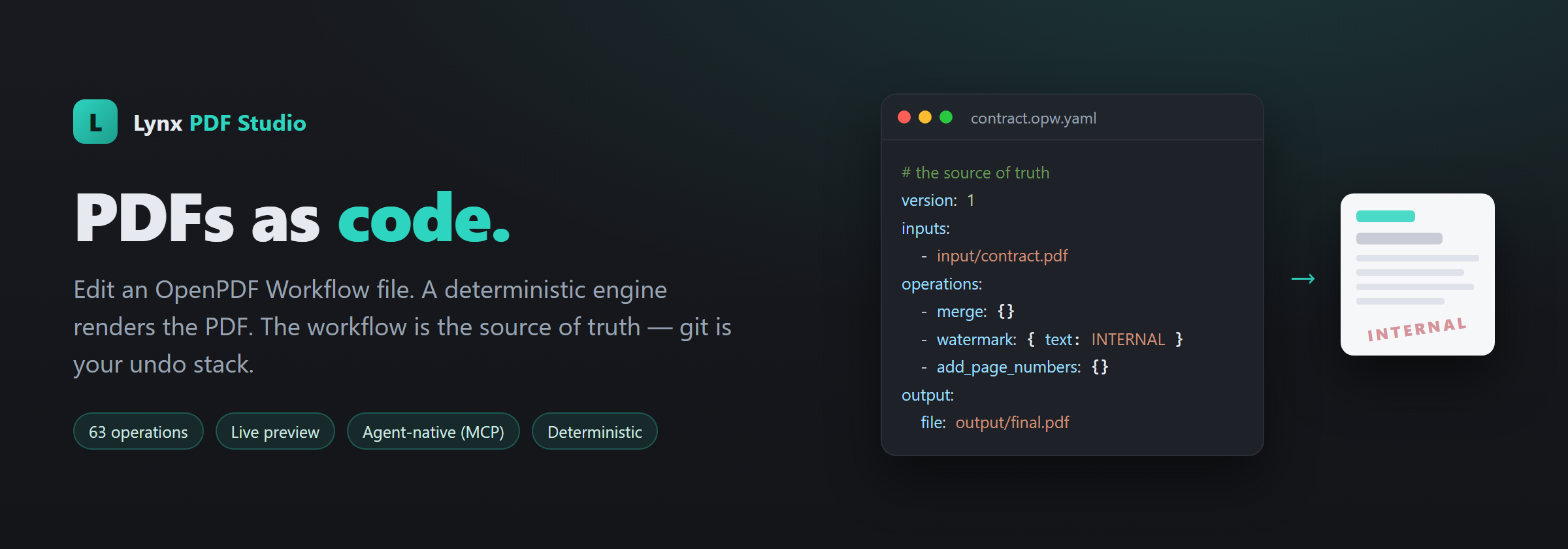
Lynx PDF Studio Automation for VS Code
PDFs as code — built for coding agents. 100 composable PDF operations, one workflow language.
Your coding agent authors the workflow, you review the diff, and a deterministic engine renders the PDF — on your machine.
lynxdi.com/pdf ·
Marketplace






Merging the same reports every month. Filling the same form for the 40th client. Redacting
SSNs before a file goes out. Pulling 500 completed forms into a spreadsheet. Today that work
gets done one of three ways, and all three have a catch:
- Clicking through a PDF editor — fine for one document, and unrepeatable by the second.
- Uploading to a free online tool — which is a client's tax return on someone else's server.
- A script somebody wrote once — which only they understand, and which broke last quarter.
So don't click around a PDF editor — edit a file. You write an OpenPDF Workflow (OPW):
plain YAML, one line per step. A deterministic engine renders it. The workflow is the source of
truth; the PDF is a build artifact; git is your undo stack; and your documents stay on your machine.
# workflow.opw.yaml
version: 1
kind: pdf
inputs:
  - input/contract.pdf
  - input/appendix.pdf
operations:
  - merge: {}
  - delete_pages: { pages: [10, 11] }
  - watermark: { text: INTERNAL, opacity: 0.15 }
  - add_page_numbers: { format: "Page {n} of {total}", position: bottom-right }
  - set_metadata: { title: Contract, author: Legal }
output:
  file: output/contract_final.pdf
Save it and the PDF re-renders. Change inputs to "contracts/*.pdf" and the same workflow
runs over the whole folder. Next quarter it produces the same result from the same input —
and git diff says exactly what changed and who changed it.
It's built for developers and technically-minded operators: one person sets the workflow up,
and the whole team — or a coding agent — reruns it forever.
PDFs as code, built for coding agents
You don't have to write the YAML yourself. Tell a coding agent what you want in plain
language — "merge these, drop the internal pages, watermark it, strip the metadata" — and it
authors the .opw.yaml for you, then keeps updating it as the conversation continues
("actually, make the watermark say DRAFT and add page numbers"). The workflow is an editable
software artifact your agent maintains; the PDF is what falls out the end.
Prompt  ("redact the SSNs and give me a version that's safe to share")
   ↓
Coding Agent   ·  Claude Code · Codex · Gemini · Copilot · your choice
   ↓
workflow.opw.yaml   ←  the editable software artifact (the source of truth)
   ↓
Git diff / human review   ←  you approve the change before anything runs
   ↓
Validate → Optimize → Plan
   ↓
Deterministic engine (local)
   ↓
PDF   (a build artifact)
This is the axis we own: not "AI edits your PDF," but PDFs as code. Every other AI PDF tool
either pokes the binary in a WYSIWYG editor or hands the document to a model. Here the agent
never processes the PDF — it only writes the workflow. The document never enters the model's
context, you review a plain git diff before anything renders, and a fixed, deterministic engine
does the actual work on your machine. A bundled MCP server exposes deterministic OPW helpers
(opw_validate, opw_compile, …) and a generated CLAUDE.md / AGENTS.md / GEMINI.md teaches
whichever agent you use how to edit PDFs here. GitHub Copilot's agent mode picks the server up
automatically; for Claude Code, Cursor and other .mcp.json clients, Set Up MCP for This
Workspace wires it in one step. Then just talk to your agent.
What people actually do with it
Prepare a contract to send out. Merge it with its appendices, drop the internal pages,
watermark it, number the pages, strip the metadata and embedded JavaScript, and ship the final.
Turn a stack of completed forms into a spreadsheet. Point at a folder of 500 filled PDFs;
each is identified, read, and written out as JSON and CSV. Re-run it after more arrive and only
the new ones are read.
Make your own fillable form. Write it in Word, type [[check]] and [[text]] where the
fields belong, and get a real AcroForm PDF — then fill it and read the answers back.
Fill a real government form. W-9, I-9, 1040, DS-11 and eight more ship already mapped to
their actual field names. Your details live in one local file (or your existing CSV), and the
same record fills any of them.
Redact before sharing. Find every SSN, email and account number by pattern and truly
delete them — not a black rectangle over text that's still selectable underneath. (Scanned
pages need ocr first: pattern matching needs a text layer to search.)
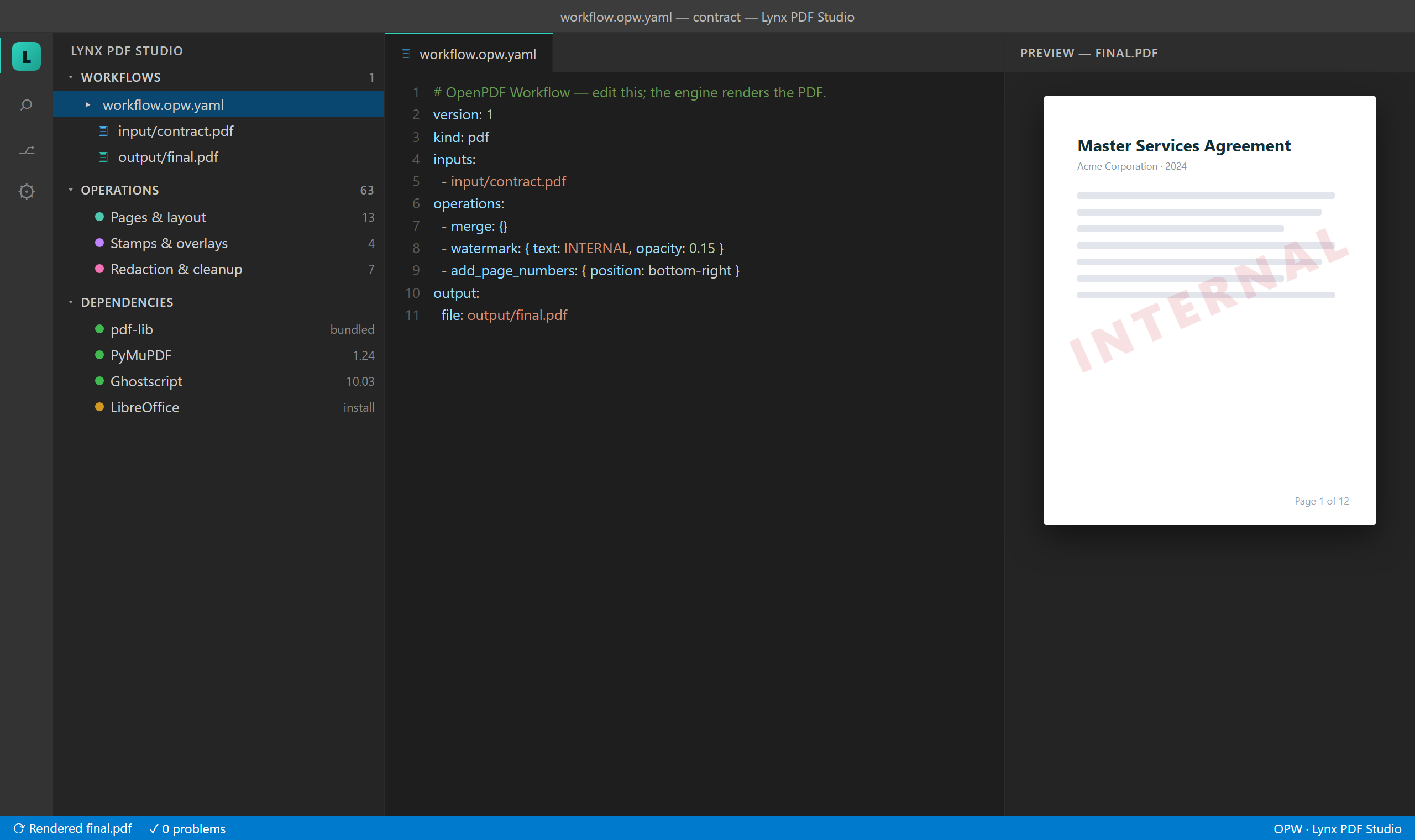
See it in action
Diff it, revert it, review it in a PR — it's just code.
Why it's different
- Agent-native — PDFs as code. Talk to any coding agent (Claude Code, Copilot, Cursor,
Gemini, or a fully local one); it authors and updates the workflow, never the binary. A bundled
MCP server exposes deterministic OPW helpers and a generated
CLAUDE.md / AGENTS.md teaches
the agent your project. The agent writes the YAML; you review the diff before anything runs;
a fixed engine does the work — and the PDF never enters the model's context.
- Code-first, not click-first. Every change is a line in a human-readable YAML file —
versionable, diffable, reproducible. No opaque binary edits. A PDF editor is a fine place to
read a document; it's a terrible place to repeat a process.
- Your documents stay on your machine. No account, no upload service, no per-document
pricing — the client's tax return, the signed contract, the medical intake form stay on the
disk they're already on. The only network paths are ones you explicitly choose: offloading
heavy OCR to a GPU box you own (opt-in, over SSH), or an AI op pointed at a provider you
pick (a local Ollama by default). That isn't a plan tier; it's the architecture — there is no
server of ours to upload to.
- Deterministic pipeline.
parse → validate → optimize → plan → render. The plan is pure,
previewable and hashable before anything runs; the same workflow, inputs and backends
reproduce the same result; and an operation whose backend is missing is reported before you
render, not halfway through. The few ops that can't be reproducible by nature — live URLs,
AI, trusted timestamps — are explicit lines in the workflow, never ambient behaviour.
- One file or ten thousand. Put a glob in
inputs and the same workflow runs over the whole
folder. One bad file is skipped and reported, not fatal.
- Batteries included, nothing else required. The bundled engine renders many operations with zero
external dependencies; advanced ones light up when their optional dependency is present.
Getting started
Help → Get Started → Get Started with PDF Studio walks you through it in four steps, each one command.
Or do it by hand:
- Initialize Project — seeds
workflow.opw.yaml + two sample PDFs.
- Edit the workflow — by hand, the Operations panel, guided Add Operation…, or your
coding agent (Set Up MCP for This Workspace).
- Render Workflow (▶ in the sidebar) — writes
output/*.pdf.
- Open Preview — see the result; it re-renders on save.
Prefer to learn from a working project? Hit ⤓ Get Example Projects in the PDF Studio
sidebar (or run it from the Command Palette) to download runnable examples straight into your
workspace — merge, batch, compare, split, split by size (every part under a 5 MB upload cap),
fill-forms, merge anything (a PDF, a Word file, Markdown and images into one PDF),
PowerPoint → PDF (a folder of lecture decks, one PDF each or all merged), page stats
(profile a mixed doc before OCR), extract links, interleave (alternate two PDFs page by
page), and a full operations reference with one example workflow for every operation. Pick any subset; each bundle is checksum-verified
and unzipped for you, ready to Render.
Nothing else to install to start: the bundled engine handles merge, pages, watermarks, stamps and
metadata on its own. Forms, OCR, redaction and Office conversion light up when their optional
dependency is present — the Dependencies view shows what you have and what each one unlocks,
and opw_compile reports an operation as unsatisfied before you render rather than failing
during.
Discover and build without memorizing YAML
|
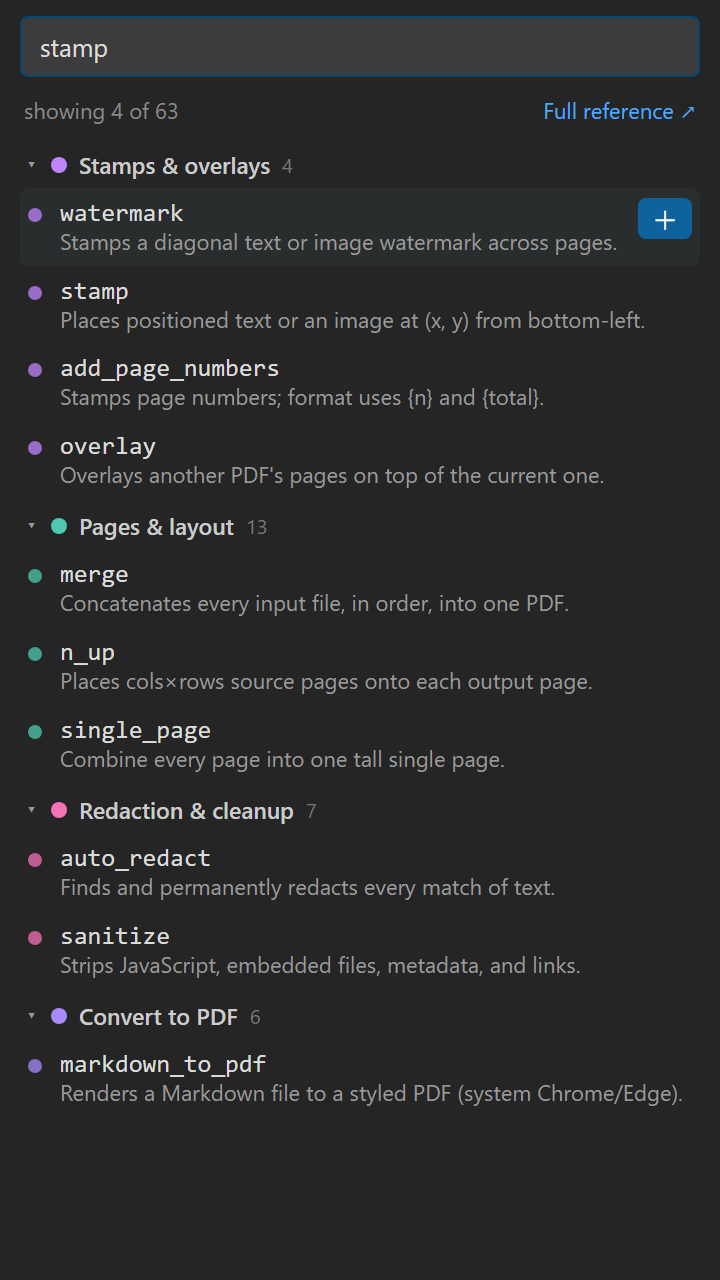
Searchable Operations panel — all 100 operations grouped by category. Search,
click to open the docs, or + to add one to the active workflow.
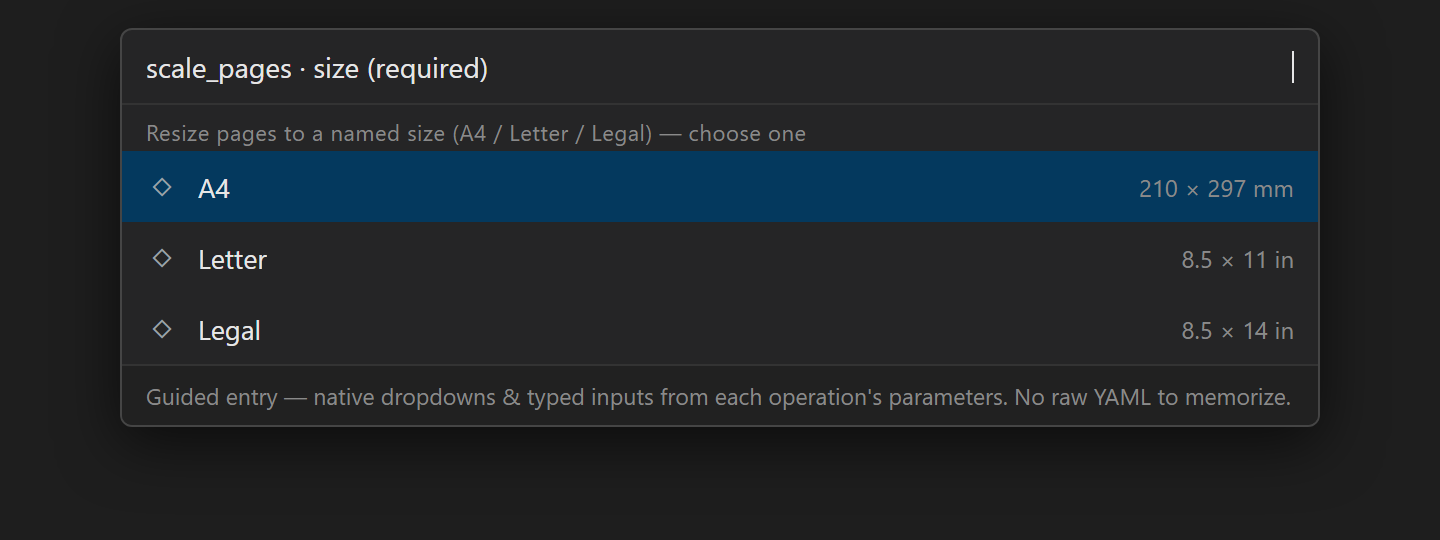
Guided Add Operation — pick an operation and fill its parameters with native
controls: dropdowns for choices, validated number boxes, list inputs. No hand-typing
raw YAML.
Per-operation Documentation — every op has a page with a summary, a parameter
table, and a complete, copy-pasteable example workflow.
Find a Workflow (🔍 in the sidebar) — once a project has dozens of .opw.yaml
files, search them by what they do: an operation (watermark), an input glob, an
output name, a var. Enter jumps to the hit; the filter button narrows the Workflows
tree to the matches and each row says why it matched.
Live preview & color-coded Dependencies — the output re-renders on save; every
dependency shows green when ready, amber with a one-click install hint when not.
|
|
100 operations, fourteen categories
Every operation is one line in the operations: list. A quick reference:
See all 100 operations by category
Pages & layout (20)
merge — combine all inputs into one PDF, including non-PDFs: a Word file, a deck, images, Markdown or an email are converted first (chosen by file extension), PDFs pass through, and convert: false requires PDFs only. interleave: true alternates their pages instead (a document beside its translation, or a duplex scan rejoined)split — split into multiple PDFs by page ranges, every N pages, or max_size so every part fits an upload limit (5 MB forms, e-filing caps); name templates the filenames. Also spelled burstsplit_invoices — split a multi-invoice PDF into one file per invoice (auto-named)delete_pages — remove the given pagesreorder_pages — reorder pages to a complete new permutation (every page, exactly once)move_pages — move pages to a new position, leaving every other page where it isswap_pages — exchange two pagesrotate_pages — rotate pages by a multiple of 90°flip_pages — mirror pages horizontally or verticallyinsert_blank — insert a blank page at a positiontitle_page — draw a cover page (title, subtitle, author, logo, background) and insert it at the front; fixes the placeholder an e-reader shows when page 1 is a bare scan. Also spelled cover_pageinsert_pages — insert another PDF's pages at a positionreplace_pages — replace pages with pages from another PDFextract_pages — keep only the given pagescrop — crop pages to a rectanglescale_pages — resize to A4/Letter/Legal or by a factorn_up — place multiple source pages per sheet in a gridbooklet — impose 2-up in saddle-stitch booklet orderposter — split each page into a grid of tiles (also halves a 2-up scan)single_page — combine every page into one tall page
Stamps & overlays (7)
watermark — stamp a diagonal text/image watermarkstamp — stamp positioned text or an imageannotate — add text, highlights, notes, shapes, or imageshighlight — find text anywhere and mark it (highlight/underline/strikeout/squiggly/box) — auto_redact's matcher, non-destructiveadd_page_numbers — stamp page numbers on every pageheader_footer — running headers/footers with page-number, date & legal Bates tokensoverlay — overlay another PDF's pages on top
Metadata, bookmarks & tables (12)
set_metadata — set title/author/subject/keywordsset_language — set the document's default language (/Lang) for accessibilityset_bookmarks — replace the outline/bookmarksextract_bookmarks — export the outline as JSONextract_fields — export form fields to CSVextract_tables — detect tables and export each as CSVextract_annotations — export comments/highlights/notes to JSON + CSVpdf_info — write a JSON report (pages, sizes, metadata, fonts, security)check_accessibility — audit PDF/UA compliance (title, language, tags, alt text) to a reporttag_pdf — auto-tag an untagged PDF: build a real structure tree (headings/paragraphs/figures + alt text) so screen readers can read it — the fix for check_accessibility's "untagged" failcompare_pdfs — page-aligned text + visual diff of two PDFsset_view_preferences — control how a PDF opens (layout, full-screen, zoom)
Text, image & Markdown extraction (6)
extract_text — extract page text (optional header/footer + reflow cleanup)inspect_text — map every text span (bbox, font, size, color, bold/italic) to a report — the coordinates/styling to author a precise redact/stamp/annotate or style-matched replace_textextract_images — extract embedded imagesrender_pages — render pages to PNG/JPG or vector SVGreplace_image — replace an embedded image objectreplace_text — find text and replace it in place (same position, size, and color)
OCR & document recognition (5)
text_report — profile a PDF before extracting: per-page stats + which pages need OCR (read-only)ocr — add a searchable text layer via OCRextract_markdown — extract content as Markdown (tables included; optional Marker AI OCR)pdf_to_markdown — convert a PDF to Markdown (tables included; optional Marker AI OCR)extract_receipt — read receipts/invoices as images with a vision model → structured JSON + CSV
Redaction & cleanup (7)
redact — permanently remove content in regionsauto_redact — find and truly delete matching text / PII patternssanitize — strip JavaScript, embedded files, metadata, and linksremove_annotations — remove all annotationsremove_images — remove all imagesremove_blank_pages — detect and delete blank pagesextract_js — report embedded JavaScript for inspection (read-only)
Forms (6)
create_form — turn a Word/Markdown/HTML template into a fillable PDF ([[check]]/[[text]] → real fields)fill_form — fill a known form from your records (12 forms — see below)extract_form — read filled forms back out to JSON + CSV, in bulk (the inverse of fill_form)fill_field — set a single form field's valueflatten — bake form fields + annotations into the pageunlock_forms — clear the read-only flag so fields can be filled
Attachments (4)
extract_attachments — extract embedded file attachmentsadd_attachments — embed a file as an attachmentextract_links — pull every hyperlink from a PDF (or a folder) to JSON + CSV (read-only)add_links — make bare URLs clickable + add explicit links (the inverse of extract_links)
Encryption & permissions (3)
encrypt — password-protect with AES-256decrypt — remove password protection (supply the password)set_permissions — restrict print/copy/modify via an owner password
Optimize, repair & archival (9)
compress — reduce file size (deep compression when available)linearize — linearize for fast web viewrepair — repair/rewrite a broken PDFdecompress — uncompress content streams (debuggable PDF)rasterize — flatten every page to an imagerecolor — dark mode / invert / grayscale (dark mode keeps photos intact)convert_colors — true color-space conversion to gray/CMYK/RGB (vectors preserved; needs Ghostscript)scanner_effect — make a clean PDF look scanned (skew, softening, grain)pdf_to_pdfa — convert to PDF/A for archival
Convert to PDF (8)
images_to_pdf — build a PDF from images: PNG/JPEG on the bundled engine; WEBP/TIFF/GIF/BMP/SVG/PSD with the Python backend, and HEIC (iPhone photos) with pillow-heifhtml_to_pdf — render an HTML file to PDFmarkdown_to_pdf — render Markdown to a styled PDFurl_to_pdf — fetch a web page and render it to PDFeml_to_pdf — render an .eml email to PDF (remote images blocked)epub_to_pdf — convert an EPUB ebook to PDFoffice_to_pdf — convert docx/xlsx/pptx/odt to PDF (needs LibreOffice)video_to_pdf — sample a video into one timestamped frame per page; follow with n_up for a contact sheet (needs ffmpeg)
Convert from PDF (7)
pdf_to_docx — convert a PDF to Wordpdf_to_pptx — convert a PDF to PowerPointpdf_to_xlsx — convert a PDF to Excelpdf_to_html — convert a PDF to HTMLpdf_to_epub — convert a PDF to a reflowable EPUB (Kindle)pdf_to_png — convert a PDF to PNG images, one per page; transparent: true drops the white backgroundpdf_to_jpg — convert a PDF to JPG images, one per page (smaller than PNG for scans and photos)
Document intelligence (AI) (3) — local LLM (Ollama) by default, or Claude with an API key; opt-in, private
summarize — LLM Markdown summary of the documenttranslate — LLM translation to a target languagesemantic_search — ask a PDF a question; ranked passages with page numbers (local embeddings)
Digital signatures (3)
sign — digitally sign with a PKCS#12 certificatevalidate_signature — validate signatures; emit a JSON reporttimestamp — add an RFC-3161 trusted timestamp
fill_form fills these real forms from a local, gitignored people.yaml, a .csv (your
vendor/staff/client export — one row per record, column headers as the keys), or inline
values: — mapping friendly keys to each form's actual fields. 12 forms across 4 categories:
- Passport —
ds11 (U.S. Passport Application) · ds82 (U.S. Passport Renewal)
- Tax —
f1040 (IRS 1040) · schedc (Schedule C, profit/loss from business) · schedse (Schedule SE, self-employment tax) · w9 (IRS W-9) · w8ben (IRS W-8BEN, foreign status / treaty benefits) · w4 (IRS W-4) · w7 (IRS W-7 / ITIN) · nec1099 (IRS 1099-NEC)
- Employment —
i9 (USCIS I-9, Employment Eligibility)
- Immigration —
i765 (USCIS I-765, Employment Authorization / EAD)
The freelancer set chains: 1099-NEC (what you were paid) → Schedule C (profit/loss) →
Schedule SE (self-employment tax); W-9 and W-8BEN are the U.S. and foreign-vendor
counterparts you hand a payer.
The PDF Fill sidebar and the form_fields MCP tool show each form's fields plus a
copy-paste starter workflow. New forms are drop-in JSON packs.
Need a form that isn't here? Open an issue
with a link to the blank PDF — if it's a fillable AcroForm, adding it is a data change, not a
code change, and we're happy to map it for you.
Every form above is one someone else authored. create_form makes your own: write the
document in Word (or Markdown/HTML), type [[check]] and [[text]] where fields belong, and
get a real AcroForm PDF. Word controls the layout; the fields are injected after conversion.
inputs:
  - onboarding.docx           # or .md / .html — anything that converts to a text layer
operations:
  - office_to_pdf: {}         # LibreOffice renders the layout
  - create_form:
      debug: true             # writes a copy with every field outlined, so you can see them
output:
  file: output/onboarding-fillable.pdf
That's the whole config. The tags are just type names — [[text]], [[check]], [[date]],
[[sign]] — used as many times as you like. You never invent a unique name: they're numbered
in reading order (text_01, checkbox_01, checkbox_02…), so tagging a 100-checkbox intake
form is copy-paste. Fields fill their table cell automatically and get a visible border.
Which checkbox_47 is which question? The field map answers that — create_form records the
text printed beside every field, so the map is a generated codebook that can't drift:
{ "key": "checkbox_92", "page": 4, "rect": [...],
  "near": "I/We would like any REFUND electronically deposited into my/our U.S. bank account." }
- text · date · money · number · phone · ssn · zip · checkbox · dropdown · listbox · signature.
A typed field is a plain text box with a tooltip and a length cap —
[[date]] hovers as
"MM/DD/YYYY" and stops at 10 characters. Both work in every viewer and cannot fail.
There is deliberately no JavaScript in a generated form. A PDF can only police typing with
JS, and that is unreliable by construction — Chrome/Edge/Preview run little or none, and our
own sanitize op strips what they do run — while a picture validator will happily reject a
date you typed correctly and throw it away. A form that eats your answer is far worse than one
that accepts an odd one. Validate in the pipeline instead: extract_form sees every value
on its way to JSON/CSV, runs the same everywhere, and can't destroy anything.
- Want meaningful names, tooltips, choices or explicit widths? Use a named tag
(
[[employee_name]]) and a fields_file YAML keyed by tag — the DOCX stays readable and the
schema stays git-diffable.
- The tag key becomes the PDF field name, so a created form fills and extracts immediately:
fill_form: { fields: { text_01: "Jane" } } → extract_form → raw.csv. No form pack, no
registry entry — that's the whole lifecycle from a Word file.
- It fails loudly rather than shipping a broken form. A marker too long for its column gets
clipped by the renderer; instead of a form with a missing field and a mangled
[[emplo on the
page, the run stops and names the tag. preview: true dry-runs it first.
type: signature creates a real signature field — hand it to sign (pyHanko) for a
complete local signing pipeline, no cloud round-trip.
The map runs both ways. Because a pack knows which real field holds date_of_birth, the same
pack that fills a form reads one back — so every supported form is extractable with no
extra setup, and a stack of filled PDFs becomes a table your other systems can ingest.
inputs:
  - "intake/*.pdf"          # one file, or a whole folder — all of it folds into ONE table
operations:
  - extract_form:
      to: output/extracted  # → <name>.json per form, forms.json, + one CSV per form type
- Auto-identifies each PDF from its field signature — mix W-9s and W-8BENs in one folder
and each is recognized (pass
form: to force one).
- JSON and CSV, every run. Per-form JSON plus a combined
forms.json for record-by-record
use, and one CSV per form type (w9.csv, f1040.csv) for spreadsheets and ETL — unrelated
schemas never share a table. A CSV's columns come from the form pack, in the form's own field
order, so the header is stable across runs: it doesn't shift when a form leaves a field
blank or when new files arrive, and a downstream table built once keeps working.
- Re-runs are incremental.
forms.json doubles as a ledger keyed by content hash: drop new
files in, run again, and only the new or changed ones are read — the rest are skipped and the
table is merged. Stop and resume a 500-form backlog whenever you like (resume: false
re-reads everything).
- A form you built with
create_form needs no pack at all. Nothing matches it, so its
fields are read raw (field name → value) into raw.csv — which is exactly right, because
its field names are the keys.
- Values come back normalized: a split SSN as digits, any date mask as
YYYY-MM-DD.
Note: a flatten: true PDF has no fields left to read — extract before you flatten.
Batch — one workflow over many files
Put a glob in inputs and the whole workflow runs once per matched file:
inputs:
  - "invoices/*.pdf"        # each match runs the ops below
operations:
  - compress: {}
  - watermark: { text: PAID }
output:
  folder: output/processed  # → output/processed/<input-name>.pdf per file
The output is per-input — an output.folder (named by the input) or a templated
output.file ({stem}/{name}/{ext}/{i}). One bad file is skipped and reported,
not fatal; progress shows "file i/N".
Markdown / HTML / URL → PDF, high fidelity, no bloat
markdown_to_pdf, html_to_pdf, url_to_pdf, and eml_to_pdf render through a
system Chrome or Edge in headless print mode for full-fidelity output — no
200 MB bundled browser. When no browser is present they fall back to WeasyPrint and
then a pure-Python engine, so they always work.
Don't OCR a document that doesn't need it — and don't OCR a whole file when three pages are
the problem. text_report walks a PDF read-only and writes the numbers to decide with:
text coverage, per-page stats (size, characters, images, and a text / image_only /
empty class), which pages are blank or oversized, the scripts present — and a
recommendation with a ready-to-run workflow. On a mixed document it tells you to OCR
just the image-only pages, not all of them.
operations:
  - text_report: { to: output/coverage.json, format: both }   # + a one-screen coverage.md
Add sample: 50 to profile a huge file fast (every 50th page), or detail: summary to drop
the per-page table. Run it first, then act on what it found.
Scanned or photographed receipts have no text layer to parse. extract_receipt reads each
page as an image with a vision-language model and pulls out the fields — merchant, date,
currency, subtotal, tax, tip, total, receipt number, and line items — to per-file JSON, a
combined receipts.json, and a flattened receipts.csv for bookkeeping or expenses. Point it
at one PDF or a whole folder; re-runs are incremental (a content-hash ledger skips unchanged
files). It sends page images to a model server you name, so it's gated by
pdfStudio.allowRemoteRender — point endpoint at your own vLLM/Ollama box (a self-hosted GPU
on your LAN), and nothing goes to a third party.
Scanned books & documents → Markdown (AI OCR)
Old scans with a poor or missing text layer? extract_markdown and
pdf_to_markdown can run Marker (Surya OCR + layout models) to rebuild clean,
GitHub-flavored Markdown — headings, lists, and tables intact — straight from the
page images:
operations:
  - extract_markdown: { engine: marker }
Marker is accurate but heavy. For a full book, offload it to a GPU box over SSH
with one parameter — minutes on a GPU vs hours on a CPU:
operations:
  - extract_markdown: { engine: marker, remote: user@gpu-box }   # 138-page scan → ~1 min on a GPU
The PDF is uploaded, Marker runs on the remote GPU, and the Markdown is downloaded.
Off by default — enable pdfStudio.allowRemoteRender; it runs over key-based SSH,
and the host is validated to block command injection. For lighter scans,
ocr_first: true runs an OCRmyPDF/Tesseract pass before extraction — no GPU needed.
Two local Markdown-OCR engines are wired, and they trade off differently:
operations:
  - extract_markdown: { engine: paddleocr-vl }   # Baidu 0.9B doc VLM — fast, CPU-capable
An independent 16-engine benchmark (OmniDocBench + a full 4,494-page PDF)
places them cleanly: marker gives the cleanest Markdown reconstruction and keeps
figures, but is slow (~5 pg/min); paddleocr-vl is the throughput champion
(~300 pg/min, 1.8 GB) with the best word recall — ideal for making a big scanned
archive searchable — though it flattens complex tables. Rule of thumb: PaddleOCR-VL
for fast searchable text at scale, Marker for a faithful document → Markdown. The
bundled OCR engines example gallery demos every path side by side; the full
benchmark and per-page-type picks live in its README (Documentation panel).
Convert any file to Markdown
Beyond PDFs: right-click any file in the Explorer → Convert File to
Markdown, or run it from the palette. Powered by Microsoft MarkItDown, it
turns Word / PowerPoint / Excel / HTML / EPUB / CSV / images and more into clean
Markdown — handy for docs, diffs, and LLM ingestion. (Install MarkItDown when
prompted; it's an optional dependency.)
Dependencies
Every optional dependency is free, installed by you, and auto-detected — none is bundled
with the extension. The colour-coded Dependencies view groups them by how much they
matter, so you can tell at a glance what's worth installing:
Bundled — nothing to install. The pdf-lib engine ships with the extension and runs
25 operations on its own: merge, split, page surgery, rotate, crop, n-up, watermarks,
stamps, page numbers, metadata, cover pages, image→PDF. A complete, usable product with no
Python and no system tools.
Recommended — unlocks most of the rest.
| Dependency |
Unlocks |
| Python + PyMuPDF + pikepdf |
66 more operations: text and table extraction, redaction, forms, sanitize, encryption, bookmarks, attachments, OCR plumbing |
Per-feature — install only what you use.
| Dependency |
Unlocks |
| Ghostscript |
deep compression, convert_colors, PDF/A |
| qpdf |
compression, linearization |
| Tesseract |
OCR text layer |
| LibreOffice |
Office ⇆ PDF conversion |
| Chrome / Edge |
high-fidelity Markdown / HTML / URL → PDF |
| ffmpeg |
video_to_pdf — sample a video into timestamped frames |
| pillow-heif |
HEIC / HEIF images (iPhone photos) in images_to_pdf |
| pyHanko |
digital signatures, timestamps |
| MarkItDown |
any file — Word, Excel, PowerPoint, HTML, EPUB, CSV, images — to Markdown |
| pymupdf4llm |
better Markdown extraction |
Heavy · opt-in — large models, usually a GPU.
| Dependency |
Unlocks |
| Marker (Surya OCR + layout) |
AI OCR: scanned books → clean Markdown; optional remote GPU render |
| PaddleOCR-VL |
fast searchable text at scale (its own venv) |
| Qwen3-VL |
extract_receipt — receipts and invoices → structured JSON/CSV |
Until a dependency is installed, opw_compile reports its operations as
unsatisfied — nothing fails silently.
Agent-native (MCP)
A local MCP server exposes deterministic OPW helpers — opw_validate,
opw_compile, opw_optimize, opw_diff, opw_scaffold, opw_operations — so an
MCP-capable agent can author and check workflows without ever touching the PDF
directly. The server never renders and never writes files.
- GitHub Copilot / VS Code agent mode — zero config. The extension registers the
server with VS Code's own MCP host, so the tools show up in Copilot's agent mode the
moment the extension is active — nothing to wire (VS Code 1.101+). Copilot Chat also
gets a bundled instructions file that teaches it to edit the
.opw.yaml, not the PDF.
- Claude Code · Cursor · Gemini · any other MCP client. Run Set Up MCP for This
Workspace — one step writes a project-local
.mcp.json plus a CLAUDE.md /
AGENTS.md / GEMINI.md guide, so the agent knows your workflow format.
Security & trust model
A workflow is treated as potentially untrusted — it may be cloned, shared, or
agent-authored. Input/output/asset paths are confined to the project directory,
${ENV_VAR} expands only in password params (never into text/url/metadata), the
Python interpreter is pinned, and webviews use a strict CSP. CSV exports
(extract_form, extract_fields, extract_tables, extract_receipt, extract_links)
are hardened against spreadsheet formula injection — a document value like =… is
written as literal text, never executed when the file is opened. Because url_to_pdf /
html_to_pdf fetch network and local resources by design, review an untrusted
workflow before rendering it. Full details:
docs/security.md.
Telemetry
Off by default. Nothing is collected unless you turn it on.
If you would like to help, pdfStudio.telemetry.enabled opts in to anonymous,
non-identifying usage events — which features and operations get used, and
whether a render succeeded — so development can be aimed at what people actually
use. It never collects file paths, document contents, names, or any personal
data; the only identifier is vscode.env.machineId, an anonymized per-install
id. VS Code's global telemetry setting (telemetry.telemetryLevel) must also
allow it, so either switch alone keeps it off. Set pdfStudio.telemetry.debug
to watch exactly what would be sent.
About
Lynx PDF Studio Automation is built by Lynx DI. Learn more at
lynxdi.com/pdf, or explore the company at
lynxdi.com.
License
AGPL-3.0-or-later — Copyright © 2026 Lynx DI. See LICENSE.
Free to use, at work and commercially — the AGPL restricts redistribution and modification,
not use. If you need to embed Lynx PDF Studio Automation in a closed-source product, or your organisation
prohibits AGPL, a commercial licence is available; see
LICENSING.md.
Bundled third-party components remain under their own licenses — see
NOTICE, whose full
licence texts ship with the extension in THIRD-PARTY-LICENSES.txt. The complete
corresponding source is at
github.com/LynxDI/pdf-studio, as AGPL §6 requires.

