Cursor Curse Monitor by Lorapok
Live Cursor usage dashboard for limits, budget, billing cycles, and free-fallback model switching.
Supports every major VS Code wrapper AI IDE — install from Open VSX or the VS Code Marketplace and run in
Cursor, Visual Studio Code, Windsurf, VSCodium, Void, Gitpod, Positron, Trae, Kiro, Qoder, PearAI, code-server, Eclipse Theia, Azure Data Studio, Coder, and any other VS Code–compatible host.
Lorapok Labs · Built for Cursor IDE & VS Code











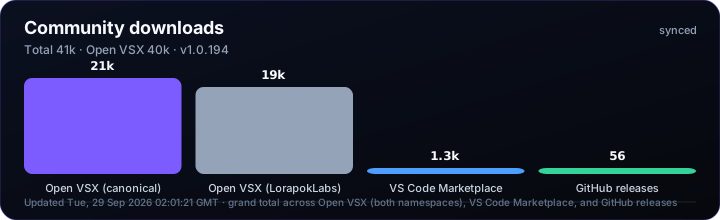
📊 Live download chart (SVG) · refreshed every 5 min from marketplace APIs · site-data.json · Mission Control overlay
Overview
Cursor Curse Monitor by Lorapok helps developers track Cursor AI usage in real time — included limits, remaining quota, billing cycle reset, on-demand spend, and automatic fallback to Composer 2.5 (Fast off) when limits are exceeded (free slow-pool mode).
This extension supports all VS Code wrapper–based AI IDEs where Open VSX or the VS Code Marketplace is available — not just Cursor. One install works across Cursor, Windsurf, VSCodium, Void, Gitpod/Ona, Positron, Trae, Kiro, Qoder, PearAI, code-server, Eclipse Theia, Azure Data Studio, Coder, and Visual Studio Code itself.
"Know your limits before they know you." — Lorapok Labs
More Lorapok Labs software: lorapok.tech
Architecture
End-to-end topology for the IDE extension, browser add-ons, Mission Control, and Production Deployment workflow. Interactive animated diagrams also live on the marketing site and Mission Control → Architecture — including Schedules & Discord.
flowchart LR
  IDE["Cursor / VS Code"] -->|local token| EXT["IDE Extension"]
  EXT -->|usage + billing| API["api2.cursor.sh"]
  EXT --> SCAN["scanSecrets"]
  Browser["Firefox / Chrome"] --> BEXT["Browser ext"]
  BEXT --> API
  BEXT --> SCAN
  SCAN --> ALERT["Security alerts"]
  GitHook["pre-commit"] --> SCAN

  Visitor["Visitor"] --> SITE["GitHub Pages"]
  Operator["Admin"] --> MC["Mission Control"]
  MC -->|dispatch| GHA["Production Deployment"]
  MC --> KV[("ADMIN_KV")]
  GHA --> OVSX["Open VSX"]
  GHA --> VSM["VS Code Marketplace"]
  GHA --> AMO["Firefox AMO"]
  GHA --> CHROME["Chrome zip"]
  GHA --> Pages["Admin + marketing deploy"]
| Surface |
Role |
| IDE extension |
Local quota dashboard, fallback model, credential scan |
| Browser extension |
Popup budget tracker + paste guard (Firefox AMO, Chrome zip) |
| Mission Control |
Deploy, rollback, notices, mailbox, team access |
| Production Deployment |
ci-cd.yml — CI, tag prep, marketplaces, Pages deploy |
| Marketing site |
Static GitHub Pages + generated site-data.json + live stats overlay |
Schedules & Discord
Cron layers and notification paths (interval for live stats refresh is configurable in Settings).
flowchart TB
  subgraph settings["Mission Control Settings"]
    StatsCfg["Live stats refresh · enabled + intervalMinutes"]
    DiscordCfg["Discord webhooks · deployment + feedback"]
  end

  subgraph gh["GitHub Actions — fixed schedule"]
    SEO["seo-pipeline · Mon 06:00 UTC"]
    DepSec["dependency-security · Mon 07:30 UTC"]
    SEO --> Artifacts["site-data.json · SEO · badges · sitemap"]
  end

  subgraph cf["Cloudflare"]
    Worker["ccm-stats-cron worker · every minute"]
    CronAPI["POST /api/cron/stats-refresh"]
    KV[("ADMIN_KV")]
    Pages["Pages Functions /api/*"]
  end

  subgraph stats["Live download stats"]
    Refresh["runStatsRefresh"]
    Cache["stats:live-cache"]
    Public["GET /api/site-data · shields/*.svg · readme.svg"]
  end

  subgraph discord["Discord notifications"]
    DeployEvt["Deploy started / completed watch"]
    CINotify["CI discord-deployment-notify.mjs"]
    Feedback["Feedback webhook test"]
    Webhook[("deploymentWebhookUrl")]
    FeedbackHook[("feedbackWebhookUrl")]
  end

  StatsCfg -.->|interval gate| CronAPI
  DiscordCfg --> Webhook
  DiscordCfg --> FeedbackHook
  Worker -->|X-Cron-Secret| CronAPI
  CronAPI -->|when due| Refresh
  Refresh --> KV
  Refresh --> Cache
  Cache --> Public
  Pages --> KV

  DeployEvt --> Webhook
  CINotify --> Webhook
  Feedback --> FeedbackHook

  MC["Operator"] --> settings
  MC -->|manual refresh| Refresh
Deep dive: docs/wiki/Architecture.md
Live snapshot from GitHub Insights and Mission Control ([Project #4](https://github.com/users/Maijied/projects/4)). Refreshed via npm run site:data into site-data.json (githubCommunity).
Shown on the marketing site features section, Mission Control Overview, and wiki Ecosystem Roadmap.
Agent commands: say Update? for a task snapshot or next to implement the top open item — see AI Agent Commands.
Features
| Feature |
Description |
| Sidebar dashboard |
Activity bar → Cursor Curse Monitor |
| Status bar |
Live usage percentage at a glance |
| Auto refresh |
Polls Cursor API every 60s (configurable) |
| Custom budget |
Set a personal USD cap in the dashboard |
| Limit alerts |
Warning at 80% (configurable) |
| Free fallback |
Auto-switches to Composer 2.5 (Fast off) at 100% |
| Team aware |
Shows team vs individual limit type |
| DB safety |
Atomic writes, backup/restore, integrity checks |
Screenshots
Open the Cursor Curse Monitor panel in the activity bar after install to see:
- Usage progress bar (included / remaining)
- Billing cycle and days until reset
- On-demand status and spend
- Fallback model status when limit is crossed
Installation
Also available on: Open VSX · VS Code Marketplace · Firefox AMO (coming soon — use GitHub Release meanwhile) · Chrome zip · Product site
The marketing site hero uses animated live download and visit meters synced from marketplace APIs — product screenshots appear once in the ecosystem tabs, not duplicated across the page.
From Open VSX (Cursor Marketplace) — Recommended for Cursor
- Open Extensions in Cursor
- Search
Cursor Curse Monitor by Lorapok or lorapok-labs.cursor-curse-monitor-by-lorapok
- Click Install
Direct link: Open VSX Registry
From VS Code Marketplace — Recommended for VS Code
- Open Extensions in VS Code
- Search
Cursor Curse Monitor by Lorapok or LorapokLabs.cursor-curse-monitor-by-lorapok
- Click Install
Direct link: VS Code Marketplace
From VSIX (manual)
git clone https://github.com/Maijied/Cursor-Curse-Monitor-by-Lorapok.git
cd Cursor-Curse-Monitor-by-Lorapok
npm install
npm run compile
npm run package
cursor --install-extension *.vsix
Reload Cursor: Developer: Reload Window
Configuration
| Setting |
Default |
Description |
cursorCurseMonitor.pollIntervalSeconds |
60 |
API refresh interval |
cursorCurseMonitor.customBudgetLimit |
0 |
Personal USD budget cap |
cursorCurseMonitor.autoApplyFallbackModel |
false |
Auto-switch to Composer 2.5 (Fast off) at 100%. Rewrites state.vscdb; unsafe on large databases. |
cursorCurseMonitor.showStatusBar |
true |
Show usage in status bar |
cursorCurseMonitor.statusBarUsageSource |
autoApi |
Status bar numbers: plan (included/budget %), autoApi (Auto · API %), or both |
cursorCurseMonitor.warnAtPercent |
80 |
Warning notification threshold |
Status bar
Toggle visibility and choose which Cursor usage numbers appear in the bottom status bar. Open Cursor Settings → Extensions → Cursor Curse Monitor by Lorapok.
cursorCurseMonitor.showStatusBar — show or hide the status bar item.cursorCurseMonitor.statusBarUsageSource:
plan — included quota (totalPercentUsed) or USD budget %, rounded. Same number as the dashboard Usage gauge. This is not the API features percent.autoApi (default) — Auto X% · API Y% from Cursor (autoPercentUsed / apiPercentUsed), up to 2 decimal places. Same numbers as the API features chip.both — plan percent plus Auto/API.
Hover the status bar to see Plan, Auto, and API percentages together.
Commands
| Command |
Description |
Cursor Curse Monitor: Open Dashboard |
Open sidebar panel |
Cursor Curse Monitor: Refresh Now |
Force refresh usage data |
Cursor Curse Monitor: Apply Free Fallback Model |
Manually apply Composer 2.5 (Fast off) |
How it works
- Reads
cursorAuth/accessToken from Cursor's local SQLite state (state.vscdb)
- Calls
https://api2.cursor.sh/auth/usage-summary
- Calls
https://api2.cursor.sh/auth/full_stripe_profile
- When usage ≥ 100%, optionally writes Composer 2.5 (Fast off) into Cursor model config
Note: Uses undocumented Cursor internal APIs. Behavior may change if Cursor updates their endpoints.
Database Safety
The extension takes multiple precautions when writing to the Cursor state database:
- Pre-write integrity check — validates SQLite header, file size, and existence
- Automatic backup — creates a timestamped backup before any write
- Atomic writes — writes to a temp file then renames (with cross-filesystem fallback)
- Post-write verification — validates integrity after writing
- Automatic restore — restores from backup on any failure
- Retry with backoff — retries once after restoring the backup
- Timeout protection — operations abort after 15s to prevent hangs
- Parameterized queries — prevents SQL injection
- Stale backup cleanup — removes old backups automatically
Production Deployment
All production deployment is managed by a single workflow (ci-cd.yml). Marketplace publishing is manual — pushes to main run CI and update the website; releases are triggered from Mission Control or GitHub Actions.
| Trigger |
What happens |
PR to main |
Build, compile, validate, package — no deploy |
Push to main |
Extension CI, admin CI, marketing site deploy |
| Manual dispatch |
Version bump → tag → publish to selected marketplaces (Open VSX, VS Code, Firefox AMO, or Both) |
| Deploy existing tag |
Re-publish a prior tag without rewriting main |
| Rollback |
Restore a previous tag as a new patch release |
Releases (master admin only)
Production releases are dispatched from Mission Control (Deployments) or Actions → Production Deployment → Run workflow. Only the master admin account can trigger deploy, release, and rollback APIs.
- Choose Release Channel (Production or Beta)
- Choose Publish Market (
Both, Open VSX, VS Code Marketplace, or Firefox AMO)
- Select version bump type or custom version
Dynamic versioning
Root package.json holds the production base version (e.g. 1.0.1). Workspace packages (browser-extension, packages/shared) stay at 0.0.0 in git; npm run version:sync resolves the real semver at build time.
See DEPLOYMENT.md for full setup details.
Privacy
Only your logged-in Cursor account can see usage in this extension. Team members' individual usage is not shown.
- Auth token stays on your machine
- API calls go only to
api2.cursor.sh
- No telemetry, analytics, or third-party tracking
See the privacy policy.
Development
npm install
npm run compile
npm run watch   # optional, during development
Press F5 in Cursor/VS Code to launch the Extension Development Host.
Publishing
See DEPLOYMENT.md and MARKETPLACE_PUBLISHING.md for full CI/CD setup.
Requires GitHub secrets:
OVSX_PAT — Open VSX access tokenVSCE_PAT — VS Code Marketplace personal access tokenAMO_JWT_ISSUER / AMO_JWT_SECRET — Firefox Add-ons API (browser extension)
Marketplace Links
Author
Contributors
Thanks to everyone who has improved the project through pull requests:
See also AUTHORS.md and CONTRIBUTING.md if you would like to contribute.
Lorapok Labs
|
|
| Company |
Lorapok Labs |
| Model |
Mostly open source — 20+ public projects |
| Focus |
Cross-platform media, Laravel packages, Android AI |
| Platforms |
Web · Windows · Mac · Linux · Android · npm · PyPI · Packagist |
"Code is the language of the future. Every line written is a step toward it."
— Maizied
License
GPL-3.0 © Mohammad Maizied Hasan Majumder / Lorapok Labs
See LICENSE for details. Community standards are in CODE_OF_CONDUCT.md.
Code of Conduct
This project follows the Contributor Covenant. Please be respectful in issues, discussions, and contributions.
Disclaimer
This extension is an independent open-source product by Lorapok Labs. It is not affiliated with, endorsed by, or sponsored by Cursor / Anysphere. "Cursor" is a trademark of its respective owner.