😖 The problem
Run several coding agents at once — each in its own git worktree — and VS Code
stacks every worktree together in one Source Control panel. Nothing connects the
terminal you are working in to the diff you are looking at. You hunt for the
right repository entry every single time you switch.
✨ The fix
Parallelo adds that one missing connection. Focus a terminal, and the Changes
and Files views scope themselves to that terminal's worktree.
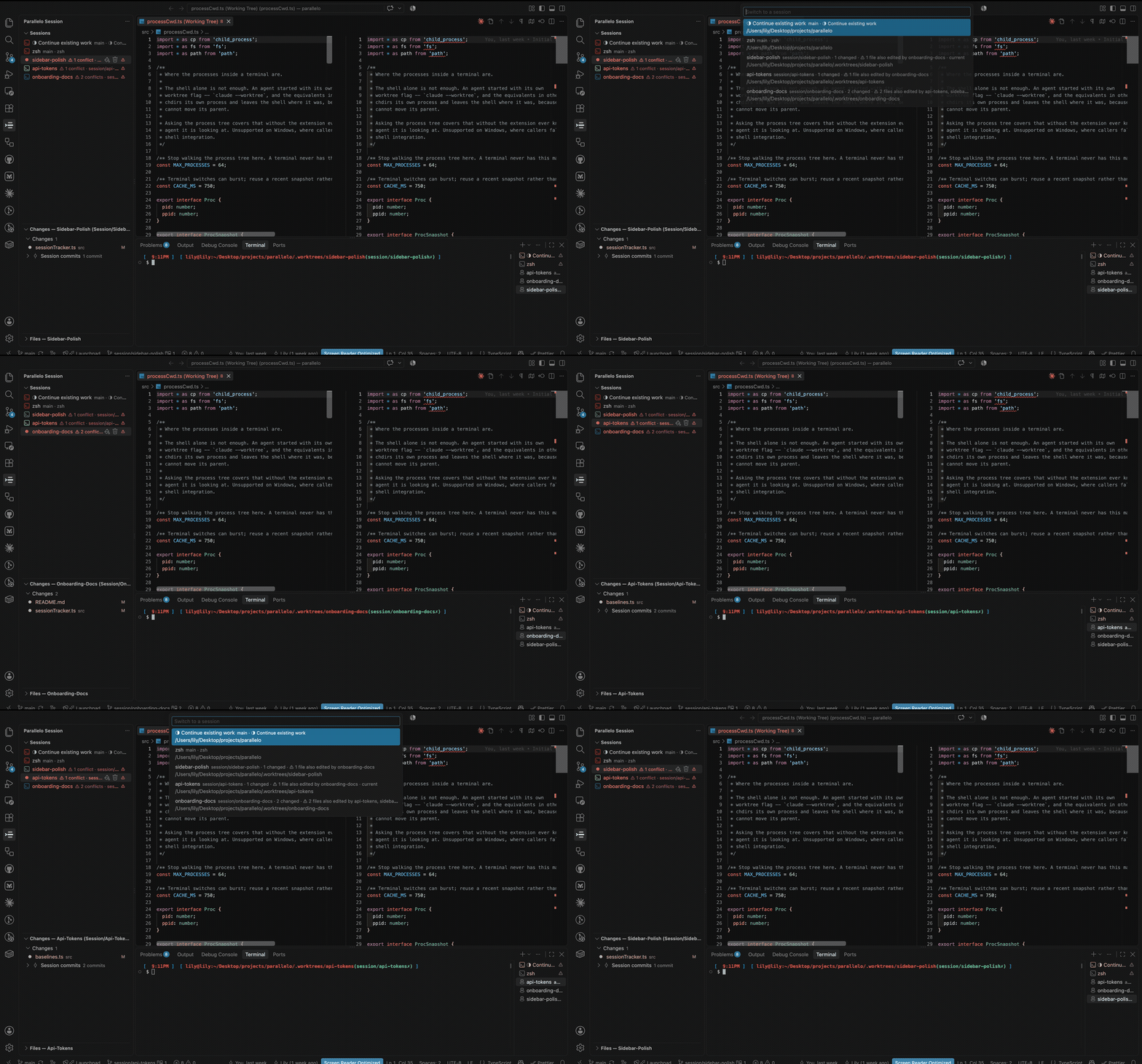
Three agents, three worktrees, one window. Pick a session and everything follows
it — the diff, the file tree, the terminal, the branch in the status bar. The ⚠
marks two sessions that are editing the same file.
It never asks what is running. Claude Code, Codex, aider and a plain shell all
behave identically, because the working directory of the process in the
terminal is the only contract.
🎁 What you get
|
|
| 🔍 Changes |
One worktree's staged and unstaged files. Native diffs, per-hunk staging, discard and unstage inline. |
| 📝 Session commits |
What this session has committed since it branched, one row per commit, files underneath. |
| ⚠️ Conflict radar |
Two sessions editing the same file get marked before they collide. |
| 🗂️ Sessions |
Every terminal in a worktree, with branch, drift (↑2 ↓1) and change count. Drag to reorder, drag to pin. |
| 🌲 Files |
A file tree rooted at the active worktree, and a full-text search scoped to it. |
| 🚀 Every worktree from the start |
A terminal opens in each one when the window does, so none stays invisible. |
| ● Waiting / done |
A session marks itself when its agent asks you something or finishes a turn. Clears when you look at it. |
| 🎨 Session appearance |
Name, colour and icon per worktree, remembered across reloads. |
| 📊 Status bar |
Active branch and change count. Click to switch session. |
| ➕ Start Session |
Creates the branch and worktree, copies your ignored files, installs dependencies, launches the agent. |
| 🗑️ Delete Worktree |
Removes the directory, keeps the branch, always asks first. Says how many sessions share that worktree, and offers to close just one — or to delete the branch too, when nothing would be lost. |
📦 Requirements
VS Code 1.93 or newer. No runtime dependencies. Process-tree detection needs
macOS or Linux; Windows falls back to shell integration.
🧭 How it behaves
📝 Session commits
The last group in the Changes view: the commits this worktree made, newest
first, each with the files it touched.
It is read, not inferred. Every linked worktree keeps its own log of what
happened inside it, and Parallelo lists the entries that are commits. So:
- Merges are never rows. A merge that arrived by
git pull is not a commit
this session wrote. You see the messages somebody typed, not Merge pull request [#221](https://github.com/lilyanAhmetoglu/parallelo/issues/221).
- Nothing another branch did can appear. A stale default branch, a branch
already merged, an agent that leaves a mirror branch — none of them can add
or remove a row, because none of them is in this worktree's log.
Reset Session Baseline to Now hides everything up to this point, for when
you have reviewed what an agent did and want to watch what it does next.
The group is for worktree sessions only. A terminal in the main checkout
does not get one: its log reaches back to the repository's first commit, which
is not a session.
⚠️ Conflict radar
A session that has edited a file another session has also edited since either
of them started is marked three ways, so it reads at any sidebar width: the
name takes the conflict colour, a ⚠ badge pins to the right edge, and the row
leads with ⚠ 2 conflicts. Hover for the files and who else is in them.
Committing does not clear the warning — a session's own commits count, including
the old name of a renamed file. This matters, because the agent worth warning
about is the one making steady progress.
Three things it leaves out on purpose:
- Merges — a merge authors nothing, and would drag in every file the merged
branch ever touched.
- The main checkout — a
git pull there brings hundreds of commits nobody
in the window wrote.
- Meaning — two sessions in different functions of one file are flagged; two
sessions at opposite ends of the same API are not.
Off with parallelo.conflictRadar, or back to uncommitted-only with
parallelo.sessionBaseline.
🤖 Agents that make their own worktree
Some agents create a worktree and move into it — claude --worktree is the
common case. The shell never moves, so its working directory still points where
you launched from.
Parallelo reads the working directory of the terminal's process tree, not
just the shell, so those sessions bind correctly anyway. Turn it off with
parallelo.followProcessCwd.
Start these as a normal session, not a worktree session — the agent makes
the worktree, so there is no point making one first. A normal session opens in
the main checkout, on the base branch, whichever session you started it
from; it never lands in another session's worktree. When you do want a second
terminal in the worktree you are already in — a dev server, a test run — the
picker offers This worktree as its own entry. To get the agent its own
entry in the picker:
{ "label": "Claude Code (own worktree)", "command": "claude --worktree" }
🧠 Brainstorming rooms
Sometimes the expensive mistake is in the plan, not the code. A room puts two
agents in one worktree and makes them argue about it before anyone writes
anything.
Click +, choose Brainstorming room, give it a topic, and pick the two
agents. Parallelo makes a worktree, opens two terminals in it, and seats one
agent as the lead and the other as the peer. They take turns through a
transcript on disk until they agree or run out of rounds, and the lead writes a
spec file at the end.
Rooms need the server that carries the conversation:
bun add -g roundtable-mcp
The brief travels in the system prompt, not as typed input.
--append-system-prompt-file puts each seat's instructions in place before the
agent accepts anything, so a startup dialog cannot swallow them. Typed input
can be lost; a system prompt cannot. If the opening line is eaten, type anything
at all — the agent already knows which seat it is and what the room is for.
No seat can write a file, and that is enforced rather than asked for. An
agent holding a file-writing tool will eventually use it: give a lead Write
and Bash and it will start implementing the thing it was asked to plan. So the
seats get reading and the room's own tools — the spec is produced through the
server's write_spec, so no seat needs write access to produce output. Their
permissions are settled up front too, because the peer spends most of a room
parked inside one tool call, and an agent stopped at a prompt is a conversation
that never starts.
Copilot and Codex seats need a POSIX shell. Neither CLI has a
system-prompt flag, so their brief is handed over as $(cat …) on the command
line, which cmd.exe and PowerShell do not expand the same way. On Windows,
seat Claude Code.
Codex seats are read-only, including the lead. Codex fences writes with
sandbox_mode=read-only rather than a tool list, and a sandbox cannot make an
exception for git — so a Codex lead writes its spec through the room's
write_spec and cannot commit it. Seat Claude Code or Copilot as the lead if
you want the commit too.
Git is the exception, and only the lead has it. It is the seat that produces
something, so it is the one that might commit the spec: it gets Bash(git:*)
through leadRoomArgs, while the peer keeps Bash denied outright. Nothing
there lets either seat write a file. Both seats share one checkout, so a git checkout . or git reset --hard from the lead discards what the peer is
reading, and git stash is shared across every worktree in the repository.
None of that is yours to configure. The flags live on the agent entry in
parallelo.agents as roomArgs — plus leadRoomArgs where the lead needs more
than the peer — and Claude Code, GitHub Copilot and Codex all ship with working
ones, each written in that CLI's own syntax. Claude Code's and Copilot's were
checked against the real binary; Codex's come from OpenAI's documentation,
because that CLI is not installed here. An
agent with no roomArgs is refused a seat rather than opened, because a seat
that cannot reach the server produces a terminal that sits there doing nothing
and looks exactly like one that is thinking. To seat an agent Parallelo does not
know, give it a roomArgs; to force one command line on both seats, set
parallelo.roundtable.agentArgs. ${roomDir}, ${room} and ${seat} are
substituted per room, and both are used in rooms only, never in a normal
session.
Keep worktrees inside the repo. With the default worktreePath of
.worktrees, a room's worktree sits under a directory your agent already
trusts, and it starts straight into the conversation. Point worktreePath
somewhere outside the repo and every seat opens in unfamiliar territory and
stops to ask whether you trust it — in both terminals, every room.
You do not type anything into either terminal. The topic you gave the
dialog is the whole brief, and it reaches each seat before the seat can be
typed at — in the system prompt for Claude Code, and as the opening prompt on
the command line for GitHub Copilot and Codex, which have no system-prompt
flag. Either
way it is an argument to the agent, not text typed at a TUI that is still
starting. Parallelo then waits for each seat to appear in the room — an agent registers
with the server the moment it has finished starting, which is the only reliable
signal that it is ready to be told anything — and sends that seat its opening
line. The lead posts first; the peer is already parked inside
wait_for_message, so the lead's post wakes it. Nothing needs a person.
If a seat never reaches the room within two minutes, Parallelo says which one
and offers its terminal, where the error will be. Parallelo: Send
Brainstorming Room Brief re-sends by hand if you restart a seat yourself.
To read the discussion afterwards, not just the conclusion: focus a terminal
in the room's worktree and run Parallelo: Show Brainstorming Room Transcript.
It opens the whole argument in a preview, rendered outside the worktree.
The spec is the decision, written for someone who was not in the room. The
transcript is how they got there — what the peer objected to and what the lead
conceded. Deliberately two documents: putting the argument inside the spec makes
the decision harder to find, and the spec is the file you push. From a shell:
roundtable transcript --room <name> --cwd <worktree>              # Markdown
roundtable transcript --room <name> --cwd <worktree> --out r.html # a page
You are asked which model each seat runs, so a room can be two of the same
agent on different models — Opus 5 leading, Sonnet 5 pushing back. The choice is
recorded against every message in the transcript. Add models to any agent in
parallelo.agents.
Parallelo does not implement any of the protocol. It starts the worktree and the
terminals, and puts a different seat in each terminal's environment — that last
part is what lets two instances of the same agent hold a conversation, since
neither the extension nor the server can otherwise tell them apart. Claude and
Codex, Claude and Claude, Copilot and anything: the room never learns what is
sitting in a seat.
Worth knowing before you run one:
- Both agents share one checkout, because they are arguing about the same
code. Rooms are for planning. Give the implementation to one agent afterwards,
in a session of its own.
- The round budget is the termination condition, not a safety rail. Two
agents do not get bored and never run out of refinements. The default is 8.
- It costs double. Two agents reasoning over the same repository. Worth it
for a decision you would otherwise get wrong, not for naming a variable.
- The spec ends with a Dissent section holding whatever the peer still
disagrees with, in its own words. Two agents left alone converge into
agreement, and what they flattened on the way there is usually the part worth
your attention.
What a room leaves behind
One file, and you say where it goes when you create the room. You are offered
SPEC-<room>.md in the root of the worktree, an existing docs/specs or
docs if the repository has one, a folder browser, and a plain path box — the
directories are made when the spec is written, so a folder that does not exist
yet is fine. Browsing shows the base checkout, because the worktree does not
exist yet and will hold the same directories anyway. That is the room's output and the only thing you need to read — the decision in the first
paragraph, then the reasoning, the work broken into steps, and a Dissent
section holding whatever the peer still disagrees with, in its own words.
Everything else is working material and is not committed. The prompts, the
server config, and the transcript live under .roundtable/, which ignores
itself — your repository's own .gitignore is never touched, and git status
in a room worktree shows the spec and nothing else.
So the answer to "which file is the final one" is always the same: the one git
is showing you.
Choosing the location needs roundtable-mcp 0.2.0 or newer. An older one
writes SPEC-<room>.md and Parallelo says so rather than letting the file turn
up somewhere you did not expect.
● Which session is waiting for you
Four agents running. Which one asked a question six minutes ago, and which is
still working? Today you click all four to find out.
A session row shows a dot when its agent needs you and a tick when it
has finished its turn. Both clear the moment you click the row — a mark that
stayed after you had read it would be on every row by lunchtime.
The agent says which it is, because nothing outside it can tell. From the
process tree, an agent waiting on a question and an agent that finished are
identical: both alive, both holding the terminal, both using no CPU. This was
built once from CPU sampling and removed, because the dot lit on every idle
agent. So the signal comes from the agent itself — from whatever it already runs
to tell you it needs you.
The contract is two commands, and any agent can drive it. That is the whole
of it, and it is why this is not a Claude Code feature:
# when it needs you
d=$(git rev-parse --absolute-git-dir 2>/dev/null) && printf 'waiting\n' > "$d/parallelo-status"
# when it finishes
d=$(git rev-parse --absolute-git-dir 2>/dev/null) && printf 'done\n' > "$d/parallelo-status"
One line covers every repository, because it finds its own. In a terminal
Parallelo opened, $PARALLELO_STATUS names the same file — for an agent whose
notification command runs somewhere git is awkward to reach from. Put them
wherever your agent takes them: Claude Code's Notification and Stop hooks,
Codex's notify, a wrapper script, a Makefile target. Nothing here reads any
agent's private session state.
Parallelo: Set Up Status Hooks
That asks which agent you run. For Claude Code it writes the two hooks into
~/.claude/settings.json, shown in full first and merged with whatever is
already there. For anything else it hands you the two commands to paste —
because writing a config format from memory would put broken settings in your
home directory, and only Claude Code's has been checked against a real file.
A mark means something an agent did while Parallelo was watching. Whatever
is already in the file when a window opens is treated as read, so yesterday's
tick is not on the row this morning — and because a mark is tracked by when it
was written rather than by what it says, an agent that finishes twice in a row
lights the row twice, even though it wrote the same word both times.
The file lives in the git directory rather than the worktree, so it never
appears in git status, the Changes view, or the conflict radar. A linked
worktree has its own, so sessions do not collide — though two terminals in one
worktree share a directory and so share the mark, which is true: something in
there wants you.
Off with parallelo.sessionStatus.
💡 Things worth knowing
⚠️ git stash is shared across all worktrees. refs/stash lives in the
common .git directory, so every worktree pushes onto one stack — one agent's
stash pop will happily take work another agent stashed. Have agents commit to
their session branch instead.
Parallelo warns once per repository per window, the first time the stash is
touched while more than one session is live. It is a warning only; the extension
deliberately has no stash feature. Off with parallelo.stashGuard.
🗑️ Deleting a worktree discards uncommitted work. The branch is kept, so
anything committed is safe. Anything still in the working tree is on no branch
and goes with the directory — the confirmation tells you how many files that is.
Nothing is ever moved into your main checkout. Use Close Session if you just
want the row gone — it closes that one terminal, and leaves any other session in
the same checkout running.
When the branch holds nothing your base checkout does not already have, the
confirmation offers Remove and Delete Branch as well. That is how a session
name becomes free again. It is never offered for a branch with commits of its
own, so the button cannot throw away an agent's work.
🌱 A new session always gets a new branch. Because deleting a worktree keeps
its branch, a name you have used before is free in .worktrees and still taken
in refs/heads. Parallelo will not silently check that old branch out —
starting foo again branches session/foo-2 off your base checkout and says
so. The old branch is left exactly where it was.
🔍 Search looks inside the session's files, not just at their names. The
magnifier on the Files view opens VS Code's own Search panel with files to
include already pointed at the active worktree, so a query finds text anywhere
under it and nowhere else — switch terminals and the scope follows, like
everything else here. It deliberately ignores your .gitignore for that search,
because the default worktree location is .worktrees, which most repositories
ignore; without that, searching a session would quietly return nothing. The find
box on the tree itself is unchanged and still filters the rows you can see.
📦 A new worktree arrives ready to run. git worktree add checks out
tracked files and nothing else, so a fresh session has no .env, no
node_modules, and no local settings — which usually shows up as the agent's
first command failing. Parallelo closes both gaps when it makes the worktree:
Ignored files are copied from the base checkout — .env, .dev.vars,
.claude/settings.local.json: the machine's half of the project, which
.gitignore keeps out of the repository and so out of a new worktree.
parallelo.copyExclude skips what is installed or rebuilt rather than carried:
node_modules, dist, .next, target, .venv, caches. Names are matched
against every part of the path, so a monorepo's packages/ui/dist is skipped
too. Files that are simply un-added are left behind — those are your work in
progress, not the project's setup. Off with parallelo.copyIgnoredFiles;
parallelo.copyFiles still names files to copy whatever else is decided.
Dependencies are installed with the command the base checkout implies.
Every language keeps its dependencies out of the repository — node_modules,
.venv, vendor, target — so no worktree comes with them, whatever the
project is written in:
|
|
| JavaScript |
bun.lock · pnpm-lock.yaml · yarn.lock · package-lock.json, or packageManager in package.json, which outranks them all |
| Python |
uv.lock · poetry.lock · pdm.lock · Pipfile.lock · requirements.txt |
| Rust · Go |
Cargo.lock · go.mod |
| Ruby · PHP · Elixir |
Gemfile · composer.json · mix.lock |
| Swift · Java · .NET |
Package.resolved · gradlew or pom.xml · any .csproj |
| Dart |
pubspec.yaml, telling Flutter from plain Dart by what is in it |
A repository with two of these gets both, joined with &&. It is typed into
the terminal like any other line, so you can see it and stop it. Nothing runs
when nothing says which manager the project uses — guessing wrong writes a
lockfile the project does not want. Off with parallelo.installDependencies,
and skipped entirely when you have set parallelo.setupCommand.
A new session therefore starts with a clean git status: everything copied is
ignored, so the first thing in its diff is the first thing its agent did. The
conflict radar is told what a worktree was created holding anyway, because
.gitignore is a tracked file and a branch may spell it differently.
Copying is cancellable from the progress notification. An ignored directory can
be any size, and a session creation that cannot be stopped would be worse than
one that copies nothing.
🔌 Worktrees isolate files, nothing else. Ports, databases, dev servers and
.env state are shared. Two agents running the same dev server will fight over
the port.
⏱️ Terminals opened before the extension activates are picked up on
activation, though one whose shell has not reported a directory yet may take a
moment.
⚙️ Settings
| Setting |
Default |
What it does |
parallelo.agents |
Claude Code, Codex, GitHub Copilot, Shell |
Agents offered when starting a session or a room, each with its models and its room flags |
parallelo.worktreePath |
.worktrees |
Where new worktrees go, relative to the repo root |
parallelo.branchPrefix |
session/ |
Prefix for branches created for new sessions |
parallelo.autoOpenRepository |
true |
Register a worktree with git when a terminal enters it |
parallelo.followProcessCwd |
true |
Resolve the worktree from the terminal's processes, not just the shell |
parallelo.autoSessionColors |
true |
Give each session a distinct colour automatically |
parallelo.stashGuard |
true |
Warn when the shared stash is used with more than one session live |
parallelo.conflictRadar |
true |
Mark sessions editing the same file as another session |
parallelo.sessionBaseline |
true |
List the commits each worktree session has made, and count them in the conflict radar |
parallelo.setupCommand |
— |
Command run once in a new worktree before the agent starts, instead of the install below |
parallelo.installDependencies |
true |
Install dependencies in a new worktree, using the package manager the lockfile names |
parallelo.roundtable.command |
roundtable |
The MCP server executable that brainstorming rooms run |
parallelo.roundtable.budget |
8 |
Turns the lead agent gets in a room before it must write the spec |
parallelo.copyIgnoredFiles |
true |
Copy the files .gitignore covers into each new worktree |
parallelo.copyExclude |
node_modules, dist, caches… |
Names skipped when copying, matched against every part of the path |
parallelo.copyFiles |
.env, .env.local |
Files always copied, even when excluded above |
parallelo.sessionStatus |
true |
Mark a session when its agent asks you something or finishes a turn |
parallelo.showStatusBar |
true |
Show the active session's branch in the status bar |
parallelo.showMainCheckout |
true |
List a terminal in the main checkout, not only worktree sessions |
parallelo.openWorktreeTerminals |
true |
Open a terminal in every worktree when the window starts |
🔨 Building it
bun install
bun run compile
Press F5 for an Extension Development Host. Cmd+R reloads it after a
rebuild.
📄 Licence
MIT
Made for the window with too many agents in it. 🧵