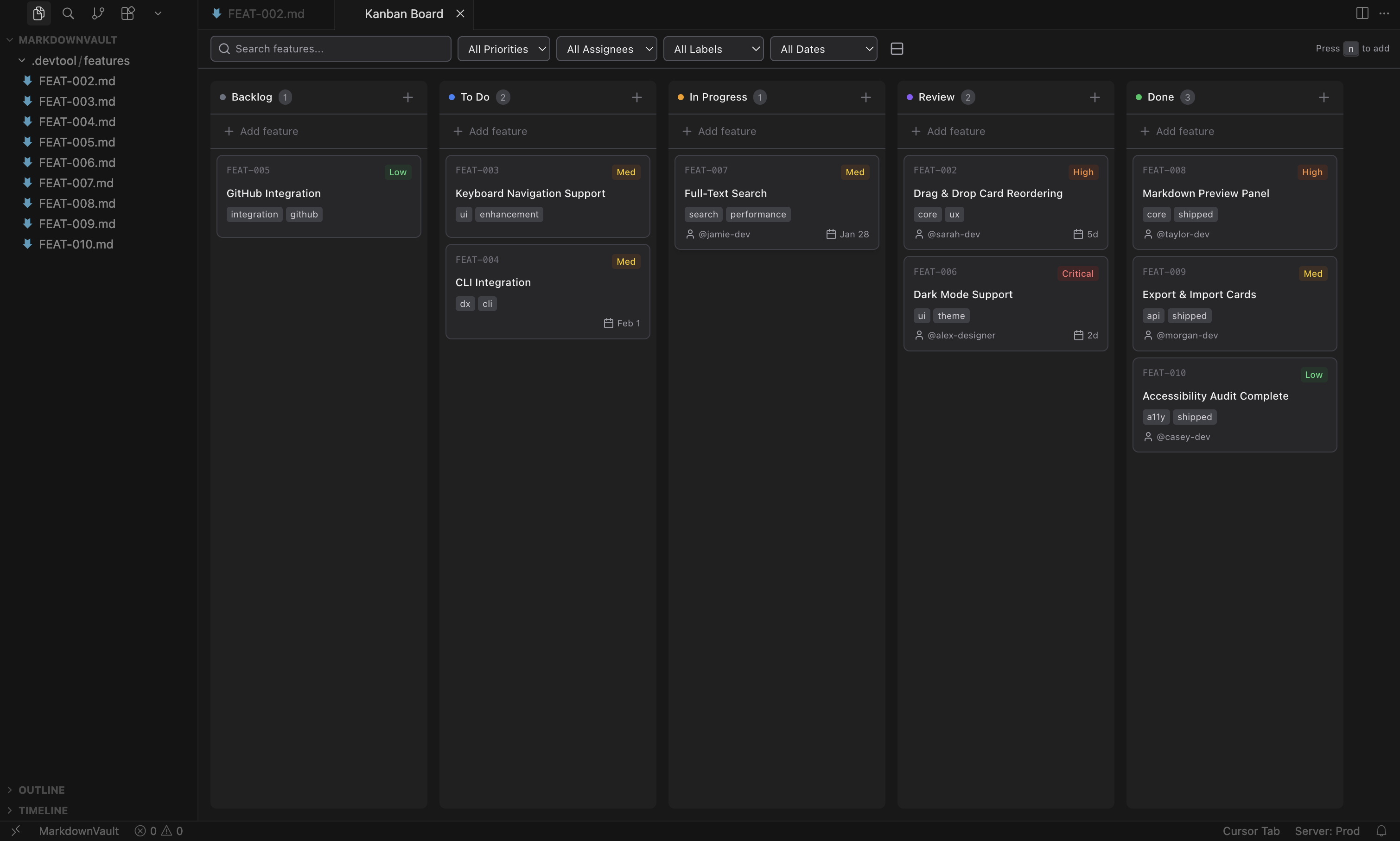
Features are stored as markdown files with YAML frontmatter — version-controllable, diffable, and editable outside the extension. No accounts, no external services.
Quick Start
- Install — search "Kanban Markdown" in the Extensions view (VS Marketplace / Open VSX)
- Open — run
Open Kanban Board from the command palette (Cmd+Shift+P / Ctrl+Shift+P)
- Create — press
N to add your first feature card
Features
Board & Workflow
- 5-column workflow — Backlog, To Do, In Progress, Review, Done (customizable)
- Drag-and-drop between columns and within columns
- Sidebar view from the activity bar
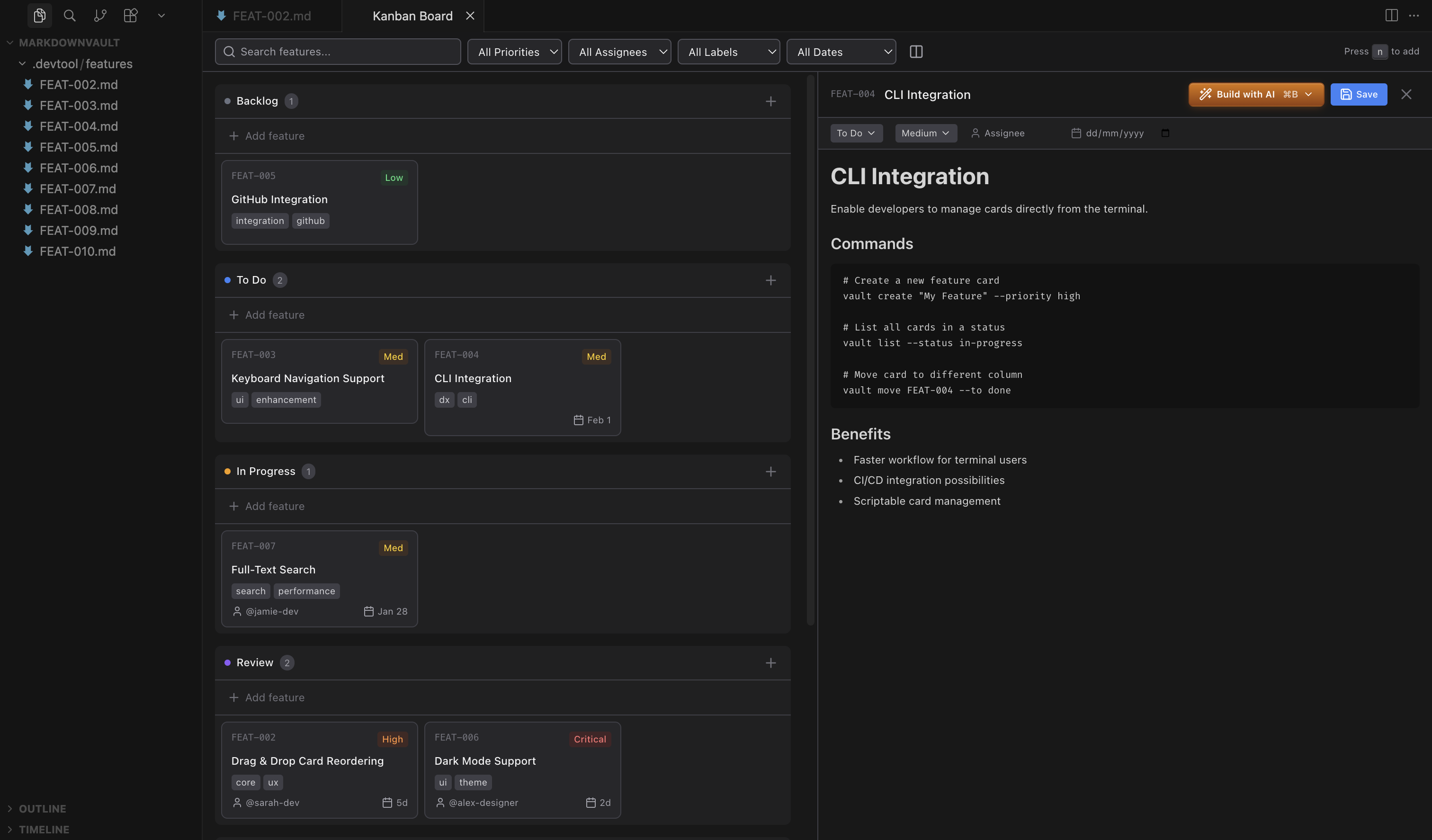
- Split-view editor — board on left, inline editor on right
- Horizontal and vertical layouts
- Compact mode for dense boards
- Keyboard shortcuts —
N new feature, Esc close dialogs, Cmd/Ctrl+Enter submit
Cards
Each card is a markdown file with YAML frontmatter.
- Priority levels — Critical, High, Medium, Low with color-coded badges
- Assignees
- Due dates with smart formatting (Overdue, Today, Tomorrow, "5d", etc.)
- Labels — multiple per card, shows up to 3 with "+X more"
- Automatic created/modified timestamps
- Archive completed features to keep the board clean
Search & Filtering
- Full-text search across content, IDs, assignees, and labels
- Filter by priority, assignee, label, or due date
- Due date filters — overdue, today, this week, or no date
Editor Integration
- Rich text editing with Tiptap
- Inline frontmatter editing — dropdowns for status/priority, inputs for assignee/due date/labels
- Auto-save on change
- Auto-refresh when files change externally
- Native markdown mode — open files in VS Code's built-in editor instead
- Follows your VS Code/Cursor theme (light & dark)
AI Agent Integration
Cards include a "Build with AI" action that passes full feature context (title, priority, labels, description) to your preferred agent.
| Agent |
Modes |
| Claude Code |
Default, Plan, Auto-edit, Full Auto |
| Codex |
Suggest, Auto-edit, Full Auto |
| GitHub Copilot |
Default |
| OpenCode |
Default |
Kanban Skill
Give agents read/write access to your board from the terminal:
npx skills add https://github.com/LachyFS/kanban-skill
Compatible with Claude Code, Codex, OpenCode, and skills.sh-compatible agents. See kanban-skill for details.
Features live in .devtool/features/ by default, organized into subfolders by status.
---
id: "implement-dark-mode-toggle-2026-01-25"
status: "todo"
priority: "high"
assignee: "john"
dueDate: "2026-01-25"
created: "2026-01-25T10:30:00.000Z"
modified: "2026-01-25T14:20:00.000Z"
labels: ["feature", "ui"]
order: 0
---

# Implement dark mode toggle

Add a toggle in settings to switch between light and dark themes...
Configuration
Settings live under kanban-markdown.* in your VS Code/Cursor preferences.
| Setting |
Default |
Description |
featuresDirectory |
.devtool/features |
Directory for feature files (relative to workspace root) |
filenamePattern |
name-date |
Filename pattern for new cards (name-date, date-name, name-datetime, datetime-name) |
defaultPriority |
medium |
Default priority for new features |
defaultStatus |
backlog |
Default status for new features |
columns |
see below |
Customize column IDs, names, and colors |
aiAgent |
claude |
AI agent for "Build with AI" (claude, codex, copilot, opencode) |
showPriorityBadges |
true |
Show priority badges on cards |
showAssignee |
true |
Show assignee on cards |
showDueDate |
true |
Show due date on cards |
showLabels |
true |
Show labels on cards and in editors |
showBuildWithAI |
true |
Show "Build with AI" button on cards |
showFileName |
false |
Show the source markdown filename on cards |
compactMode |
false |
Use compact card layout |
addNewCardsToTop |
false |
Add new cards to the top of the column |
markdownEditorMode |
false |
Open files in VS Code's native text editor instead of the inline rich-text editor |
Default columns:
[
  { "id": "backlog", "name": "Backlog", "color": "#6b7280" },
  { "id": "todo", "name": "To Do", "color": "#3b82f6" },
  { "id": "in-progress", "name": "In Progress", "color": "#f59e0b" },
  { "id": "review", "name": "Review", "color": "#8b5cf6" },
  { "id": "done", "name": "Done", "color": "#22c55e" }
]
Installation
VS Code Marketplace
Install from the VS Code Marketplace or search "Kanban Markdown" in the Extensions view.
Open VSX (VSCodium, Cursor, etc.)
Install from Open VSX or search "Kanban Markdown" in the Extensions view.
From VSIX
- Download the
.vsix from Releases
- In VS Code: Extensions >
... > Install from VSIX
- Select the downloaded file
Development
Prerequisites
Setup
pnpm install       # Install dependencies
pnpm dev           # Start development (watch mode)
pnpm build         # Build for production
pnpm typecheck     # Type checking
pnpm lint          # Linting
Testing
# Unit + component tests (fast, no VS Code host required)
pnpm test

# Watch mode
pnpm test:watch

# Integration tests (launches a real VS Code instance)
pnpm test:integration
Unit tests cover shared logic, extension utilities, and React components. Integration tests run inside a VS Code host using @vscode/test-electron and exercise the real file system and VS Code APIs.
Running the CI pipeline locally with act
act runs GitHub Actions workflows locally in Docker.
# Install (macOS)
brew install act

# Run the full CI test job
act push -j test --container-architecture linux/amd64
The first run downloads a VS Code binary (~160 MB) into .vscode-test/ which is cached for subsequent runs.
Debugging
- Press
F5 in VS Code to launch the Extension Development Host
- Open the command palette and run "Open Kanban Board"
- Make changes and reload the window (
Cmd+R) to see updates
Tech Stack
Extension: TypeScript, VS Code API, esbuild | Webview: React 18, Vite, Tailwind CSS, Zustand, Tiptap
See CONTRIBUTING.md for details.
Contributors
- @luciopaiva — sidebar view and layout improvements
- @ungive — file organization and status subfolders
- @hodanli — label management enhancements
- @SuperbDotHub — compact mode and card display options
License
MIT