PyCloud CI Doctor
Diagnose Python cloud development issues before they hit CI.
VS Code extension for Poetry, boto3/aioboto3, and GitHub Actions troubleshooting.
Latest: v1.2.1 – Improved asset visibility and dependency visualization.
Why use PyCloud CI Doctor?
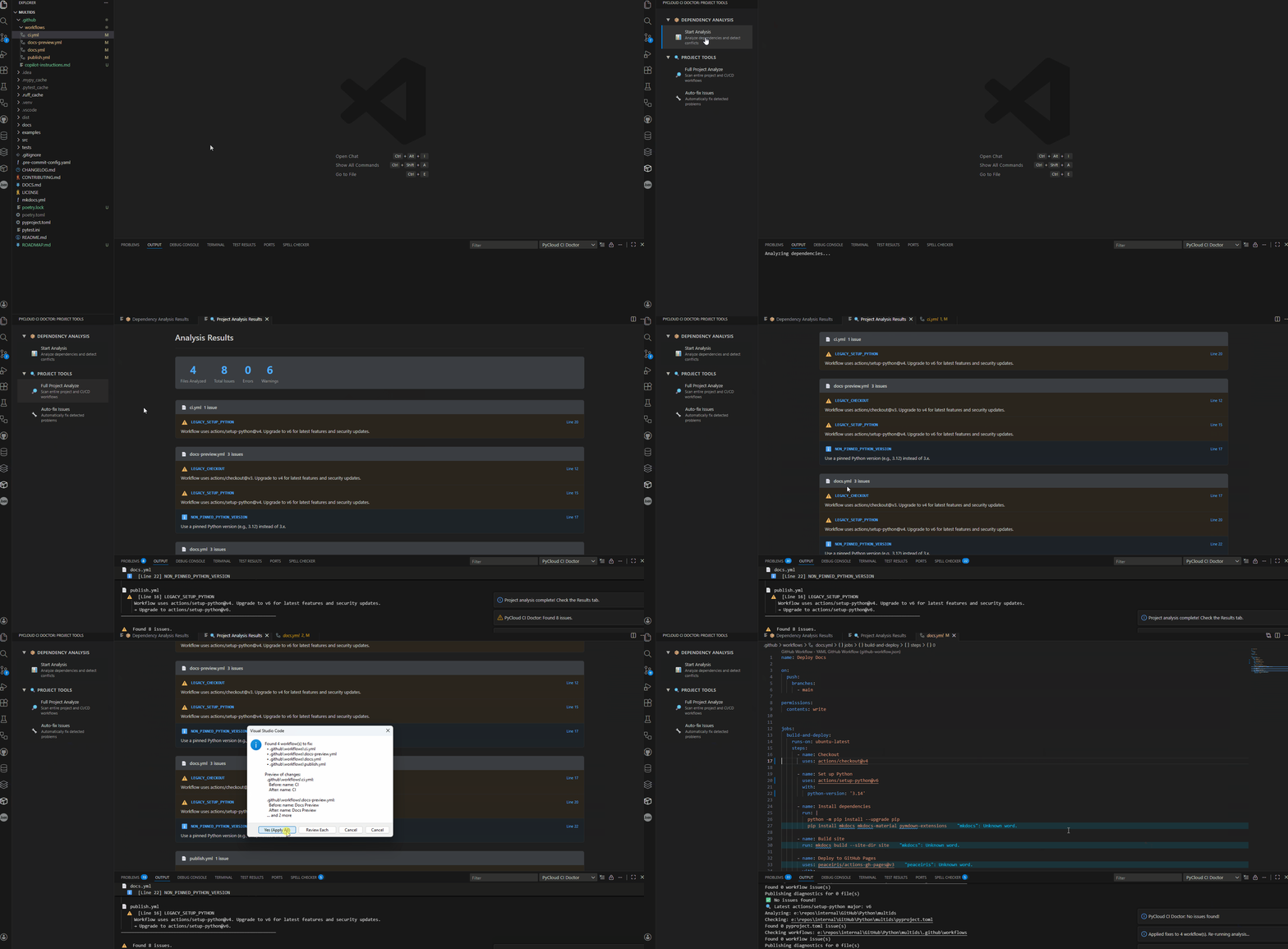
PyCloud CI Doctor is for Python developers who:
- Use Poetry and deploy to AWS with GitHub Actions.
- Keep getting red CI builds from dependency, environment, or workflow issues.
- Want one place in VS Code to spot and fix these problems quickly.
Run a single command to scan your workspace, see diagnostics in the Problems panel, and apply safe auto-fixes to CI
workflows.
Features
Automated project analysis
Scan your Python project for common cloud/CI issues:
Poetry & dependencies
- Detects
boto3 + aioboto3 mixed usage (sync/async conflicts).
- Flags missing AWS SDK dependencies when imports are present.
- Cross-references Python files with
pyproject.toml.
GitHub Actions workflows
- Detects outdated
actions/setup-python versions (via GitHub API).
- Flags missing or overly broad
python-version configurations.
- Detects tests running without proper Poetry dependency setup.
- Validates Poetry installation in CI pipelines.
VS Code integration
- Issues show up in the Problems panel with file + line number.
- Click any issue to jump directly to the offending line.
- Clear severity indicators and structured output in the Output panel.
Environment & UX
- Detects Poetry/venv mismatches and mixed dependency managers.
- Auto-detects Python version from local venv or system interpreter.
- Status bar indicator with quick access to the Analyze command.
Smart quick fixes and auto-fix
Let the extension apply safe, reviewable fixes to your workflows:
Quick Fixes
- One-click code actions for detected issues.
- Automatic TOML/YAML editing with consistent formatting.
- Light bulbs in the editor and Problems panel for fast navigation.
Auto-Fix All Workflows
- Preview mode with before/after snippets before applying changes.
- Choose between Apply All, Review Each, or Cancel.
- Per-file review with inline diffs.
- Automatically upgrades to the latest
actions/setup-python major (via GitHub API, fallback to v5/v6 as
configured).
- Pins
python-version to a specific version (configurable or auto-detected).
- Optionally adds Poetry setup steps before tests (
poetry install, etc.).
Get a high-level view of your project’s health:
Dependency graph
- Visual tree view of dependencies from
pyproject.toml or requirements.txt.
- Highlights version conflicts and unmet peer dependencies.
Environment status
- Shows current Python interpreter.
- Displays Poetry environment status.
- Surfaces linter/formatter status (Flake8, Black, isort, Pylint).
Project stats
- High-level overview of total lines of code, dependency count, and file types.
Enhanced diagnostics output
Readable, searchable diagnostics in both Problems and Output panels:
- Issues include exact line numbers and clear messages.
- Emoji-based markers (✅, ❌, ⚠️, ℹ️, →) keep output scannable in any terminal.
- Analysis and fixes are separated with visual dividers.
- Change logs show precise line changes during auto-fix.
Configuration
Configure PyCloud CI Doctor via VS Code settings or settings.json:
pycloudCiDoctor.ignoreWorkflows: Glob patterns to skip analyzing certain workflow files.pycloudCiDoctor.disableRules: List of rule codes to suppress.pycloudCiDoctor.pythonVersionTarget: Pin to a specific Python version (e.g. "3.12") or "auto" to detect from
venv/system.pycloudCiDoctor.autoFixPoetry: When enabled, auto-fix adds Poetry install and poetry install before tests if
missing.
Example settings.json snippet:
{
  "pycloudCiDoctor.pythonVersionTarget": "3.12",
  "pycloudCiDoctor.autoFixPoetry": true,
  "pycloudCiDoctor.ignoreWorkflows": [
    ".github/workflows/experimental-*"
  ]
}
Commands
Available commands in the Command Palette:
PyCloud CI Doctor: Analyze Project
Scan the current workspace for issues and show results in Problems + Output.
PyCloud CI Doctor: Auto-fix All Workflows
Run an interactive auto-fix over all detected workflow issues, with preview.
Installation
From VS Code Marketplace
- Open Extensions (
Ctrl+Shift+X).
- Search for “PyCloud CI Doctor”.
- Click Install.
From command line
code --install-extension KhaldounAljasem.vscode-pycloud-ci-doctor
Usage
Quick start
- Open a Python project with
pyproject.toml (Poetry) and/or .github/workflows/.
- Press Ctrl+Shift+P (or Cmd+Shift+P on macOS).
- Run PyCloud CI Doctor: Analyze Project.
- Open the Problems panel (
Ctrl+Shift+M) to review issues.
View results
Problems panel
All diagnostics appear with file + line; click any entry to jump to code.
Output panel
Choose the “PyCloud CI Doctor” output channel to see detailed analysis, summaries, and applied fixes.
Auto-fix workflows
- Run PyCloud CI Doctor: Auto-fix All Workflows.
- Review the preview of affected workflows.
- Choose Apply All, Review Each, or Cancel.
- If reviewing, approve or skip each change using inline diffs.
- Check the Output panel for a full log of applied changes.
Example output
Analysis output
ℹ️ Starting workspace analysis...
Found 2 workspace folder(s)
🔍 Latest actions/setup-python major: v6
───────────────────────────────────────────────────────
📋 ISSUES SUMMARY
───────────────────────────────────────────────────────
📄 publish.yml
⚠️ [Line 16] LEGACY_SETUP_PYTHON
Workflow uses actions/setup-python@v5. Upgrade to v6...
→ Upgrade to actions/setup-python@v6.
📄 pyproject.toml
⚠️ [Line 8] BOTO3_SYNC_ASYNC_CONFLICT
Both boto3 and aioboto3 detected. Ensure async/sync...
→ Remove aioboto3 or ensure async usage is consistent.
───────────────────────────────────────────────────────
⚠️ Found 2 issues.
Auto-fix output
════════════════════════════════════════════════════════
APPLYING FIXES TO ALL WORKFLOWS
════════════════════════════════════════════════════════
📝 .github/workflows/ci.yml
Line 12:
uses: actions/setup-python@v5
uses: actions/setup-python@v6
Line 14:
python-version: "3.x"
python-version: "3.11"
✅ Applied fix to .github/workflows/ci.yml
════════════════════════════════════════════════════════
Release history
- v1.2.1 – Fixed GIF display in Marketplace for private repositories.
- v1.2.0 – Dependency visualization, project tools panel, improved conflict detection.
- v1.1.0 – Linting and formatting integration (Flake8, Black, isort, Pylint).
- v1.0.0 – Initial stable release with automated diagnostics, quick fixes, GitHub API integration.
- v0.3 – Poetry/venv environment detection, status bar, interpreter picker.
- v0.2 – Quick-fix code actions for detected issues.
- v0.1 – Basic analyzer for
pyproject.toml and GitHub Actions.
Known issues
- TOML and YAML parsing currently uses regex patterns; full AST parsing is planned.
- GitHub Actions analysis focuses on common patterns; complex workflows may have edge cases.
- Only GitHub Actions is supported today; GitLab CI and Azure Pipelines are planned.
- Quick fixes assume standard TOML/YAML formatting; heavily customized files may need manual edits.
Report bugs and feature requests via the issue tracker.
Testing
Comprehensive unit tests live in src/test/:
Run all tests
npm test

Run tests in watch mode
npm run watch-tests

Compile tests
npm run compile-tests
Test layout:
src/test/extension.test.ts – Extension activation and command tests.src/test/analyzers/projectAnalyzer.test.ts – PyProject and GitHub Actions analyzer tests.src/test/providers/diagnosticsProvider.test.ts – Diagnostics integration tests.src/test/providers/codeActionProvider.test.ts – Quick-fix code action tests.src/test/utils/test-analyzer.ps1 – PowerShell utility for manual testing.
For manual testing, run:
.\src\test\utils\test-analyzer.ps1 -OpenInVSCode
This creates a sample project with intentional issues for testing the analyzer.
Contributing
Contributions are welcome.
See the vscode-extension-assets repository for:
- Feature requests.
- Issue tracker.
- Public documentation.
License
MIT License © 2026 Khaldoun Aljasem
Links

