Skip to content
| Marketplace
Sign in
Visual Studio Code>Programming Languages>KeelTestNew to Visual Studio Code? Get it now.
KeelTest

KeelTest

KeelCode

|
3 installs
| (0) | Free
AI-powered unit test generator for Python. Generates, validates, and fixes tests automatically with 70%+ pass rate guarantee.
Installation
Launch VS Code Quick Open (Ctrl+P), paste the following command, and press enter.
Copied to clipboard
More Info

KeelTest

AI-powered unit test generator for Python that actually works.

What is KeelTest?

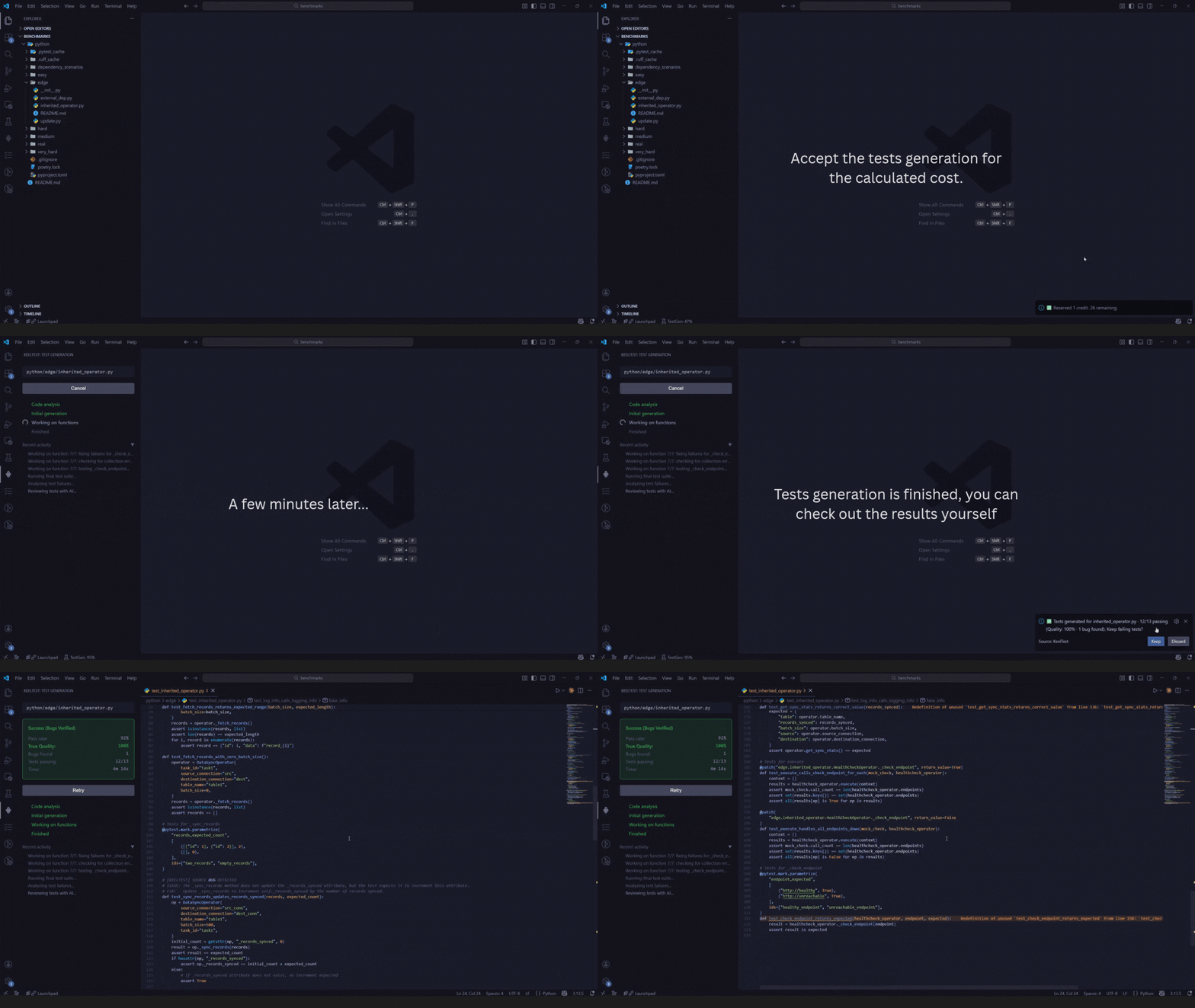
KeelTest generates production-ready pytest unit tests using AI. It analyzes your project, generates tests, runs them locally, and fixes failures automatically before showing you results.

The difference: 70%+ pass rate guarantee or refund.

Why not GitHub Copilot or Cursor?

Tools like Copilot, Cursor, and ChatGPT are great at generating code that looks right. But when you run AI-generated tests, they often fail with import errors, incorrect mocks, or hallucinated fixtures.

KeelTest solves this:

  • Tests are actually run in your environment before delivery
  • Failures trigger automatic fixes (reads pytest output, adjusts code, retries)
  • Project-wide analysis prevents import and dependency errors
  • You only pay for tests that pass

Stop copy-pasting test suggestions and debugging them manually. Get verified, working tests from the start.

Features

  • Tests validated and run locally before delivery
  • Self-healing: auto-fixes failing tests through iteration
  • Per-function generation for maintainable tests
  • Library-specific strategies (FastAPI, Pydantic, SQLAlchemy, pandas, etc.)
  • Ruff integration for code quality
  • Works with Poetry or pip

Installation

  1. Install from VS Code Marketplace or search "KeelTest" in VS Code
  2. Get your API key from keelcode.dev/account
  3. Configure: Ctrl+, → Search "KeelTest" → Enter API key

Prerequisites:

  • Python 3.8+
  • pytest installed in your project
  • Poetry (recommended) or pip
# Install pytest
poetry add pytest --group dev
# or: pip install pytest

# Optional: for async code and formatting
poetry add pytest-asyncio ruff --group dev

Note: KeelTest prefers Poetry (poetry run pytest) but falls back to python -m pytest automatically.

Quick Start

  1. Right-click any Python file
  2. Select KeelTest: Generate Tests
  3. Confirm cost estimate
  4. Watch the progress panel
  5. Get your test file with test_ prefix

Configuration

Settings: File > Preferences > Settings > Extensions > KeelTest

Setting Default Description
keeltest.apiKey "" Your API key
keeltest.useRuff true Format with Ruff
keeltest.failureHandling "ask" Handle failures: "include", "exclude", or "ask"

Pricing

  • Free tier: 7 credits/month
  • 1 credit = 1 small file (up to 15 functions)
  • Credits reset monthly
  • Pay only for successful generation

View pricing plans

Troubleshooting

API key not configured

Settings → KeelTest → Enter your API key from keelcode.dev/account

pytest not found

poetry add pytest --group dev
# or: pip install pytest

Insufficient credits

Check balance at keelcode.dev/account

Tests failing persistently

  1. Verify all dependencies are installed
  2. Install pytest-asyncio for async code
  3. Review generated tests for project-specific issues

Support

  • Issues: GitHub Issues
  • Contact: hello@keelcode.dev
  • Website: keelcode.dev/keeltest

Privacy

Code is not stored or used for training.


Made with focus by KeelCode

  • Contact us
  • Jobs
  • Privacy
  • Manage cookies
  • Terms of use
  • Trademarks
© 2025 Microsoft