Sage Paper Light
Warm paper. Soft sage. A touch of forest green.

Sage Paper Light is a quiet light theme for Visual Studio Code, with a palette hand-tuned by Junxi. Warm paper and soft sage surfaces give the workbench a gentle rhythm; forest-green accents keep focus, navigation, and selections easy to follow. Muted plum, rose, gold, and teal bring a considered balance to syntax highlighting.
Light theme · VS Code 1.85+ · TextMate + semantic highlighting · MIT
Preview
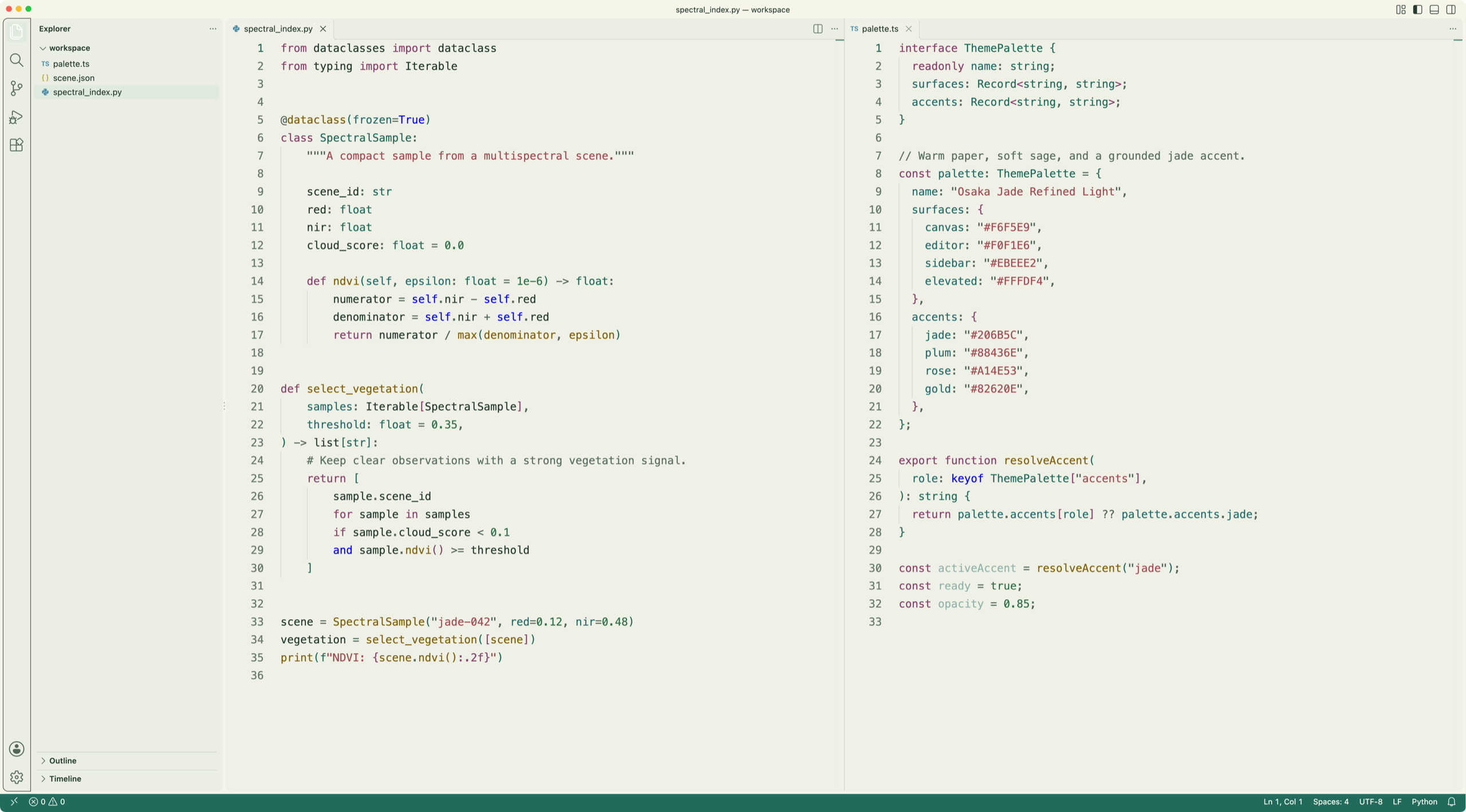
The workbench
Python and TypeScript side by side, with warm editor surfaces, sage navigation, and restrained syntax colors.
The terminal
The integrated terminal shares the editor's background and includes a matching 16-color ANSI palette.
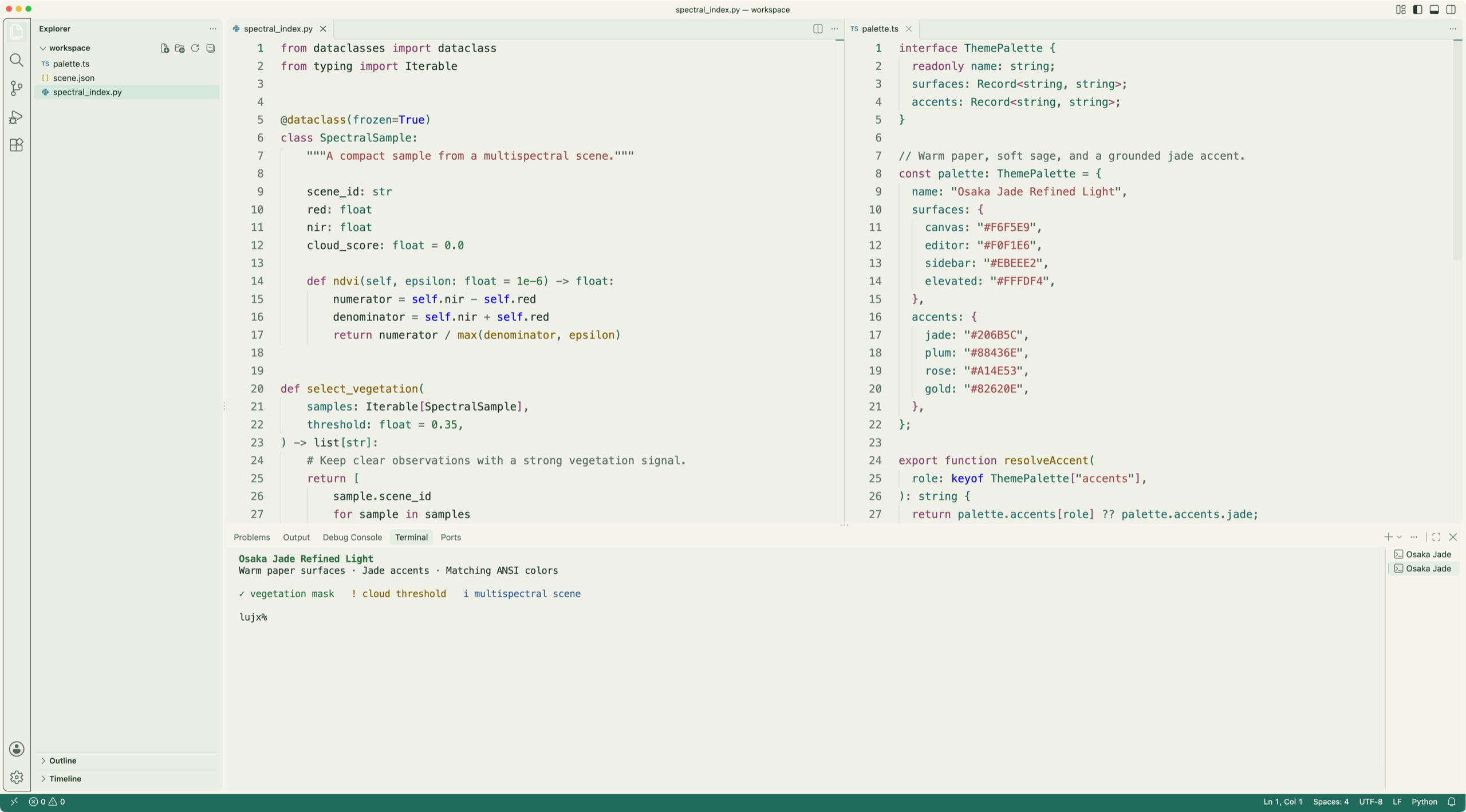
Captured in VS Code on macOS with the bundled theme, Menlo, and demonstration files. Fonts, icons, and editor layout are controlled by VS Code settings.
Designed for a calmer workbench
- Layered light surfaces — warm paper, pale sage, and soft cream distinguish the editor, sidebar, panels, and floating controls.
- Grounded forest accents — active tabs, focus borders, the cursor, buttons, and the workspace status bar share the same green.
- A considered syntax palette — muted plum keywords, rose strings, gold functions, teal variables, and forest-green types.
- TextMate and semantic tokens — includes Light+ grammar coverage with custom syntax roles and semantic highlighting enabled. Semantic colors depend on the language extension providing tokens.
- Beyond the editor — color mappings for the terminal, Git decorations, diffs, diagnostics, search, minimap, notebooks, settings, and chat.
- A static theme — no extension runtime, background tasks, telemetry, or network requests.
Palette
Workbench surfaces
| Role |
Color |
Where it appears |
| Warm paper |
#F6F5E9 |
Title bar and panels |
| Pale sage |
#F0F1E6 |
Editor and terminal |
| Soft sage |
#EBEEE2 |
Sidebar, activity bar, and inactive tabs |
| Cream |
#FFFDF4 |
Inputs, menus, and floating widgets |
| Deep green |
#243A30 |
Main text |
| Forest green |
#206B5C |
Focus, cursor, buttons, and workspace status bar |
| Mist green |
#D5E8D9 |
Selections |
Syntax roles
| Role |
Color |
| Comments |
#5B7063 |
| Keywords |
#88436E |
| Strings |
#A14E53 |
| Numbers and booleans |
#2D7048 |
| Functions and methods |
#82620E |
| Variables, parameters, and properties |
#246C6B |
| Types, classes, and interfaces |
#206B5C |
These are the theme's role mappings. Individual grammar scopes and language-provided semantic tokens may use inherited Light+ rules.
Get started
- Install Sage Paper Light from the Visual Studio Marketplace. For a local VSIX package, use Extensions → … → Install from VSIX….
- Open the Command Palette with ⌘⇧P on macOS or Ctrl+Shift+P on Windows/Linux.
- Run Preferences: Color Theme and select Sage Paper Light.
For the theme picker shortcut, use ⌘K, ⌘T on macOS or Ctrl+K, Ctrl+T on Windows/Linux.
The extension provides one light theme. Your font, icon theme, and editor layout stay configurable independently.
Credits & license
Palette, workbench colors, and syntax refinements by Junxi.
Base TextMate coverage derives from Microsoft's Light+ and Light (Visual Studio) themes.
The editor and terminal previews above are actual VS Code captures.
Released under the MIT License. See LICENSE and NOTICE for licensing and attribution.

