Token Consumer Dashboard
Token Consumer Dashboard helps you understand how much AI assistance you are using inside and around VS Code. It collects local usage signals from supported AI tools, normalizes them into one timeline, and shows daily totals, active consumption, model breakdowns, costs, and trends in a clean dashboard.
Dashboard Preview
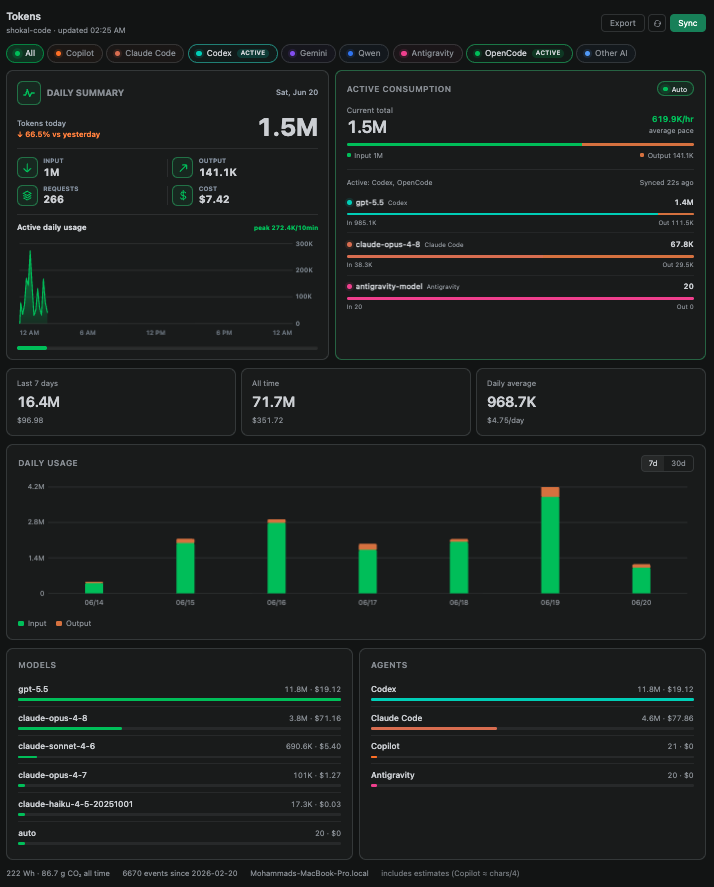
Use it when you want a quick answer to questions like:
- How many tokens did I use today?
- Which agents have been active recently?
- Which AI agent or model is using the most context?
- How much input vs output token usage am I generating?
- What did the last 7 or 30 days look like?
- Are my token totals coming from verified provider data or estimates?
Highlights
- Realtime local-log watching with a configurable polling fallback.
- Independent
Active badges for every agent observed during the last 5 minutes.
- Per-agent tabs for Copilot, Claude Code, Codex, Qwen, Antigravity, OpenCode, and imported usage.
- Daily summary with token totals highlighted first, plus estimated cost, input/output split, requests, and comparison with yesterday.
- Intraday token area graph with 1-minute activity windows, peak tokens, hover details, and a continuously advancing daily timeline.
- Agent Wise consumptions view with daily tokens highlighted first, estimated cost as supporting detail, input/output split, model activity, and last sync time.
- 7-day and 30-day cost charts plus all-time totals, daily averages, and compact trend graphs.
- Model, agent, source, energy, and estimated carbon breakdowns.
- JSON export and local source diagnostics.
- Optional multi-device aggregation through a folder you control.
- Local-first storage with no account, hosted server, or external dashboard required.
Supported Sources
Token Consumer reads usage data from local files created by AI tools on your machine.
| Agent |
What is tracked |
Quality |
| Claude Code |
Session transcript usage records, with streamed output normalized to visible final turns |
Verified |
| Codex |
Local task records, using visible prompt input estimates plus provider output deltas |
Estimated |
| Qwen Code |
Local per-response usageMetadata from Qwen chats |
Verified |
| Antigravity (AGY) |
Local prompt history; response tokens are not exposed |
Estimated |
| OpenCode |
Numeric token, cache, reasoning, model, and cost metadata from the local database |
Verified |
| GitHub Copilot |
Provider-reported VS Code chat/agent usage grouped by session and model; GitHub AI Credit values are used when saved locally |
Estimated |
| Other AI |
Manually added or imported normalized events |
Depends on source |
Some tools expose exact token counts locally. Others only leave enough information for a careful estimate. The dashboard labels this so you know how much confidence to place in each number.
Realtime Activity
Supported agent logs are watched for local file changes. A change schedules a fresh usage scan immediately; the configured refresh interval remains as a fallback for sources that do not emit a usable file event.
Each agent has its own rolling 5-minute activity window:
- A watched log change or an increase in that agent's token total renews its
Active badge.
- Several agents can remain
Active at the same time.
- Activity from one agent does not renew or remove another agent's badge.
- The badge disappears automatically after 5 minutes without another observed signal.
- Hovering an active agent tab shows when its last activity was observed.
Active means Token Consumer recently observed local log or token activity. It does not guarantee that the agent process is still running or generating a response at that exact moment.
Getting Started
- Install Token Consumer Dashboard.
- Open the Token Consumer icon from the VS Code Activity Bar.
- Let the automatic initial scan discover supported local sources, or click
Sync to force a fresh scan.
- Keep
Live enabled for realtime updates while the dashboard is visible.
You can also open it from the Command Palette with Token Consumer: Open Dashboard.
Dashboard Sections
Daily Summary
See today's token total first, with estimated cost, input/output split, request count, and comparison with yesterday. The area graph plots token activity across the full day, advances with the current time, highlights the peak total, and shows interval details on hover.
Agent Wise Consumptions
Watch the selected agent's active daily token usage, token pace, estimated cost, input/output split, active models, and last sync time update as local usage appears. Pause or resume automatic updates with the Live control.
Agent Tabs
Choose All for combined usage or select an individual agent to filter the daily summary, active consumption, charts, models, sources, and totals. Recently observed agents receive independent Active badges.
Daily Usage
Switch between 7-day and 30-day charts to spot heavier usage days and trends over time.
Models and Agents
Compare usage by model and by AI agent. When an individual agent is selected, the agent breakdown becomes a source breakdown so you can see where its records came from.
Devices
If you connect multiple machines to the same shared data directory, the dashboard can show combined totals and a per-device breakdown.
Export and Source Checks
Use Export to save the currently selected agent, range, dashboard metadata, and normalized events as JSON. Run Token Consumer: Check CLI Data Sources to see which supported tools and exact or estimated usage sources are available locally.
Agent Views
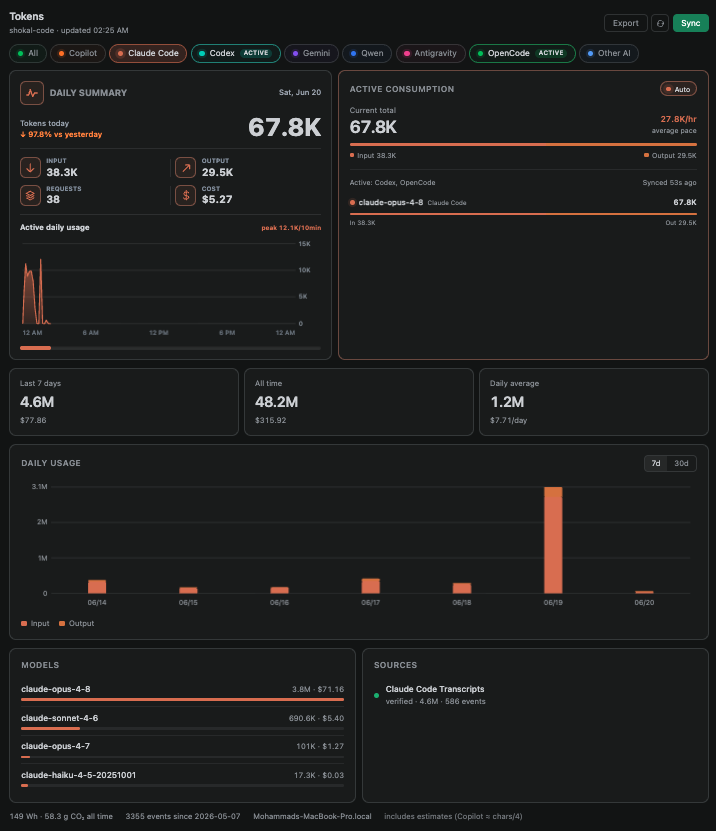
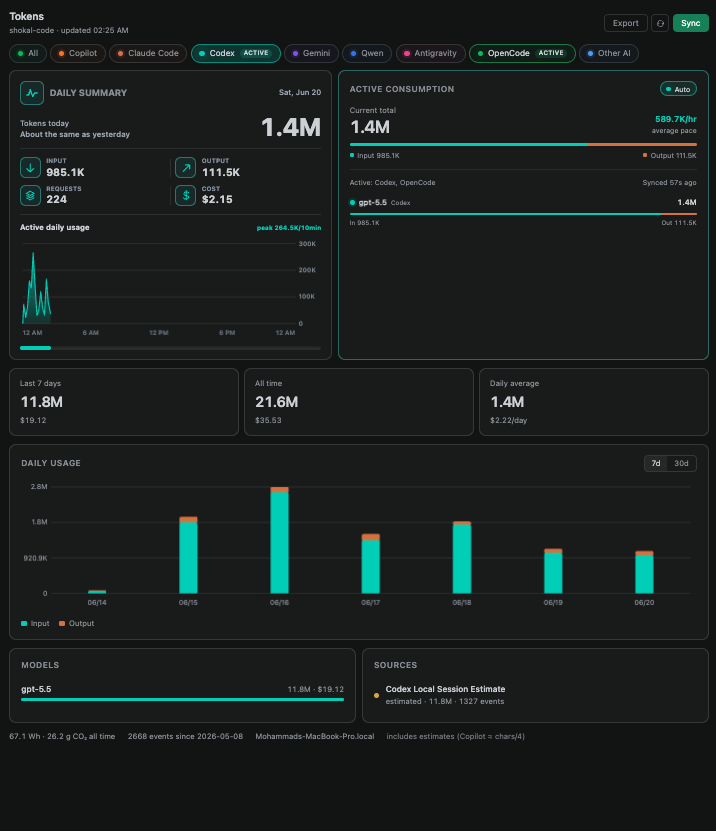
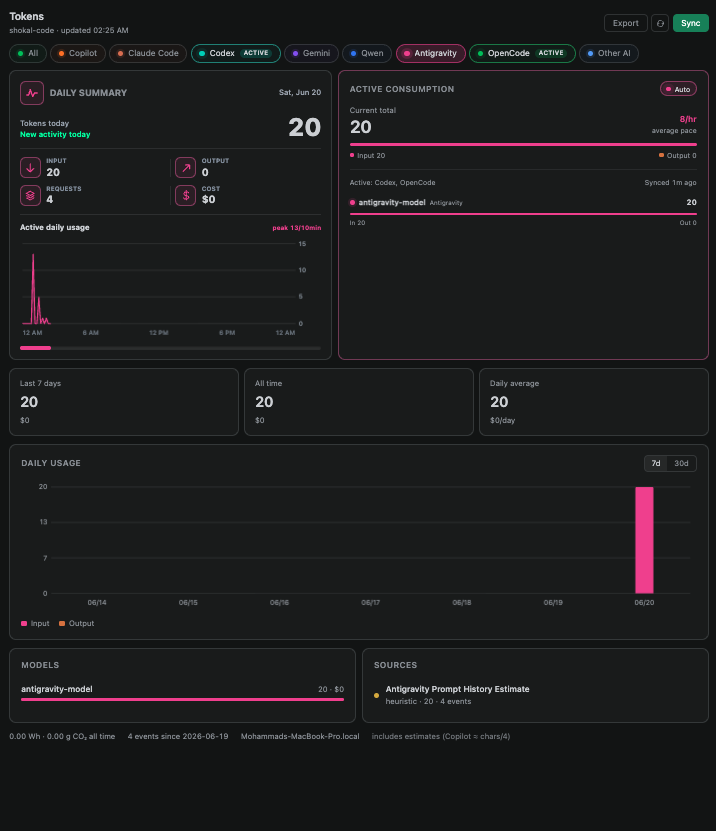
Select an agent tab to focus every total, graph, model, and source breakdown on that agent. Open any preview below to inspect the full dashboard view.
Claude Code
Codex
Antigravity
Privacy and Storage
Token Consumer is designed to be local-first.
- Usage events are stored in VS Code's extension global storage by default.
- Nothing is written to your project folder by default.
- No account is required for local tracking.
- Optional Token Consumer cloud sync is available with Sign Up / Sign In and stores usage metadata in Supabase under your account.
- Imported records contain usage metadata only; Token Consumer does not copy prompt or response text into its event files.
- Each machine writes its own local
events-<deviceId>.jsonl file.
- You can choose a cloud-synced folder if you want to merge usage across devices.
Cloud sync uploads token counts, estimated costs, agent/model labels, timestamps, device/workspace identifiers, and source metadata. Prompt and response text are not uploaded by Token Consumer. You can also choose a cloud-synced folder, such as iCloud Drive, Dropbox, OneDrive, or Google Drive, if you prefer file-based multi-device merging.
Accuracy Notes
Different AI tools expose different levels of local usage detail.
- Claude Code, Qwen, and OpenCode sources can include provider-reported token counts. Claude Code streamed transcript blocks are normalized so repeated hidden output blocks are not counted as new user-visible output.
- Codex and Copilot may rely on local estimates when exact usage is not available. Codex task counters are normalized to avoid counting the same replayed conversation context on every internal model call.
- Antigravity currently exposes readable prompt history but not response token totals, so its events are marked heuristic and count prompt characters only.
- Copilot uses provider-reported session usage when VS Code saves it. Records that only contain visible chat text are skipped for token and credit totals, because visible text alone misses hidden context and would create misleading billing estimates.
- Copilot spend is shown as GitHub AI credits on the Copilot tab. When VS Code saves GitHub-reported credit values in chat session metadata, those values are used; otherwise the dashboard estimates from the saved token counts, published per-token model rates, and the fixed conversion
1 GitHub AI Credit = $0.01 USD. It represents estimated usage value; included plan credits may cover it, and it is not an invoice.
- Cost values for every provider remain estimates when complete billing metadata is not available locally.
- Cached input tokens and cached-token cost are stored separately and excluded from dashboard totals by default.
The dashboard is best used as a practical visibility tool, not as a billing authority.
Useful Settings
Open VS Code Settings and search for Token Consumer.
| Setting |
What it does |
tokenConsumer.liveRefreshSeconds |
Controls the fallback scan interval. Supported local log changes normally trigger realtime sync. |
tokenConsumer.syncLookbackDays |
Controls how far back local logs are scanned during sync. |
tokenConsumer.includeCachedInputTokens |
Includes cached input tokens in combined headline totals where the provider reports them that way. Claude Code cache read/write remain separate, and cost always includes billable cache traffic. |
tokenConsumer.dataDirectory |
Uses a custom folder for storage or multi-device aggregation. |
tokenConsumer.deviceLabel |
Gives the current machine a friendly name in the device breakdown. |
tokenConsumer.showDemoData |
Shows generated demo data when no real events exist. |
Commands
| Command |
Purpose |
Token Consumer: Open Dashboard |
Opens the full dashboard. |
Token Consumer: Sync Usage Data |
Scans supported local tools and updates the dashboard. The $(sync) Sync Tokens button immediately beside the bottom-right token counter runs the same sync without opening the dashboard. |
Token Consumer: Open Token Event File |
Opens the normalized event file for manual review or import. |
Token Consumer: Check CLI Data Sources |
Shows which local sources were found. |
Token Consumer Dashboard is developed and maintained by Mohammad Joynul Abedin (Shokal).
Manual Events
If you have verified usage from another tool, you can add it as a normalized JSON event.
Example:
{"agent":"codex","model":"gpt-5-codex","timestamp":"2026-06-10T10:15:00.000Z","inputTokens":4200,"outputTokens":900,"costUsd":0.0143,"source":"Provider Verified Export","sourceKind":"verified","language":"JavaScript","requests":1,"accepted":1}
Supported agent ids are copilot, claude-code, codex, qwen, antigravity, opencode, and other-ai.
Event Fields
agent: Agent or provider id.model: Model name.timestamp: ISO date string.inputTokens: Prompt, context, or input tokens.outputTokens: Generated response tokens.totalTokens: Optional. If omitted, input and output are added.cachedInputTokens: Optional aggregate cached prompt/context tokens (compatibility field).cacheReadInputTokens: Optional provider-reported cache-read tokens.cacheWriteInputTokens: Optional provider-reported cache-creation tokens; Claude events also preserve the 5-minute and 1-hour write split.cacheUsageAvailable: Optional boolean distinguishing a verified zero from a source that does not expose cache data.rawInputTokens: Optional provider-reported input before cached-token handling.costUsd: Optional cost estimate in USD.source: Human-readable source label.sourceKind: verified, estimated, heuristic, sample, or demo.language: Optional language or category label.requests: Optional request count.accepted: Optional accepted suggestion or edit count.

