ADR Companion for VS Code


Write, link and govern Architecture Decision Records without leaving the editor — and enforce
the same rules in CI with a single-file CLI. Open source (Apache-2.0) by Jakub Jirák. No account,
no telemetry, zero runtime dependencies.
Features
Create
- New ADR from a template — Nygard (Classic), MADR, RFC, Y-Statement, Tyree & Akerman, or your
own Custom template with
{{number}}, {{number:0000}}, {{title}}, {{date}}, {{status}}.
Numbering is automatic and keeps your existing zero padding (0007-use-kafka.md).
- ADR from a merged pull request — pick a merge commit (
git log --merges) or paste a copied PR
description; Context / Decision / Consequences are extracted from its sections, the PR number and
a readable title are detected (GitHub, GitLab and squash-merge subjects).
Browse and navigate
- Architecture Decisions view in the Explorer: grouped by status, as a timeline by month, or
as a flat list; tooltips show status, date, successor and context.
- Go to ADR — fuzzy pick by number, title or words from the context.
- Code ↔ ADR links —
@adr:0007, @adr-7, @adr#7 or @ADR(7) in any language becomes a link
with a hover card; @adr: completion lists every decision (outdated ones last, struck through).
- Link Code to ADR (
Cmd/Ctrl+Alt+A) inserts the annotation in the current language's comment
syntax. Find Code References lists every place a decision is cited, or tells you it is an orphan.
Lifecycle
- Change Status — Draft → Proposed → Accepted → Deprecated / Superseded / Rejected, with
non-standard transitions labelled. Front matter and the
## Status section are updated together.
- Supersede links both ways — choosing Superseded asks for the successor, writes
Superseded by [ADR-0012](https://github.com/JirakJ/vscode-adr-companion/blob/HEAD/0012-….md) and adds Supersedes ADR-0007 (and supersedes: [7] in front
matter) to the successor.
- Safe renumbering — change a number and the file name, title heading, front matter and every
ADR-7 / @adr:007 / Markdown link across the folder are rewritten, each keeping its own padding.
This is how you fix two branches that both created ADR-0007.
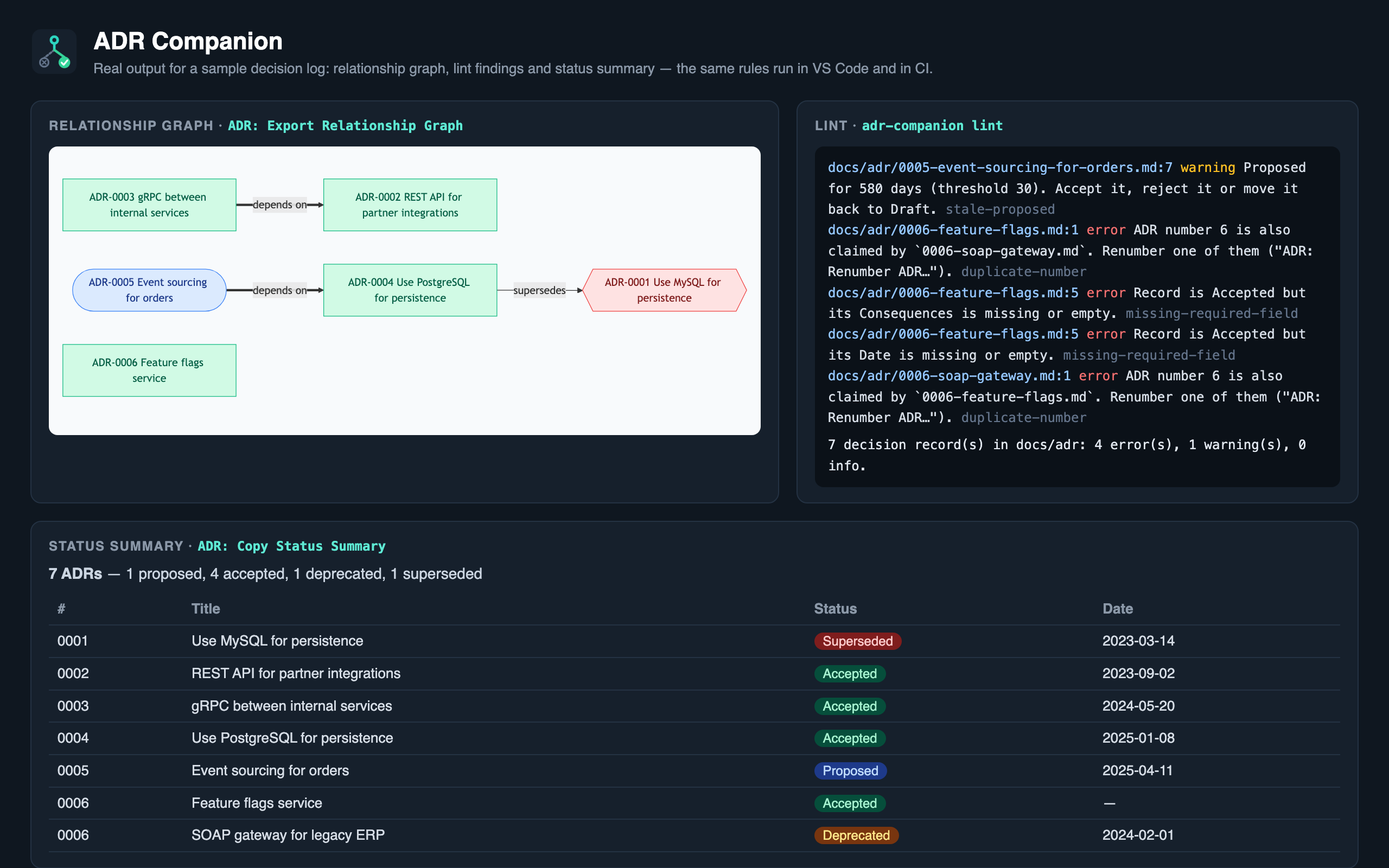
Lint diagnostics (Problems panel, live while you type)
| Rule |
Severity |
| Accepted record without Decision, Consequences or Date |
error |
| Superseded record without a successor; successor that does not exist |
error |
| Two records claiming the same number |
error |
| Rejected record without any rationale |
error |
Proposed for longer than maxProposedAgeDays |
warning |
| Unknown / missing status, invalid date, conflicting numbers (file vs heading vs front matter) |
warning |
| Accepted record still containing template placeholder text |
warning |
@adr:NNN in code pointing at a missing ADR / at a deprecated or superseded one |
warning / info |
Accepted record older than stalenessThresholdDays (opt-in review reminder) |
info |
Share
- Copy Status Summary — a Markdown badge, status breakdown and table for a README or PR.
- Generate Index —
index.md in the ADR directory as one table or grouped by status or year.
- Export Relationship Graph — Mermaid (renders on GitHub, GitLab, Confluence, Backstage) or
Graphviz DOT; supersedes / amends / depends-on / related edges; optional clustering by status.
Govern
- Team configuration — a committed
.adr-config.yaml overrides personal settings key by key.
The format is shared with the ADR Companion plugin for JetBrains IDEs.
- Governance check — list architecturally significant globs under
requireAdrForPaths; when a
change touches them without adding or updating an ADR, ADR: Check Governance warns in the editor
and adr-companion governance fails the pull request.
Getting started
- Run ADR: Create New ADR… from the Command Palette (or the
+ in the Architecture Decisions view).
Records are found in doc/adr, docs/adr, adr, docs/decisions or docs/architecture/decisions;
the first ADR goes to docs/adr unless you configure another directory.
- Optionally run ADR: Create Team Configuration to commit a documented
.adr-config.yaml.
- Add
// @adr:0001 above the code a decision governs.
Team configuration — .adr-config.yaml
directory: docs/adr
defaultFormat: MADR          # NYGARD | MADR | RFC | Y_STATEMENT | TYREE_AKERMAN | CUSTOM
maxProposedAgeDays: 30
stalenessThresholdDays: 180
customTemplatePath: docs/adr/.adr-template.md

# Changing a matching file without an ADR fails the governance check.
requireAdrForPaths:
  - "**/api/**"
  - "**/*.proto"
  - db/migrations/**
** crosses directories, * and ? stay within one. Unknown keys and bad values become warnings on
the file itself — a malformed config never stops the extension from finding your decisions.
CI: the adr-companion CLI
Every release ships
adr-companion-cli.cjs, a single dependency-free file that runs with Node 18+. ADR: Create GitHub
Actions Governance Workflow writes this for you:
- uses: actions/checkout@v4
  with: { fetch-depth: 0 }
- run: curl -fsSL -o adr.cjs https://github.com/JirakJ/vscode-adr-companion/releases/download/v1.0.0/adr-companion-cli.cjs
- run: node adr.cjs lint --format github        # findings appear on the PR diff
- run: node adr.cjs governance --format github  # uses origin/$GITHUB_BASE_REF as the base
adr-companion lint        [--format text|json|github] [--fail-on error|warning|info|never]
adr-companion governance  [--base <ref>] [--head <ref>] [--files a,b] [--format text|github] [--warn-only]
adr-companion graph       [--format mermaid|dot] [--direction TD|LR] [--cluster] [--out <file>]
adr-companion index       [--group none|status|year] [--out <file>]
adr-companion summary
common:                   [--root <repo>] [--dir <adr directory>]
Exit codes: 0 ok, 1 findings at or above the threshold / governance violation, 2 runtime error,
64 usage error. Git is always run via execFile with an argument array, never through a shell.
Settings
| Setting |
Default |
Description |
adrCompanion.directory |
(auto) |
ADR directory relative to the workspace folder |
adrCompanion.defaultFormat |
nygard |
Template preselected for new records |
adrCompanion.customTemplatePath |
(empty) |
Template for the Custom format |
adrCompanion.maxProposedAgeDays |
30 |
Stale-proposal threshold |
adrCompanion.stalenessThresholdDays |
0 |
Review reminder for old accepted records (0 = off) |
adrCompanion.requireAdrForPaths |
[] |
Globs that need an ADR when changed |
adrCompanion.governance.baseRef |
(auto) |
Base for the governance check (origin/HEAD, then main/master) |
adrCompanion.view.mode |
status |
status, timeline or flat |
adrCompanion.lint.enabled |
true |
Lint diagnostics on decision records |
adrCompanion.referenceCheck.enabled |
true |
Check @adr annotations in code |
adrCompanion.statusBar.enabled |
true |
ADR count in the status bar |
Keys present in .adr-config.yaml take precedence over these settings.
Workspace trust
In an untrusted workspace you can browse, lint and edit records; commands that run git (ADR from
merged PR, governance check) and the custom template path are disabled until you trust the folder.
Development
npm ci
npm run lint && npm run typecheck && npm test
npm run vsix            # builds dist/ and packages the extension
npm run icon            # regenerates media/icon.png
npm run screenshot      # regenerates media/screenshot.png from real CLI output (needs Chrome)
Everything under src/core is pure TypeScript without the VS Code API, so the editor and the CLI share
one implementation. This repository records its own decisions in docs/adr.
License
Apache-2.0 © 2026 Jakub Jirák

