🧠 GHCP-MEM
You ship features. Your AI shouldn't have to relearn your project every morning.
Every Copilot chat starts from zero — you pay the Context Tax: ten minutes
and thousands of tokens re-explaining a project you already explained
yesterday. GHCP-MEM ends it. It gives Copilot a local, auditable
engineering memory — seeded from your git history in 30 seconds — so every
chat starts where the last one ended, and every claim shows its receipts.
No cloud memory backend: stored memory, search, and retrieval stay on your
machine — secrets and cloud identifiers redacted before they hit disk,
optional AES-256-GCM encryption at rest. The one remote step is optional
session compression, which sends redacted session data to your existing
Copilot model under GitHub's terms (a fully local extractive fallback runs
when no model is available — see the
threat model for the exact data flow).
Every stored decision cites the events that produced it. Most
"what / why / how" questions route to a millisecond local lookup instead of
a fresh Copilot completion — your token budget goes to shipping, not
catching up.
Local-first · Copilot chat participant · MCP stdio · Redaction-first











The villain: the Context Tax
Every new Copilot chat is a fresh amnesia. The Context Tax is what it collects from you, every single day:
What it takes from your wallet and your clock
- Copilot re-reads files just to figure out "what is this project?" — 2,000–10,000 tokens before you've asked a real question.
- You re-explain the same architecture decisions, week after week.
What it takes from your head
- The first ten minutes of every chat feel like onboarding the same intern, again.
- You start second-guessing AI suggestions because they might come from a memory layer that's hallucinating context you can't verify.
- You stop trusting the tool — and silently revert to copy-paste prompting.
Why it's simply wrong
- A tool that forgets your work disrespects your work. AI should remember what you've already done — and prove what it remembers. A coding assistant without provenance is a coworker with confident amnesia: the worst kind to work with.
Why we built this
We paid the Context Tax every morning too. We know the exact feeling of typing the same architecture explanation for the fourth Monday in a row — and the quiet distrust when a "memory" tool confidently asserted something we couldn't verify. We shopped the market and found tools that wanted ports, sidecars, vector databases, or cloud sync — and not one of them showing receipts for what they claimed to remember.
GHCP-MEM is what we shipped instead. It's the memory layer we wanted: local-first, evidence-grounded, self-routing. Built specifically for VS Code + Copilot, then extended to every MCP-compatible agent (Cursor, Cline, Windsurf, Claude Desktop, Copilot CLI) through one stdio server.
Why it's worth your trust:
- 626 tests, zero native dependencies, zero open ports —
npm install doesn't compile anything. Source is formatted with Prettier (CI-enforced via format:check) so reviewers see real code, not bundle output. Auditable in an afternoon.
- Documented, versioned engineering phases, each with grounded design rationale in the CHANGELOG. No marketing claims that don't have code behind them.
- An evidence-citation gate in the compressor — the LM cannot emit a decision without pointing at the captured event that produced it. Hallucinated rationale never reaches storage.
- An nDCG@K regression gate runs in CI — if a ranker change regresses retrieval, the build fails.
/compliance chat command prints a one-shot audit report (grounding coverage, trust distribution, conflict counts, redaction stats) — built for the security reviewers in your org, not just for engineers.
The 30-Second Memory Plan
| Step |
What you do |
What GHCP-MEM does |
| 1. Install |
One click from the Marketplace, or code --install-extension ITcredibl.ghcp-mem |
Activates on next VS Code launch. Zero config required. |
| 2. Seed |
Accept the one-click prompt (or run GHCP-MEM: Seed Memory from Git History...) |
Mines your repo's last 200 commits into searchable, redacted sessions in ~30 seconds — months of decisions, fixes, and deploys, remembered on day one |
| 3. Ask |
Open Copilot Chat: @mem /search why did we switch to X — or just ask your usual question |
Copilot starts with your project's decisions already cited. For "what / why / how" questions, the answer comes from local lookup — no Copilot completion is spent. On real-repo benchmarks: recall@5 of 73–100%, p95 under 100ms at 10,000 sessions. |
From then on it just captures as you work — edits, terminals, diagnostics, deploys — and every new chat starts caught up.
Our three promises while it runs: everything stays local (no memory backend, zero open ports) · everything is redacted before it touches disk (30 rules + entropy catch-all + optional encryption at rest) · everything is auditable (every claim cites its evidence; /compliance prints the proof).
That's it. No daemon to keep running. No cloud account to register. No vector DB to provision.
Watch it prove itself (real output, 60 seconds)
Everything below was generated by running GHCP-MEM against this repository's own git history — not a mock-up. Reproduce it yourself: install, open this repo, accept the seed prompt.
1 · Seed — one click, ~30 seconds:
GHCP-MEM: Seeded 28 sessions from 157 commits (9 low-signal skipped). 7 secrets redacted.
Seven redactions on our own history — here's one in the stored data, a branch path the entropy detector wouldn't clear:
Merge pull request [#20](https://github.com/ITcredibl/ghcp-mem/issues/20) from [REDACTED:high-entropy]#8b0e3e79 — plus 20 related commit(s)…
2 · Ask — a question a teammate would actually ask:
@mem /search why did seeded sessions disappear after restart

[#1](https://github.com/ITcredibl/ghcp-mem/issues/1)  [deployment · 2026-09-12 · id 8ff196d]
    release: v1.18.1 — maintenance batch + release-gate correctness fixes
    — plus 3 related commit(s): fix(ci): strict gate no longer demands tag-at-HEAD…
    ↳ decision: ancestry instead of equality so tag re-runs after main advances work
A dated, id-addressed answer with the decision surfaced — not a vibe, a citation.
3 · Audit — see exactly what it knows and what it hid:
GHCP-MEM: Show Current Repo Memory — every stored row for this repo, in one report@mem /why <query> :: 8ff196d — the per-signal math behind that ranking@mem /compliance — grounding coverage, trust distribution, and redaction stats, audit-ready
If any step above doesn't reproduce on your machine, that's a bug — file it.

The cost of doing nothing
Ignore it, and the Context Tax doesn't stay flat — it compounds, session by session:
| If you don't act |
What it costs you |
| Catch-up tokens stay invisible |
You burn 2,000–10,000 tokens per chat re-explaining what's already in your repo |
| Decisions live only in your head |
Three weeks later, you can't remember why the auth refactor took the shape it did — and Copilot guesses |
| AI "memory" you can't audit |
The model surfaces a confident claim once, you act on it, and only later discover it was wrong — trust is broken |
| Conflicting decisions stack up |
"We use JWT" / "We switched to sessions" / "We're back on JWT for mobile" — Copilot sees them all, picks one at random |
| Compliance reviews require a research project |
When security asks what does this tool know about our code?, you can't answer in under a day |
What changes after you install
| Before |
After |
| The engineer who re-explains the project every morning |
The engineer whose AI already knows — with receipts |
| "Let me find that decision…" (20 minutes of git archaeology) |
@mem /search why did we switch (500 tokens, 2 seconds) |
| Trusting AI memory on faith |
Auditing AI memory on evidence — every claim cites its source |
| Paying the Context Tax daily |
Spending those tokens on shipping |
With GHCP-MEM in place:
- 🟢 Your Copilot resumes where you left off. The auto-injected memory file makes every new session start with context already loaded.
- 🟢 Every decision is cited.
@mem /entity src/auth.ts shows you the supersession chain, the evidence, the contributors — in 500 tokens.
- 🟢 Wrong rank? You see why.
@mem /why <q> :: <id> breaks down every signal that contributed to a ranking — when the system is wrong, it tells you exactly why.
- 🟢 Contradictions surface before they bite.
/conflicts flags "we picked X instead of Y" decisions that overlap with older choices.
- 🟢 Token bill goes down. The startup primer biases Copilot toward MCP queries (~200–500 tokens) over file opens (~2,000–10,000 tokens) for history questions — a modeled 5–20× estimate; run
@mem /savings for the breakdown on your own store (exact token counts when the model tokenizer is available, chars÷4 heuristic otherwise).
- 🟢 Security review takes 5 minutes.
/compliance prints the audit report. You hand it to the reviewer and move on.
Tokens go to building. Decisions stay grounded. Trust holds.
How it surfaces (4 pillars at a glance)
| Pillar |
What it delivers |
Try it |
| 🧠 Memory |
Persistent, structured record of what you changed, decided, fixed, deployed — captured locally from real editor events |
@mem /recent · @mem /entity src/<file> |
| 💰 Tokens |
Auto-routing primer in every Copilot session steers the agent to cheap MCP queries over file opens |
@mem /route <question> shows the cost estimate |
| ⚡ Performance |
Hybrid retrieval — BM25 + recency + embeddings + match-ratio + decayed confidence + reinforcement, with an optional LM rerank on the top-K, tuned by per-user adaptive weights, gated by nDCG@K regression suite (marginal lift of each stage is published in the real-world ablation) |
@mem /why <q> :: <id> decomposes the score |
| 🤖 AI agentic coding |
Full MCP parity (14 tools), evidence-grounded decisions, conflict detection, score explainer, Mermaid graph export — for Cursor, Cline, Windsurf, Claude Desktop, Copilot CLI |
npx ghcp-mem-mcp exposes all tools over stdio |
It surfaces memory through:
- the
@mem chat participant (42 commands including /savings, /entity, /snippet, /why, /graph, /compliance, /route, /lessons, /rules)
- native Copilot agent tools (
#ghcpMemSearch, #ghcpMemStore, #ghcpMemAudit, #ghcpMemLessons)
- a bundled stdio MCP server with 14 tools for Cursor, Cline, Windsurf, Claude Desktop, and GitHub Copilot CLI
Why engineers trust it (deeper guarantees)
| What GHCP-MEM does |
Why it matters |
| Auto-routes Copilot to cheap context |
Every new session ships a routing primer that biases the agent toward MCP queries (~200–500 tokens) over file opens (~2,000–10,000 tokens) for "why / what / how" questions |
| Grounds every decision in evidence |
The compressor enforces an evidence-citation gate: any decision the LM emits without pointing at a captured event is dropped before storage. No hallucinated "we picked X because Y" |
| Scores trust per memory + decays over time |
Each session carries a confidence ∈ [0, 1] derived from evidence breadth, redaction noise, and compressor mode; effective confidence decays with disuse (60-day half-life) so stale memories fade in ranking |
| Detects contradictions on capture |
Heuristic conflict detector flags decisions containing markers like "instead of" / "deprecated" that overlap with older sessions sharing files; surfaces via /conflicts for review |
| Explains every rank |
/why <query> :: <id> returns a per-signal score breakdown (keyword, recency, confidence, feedback, learned weights, …) so when ranking is wrong, you can see why |
| Learns from your feedback |
/accept and /reject pump signals into a bounded adaptive learner (±25% per weight, 60-day half-life) so the ranker tunes to your actual workflow |
| Runs with zero native dependencies |
No Bun, Python, SQLite binary, WASM, Chroma, or model downloads |
| Opens zero network ports |
No GHCP-MEM backend or telemetry. LM compression uses your existing Copilot subscription only |
| Stores data locally |
Memory stays on your machine under your control |
| Redacts secrets by default |
30-rule dual-pass redaction + custom regex rules + custom-entity literal rules + <private>...</private> stripping |
| Enterprise privacy controls |
Strict mode disables terminal capture, raw snippets, team export, and MCP write tools |
| Supports enterprise policy injection |
Optional remote policy URL appends centrally managed redaction rules on startup |
| Idle-triggered compression |
Auto-flush sessions when editor is inactive (configurable 0–300s timeout) |
| Enterprise compliance modes |
User-defined regex redaction rules for FinTech (PCI-DSS), Healthcare (HIPAA), or custom compliance, plus customSensitiveEntities for organisation/project codenames |
| One-shot compliance posture |
/compliance chat command (and ghcpMem_compliance MCP tool) renders an audit-friendly snapshot: grounding coverage, trust distribution, conflict counts, redaction stats |
| Understands Azure workflows |
Azure subsystem tagging, live az snapshotting, Azure-specific redaction |
How it works
Step 1: Install it
Live on the VS Code Marketplace — one-click install, auto-updates included.


| Method |
Steps |
| Marketplace (recommended) |
Install from the Marketplace listing. |
| Inside VS Code |
Open Extensions (⇧⌘X / Ctrl+Shift+X), search GHCP-MEM, click Install. |
| Command line |
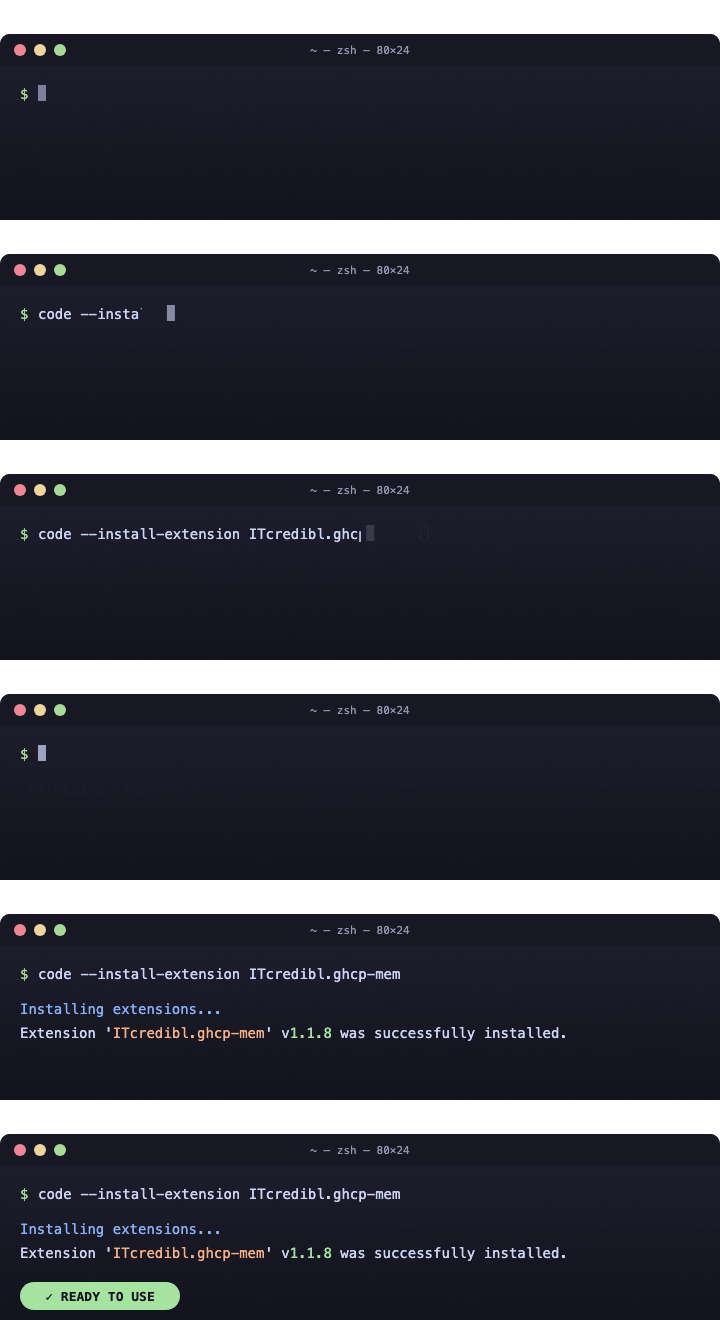
code --install-extension ITcredibl.ghcp-mem |
| Offline / air-gapped |
Download a .vsix from Releases and run code --install-extension ghcp-mem-<version>.vsix |
Verify the installed extension (security-conscious teams)
Every release from v1.6.1 onward uploads four artifacts to its GitHub Release page:
| Artifact |
What it lets you check |
ghcp-mem.vsix |
The exact build the Marketplace publishes |
ghcp-mem.vsix.sha256 |
Tamper-evident integrity for the .vsix |
sbom.json (CycloneDX) |
Every npm dependency that ends up in the bundle — auditable before install |
release-manifest.json + SLSA L3 provenance attestation |
Build provenance: this .vsix was built by the public release.yml workflow on the matching tag |
Backfilled v1.5.0–v1.6.0 releases include .vsix + .sha256 + sbom.json + a manifest, but not the SLSA L3 attestation — those tags predate the workflow fix that lets the attestor run successfully. Verify them via the SHA-256 + SBOM only. v1.6.1+ has the full L3 trail.
End-to-end verification script you can paste into a terminal:
# Discover the installed version and the matching tag.
VERSION=$(code --list-extensions --show-versions | grep -i 'ITcredibl.ghcp-mem' | cut -d@ -f2)
TAG="v${VERSION}"
test -n "$VERSION" || { echo "GHCP-MEM not installed"; exit 1; }

# 1. Pull the public release artifacts.
BASE="https://github.com/ITcredibl/ghcp-mem/releases/download/${TAG}"
curl -sfLO "${BASE}/ghcp-mem.vsix"            || { echo "no .vsix for ${TAG}"; exit 1; }
curl -sfLO "${BASE}/ghcp-mem.vsix.sha256"     || { echo "no checksum for ${TAG}"; exit 1; }
curl -sfLO "${BASE}/sbom.json"                || echo "(no SBOM for ${TAG} — backfilled release)"

# 2. Verify the .vsix matches its published checksum.
shasum -a 256 -c ghcp-mem.vsix.sha256

# 3. Verify your locally-installed bundle byte-for-byte against the .vsix.
EXT_DIR="$HOME/.vscode/extensions/itcredibl.ghcp-mem-${VERSION}"
test -d "$EXT_DIR" || { echo "expected $EXT_DIR — is the extension installed?"; exit 1; }
unzip -p ghcp-mem.vsix 'extension/out/extension.js' \
  | shasum -a 256 \
  | awk '{print $1}' > /tmp/release-extension.sha256
shasum -a 256 "$EXT_DIR/out/extension.js" \
  | awk '{print $1}' > /tmp/installed-extension.sha256
diff /tmp/release-extension.sha256 /tmp/installed-extension.sha256 \
  && echo "✅ installed bundle SHA matches the public release"

# 4. (v1.6.1+ only) Verify the SLSA L3 provenance attestation.
gh attestation verify ghcp-mem.vsix --owner ITcredibl
Step 3 catches the only attack that step 2 can't: a tampered Marketplace artifact that wasn't built from the public source. If step 3's diff shows a mismatch on a v1.6.1+ install, don't trust the install — open an issue with the diff and the installed-extension manifest.
Step 2: Let it capture your work
GHCP-MEM records the signals that matter in a coding session:
- file edits, creates, deletes, renames, opens, closes
- diagnostics transitions
- git changes
- debug session start and stop
- task runs with exit codes
- terminal commands through VS Code shell integration
Then it debounces, redacts, classifies, and compresses those events into structured memory.
Step 3: Ask for the right memory at the right time
Use:
@mem /recent@mem /search@mem /timeline@mem /detail#ghcpMemSearch#ghcpMemStore
Or connect the bundled MCP server from clients like Cursor, Cline, Windsurf, Claude Desktop, or GitHub Copilot CLI.
Get started
Stop paying the Context Tax. Five minutes from install to proof:
- Install GHCP-MEM
- Open any workspace with git history and accept the Seed from Git History prompt (~30s)
- Open Copilot Chat and try
@mem /search <something you shipped last month>
- Run
GHCP-MEM: Capture Session Snapshot Now to capture today's work too
- Run
@mem /savings after a few sessions to see session-by-session and lifetime token-savings (measured with the model tokenizer when available)
📺 Watch the install in 5 seconds
Who it is built for
GHCP-MEM is the local, auditable session-memory layer for engineers who live in VS Code, use Copilot, work in Azure-heavy enterprise environments, and cannot run cloud memory services, sidecars, local HTTP workers, or native dependencies.
If your machine is locked down, air-gapped, or subject to data residency rules, GHCP-MEM is designed for your constraints — not around them.
Why teams need this
Without persistent session memory, the Context Tax bills every engineer on the team, every session:
- tokens burned re-explaining what the project does
- tokens burned re-establishing architecture and patterns
- tokens burned re-learning why a decision was made
- more tokens spent on the same work, slower progress, worse answers
GHCP-MEM ends that tax. The tokens you stop wasting on catch-up are the tokens that get your work done.
See it in action
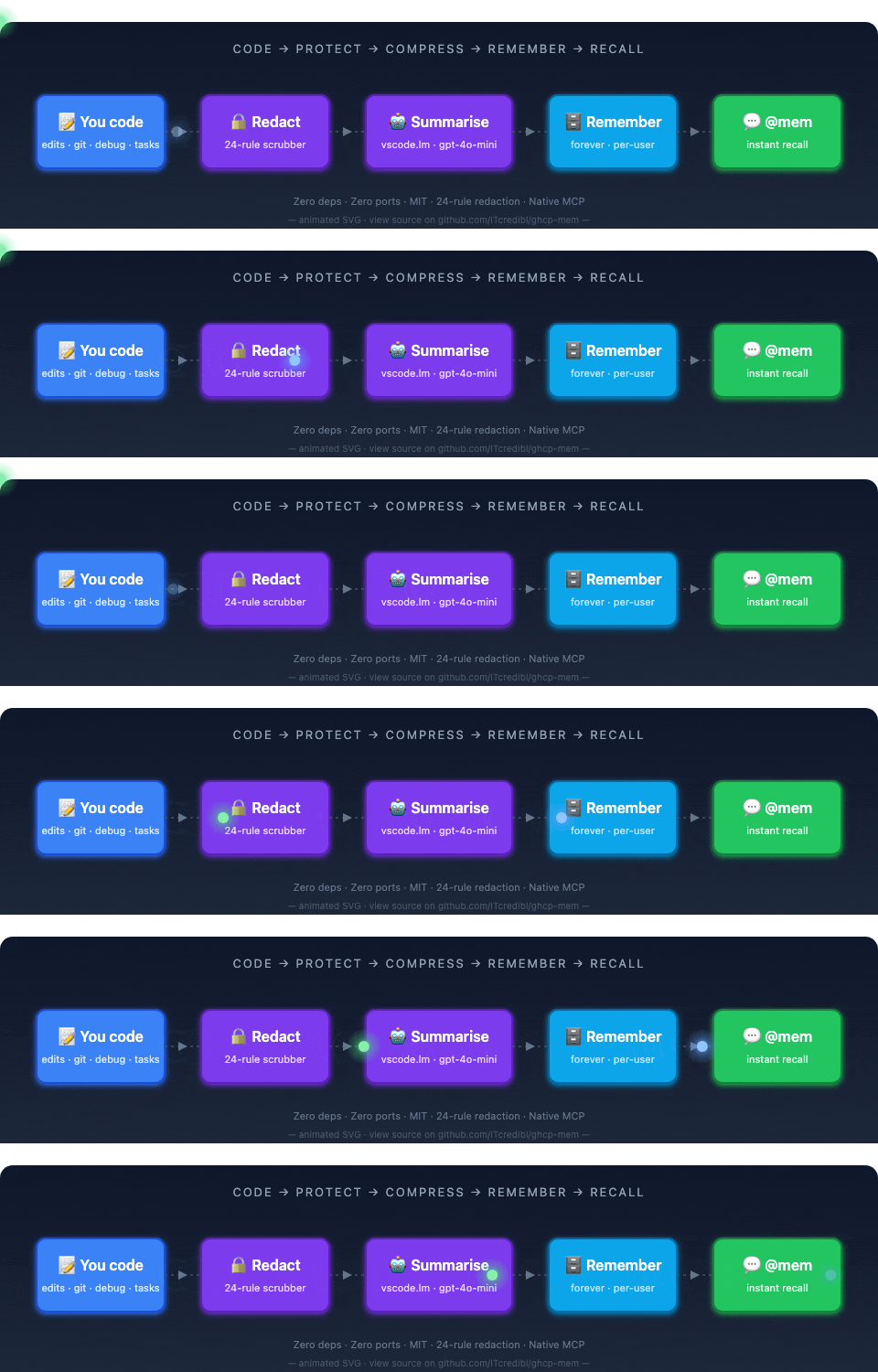
What happens: every edit, diagnostic, git op, and terminal command is debounced, scrubbed of secrets, summarized through your existing Copilot LM, and stored locally. Later, GHCP-MEM recalls the most relevant prior context in milliseconds.
Core features
Automatic capture
- File edits, creates, deletes, renames, opens, closes
- Diagnostics transitions
- Git state changes
- Debug sessions
- Task execution with exit codes
- Terminal commands (VS Code 1.93+ shell integration)
- Debounced and rate-limited capture
Observation typing
GHCP-MEM classifies sessions into:
feature · bugfix · refactor · docs · test · chore · research · config · security · deployment · infra · unknown
Azure signals such as azd, az, .bicep, and .tf edits influence deployment and infra inference automatically.
Secret redaction
21 generic patterns including:
- AWS access key and secret
- AWS account IDs and ARNs
- GitHub PATs (classic and fine-grained)
- npm tokens
- OpenAI and Anthropic keys
- Stripe live keys
- Google API keys and GCP project IDs
- Slack tokens
- JWT and Bearer tokens
- DB URL passwords
- PEM private key blocks
password= assignments- emails, IPv4 addresses, and credit cards
9 Azure-specific patterns including:
- Storage, Service Bus, Cosmos, and SQL connection strings
- SAS tokens
- 88-character storage keys
- service principal secrets
- subscription and tenant GUIDs
- Azure resource paths (
/subscriptions/.../resourceGroups/...)
30 named rules in total, plus an optional high-entropy catch-all. Also strips user-tagged <private>...</private> blocks before persistence.
Hybrid retrieval
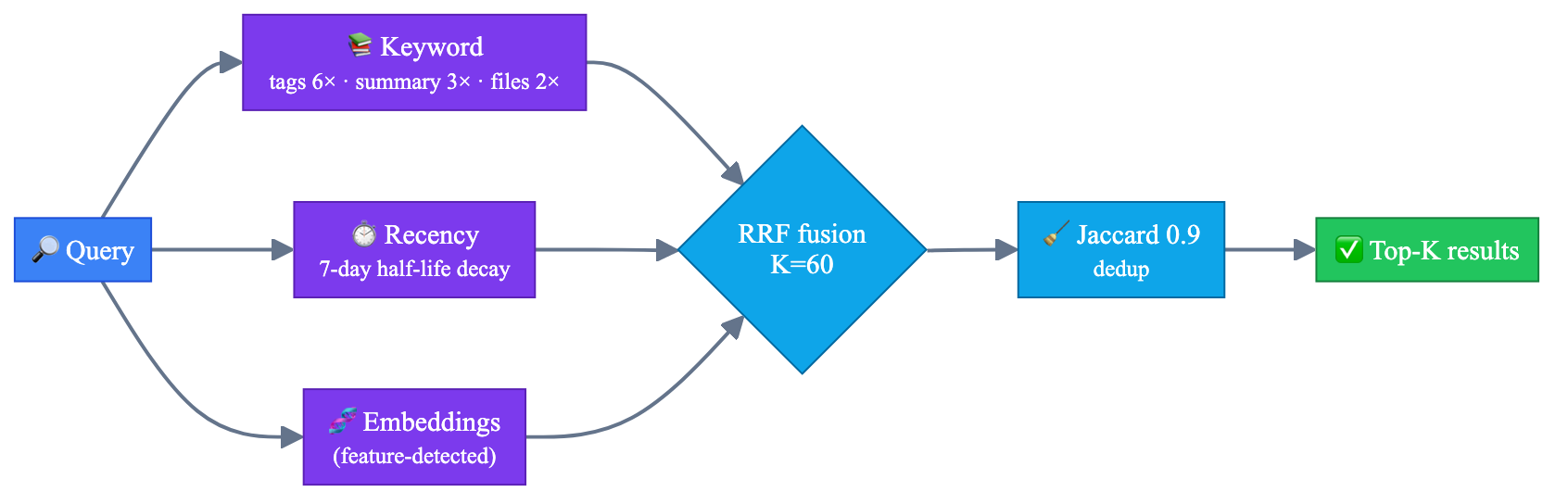
Retrieval blends keyword search (BM25), recency, embeddings when available, an optional LM rerank on the top-K candidates, and near-duplicate collapse so the right memories surface first. The benchmark harness publishes a per-stage ablation so the marginal lift of each signal is visible, not asserted.
Progressive disclosure
| Layer |
Command |
Use |
| Index |
/search <query> |
short summaries and IDs |
| Timeline |
/timeline <window> |
chronological context around a date or session |
| Detail |
/detail <id-prefix> |
full session only after filtering |
This keeps memory useful without dumping huge amounts of text into every prompt.
Visual Timeline
GHCP-MEM: Open Visual Timeline (Command Palette) opens a full WebviewPanel timeline — color-coded by observation type, searchable by keyword or branch, with expandable session cards.
Session CodeLens
A 📚 N sessions touched this file lens appears at the top of every opened source file. Click it to open a quick-pick of sessions that edited the same path, pre-sorted by recency.
AI-powered chat commands
| Command |
What it generates |
@mem /standup |
Daily standup note from yesterday's sessions |
@mem /commit |
Conventional commit message from staged diff + recent sessions |
@mem /ask <question> |
Cited answer pulled from matching sessions via RAG |
@mem /recap [7d\|30d\|90d] |
Narrative engineering recap for sprint retros |
@mem /related |
Sessions that touched the active file, grouped by recency |
@mem /decisions [keyword] |
ADR-style decision log deduped across all sessions |
@mem /savings |
Session and lifetime token-savings measurements plus GPT-4o dollar-equivalent |
@mem /whereami |
Interruption-recovery brief: what you were doing, where you left off, your next step |
@mem /debt |
Technical debt ledger — TODO/FIXME/HACK signals grouped by age and file |
@mem /adr [topic] |
Formal Architecture Decision Record auto-generated from session history |
@mem /pr [branch\|PR#] |
PR review context — surface sessions matching the PR's changed files |
@mem /precommit |
Pre-commit check — verify staged changes against past architectural decisions |
Trust + lineage commands (added in 1.6.0)
| Command |
What it does |
@mem /entity <path>[#symbol] |
Aggregate every session that touched a file or LSP symbol — decisions, problems, topics, supersession lineage, recent sessions |
@mem /snippet <query> |
Chunk-level retrieval — returns the exact decision/problem text matching the query (not whole sessions) |
@mem /conflicts / /conflicts dismiss <id> |
List or dismiss pending heuristic conflict warnings (e.g. "use JWT instead of cookies" overlapping with an older cookie-session decision) |
@mem /lineage <id> |
Cross-session causal chain — predecessors and successors sharing files within ±30 days, edge-labeled (introduced_issue_fixed_by, etc.) |
@mem /verify <id> |
Re-run SHA-based grounding validation — per-file verified / drifted / missing breakdown |
@mem /correct <id> <text> |
Capture a correction note that supersedes the original session (kept in the audit log) |
@mem /supersede <newer> <older> |
Mark one session as superseding another; auto-acknowledges matching conflict warnings |
@mem /retract <id> [reason] / /retract undo <id> |
Exclude a session from retrieval/injection (reversible) |
@mem /noise <id> / /noise undo <id> |
Mark a session as low-quality noise — same effect as the ingestion quality gate, reversible |
@mem /janitor |
Re-score every stored session against the current quality floor and flag/unflag low-quality memories |
@mem /accept <id> / /reject <id> |
Reinforcement signal — strengthens or weakens a session's retrieval ranking |
@mem /why <query> :: <id> |
Score-decomposition explainer — break down every signal contribution (keyword, recency, confidence, feedback, …) |
@mem /graph [file:<path>] |
Mermaid flowchart of the decision graph (supersession + correction + causal edges) for paste into PRs/ADRs |
@mem /compliance |
One-shot audit report: grounding coverage, trust distribution, conflict counts, redaction stats |
Lessons & working-set commands (added in 1.8.0)
| Command |
What it does |
@mem /lessons |
List the consolidated semantic (facts) and procedural (how-to) lessons distilled from recurring decisions across your sessions |
@mem /lessons add <text> |
Pin a hand-authored lesson on the hot path (redacted first) — the "remember this" write |
@mem /lessons forget <id> |
Delete a lesson by id prefix |
@mem /evict <id> |
Drop a session from the injected working set for this VS Code session without deleting it from disk |
@mem /pin <id> |
Restore a session previously dropped with /evict |
@mem /route <question> |
Context-acquisition recommender — estimates whether an MCP query or a file open is cheaper for a given question |
Project memory rules (team-shared, git-committed)
Durable, team-authored directives — the GHCP-MEM answer to Cursor's .cursorrules / Continue's project context. Unlike pinned lessons (personal, local), project rules live in a git-committed file so they travel with the repo and apply for everyone who clones it. They inject at the top of every Copilot/agent session — ahead of the routing primer, lessons, and session cards — and are never evicted.
- Source of truth:
.github/memory/rules.md, grouped under ## Architecture / Conventions / Constraints / Gotchas / General. Commit it to share with your team.
- Always-on: rules inject even before you've captured any sessions, and a hand-edited secret in the file is redacted before it reaches any generated context.
| Command |
What it does |
@mem /rules |
List the current project rules grouped by category |
@mem /rules add [category:]<text> |
Add a rule (redacted first); category: is optional and one of architecture, convention, constraint, gotcha, general |
@mem /rules remove <id\|index> |
Delete a rule by id prefix or its list number |
GHCP-MEM: Edit Project Memory Rules |
Open (creating if needed) .github/memory/rules.md to edit rules by hand |
Enterprise & Azure
Built for locked-down machines
- No admin install required
- No outbound service dependency
- No native binaries
- No open ports
- Default glob exclusions for
.env*, *.pem, *.key, secrets/**, and node_modules/**
<private>...</private> content never persists- Data stored per-user in VS Code state plus
~/.ghcp-mem/sessions.json
- MIT licensed
Built for Azure shops
- 12-subsystem classifier across
bicep, Terraform, azd, Functions, App Service, AKS, Container Apps, Storage, Key Vault, OpenAI, az CLI, and more
- Live
az snapshot with subscription, tenant, resource group, location, and up to 50 resource IDs
@mem /azure groups Azure-tagged sessions by subsystem- Azure-aware observation typing and redaction
- Graceful fallback when
az is missing or not signed in
Commands
| Group |
Command |
Description |
| Capture |
GHCP-MEM: Capture Session Snapshot Now |
Manually trigger compression (⌘⇧⌥S / Ctrl+Shift+Alt+S) |
|
GHCP-MEM: Compress Current Session |
Compress with progress |
| Inspect |
GHCP-MEM: Show Stored Context |
Open a markdown report of sessions |
|
GHCP-MEM: Edit Project Memory Rules |
Open/create .github/memory/rules.md — team-shared rules injected first in every session |
|
GHCP-MEM: Show Memory Health Score |
Show 0-100 health score and notes |
|
GHCP-MEM: Run Retrieval Eval |
Compare retrieval quality |
|
GHCP-MEM: Open Visual Timeline |
Color-coded WebviewPanel timeline of all sessions |
|
GHCP-MEM: Show File Session History |
Sessions that touched the active file (quick-pick) |
| Backup / Restore |
GHCP-MEM: Export Memory to JSON... |
Full backup |
|
GHCP-MEM: Import Memory from JSON... |
Restore or merge |
|
GHCP-MEM: Restore From Backup... |
Restore from rolling backup |
| Team sharing |
GHCP-MEM: Export Memory Pack... |
Build a .ghcpmem-pack.json |
|
GHCP-MEM: Import Memory Pack... |
Install a pack |
|
GHCP-MEM: Uninstall Memory Pack... |
Remove imported pack sessions |
|
GHCP-MEM: Export Team Memory Snapshot |
Write .github/memory/team-context.md for git-native team context sharing |
| Sidebar |
GHCP-MEM: Filter Sessions... |
Filter by scope, type, tag, days, or text |
|
GHCP-MEM: Clear Filter |
Reset active filter |
|
GHCP-MEM: Refresh |
Refresh sessions tree |
| Chat |
GHCP-MEM: Inject Relevant Context Into Copilot Chat... |
Copy top matches into chat |
| Manage |
GHCP-MEM: Delete Session |
Delete one session |
|
GHCP-MEM: Tag Session... |
Add user tags |
|
GHCP-MEM: Pin/Unpin Session |
Pin or unpin a session |
|
GHCP-MEM: Open Session Detail |
Open session detail view |
|
GHCP-MEM: Export Session as Diff-Friendly Markdown... |
Stable markdown export |
|
GHCP-MEM: Clear All Stored Context |
Wipe all stored context |
| Azure |
GHCP-MEM: Capture Azure Context Snapshot... |
Save live Azure context |
|
GHCP-MEM: Seed Azure Demo Sessions |
Create demo sessions |
| MCP |
GHCP-MEM: Show External MCP Client Config |
Show resolved MCP config |
Copilot agent mode can call these without a separate MCP setup:
| Tool |
Inline reference |
What it does |
ghcpMem_search |
#ghcpMemSearch <query> |
Search past sessions by keyword, type, date, or tag |
ghcpMem_store |
#ghcpMemStore <note> |
Persist a durable note, decision, or preference |
@mem chat participant
| Command |
Example |
/status |
@mem /status |
/recent |
@mem /recent |
/search |
@mem /search type:bugfix since:7d authentication |
/timeline |
@mem /timeline 72h or @mem /timeline <id> |
/detail |
@mem /detail a1b2c3d4 |
/export |
@mem /export a1b2c3d4 |
/azure |
@mem /azure key-vault |
/health |
@mem /health |
/savings |
@mem /savings — per-session and lifetime token-savings with dollar-equivalent. Counts are measured with the active Copilot model's tokenizer when a chat model is available, falling back to a chars/4 heuristic offline |
/related |
@mem /related — sessions touching the currently open file |
/decisions |
@mem /decisions or @mem /decisions auth — ADR-style decision log |
/standup |
@mem /standup or @mem /standup yesterday — AI daily standup note |
/commit |
@mem /commit — AI conventional commit message from staged diff + sessions |
/ask |
@mem /ask why did we change the auth flow? — RAG Q&A over session history |
/recap |
@mem /recap 7d / 30d / 90d — narrative engineering recap for retros |
/whereami |
@mem /whereami — interruption recovery brief with AI re-entry suggestion |
/debt |
@mem /debt — technical debt ledger from session signals, grouped by age |
/adr |
@mem /adr auth — formal ADR auto-generated from session history |
/pr |
@mem /pr main or @mem /pr 42 — PR review context from session history |
/precommit |
@mem /precommit — pre-commit architectural consistency check |
Settings
Configuration reference
| Key |
Default |
Description |
ghcpMem.enabled |
true |
Master switch |
ghcpMem.compressionIntervalMinutes |
15 |
Periodic compression |
ghcpMem.maxStoredSessions |
50 |
Count-based retention |
ghcpMem.maxStoreSizeMB |
25 |
Soft size cap on ~/.ghcp-mem/sessions.json |
ghcpMem.retentionDays |
90 |
Age-based retention |
ghcpMem.contextRetrievalCount |
5 |
Number of injected matches |
ghcpMem.scope |
"repo" |
Retrieval scope: user, workspace, or repo. Default is repo so memories don't leak across projects |
ghcpMem.globalTags |
["global"] |
User tags that promote a session to always-included status regardless of scope — reserve for cross-repo knowledge (org coding standards, naming, WAF) |
ghcpMem.qualityFloor |
0.3 |
Minimum heuristic quality score (0–1) required for a captured session to be injected. Sessions below the floor are flagged lowQuality, kept on disk for audit, and excluded from the startup block. Set to 0 to disable the gate |
ghcpMem.janitorEnabled |
true |
Periodically re-score stored sessions against the current qualityFloor |
ghcpMem.janitorIntervalDays |
7 |
Days between janitor re-scoring passes |
ghcpMem.janitorPruneAfterDays |
0 |
If > 0, delete sessions that have been lowQuality past this threshold and were never /accept-ed (0 = flagging only) |
ghcpMem.validateAgainstCodebase |
true |
Drop stale memories whose key files no longer exist |
ghcpMem.freshnessFloor |
0.25 |
Minimum surviving key-file fraction |
ghcpMem.githubCompatibleMode |
false |
Mirror Copilot Memory's 28-day repo-scoped contract |
ghcpMem.redactSecrets |
true |
Secret and PII scanning |
ghcpMem.honorPrivateTags |
true |
Strip <private>...</private> |
ghcpMem.excludeGlobs |
default exclusions |
Skip sensitive or noisy paths |
ghcpMem.autoInjectStartupContext |
true |
Write prior session context to .github/instructions/session-memory.instructions.md, CLAUDE.md, and .cursor/rules on startup and after each compression |
ghcpMem.projectRules |
true |
Inject durable, team-shared project rules from .github/memory/rules.md (managed with @mem /rules) at the top of every session |
ghcpMem.startupContextSessionCount |
5 |
Number of recent sessions (1–20) included in the auto-injected instructions file |
ghcpMem.healthAlertThreshold |
30 |
Warn when health score is low |
ghcpMem.autosave.enabled |
true |
Enable context-pressure autosave |
ghcpMem.autosave.eventThreshold |
40 |
Autosave after buffered event threshold |
ghcpMem.autosave.minutesThreshold |
20 |
Autosave after time threshold |
ghcpMem.captureFileEdits |
true |
Capture file edits |
ghcpMem.captureDiagnostics |
true |
Capture diagnostics |
ghcpMem.captureTerminalCommands |
true |
Capture terminal commands |
ghcpMem.captureDiagnostics |
true |
Capture error/warning diagnostics |
ghcpMem.captureGitOps |
true |
Capture git operations |
ghcpMem.redactSecrets |
true |
Redact secrets and PII |
ghcpMem.idleTimeoutSeconds |
30 |
Seconds of inactivity before idle-triggered compression (0 = disabled) |
ghcpMem.customRedactionRules |
[] |
Array of custom regex redaction rules for enterprise compliance modes |
ghcpMem.captureGitOps |
true |
Capture git operations |
External MCP clients
GHCP-MEM mirrors memory to ~/.ghcp-mem/sessions.json. MCP-compatible clients can read it through the bundled stdio server.
{
  "mcpServers": {
    "ghcp-mem": {
      "command": "node",
      "args": ["/path/to/extension/out/mcpServer.js"]
    }
  }
}
Use GHCP-MEM: Show External MCP Client Config to get the resolved path on your machine.
Exposed MCP tools (14 total):
ghcpMem_search(query, type?, sinceDays?, tag?, workspaceName?, limit?) — keyword + RRF searchghcpMem_recent(limit?, workspaceName?) — most recent sessionsghcpMem_timeline(days?, limit?) — sessions by time windowghcpMem_get(id) — full session by ID prefixghcpMem_store(summary, tags?, observationType?) — write a new session from an external clientghcpMem_delete(id) — delete a session by ID prefixghcpMem_entity(path) — aggregate every session touching a file/symbolghcpMem_snippets(query, limit?) — chunk-level decision/problem retrievalghcpMem_conflicts() — pending heuristic conflict warningsghcpMem_lineage(id) — cross-session causal chainghcpMem_explain(query, id) — score decomposition for a sessionghcpMem_graph(file?) — Mermaid decision graphghcpMem_route(query, fileSizes?) — cheapest-path context recommenderghcpMem_lessons(kind?, limit?) — consolidated semantic + procedural lessons
CI/CD Integration: Memory Seeding
GHCP-MEM ships a headless CLI seeder for pre-populating memory from CI/CD pipelines. When a developer checks out a feature branch, the pipeline can generate a condensed summary of recent production alerts, infrastructure changes, or staging test results, and pre-seed the local store.
The next time they open VS Code, their AI assistant already has live-environment context without the developer having to ask.
Usage
# Seed from a JSON payload
echo '{"sessions": [{"summary": "Prod API at 50% error rate", "observationType": "bugfix", "keyTopics": ["api", "reliability"]}]}' | \
  npx ghcp-mem-ci-seed

# Or via npm
npm install --save-dev @ghcp-mem/cli
echo '...' | npx ghcp-mem-ci-seed --seed-label=prod-alert
{
  "sessions": [
    {
      "id": "optional-uuid",
      "summary": "What happened",
      "observationType": "deployment|bugfix|feature|etc",
      "keyTopics": ["tag1", "tag2"],
      "keyFiles": ["path/to/file1.ts"],
      "decisions": ["ADR-style decision"],
      "problemsSolved": ["What we fixed"]
    }
  ],
  "observations": ["Free-form observation text"],
  "seedLabel": "prod-alert"  // tagged for easy filtering later
}
All secrets are automatically redacted using the 30-rule set + any custom rules defined in settings.
Architecture
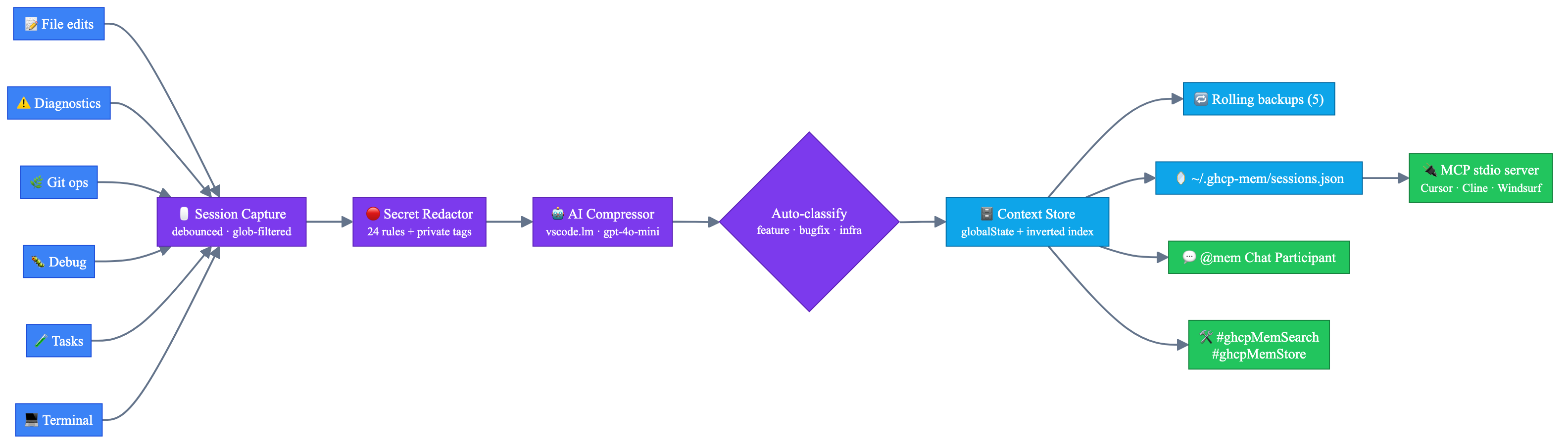
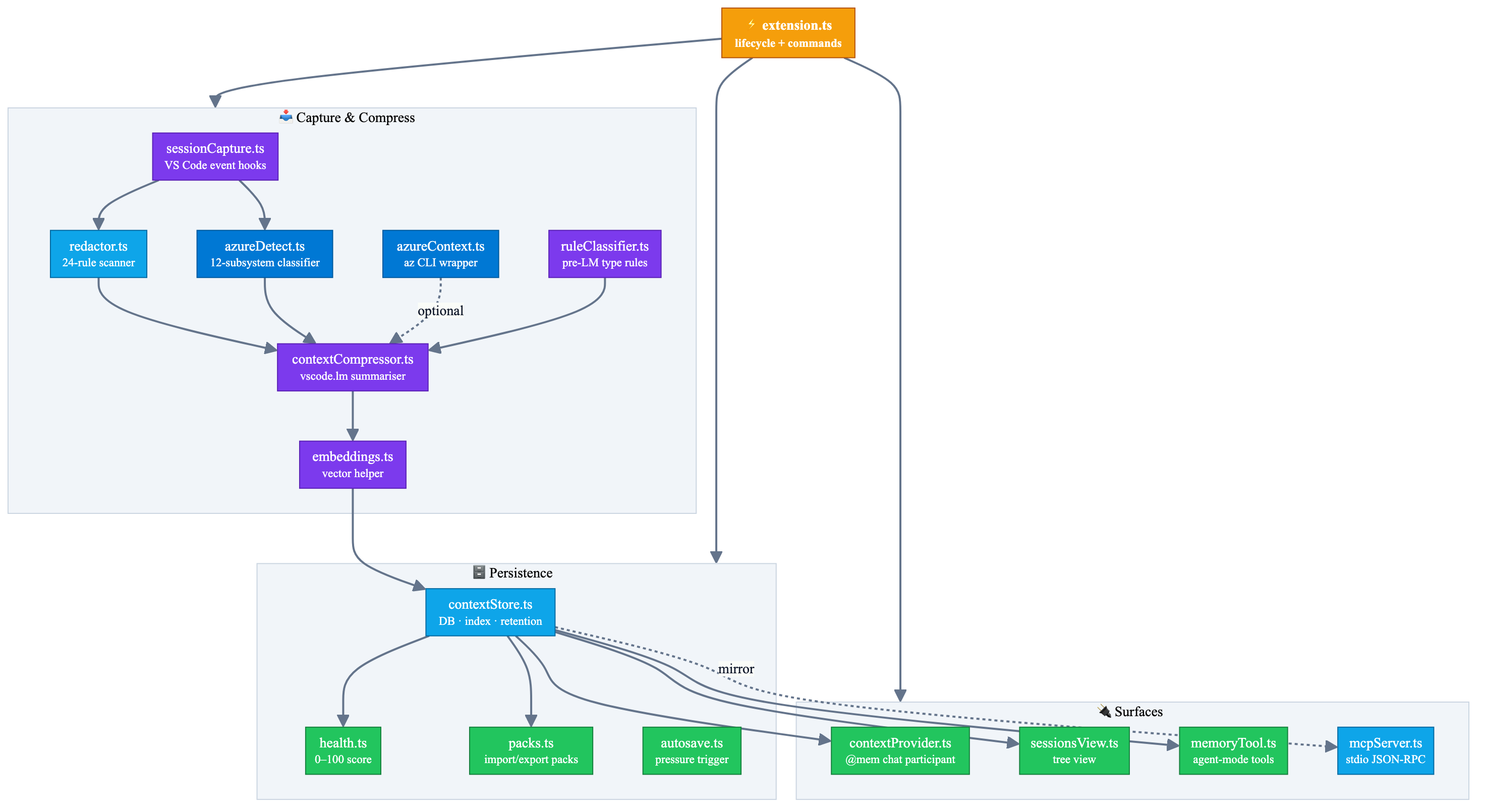
Key modules:
| Module |
Responsibility |
src/redactor.ts |
30-rule secret and privacy redaction + user-defined regex rules |
src/ciSeeder.ts |
Headless CLI for pre-seeding memory from CI/CD pipelines (reads JSON from stdin) |
src/azureDetect.ts |
Azure subsystem detection |
src/azureContext.ts |
az CLI snapshotting with cache and fallback |
src/sessionCapture.ts |
VS Code event hooks and capture pipeline |
src/contextCompressor.ts |
LM compression, classification, and git branch tagging |
src/contextStore.ts |
Persistent storage, indexing, eviction, backups, lifetime token stats |
src/searchCore.ts |
Shared retrieval scoring (BM25 + RRF + recency decay) |
src/lessons.ts |
Consolidation of episodic sessions into durable semantic + procedural lessons |
src/projectRules.ts |
Parse/serialize/render team-shared project rules from .github/memory/rules.md |
src/contextProvider.ts |
@mem chat participant with 42 slash commands |
src/memoryTool.ts |
Agent-mode tools (#ghcpMemSearch, #ghcpMemStore, #ghcpMemAudit, #ghcpMemLessons) |
src/mcpServer.ts |
Stand-alone stdio MCP server (14 tools, read + write) |
src/timelinePanel.ts |
Visual Memory Timeline WebviewPanel |
src/sessionCodeLens.ts |
Inline file-history CodeLens at line 0 |
src/extension.ts |
Lifecycle, commands, walkthroughs, integration wiring |
More detail: docs/diagrams/pipeline.mmd
Privacy & security
All GHCP-MEM data stays on your machine. GHCP-MEM has no backend, opens no ports, and sends no telemetry to any third party.
Note: LM compression uses vscode.lm — your existing GitHub Copilot subscription — meaning compressed session summaries pass through Copilot's LM. No GHCP-MEM service is involved.
- Storage: VS Code
globalState plus atomic mirror to ~/.ghcp-mem/sessions.json
- LM traffic: your existing Copilot subscription only
- Redaction: dual-pass redaction at capture and LM output time, plus redact-on-import
- Workspace artifact:
.github/instructions/session-memory.instructions.md, automatically added to .gitignore
- Attack surface: VS Code extension host only
Troubleshooting
| Symptom |
Likely cause / fix |
| Memory count stays at zero |
Trigger Capture Session Snapshot Now, or lower autosave thresholds. |
@mem says no Copilot language model is available |
Install and sign in to GitHub Copilot. |
/azure says Azure CLI is not signed in |
Run az login; GHCP-MEM degrades gracefully if Azure CLI is unavailable. |
~/.ghcp-mem/sessions.json does not exist |
It is created on first successful persist. |
| MCP client cannot see tools |
Point it to <extension-install-dir>/out/mcpServer.js or use the built-in config command. |
| Terminal commands are missing |
Enable VS Code shell integration. |
Tests fail with Cannot find module 'vscode' |
Run npm install first, then npm test. |
| You want to wipe everything |
Run Clear All Stored Context, delete ~/.ghcp-mem/, and see docs/UNINSTALL.md for a full clean-removal checklist. |
Uninstall
To remove GHCP-MEM completely — extension, stored sessions, workspace artifact, and any MCP/cross-editor injections — follow the step-by-step guide:
docs/UNINSTALL.md
Quick summary:
- (Optional) Export your memory:
GHCP-MEM: Export Memory to JSON...
- Clear stored data:
GHCP-MEM: Clear All Stored Context
- Uninstall the extension: Extensions sidebar → gear → Uninstall (or
code --uninstall-extension ITcredibl.ghcp-mem)
- Delete
~/.ghcp-mem/ (the MCP mirror file)
- Remove
.github/instructions/session-memory.instructions.md from your workspace
- Remove any cross-editor files (
CLAUDE.md block / .cursor/rules) if injected
License
MIT — see LICENSE.
Report a bug · Request a feature · Live demo · Compare memory tools · Uninstall guide · Configuration reference · Contributing · Security policy
v1.18.3 · local-first memory for Copilot
| |

