Smart Commit Generator AI


Fast, accurate, and context-aware Git assistant for VS Code, Cursor, and Antigravity IDE. Generate conventional commits, one-click commit & push, sync branches safely, draft comprehensive Pull Request descriptions, and resolve branch merge conflicts with OpenAI & Google Gemini.
Key Features
- Strict Diff Inspection: Reads your exact line additions and deletions—never assumes changes from file names or unrelated code.
- Conventional Commits: Produces standardized headers (
feat, fix, refactor, perf, docs, chore, etc.) under 72 characters, with optional bullet points for multi-part edits.
- Fast Mode vs Safe Mode Toggle: Switch between instant 1-click push (zero dialogs) and safe review mode with a single click.
- Safe Branch Sync & Push (
$(git-merge)): Automatically verifies zero merge conflicts in memory with git merge-tree before syncing and pushing changes to any target branch (e.g. publish, dev, staging).
- One-Click Commit & Push: Stage, generate, commit, and push to your remote repository in a single click with built-in preview and safety confirmation.
- Pull Request (PR) Generator: Compares your working branch against
main or master to generate a comprehensive markdown PR description with summary, key changes, and verification checklist.
- Branch Compare & AI Conflict Advisor: Dry-run merge check between any two branches. Identifies conflicts before they happen and provides production-ready merged code solutions.
- Status Bar Launcher: Permanent
$(sparkle) Smart Git status bar button displaying current mode with one-click access to all tools.
- Dual AI Engine: Seamlessly switch between OpenAI (
gpt-4o-mini, gpt-4o) and Google Gemini (gemini-3.8-flash, gemini-2.5-pro).
- Interactive Setup: No manual configuration files required. If an API key is missing, a one-click prompt lets you paste your key directly in the editor.
- 100% Private & Local: Your API keys stay on your machine. API calls are made directly to OpenAI/Google with zero telemetry or intermediate servers.
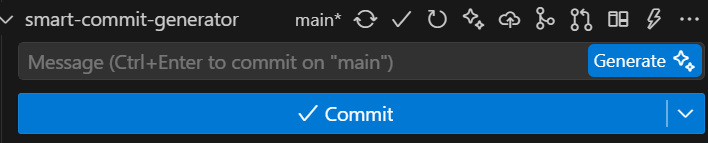
Six dedicated action buttons are built right into your Source Control view header:
| # |
Button |
Action |
Shortcut |
Description |
| 1 |
 |
Generate Message |
Ctrl+Alt+G |
Inspects staged diff and populates the commit box with Conventional Commits. |
| 2 |
 |
Generate, Commit & Push |
Ctrl+Alt+P |
Stages modified files, generates message, commits, and pushes to remote in 1 click. |
| 3 |
 |
Safe Sync to Branch |
Ctrl+Alt+S |
Conflict-safe branch merge & push with auto semver release bump (e.g. main ➔ publish). |
| 4 |
 |
Generate PR Description |
— |
Drafts full markdown Pull Request description and copies to clipboard. |
| 5 |
 |
Compare & Security Audit |
Ctrl+Alt+C |
Compares branches, checks conflicts, scans for leaked API keys, and offers 1-click push. |
| 6 |
 |
Toggle Fast / Safe Mode |
Ctrl+Alt+T |
Flips visually between Safe Mode (modal confirmation) and Fast Mode (instant push). |
Detailed Workflows
1. Generating a Commit Message
- Open the Source Control panel (Ctrl + Shift + G).
- Stage your changes (
+), or leave them unstaged—the extension checks unstaged diffs as fallback.
- Click the sparkle icon (
$(sparkle)) on your repository header or press Ctrl + Alt + G.
- Your commit message will appear in the commit input box instantly.
2. One-Click Commit & Push
- Click the cloud upload icon (
$(cloud-upload)) or press Ctrl + Alt + P.
- In Safe Mode: A modal dialog previews the message and lets you confirm.
- In Fast Mode: Immediately stages, commits, and pushes to remote with zero dialogs.
3. Safe Branch Sync & Push
- Click the safe branch sync icon (
$(git-merge)) or press Ctrl + Alt + S.
- Select your target branch (e.g.,
publish to release, or staging).
- The extension tests for merge conflicts in memory:
- Zero conflicts: Safely switches, merges, pushes to remote, and returns to your working branch.
- Conflicts detected: Aborts before touching files and opens the AI Conflict Advisor.
4. Pull Request Description Generator
- Click the git pull request icon (
$(git-pull-request)).
- The AI compares your working branch against
main or master.
- Copies full Markdown PR to your clipboard and opens in a new tab.
5. Branch Compare, Security Audit & Direct Push
- Click the branch compare icon (
$(diff)) or press Ctrl + Alt + C.
- Select any target branch to compare against.
- Automatically runs:
- Merge conflict dry-run (
git merge-tree).
- Security scanner for leaked credentials, API keys, or private tokens.
- AI Architecture & Risk report opened in your editor.
- If clean and ready, provides direct 1-click modal actions:
Sync & Push to "<branch>": Automatically merges and pushes right from the comparison!Generate PR Description: Formats ready-to-paste PR markdown.Cancel: Closes modal and keeps report open.
- If conflicts exist, blocks pushing and provides step-by-step resolution guidance.
Configuration
Open Settings (Ctrl + ,) and search for smartCommit:
| Setting |
Type |
Default |
Description |
smartCommit.provider |
string |
"openai" |
AI provider: "openai" or "gemini". |
smartCommit.openaiApiKey |
string |
"" |
OpenAI API key (sk-proj-...). |
smartCommit.geminiApiKey |
string |
"" |
Google Gemini API key. |
smartCommit.model |
string |
"" |
Optional model override (e.g. gpt-4o, gemini-2.5-pro). |
smartCommit.autoStage |
boolean |
false |
Automatically stage all modified files if nothing is staged before generating. |
smartCommit.confirmBeforePush |
boolean |
true |
When true: Safe Mode (shows modal). When false: Fast Mode (instant 1-click push). |
smartCommit.baseBranch |
string |
"" |
Target base branch for PR generator (auto-detects main or master if empty). |
Keyboard Shortcuts
| Shortcut (Windows/Linux) |
Shortcut (macOS) |
Command |
| Ctrl + Alt + G |
Cmd + Alt + G |
Smart Commit: Generate Message |
| Ctrl + Alt + P |
Cmd + Alt + P |
Smart Commit: Generate, Commit & Push |
| Ctrl + Alt + S |
Cmd + Alt + S |
Smart Commit: Safe Branch Sync & Push |
| Ctrl + Alt + C |
Cmd + Alt + C |
Smart Commit: Compare Branches & Conflict Advisor |
| Ctrl + Alt + T |
Cmd + Alt + T |
Smart Commit: Toggle Fast Push / Safe Mode |
License
MIT © Hessam Barasm Mamagani
| |

