Tootega Cockpit for Claude Code
Unofficial. Not affiliated with, endorsed by, or sponsored by Anthropic.
"Claude", "Claude Code" and "Anthropic" are trademarks of Anthropic, PBC, used here
only to describe interoperability. This project talks to the official Claude Code CLI;
it does not bundle or redistribute it.
A rich GUI for Claude Code, packaged as a native VS Code extension.
The interface is only a presentation and control layer over the Claude Code CLI —
all orchestration (the agent loop, tools, subagents, context, cache, compaction,
permissions, MCP, hooks, skills) lives in the CLI. The extension renders the event
stream the CLI emits and implements the client side of the interactive protocols.





|
|
| Author |
Tootega Pesquisa e Inovação |
| License |
MIT (open source) |
| Type |
Visual Studio Code extension (React webview + TypeScript host) |
| Extension version |
1.0.264 |
| Channel to the engine |
claude in headless/streaming mode (stream-json) |
| Engine tested against |
Claude Code CLI 2.1.x (aligned with 2.1.265; minimum 2.1.162, which fixed Esc/interrupt being dropped in stream-json sessions; the model list is discovered, not pinned) |
| Languages |
pt-BR and international English (runtime switching) |
Features at a glance
Feature grid — Cockpit × official Claude Code GUI
A serious, side-by-side comparison against the official Claude Code for VS Code
extension by Anthropic. The official column was checked against the official docs and
Marketplace listing (see Sources); 📅 2026-06 reflects what those pages
documented at the time of writing — Anthropic ships fast, so verify before quoting.
Legend: ✅ has it · 🟡 partial · ❌ doesn't have it · ➖ not applicable.
Conversation & rendering
| Feature |
Cockpit |
Official GUI |
Notes |
| Token-by-token streaming chat |
✅ |
✅ |
partial-messages + fallback |
| Thinking blocks (toggle / expand-all) |
✅ |
✅ |
official adds Ctrl+O expand-all |
| Tool-call timeline (per-tool cards) |
✅ |
✅ |
Cockpit: emoji per tool, Bash split, Read gutter |
| Markdown + syntax highlight |
✅ |
✅ |
highlight.js + line-number gutter |
| Find in conversation (Ctrl+F) |
✅ |
❌ |
scope Timeline vs Prompts only, 250 ms debounce, highlight + jump |
| Export conversation |
✅ |
❌ |
self-contained HTML snapshot with expandable tool cards, or AI-polished Markdown |
| Timeline verbosity filter (verbose→quiet) |
✅ |
❌ |
display-only, doesn't change the agent |
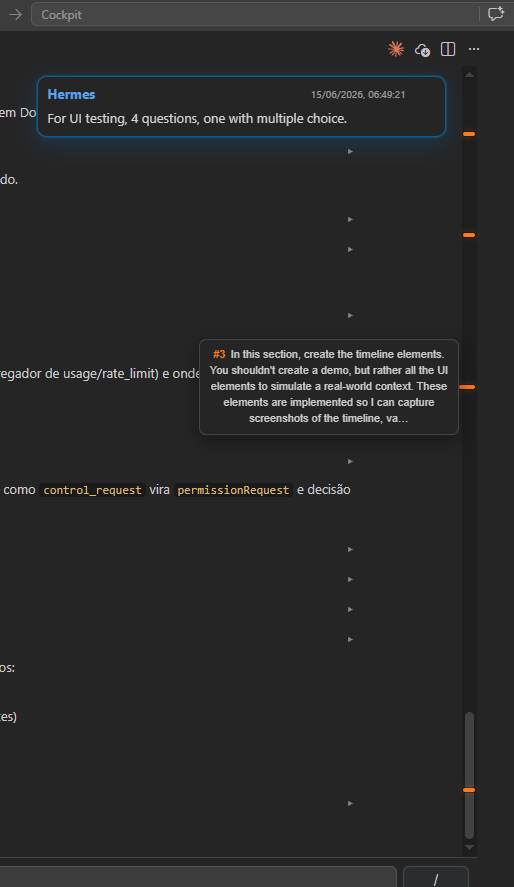
| Scroll-marker rail (one per prompt) |
✅ |
🟡 |
Cockpit minimap rail with numbered hover |
Editing & human control
| Feature |
Cockpit |
Official GUI |
Notes |
| Permission approval (Allow / Always / Deny) |
✅ |
✅ |
per-tool preview; Ctrl+Enter/Esc |
| Permission modes (plan/acceptEdits/auto/…) |
✅ |
✅ |
dropdown; official cycles via the mode indicator |
| Plan mode (review, edit & approve) |
✅ |
✅ |
Cockpit: Edit/Preview toggle; "Keep planning (send my notes)" feeds edits back to the agent |
| Composed questions (AskUserQuestion) |
✅ |
✅ |
tabs, multi-select, "Other" |
| Questions asked in your language |
✅ |
❌ |
steers AskUserQuestion to the configured voice/UI language |
| Side-by-side diff |
✅ |
✅ |
in-webview diff plus "Open diff in editor" → VS Code native vscode.diff; official also lets you edit in the diff before accepting |
| @-mention files/folders |
🟡 |
✅ |
Cockpit: fuzzy file autocomplete (@ menu, host findFiles); no Alt+K shortcut |
Share active selection (@file#a-b) |
✅ |
✅ |
composer chip with an eye toggle to include/exclude the editor selection |
| Checkpoints / rewind (restore files) |
🟡 |
✅ |
official: fork / rewind-code / both. Cockpit rewinds the transcript only (file restore via Git planned) |
Spell-checker & dictation (Cockpit specialty)
| Feature |
Cockpit |
Official GUI |
Notes |
| Inline spell-checker PT-BR + EN |
✅ |
❌ |
Hunspell (WASM) in the host; only flags words wrong in both languages. Marks only — never auto-corrects |
| Spell suggestions dropdown |
✅ |
❌ |
grouped per language; click the underlined word → fixes |
| Voice dictation (speech-to-text) |
✅ |
❌ |
Claude STT WebSocket; live partials |
| Post-dictation AI correction |
✅ |
❌ |
opt-in (tootega.voiceCorrect, default off); clean isolated one-shot |
| Editable dictionaries modal (tabs) |
✅ |
❌ |
dictation terms/replacements + spell words; per-machine in ~/.claude/tootega |
Statistics, context & consumption (the heart of the product)
| Feature |
Cockpit |
Official GUI |
Notes |
| Context-window meter (used/limit, 200K·1M) |
✅ |
✅ |
limit auto-derived from the active model |
| Cache panel (hit-rate, read, write, savings) |
✅ |
❌ |
per-turn + cumulative; last-turn hit rate |
| Local cost estimate (per turn/session) |
✅ |
🟡 |
official shows plan-usage; Cockpit adds a price-table estimate labelled "estimated" |
| Session / weekly subscription limits (% + reset) |
✅ |
✅ |
Cockpit reads the real OAuth /usage, including the per-model weekly window labelled by the server |
| Usage attribution (long context / subagents / cache / MCP) |
✅ |
✅ |
Cockpit estimates it from local transcripts; official reads it from the CLI /usage dialog |
| Cache keep-alive (1h TTL): meter and refresh |
✅ |
❌ |
not just a countdown — opt-in Keep cache alive re-arms the TTL before it lapses, so an idle session doesn't pay a full cache re-write |
| Estimated cache savings (USD) |
✅ |
❌ |
prices the cache-read tokens against the full input rate |
| Turn timing by (model, effort, type) |
✅ |
❌ |
atomic cross-process merge |
| Session activity: duration, turns, peak context |
✅ |
❌ |
high-water mark of context with its cache figure |
| Context injected per tool (calls + tokens) |
✅ |
🟡 |
ranks Bash/Read/Edit/MCP by the context each pushed in; MCP servers grouped |
| 7-day spend breakdown by model |
✅ |
🟡 |
from this machine's transcripts, as equivalent API price |
All-time global token counter (DailyTokens) |
✅ |
❌ |
sent / received / total across every project on the machine, plus a per-day history — read from ~/.claude/projects/**/*.jsonl with an incremental rollup, not just the open session |
Context breakdown via /context |
⏳ |
✅ |
Cockpit UI ready, data source pending |
Sessions, panels & recovery
| Feature |
Cockpit |
Official GUI |
Notes |
| History: list / resume / rename / delete |
✅ |
✅ |
both: AI-ish titles, search; official browses by time |
| Search/filter sessions |
✅ |
✅ |
— |
| History grouped by time |
✅ |
✅ |
Today / Yesterday / Last 7 days / Older |
| Multiple parallel conversations |
✅ |
✅ |
per-tab CLI/stats/streaming; status dot idle/busy/error |
| Per-session spinner in the hub grid |
✅ |
🟡 |
Cockpit shows a spinner on every running context card |
| Close the webview without stopping the run |
✅ |
🟡 |
Cockpit keeps the CLI/session alive in the host; reopening replays the full timeline. Official tab-close behavior is not documented |
| Manual reload (fix gray/dead webview) |
✅ |
➖ |
status-bar ↻ + per-session-card ↻ + auto render-watchdog |
| Reopen closed session |
✅ |
✅ |
Ctrl+Shift+T + command palette |
| Remote control (follow from phone) |
✅ |
✅ |
📱 on the session card (and in the composer) hands the conversation to claude --remote-control --resume in a visible terminal — see Remote Control |
| Resume cloud / remote sessions (claude.ai) |
❌ |
✅ |
official Remote tab |
| Reposition panel (sidebar / editor / window) |
🟡 |
✅ |
Cockpit lives in editor + activity-bar hub |
Extensibility
| Feature |
Cockpit |
Official GUI |
Notes |
| Slash commands with autocomplete |
✅ |
✅ |
Cockpit curates descriptions; official / menu |
| Plugins manager + marketplaces |
✅ |
✅ |
browse/install/enable/disable/update |
MCP servers manage (/mcp) |
🟡 |
✅ |
both forward to the CLI |
| Built-in IDE MCP server (getDiagnostics, Jupyter execute) |
❌ |
✅ |
official runs a local ide MCP |
| Skills: cost per skill + what is loaded |
✅ |
❌ |
Cockpit reads get_context_usage (no turn, no tokens); see Skills |
| Hooks / subagents UI |
🟡 |
✅ |
Cockpit forwards /hooks etc.; no dedicated UI |
| UTF-8 fix for PowerShell output (Windows) |
✅ |
❌ |
one-click PreToolUse hook; see Accented characters in PowerShell output |
Chrome browser automation (@browser) |
❌ |
✅ |
official only |
| Git worktrees (parallel branches) |
❌ |
✅ |
official --worktree |
| Dynamic workflows / Artifacts (preview) |
❌ |
✅ |
official research preview |
Platform, input & presentation
| Feature |
Cockpit |
Official GUI |
Notes |
| Theme synced with VS Code |
✅ |
✅ |
var(--vscode-*) |
| Bilingual i18n (pt-BR + EN), runtime switch |
✅ |
❌ |
host + webview, no reload |
| Image paste / screenshot |
✅ |
✅ |
Cockpit also pastes file paths (Unicode-safe on Windows) |
| Drag-to-attach files |
✅ |
✅ |
drop files on the composer (reuses the path resolver) |
| Status-bar entry + spinner |
✅ |
✅ |
Cockpit: idle/busy dot + model chip |
| Editor-toolbar entry point |
✅ |
✅ |
✦ icon opens the Cockpit from the editor title bar |
| Auto-save before read/write |
✅ |
✅ |
flushes a dirty buffer before the agent touches the file (tootega.autosave) |
| Keyboard shortcuts |
✅ |
✅ |
open / new / interrupt / Ctrl+F |
URI handler (vscode://…/open) |
✅ |
✅ |
both |
| Release-notes link for the active CLI |
✅ |
❌ |
clicking the CLI version opens GitHub releases |
Live model discovery (/v1/models) |
✅ |
🟡 |
Cockpit lists discovered models + grouped picker |
| Tolerant stream-json parser |
✅ |
➖ |
unknown events ignored, survives CLI upgrades |
| Sign-in / onboarding checklist |
🟡 |
✅ |
sign-in via the CLI auth; dismissible onboarding checklist in the hub |
Terminal mode (useTerminal) |
➖ |
✅ |
Cockpit is GUI-only by design |
| Third-party providers (Bedrock/Vertex) |
🟡 |
✅ |
via shared ~/.claude/settings.json |
Visual design
| Aspect |
Cockpit |
Official GUI |
Notes |
| Native VS Code look (theme tokens) |
✅ |
✅ |
light / dark / high-contrast |
| Per-tool cards with emoji + rich render |
✅ |
🟡 |
Bash split, Read line-gutter, Write/Edit highlight |
| Color-banded meters (context / limits) |
✅ |
🟡 |
green→amber→red bands |
| Big centered "Cockpit" loader while loading |
✅ |
❌ |
orange ring instead of a gray/blank panel |
| Orange accent + spinners (busy/running) |
✅ |
🟡 |
per-tab + per-session-card spinners |
| Scroll-marker minimap rail |
✅ |
❌ |
one numbered marker per prompt |
| Wavy underline for misspellings |
✅ |
❌ |
from the inline spell-checker |
| Configurable UI density |
⏳ |
— |
planned |
Information on screen
| Information |
Cockpit |
Official GUI |
Notes |
| Context used / remaining / limit |
✅ |
✅ |
live, color-banded |
| Cache hit-rate + read/write + savings |
✅ |
❌ |
per-turn and cumulative |
| Cost per turn / per session (estimate) |
✅ |
🟡 |
labelled "estimated" |
| Tokens in / out / cache-create / cache-read |
✅ |
🟡 |
dedicated block |
| Session / weekly limits with reset time |
✅ |
✅ |
includes the per-model weekly window |
| Cache TTL countdown (keep-alive) |
✅ |
❌ |
time-to-expiry of the 1h cache |
| Turn timing by model/effort/type |
✅ |
❌ |
sample counts |
| Active model / effort / permission mode |
✅ |
✅ |
dropdowns + status bar |
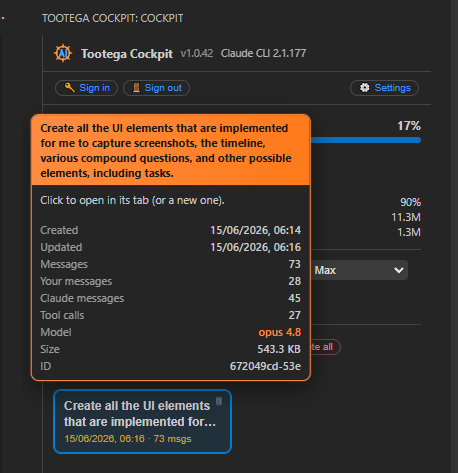
| Session hint (created/updated/msgs/tools/size) |
✅ |
🟡 |
rich tooltip per context card |
| CLI version + update indicator |
✅ |
🟡 |
+ release-notes link |
| Per-turn vs cumulative cache hit in logs |
✅ |
❌ |
hit=95% (last 100%) |
Usability
| Aspect |
Cockpit |
Official GUI |
Notes |
| Draft anti-loss (survives reload/crash) |
✅ |
🟡 |
mirrored in host + webview state |
| Reopen → full timeline replay |
✅ |
🟡 |
even if the run continued in the background |
| Manual render recovery (no restart) |
✅ |
➖ |
status-bar ↻ + card ↻ + auto-watchdog |
| Find + jump + highlight (Ctrl+F) |
✅ |
❌ |
scope Timeline / Prompts |
| Inline spell-checker + suggestions dropdown |
✅ |
❌ |
marks only; click to fix (no auto-correct) |
| Voice dictation with live partials |
✅ |
❌ |
+ opt-in post-dictation AI cleanup |
| Slash autocomplete + curated hints |
✅ |
✅ |
↑/↓/Enter/Esc |
| @-mention file autocomplete |
✅ |
✅ |
@ menu over workspace files (fuzzy) |
| Editable plan mode |
✅ |
✅ |
Edit/Preview + send notes back |
| Open diff in native editor |
✅ |
✅ |
button on the edit-permission modal |
| Auto-save before read/write |
✅ |
✅ |
flush dirty buffer first |
| Reopen closed session |
✅ |
✅ |
Ctrl+Shift+T |
| Remote control from phone |
✅ |
✅ |
📱 on the session card |
| Onboarding checklist (dismissible) |
✅ |
✅ |
first-run steps in the hub |
| One-click export (HTML snapshot / Markdown) |
✅ |
❌ |
tool cards reopen in the browser, or AI-polished |
| Elegant confirm dialogs (delete/effort) |
✅ |
🟡 |
Esc/overlay, danger styling |
| Scroll-to-bottom + at-bottom autoscroll |
✅ |
✅ |
floating button when scrolled up |
| Keyboard-first (send/stop/new/find) |
✅ |
✅ |
— |
Where Cockpit leads: consumption transparency — the cache panel with its savings
estimate and an active keep-alive that re-arms the 1 h TTL, session activity
(duration, turns, peak context), context injected per tool, and an all-time global
token counter spanning every project on the machine — plus bilingual runtime i18n,
in-conversation find, an inline PT/EN spell-checker (marks only, click to fix), voice
dictation, HTML/Markdown export, and resilient render recovery.
Where the official GUI leads: native-editor diff with edit-before-accept, editable plan
mode, @-mentions, file-restoring checkpoints, sign-in/onboarding, the built-in IDE MCP
server (diagnostics/Jupyter), Chrome automation, worktrees, cloud-session resume, and
dynamic workflows/Artifacts.
Sources
Gaps worth closing (official has it, Cockpit doesn't)
Recently closed (this release): reopen closed session, history time-buckets,
editor-toolbar entry, drag-to-attach, auto-save before read/write, @-mention file
autocomplete, active-selection sharing, editable plan mode, "open diff in native editor",
onboarding checklist, and remote control (📱 on the session card).
Still open — and why each is non-trivial here:
| Gap |
Effort |
Why it's not done / approach |
Context breakdown via /context |
🟡 blocked |
No clean source in stream-json — only running /context (pollutes the transcript, costs a turn) yields a brittle text block. UI is ready; needs a stable data source. |
| Chat in the secondary sidebar |
🟡→large |
Our chat is a WebviewPanel (editor area); VS Code only puts WebviewViews in the sidebar. Needs a dedicated chat-view provider with its own streaming/replay — a focused PR. |
Heavy/out-of-scope (official-only): file-restoring checkpoints, built-in IDE MCP server,
Chrome automation, git worktrees, cloud-session resume, dynamic workflows/Artifacts,
terminal mode.
Table of contents
Overview
The Cockpit gives Claude Code users a complete GUI inside VS Code, focused on
radical consumption transparency and fine-grained human control:
- Chat with token-by-token streaming, thinking blocks, and a tool-call timeline.
- A meter for the context window, cache (hit-rate / read / write), cost, and
account limits (5-hour and 7-day windows) always on screen.
- Permission approval, plan mode, composed questions (AskUserQuestion), and rendered
diffs — all via the CLI's interactive protocol.
- A list of saved sessions (contexts) with resume, statistics, and deletion.
- A model and effort selector per session; runtime language switching.
- Voice dictation (speech-to-text) straight into the composer, with optional
spelling/grammar correction — and other Cockpit-only differentiators (see
Cockpit-exclusive features).
It runs as an editor tab (resizable panel) and/or as a view in the Activity Bar
(the Tootega Cockpit container, view id tootega.hub).
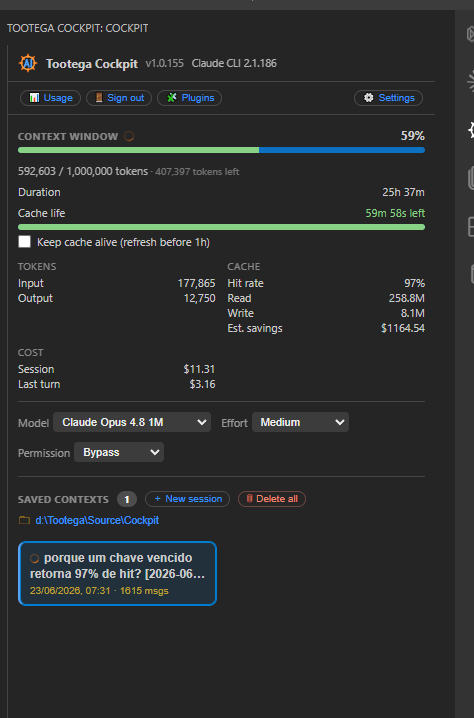
| Main panel |
Session statistics |
|
 |
Architecture
┌────────────────────────────┐        stream-json (stdout)         ┌──────────────────────────────┐
│   Claude Code CLI          │ ──────────────────────────────────▶ │  VS Code extension           │
│   (engine)                 │                                      │  ┌────────────────────────┐  │
│   - agent loop             │ ◀────────────────────────────────── │  │ Webview (React + Vite) │  │
│   - tools, subagents       │     input + responses (stdin)        │  │ chat · timeline · stats│  │
│   - todos, context, cache  │                                      │  └────────────────────────┘  │
│   - permissions, MCP, hooks│                                      │  ┌────────────────────────┐  │
└────────────────────────────┘                                      │  │ Extension host (TS)    │  │
                                                                    │  │ spawn · NDJSON parser  │  │
                                                                    │  └────────────────────────┘  │
                                                                    └──────────────────────────────┘
Primary channel with the engine — claude in headless/streaming mode. The actual command
the host spawns (see src/cli/CliProcessManager.ts):
claude -p \
  --output-format stream-json \
  --input-format stream-json \
  --include-partial-messages \
  --permission-prompt-tool stdio \
  --verbose \
  --permission-mode <mode> [--model <id>] [--effort <level>] [--resume <session_id>]
--output-format stream-json: the CLI emits one JSON object per line (messages,
tool_use, tool_result, usage, control_request, etc.).--input-format stream-json: lets the host send messages and control responses via
stdin during the session.--include-partial-messages: enables token-by-token streaming (stream_event).--permission-prompt-tool stdio: routes permission decisions through the control
protocol; without it, headless mode silently denies tools. This is also how
AskUserQuestion reaches the UI.--permission-mode is always sent, default included: since CLI 2.1.285 a -p
The stream parser (src/cli/StreamParser.ts) is
version-tolerant: unknown events are ignored without breaking the UI.
Architecture decision: the channel is the CLI, not the Anthropic API / Agent SDK
directly. This keeps automatic parity with the official engine (auth, billing,
subscription limits, new features) without reimplementing anything.
Prerequisites
| Requirement |
Version |
Note |
| VS Code |
≥ 1.90 |
engines.vscode in the manifest |
| Node.js |
≥ 20 |
Needed only for build/dev |
| Claude Code CLI |
recent |
claude on the PATH, authenticated |
| Git |
any |
Recommended for checkpoints (planned) |
Tested against Claude CLI 2.1.x (aligned with 2.1.223; screenshots show 2.1.177). The
parser is version-tolerant — unknown stream events are ignored gracefully — but the event
contract can vary between versions, see Known limitations.
On Windows, claude is typically a .cmd shim. Node 22+ refuses to execute it
without a shell (CVE-2024-27980 mitigation), so the host spawns it with shell: true.
If the CLI was installed by the native installer into ~/.local/bin (which is not
always on the PATH on Windows), the host probes that location automatically and uses the
first claude that answers --version.
The Cockpit does not replace the CLI — it pilots it. Install and authenticate the CLI
first.
- Install Claude Code (follow Anthropic's official documentation for your OS).
- Verify it is on the PATH:
claude --version
- Authenticate (once), by subscription or API key:
claude            # starts an interactive session; log in when prompted
# or, inside the Cockpit: the "Tootega: Sign in to Claude (CLI)" command
- (Optional) Adjust CLI defaults in
~/.claude/settings.json — for example
effortLevel. The Cockpit honors these defaults when you leave the selector on
"CLI default".
If claude is not on the PATH, set the full path in Settings → tootega.claudePath.
On activation, if the CLI is missing, the extension offers to help.
Install the extension
From a .vsix (recommended while there is no Marketplace publication):
code --install-extension tootega-cockpit-<version>.vsix
Or via the UI: Extensions → ⋯ → Install from VSIX…
To build the .vsix, see Build and packaging.
Run in development (without installing)
Opens VS Code in an Extension Development Host, loading the extension straight from
source — nothing is installed permanently.
Windows (PowerShell):
./run-dev.ps1
./run-dev.ps1 -OpenPath "C:\path\to\project"   # open pointing at a project
./run-dev.ps1 -Watch                           # recompile on save
Windows (cmd):
run-dev.cmd
run-dev.cmd C:\path\to\project
macOS / Linux (bash):
./run-dev.sh                       # test window without a folder
./run-dev.sh /path/to/project      # open pointing at a project
./run-dev.sh --watch               # recompile on save
./run-dev.sh --code code-insiders  # use VS Code Insiders
Via VS Code: open this folder and press F5 (the Run extension (dev) configuration
in .vscode/launch.json).
In the test window, open the Cockpit with Ctrl+Alt+C, the Cockpit item in the
status bar, or the palette (Ctrl+Shift+P → "Tootega: Open Cockpit").
Build and packaging (.vsix)
npm install
npm run build        # compiles host + webview into dist/ (esbuild)
npm run typecheck    # type-checks both tsconfigs (host + webview)
npm test             # unit tests (Vitest)
npm run package      # bump patch + build + produce the .vsix (requires @vscode/vsce)
Available scripts (package.json):
| Script |
Does |
build |
node esbuild.mjs — bundles extension.js + webview/main.js + CSS |
watch |
build in watch mode |
typecheck |
tsc --noEmit over both tsconfigs (host and webview) |
test / test:watch |
Vitest |
vscode:prepublish |
production build (esbuild.mjs --production) |
package |
npm version patch → build → vsce package |
vsix |
typecheck → bump → build → vsce package |
On Windows there are also package-vsix.ps1 / package-vsix.cmd as shortcuts; on
macOS/Linux use ./package-vsix.sh [out.vsix]. For the dev host, ./run-dev.sh mirrors
run-dev.ps1.
Build output lands in dist/ (extension.js, webview/main.js, webview/main.css).
Packaging boundaries are controlled by .vscodeignore — only dist/,
l10n/, media/, package.nls*.json, LICENSE, and README.md ship in the .vsix.
Getting started
- Open a project folder in VS Code.
- Open the Cockpit (Ctrl+Alt+C).
- Confirm at the top: name, version, and the detected Claude CLI version.
- If a login warning appears, use Sign in.
- Choose Model, Effort, and Permission (or keep the defaults).
- Type in the composer and send (Enter sends, Shift+Enter inserts a line break).
With tootega.autoResumeLastSession enabled (the default), opening the folder
automatically resumes the most recent session for that directory.
Features
Status legend: ✅ implemented · 🟡 base/partial · ⏳ planned.
The full requirements and priority catalog lives in CLAUDE.md and
Docs/.
Conversation and agent core
| Feature |
Status |
How to use |
Limitations |
| Token-by-token streaming chat |
✅ |
Type and send; the answer appears incrementally |
— |
| Thinking blocks with toggle |
✅ |
Expand in the chat; default controlled by tootega.showThinking |
Only appears if the model/effort emits thinking |
| Tool-call timeline (expandable cards) |
✅ |
Click a card for input/output; default via tootega.expandToolCards |
Inline diff in the editor not yet (rendered in the webview) |
| Sandbox denials on the Bash card |
✅ |
An access the sandbox refused shows in an amber band above the output — the cause of the failure, not just its effect |
The CLI only annotates the result with them from 2.1.224; recognised by shape, so a line we don't recognise stays in the output where it always was |
| Interrupt the agent (Stop) |
✅ |
Stop button or Ctrl+Alt+. |
Stops by ending the CLI process; it respawns on the next send |
| Session history: list, resume, rename |
✅ |
Saved contexts drawer; click to resume; rename button on the context card (updates the open webview title) |
Advanced search partial |
| Rewind from a prompt |
✅ |
Rewind button on a prompt — truncates the transcript at that point and re-arms --resume |
Restores the conversation, not the files on disk (Git checkpoints still planned) |
| Elapsed time per turn |
✅ |
Shown live on the gauge and again at the end of the turn |
— |
| Subagents (parallel threads) |
🟡 |
Rendered when the CLI emits them |
A dedicated parallel view is planned |
| Message queue (follow-ups) |
⏳ |
— |
— |
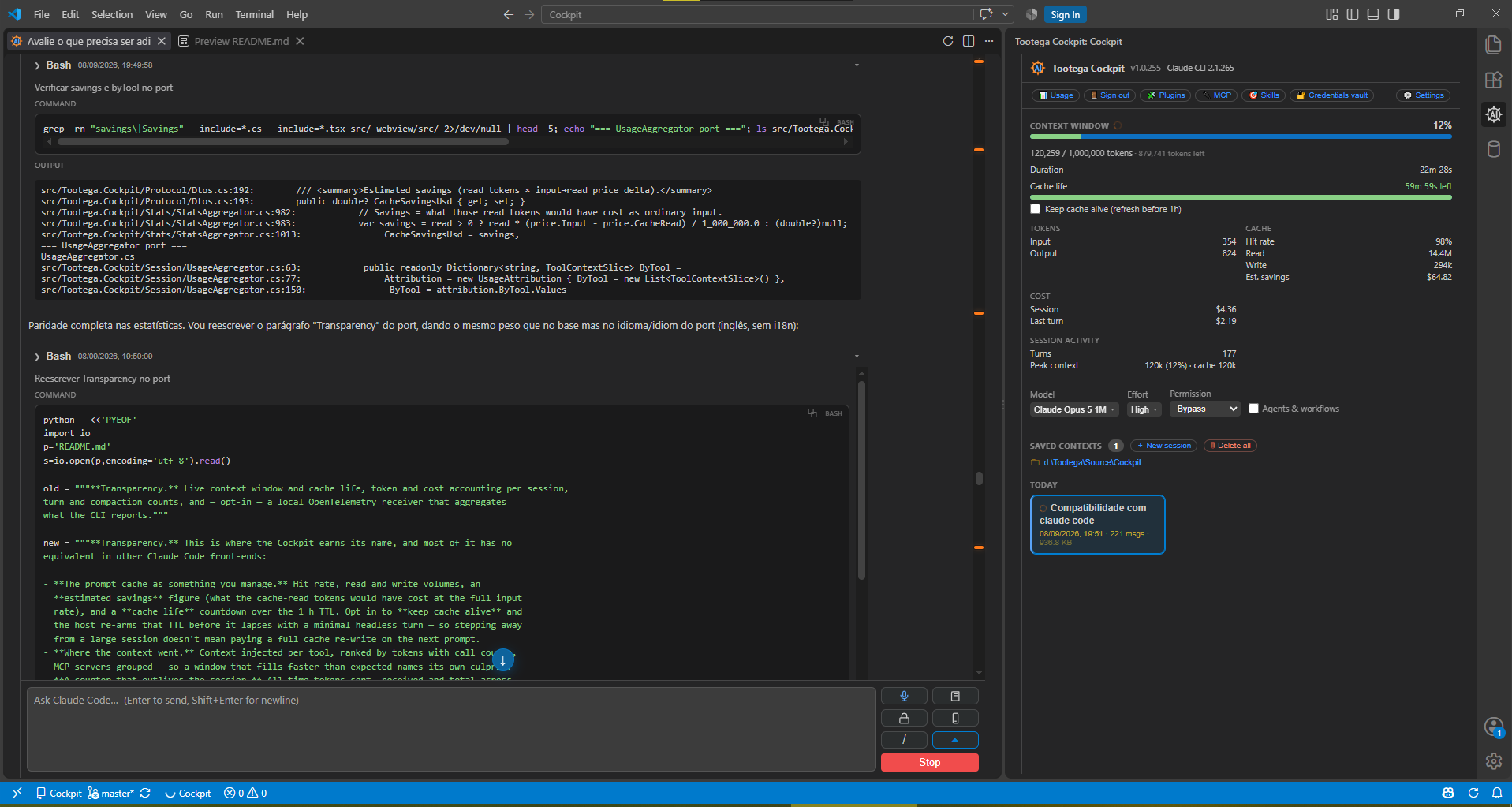
Rendered diff (an edit expanded in the timeline):
Editing, diff, and human control
| Feature |
Status |
How to use |
Limitations |
| Permission approval (Allow / Always / Deny) |
✅ |
Per-tool modal with preview (Bash, Write, WebFetch, JSON); Ctrl+Enter = allow, Esc = deny |
— |
| Invisible characters exposed in the command |
✅ |
Zero-width, bidi overrides, non-ASCII spaces, tab padding and C0 controls show as a marked glyph (hover gives U+XXXX NAME), with a warning above the command |
Applies to the command preview; other previews show the raw text |
| Permission modes (HITL ↔ auto) |
✅ |
Permission dropdown (default, plan, acceptEdits, auto, dontAsk, bypassPermissions) |
bypassPermissions disables approvals — use with care |
| Plan mode (view, edit and approve a plan) |
✅ |
ExitPlanMode permission with Edit/Preview toggle and a ⛶ maximize toggle for long plans; Approve & run or Keep planning (send my notes) feeds your edits back |
— |
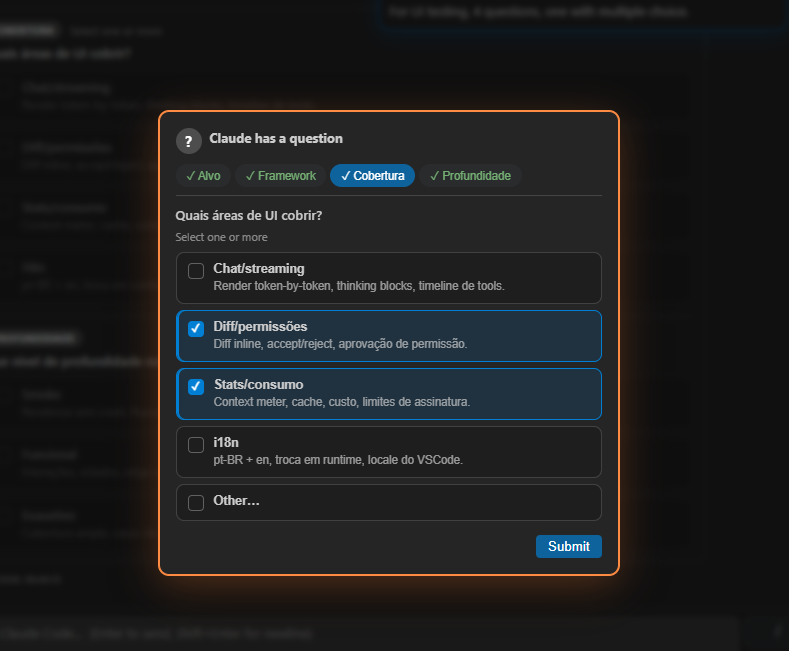
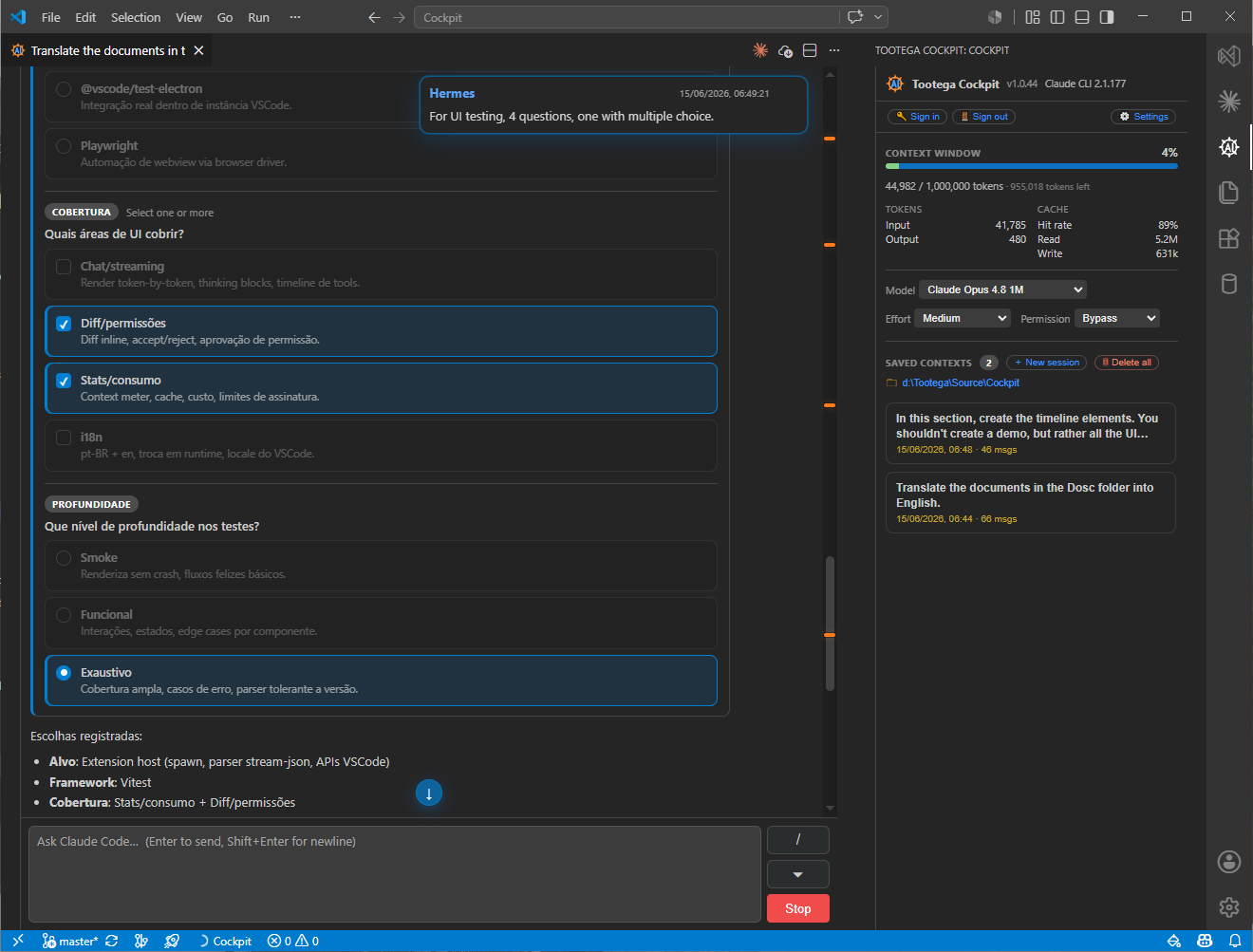
| Composed questions (AskUserQuestion) |
✅ |
Modal with tabs per question, option cards, multiSelect, an Other option, and a text box per question that is added to that question's choices (Enter sends, Shift+Enter new line) |
— |
| Side-by-side diff in the native editor |
✅ |
Open diff in editor button on the edit-permission modal → VS Code vscode.diff |
Editing inside the native diff to change the proposal is still in the webview path |
| @-mention file autocomplete |
✅ |
Type @ to pick a workspace file (fuzzy) |
No Alt+K line-range shortcut |
| Share editor selection |
✅ |
Composer chip (@file#a-b) with an eye toggle to include/exclude |
— |
| Auto-save before read/write |
✅ |
Flushes a dirty buffer before the agent reads/writes (tootega.autosave) |
— |
| Accept/reject per file and per hunk |
⏳ |
— |
— |
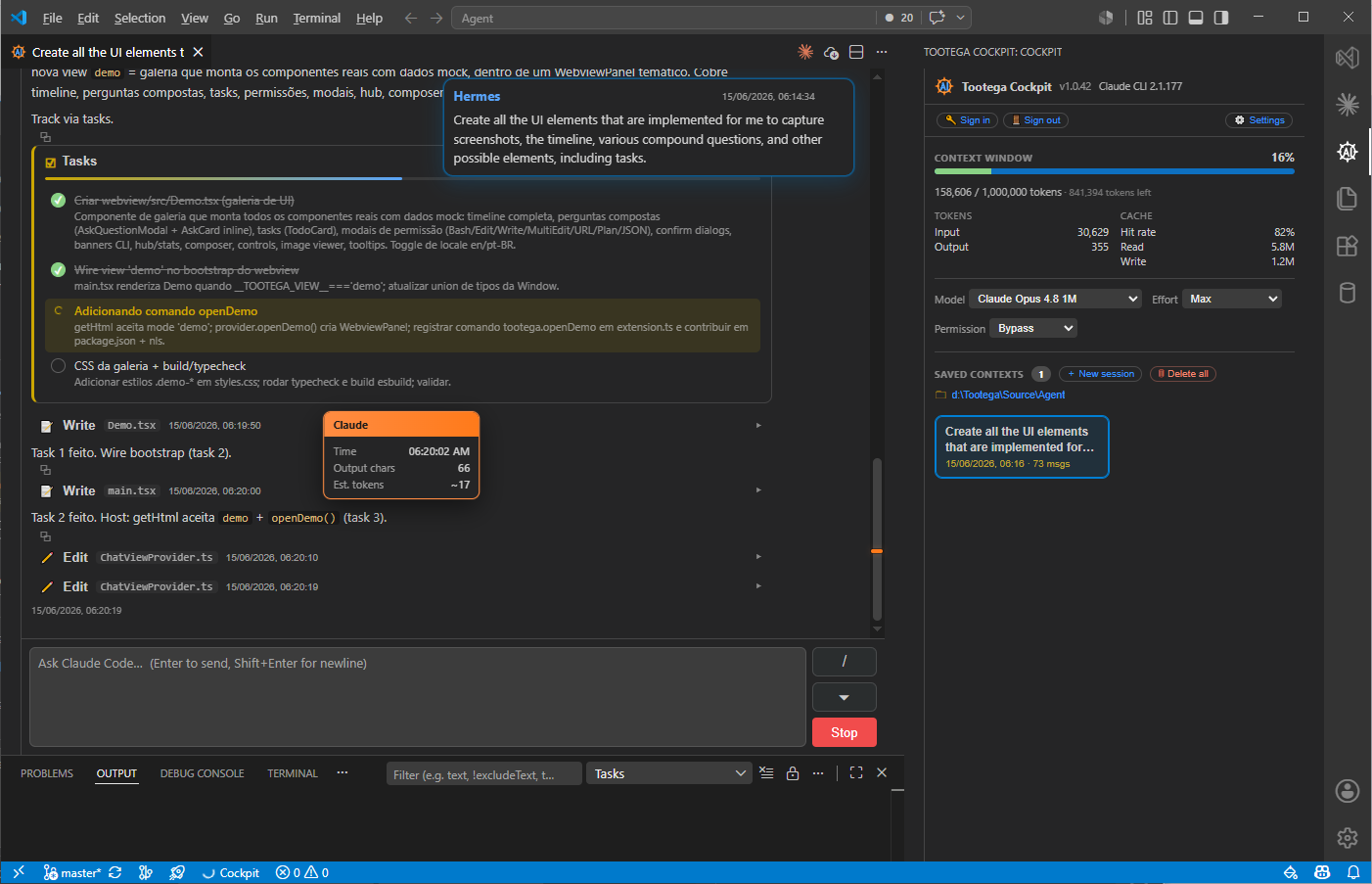
| Agent Todos panel |
🟡 |
The Tasks tab shows the live task list |
Depends on the CLI emitting todos |
Permission / composed question and the recorded answer:
| Question (multi-select) |
Recorded answer |
 |
 |
Tasks (Todos) panel:
Checkpoints and recovery
| Feature |
Status |
Note |
| Automatic checkpoint before large changes |
⏳ |
Planned (Git) |
| Rewind from any message |
🟡 |
Truncates the transcript and re-arms --resume (conversation rewind); file restore via Git still planned |
| Restore Files / Files Only / Files & Task |
⏳ |
— |
Statistics, context, cache, and consumption (the heart of the product)
| Feature |
Status |
How to use |
Limitations |
| Context window meter (used / remaining / limit) |
✅ |
Bar at the top, with color bands; 200K or 1M limit. CLAUDE_CODE_DISABLE_1M_CONTEXT (environment or the env block of user/project settings) caps it at 200K, where the CLI auto-compacts |
Limit auto-derived from the active model when the engine doesn't report its own |
| Engine warnings (fast-mode credits, restricted subagent model) |
✅ |
⚠ banner in the timeline, once per session |
Recognised by shape from system events — a warning the CLI stops emitting simply stops appearing |
| Cache: hit-rate, read, write |
✅ |
Cache block in the panel |
— |
Cache life countdown + keep-alive (CacheKeeper) |
✅ |
Bar showing how much of the prompt cache's 1 h TTL is left. Ticking Keep cache alive re-arms it before expiry with a headless one-shot, so a session you step away from doesn't pay a full cache re-write on the next turn |
The refresh costs one minimal turn; the TTL is the CLI's, not ours |
| Estimated cache savings |
✅ |
Est. savings in the Cache block: what the cache-read tokens would have cost billed at the full input rate |
Estimate, same caveat as Cost |
| Cost per turn and session |
🟡 |
Cost block ("estimated" label) |
Estimate, not the official invoice |
| Tokens in / out / cache-create / cache-read |
✅/🟡 |
Tokens block |
Full breakdown partial |
| Subscription limits (current session, weekly, per-model weekly) |
✅ |
Meters in the panel, fed by the real OAuth /usage API (same source as /usage) |
Statusline complements it during low usage — see statusline |
| Usage attribution (long context, subagents, cache hit-rate, context per tool/MCP) |
✅ |
"Where your tokens went" section in the Usage dialog |
Estimated from local transcripts; tool_result tokens approximated at ~4 chars/token |
| Global token counter (all-time + per day) |
✅ |
Tokens (global) block in the Usage dialog: sent, received and total across every project on this machine, with a day-by-day bar history |
Machine-local only (this device's transcripts); does not include other devices |
| 7-day spend by model |
✅ |
Breakdown in the Usage dialog, with new vs. cache-read tokens per model |
Equivalent API price — on a subscription you are not charged this |
| Turn timing segmented by (model, effort, type) |
✅ |
Sample counts per segment; debounced flush with a cross-process lock (atomic merge) |
— |
| Session duration, turn count, peak context |
✅ |
Session activity block: wall-clock duration, turns completed, and the high-water mark of context (with the cache figure at that moment) |
— |
| Context-near-limit alert |
✅ |
Automatic warning above ~85% |
— |
| Visible compaction (S11) |
✅ |
While it happens the indicator says "Compacting the context…" instead of looking stuck; the compact_boundary closes it with a blue band in the timeline: before → after · −condensed · duration |
The sizes are the CLI's own (compact_metadata); a field it stops sending just disappears from the band |
Context breakdown via /context |
⏳ |
— |
UI ready, data source pending |
| Historical consumption charts |
⏳ |
— |
— |
| Active model / effort / mode |
✅ |
Dropdowns in the panel + status bar |
— |
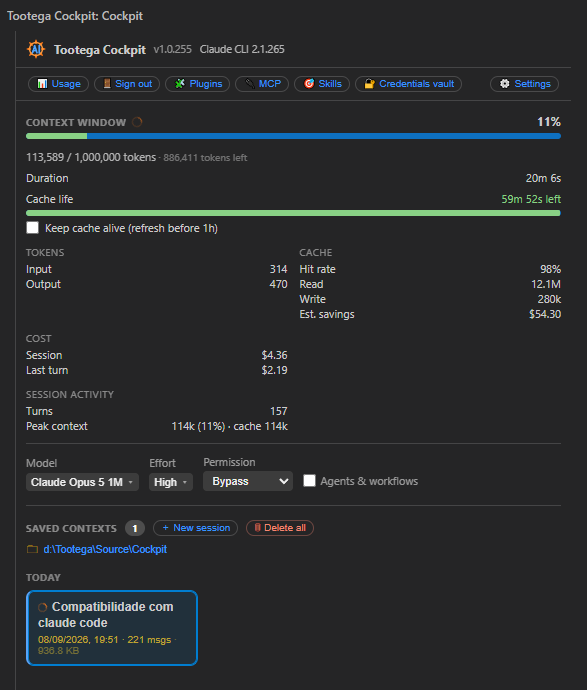
Detailed session statistics (tooltip/hint):
What you can see here and nowhere else
The CLI knows all of this — it just never shows most of it, and neither does the official
GUI. Four of these come from doing work the CLI does not do for you:
1. The prompt cache as a resource you manage, not just observe.
Every GUI can show a cache hit rate after the fact. The Cockpit prices it — Est. savings
is what those cache-read tokens would have cost at the full input rate — and, more usefully,
lets you keep it: the Cache life bar counts down the 1 h TTL, and ticking Keep cache
alive re-arms it with a minimal headless turn before it lapses. Walking away from a large
session normally means the next prompt re-writes the whole cache; this is the difference
between paying cache-read and paying cache-write on a 500 K-token context.
2. Where the context actually went.
Context injected per tool ranks Bash, Read, Edit, Grep and MCP by the tokens each pushed
into the window, with call counts. When a session fills up faster than expected, this names
the culprit instead of leaving you to guess — usually one chatty tool. MCP servers are
grouped so a noisy server stands out as one row.
3. A token counter that outlives the session.
Tokens (global) is all-time and machine-wide: sent, received and total across every
project in ~/.claude/projects, with a per-day history. The CLI's own /usage answers "how
much of my plan is left this week"; this answers "how much have I actually run through this
tool, ever, and on which days". It is built from an incremental rollup of the transcripts,
so it is cheap to recompute and survives every session you have ever run.
4. Peak context, not just current context.
A context meter that only shows now hides the spike that triggered compaction.
Session activity keeps the high-water mark — with the cache figure at that moment —
alongside duration and turn count.
Honest about the numbers: the USD figures are the equivalent API price, computed
locally from a price table — on a subscription you are not charged them, and they are
labelled as estimates throughout. tool_result tokens are approximated at ~4 chars/token.
Everything derived from transcripts covers this machine only. The one set of figures
that is not an estimate is the subscription limits, which come from the same OAuth
/usage API the CLI itself uses.
Extensibility (surfacing what the CLI exposes)
| Feature |
Status |
Note |
| Slash commands (built-in + custom) with autocomplete |
✅/🟡 |
Curated catalog (context, session, config, tools, account, info); the CLI exposes only names via sessionInit, descriptions are curated |
| Plugins manager (browse / install / remove / enable / disable / update + marketplaces) |
✅ |
🧩 Plugins in the Hub — see Plugins |
| Skills: listing cost, loaded state, per-skill listing control |
✅ |
🎯 Skills in the Hub — see Skills |
| Custom subagents: list / select |
⏳ |
— |
| MCP servers: health / tools / pending approval |
✅ |
🔌 MCP in the Hub: a card per server with its live status and the tools it exposes; ⏸ Pending approval (unapproved .mcp.json) is surfaced. Connecting/approving is still done in the CLI (/mcp) |
| Hooks: view configured ones |
🟡 |
/hooks forwarded to the CLI |
CLAUDE.md / settings editor |
⏳ |
— |
Presentation and accessibility
| Feature |
Status |
Theme synced with VS Code (light/dark/high-contrast via var(--vscode-*)) |
✅ |
| Rich Markdown + syntax highlighting (highlight.js) |
✅ |
| Keyboard shortcuts |
✅ |
| Bilingual i18n pt-BR + English, runtime switching |
✅ |
| Configurable UI density |
⏳ |
Prompt history
Browse previous prompts and the session stream directly in the panel:
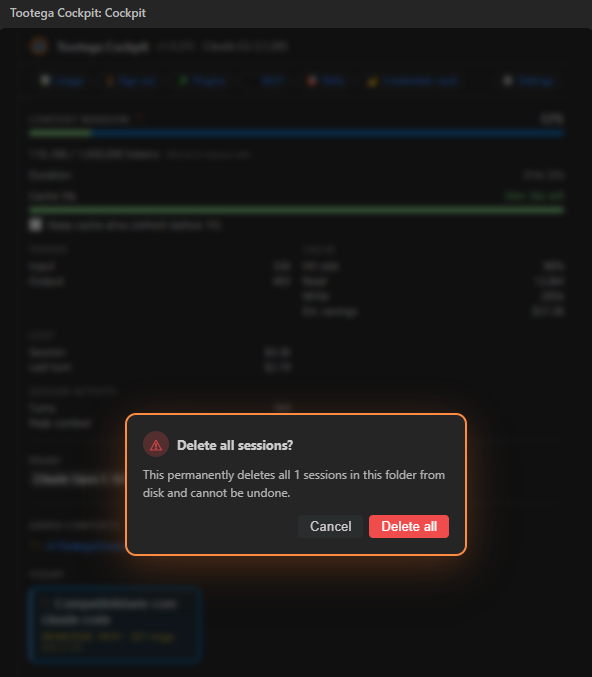
Delete session
Deleting a session removes the transcript from disk — an irreversible action, guarded
by a confirmation:
Cockpit-exclusive features
Differentiators that go beyond surfacing the CLI — the Cockpit's own value layer. Most
rely on a deliberately narrow exception to the "CLI-only" rule: a handful of clean,
isolated calls authenticated with the local Claude.ai OAuth token
(~/.claude/.credentials.json). These are not the agent loop — they send only what the
task needs (instruction + text), with no agent system prompt, tools, MCP, or project
context, and never write or log credentials.
| Feature |
What it does |
Channel |
| 🎙️ Voice dictation (speech-to-text) |
Dictate straight into the composer — see Voice dictation |
OAuth STT WebSocket (same service as the CLI's /voice); no token spend |
| ✍️ Dictation correction |
Opt-in (default off) spelling/grammar pass after you stop dictating; a clean one-shot (instruction + text only, ~1.7 s) |
Anthropic Messages API with the internal model (tootega.internalModel, default Haiku) |
🧠 Internal AI utility helper (AiClient) |
Shared, clean one-shot helper for the Cockpit's own utility calls (dictation correction, slash-command research). Avoids the CLI one-shot's ~5 s cold start + full system prompt/tools |
Anthropic Messages API (OAuth), isolated |
🏷️ Slash-command auto-research (SlashCommandResearch) |
Categorizes/labels unknown slash commands (category, short hint, detail) in the UI language; results cached globally in ~/.claude/tootega/ so each command is researched only once |
Internal AI helper |
🧩 Plugins manager (PluginManager) |
Browse/install/remove/enable/disable/update plugins + marketplaces; canonical URL and kind badge per plugin resolved once by the internal helper and cached — see Plugins |
CLI (claude plugin …) + internal AI helper for URL/kind |
| 🎚️ Timeline verbosity |
Display-only filter (verbose / necessary / dialogo / quiet) that collapses tool noise — see Timeline verbosity |
Local |
🚦 Minimum-effort gate (RepoDirectives) |
A folder can pin a minimum reasoning effort via a CLAUDE.md tag (<!-- **enffort=max** -->); on send, if the selected effort is below the folder's floor the Cockpit asks to confirm |
Local (reads CLAUDE.md) |
| ⏪ Prompt rewind |
Rewind to an earlier prompt: truncates the transcript and re-arms --resume |
Local |
| ✏️ Rename context |
Rename a saved session from its card; updates the open webview title |
Local |
| ⏱️ Per-turn elapsed time |
Live on the gauge and again at the end of each turn |
Local |
🔋 Prompt-cache keep-alive (CacheKeeper) |
Opt-in per session: re-arms the cache's 1 h TTL before it lapses so an idle session doesn't pay a full cache re-write on the next prompt |
Headless one-shot resume (minimal turn) |
🔢 All-time global token counter (DailyTokens) |
Sent / received / total across every project on this machine, with a per-day history; incremental rollup over ~/.claude/projects/**/*.jsonl |
Local (reads transcripts) |
| 📊 Real account usage |
Session / weekly / per-model meters fed by the real OAuth /usage API (no manual budgets) |
OAuth /usage; no token spend |
| 🪟 Statusline real-usage wrapper |
Reversible wrapper that caches rate_limits / context_window and re-invokes your original statusline — see statusline |
Local (Windows) |
Why the exception is safe: these calls are clean and isolated and sit outside agent
orchestration. The agent loop, billing parity, and subscription limits stay 100% on the
CLI. The OAuth token is read-only; /usage and STT spend no tokens, and the
dictation correction spends only minimal subscription tokens (instruction + text). See
CLAUDE.md §6 for the recorded decision.
Models, effort, and sessions
- Model and Effort are session overrides (they do not change global settings);
switching restarts the CLI session.
- The model list is not hardcoded anywhere. The CLI has no
models subcommand, so the
catalogue comes from /v1/models — id, display_name (the label shown),
max_input_tokens (the context column, and what decides the [1m] suffix) and
created_at (newest first). A model released to your account appears on its own, with no
extension update.
- The credential is the API key set via Tootega: Set Anthropic API key (OS keychain),
ANTHROPIC_API_KEY / ANTHROPIC_AUTH_TOKEN, or — on subscription accounts with no
API key — the CLI's own OAuth token. GET /v1/models spends no tokens.
- The last successful answer is cached (globalState) and is what the picker shows while
offline or before discovery replies, instead of a list that goes stale.
default (no --model flag) and the Custom… field (any id, validated by the CLI on
spawn) are the only entries the extension itself contributes.
- Default (…) in the picker is not ours either: it is
model from
~/.claude/settings.json (re-read on every session init, so a change made with the CLI's own
/config shows up without reloading the window), or the default observed in the init of a
session with no per-tab override.
- Effort is a fixed CLI enum:
low / medium / high / xhigh / max.
- Engine —
tootega.tootegaEnabled is the master switch for the local Tootega Code
engine, off by default. Off, the Cockpit runs on Claude Code alone: nothing spawns
agent.exe, tootega.engine is ignored and the Engine combo is not rendered (the host
offers a single engine, and a one-option picker is noise). On, the combo returns and each tab
can be pinned — N Claude tabs plus one Tootega tab, which needs the TootegaEngine server up
(serve.cmd; tootega.tootegaServer says where).
Remote Control
Continue a Cockpit conversation from your phone or from claude.ai/code. The 📱 button — on the
session card in the Hub and in the composer — starts it.
Why it is a terminal, not a slash command. /remote-control only exists in an interactive
session. The Cockpit's session is headless (-p --input-format stream-json, which is what gives
us the event stream), and there the CLI answers "/remote-control isn't available in this
environment" — the command isn't even in that session's slash_commands (measured on 2.1.223).
So the Cockpit hands the conversation over the way the CLI does support it.
What the button does:
- Stops the tab's headless process. Two processes owning one session would duplicate the
context on disk.
- Opens a visible terminal with
claude --remote-control --resume <session-id> — an
interactive session that continues this conversation and prints the pairing URL/QR.
- Keeps the timeline following. The interactive session writes to the same transcript, so
the tab repaints from it while the remote session runs: local history and remote turns side
by side.
- Steps the composer aside. The button turns green; typing in the Cockpit is refused with an
explanation and reveals the terminal instead of respawning a process over the conversation.
- Clicking again turns it off (same toggle as the official extension): the terminal closes
and the Cockpit drives the conversation again. Nothing is lost — the next message resumes it.
Closing the terminal by hand does the same.
The button says what is known, not what was hoped for. Spawning the terminal is not proof
that the session came up, so the state is confirmed: the CLI registers every running process in
~/.claude/sessions/<pid>.json, and SessionRegistry looks for
this conversation there (checking the pid is really alive — a hard kill leaves the file behind).
The button is amber and pulsing while connecting, green once the process is registered,
and red if it never appeared (45s) or disappeared after being up. A failure leaves the
terminal open — it holds the reason (login, network, a CLI error) — and the next click
reconnects instead of toggling off. Assuming success was the bug the official extension fixed in
2.1.224; the fix here is the same one, at the same place.
Requirements are the CLI's, not ours: Remote Control needs a claude.ai login (an
ANTHROPIC_API_KEY in the environment, or an ANTHROPIC_BASE_URL outside api.anthropic.com,
disables it), and the local process must stay alive while the remote session is connected.
Plugins
A full plugins manager (src/cli/PluginManager.ts,
PluginsModal), opened from the 🧩 Plugins
entry in the Hub. Everything goes through the official CLI (claude plugin …) — the Cockpit
only surfaces it:
- List installed + available plugins (across configured marketplaces) and filter by
All / Installed / Available; search by name; sort exposes install counts.
- Actions: install (with scope), uninstall, enable, disable, update.
- Marketplaces: add (URL,
owner/repo, or local path) and remove.
- Enrichment: each plugin shows a kind badge (skills · agents · commands · MCP ·
hooks · mixed) and a canonical URL. The kind of installed plugins is computed
precisely from local components; URL + kind for the rest are resolved once by the internal
AI helper (Haiku) and cached in
~/.claude/tootega/plugin-urls.json (Refresh can
force re-validation). Best-effort — failure keeps the derived values.
Skills
Skills are cheap until they aren't: every skill the CLI knows keeps its name + description
in the context of every turn, and a skill that is actually triggered injects its whole
SKILL.md body. The 🎯 Skills entry in the Hub
(SkillsModal) makes both visible.
The panel keeps two axes side by side: the dropdown configures what enters the listing,
and the label next to it observes what is actually in the context — light, ⚡ loaded, or
⚠ off · resident. Header totals show skills · metadata · loaded, and rows are grouped
by origin (project · user · built-in) with filter chips.
Colour carries meaning rather than decorating: one hue per origin, shared by the chip, the
group header, the row's side rule and its badge, so a column reads at a glance. Each row has a
2px weight bar — its cost relative to the most expensive skill in the listing. A row you
switch off is dimmed (and brightens on hover, so its former cost stays readable); ⚠ off · resident is never dimmed, because an alert that fades away is not an alert. Every colour comes
from VS Code theme tokens, so light, dark and high-contrast all work.
- Where the numbers come from: the control-protocol request
get_context_usage
(ContextUsage.ts). It is a local computation in the engine —
it does not create a turn, spend tokens, or add a line to the transcript. It answers even
before the first message. Per skill it returns the origin (projectSettings ·
userSettings · built-in; anything new falls back to a plugin group instead of
disappearing) and the metadata tokens — measured by the engine, not estimated. Only
the loaded body is an estimate, and it is the only figure labelled est..
- Loaded vs. light: the CLI emits no dedicated event when a skill is triggered. A skill
called by the model shows up as a
Skill tool call whose result is Launching skill: <name>,
followed by a synthetic message carrying the body — the size estimate comes from that
message (~4 chars/token), i.e. what actually entered the context, not from the file on
disk. That message is taken by position, not by a header: a skill with its own directory
opens with Base directory for this skill: …, a built-in ships the SKILL.md raw, and
matching a header would leave the built-ins with no number. The other engine path,
Execute skill: <name>, loads nothing into the context and is therefore not marked.
A skill triggered by /name from the Cockpit is marked too (we sent it), but the engine
reports no size, so no number is shown rather than a made-up one.
- Loaded by a hook: a hook (
SessionStart, UserPromptSubmit, …) can dump a skill body
straight into the context — no Skill tool call, no /name, so nothing would mark it. The
stream does carry system/hook_response with the injected text, but not the skill's name
(the hook command is usually a script of its own), so the only possible link is the
content: SkillBodyIndex.ts matches the injected text
against the body of the SKILL.md files on disk (a 200-character normalised signature, past
the frontmatter). On a match the skill is marked ⚡ loaded and labelled loaded by a hook,
because it is an inference. A built-in has no file on disk and therefore cannot be named.
- Hook context: matched or not, every
hook_response is accounted for under hook
context in the panel, grouped by hook with the injected size and how many times it fired.
That text weighs in the prompt exactly like a skill body, so hiding it would be the same
blind spot in a different place.
- Visible in the timeline: when a body enters the context, the
Skill card gets a
⚡ <name> · +N tk loaded (est.) seal — the cost appears at the moment it happens, not only
in the panel. A hook injection has no card to seal, so it gets its own thin band in the
timeline (a SessionStart hook fires before the first prompt and belongs to no turn); a hook
that fires on every prompt is banded once, and the repetitions are counted in the panel.
- Listing control (per skill):
On (full) · Name only · Only /command · Off. This maps
to the CLI's skillOverrides and the saving is real — measured on a 14-skill setup, turning
three of them down took the listing from 1928 → 1027 tokens. Overrides are stored per
workspace (.claude/skills/ belongs to the project, so they must not leak into other
folders), survive a VS Code restart, and are passed to the CLI when it starts; your
~/.claude/settings.json is never touched, and the CLI outside the Cockpit is unaffected.
- What the panel will not pretend: there is no way to unload a single skill from a live
context — the engine offers none. An already-loaded skill you switch off is shown as
⚠ off · resident: it will not be listed or triggered again, but the body stays until a new
session or /clear. Measured on the same session: listing dropped by exactly the skill's
metadata tokens while Messages stayed unchanged.
- A skill triggered by
/name typed outside the Cockpit (in the terminal, on a session we
resumed) is invisible to us and is not shown.
Field notes with the raw captures: Docs/pesquisa/skills-transparencia.md.
Custom system prompt
Quiet directive (systemPrompt.quiet, a separate multi-line box): injected at the very
start of the appended payload, before the language rule and your own text — it tells the
agent to stop narrating the execution and to stop closing with a report or summary. It has no
on/off switch: an empty box injects nothing. It leads the payload because it is a rule about
the shape of every answer, and a rule of shape read after the content loses to the content.
Settings → Tootega Cockpit → System Prompt: a multi-line box (systemPrompt.text) plus an
on/off switch (systemPrompt.enabled, off by default). When on, the text is appended to the
CLI's system prompt.
- Applied on every CLI start, including the respawn that continues the same conversation
(model/effort change, skill override). Injecting it only on a brand-new context would make
the directive vanish mid-conversation without anyone noticing.
- The text is a template, validated against your machine
(
SystemPromptTemplate.ts):
${defaultShell} · ${psVersion} · ${winPathStyle} · ${projectPathWin} ·
${projectPathGitBash} · ${projectPathWsl} · ${wslRow} · ${os} · ${tempDir}.
A line whose placeholder points at something not installed here — no WSL, no Git Bash — is
dropped whole: describing a shell the machine does not have is worse than saying nothing.
An unknown ${name} is kept verbatim rather than invented or blanked.
- The default content is a shell-discipline directive (which interpreter, which path style,
where
/tmp does and does not exist), which is exactly the class of mistake that costs a
broken command.
- Delivered by file, not by argument. Measured on Windows: passed inline, a multi-line text
containing
|, $ or backticks is mangled by cmd.exe under shell:true and reaches the
model empty — an injected sentinel came back MISSING. Through
--append-system-prompt-file it arrives intact. Also measured: repeating
--append-system-prompt does not accumulate (the last one wins), so your text and the
AskUserQuestion language rule are merged into one payload instead of one erasing the other.
Timeline verbosity
tootega.verbosity controls how much of the timeline is shown — display only; it does not
change the agent or what the CLI does. Modes:
| Mode |
Shows |
verbose (default) |
Everything (as before) |
necessary |
Only edits and final explanations |
dialogo |
Only edits and what it's doing |
quiet |
Only final explanations |
In non-verbose modes the progress bar collapses several hidden tool calls into a single
turn/edit segment instead of one card per tool.
Voice dictation
Dictate prompts straight into the composer. The mic button in the composer bar starts
and stops capture.
- Transcription runs over the OAuth speech-to-text WebSocket
(
/api/ws/speech_to_text/voice_stream) — the same service the CLI's /voice uses
(deepgram-nova3, live interim results, endpointing). It spends no tokens.
- Mic capture happens on the host via ffmpeg (the webview blocks
getUserMedia).
Point tootega.ffmpegPath at your ffmpeg binary, or leave it empty to use ffmpeg from
the PATH.
- Optional correction (opt-in, default off): turn on
tootega.voiceCorrect and, when you
stop, the text is sent to the internal model (tootega.internalModel, default Haiku) for a
quick spelling/grammar pass — a clean, isolated one-shot (instruction + text only, ~1.7 s).
- Language:
tootega.voiceLanguage sets the dictation language; empty follows the
Cockpit UI language.
- UX: the input gets focus when dictation starts; on stop it goes read-only with a
spinner while correcting; typing ends the dictation.
Voice features use the OAuth exception (clean, isolated calls) — see
Cockpit-exclusive features.
Composer attachments
- Paste image (screenshot/bitmap without a path): attached as a base64 image block in
the
user message ({type:'image',source:{type:'base64',media_type,data}}); preview
chips in the composer and thumbnails in the bubble.
- Paste file (with a path): inserts the address into the text — relative to the
context cwd if inside it, otherwise absolute (resolved on the host with
path.relative). The path comes from File.path (Electron) or text/uri-list
(file://…); when the webview exposes neither, the host reads the OS clipboard
(cross-platform: Get-Clipboard on Windows, AppleScript on macOS, wl-paste/xclip
on Linux).
Settings reference
All under Settings → Extensions → Tootega Cockpit (prefix tootega.):
| Key |
Type |
Default |
Description |
claudePath |
string |
claude |
Path to the Claude Code CLI executable |
language |
enum |
auto |
UI: auto (follows VS Code) / pt-BR / en |
model |
enum |
default |
Default model for new sessions; reflected in the panel dropdown |
effort |
enum |
default |
Default effort (low…max); default uses the CLI's effortLevel |
autoResumeLastSession |
boolean |
true |
On opening the folder, resume the most recent session for that directory |
permissionMode |
enum |
default |
Permission mode forwarded to the CLI (always sent, default included); reflected in the dropdown |
notifyOnComplete |
boolean |
true |
Notify when the agent finishes and the panel is not visible |
showThinking |
boolean |
false |
Expand thinking blocks by default |
verbosity |
enum |
verbose |
Timeline display level — verbose / necessary / dialogo / quiet (display only; see Timeline verbosity) |
expandToolCards |
boolean |
false |
Expand tool cards by default in the timeline |
spellCheck |
boolean |
false |
Inline PT-BR + EN spell-checker in the composer — marks only, never auto-corrects; click an underlined word for suggestions |
userName |
string |
"" |
Name shown on your messages; empty = OS user |
internalModel |
enum |
claude-haiku-4-5 |
Model for the Cockpit's internal AI calls (dictation correction, slash-command research) — clean, isolated calls; Haiku is fastest/cheapest |
voiceCorrect |
boolean |
false |
After stopping dictation, run a spelling/grammar pass with the internal model (clean one-shot). Opt-in |
voiceLanguage |
string |
"" |
Dictation language (speech-to-text); empty follows the UI language |
ffmpegPath |
string |
"" |
Path to ffmpeg used for voice capture; empty = ffmpeg from PATH |
systemPrompt.quiet |
string |
quiet directive |
Injected at the start of the system prompt: no narration during execution, no closing report. Empty = injects nothing |
systemPrompt.enabled |
boolean |
false |
Append your text to the CLI's system prompt on every start — see Custom system prompt |
systemPrompt.text |
string |
shell directive |
Multi-line text appended to the system prompt; supports placeholders resolved against this machine |
The limit meters now read real account usage via the OAuth /usage API
(same source as the CLI's /usage), so no manual budgets are needed. The context
meter limit is auto-derived from the active model (1M for [1m] variants and the natively-1M
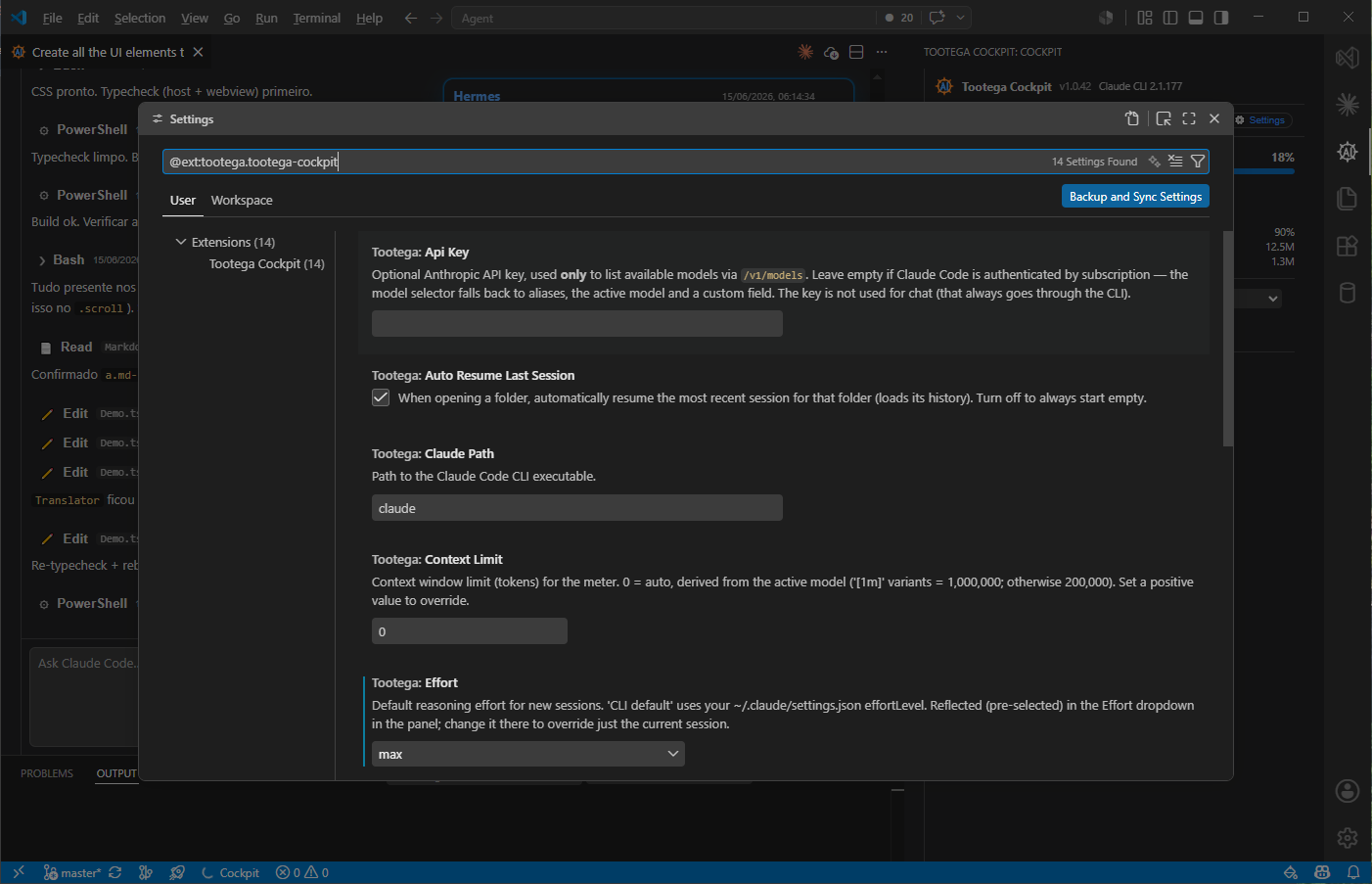
Commands and keyboard shortcuts
Commands (palette, Tootega category):
| Command |
ID |
Shortcut |
| Open Cockpit |
tootega.open |
Ctrl+Alt+C (mac: Cmd+Alt+C) · also ✦ in the editor toolbar |
| New session |
tootega.newSession |
Ctrl+Alt+N (in the panel) |
| Interrupt agent |
tootega.interrupt |
Ctrl+Alt+. |
| Reopen closed session |
tootega.reopenClosed |
Ctrl+Shift+T (when the Cockpit is focused) |
| Reload view (fix gray/blank panel) |
tootega.reloadView |
↻ in the editor title bar + status bar |
| Sessions |
tootega.openSessions |
— |
| Settings |
tootega.settings |
— |
| Open in editor (resizable) |
tootega.openInEditor |
— |
| Sign in / Sign out to Claude (CLI) |
tootega.login / tootega.logout |
— |
| Toggle language (pt-BR / English) |
tootega.toggleLanguage |
— |
| Set / Remove Anthropic API key (model discovery, stored in the OS keychain) |
tootega.setApiKey / tootega.clearApiKey |
— |
| Enable / Disable real usage tracking |
tootega.enableUsageTracking / ...disableUsageTracking |
— |
| Fix accents in PowerShell output (install / remove the UTF-8 hook, Windows) |
tootega.enableUtf8Fix / tootega.disableUtf8Fix |
— |
Accented characters in PowerShell output (Windows)
The Cockpit runs the CLI headless (stdio over pipes, no console attached). Without a
console, .NET falls back to the system OEM code page (e.g. 437) instead of UTF-8, so
powershell / cmd write their output in a legacy encoding — the CLI reads it as UTF-8 and
you get mojibake. Characters outside that code page (ã in CP 437) are lost at write time,
so no decoding fix on our side can recover them. In a terminal the problem is invisible
because the console is already at chcp 65001.
Tootega: Fix accents in PowerShell output installs a PreToolUse hook in
~/.claude/settings.json (script at ~/.claude/.tootega/utf8-hook.ps1) that prefixes every
PowerShell tool command with the UTF-8 encoding setup. It is idempotent, never blocks or
denies a command (any failure is a silent no-op), and is removed by the Remove command. No
system setting is changed and no reboot is needed. The Bash tool (Git Bash) is already
UTF-8 and is left untouched.
In the composer: Enter sends · Shift+Enter new line · Ctrl+F finds in the
conversation · @ opens the file autocomplete · the / button opens the slash-command
menu · the ▾ button opens options · drag files onto it to attach.
On a session card (hub), hover reveals: 📱 remote control, ↻ reload, ✏ rename,
🗑 delete.
URI handler: vscode://tootega.tootega-cockpit/open opens the Cockpit.
Slash commands
Slash commands are surfaced from the CLI (which exposes only their names via
sessionInit); the Cockpit adds curated categories and descriptions
(webview/src/slashCatalog.ts). Commands outside the
curated catalog are auto-researched by the internal AI helper
(SlashCommandResearch) — category, short hint, and
detail in the UI language, cached globally in ~/.claude/tootega/ so each one is researched
only once. Third-party plugin commands group under Plugin; anything still unresolved
falls under Other.
| Category |
Commands |
| Session |
resume |
| Context |
clear, compact, context, memory |
| Config |
model, config, permissions |
| Tools |
review, init, mcp, agents, hooks |
| Account |
login, logout |
| Info |
cost, usage, status, help, doctor |
| Plugin |
third-party plugin commands (auto-grouped) |
| Other |
anything still unresolved after auto-research |
Real account usage (statusline)
The limit meters need real rate_limits data. The automatic channel
(rate_limit_event in the stream) already works; the statusline complements it during
low usage.
Claude Code now reports these limits as a limits[] array — one entry per window, with
kind = session | weekly_all | weekly_scoped and the model name in
scope.model.display_name. The Cockpit reads that array and labels the per-model window
with whatever the server calls it (today, Fable). The older fixed fields
(five_hour, seven_day, seven_day_<model>) are still accepted as a fallback.
Order of sources, and what happens when one fails. The meters prefer the OAuth
/usage API (the account's actual percentage), then the statusline cache, and only then a
local USD estimate computed from this machine's transcripts. A failed API call no longer
drops straight to that estimate: transient causes (timeout, 429, 5xx, dropped connection)
are retried once, and if the call still fails the last good reading is reused for up to
15 minutes — a real percentage from a few minutes ago beats a table estimate. 401
is not retried, since an expired token only comes back when the CLI refreshes it. When the
panel does fall back, the estimate note states the reason (e.g. HTTP 401), and the change
of source is written to the Tootega Cockpit output channel.
The Enable real usage tracking command installs a statusline wrapper that:
- writes
rate_limits and context_window to ~/.claude/.tootega-usage.json;
- re-invokes your original statusline (preserving, e.g., badges like the caveman one).
It is reversible (Disable real usage tracking). On first activation the extension
also offers it once via a notification. Today it is Windows-only (PowerShell). After
enabling, run an interactive claude session once to populate the cache.
If editing ~/.claude/settings.json fails (e.g. it contains comments), the extension
warns you to edit it manually.
Internationalization (i18n)
- Every visible string goes through i18n — no hardcoded text.
- Locales: pt-BR and en (international English, neutral).
- Default: follows
vscode.env.language; falls back to en when the locale is not
supported. Manual override in tootega.language. Runtime switching (no extension
reload).
- Catalogs:
- Manifest:
package.nls.json (en base) + package.nls.pt-br.json.
- Host (runtime):
l10n/bundle.l10n.json + l10n/bundle.l10n.pt-br.json
(vscode.l10n).
- Webview:
webview/src/i18n/en.ts + pt-br.ts, with {0} interpolation.
Project structure
src/                  Extension host (TypeScript)
  extension.ts        Activation, commands, config listeners, URI handler, status bar
  cli/                Spawn, stream-json parser, model discovery, statusline, settings
  panel/              ChatViewProvider (host ↔ webview bridge; editor panel + hub view)
  session/            Session store (~/.claude/projects), usage aggregation
  stats/              Context/cache/cost/tokens aggregator
  i18n/               Host i18n
  util/               Logger
webview/              UI in React + Vite
  src/components/     Composer, Timeline, DiffView, modals, Todos, etc.
  src/i18n/           en / pt-BR catalogs
  src/store.ts        Webview state
  src/slashCatalog.ts Curated slash-command metadata
shared/               Event contract and host ↔ webview protocol
l10n/                 Runtime strings (vscode.l10n)
media/                Icons
package.nls*.json     Manifest strings
test/                 Vitest unit tests (StreamParser)
Docs/                 Planning, comparison with the official GUI, status
images/               Screenshots used in this README
Communication:
Event stream and control protocol (developer deep-dive)
The host spawns claude once per session and speaks stream-json over stdin/stdout. The
parser (src/cli/StreamParser.ts) splits NDJSON and tolerates
noise; unknown event types are dropped rather than crashing the UI.
Outbound (host → CLI), written one JSON object per line:
- Right after spawn, a control handshake enables interactive routing and returns the slash
command list:
{"type":"control_request","request_id":"init","request":{"subtype":"initialize"}}
- A user turn:
{"type":"user","message":{"role":"user","content":[{"type":"text","text":"…"}]}}
Pasted images add {"type":"image","source":{"type":"base64","media_type":"…","data":"…"}}
blocks to content.
- A permission decision (reply to
can_use_tool):
{"type":"control_response","response":{"subtype":"success","request_id":"…","response":{…}}}
allow requires updatedInput (the CLI validates with Zod — replying just
{behavior:"allow"} fails the union). "Always allow" returns updatedPermissions from
the CLI's permission_suggestions. Deny sends {behavior:"deny", message}.
Inbound (CLI → host) event types the UI consumes: system (incl. init with the
active model), assistant / user messages, result, stream_event (partial tokens),
and control_request (can_use_tool, which carries both tool-permission prompts and
AskUserQuestion).
Interrupt ends the CLI process and kills the whole tree so no orphaned child
(e.g. a node subagent) keeps running: on Windows (shell: true) via taskkill /T; on
macOS/Linux the CLI is spawned detached (its own process group) and killed with
process.kill(-pid) (SIGTERM, then SIGKILL after a grace period). The process respawns on
the next send. Resume re-arms --resume <session_id> and
replays the transcript read from ~/.claude/projects/<encoded-cwd>/<id>.jsonl (the cwd is
encoded by mapping : \ / → -).
Troubleshooting
| Symptom |
Likely cause |
Action |
| "CLI not found" on activation |
claude not on the PATH |
Set tootega.claudePath; confirm claude --version |
| Chat does not respond / auth error |
CLI not authenticated |
Run Sign in or claude in a terminal and log in |
| Model selector shows only aliases |
Subscription account (no API key) |
Expected — use an alias, the active model, or Custom… |
| Limit meters empty |
No real usage source |
Enable Real usage tracking and run a claude session |
| Session list empty / every tab shows "0 msgs" |
Extension older than 1.0.257 and a project path containing a space or an accent |
Update the extension — encodeCwd was looking in a folder that never existed |
| Stop button does nothing |
CLI older than 2.1.162 |
Run claude update — older versions drop the interrupt in stream-json sessions |
| Statusline does not update |
settings.json has comments |
Edit ~/.claude/settings.json manually |
| New events do not render |
The CLI version changed the contract |
The parser ignores unknown ones; open an issue with the CLI version |
| Changed model/effort and the session restarted |
Expected behavior (overrides restart) |
— |
Host logs: Output → Tootega Cockpit.
Known limitations
- Inline diff in the native editor, editing a plan before approving,
Git checkpoints / file-restore, and the context breakdown via
/context are still
planned. Rewind today restores the conversation (transcript truncation + --resume),
not the files on disk.
- Cost is an estimate ("estimated" label), not Anthropic's official invoice: it is the
equivalent API price, which a subscription does not charge you.
- Usage attribution is estimated from local transcripts:
tool_result sizes are
approximated at ~4 characters per token, and a tool call whose result landed in another
transcript file is not attributed to it.
- Statusline real-usage wrapper is Windows-only for now (the OAuth
/usage meters
themselves are cross-platform); voice capture needs ffmpeg on the host.
- The event contract is not yet frozen against real fixtures of a target
claude
version; version changes may affect parts of the rendering (the parser degrades
gracefully, ignoring unknown events).
- Slash-command categories/descriptions are curated, then auto-researched by the
internal AI helper for anything outside the catalog (the CLI exposes only names).
See the detailed status in
Docs/implementation-status.md.
Non-goals
- Do not compete with the official extension at 1:1 parity — the differentiator is
consumption transparency and fine-grained control.
- Do not talk to the Anthropic API directly for the agent loop — that channel is the
CLI. The only exception is a few clean, isolated utility calls with the local OAuth
token (real usage, voice STT, dictation correction); see
Cockpit-exclusive features and
CLAUDE.md §6.
- Do not implement our own billing — the account and limits are the user's subscription.
- Do not store user data off their machine.
Privacy and security
- Credential content is never logged.
- The CLI's permission model is honored; approvals are not bypassed by the UI.
- The optional API key (stored encrypted in the OS keychain via SecretStorage, set
through the Tootega: Set Anthropic API key command) is used only to list models
(
/v1/models), never in chat.
- The local OAuth token (
~/.claude/.credentials.json) is read read-only for the clean
utility calls (real usage, voice STT, dictation correction); it is never written or
logged, and those calls carry no agent context.
- Session data lives locally in
~/.claude/ (transcripts) — nothing leaves the machine.
Contributing
- Code/identifiers in English; comments and repository documentation in pt-BR.
- Follow the neighboring file's pattern (naming, comment density, language).
- Do not reimplement the engine. If you are tempted to replicate orchestration, stop
and surface what the CLI already does.
- Every visible string goes through i18n.
- Before a PR:
npm run typecheck && npm test && npm run build.
Related documents: CLAUDE.md ·
Docs/FAQ.md ·
Docs/execution-plan.md ·
Docs/implementation-status.md.
License
© Tootega Pesquisa e Inovação — MIT License (see LICENSE).
| |

