
Bee: Quantum Intelligence - Code
Plan, edit, run, verify, and rewind without leaving VS Code.
BEE Code is an agentic coding assistant from HEOSSI.
It works across your repository, uses the diagnostics already available in the
editor, and keeps outward-facing actions such as Git push and pull requests
behind an approval in every mode.
Bee-operated HTTPS requests from the extension require TLS 1.3 with
X25519MLKEM768 hybrid key exchange and AES-256-GCM. Classical-only key
exchange, older TLS, invalid certificates, and credential-forwarding redirects
are not accepted. Browser sign-in and external tools have separate trust
boundaries; this is not a claim of post-quantum certificate authentication.
Install from the Microsoft Marketplace
· Install from Open VSX
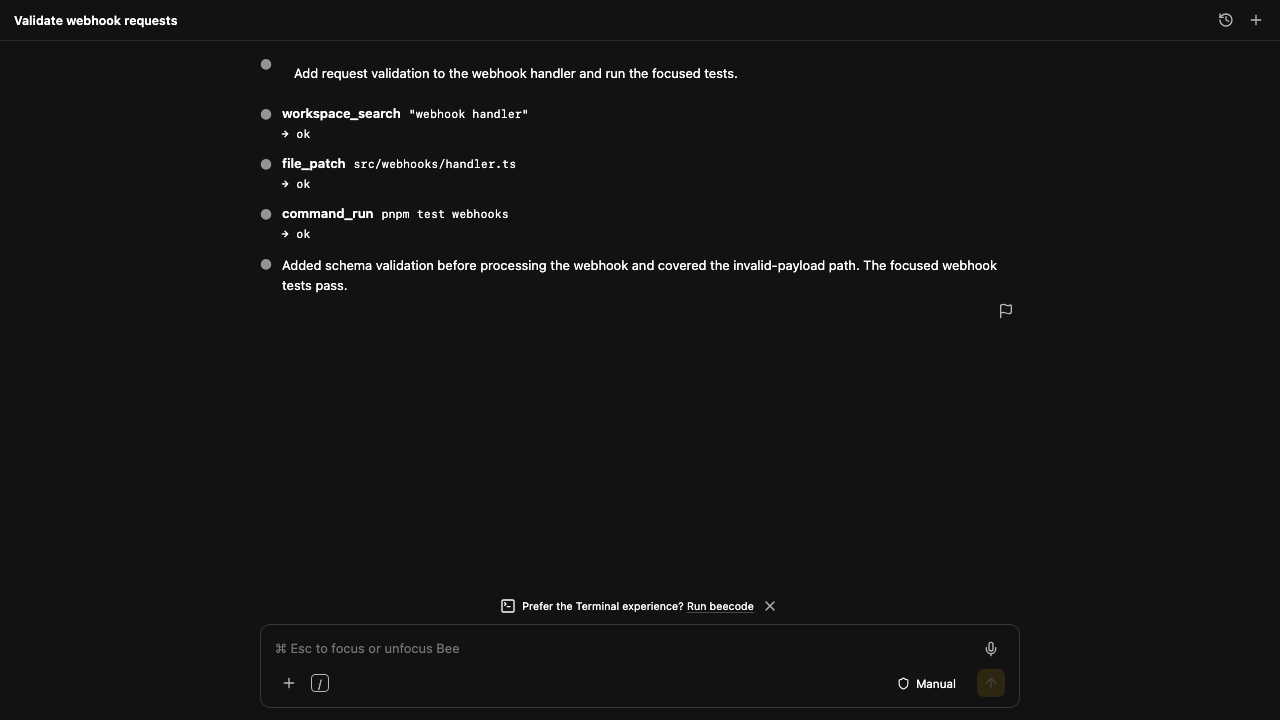
Start in under a minute
- Install Bee: Quantum Intelligence - Code.
- Open a folder and select the Bee icon in the Activity Bar.
- Sign in with a Bee account or a scoped
bee_sk_ API key.
Account sign-in uses bee.native-session.v1. Dotted legacy JWT-shaped Code
credentials are rejected. A protocol mismatch returns HTTP 426
protocol_version_unsupported.
- Ask for a change in plain language and review the proposed work.
Free Bee Cell access is available through a Bee Workspace account. Bee Code
offers the full Cell, Brood, Comb, Buzz, Hive, and Swarm ladder; the signed-in
customer sees and can select only the models included with their Workspace,
Business, Enterprise, or API entitlement.
What BEE Code can do
- Understand a real repository. List and search the workspace, read active
files and selections, and attach or mention project files as context.
- Make complete changes. Create, write, append, patch, and delete files with
a visible permission boundary.
- Run and verify work. Launch bounded commands, follow long-running jobs,
read native editor diagnostics, and report the evidence. Implementation-like
tasks cannot be reported complete without a successful mutation followed by
successful verification.
- Work with Git deliberately. Inspect status, create branches and commits,
push, and open pull requests. Publication always requires approval.
- Use the web and installed tools when needed. Governed web search is
built in. Tools actually registered in VS Code, including installed MCP
tools for browsers, forms, design systems, infrastructure, and other
services, can be selected from a bounded per-request catalog. Every such
invocation asks explicitly and is revalidated by VS Code before execution.
- Recover precisely. Branch only the conversation, restore only the files,
or do both from any user turn.
Bee Code exposes 20 built-in governed tools across workspace search, file
editing, commands, diagnostics, Git, pull requests, web search, and the
approval-gated VS Code/MCP bridge. Availability of a particular external tool
depends on what the customer has installed and configured in VS Code.
Bounded orchestration
Bee Code 0.2.11 gives each customer request a durable manager run. Bee Cell
uses one manager model call at a time. Paid tiers can add bounded specialist
and independent-verifier calls according to both the active subscription and
the selected model; the lower entitlement always wins. A request for 1,000
agents is represented as governed logical-worker shards and never means 1,000
simultaneous GPU containers.
Every manager, specialist, and verifier call reserves its model-call slot and
token ceiling atomically before provider work. Cancellation, retries, parallel
limits, usage metering, and terminal state are stored against the signed-in
account. Specialist analysis is advisory; only the manager can use the local
workspace tools, and it must verify completed work before reporting success.
This contract requires both Bee Code 0.2.11 or newer and the matching production
agent API. A visible Marketplace page is not version evidence: the current
published client version is reported on the Bee download page,
and the client fails closed if the matching agent transport is unavailable.
Choose the authority level
| Mode |
File edits |
Commands |
Git push and pull requests |
| Manual |
Ask |
Ask |
Ask |
| Plan |
Ask after planning |
Ask after planning |
Ask |
| Edit automatically |
Run |
Ask |
Ask |
| Auto |
Run |
Run |
Ask |
Manual is the default. Session approvals expire with the conversation, and
publication approval cannot be disabled.
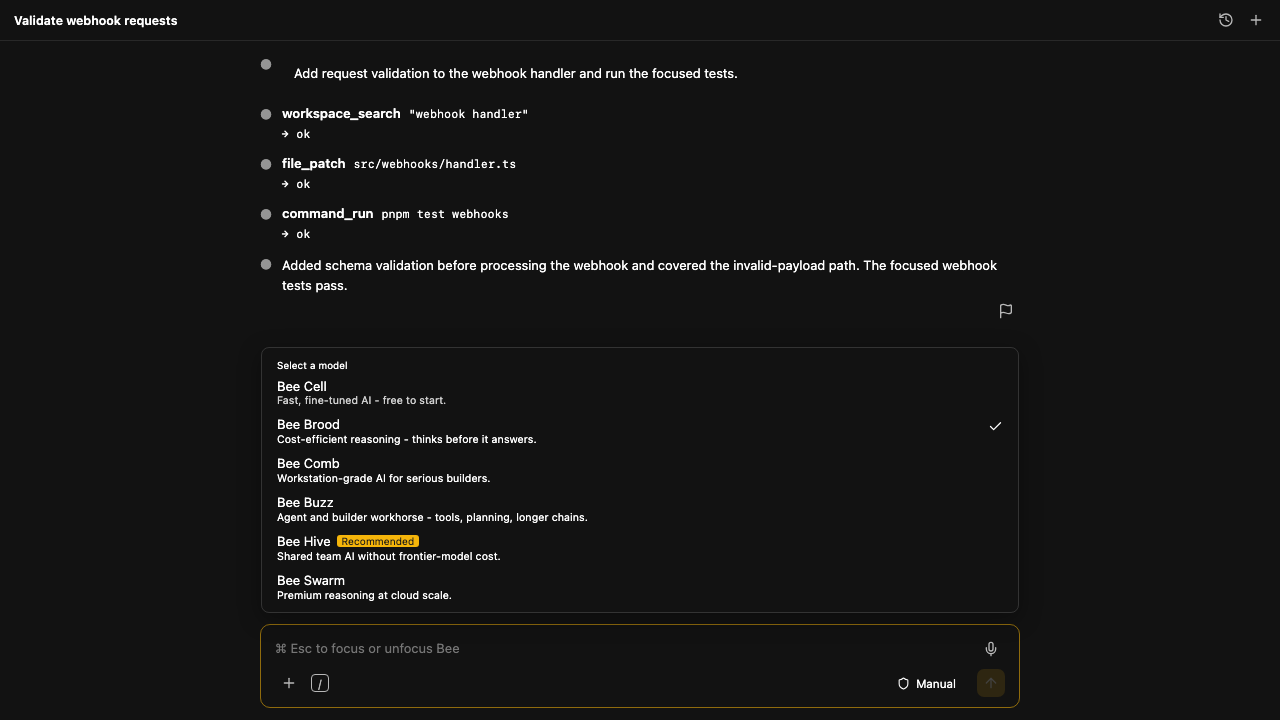
Models and reasoning controls
- Select any entitled production model: Bee Cell, Brood, Comb, Buzz, Hive, or
the governed Swarm routing fabric.
- Select reasoning effort for the next request.
- Enable Thinking on models that support it.
- Use Fast mode for Low effort with Thinking off, without silently changing
the selected model.
- Optionally flag an answer so the next request uses the stronger eligible Bee
Code model. A flagged response is never re-run automatically.
Model availability is enforced by the agent API against the customer account,
not trusted to a client-side menu. Paid Modal capacity remains scale-to-zero and
wakes only for an entitled request; Swarm uses its governed routed execution
fabric. See the live model and capability matrix
for context, reasoning, modality, and tool details.
Customize and integrate
- Account output styles opens the live Bee preference control; Bee Code
applies the saved tone, response style, and response format on agent turns.
- Bee memory opens the account's live memory manager.
- VS Code agents, hooks, MCP servers, and plugins open the corresponding
native manager supplied by the installed editor. On older builds, Bee Code
reports the missing editor capability instead of pretending it was changed.
- Installed VS Code and MCP tools are advertised to Bee only for the active
request. A tool not advertised by that editor is rejected by the API. Every
invocation is outward-facing and requires a fresh approval; “Allow for
session” is intentionally unavailable for this bridge.
- Focus view toggles VS Code Zen Mode.
- Remote Control is displayed as unavailable. Bee Code has no remote-session
subsystem in this release and never enables one implicitly.
Rewind without collateral damage
Hover a message you sent and choose exactly what should move back:
- Swarm from here branches the conversation and leaves files alone.
- Rewind the comb restores the files and keeps the conversation.
- Swarm and rewind does both.
Bee Code snapshots the files touched by a turn immediately before changing
them. A rewind restores only that turn's affected files rather than replacing
the whole repository.
Local sessions and explicit data flow
Conversation history is stored on the local machine and can be reopened,
renamed, retained, or deleted by the user. Bee Code sends the prompt and the
workspace context required for a turn to the configured Bee agent endpoint; it
does not upload an entire repository as background synchronization.
Session history is local by default and checkpointed between tool actions.
Opt-in encrypted cloud sync is available with beecode.sessionSync: true and
the same beecode.sessionSyncWorkspace project key on each device. Use the
same signed-in account. Prompts and tool results are uploaded to Bee's API;
credentials, workspace files, approvals and running processes are not synced.
Legacy histories are not uploaded automatically: Bee Code: Import Local
Session for Sync imports only the conversation you select. Bee Code: Sync
Sessions Now retries immediately. Pending changes survive reloads; conflicts
preserve local work rather than silently overwriting another device's edits.
Local and opted-in histories remain separate and account/project-scoped.
After sign-in, the last selected session
can be restored for the same account and workspace following an editor reload.
Use Session history to reopen older conversations and send a follow-up to
continue. Restoring history does not rerun edits or commands, restore running
processes, or resume paid inference automatically. A save failure is reported
in the panel; keep the window open until it is resolved.
Secrets are excluded by default. .env, private keys, .aws/, and .ssh/
matches are never read, sent as context, or edited, including when explicitly
requested. Paths are confined to the canonical workspace, and commands run
from an argument array rather than through a shell.
Bee Code refuses VS Code Restricted Mode instead of operating with a misleading
partial-trust posture. Credentials are stored in VS Code SecretStorage and are
excluded from settings.json and Settings Sync.
Transparent commit attribution
Commits created through Bee Code retain the developer's configured Git identity
as the primary author. By default, a separate trailer records the selected Bee
model, for example:
Co-Authored-By: Bee Cell <bee-noreply@heossi.com>
Set beecode.gitCommitAttribution to false to omit the trailer.
Sign-in options
- Bee Workspace Subscription - individual and team plans.
- Bee Business or Enterprise Subscription - regulated and Enclave plans,
with entitlement confirmed against the signed-in account.
- Bee API Subscription - Pollen, Nectar, Honey, or Royal Jelly using a
bee_sk_ key with the code:actions:write scope.
An existing beecode login session is detected automatically.
Settings
| Setting |
Default |
Purpose |
beecode.apiUrl |
Bee agent endpoint |
Agent-plane endpoint |
beecode.model |
bee-cell |
Agent model for new turns |
beecode.initialMode |
manual |
Manual, Plan, Edit, or Auto authority |
beecode.deniedPaths |
secret globs |
Files Bee must never read or edit |
beecode.allowedExecutables |
[] |
Commands that may run without asking |
beecode.autosave |
true |
Save dirty editors before agent access |
beecode.respectGitIgnore |
true |
Exclude ignored paths from search |
beecode.gitCommitAttribution |
true |
Add optional Bee model attribution |
beecode.sessionRetentionDays |
0 |
Keep local sessions indefinitely |
beecode.sessionSync |
false |
Opt in to encrypted account-scoped conversation sync |
beecode.sessionSyncWorkspace |
empty |
Same portable project key on each device |
beecode.sessionSizeWarningMb |
1024 |
Warn before history grows too large |
Keyboard and commands
- Cmd/Ctrl+Esc: focus or unfocus Bee Code.
- Alt+K: mention the current selection.
- Cmd/Ctrl+Shift+Backspace: cancel the active turn.
The Command Palette includes sign in, sign out, open, new session, history,
delete session, focus, unfocus, cancel, mention selection, and logs.
Support and trust
Version 1.0.98 requires VS Code 1.138 or newer.
Bee Code is part of Bee: Quantum Intelligence - The Progressive Quantum-Native
Intelligence Engine.

