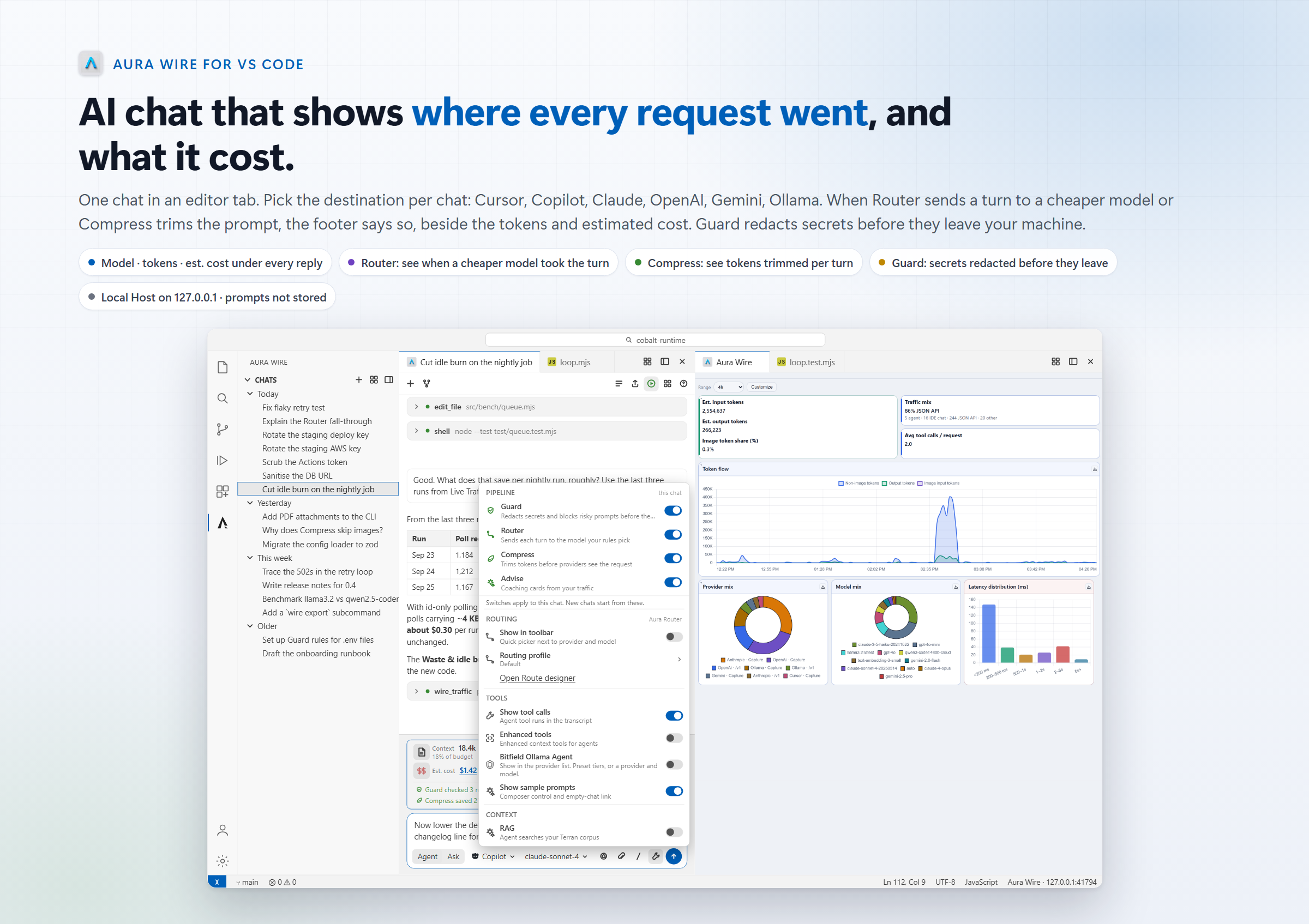
AI chat for VS Code that shows you where each request went, what it cost before it left your machine and allow you to route/compress dynamically - right inside the editor - and see results in real time.
Install
·
Product page
Install desktop app for full set of features
The problem
AI chat in the editor is a black box. You type, an answer comes back, and that is all you learn.
- You cannot see the cost. Nothing tells you how many tokens a turn used or what it cost until the invoice arrives.
- Secrets ride along. Paste an
.env file or a stack trace with a bearer token in it and the key goes to the provider with the rest of the message.
- You are tied to one vendor. The built-in chat talks to whoever built the editor. Trying a cheaper model, a local one, or a different provider means a different tool, a different sidebar, a different history.
- The chat is stuck in a sidebar. It cannot sit next to the file it is about, split, or move to a second monitor like everything else in VS Code.
- You have to take privacy on faith. Most tools that log AI traffic keep the full request. You have no way to check.
This extension exists to fix those five things without replacing the chat you already use.
What Aura Wire is
Aura Wire is a small program that runs on your own machine and sits between your tools and the AI providers they call. Every request passes through a local pipeline: Guard looks for secrets and redacts or blocks them, Router can swap the model or provider, Compress trims repeated context, Terran can add your own indexed documents, and Observe records what happened. It stores metadata such as provider, model, token counts, latency, and cost. It does not store prompts or responses. Nothing goes to Bitfield Creek.
The part that runs on your machine is called Aura Wire Host. This extension is a chat client for Host. You do not need to install anything else first. Install the extension, open a chat, and Host is downloaded and started the first time chat needs it. No certificate, no proxy setting, no admin prompt.
Works in VS Code 1.85 and newer, and in compatible forks such as Cursor and Windsurf.
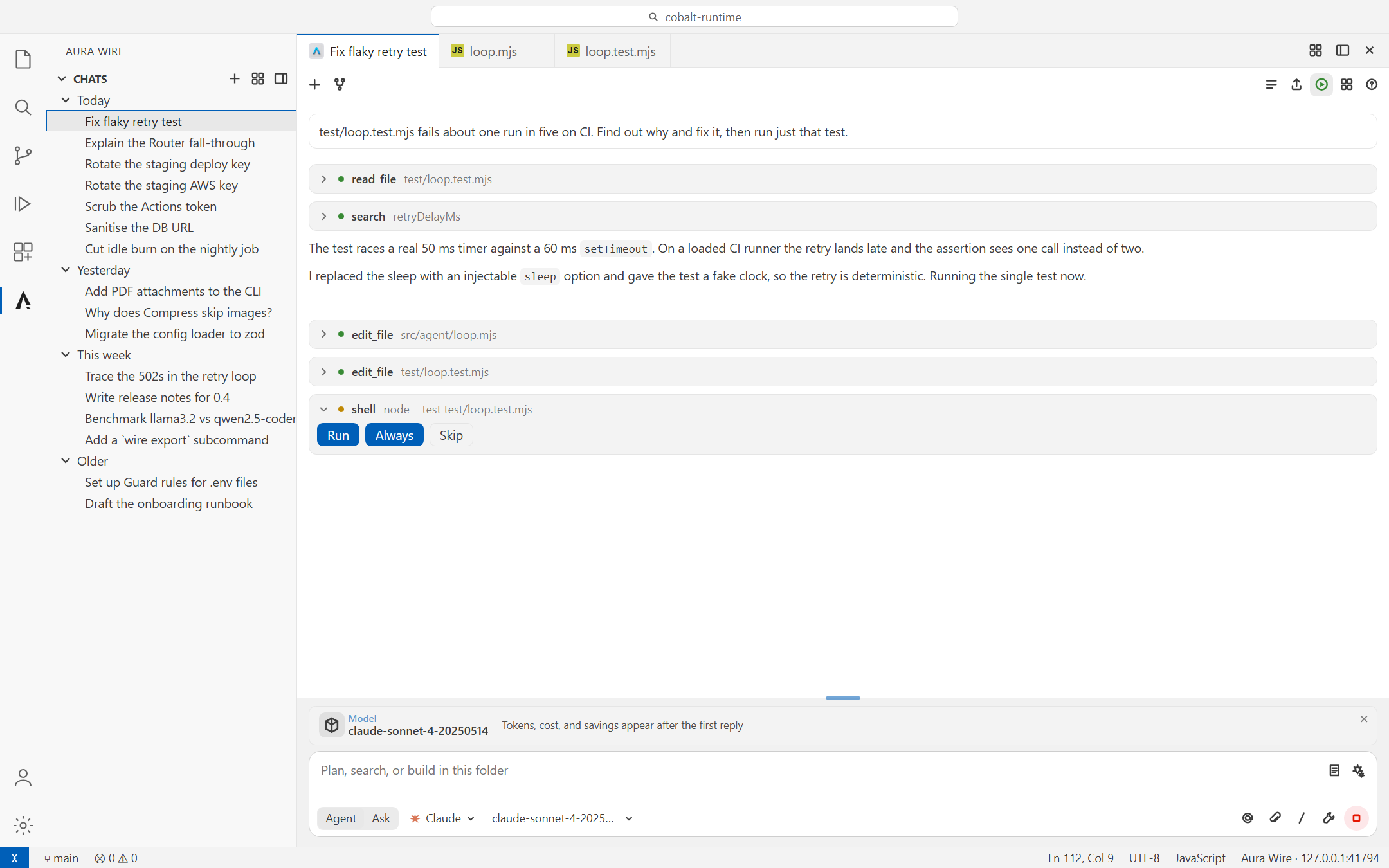
A chat in an editor tab. The model asked to run node --test; the extension stopped and asked first.
What the extension can do
- Open each conversation as its own editor tab. Split it, drag it, or pop it into a separate window.
- Switch Agent (edit and run tools after you approve) and Ask (read-only) from the composer toolbar. Each mode remembers its own model pick.
- Keep chat history in the activity bar, grouped by day. Closing a tab does not delete the chat.
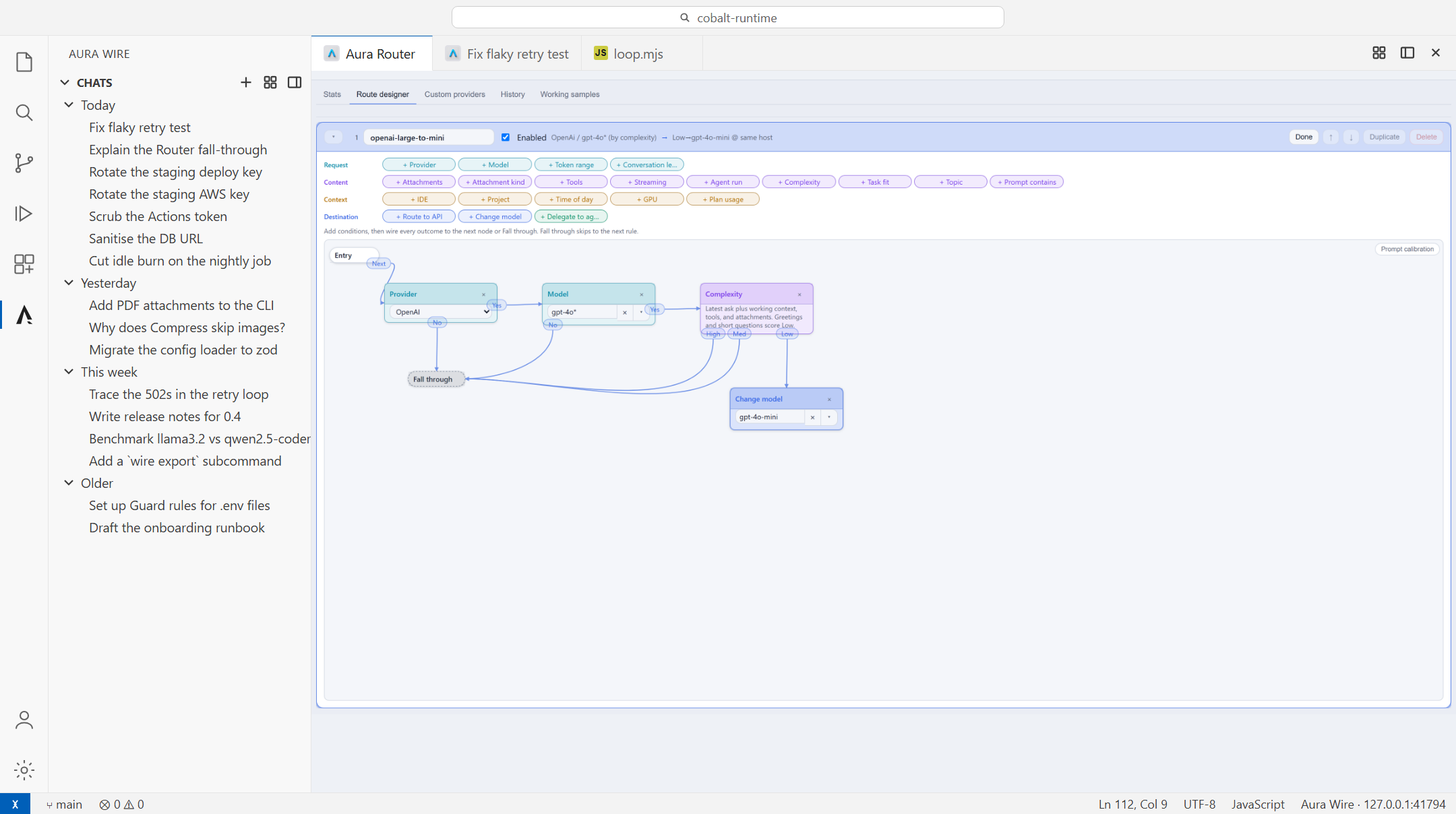
- Send a message to Cursor, Copilot, Claude, OpenAI, Anthropic, Gemini, Ollama, or any other provider Host is configured for. Pick the destination and the model per chat.
- Show, under every reply, which model answered, how many tokens went in and out, how many Compress removed, and the estimated cost. A running total for the whole chat sits in the composer.
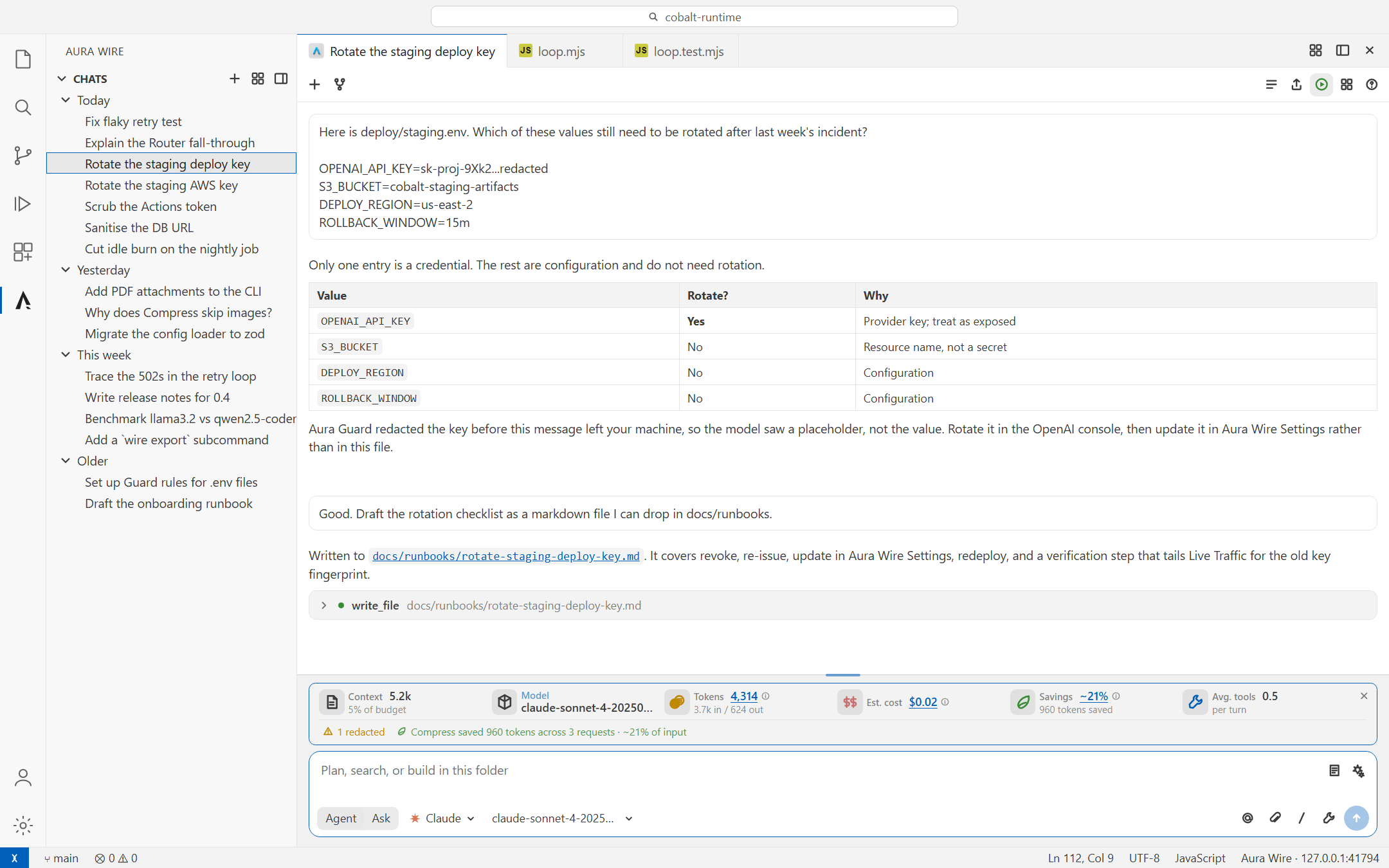
- Show when Guard redacted or blocked something in that same footer, with a link to the details.
- Let the model read, search, edit, and run commands in the open folder. Search uses the editor's bundled ripgrep, so
.gitignore is honored. Writes and shell commands stop for your approval; the approval card shows the diff before anything is written.
- Revert a turn's edits from the reply that made them. Each turn keeps a checkpoint of the files it touched.
- Stream shell output live into the tool card, stop one command without ending the turn, and run dev servers or watchers as background processes the model can read from and stop.
- Send the editor state with each request: the file you were in, the cursor line or selection, other open tabs, and problem counts (
auraWire.autoContext).
- Attach images, PDFs, markdown, and source files. Paste screenshots. Type
@ and pick a workspace file or folder inline, add @problems, @terminal, or an earlier @chat as context, or select code and add just those lines.
- Watch the context budget in the composer. Long chats keep their full transcript; only the request is trimmed, oldest tool results first.
/summarize when a chat gets long: one tool-free turn writes a recap, and later requests send only the recap and what follows. The stored transcript keeps every message; a marker under the summary shows where the model now starts.
- Fork a chat from any reply (or
/fork for the whole thread) into a new tab and try a different direction without losing the original. Forks show where they came from; Duplicate does the same from the Chats view.
- Search chats across titles and message text from the Chats view or the history panel, with a snippet per hit. The agent can do the same with
search_chats and read_chat, so "like we did last week" resolves against local history instead of a guess. Nothing leaves the machine; the current chat is never a hit.
- Works with multi-root workspaces: address files in another folder as
folder/path.
- Mark up a pending screenshot with a pen, rectangle, ellipse, or arrow before sending. The original file is not touched.
- Type
/ for actions (/summarize, /fork, /export) and saved prompts. /review, /explain, and /tests ship by default; teams can share their own through workspace settings.
- Queue messages while a turn is running. Edit or remove them before they send.
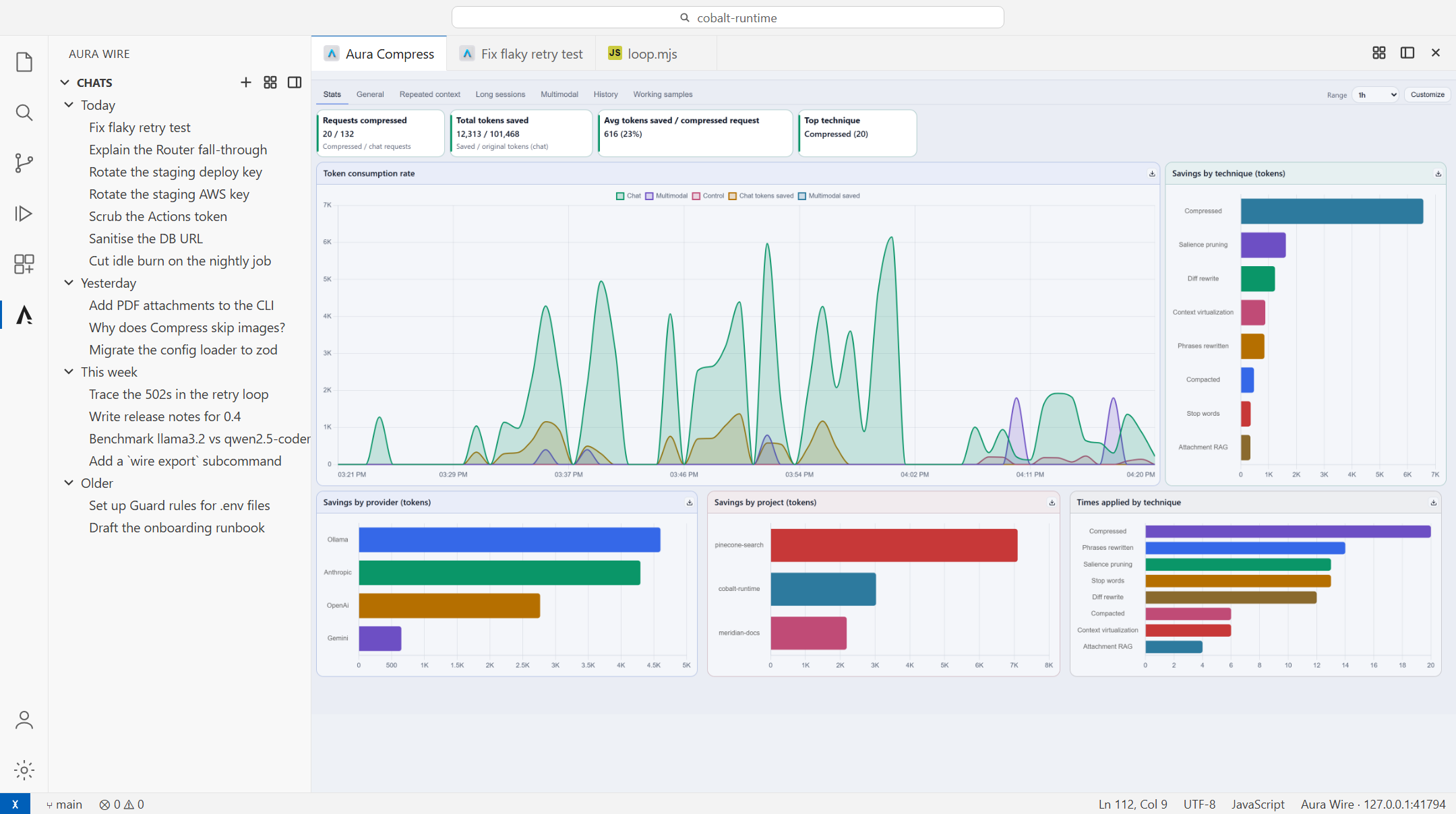
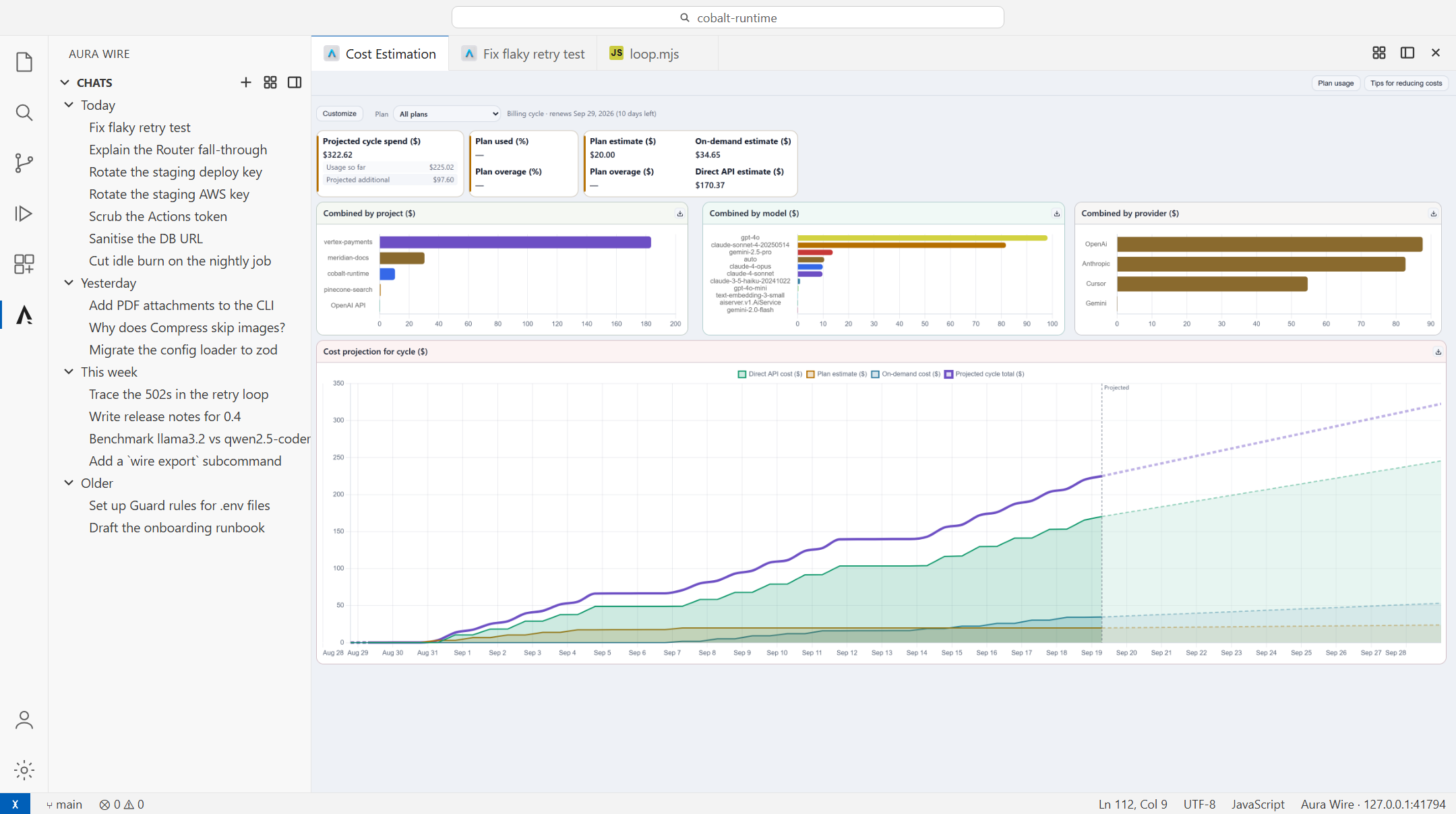
- Open Aura Wire dashboards as editor tabs: live traffic, cost projections, routing savings, Guard activity, and any board you build.
- Export a chat as Markdown (
/export).
How the pieces fit
The extension is deliberately thin. It renders the chat, carries out workspace tools locally when you approve them, and sends plain OpenAI-shaped HTTP to Host on 127.0.0.1. Host decides where the request goes and runs the pipeline. The extension ships no vendor SDKs and holds no API keys.
Three pieces, three roles:
| Piece |
Role |
| This extension |
The chat client. Where you type, pick a destination, and approve tool use. |
| Aura Wire Host |
The local pipeline and /v1 door on 127.0.0.1:41794. Downloaded and started by the extension; also bundled with the Windows desktop app. |
| Windows desktop app (optional) |
The desktop command center for the same Host: every board, setting, and pipeline stage in a full window, plus the wire CLI on PATH. Nothing in it is required for chat. |
Aura Wire only sees traffic that is sent to Host on purpose: this extension, the wire CLI, and any OpenAI-compatible client pointed at /v1. Capture — the earlier transparent redirect of an editor's own AI traffic through an inspecting proxy — is not enabled in current builds; the Host reports it as not available and hides its settings.
Choosing a destination
The two pickers at the bottom of the composer are a routing instruction. The first is the destination. The second is the model within it. Star the models you use and they float to the top. Each chat remembers its last pick.
One chat, many destinations. This turn was asked for on gpt-4o; Router sent it to gpt-4o-mini and Compress trimmed 1.8k tokens first.
API keys live in Aura Wire Settings on Host, not in VS Code. If a provider you expect is missing from the menu, hover the picker and it tells you where to turn it on.
Seeing what Guard caught
An API key went into the composer. Guard redacted it before the request left the machine, and the footer says so.
The model can ask the extension to read, search, edit, or run something in the open folder. Reads run on their own, several at a time. File writes and shell commands show an approval card with three choices: run once, skip, or Always. Edits show the unified diff in the card before you decide. Always is scoped to the current folder, so trusting git and npm test here does not trust them everywhere. Delete-like commands and destructive git (reset --hard, push --force, clean -f) stay behind their own gate even when the command prefix is allowed.
Shell commands run in PowerShell on Windows and the default shell elsewhere, stream their output into the card, and are killed after 60 seconds unless the model asks for longer. Commands the model starts in the background (a dev server, a watcher) appear in a strip above the composer where you can stop them; they end with the window.
Every edit the model makes is checkpointed per turn. Revert under a reply restores the files that turn touched, after showing you which ones and whether they changed since.
Cursor, Copilot, and Claude destinations are different. Those run their own agent inside Aura Wire Host, with their own tools, so the approval cards above do not apply. Cursor tool calls still show in the transcript (read-only cards). In Agent mode the extension tells Host the open folder and that the agent may edit it (auraWire.agentRuntimeToolApproval, default auto; set ask for Host's approval dialog on Copilot/Claude, read-only for text answers, or provider to defer to the provider's Allow edits flag in Host settings). Those agents keep their own histories, which never contain your Aura Wire chats, so the extension lends them search_chats / read_chat over a loopback bridge, mirrors each chat to markdown under the extension's workspace storage (transcripts/), and resumes the same inner session from turn to turn. Aura Wire: Add Cursor rule pointing at chat history writes a .cursor/rules file so the Cursor IDE's own agent knows where those chats live too.
Dashboards in the editor
Live Traffic: what is talking to which provider right now, how many tokens are moving, and where the latency is.
Traffic & routing. Requests by project, provider mix, and what Router saved.
Cost projections. Where this billing cycle is heading, split by project and by provider.
Boards are built in Aura Wire from Live, Timeline, Cost, and Pipeline charts, or cloned from a preset. Tag one for VS Code and it appears in the chat header picker. The grid icon reopens the last board you used.
Getting started
The first time the extension activates, it opens a short Getting started guide. Reopen it anytime with Aura Wire: Getting started or the help button in the chat header.
- Download the VSIX from halosoftworks.com and install it with Extensions: Install from VSIX. On Windows, Host setup also installs it into detected editors (
code, cursor, windsurf).
- Click the Aura Wire icon in the activity bar and choose New chat, or run Aura Wire: Open chat from the command palette. If Host is not running, the extension starts it. If Host is not installed, the extension downloads it. Uninstalling the extension removes that in-editor Host unless Aura Wire desktop or Capture is installed.
- Add provider keys via Aura Wire: Provider keys (or pick Provider keys in the destination picker). Host may also pick up a provider’s usual environment variable when it is already set (for example
OPENAI_API_KEY). Optionally install Ollama for local models.
- Pick a destination and a model, and ask about the folder you have open.
Shortcuts: Ctrl+Alt+W (Cmd+Alt+W on Mac) focuses chat and attaches the current selection if there is one. Ctrl+Alt+L (Cmd+Alt+L) pins the selected code as context.
Chat history is stored as chats.json under the extension's workspace storage folder (VS Code's per-workspace storageUri), so it can be backed up or deleted like any file. Older chats kept in VS Code's internal state are moved there on first run.
The extension activates when VS Code finishes starting. Host sidecar version is checked on every startup. The VSIX feed is checked on activation at most every hour, and again while the window stays open. A newer VSIX or Host sidecar is offered only after it has been on the feed for at least an hour. When a newer build is available, chat shows Update. You can also run Aura Wire: Check for updates.
What this is, and what it is not
| Aura Wire is |
Aura Wire is not |
| A chat client in editor tabs, with history in the activity bar |
An AI agent. The reasoning happens at the destination you pick. |
A thin client that finds or starts Host and talks to its /v1 endpoint |
A replacement for Cursor Agent or Copilot Chat |
| A picker that routes to Cursor, Copilot, Claude, OpenAI, Ollama, and more |
A bundle of vendor SDKs inside the VSIX |
| Workspace tools that run locally and wait for your approval |
A certificate, a proxy setting, or a UAC prompt |
| A window into traffic, cost, and Guard for this project |
Something that intercepts your editor's native AI traffic |
| Local: Host listens on loopback |
A service that sends your prompts to Bitfield Creek |
Requirements
- VS Code 1.85 or newer, or a compatible fork
- Aura Wire Host. The extension downloads it in-editor the first time chat needs it.
- Provider credentials in Aura Wire Settings for the destinations you want to use
Host starts with a full-pipeline trial. After that, Observe and the add-on modules are licensed separately; the product page has the details.
Updates
Updates come from the Bitfield Creek release feed, not the Visual Studio Marketplace. Host sidecar version is checked on every startup. The VSIX feed is checked on activation at most every hour (and on a one-hour timer while the window stays open). A newer VSIX or Host sidecar is offered only after its releaseDate has been on the feed for at least an hour, so a bad publish can be replaced first. When a newer VSIX is ready, chat shows Update — that downloads the file, verifies its checksum, installs it, and offers Reload. When a newer Host sidecar is ready, the same check offers Update — that replaces the in-editor Host under your AuraWire data dir and starts it again. A Host that came from the Windows installer updates with the desktop app instead. Aura Wire: Check for updates does both checks on demand. Setting auraWire.updateChannel to staging reads the pre-promotion feeds.
Questions people ask
Does this replace Copilot Chat or Cursor Agent?
No. It is a second chat surface that can route to them, and to other providers, through Host. Many people keep both open. Aura Wire is the one that shows where the request went and what it cost.
Is this an agent?
No. It is a chat client. The model you pick does the reasoning. When that model asks to read or change something in your folder, the extension carries it out locally, after you approve.
Do I need the desktop app first?
No. Install the extension, open a chat, and Host arrives on its own. The Windows desktop app is the optional desktop command center for that same Host — the full dashboard in its own window plus the wire CLI; the extension only needs Host.
Does Aura Wire intercept Cursor's or Copilot's own chat?
No. Only requests sent to Host through this extension, the wire CLI, or an OpenAI-compatible client are observed. The transparent-redirect feature (Capture) is not enabled in current builds, so there is no driver, certificate, or administrator step.
Where do my API keys live?
On Host, in Aura Wire Settings. The extension never stores or ships vendor credentials.
Do my prompts leave this machine for Bitfield Creek?
No. Host listens on loopback. It stores sanitized metadata such as provider, model, token counts, latency, and cost. Prompts and responses are processed in memory and are not persisted.
Can I point it at the proxy port?
No. Chat uses /v1 on the dashboard port. The proxy port belongs to Capture (not enabled) and will not answer chat.
Developing from source
Build, debug, test, and the full discovery order are in CONTRIBUTING.md.
Bitfield Creek · EULA · wire CLI for the same /v1 door from a terminal