DotCode for VS Code
Agentic coding with any LLM (Anthropic, OpenAI, Azure OpenAI, Gemini, DeepSeek, Ollama, OpenAI-compatible) right inside VS Code. The extension is a thin client of the DotCode agent: the same engine, tools, permissions, MCP servers, skills and settings as the dotcode terminal app.
Built by Gravicode Studios, led by Kang Fadhil.
Features
- Chat panel (activity bar,
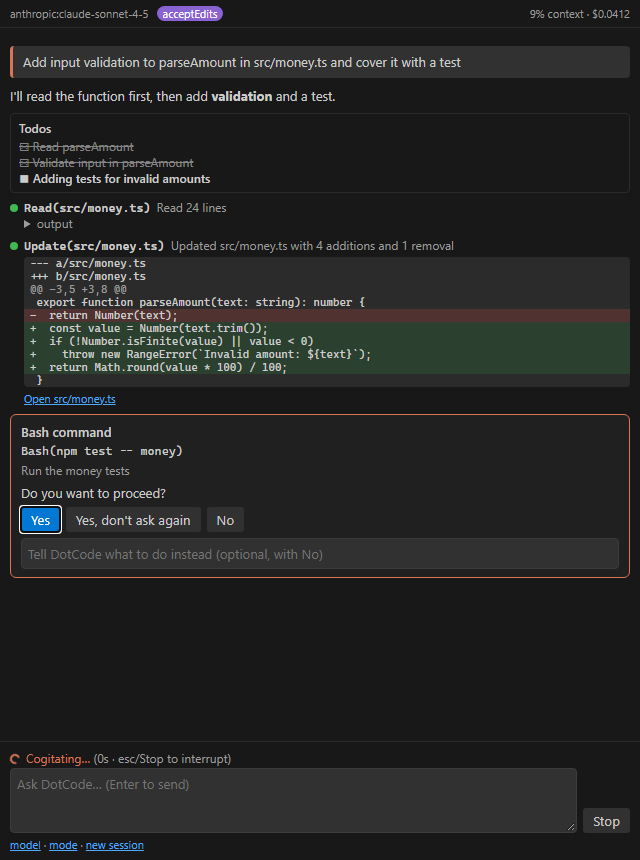
Ctrl/Cmd+Esc): streaming answers, tool calls with live status, colored diffs, command output, todo list, cost and context usage.
- Permission prompts: Yes / Yes-don't-ask-again / No (with feedback) in the chat or as a notification. Proposed edits open in VS Code's diff editor before you approve them.
- Ask about selection (
Ctrl/Cmd+Alt+K or the editor context menu) sends the selected code with its file and line range.
- Model and permission mode pickers (
default, acceptEdits, auto, plan); the plan review opens as a markdown document.
- Questions from the agent appear as quick picks.
- Open DotCode in Terminal runs the full terminal UI in the integrated terminal.
- Status bar item with the current model and mode.
Requirements
Install it from the Marketplace (code --install-extension GravicodeStudios.dotcode-vscode). It needs the dotcode CLI: the extension finds it in dotcode.cliPath, DOTCODE_CLI_PATH, PATH or the installer's default location, and offers to install it:
curl -fsSL https://raw.githubusercontent.com/DotNetVibeCoderz/Vibe_Dev/main/DotCode/install/install.sh | sh          # macOS / Linux
irm https://raw.githubusercontent.com/DotNetVibeCoderz/Vibe_Dev/main/DotCode/install/install.ps1 | iex             # Windows
Configure a model provider once (for example ANTHROPIC_API_KEY, OPENAI_API_KEY, DEEPSEEK_API_KEY, or ollama) — see Getting started.
Settings
| Setting |
Description |
dotcode.cliPath |
Path to dotcode (or dotcode.dll) |
dotcode.model |
provider:model, alias or role; empty = your DotCode settings |
dotcode.permissionMode |
default, acceptEdits, auto or plan for new sessions |
dotcode.showDiffOnPermission |
Open proposed edits in the diff editor (default on) |
dotcode.settings |
Inline DotCode settings, e.g. a providers block |
Everything else (permission rules, hooks, MCP servers, skills, sandbox, LSP…) comes from your DotCode settings files (~/.dotcode/settings.json, .dotcode/settings.json, .claude/), exactly like the terminal app.
Commands
DotCode: Open Chat · New Session · Ask DotCode about Selection · Stop · Select Model · Set Permission Mode · Open DotCode in Terminal
License: MIT

