VsMerMark AzDevOps — User Guide
VsMerMark AzDevOps is an Azure DevOps Services extension that brings rich Markdown and Mermaid preview to work item attachments. Open any work item, select the VsMerMark Attachments Preview tab, click an attached .md, .mmd, or .mermaid file, and see it rendered inline with full diagram support — no downloads, no context switching. The extension reuses the same rendering engine as the VsMerMark Editor for Visual Studio, so output is visually identical across your IDE and your work tracking platform. Developed by GiPStech srl.
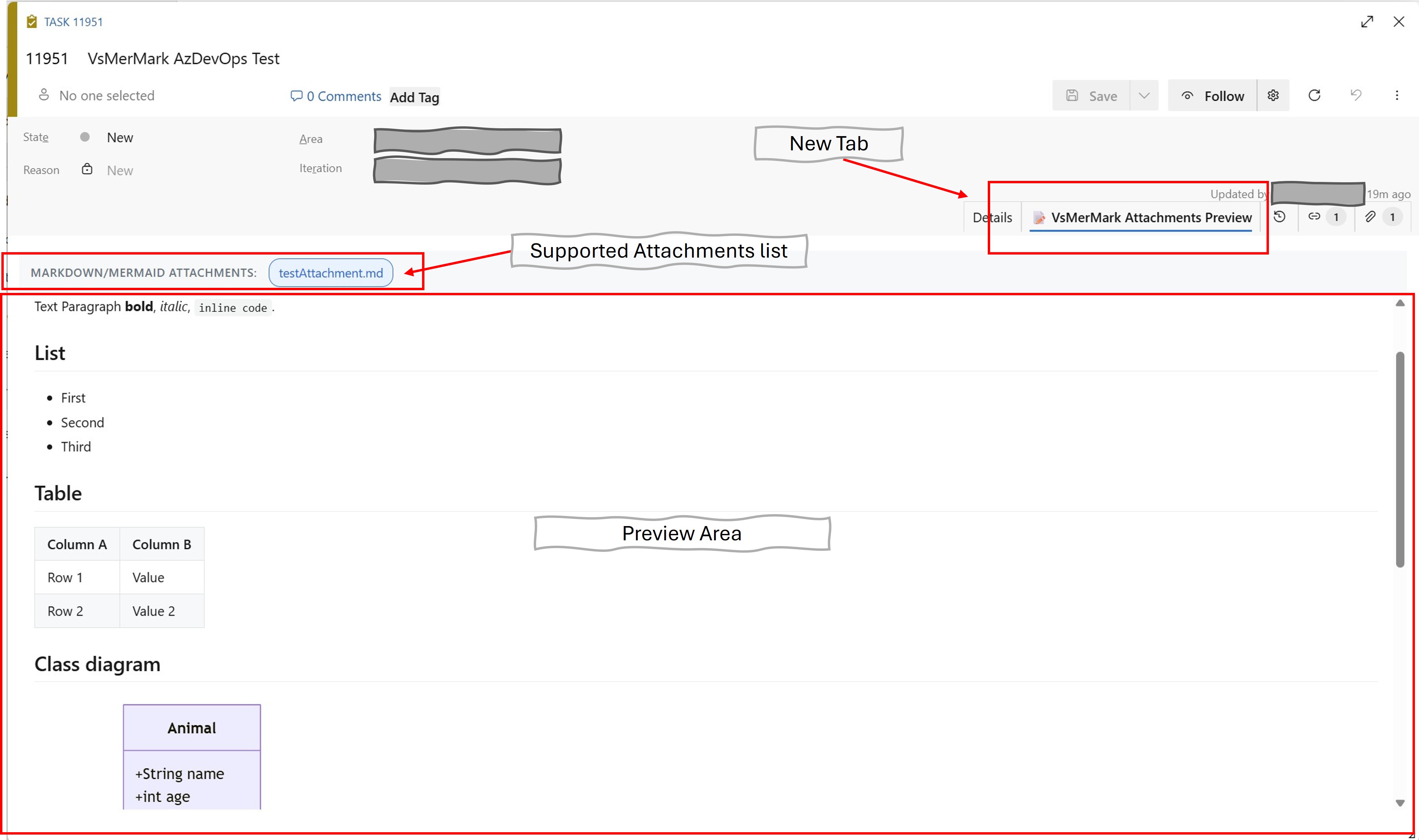
Table of Contents
- License
- Changelog
- Features Overview
- What VsMerMark AzDevOps Adds
- Installation
- Getting Started
- Supported File Types
- Supported Mermaid Diagram Types
- Interactive Click-Highlighting
- Dark Theme Support
- Permissions
- Example: Markdown with Embedded Mermaid
- Known Limitations
- Related Products
- Attribution & Third-Party Licenses
- Support
License
Copyright & Distribution
Copyright (c) since 2026 GiPStech srl. All rights reserved.
VsMerMark AzDevOps is currently distributed as freeware. You may install and use this extension free of charge within your Azure DevOps organization for any purpose, including commercial and non-commercial use. Redistribution of the VSIX package, in original or modified form, requires prior written consent from GiPStech srl.
Future Licensing Changes
GiPStech srl reserves the right to change the licensing terms in future versions, including but not limited to introducing usage limits, feature restrictions, or paid tiers for some or all of the current functionality. The extension is currently free of charge, but this may change in a subsequent release. Any change to the licensing terms will be communicated through the release notes in the Changelog section of this page, and through the Visual Studio Marketplace listing.
Warranty Disclaimer
THIS SOFTWARE IS PROVIDED "AS IS", WITHOUT WARRANTY OF ANY KIND, EXPRESS OR IMPLIED, INCLUDING BUT NOT LIMITED TO THE WARRANTIES OF MERCHANTABILITY, FITNESS FOR A PARTICULAR PURPOSE AND NONINFRINGEMENT.
GiPStech srl shall not be liable for any claim, damages, or other liability, whether in an action of contract, tort, or otherwise, arising from, out of, or in connection with the software or the use or other dealings in the software.
Third-Party Libraries
The extension bundles third-party open-source libraries distributed under their original licenses (MIT, Apache 2.0, BSD-2-Clause). See the Attribution & Third-Party Licenses section for the complete list.
Changelog
Version 1.1.0 (June 2026)
- Per-diagram zoom & pan. Each Mermaid diagram is now rendered inside a fixed-height box with its own zoom (mouse wheel / toolbar) and pan (drag), so large diagrams can be explored without scrolling the whole page or affecting the surrounding Markdown. Each box has a small overlay toolbar (zoom in / out / fit-width). Powered by
svg-pan-zoom. Interactive click-highlighting keeps working inside the zoomable box.
Version 1.0.0 (April 2026)
First release.
Features introduced in this release:
- VsMerMark Attachments Preview tab contributed to every Azure DevOps work item form (Bug, User Story, Task, Feature, Epic, and custom types).
- Full Markdown rendering via
marked@17.0.5, with support for headings, paragraphs, lists (ordered, unordered, task lists), tables, code blocks, blockquotes, inline code, images, links, horizontal rules, and emphasis.
- Embedded Mermaid diagrams via
mermaid@11.13.0, rendered as scalable SVG inside fenced code blocks tagged ```mermaid.
- Multiple file extensions recognized as previewable attachments:
.md (Markdown, optionally with embedded Mermaid fences), .mmd and .mermaid (pure Mermaid content). The parser detects the format automatically.
- Interactive click-highlighting on Mermaid diagrams: click any node or edge to emphasize it;
Ctrl+click to build a multi-selection; click empty space to clear.
- Automatic dark mode following the Azure DevOps theme via the
prefers-color-scheme media query. Both the surrounding UI and the Mermaid theme switch in sync.
- Auto refresh on save: when a work item is saved, the attachment list is reloaded automatically — no need to reload the tab.
- Shared rendering engine with the VsMerMark Editor for Visual Studio: the bundle reuses the exact same source files (
LivePreview/src/index.js, highlight.js), ensuring pixel-perfect visual consistency between the two tools and propagating future fixes to both in one place.
- Read-only by design: the extension requests only the
vso.work scope (read access to work items and their attachments) and never modifies data.
Features Overview
| Feature |
Description |
| VsMerMark Attachments Preview tab |
Dedicated work item form page contribution, visible alongside Details, History, Links, and Attachments. |
| Attachment list |
Top bar lists all .md / .mmd / .mermaid attachments as selectable chips. |
| Auto-select |
If the work item has exactly one previewable attachment, it is opened automatically. |
| Markdown rendering |
Headings, lists, tables, code blocks, blockquotes, images, links, task lists, horizontal rules, emphasis. |
| Mermaid rendering |
Full Mermaid 11 support via SVG, including 18+ diagram types (see Supported Mermaid Diagram Types). |
| Click-highlighting |
Click nodes/edges/labels in any Mermaid diagram to emphasize them. Ctrl+click for multi-selection. |
| Dark mode |
Follows Azure DevOps theme automatically. Both UI and Mermaid theme switch in sync. |
| Auto refresh |
Attachment list reloads when the work item is saved. |
| No backend |
Pure client-side extension running inside the Azure DevOps iframe. No server, no external API calls. |
| Read-only |
Requests only vso.work scope. Never modifies work items or attachments. |
What VsMerMark AzDevOps Adds
Azure DevOps Services has no native inline preview for Markdown or Mermaid attachments. The table below compares out-of-the-box behavior against what this extension provides.
| Scenario |
Azure DevOps (native) |
VsMerMark AzDevOps |
.md attachment on a work item |
Download link only; opens in external editor |
Rendered inline in the VsMerMark Attachments Preview tab |
Mermaid diagram inside .md |
Not supported; shows as fenced code block after download |
Rendered as interactive SVG |
.mmd / .mermaid attachment |
Download link only |
Auto-detected as pure Mermaid and rendered |
| Click on a diagram node |
No interaction |
Visual emphasis on the selected node |
| Multiple attachments |
One download per file, manual open |
Selectable chips, one click to switch |
| Dark mode |
Only the ADO UI follows the theme |
UI + Mermaid both follow the theme |
| Refresh on save |
— |
Attachment list auto-updates |
Installation
- Open the VsMerMark AzDevOps page on Visual Studio Marketplace.
- Click Get it free.
- Select your Azure DevOps organization from the dropdown.
- Click Install.
- After a few seconds, the extension is active on all work items in all projects within that organization.
For private distribution scenarios, contact GiPStech srl for direct .vsix delivery.
Getting Started
- Open any work item (Bug, User Story, Task, Feature, Epic, ...) in your Azure DevOps organization.
- Go to the Attachments tab of the work item form and upload one or more
.md, .mmd, or .mermaid files (drag-and-drop supported).
- Save the work item.
- Click the VsMerMark Attachments Preview tab, which appears next to Details, History, Links, and Attachments.
- The top bar of the tab lists every Markdown/Mermaid attachment as a selectable chip. Click a chip to open that file in the preview viewport.
- Scroll through the rendered content. For Mermaid diagrams, click on nodes to highlight them; hold
Ctrl while clicking to add more elements to the selection.
Tip: If the work item has exactly one previewable attachment, it is opened automatically as soon as the tab loads.
Supported File Types
| Extension |
Expected content |
Parsing behavior |
.md |
Markdown, optionally with embedded ```mermaid fenced blocks |
Parsed into alternating Markdown and Mermaid segments |
.mmd |
Pure Mermaid syntax (no fences) |
Treated as a single Mermaid segment |
.mermaid |
Pure Mermaid syntax (no fences) |
Treated as a single Mermaid segment |
The parser applies a heuristic to detect pure Mermaid content: if the first non-empty, non-comment line starts with a known Mermaid keyword (classDiagram, flowchart, graph, sequenceDiagram, erDiagram, stateDiagram, gantt, pie, gitGraph, journey, mindmap, timeline, sankey, xychart, block-beta, quadrantChart, requirementDiagram, C4, or kanban), the entire file is rendered as one diagram.
Supported Mermaid Diagram Types
All diagram types supported by Mermaid 11.13.0:
| Type |
Keyword |
Use case |
| Class diagram |
classDiagram |
Object-oriented class relationships |
| Flowchart |
flowchart / graph |
Process flows and decision trees |
| Sequence diagram |
sequenceDiagram |
Interactions between actors over time |
| ER diagram |
erDiagram |
Database entity relationships |
| State diagram |
stateDiagram |
Finite state machines |
| Gantt chart |
gantt |
Project schedules and timelines |
| Pie chart |
pie |
Categorical proportions |
| Git graph |
gitGraph |
Branching and merging history |
| User journey |
journey |
User experience flows |
| Mindmap |
mindmap |
Hierarchical idea maps |
| Timeline |
timeline |
Chronological events |
| Sankey |
sankey |
Flow quantities between nodes |
| XY chart |
xychart |
Data point scatter / line charts |
| Block diagram |
block-beta |
Block-level architecture |
| Quadrant chart |
quadrantChart |
2×2 matrix classification |
| Requirement diagram |
requirementDiagram |
SysML-style requirements |
| C4 diagram |
C4 |
C4 model architecture diagrams |
| Kanban board |
kanban |
Task state boards |
Interactive Click-Highlighting
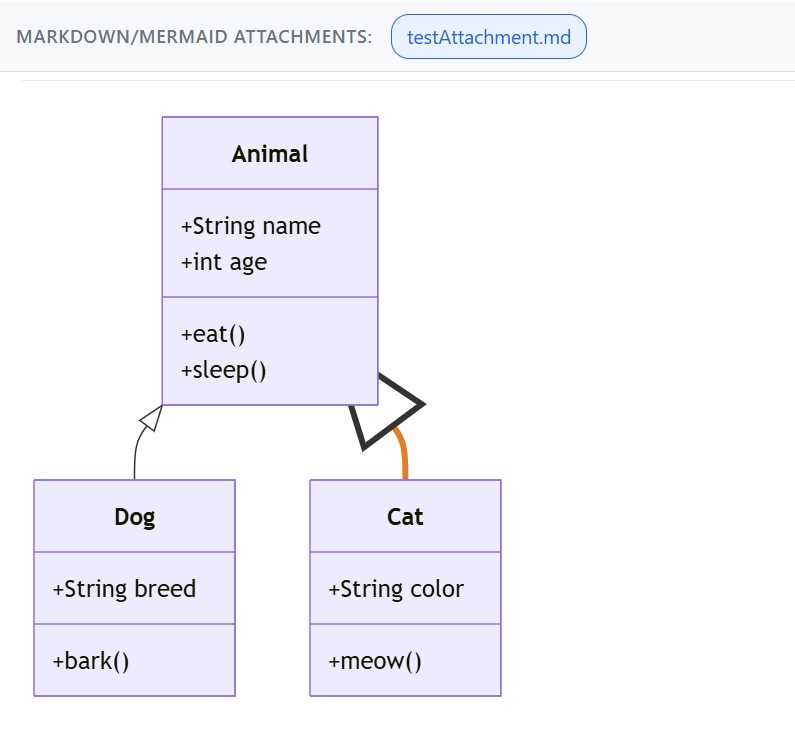
When you click on a Mermaid diagram inside the preview, the extension tracks which element you selected and applies a visual emphasis:
- Nodes (classes, flowchart boxes, ER entities, sequence actors): border stroke width is increased and the fill saturation/brightness is boosted.
- Edges (relationships, arrows, connectors): the line is recolored to a highlight color and drawn thicker.
- Labels on edges: bold and darker.
Controls:
| Action |
Effect |
| Click on a node or edge |
Select that element exclusively (clears previous selection) |
Ctrl+click on another element |
Add it to the current selection (multi-select) |
Ctrl+click on an already selected element |
Remove it from the selection |
| Click on empty space inside the diagram |
Clear all highlights |
The click-highlighting feature is useful when walking stakeholders through a specific path in a flowchart or a chain of relationships in a class diagram during a work item review meeting.
Dark Theme Support
The preview follows the Azure DevOps theme automatically, without any manual toggle. The mechanism relies on the prefers-color-scheme CSS media query evaluated inside the iframe hosting the tab: when Azure DevOps is set to a dark theme, the UI switches to a dark palette and the Mermaid theme changes to dark at the same time. When the user switches theme at runtime, the change is detected via the change event on the media query and applied immediately, without reloading the tab.
Permissions
The extension requests a single OAuth scope:
| Scope |
Purpose |
vso.work |
Read access to work items and their attachments (download file content) |
No write permissions are requested. The extension is strictly read-only and never creates, modifies, or deletes work items, attachments, comments, or any other data in your Azure DevOps organization.
Example: Markdown with Embedded Mermaid
Any .md attachment can mix prose and diagrams using standard fenced code blocks:
# Architecture notes

The authentication service depends on the user repository through the repository pattern.

```mermaid
classDiagram
    class AuthService {
        +login(user, pass)
        +logout()
    }
    class IUserRepository {
        <<interface>>
        +findByEmail(email)
    }
    AuthService ..> IUserRepository : depends on
```

## Login flow

```mermaid
sequenceDiagram
    actor User
    User->>AuthService: login(email, password)
    AuthService->>IUserRepository: findByEmail(email)
    IUserRepository-->>AuthService: user record
    AuthService-->>User: JWT token
```

## Known constraints

- Token expires after 15 minutes
- Refresh token valid for 7 days
Files with the .mmd or .mermaid extension can contain pure Mermaid syntax without any fence — the parser detects and renders them automatically.
Known Limitations
- Relative image paths in Markdown are not resolved. Images referenced with a relative path like
 do not render, because the attachment has no companion folder to resolve against. Absolute URLs (https://...) work normally.
- Cross-work-item links of the form
#1234 are rendered as plain text, not as clickable Azure DevOps work item references.
- Raw HTML inside Markdown is accepted and rendered as-is. Consider the security implications if work items are authored by untrusted users in your organization.
- Large attachments (> 1 MB of markdown) may take a noticeable time to render the first time they are opened.
VsMerMark AzDevOps shares its rendering engine with VsMerMark Editor for Visual Studio, which brings the same Markdown and Mermaid preview directly into the Visual Studio editor, plus additional authoring features:
- Side-by-side live preview for
.md, .mmd, and .mermaid files while editing
- Automatic C# class diagram generation from source code via Roslyn, with full support for partial classes
- DevExpress XPO model diagram generation from
[Association] / [Aggregated] attributes
- Multi-format export: HTML, SVG, PNG
- Syntax highlighting for Mermaid inside Markdown code fences
- Diagram Explorer tool window with navigable tree of all diagram elements
- Smart merge of regenerated diagrams into existing Mermaid blocks, preserving manual edits and styling
Install both extensions to keep documentation authoring and work tracking perfectly in sync, with identical visual output across your whole workflow.
Attribution & Third-Party Licenses
VsMerMark AzDevOps is built on top of the following open-source components:
All bundled third-party libraries retain their original licenses. License texts are included in the distributed .vsix file via work-item-preview.js.LICENSE.txt.
Support
For bug reports, feature requests, or questions, please contact GiPStech srl through your usual support channel.


