
VsMerMark Editor for Visual StudioAn editor for Mermaid files (*.mmd, *.mermaid) and Markdown files (*.md) with embedded Mermaid diagrams. It offers live preview, syntax highlighting, C# class diagram generation, DevExpress XPO support, and multi-format export (HTML, SVG, PNG). Developed by GiPStech. |

VsMerMark Editor for Visual Studio - User GuideSummaryVsMerMark Editor is a Visual Studio 2022+ extension for editing and previewing Mermaid diagrams and Markdown documents with embedded Mermaid code blocks. It provides a complete authoring workflow with live preview, syntax highlighting, interactive diagram exploration, C#-to-diagram generation (including DevExpress XPO support), and multi-format export. Developed by GiPStech. The extension was originally developed for internal use at GiPStech and is currently released as freeware. It extends the built-in Markdown and Mermaid editing capabilities of Visual Studio 2026, fully integrating into the IDE environment. New companion extension — VsMerMark AzDevOps. A companion product, VsMerMark AzDevOps, is now available on the Visual Studio Marketplace. It brings the same Markdown and Mermaid rendering engine to Azure DevOps work items through a dedicated VsMerMark Attachments Preview tab that displays The extension was originally inspired by Mermaid Editor for Visual Studio by NeVeSpl (MIT License). VsMerMark Editor has been practically rewritten from scratch, retaining the core concept of a live Mermaid preview inside Visual Studio while adding extensive new capabilities: unified Table of Contents
LicenseCopyright (c) since 2025 GiPStech. All rights reserved. VsMerMark Editor is distributed as freeware. You may use this extension free of charge for any purpose, including commercial and non-commercial use. Redistribution of the extension binary (VSIX package) is not permitted without prior written consent from GiPStech. The extension periodically checks for newer versions. GiPStech may require users to update to the latest version within a reasonable time frame to continue using the extension. THIS SOFTWARE IS PROVIDED "AS IS", WITHOUT WARRANTY OF ANY KIND, EXPRESS OR IMPLIED, INCLUDING BUT NOT LIMITED TO THE WARRANTIES OF MERCHANTABILITY, FITNESS FOR A PARTICULAR PURPOSE AND NONINFRINGEMENT. IN NO EVENT SHALL GIPSTECH BE LIABLE FOR ANY CLAIM, DAMAGES OR OTHER LIABILITY ARISING FROM THE USE OF THIS SOFTWARE. This extension includes third-party libraries distributed under the MIT License (see Attribution and Third-Party Licenses). GiPStech reserves the right to change the licensing terms in future versions, including but not limited to introducing usage limits, feature restrictions, or paid tiers for some or all of the current functionality. Continued use of the extension is subject to the terms of the installed version. ChangelogVersion 1.2.0 (June 2026)New Features
Bug Fixes
Version 1.1.1 (April 2026)Minor changes and fixes.
Version 1.1.0 (April 2026)Diagram Explorer
Improvements
Bug Fixes
Version 1.0.0 (2025)Initial release. Editing and Preview
C# Class Diagram Generation
DevExpress XPO Diagram Generation
Smart Merge
Interactive Features
Export
Syntax Highlighting
Configuration
Annotations
Context Menu Commands
Build and Architecture
Features Overview
What VsMerMark Editor AddsVisual Studio 2026 includes a built-in Markdown editor with basic Mermaid rendering support. VsMerMark Editor extends these capabilities significantly:
Automatic diagram generationOne of the key advantages of VsMerMark Editor is the ability to generate Mermaid class diagrams directly from C# source code. This eliminates the need to write Mermaid syntax manually, significantly increasing productivity and reducing errors. The generated diagrams stay synchronized with the code through the smart merge feature, which updates existing diagrams without losing manual edits. Installation
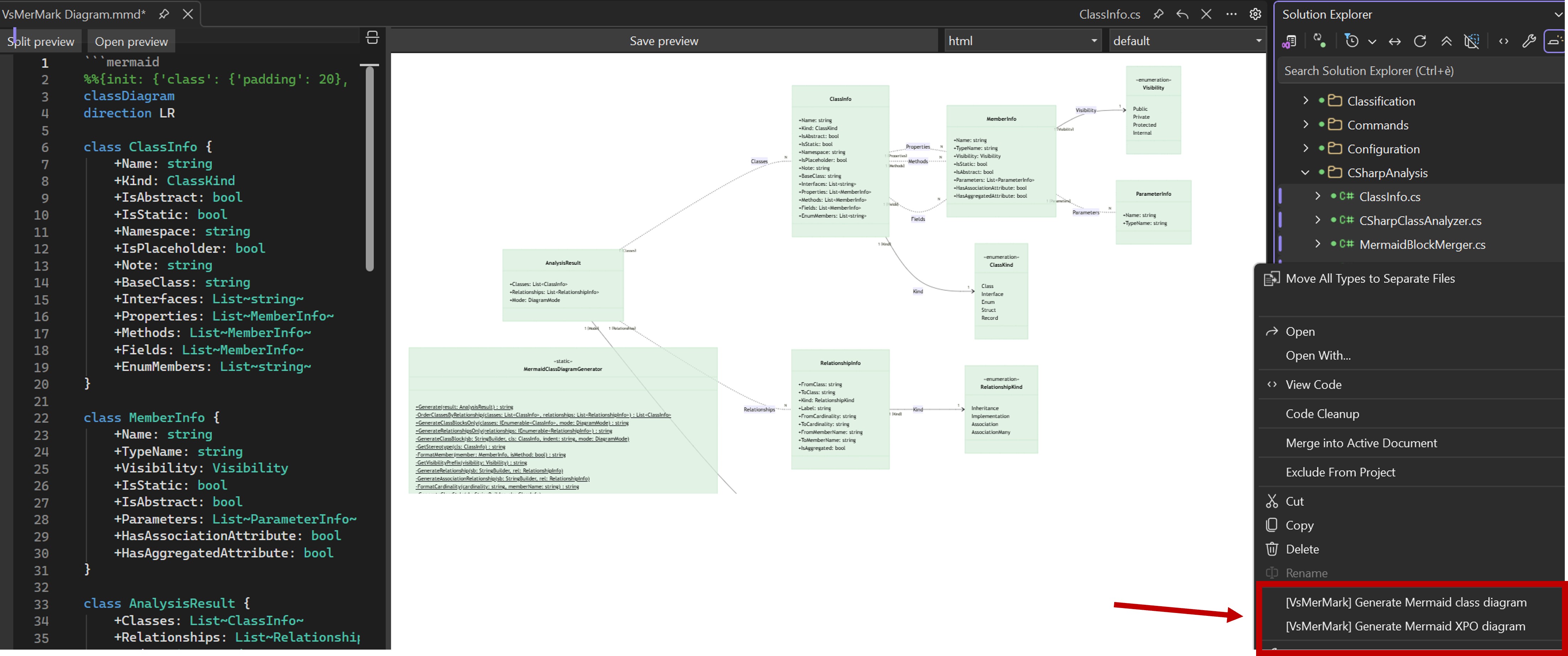
Getting StartedOpening a Mermaid file (.mmd)Simply double-click any Opening a Markdown file (.md) with previewRight-click a
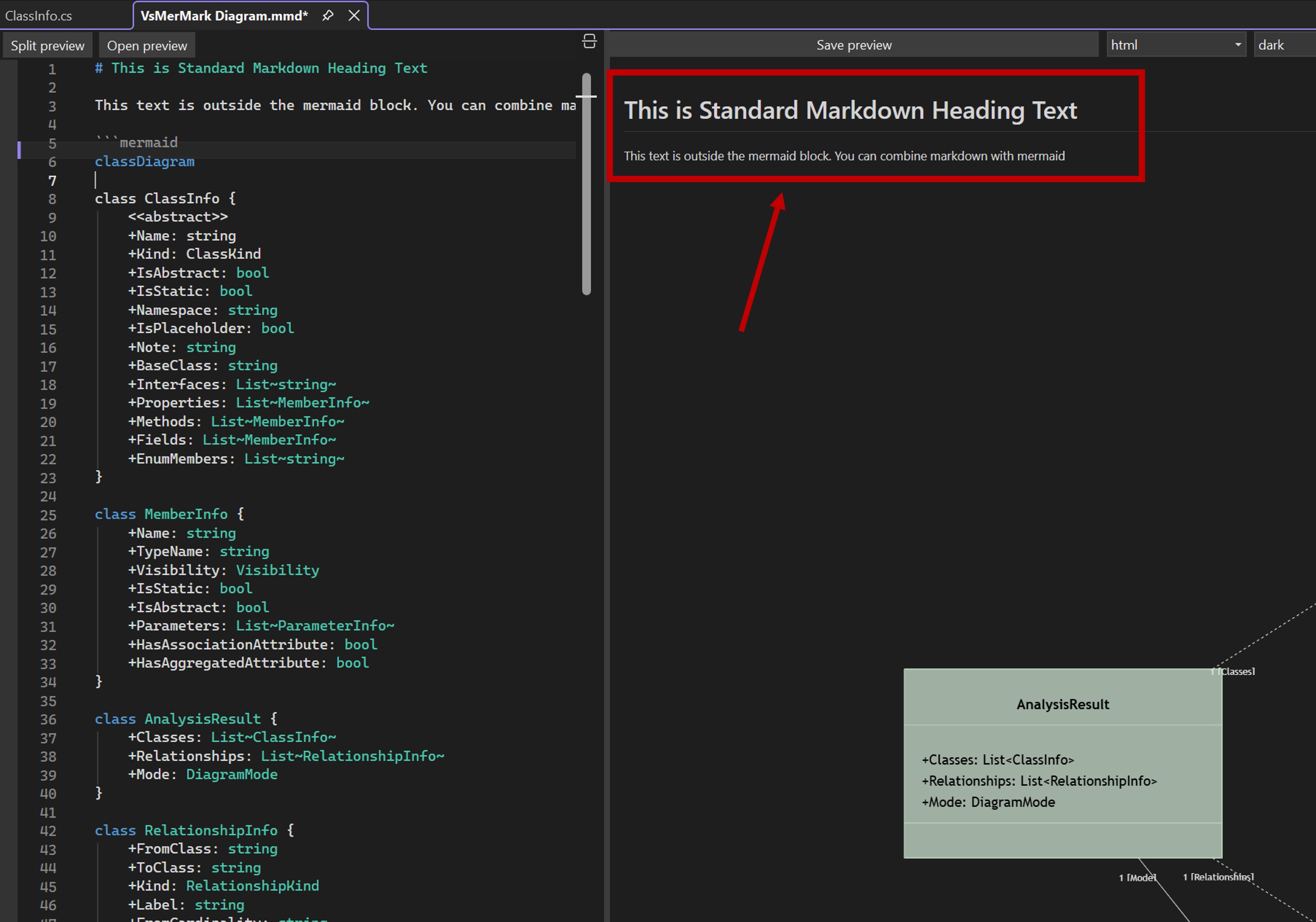
Editing Mermaid DiagramsPure Mermaid files (.mmd)Create or open a Example content: The preview renders the diagram immediately with configurable styles. Markdown with embedded Mermaid blocksFiles can mix Markdown and Mermaid. Wrap Mermaid code in fenced code blocks: The preview renders both Markdown content and Mermaid diagrams in sequence. Generating Class Diagrams from C# CodeBasic generation
The extension analyzes the selected C# files using Roslyn's Semantic Model and generates a complete class diagram including:
Generate New (no active diagram file)If you select
If a file with that name already exists, it appends a numeric suffix (
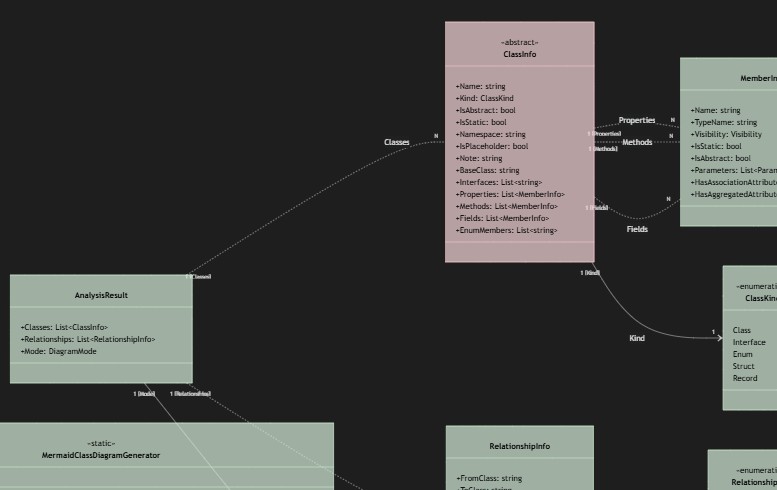
Partial class supportThe analyzer automatically discovers all partial class declarations across the entire project. You only need to select one part of a partial class; the extension finds all other parts (Designer.cs, Generated.cs, etc.) via Roslyn's Visual class stylesGenerated diagrams use color-coded styles to distinguish class types:
Colors are configurable in Tools > Options (see Configuration). The semi-transparent fill (70% opacity by default) allows relationship lines passing beneath class boxes to remain visible.
Visibility prefixes in generated members
Suffixes: Generating XPO DiagramsFor projects using DevExpress XPO (eXpress Persistent Objects), the extension provides a specialized diagram mode:
Differences from Full mode
Smart MergeWhen you generate a diagram with the cursor inside an existing mermaid block, the extension performs a smart merge instead of replacing the entire block: Merge rules
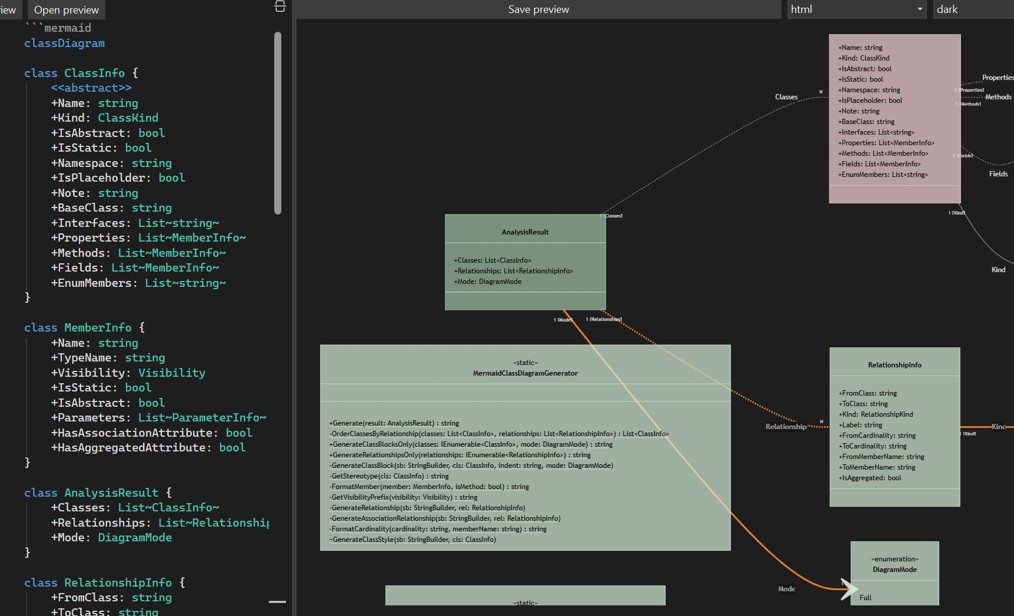
This allows you to incrementally build diagrams, adding classes from different parts of the codebase while preserving manual layout adjustments and custom annotations. Interactive Diagram HighlightingClick on diagram elements in the preview to highlight them: Interactions
Relationship lines have an invisible 20px-wide hit area for easy clicking, even on thin lines.
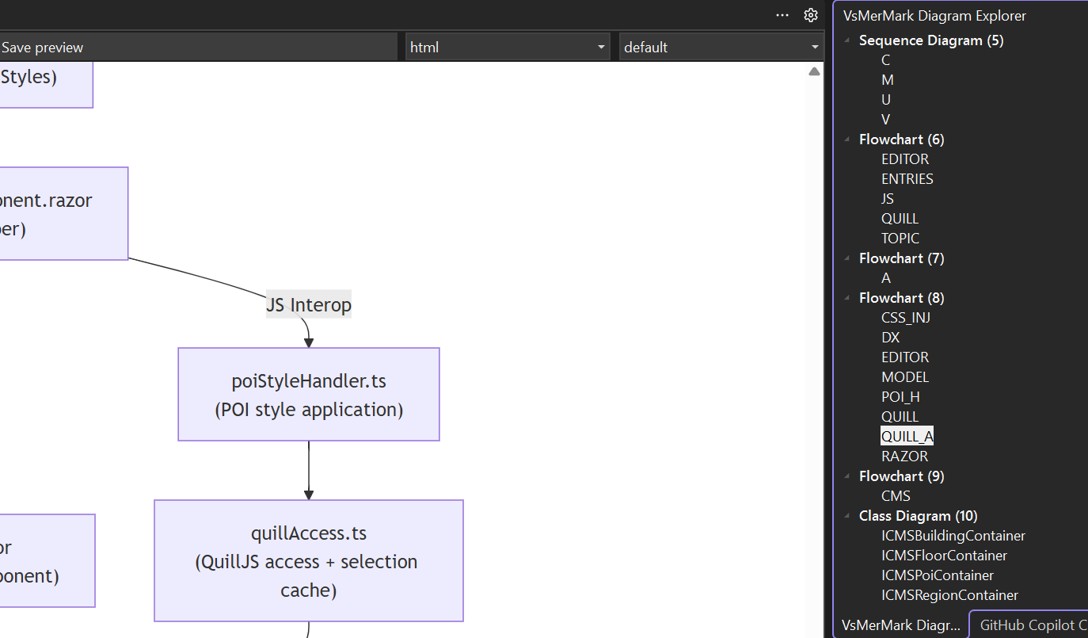
Diagram ExplorerThe VsMerMark Diagram Explorer is a dockable tool window that provides a structured tree view of all Mermaid diagrams and their classes in the active file. It is especially useful for navigating large diagrams with many classes. Opening the Diagram ExplorerGo to View > Other Windows > VsMerMark Diagram Explorer. The tool window appears docked in the IDE (by default, alongside Solution Explorer). It remains open across sessions and automatically updates when you switch between files.
Tree structureThe explorer displays a hierarchical view of the active file's content:
Class names are extracted automatically from Show in diagramRight-click on any class in the tree and select "Show in diagram" (or double-click the class). This performs two synchronized actions:
This dual navigation makes it easy to jump between the visual representation and the source code of any class, even in diagrams with dozens of classes. Automatic updatesThe tree view updates automatically when:
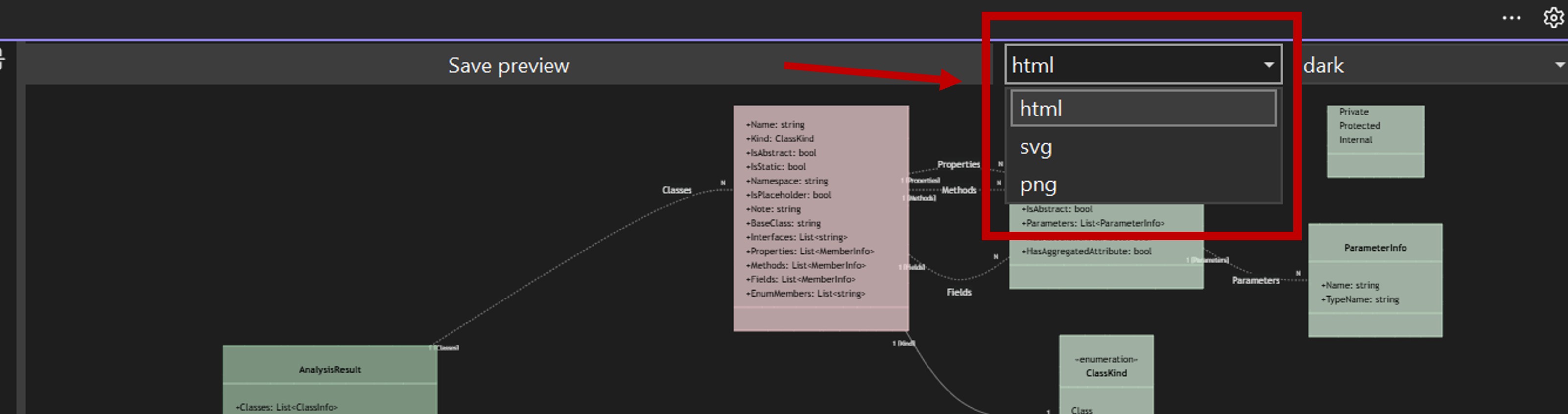
Supported file typesThe explorer activates for Exporting DiagramsUse the "Save rendered diagram" button in the preview toolbar to export:
The export format is selectable from the combo box in the toolbar. |
| Option | Default | Description |
|---|---|---|
| Default Export Format | html | Format for diagram export (html, png, svg) |
| Default Theme | default | Mermaid rendering theme (default, dark, neutral, forest) |
| Default Preview Width | 666 px | Width of the preview panel |
| Default Preview Height | 600 px | Height for the detached preview window |
Diagram settings
| Option | Default | Description |
|---|---|---|
| Default Direction | LR | Diagram layout direction: LR (left-to-right) or TB (top-to-bottom) |
| Class Padding | 20 | Padding inside class boxes |
| Node Spacing | 80 | Horizontal spacing between diagram nodes |
| Rank Spacing | 100 | Vertical spacing between diagram ranks |
Style settings
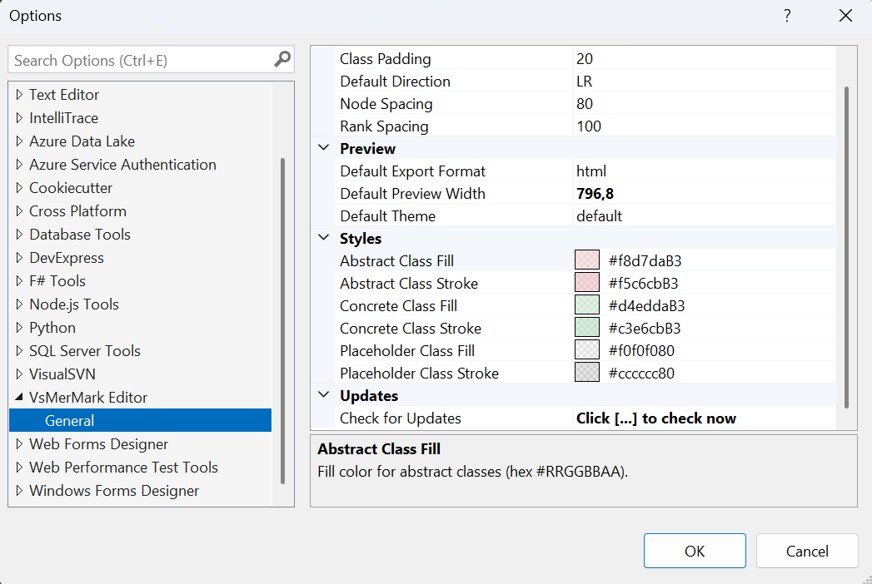
All colors use hex format with alpha channel (#RRGGBBAA). A custom color picker with alpha slider is provided for easy selection.
| Option | Default | Description |
|---|---|---|
| Abstract Class Fill | #f8d7daB3 | Fill color for abstract classes (light red, 70% opacity) |
| Abstract Class Stroke | #f5c6cbB3 | Border color for abstract classes |
| Concrete Class Fill | #d4eddaB3 | Fill color for concrete classes (light green, 70% opacity) |
| Concrete Class Stroke | #c3e6cbB3 | Border color for concrete classes |
| Placeholder Class Fill | #f0f0f080 | Fill color for external/placeholder classes (gray, 50% opacity) |
| Placeholder Class Stroke | #cccccc80 | Border color for placeholder classes |
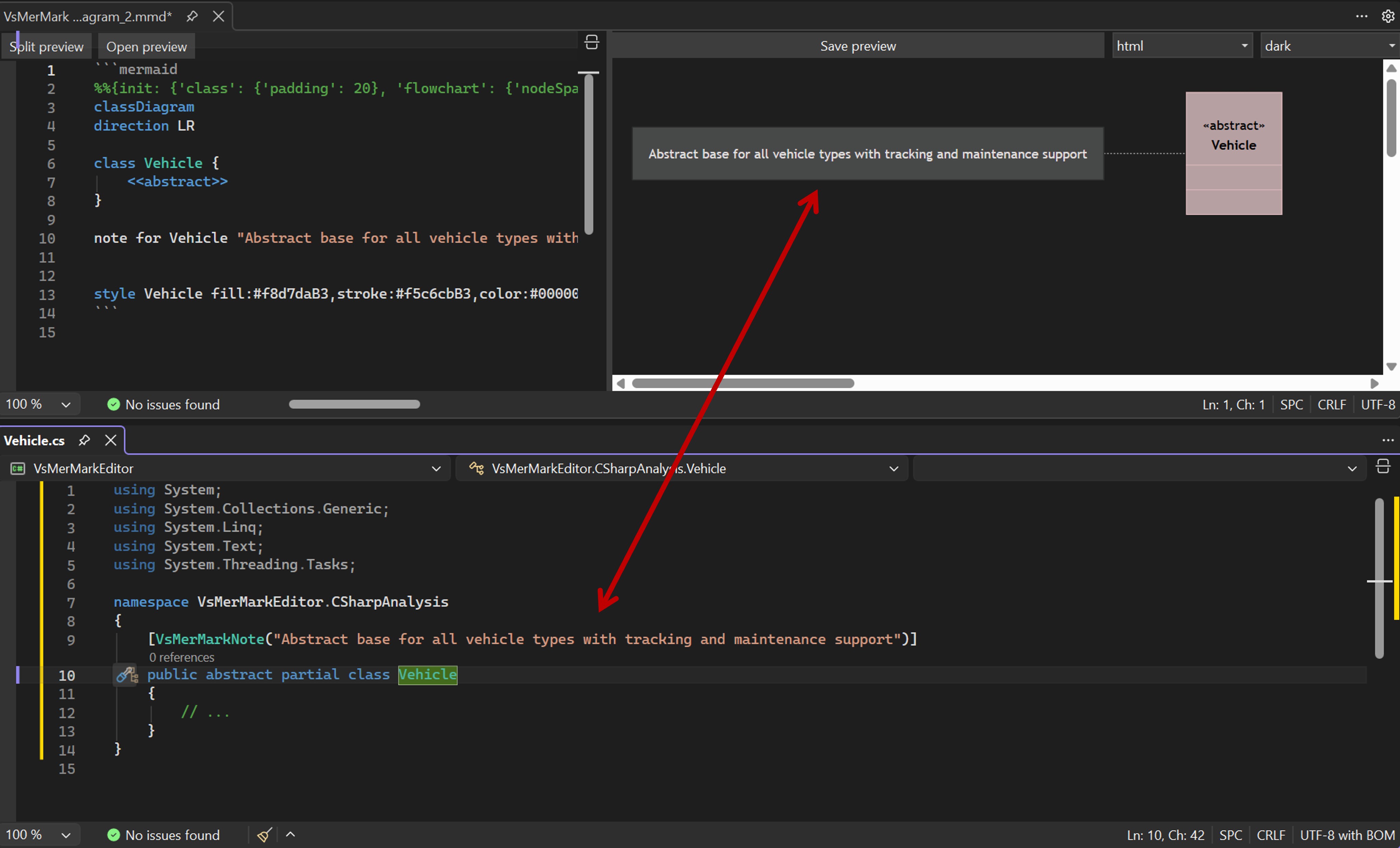
Class Annotations with VsMerMarkNote
Add descriptive notes to classes in the generated diagram by using the [VsMerMarkNote] attribute in your C# code:
[VsMerMarkNote("Abstract base for all vehicle types with tracking and maintenance support")]
public abstract partial class Vehicle : VehicleBase
{
    // ...
}
This generates a Mermaid note in the diagram:
note for Vehicle "Abstract base for all vehicle types with tracking and maintenance support"
How to use
- Define the attribute in your project (any namespace):
[AttributeUsage(AttributeTargets.Class | AttributeTargets.Interface | AttributeTargets.Enum | AttributeTargets.Struct)]
public class VsMerMarkNoteAttribute : Attribute
{
    public string Text { get; }
    public VsMerMarkNoteAttribute(string text) { Text = text; }
}
- Apply it to any class, interface, enum, or struct
- Generate the diagram as usual
The extension searches for the attribute by name (not by assembly reference), so you do not need to reference the extension's assembly. Just define the attribute anywhere in your solution.
Supported Mermaid Diagram Types
The extension supports all Mermaid diagram types for preview rendering. The auto-detection heuristic (for files without ```mermaid fences) recognizes:
| Diagram Type | Keyword |
|---|---|
| Class Diagram | classDiagram |
| Flowchart | graph, flowchart |
| Sequence Diagram | sequenceDiagram |
| ER Diagram | erDiagram |
| State Diagram | stateDiagram, stateDiagram-v2 |
| Gantt Chart | gantt |
| Pie Chart | pie |
| Git Graph | gitGraph |
| User Journey | journey |
| Mind Map | mindmap |
| Timeline | timeline |
| Sankey | sankey-beta |
| XY Chart | xychart-beta |
| Block Diagram | block-beta |
| Quadrant Chart | quadrantChart |
| Requirement Diagram | requirementDiagram |
| C4 Diagrams | C4Context, C4Container, C4Component, C4Dynamic, C4Deployment |
| Kanban | kanban |
Note: C# class diagram generation is specific to
classDiagram. All other diagram types are supported for editing and preview only.
Keyboard Shortcuts and Interactions
| Action | How |
|---|---|
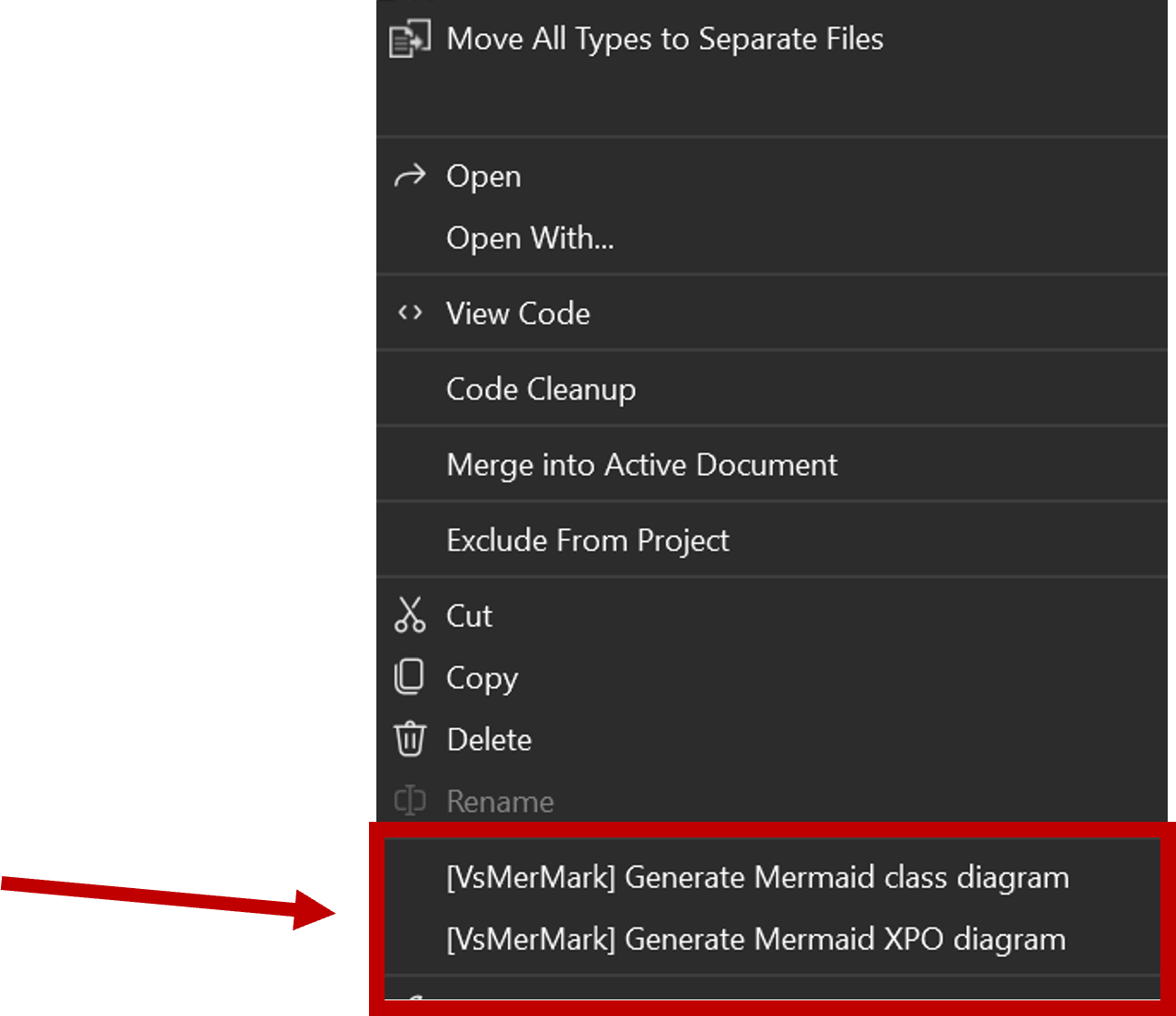
| Generate class diagram | Right-click .cs files > [VsMerMark] Generate Mermaid class diagram |
| Generate XPO diagram | Right-click .cs files > [VsMerMark] Generate Mermaid XPO diagram |
| Open .md with preview | Right-click .md file > Open with VsMerMark Editor |
| Toggle preview panel | Click "Split preview" in the top toolbar |
| Detach preview | Click "Open preview" in the top toolbar |
| Highlight class | Click on a class in the preview |
| Multi-select highlight | Ctrl+Click on classes/relationships |
| Clear highlighting | Click on empty space in the preview |
| Resize preview | Drag the splitter between editor and preview |
| Open Diagram Explorer | View > Other Windows > VsMerMark Diagram Explorer |
| Navigate to class | Right-click class in Diagram Explorer > Show in diagram (or double-click) |
| Zoom in/out diagram | Ctrl + mouse wheel in the preview panel |
Troubleshooting
Preview shows "WebView2 Runtime" message
Install the Microsoft Edge WebView2 Runtime. It is required for the preview panel.
No diagram rendered
- Ensure the Mermaid syntax is valid. Check the error panel below the preview for parsing errors.
- Make sure the file has a recognized extension (
.mmd,.mermaid, or.md).
C# generation shows "No classes found"
- The solution must compile successfully. The Roslyn Semantic Model requires a compilable solution.
- Ensure you have selected
.csfiles (not folders or other file types).
Settings show "legacy options" warning in VS 2026
- This is expected behavior. Visual Studio 2026 displays
DialogPage-based extension settings through a legacy compatibility layer. The settings work correctly.
Diagram looks different after generating
- Check your Options (Tools > Options > VsMerMark Editor) for direction, spacing, and style settings.
- The diagram layout depends on the Mermaid engine's auto-layout algorithm, which may vary with different content.
Attribution and Third-Party Licenses
All product names, trademarks, and registered trademarks mentioned in this document — including DevExpress, XPO, Visual Studio, Mermaid, and others — are property of their respective owners. Their use here is for identification purposes only and does not imply endorsement or affiliation.
VsMerMark Editor was inspired by and originally based on Mermaid Editor for Visual Studio by NeVeSpl, licensed under the MIT License. The original extension provided a lightweight editor for Mermaid files with live preview and SVG/PNG export.
VsMerMark Editor has been practically rewritten from scratch, retaining only the foundational concept of a WebView2-based Mermaid preview inside Visual Studio. Major new capabilities include:
- Complete C#-to-Mermaid generation pipeline using Roslyn semantic analysis
- DevExpress XPO model support with specialized association/aggregation handling
- Smart merge algorithm preserving manual diagram edits
- Interactive diagram highlighting with click/Ctrl+Click
- Unified
.mmd/.mdhandling with auto-detection of pure Mermaid content - Configurable class styles with color picker and alpha transparency
- Dark theme support with automatic VS theme detection
- Options page with diagram layout parameters
- Class annotations via
[VsMerMarkNote]attribute - Webpack-based build pipeline replacing vendored JS libraries
- Comprehensive syntax highlighting for both Mermaid and Markdown
Third-party libraries
| Library | Version | License | Purpose |
|---|---|---|---|
| Mermaid.js | 11.13.0 | MIT | Diagram rendering engine |
| Marked.js | 17.0.5 | MIT | Markdown parsing |
| Microsoft.CodeAnalysis (Roslyn) | 4.3.0 | MIT | C# semantic analysis |
| WebView2 | 1.0.3595.46 | Microsoft | Chromium-based web rendering |
Syntax highlighting
Mermaid and Markdown syntax highlighting is implemented natively using Visual Studio's MEF classification framework (IClassifier), with no external TextMate grammars. The classifier maps to VS built-in classification types so that colors automatically follow the user's current theme.