Skip to content
| Marketplace
Sign in
Visual Studio Code>Data Science>RASON MCP ServerNew to Visual Studio Code? Get it now.
RASON MCP Server

RASON MCP Server

Frontline Systems

|
12 installs
| (0) | Free
RASON MCP Server for VS Code Copilot — build, analyze, and solve optimization, simulation, data science, and decision models.
Installation
Launch VS Code Quick Open (Ctrl+P), paste the following command, and press enter.
Copied to clipboard
More Info

RASON MCP Server

RASON MCP RASON MCP (npm)

AI-powered platform for decision intelligence: building, analyzing, and solving optimization, simulation, data science, and decision models with RASON.

Looking for more than just MCP? Check out RASON Desktop — Frontline's flagship VS Code extension. It bundles this MCP server plus a RASON language server (IntelliSense, validation, signature help), built-in local & cloud solvers, model and examples sidebars, live Power BI / Excel integration with auto-refreshing charts, one-click result export, and more. Already have RASON Desktop installed? You have this MCP server built in — no need for the standalone extension.

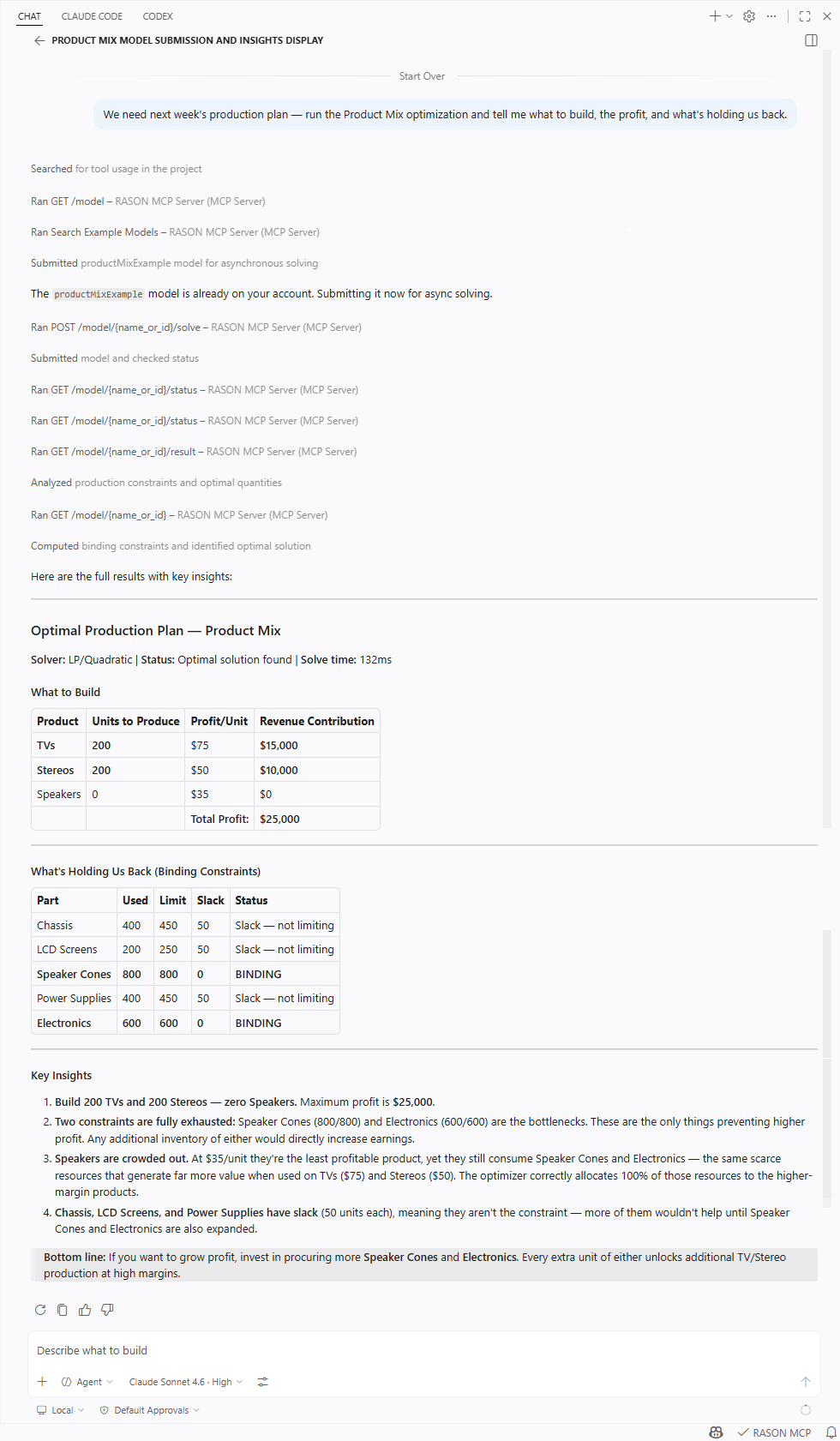
RASON MCP Server in VS Code GitHub Copilot — solving a product mix optimization model with results, constraint utilization, and key insights.

🔍 Click the screenshot to view full size.

RASON MCP Server in VS Code GitHub Copilot — solving a product mix optimization model with results, constraint utilization, and key insights

Works across all major RASON model types

Click any model type to see it in action.

Optimization example in VS Code Copilot
Optimization
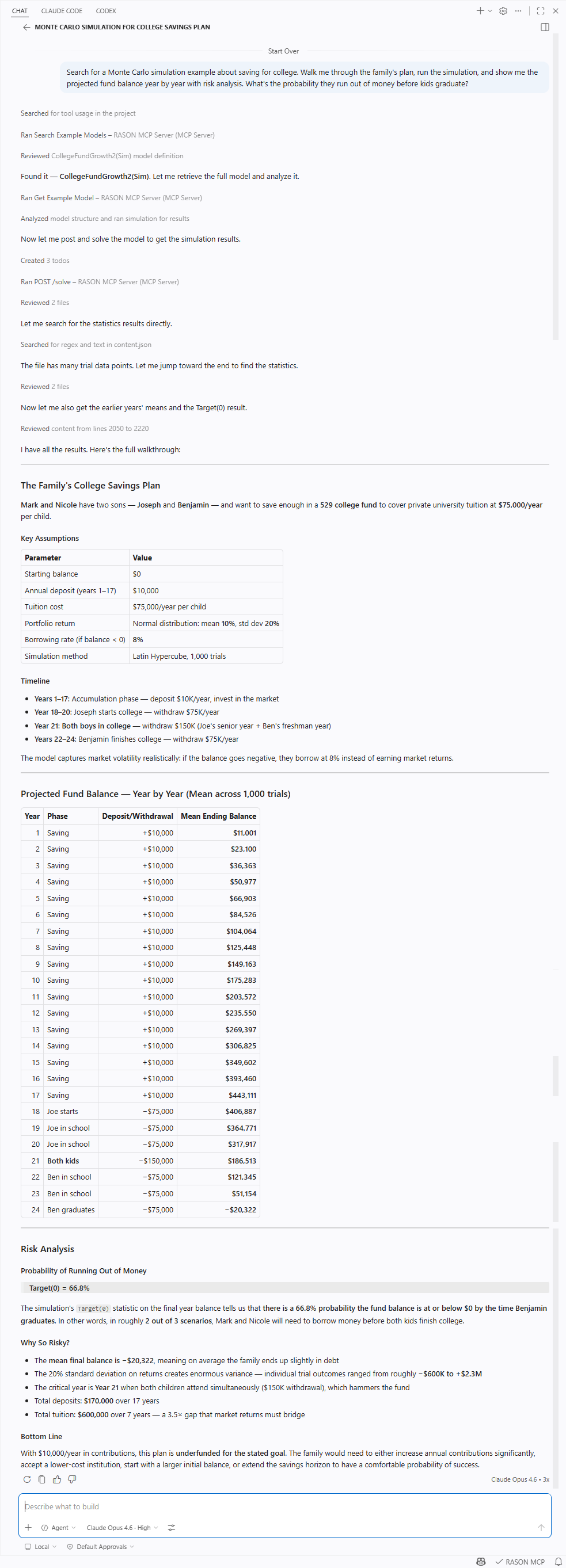
Simulation example in VS Code Copilot
Simulation
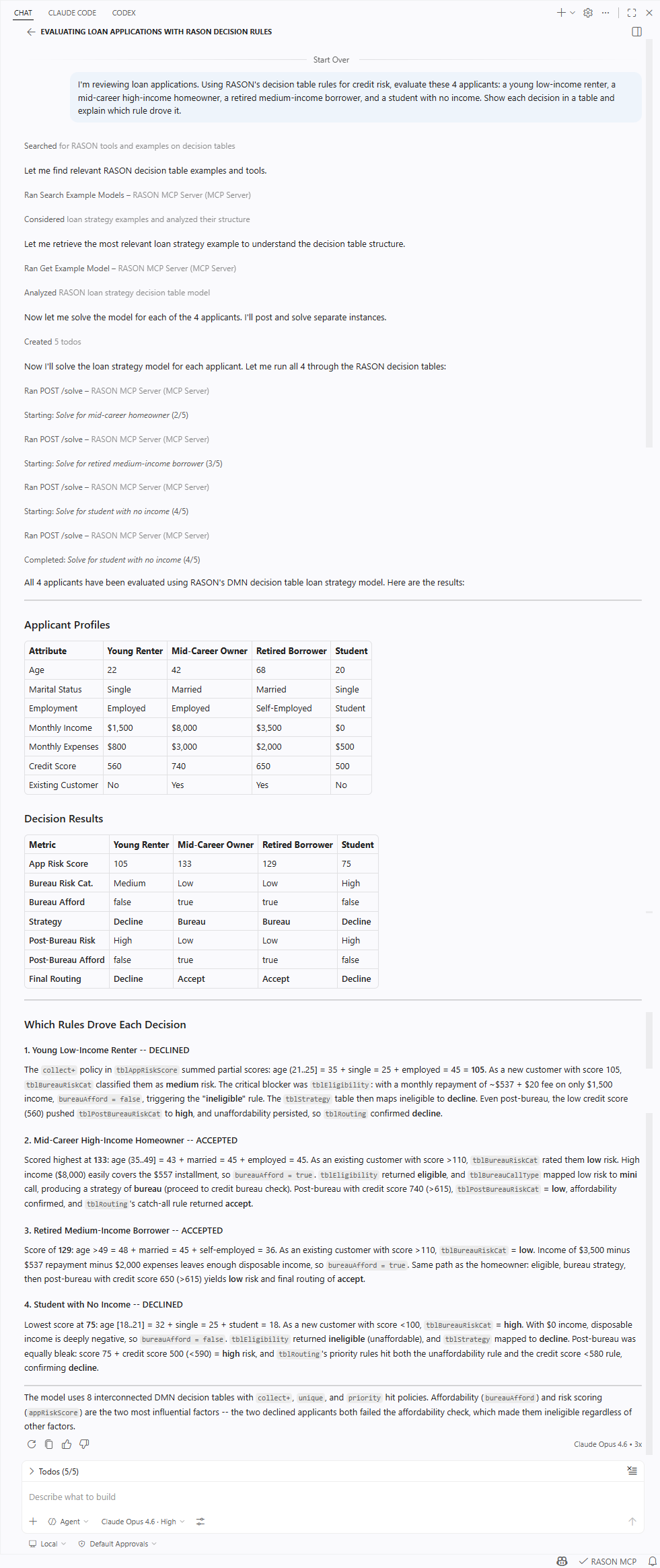
Decision Tables example in VS Code Copilot
Decision Tables
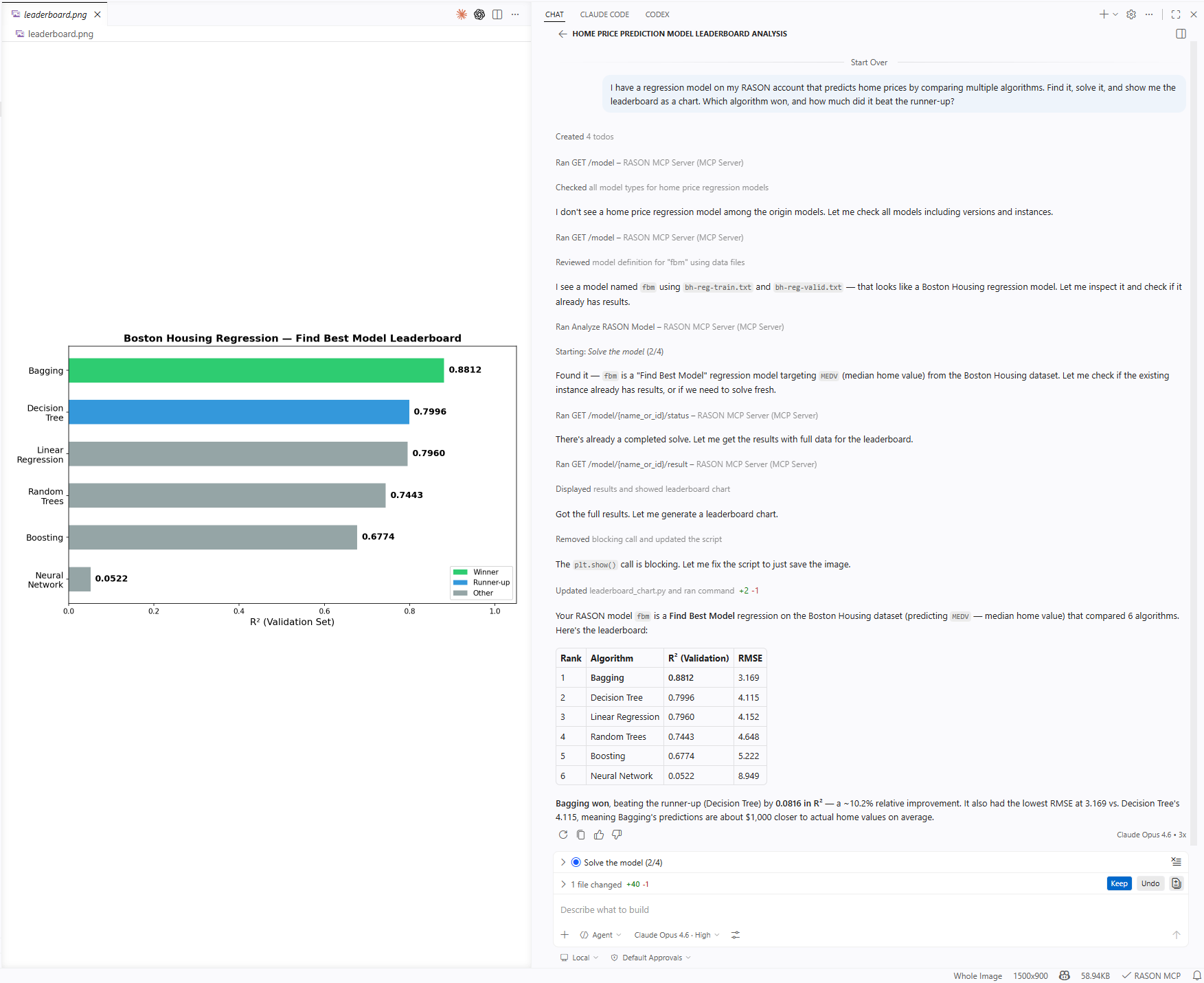
Data Science example in VS Code Copilot
Data Science
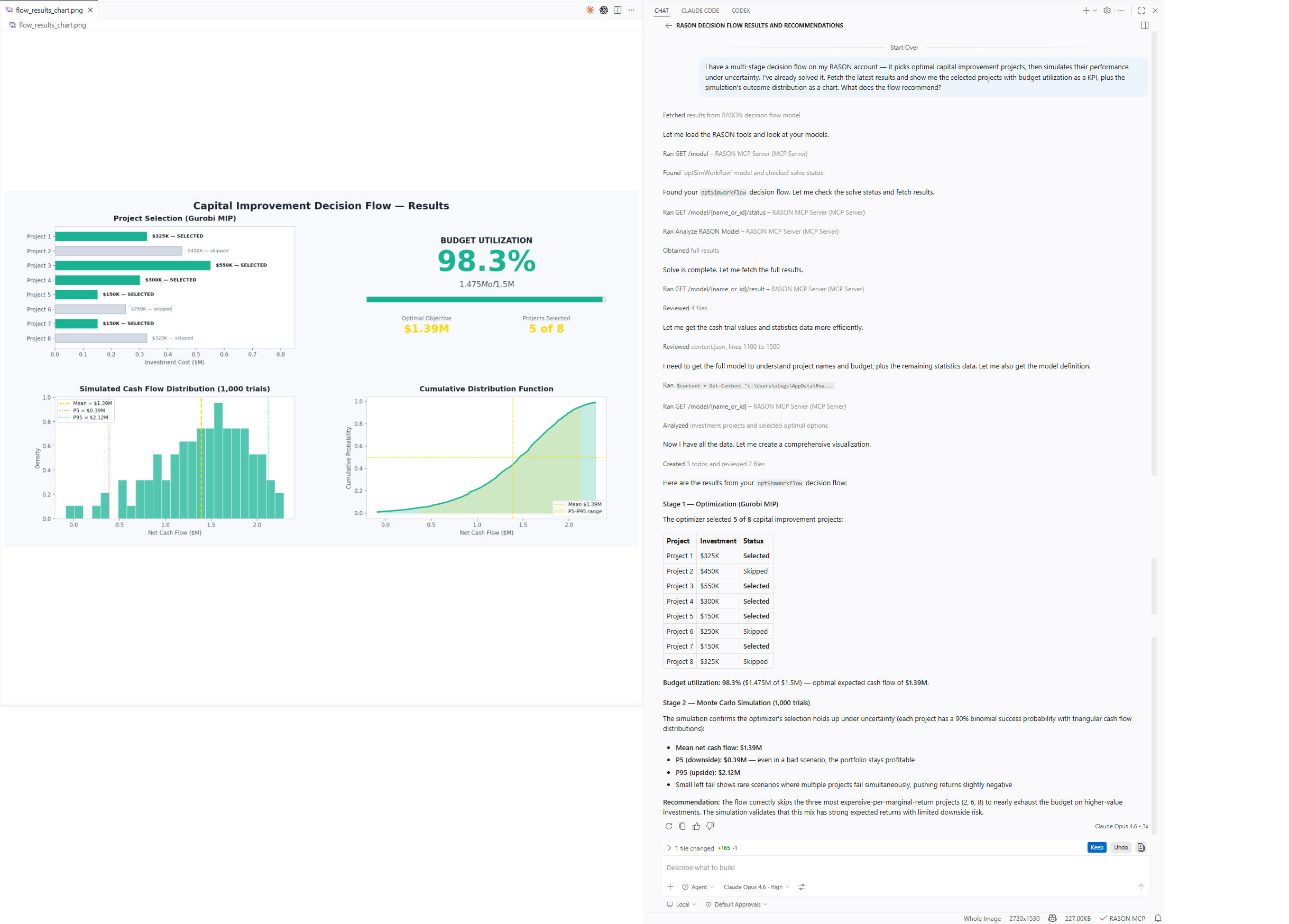
Multi-Stage Flows example in VS Code Copilot
Multi-Stage Flows

What is RASON?

RASON (Restful Analytic Solver® Object Notation) is a multi-purpose modeling language and decision intelligence platform by Frontline Systems for building, analyzing, and solving mathematical optimization, simulation / risk analysis, and data science / machine learning models, plus business decision rules and multi-stage decision flows.

You can use RASON models on your desktop with RASON Desktop for VS Code, Power BI Desktop and Excel Desktop; in the Azure cloud with a REST API working with Microsoft Fabric, Power BI Service and Excel for the Web; in Docker containers; and in your own app written in C/C++, C#, Java, Python, and R via Frontline's Solver SDK.

RASON comes with world-class solvers for mathematical optimization, advanced probability distributions and simulation, powerful machine learning algorithms, rich DMN business rule handling, and easy-to-build multi-stage decision flows with an in-memory SQL engine.

About This MCP Server

This MCP server is more than a REST API wrapper — it's a complete AI infrastructure for analytical modeling. It includes a searchable library of nearly 200 example models, templates that guide model generation, structural analysis, and solve result interpretation. An AI assistant connected to this server can help formulate a model from a business problem description, find relevant examples, explain model structure, submit it for solving, and present results in a goal-oriented way — closing the loop with suggested next steps and improvements.

What Can You Do With It?

Explore nearly 200 ready-made examples

"Find examples of portfolio optimization"

"Show me a vehicle routing model I can start from"

"What simulation examples are available?"

Build models from templates

"Create a new linear optimization model"

"Give me a decision table template"

"Start a simulation model from scratch"

Analyze and understand models

"Describe the structure of this model — what type is it?"

"What variables and constraints does this optimization model have?"

"Explain what this model is doing"

Solve optimization, simulation, data science & decision models

"Solve this product mix model and show me the optimal allocation"

"Run a Monte Carlo simulation on this risk model"

"Evaluate this decision table with the following inputs"

"Train a classification model to predict customer churn"

Go beyond simple commands

"I have a scheduling problem with 8 employees and shift constraints — build me an optimization model, solve it, and show the schedule as a table"

"Find a portfolio optimization example, adapt it for 3 assets with a 15% risk budget, solve it, and summarize the allocation"

"Submit my model for solve, keep polling status, and when it's done show results in a table with key insights"

"This model is infeasible — run diagnostics and suggest which constraints to relax"

Manage models in your RASON account

"List all my optimization models"

"Upload this RASON model with its CSV data files"

"Create a new version of 'supply-chain' and set it as the champion"

"Clean up all old versions of 'product-mix' — keep only the champion"

Getting Started

1. Install the Extension

Install from the VS Code Marketplace or search for "RASON MCP Server" in the Extensions view.

2. Start Using It

Open Copilot Chat and start asking questions — example search, templates, model analysis, and RASON info all work immediately, no account needed.

Copilot Chat is built into VS Code. If you haven't signed in to GitHub Copilot yet, VS Code will prompt you the first time you open Chat.

3. Connect Your RASON Account (optional)

To solve models and manage them in the cloud, set your auth token via the Command Palette (Ctrl+Shift+P / Cmd+Shift+P):

RASON: Set Auth Token

You can get a token at rason.com.

Works Without a RASON Account

Example search, model templates, model analysis, and RASON info tools work without credentials. You can explore the full example library and build models before signing up. A RASON account is needed only for solving models and managing models in the cloud.

Tools

All 20 tools

Examples & Templates

  • search_examples — Search ~200 example models by keyword or type (optimization, simulation, datamining/data science, calculation/decision tables, flow/multi-stage pipelines)
  • get_example — Retrieve a specific example model with full definition and metadata
  • get_model_template — Get a bare JSON scaffold for a model type: blank, optimization, simulation, sim-optimization, data-science, workflow, decision-table, power-bi

Analysis

  • describe_model — Analyze model structure: type/subtype detection, component inventory, issue identification
  • about_rason — RASON capabilities, model types, Frontline Systems ecosystem, and server info

Solving

  • solve_model — Solve a model synchronously (inline RASON, RASON files, or Excel workbooks)
  • submit_solve — Submit a model for asynchronous solving (long-running models)
  • get_solve_status — Check solving status and progress
  • get_solve_result — Retrieve the result once solving is complete
  • stop_solve — Stop a running solve (intermediate results may be available)

Diagnostics

  • diagnose_model — Run diagnostics synchronously (useful for infeasible/unbounded optimization models)
  • submit_diagnose — Submit for asynchronous diagnostics

Model Management

  • list_models — List models in your account with optional filters by type and kind
  • get_model — Retrieve a model definition (RASON JSON)
  • post_model — Create a new model from a RASON JSON definition
  • post_model_with_files — Upload a model with file attachments (RASON + data files, or Excel)
  • put_model — Update an existing model or create a new version
  • put_model_with_files — Update a model with file attachments
  • set_champion — Set or unset the champion (default) version of a model
  • delete_model — Delete models with flexible filtering by kind, type, and force option

Prompts & Resources

The server includes 12 guided prompts for common workflows (solving, uploading, diagnostics, model management) and 2 resources — a live model catalog and a browsable example library reference.

Commands

Command Description
RASON: Set Auth Token Set the bearer token for RASON API authentication
RASON: Clear Auth Token Remove the stored auth token
RASON: Open Settings Open RASON extension settings

Settings

Setting Default Description
rason.authToken "" Bearer token for the RASON REST API
rason.cloudSolverUri https://rason.net Base URL of the RASON server
rason.mcp.resultArrayLimit 25 Max array/dataFrame rows before summarizing
rason.mcp.resultSizeLimit 50000 Max result characters before truncating

Disclaimer

This software is provided "as is", without warranty of any kind. Use of this MCP server involves interaction with external cloud services (RASON REST API). You are responsible for reviewing actions before they are executed, managing your own credentials securely, and ensuring compliance with applicable terms of service. Before uploading models, files, or data to RASON cloud services, review Frontline Systems' Terms and Conditions and Privacy Policy. AI-generated model formulations and interpretations of solve results should be validated before use in production or decision-making.

License

Copyright © 2026 Frontline Systems, Inc. All rights reserved. This is proprietary software; no part may be reproduced, distributed, or modified without prior written permission from Frontline Systems. Use is governed by the Frontline Systems Software License. For licensing inquiries, contact Frontline Systems.

Feedback and Support

This software is developed and maintained by Frontline Systems, Inc. For questions, feedback, or licensing inquiries, please contact your Frontline representative or reach us at solver.com/how-may-we-help-you.

Links

  • RASON Portal — Create a free account, manage models, documentation
  • Frontline Systems — The company behind RASON and Analytic Solver
  • MCP Protocol — Learn about the Model Context Protocol
  • Contact us
  • Jobs
  • Privacy
  • Manage cookies
  • Terms of use
  • Trademarks
© 2026 Microsoft