Avro QA Pickup Timer
An automated file-reading and QA loop assistant for Cursor and VS Code, built to parse bug notes, track issues, and streamline iterative code fixes.
A live status-bar countdown in Cursor and VS Code times each QA pickup slot so the attached Agent can work through bug notes and fix lists on schedule.
Copyright © 2026 FUSION FIVE USA LLC. Developer: Vashkar Chatterjee. All rights reserved.
This extension is free to use for now. It works with both Visual Studio Code and Cursor.
Use at your own risk.
Installing or using this extension means you accept TERMS and LICENSE.
Full version history: See CHANGELOG.
Screenshots
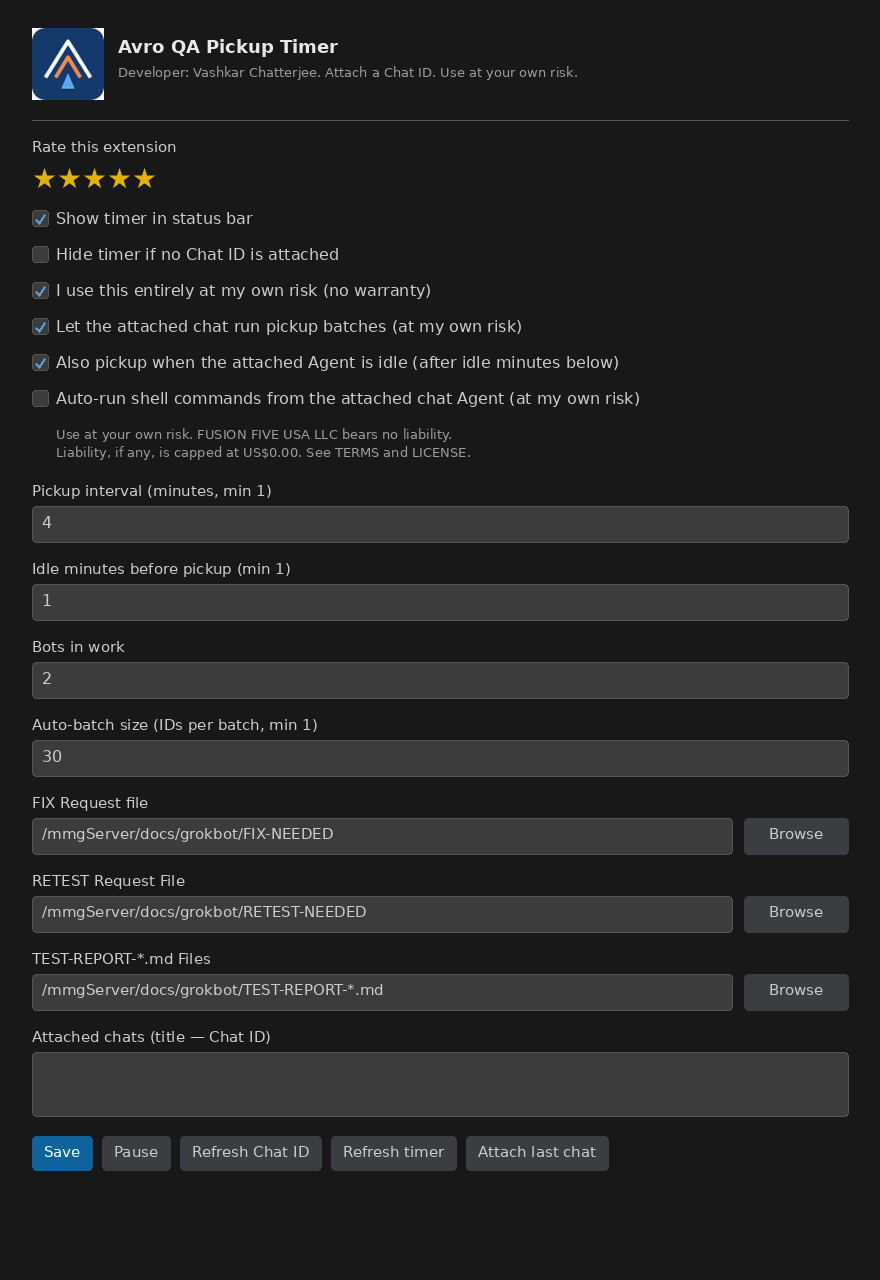
Settings
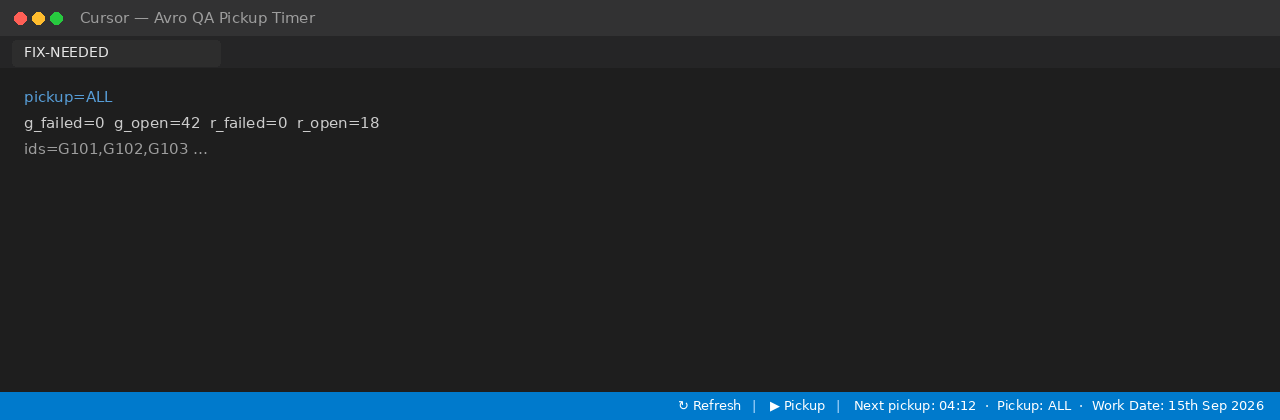
Status bar
What this is (and is not)
Status is shown on the status bar. Chat markdown cannot tick a live clock.
By default the timer is a countdown. Pickup batches and Agent command auto-run stay off until you attach a Chat ID and explicitly allow them at your own risk.
It is meant for Grok 4.6 (coding) and Grokbot (QA). Other models (Claude, GPT, OpenAI, Composer, Kimi, Gemini, and Other) are selectable.
The extension does not promise correct times, successful fixes, or safe commands. You remain responsible for your own work.
Purpose
Streamline your debugging and QA workflow inside Cursor and VS Code. This extension reads automated bug notes and fix lists, looping through diagnostic files to help development teams resolve issues systematically without context-switching.
Avro QA Pickup Timer shows when the next pickup slot is due. Optionally, with your approval, it loops the attached Chat ID so that Agent can keep picking up the request file, fixing, and asking for retest.
What it does
- Shows
Timer: MM:SS | Scope: {scope} | Refresh | Force on the right of the status bar. Refresh and Force are icon-only. No Work Date. No Pause on the bar. Agent busy: ticker swaps to On Hold.
- Counts down on UTC slot boundaries (default 8 minutes; minimum 1). Idle wait minimum 1 minute.
- Optional idle pickup: after the attached Agent is idle for 2 minutes (configurable), fire even if the UTC 8-minute gap is not over; that fire resets the interval
- Pause / Resume stops or restarts the loop and command auto-run
- Refresh Chat ID lists the last Agent Chat ID (not the Request ID) with a chat title
- Optional pickup loop on the attached chat (at your own risk)
- Optional auto-run of that Agent’s shell commands (at your own risk;
git push and host-destructive commands still ask)
- On Hold when the attached Agent is already working: countdown freezes; no new pickup. When that chat’s turn ends, Idle pickup waits the idle minutes, then fires. If idle pickup is off, the leftover UTC countdown continues.
- Auto-batch is built into the extension: it scans the QA report glob, writes the FIX request file, and kicks the attached chat. No host shell/python helpers are required.
- COLLAB.md path is a setting (empty =
COLLAB.md next to FIX-NEEDED). Pickup tells the Coding Agent to read it and not do QA (no TEST, no RETEST, no Assign ID) on any project.
- COUNTDOWN is written by the extension (
next_pickup_in, work_date, updated_utc). Empty path = COUNTDOWN next to FIX-NEEDED.
- Auto-batch size is set in Settings (
autoBatchSize, default 30, min 1, max 500). Pickup prompt uses that floor. A slot is skipped when scope=none or there are fewer IDs than that size.
- Optional pre-fix backup (on by default): local git branch before a batch that has work. Never pushed. Optional delete older backups (on by default) keeps only last known.
- Status bar does not show Work Date. Retest pending stays in the tooltip when the retest request file is present. Pickup still continues other FIX ids and skips the ones in that file.
Attach a Chat ID (required for the loop)
Chat ID ≠ Request ID. Attach the conversation UUID.
- Open the Agent chat you want to automate.
- Send any message in that chat.
- Open settings (click the status-bar timer).
- Click Refresh Chat ID. Last agent chats shows
title — Chat ID only.
- Click Attach last as Coding (worker for OPEN) or Attach last as Bot (
title — Chat ID for Lucy/Richard).
- In Attached chats, keep the Cursor/VS Code sidebar name before the em dash (edit it if the first prompt leaked in). Save.
- Check I use this entirely at my own risk.
- To loop pickup: check Let the attached chat run pickup batches.
- Keep Also pickup when the attached Agent is idle checked (default). Idle minutes default to 2. Idle fire resets the UTC interval so the next slot is not a double pickup.
- To auto-run that Agent’s commands: check Auto-run shell commands from the attached chat Agent.
- Use Pause to stop the loop and command auto-run without detaching.
Install
Free to use for now (Visual Studio Marketplace, Open VSX, and local .vsix).
Visual Studio Code (Marketplace)
URL: https://marketplace.visualstudio.com/items?itemName=FUSIONFIVEUSALLC.avro-qa-pickup-timer
Install directly: vscode:extension/FUSIONFIVEUSALLC.avro-qa-pickup-timer
Cursor (Open VSX)
URL: https://open-vsx.org/extension/FUSIONFIVEUSALLC/avro-qa-pickup-timer
Marketplace (VS Code): search Avro QA Pickup Timer (publisher FUSION FIVE USA LLC / FUSIONFIVEUSALLC). Rate on the listing after you sign in, or Settings → Rate this extension.
Cursor: the Extensions view has no Rate control. Use Avro QA Pickup Timer: Rate this extension (star on the sidebar Settings title, or Command Palette). That opens the Open VSX reviews page — sign in there to post publicly.
TERMS and LICENSE are bundled inside the .vsix. You do not upload them as separate Marketplace files. The store listing uses this README; the full terms ship in the package.
Visual Studio Code:
code --install-extension avro-qa-pickup-timer-0.5.40.vsix
Cursor:
cursor --install-extension avro-qa-pickup-timer-0.5.40-openvsx.vsix
Then Developer: Reload Window.
Requirements
- Visual Studio Code 1.90 or later, or Cursor (same engine)
- A project folder with COLLAB.md and COUNTDOWN next to your FIX / RETEST / report files (see Project files below). Empty settings resolve those two names next to FIX-NEEDED.
Use
- Open your workspace in Visual Studio Code or Cursor.
- Click the status-bar timer, or Avro QA Pickup Timer: Open settings.
- Set COLLAB.md and COUNTDOWN (or leave empty to use those names next to FIX-NEEDED). Create
COLLAB.md in that folder if it does not exist.
- Attach a Chat ID (see above). Coding chats must not TEST, RETEST, or Assign ID.
- Save. The status bar ticks immediately. COUNTDOWN is written by the extension.
- Optional: enable pickup loop and command auto-run after accepting the risk.
Commands (Command Palette):
- Refresh countdown
- Force pickup
- Refresh Chat ID
- Pause / Resume
- Attach last agent chat
- Attach chat ID
- Detach chat / Detach all chats
- Clear last chat IDs
- Open settings
- Rate this extension
Settings
Settings are stored in the workspace folder .vscode/settings.json for the folder you configure.
| Setting |
Meaning |
| Show timer in status bar |
Master on/off |
| Hide timer if no Chat ID is attached |
Hide the bar only when settings have no attached Chat ID. Other chats do not hide it |
| At my own risk |
Required before pickup loop or command auto-run |
| Pickup batches |
UTC slot and/or idle pickup. Skips the slot when the request file has no work |
| Auto-run commands |
Auto-allow shell commands from that attached Agent (git push still asks) |
| Pause / Resume |
Stop or restart the loop and command auto-run |
| Refresh Chat ID |
Reload last Chat ID + title (never the Request ID) |
| Pickup interval (minutes) |
UTC slot size (1–10080). Default 8 |
| Also pickup when idle |
After the Agent is idle for Idle minutes, pickup; that fire resets the UTC interval |
| Idle minutes before pickup |
Default 2. Minimum 1. Not capped by the UTC interval |
| Bots in work |
How many bots share slots |
| Auto-batch size |
IDs per Auto-batch (floor, 1–500, default 30). Pickup prompt uses this size |
| Coding Agent model |
Model that implements fixes. Default Grok 4.6. Other: Claude, GPT, OpenAI, … |
| QA Bot Agent |
Bot that tests/retests/clears. Default Grokbot. Separate chat from coding |
| Pre-fix backup |
Local git backup branch before a batch that has work (never pushed). Default on |
| Delete older backups |
After a new backup, drop older pre-fix branches/snapshots. Keep last known. Default on |
| Request file paths |
Empty in the store package. You set FIX / RETEST / report / export paths |
| Report files |
Glob; every match is scanned for ID/status tables |
| Rate this extension |
1–5 stars in Settings. VS Code opens Marketplace reviews; Cursor opens Open VSX |
| Attached chats |
Coding: title — Chat ID (OPEN worker). Bot chats: QA writers of FIX-NEEDED / TEST-REPORT-{Bot} |
| COLLAB.md |
Roles protocol. Empty = COLLAB.md next to FIX-NEEDED. Coding Agent must not TEST / RETEST / Assign ID |
| COUNTDOWN |
Live clock file. Empty = COUNTDOWN next to FIX-NEEDED. Written by this extension |
| FIX-NEEDED |
QA writes; Coding Agent works OPEN |
| RETEST-NEEDED |
QA retest queue. Coding Agent must not retest |
| STOP-NEW-TESTING |
QA STOP flag for new digging |
| TEST-REPORT-{Bot_Name}.md |
Dig and test reports by Bot (glob) |
| TEST-REPORT-2020-09-11.md |
Dated combined/index-style report example |
| TEST-REPORTS-*.md |
Index for QA Bots (not scanned for IDs) |
| pickup.json |
Settings for Bot, Coding, refresh, retry, Chat IDs |
Project files
Put these in one folder (example: docs/qa/). Point Settings at that folder. Empty COLLAB.md / COUNTDOWN / STOP-NEW-TESTING paths mean those names next to FIX-NEEDED.
Coding Agent (attached as Coding) implements OPEN from FIX-NEEDED only. It must not TEST, RETEST, Assign ID, hunt OPEN, or mark FIXED & WORKING / FAILED RETEST on any project. QA Bot chats TEST / RETEST / Assign ID and write TEST-REPORT-{Bot_Name}.md.
COUNTDOWN (example)
The extension writes this file. Do not print Next pickup: MM:SS in chat.
next_pickup_in=02:43.9
work_date=11th Sep 2020
updated_utc=2020-09-11T12:00:00Z
COLLAB.md (sample)
Copy and edit roles for your project. Keep the Coding Agent QA ban.
# QA ↔ Coding collab

## Roles

| Who | Does | Does not |
| --- | ---- | -------- |
| **Coding Agent** | Fix OPEN from FIX-NEEDED; mark DONE; stop for QA | TEST, RETEST, Assign ID, hunt OPEN, mark FIXED & WORKING / FAILED RETEST, write TEST-REPORT findings as QA |
| **QA Bot** | TEST, RETEST, Assign ID, write TEST-REPORT-{Bot_Name}.md, write FIX-NEEDED | Product patches, git push, DONE |

## Files (same folder)

    docs/qa/
      COLLAB.md
      COUNTDOWN
      FIX-NEEDED
      RETEST-NEEDED
      STOP-NEW-TESTING          (optional; presence pauses QA new digs)
      pickup.json
      TEST-REPORT-2020-09-11.md
      TEST-REPORT-{Bot_Name}-2020-09-11.md

## Status

| Status | Who | Meaning |
| --- | --- | --- |
| OPEN | QA | Broken / not fixed |
| DONE | Coding Agent | Fix applied on this host |
| FIXED & WORKING | QA only | Retest passed |
| FAILED RETEST | QA only | DONE failed — treat as OPEN |

Coding pickup must not Assign ID (do not invent G123 / R45). QA bots assign IDs on TEST-REPORT-{Bot_Name}.md.
FIX-NEEDED (example)
QA (or Refresh) writes this. Coding Agent reads ids= / failed= / open= only.
utc=2020-09-11T12:00:00Z
next_run=2020-09-11T12:08:00Z
next_pickup=07:46
work_date=11th Sep 2020
version=1.0.0
scope=both
pickup=ALL
ids=G1,G2,R1
open=G2,R1
failed=G1
done=
g_open=G2
r_open=R1
g_failed=G1
r_failed=
collab=/home/you/project/docs/qa/COLLAB.md
countdown=/home/you/project/docs/qa/COUNTDOWN
note=FAILED RETEST first, then OPEN. Coding: no TEST, no RETEST, no Assign ID.
RETEST-NEEDED (example)
QA retests these ids. Coding Agent must not retest.
utc=2020-09-11T12:05:00Z
version=1.0.0
scope=G
who=LUCY
coding_retest=no
ids=G10,G11
report=/home/you/project/docs/qa/TEST-REPORT-LUCY-2020-09-11.md
note=QA Team retests. Coding never does.
pickup.json (example)
Settings export (configExportPath). Chat IDs are conversation UUIDs, not Request IDs.
{
  "intervalMinutes": 8,
  "idlePickupMinutes": 2,
  "pickupOnIdle": true,
  "botCount": 2,
  "autoBatchSize": 30,
  "codingModel": "grok-4.6",
  "qaBotAgent": "grokbot",
  "qaAttachedChatIds": [],
  "fixNeededFile": "/home/you/project/docs/qa/FIX-NEEDED",
  "retestNeededFile": "/home/you/project/docs/qa/RETEST-NEEDED",
  "collabFile": "/home/you/project/docs/qa/COLLAB.md",
  "countdownFile": "/home/you/project/docs/qa/COUNTDOWN",
  "testReportGlob": "/home/you/project/docs/qa/TEST-REPORT-*.md",
  "testReportsIndexFile": "/home/you/project/docs/qa/TEST-REPORT-2020-09-11.md",
  "stopFlagFile": "/home/you/project/docs/qa/STOP-NEW-TESTING",
  "attachedChatIds": ["11111111-2222-3333-4444-555555555555"],
  "paused": false,
  "automatePickup": false,
  "autoRunCommands": false,
  "riskAccepted": false
}
STOP-NEW-TESTING (example)
Presence of this file is the flag. QA pauses new digs until you delete it.
# STOP NEW TESTING
# QA: no new OPEN digs. Retest DONE / RETEST-NEEDED only.
# Coding Agent: still must not TEST, RETEST, or Assign ID.
TEST-REPORT-2020-09-11.md (dated index / combined)
Not scanned for IDs if the basename matches TEST-REPORTS* (set this path as the index). A dated TEST-REPORT-2020-09-11.md file is a combined or index-style report:
# Test reports — 2020-09-11

- Lucy: `TEST-REPORT-LUCY-2020-09-11.md`
- Richard: `TEST-REPORT-RICHARD-2020-09-11.md`
TEST-REPORT-{Bot_Name}.md (glob)
Settings TEST-REPORT-{Bot_Name}.md is a glob. Example: /home/you/project/docs/qa/TEST-REPORT-*.md
Matches (examples):
TEST-REPORT-LUCY-2020-09-11.mdTEST-REPORT-RICHARD-2020-09-11.mdTEST-REPORT-{Bot_Name}-2020-09-11.md
Each Bot report is a markdown table. QA Assign ID here. Coding Agent must not.
# TEST-REPORT-LUCY-2020-09-11

| ID | Sev | Status | Note |
| --- | --- | --- | --- |
| G1 | High | OPEN | Example defect |
| G2 | Med | DONE | Awaiting QA retest |
| G3 | Low | FIXED & WORKING | QA only |
| G4 | High | FAILED RETEST | QA only |
The TEST-REPORTS-*.md index is not scanned for OPEN/FAILED IDs.
License and Terms of Use
Copyright © 2026 FUSION FIVE USA LLC. Developer: Vashkar Chatterjee. All rights reserved.
Free to use for now. Later versions may have different pricing or terms.
Use at your own risk.
Full Terms of use: TERMS and LICENSE about this extension.
THE SOFTWARE AND ALL ASSOCIATED SERVICES ARE PROVIDED “AS IS” AND “AS AVAILABLE”, WITHOUT WARRANTY OF ANY KIND, EXPRESS OR IMPLIED. TO THE MAXIMUM EXTENT PERMITTED BY APPLICABLE LAW, FUSION FIVE USA LLC, ITS OFFICERS, AGENTS, AND AFFILIATES SHALL BEAR NO LIABILITY WHATSOEVER AND ARE FULLY RELEASED FROM ANY AND ALL CLAIMS, DEMANDS, DAMAGES, LOSSES, LIABILITIES, FINES, OR EXPENSES (INCLUDING ATTORNEY FEES) ARISING OUT OF OR RELATED TO THE USE, MISUSE, INABILITY TO USE, OR PERFORMANCE OF THIS SOFTWARE. UNDER NO CIRCUMSTANCES SHALL FUSION FIVE USA LLC BE LIABLE FOR ANY DIRECT, INDIRECT, INCIDENTAL, SPECIAL, CONSEQUENTIAL, OR PUNITIVE DAMAGES, EVEN IF ADVISED OF THE POSSIBILITY OF SUCH DAMAGES. TO THE FULLEST EXTENT PERMITTED BY LAW, IF ANY LIABILITY IS FOUND, CONTESTED, OR CANNOT BE WHOLLY DISCLAIMED, SUCH LIABILITY OF FUSION FIVE USA LLC IS EXPRESSLY CAPPED AND LIMITED TO EXACTLY US$0.00 (ZERO US DOLLARS).
If the extension does not work after installation, FUSION FIVE USA LLC may try to support and update it when and as possible. That is a courtesy. There is no duty to fix, update, or keep it working, and no liability if support is slow or not provided.

