Conformal is a free code checker for MATLAB. It reads your code without running it and tells you where something will break, usually a matrix that is the wrong size for what comes next. You do not need a MATLAB license to use it.
If A is 3 x 4 and B is 5 x 2, it will tell you that A * B has an inner dimension mismatch and that [A; B] has mismatched column counts. Both show up as you type, before anything runs.
Screenshots
 Dimension mismatches appear as underlines while typing.
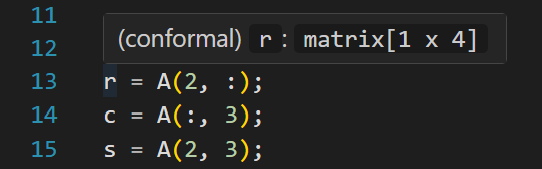 Hover any variable to see its inferred shape.
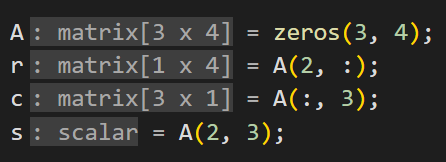 Inlay hints show shapes on the first assignment of each variable.
What it catches
- Matrix sizes that do not line up in a multiply, a concatenation, an element-wise operation, or a backslash solve
- Indexing past the end of an array
- A struct or a cell used where a number belongs
- Division by zero and negative dimensions, where they can be proven from the code
- Mistakes that only show up when one function hands data to another, including across files
By default, only high-confidence warnings show. The strict setting adds low-confidence codes like W_SUSPICIOUS_COMPARISON, mostly the kind of thing that could turn out to be a false positive.
In the editor
Diagnostics appear as underlines as code is typed, and hovering any variable shows its inferred shape, like matrix[3 x n]. Go-to-definition works for user-defined functions and for external functions in sibling files. When * is used where .* was probably intended, or && where & should be, the extension offers the fix. Function definitions populate the sidebar and breadcrumbs through document symbols, and the status bar carries the warning and error counts along with the active modes.
Most files analyze in under a tenth of a second, even ones with dozens of warnings.
Analysis is on by default as code is typed, behind a short debounce, and cross-file workspace analysis runs in the same range. The extension also registers its own MATLAB grammar, so the MathWorks extension is not needed.
Install
Search "Conformal" in VS Code Extensions, or run:
code --install-extension EthanDoughty.conformal
There should be nothing to configure. The extension bundles the analyzer directly, so there is nothing else to install and no Python or .NET runtime to manage.
Commands
| Command |
What it does |
Conformal: Analyze Current File |
Save and re-analyze the current file |
Conformal: Toggle Fixpoint Mode |
Enable or disable fixed-point loop analysis |
Conformal: Toggle Strict Mode |
Show all warnings including informational and low-confidence diagnostics |
Conformal: Restart Server |
Restart the LSP server |
Settings
| Setting |
Default |
Description |
conformal.fixpoint |
false |
Fixed-point loop analysis for convergence in loops |
conformal.strict |
false |
Show all warnings including informational and low-confidence diagnostics |
conformal.analyzeOnChange |
true |
Analyze as code is typed, behind a short debounce |
conformal.inlayHints |
true |
Show inferred shapes as inlay hints on first assignment. If hints feel noisy, set to false |
How the analysis works
Shapes are followed through assignments, function calls, control flow, and sibling .m files in the same directory. Dimensions can stay symbolic, so n, m, and n+m are carried the whole way rather than collapsing to unknown once a size stops being a literal number. The tracking reaches through user-defined functions, including the older end-less definitions and no-argument procedures, and through anonymous functions with closure capture.
VS Code Marketplace · GitHub

