Kanbeasy
A minimal kanban board within VS Code. Kanbeasy is the easiest and simplest way to get work done.
Installation
Install this extension from the VS Code marketplace.
OR
With VS Code open, search for kanbeasy in the extension panel (Ctrl+Shift+X on Windows/Linux or Cmd(⌘)+Shift+X on MacOS) and click install.
OR
With VS Code open, launch VS Code Quick Open (Ctrl+P on Windows/Linux or Cmd(⌘)+P on MacOS), paste the following command, and press enter.
ext install darrenjaworski.kanbeasy
Features
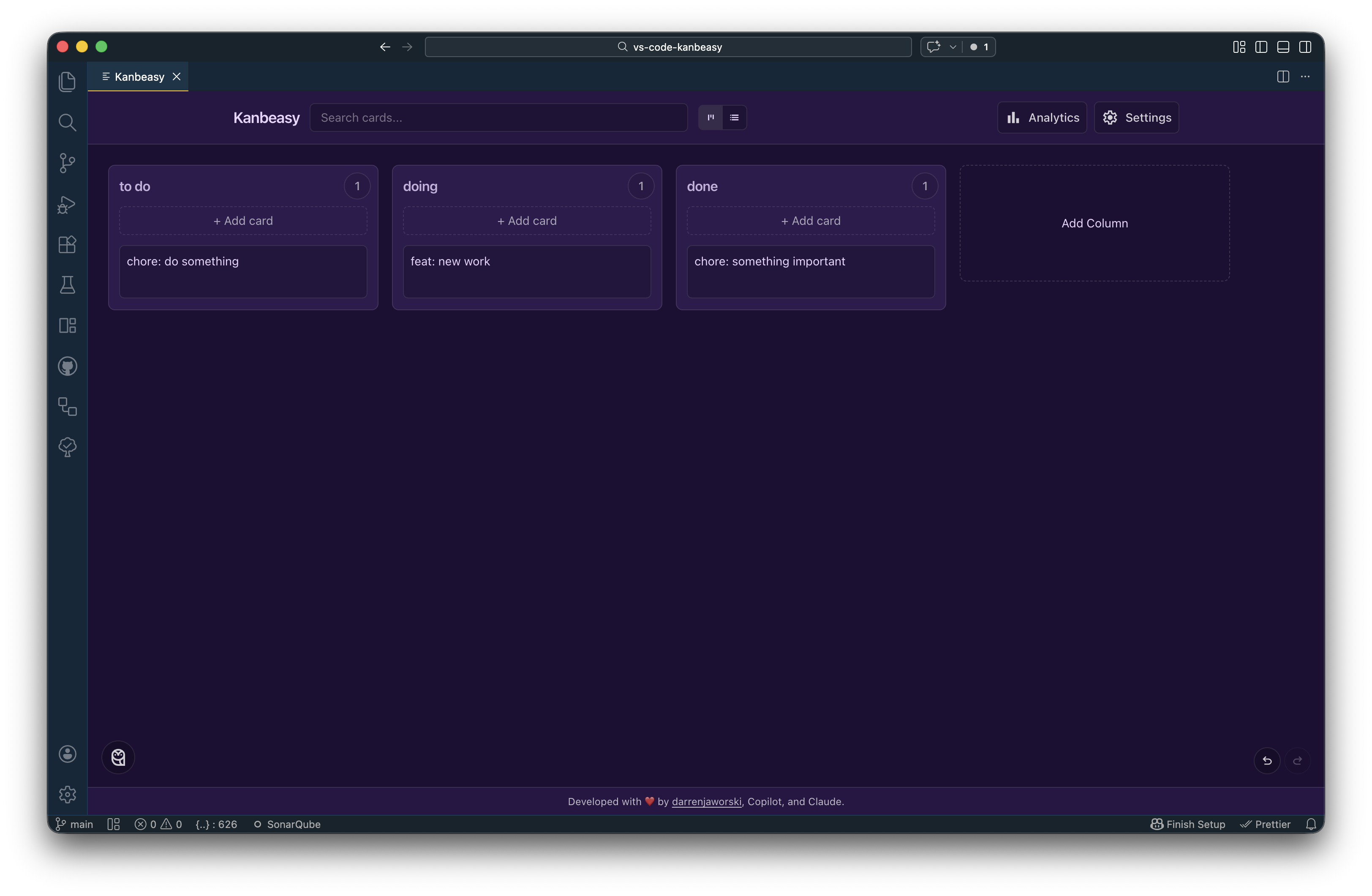
Kanban is the simplest possible methodology for organizing your work. This extension is an ultra simple kanban board for all your tasks. Define your own columns and cards. Drag and drop cards between columns. Easily manage all your ongoing work from within VS Code.
Quick Access
- Activity bar sidebar icon - Click the Kanbeasy icon in the activity bar (left sidebar) for instant access
- Toggle functionality - Open and close your kanban board with a single click
- Auto-close sidebar - Sidebar automatically closes when board opens, maximizing your workspace
- Status bar integration - Quick access button in the status bar (bottom of VS Code)
Seamless Integration
- Opens in the main editor area for full workspace utilization
- Retains board state when switching between views
- Works alongside your code without disrupting your workflow
GitHub Copilot / MCP Integration
Kanbeasy ships a built-in MCP server ("Kanbeasy Board") so you can manage your board by talking to GitHub Copilot in plain language — no panel required.
Requirements: VS Code 1.103+, GitHub Copilot, and GitHub Copilot Chat.
- Open Copilot Chat and switch the mode selector to Agent.
- Click the tools icon (looks like a wrench or slider) in the chat input bar to open Manage Tools.
- Find Kanbeasy Board in the list and toggle its tools on.
- The first time Copilot calls a tool, VS Code may ask you to confirm. Click Allow (or Allow for this session).
That's it — no config files or API keys needed. The server starts automatically when VS Code loads.
Tip: You can verify the server is running via the Command Palette: MCP: List Servers → look for "Kanbeasy Board".
How it works
- Works without the board panel open. Copilot reads and edits board state stored in the extension (
globalState), so the panel is never required.
- Live sync. If you do have the board panel open, Copilot's changes appear in it immediately.
- "Delete" is always recoverable. Removing a card archives it — you can ask Copilot to restore it later. Removing a column archives all its cards first.
- Cards have numbers. Every card gets a permanent
#number (shown on the card). Reference cards by number in your prompts — it's unambiguous and works even after renames.
- Board is global. Your board is shared across all workspaces.
Example prompts
Reading the board
What's on my board?
List the cards in my "In Progress" column.
Search my board for anything mentioning "auth".
Show me everything about card [#7](https://github.com/darrenjaworski/vscode-kanbeasy/issues/7).
Adding and editing
Add a card called "Fix login redirect" to the To Do column.
Add a card "Write release notes" to the To Do column, due 2026-07-01, with description "Cover the MCP feature."
Update card [#3](https://github.com/darrenjaworski/vscode-kanbeasy/issues/3) — change the title to "Fix login redirect (OAuth)" and set due date to 2026-06-30.
Moving cards
Move card [#7](https://github.com/darrenjaworski/vscode-kanbeasy/issues/7) to In Progress.
Move card [#12](https://github.com/darrenjaworski/vscode-kanbeasy/issues/12) to the top of Done.
Archiving and restoring
Archive card [#5](https://github.com/darrenjaworski/vscode-kanbeasy/issues/5).
Restore card [#5](https://github.com/darrenjaworski/vscode-kanbeasy/issues/5) into the To Do column.
Managing columns
Add a "Blocked" column between In Progress and Done.
Rename the "Done" column to "Shipped".
Remove the "Blocked" column. (Its cards will be archived automatically.)
| Tool |
What it does |
get_board |
Return the full board — all columns, cards, and archived count |
list_columns |
List columns with card counts |
list_cards |
List cards, optionally filtered to one column |
get_card |
Get full detail for a card by number |
search_cards |
Search card titles and descriptions |
add_card |
Create a card (title, description, due date) |
update_card |
Edit a card's title, description, or due date |
move_card |
Move a card to another column, optionally at a position |
archive_card |
Archive a card (recoverable) |
restore_card |
Restore an archived card, optionally into a specific column |
add_column |
Add a column, optionally at a position |
rename_column |
Rename a column |
remove_column |
Remove a column (archives its cards first) |
Requirements
This extension has no dependencies beyond VS Code itself. The Copilot integration requires the GitHub Copilot and GitHub Copilot Chat extensions (VS Code 1.103+).
Extension Settings
kanbeasy.appUrl — Override the URL of the kanbeasy web app loaded in the board panel. Leave empty (the default) to use the published app. Intended for development: run the kanbeasy web app locally with npm run dev and set this to http://localhost:5173/ to test extension + web app changes together before either is released. Reopen the board after changing the value.
Testing against a local web app
The board is the live web app in an iframe, so extension releases and web-app deploys are coupled. To verify a cross-repo change end to end before shipping either side:
- In the
kanbeasy repo: npm run dev (serves http://localhost:5173/).
- In this repo: press
F5 (Run Extension) to launch an Extension Development Host.
- In the development host's settings, set
"kanbeasy.appUrl": "http://localhost:5173/".
- Open the board — the iframe now loads your local web app in host mode (
?host=vscode is appended automatically).
Commands
- Toggle Kanbeasy Board (
kanbeasy.toggleBoard) - Open or close the kanban board in the main editor area
- Open Kanbeasy Board (
kanbeasy.openBoard) - Legacy command for opening the board
Known Issues
Please report any bugs or issues on the extension's Github repo.
Release Notes
1.4.0
- Bug fix: copy/cut/paste and right-click work in card text fields — Clipboard actions in the board are now served by VS Code itself (
vscode.env.clipboard) through the extension bridge, fixing paste being blocked inside the webview. Requires the web app's matching update; older combinations degrade gracefully instead of breaking.
- New setting:
kanbeasy.appUrl — Point the board panel at a local build of the web app for development. Leave empty for the published app.
- Now requires VS Code 1.125+.
1.3.1
- Bug fix: board data preserved on upgrade — Upgrading from v1.2.x to v1.3.0 could wipe your board. If you were affected, your data will be automatically restored on first open after installing this update.
1.3.0
- Copilot / MCP integration — Kanbeasy now ships a built-in MCP server ("Kanbeasy Board"). GitHub Copilot in agent mode can read and edit your board in plain language whether or not the board panel is open. Includes 13 tools covering cards (add, update, move, archive, restore, search) and columns (add, rename, remove). All deletes are archival and recoverable.
1.2.2
- Exclude
CLAUDE.md from the published .vsix package
- Remove unsupported Visual Studio Marketplace badges from README
1.2.1
- Security: patch transitive dev-dependency advisories (no runtime changes)
1.2.0
- Status bar item now displays "Kanbeasy" text label instead of layout icon
1.1.2
- Updated documentation with comprehensive installation instructions and feature descriptions
1.1.1
- New extension icon with purple kanban column design
- White monochrome activity bar sidebar icon for better theme compatibility
1.1.0
New Features:
- Activity bar sidebar icon for quick access
- Toggle functionality - open/close board with single click
- Sidebar automatically closes when board opens
- Board now opens in main editor area for better workspace utilization
- Welcome view in sidebar with clear call-to-action
- Updated status bar icon for visual consistency
1.0.2
1.0.1
1.0.0
- wrapper for kanbeasy
- status bar icon
- command to open kanbeasy

