Skip to content
| Marketplace
Sign in
Visual Studio Code>Programming Languages>Windsurf Quota -- Real-Time AI Usage TrackerNew to Visual Studio Code? Get it now.
Windsurf Quota -- Real-Time AI Usage Tracker

Windsurf Quota -- Real-Time AI Usage Tracker

CodeCraftsmaniac

|
1 install
| (0) | Free
Track Windsurf AI quotas in real-time — daily, weekly, Cascade messages, flow actions, and overage balance. Zero login. Zero config. Click for full details.
Installation
Launch VS Code Quick Open (Ctrl+P), paste the following command, and press enter.
Copied to clipboard
More Info

Windsurf Quota

Real-Time AI Usage Tracker

Zero login. Zero config. Zero delay.
Track your Windsurf AI quotas the moment they change

Marketplace GitHub License

Stars Forks Issues

Activity

Commit Activity Releases Last Commit

Preview

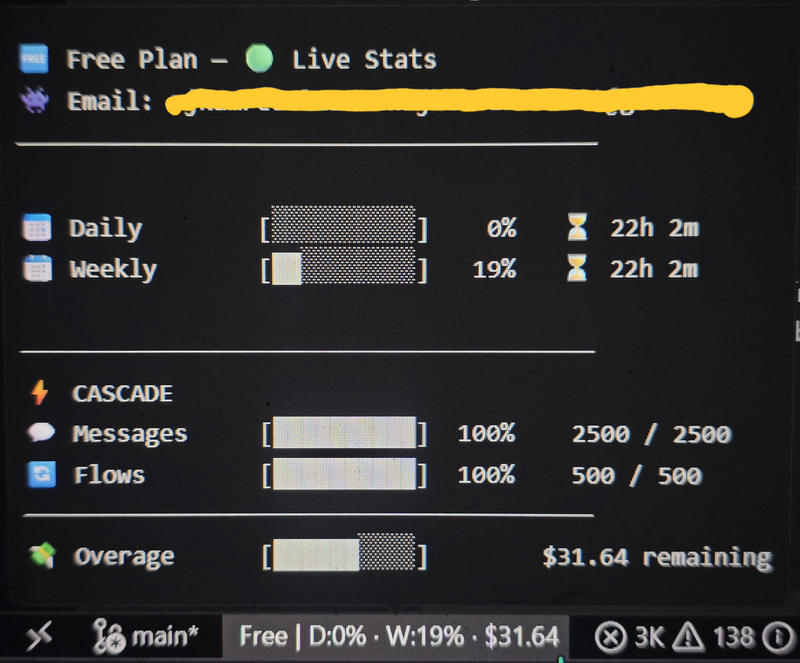
Status Bar Widget Hover Tooltip
Widget Tooltip

Features

Instant updates via fs.watch() -- fires the moment the DB changes
No API calls, no browser automation, no Selenium, no .env files
Auto-detects Windsurf's state.vscdb on Windows, macOS, and Linux
Green / Yellow / Red progress bars based on remaining quota
Messages, Flow Actions, Flex Credits tracked with block bars
Pay-per-use balance shown in status bar and tooltip

Quota Breakdown

Metric Status Bar Tooltip Format
Plan Name Free / Pro / Ultimate / Team
Daily Quota [██████████░░░░░░░░░░] + % + timer
Weekly Quota [██████████░░░░░░░░░░] + % + timer
Cascade Messages used / total + bar
Flow Actions used / total + bar
Flex Credits used / total + bar
Overage Balance $XX.XX remaining + bar
Billing Strategy quota / overage
Account Email auto from DB

Color Coding

Range Status Bar Color
>= 50% remaining ██████████
20-49% remaining ██████████
< 20% remaining ██████████

Installation

Option 1: Marketplace (recommended)

Search "Windsurf Quota" in the Extensions panel, then click Install.

code --install-extension CodeCraftsmaniac.windsurf-quota

Option 2: VSIX

Download the latest release and run:

code --install-extension windsurf-quota-2.0.0.vsix

Option 3: Manual

  1. Clone or download from GitHub
  2. Copy to your extensions directory:
# Windows
xcopy /E . "%USERPROFILE%\.windsurf\extensions\codecraftsmaniac.windsurf-quota-2.0.0-universal\"

# macOS / Linux
cp -r . ~/.windsurf/extensions/codecraftsmaniac.windsurf-quota-2.0.0-universal/
  1. Restart Windsurf IDE -- the widget appears in the status bar!

Commands & Settings

Command Description
Windsurf Quota: Show Details Opens the detail panel with full breakdown
Windsurf Quota: Refresh Now Force-refresh quota data from DB
Setting Default Description
windsurfQuota.refreshIntervalSeconds 15 Fallback polling interval (seconds)
windsurfQuota.stateDbPath auto Path to state.vscdb (auto-detected if empty)

Architecture

State DB
Windsurf IDE                          Extension
-----------                          ---------
state.vscdb  ──── fs.watch() ────>  Real-time update
  |                                    |
  ├── cachedPlanInfo ─────────────>  Daily/Weekly/Cascade/Overage
  └── codeium.windsurf ───────────>  Email/Billing/Plan
  • Data source: windsurf.settings.cachedPlanInfo + codeium.windsurf keys
  • Real-time: fs.watch() on the DB file -- fires instantly on change
  • Fallback: mtime polling every 2s + interval poll every 15s
  • Python required: Uses Python to read SQLite (auto-detected)

Contributing


MIT (c) CodeCraftsmaniac

Star

  • Contact us
  • Jobs
  • Privacy
  • Manage cookies
  • Terms of use
  • Trademarks
© 2026 Microsoft