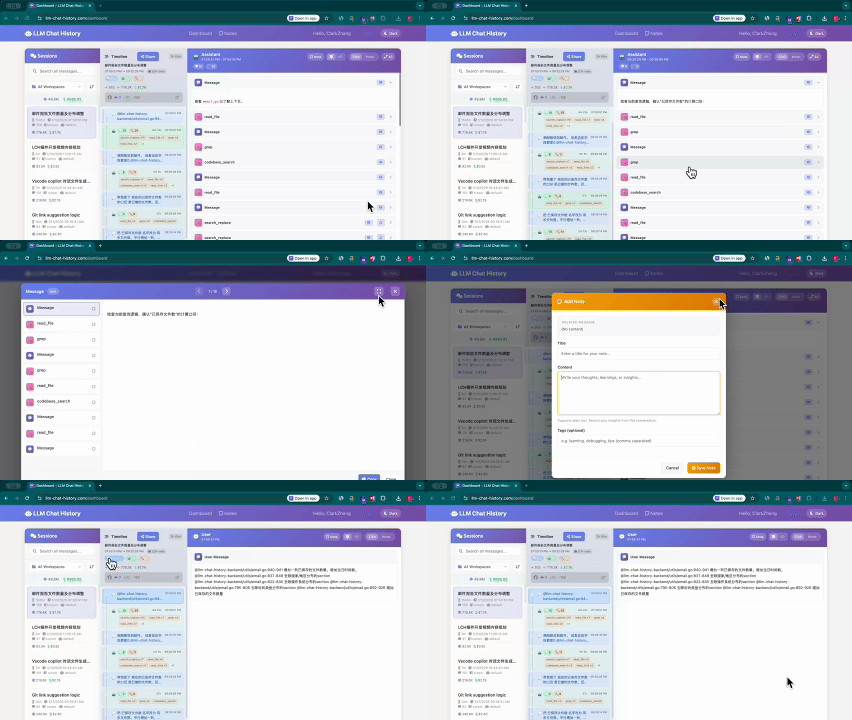
🚀 AI Chat History Saver
Never lose your AI conversations again! Automatically export chat history from Cursor, Cline, Kilo, Blackbox AI, and more to beautifully formatted Markdown files.

💡 Trusted by developers worldwide - Automatic, reliable, and beautiful AI chat archiving
✨ Why Choose AI Chat History Saver?
- 🎯 Zero Configuration - Install and forget, works automatically
- 📚 Knowledge Management - Build searchable knowledge bases from your AI chats
- 👥 Team Collaboration - Share insights and solutions with your team
- 🔄 Version Control - Track AI conversations in Git like code
- 🎨 Beautiful Output - Professional Markdown with syntax highlighting
- 🌍 Multi-Language - UI and exports in English/Chinese
- 🏢 Workspace Aware - Only saves relevant conversations
🔥 Quick Preview
Your AI conversations automatically become beautiful, searchable Markdown files:
# How to implement authentication in React?
**Created**: 2025-12-24 14:30Z
**Messages**: 6 (User: 3, Assistant: 3)
**Session ID**: `cursor-chat-abc123`
---
## 💬 User #1
_2025-12-24 14:30Z_
I need to implement user authentication in my React app. What's the best approach?
---
## 🤖 Assistant #1 (Claude-3.5-Sonnet)
_2025-12-24 14:31Z_
For React authentication, I recommend using **React Context + JWT tokens**:
```javascript
// AuthContext.js
import React, { createContext, useState, useEffect } from 'react';
const AuthContext = createContext();
export const AuthProvider = ({ children }) => {
const [user, setUser] = useState(null);
const [loading, setLoading] = useState(true);
// Authentication logic here...
return (
<AuthContext.Provider value={{ user, login, logout, loading }}>
{children}
</AuthContext.Provider>
);
};
🔧 Tool Uses (2)
🔍 **grep** — Search for "auth" in "src/components" • 3 matches
Result
src/components/LoginForm.js:15: const handleAuth = () => {
src/components/UserProfile.js:8: import { useAuth } from '../hooks/useAuth';
src/components/ProtectedRoute.js:3: import { AuthContext } from '../context/AuthContext';
💬 User #2
2025-12-24 14:32Z
Can you also show me how to protect routes with React Router?
Perfect for **Obsidian**, **Notion**, **GitHub**, or any Markdown editor! 📝
## Compatibility
### ✅ Tested Platforms
| Platform | Cursor IDE | Cline Extension | Kilo Extension | Blackbox AI |
|----------|------------|-----------------|----------------|-------------|
| Windows | ✅ Tested | ✅ Tested | ✅ Tested | ✅ Tested |
| macOS | ❓ Untested | ❓ Untested | ❓ Untested | ❓ Untested |
| Linux | ❓ Untested | ❓ Untested | ❓ Untested | ❓ Untested |
### Supported Chat Sources
- **Cursor IDE**: Native chat history from Cursor
- **Cline Extension**: Cline AI assistant conversations
- **Kilo**: Kilo AI coding assistant conversations
- **Blackbox AI**: Blackbox AI assistant conversations
The extension automatically detects which sources are available and monitors them simultaneously!
## 🌟 Key Features
### 🤖 Multi-Platform AI Support
- **Cursor IDE** - Native chat history with SQLite database
- **Cline** - Claude-powered AI assistant conversations
- **Kilo** - Advanced coding assistant sessions
- **Blackbox AI** - AI-powered coding conversations
- **Auto-Detection** - Automatically finds and monitors available AI tools
### 📝 Professional Markdown Export
- **Beautiful Formatting** - Clean, readable Markdown with emoji indicators
- **Complete Context** - User messages, AI responses, thinking processes, and tool calls
- **Syntax Highlighting** - Code blocks with proper language detection
- **Collapsible Sections** - Thinking processes and tool results can be folded
- **Timestamped & Organized** - Files named by date and conversation title
### 🔧 Smart Features
- **Workspace Filtering** - Only saves conversations relevant to your current project
- **Real-time Monitoring** - Automatically detects new conversations (30s intervals)
- **Git Integration** - Perfect for tracking AI conversations alongside code changes
- **Multi-language Support** - UI and exports available in English and Chinese
- **Zero Configuration** - Install and start saving immediately
### 📊 Perfect Integration
- **Obsidian** - Import as knowledge base notes
- **Notion** - Rich formatting with links and embeds
- **GitHub** - Version control for AI conversations
- **Any Markdown Editor** - Standard Markdown compatibility
## 🎯 Who Is This For?
### 👨💻 **Developers**
- **Knowledge Preservation** - Never lose important AI-generated solutions
- **Code Review Preparation** - Document AI suggestions for team review
- **Learning Archive** - Build personal knowledge base of AI interactions
### 👥 **Teams**
- **Knowledge Sharing** - Share AI insights across team members
- **Best Practices** - Document successful AI-assisted solutions
- **Onboarding** - Help new team members learn from past AI interactions
### 📚 **Students & Researchers**
- **Research Documentation** - Track AI-assisted research and problem-solving
- **Learning Journey** - Document your AI-assisted learning process
- **Solution Archive** - Build searchable database of solutions
### 🎨 **Content Creators**
- **Tutorial Creation** - Document AI-assisted content creation
- **Workflow Optimization** - Learn from AI suggestions over time
- **Quality Assurance** - Review and improve upon AI-generated content
## 🚀 Quick Start
### One-Click Installation
1. **Search** for "AI Chat History Saver" in VS Code Marketplace
2. **Click Install** - No configuration needed!
3. **Start chatting** with your AI assistants
4. **Watch your conversations** automatically save to `.llm-chat-history/`
### Supported IDEs
- ✅ **Cursor IDE** (primary target)
- ✅ **VS Code** with AI extensions
- ✅ **Codium**, **VSCodium** (compatible)
### ⚡ What Happens After Install?
- 🔍 **Auto-Detection**: Finds all available AI assistants
- 📁 **Auto-Creation**: Creates `.llm-chat-history/` folder in your workspace
- ⏰ **Auto-Monitoring**: Starts watching for new conversations (every 30 seconds)
- 🎯 **Smart Filtering**: Only saves relevant conversations
> **Note**: This extension uses `better-sqlite3`, a native module. The installation script automatically handles downloading the correct prebuilt binaries for Electron. If you encounter installation issues, run `npm run setup` manually.
### From VSIX
1. Download the `.vsix` file from releases
2. In VS Code, go to Extensions view
3. Click the `...` menu and select "Install from VSIX..."
4. Select the downloaded file
## Usage
The extension activates automatically when you open a workspace in VS Code or Cursor IDE.
### Automatic Saving
By default, the extension automatically monitors your LLM chat history and saves it to `.llm-chat-history/history/` in your workspace root.
### Manual Save
You can manually trigger a save by:
1. Opening the Command Palette (Ctrl+Shift+P / Cmd+Shift+P)
2. Running the command: "LLMChatHistory: Save Chat History Now"
### Viewing History
The generated Markdown files are optimized for direct viewing:
- **VS Code**: Open `.md` files directly with full Markdown preview support
- **GitHub**: View with rich formatting and collapsible sections
- **Obsidian/Notion**: Import for knowledge management
- **Any Markdown Editor**: Standard Markdown with enhanced readability
## ⚙️ Configuration (Optional)
**Good news: This extension works out-of-the-box with zero configuration!** 🎉
But if you want to customize it, here are the available settings:
### Quick Settings Access
1. Open VS Code Command Palette (`Ctrl+Shift+P`)
2. Type "Preferences: Open Settings (UI)"
3. Search for "chatHistory"
### Available Settings
| Setting | Default | Description |
|---------|---------|-------------|
| `chatHistory.autoSave` | `true` | ✅ Enable automatic saving of chat history |
| `chatHistory.outputDirectory` | `.llm-chat-history/history` | 📁 Where to save your chat files |
| `chatHistory.useUTC` | `true` | 🕐 Use UTC timezone for consistent timestamps |
| `chatHistory.locale` | `auto` | 🌍 Language: `auto`, `en`, or `zh` |
### 💡 Pro Tips
- **Keep defaults** for most users - everything works perfectly!
- **Change output directory** if you prefer a different location
- **Use UTC** if you work with international teams
- **Auto locale** adapts to your VS Code language setting
## Output Format
Conversations are saved as beautifully formatted Markdown files:
```markdown
# Conversation Title
**Created**: 2025-12-23 10:30Z
**Messages**: 4 (User: 2, Assistant: 2)
**Session ID**: `abc-123`
---
## 💬 User #1
_2025-12-23 10:30Z_
User's question here
---
## 🤖 Assistant #1 (claude-4.5-sonnet, Agent)
_2025-12-23 10:31Z_
<details>
<summary><strong>💭 Thinking Process</strong></summary>
> AI's internal thinking process
> appears as a blockquote for easy reading
</details>
AI's response here
**🔧 Tool Uses** (2)
<details>
<summary>🔍 **grep** — Grep for "pattern" in "path" • 5 matches</summary>
**Args**
```json
{
"pattern": "search term",
"path": "src/"
}
Result
{
"matches": 5
}
### Key Features
- ✨ **Clear Structure**: Hierarchical headings with emoji indicators
- 📊 **Metadata**: Session info, message counts, timestamps
- 💭 **Collapsible Sections**: Thinking processes and tool results fold away
- 🎨 **Icon System**: Visual indicators for users (💬), assistants (🤖), tools (🔧), etc.
- 📝 **Readable**: Optimized for direct viewing in any Markdown renderer
- 🌐 **Bilingual**: All labels automatically localized to English or Chinese
### File Naming
Files are named with the pattern: `YYYY-MM-DD_HH-MMZ-{title}.md`
Example: `2025-12-23_10-30Z-implementing-chat-history.md`
## System Requirements
### ✅ Tested Environments
- **OS**: Windows 10/11 (fully tested)
- **Applications**: Cursor IDE, VS Code with Cline/Kilo/Blackbox AI extensions
- **VS Code Version**: 1.93.0 or higher
### ❓ Untested (May Work)
- macOS
- Linux
- Other AI coding assistants
### Prerequisites
- At least one supported AI assistant installed (Cursor, Cline, Kilo, or Blackbox AI)
- Workspace folder must be open
## Known Issues
- The extension requires a workspace to be open
- Some AI assistants may store data in cloud services rather than local files
- Native module installation is handled automatically on Windows
### NODE_MODULE_VERSION Errors
If you encounter errors like:
Error: The module 'better_sqlite3.node' was compiled against a different Node.js version
using NODE_MODULE_VERSION 127. This version requires NODE_MODULE_VERSION 136.
**Quick Fix**:
```bash
npm run setup
npm run verify
Then restart Cursor/VS Code completely.
Why does this happen?
- VS Code/Cursor runs on Electron (which includes its own Node.js version)
- Native modules must be compiled for the specific Electron version
- Your system Node.js version is different from Electron's version
For detailed explanation and solutions:
- 📖 See
开发者完全指南.md - Complete developer guide
- 📖 See
QUICK_FIX.md - Quick reference
- 🔧 Run
npm run fix for interactive troubleshooting
Roadmap
We are continuously improving this extension. Upcoming features include:
🚀 Coming Soon
- ☁️ Cloud Sync: Sync your chat history across all devices
- 👥 Team Collaboration: Share and collaborate on conversations
- 📊 Advanced Analytics: Insights and statistics about your AI usage
- 🔍 Advanced Search: Full-text search across all conversations
- 🏷️ Tags & Organization: Better ways to organize your history
- 📤 Export Options: PDF, HTML, and more export formats
Pricing
Free Version (Current)
- ✅ Unlimited local chat history saving
- ✅ Markdown export
- ✅ Multi-language support
- ✅ Auto-save functionality
Pro Version (Coming Soon)
- ☁️ Cloud sync across devices
- 👥 Team collaboration features
- 📊 Advanced analytics
- 🎯 Priority support
- 🔄 Auto-backup
Stay tuned for updates!
License
This software is proprietary and confidential. Unauthorized copying, distribution,
modification, or use is strictly prohibited.
Copyright (c) 2025 ClarkZhang (Solo). All rights reserved.
🆘 Need Help?
- 📧 Email: 857867503@qq.com (Quick responses!)
- 🌐 GitHub Issues: Report bugs or request features
- 💬 Discussions: Share your use cases and tips
📚 Resources
- 📖 Developer Guide:
开发者完全指南.md
- 🔧 Troubleshooting:
QUICK_FIX.md
- 🎯 Contributing: See GitHub for contribution guidelines
🌟 Show Your Support
- ⭐ Star on GitHub if you find this helpful!
- 📝 Write a review on VS Code Marketplace
- 🔗 Share with colleagues who might benefit
🎁 Roadmap
We're continuously improving! Upcoming features:
- ☁️ Cloud Sync - Access your history anywhere
- 👥 Team Sharing - Collaborate on AI conversations
- 📊 Analytics - Insights into your AI usage
- 🔍 Advanced Search - Find conversations instantly
💡 Pro Tip: Your chat history becomes searchable knowledge - never lose great AI insights again!
Note: This extension is not officially affiliated with Cursor, Anthropic, or any AI providers.