Flutter Quick Runner (FQR)




Run and debug Flutter apps from any file in your project — no need to navigate to main.dart first. Includes a Command Hub, multi-device runner, customizable title bar buttons, custom commands, and a settings webview.
Tip: Type "FQR" in the Command Palette (Cmd+Shift+P / Ctrl+Shift+P) to quickly filter all Flutter Quick Runner commands — VS Code's fuzzy search matches Flutter Quick Runner.
Requires the Dart extension (Dart-Code.dart-code).
Highlights
| Feature |
What it does |
| Run from any file |
No need to open main.dart — hit Run from any .dart file |
| Multi-device runner |
Launch on Android + iOS + Chrome simultaneously |
| Command Hub |
20+ categorized Flutter commands in one QuickPick |
| Custom commands |
Create your own shell commands with variable substitution |
| Title bar buttons |
Up to 4 configurable buttons next to the Run icon |
| Pub & Build |
One-click pub get, build runner, clean, l10n, and more |
| Settings webview |
Visual editor — no JSON editing required |
Features
Run From Any File
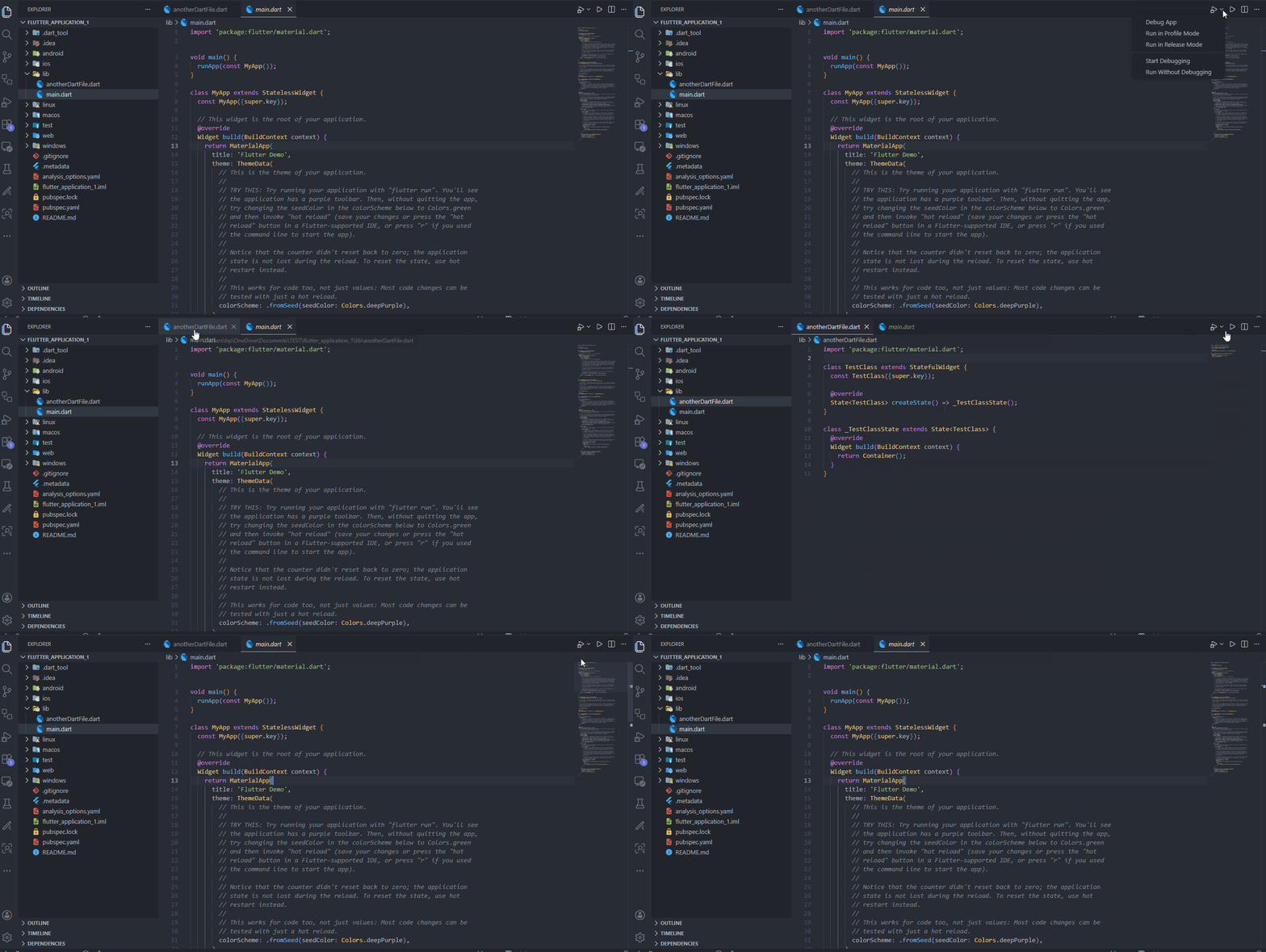
Open any .dart file (or even README.md) inside a Flutter project and hit the ▶ Run button in the editor title bar. The extension automatically detects the project root and resolves the entry point.
- Walks up to find
pubspec.yaml with a flutter: key
- Uses
lib/main.dart by default
- If multiple entry points exist (
lib/main_dev.dart, lib/main_prod.dart), shows a QuickPick with "use once" or "remember" options
- Remembered entry points are stored per-project in workspace state
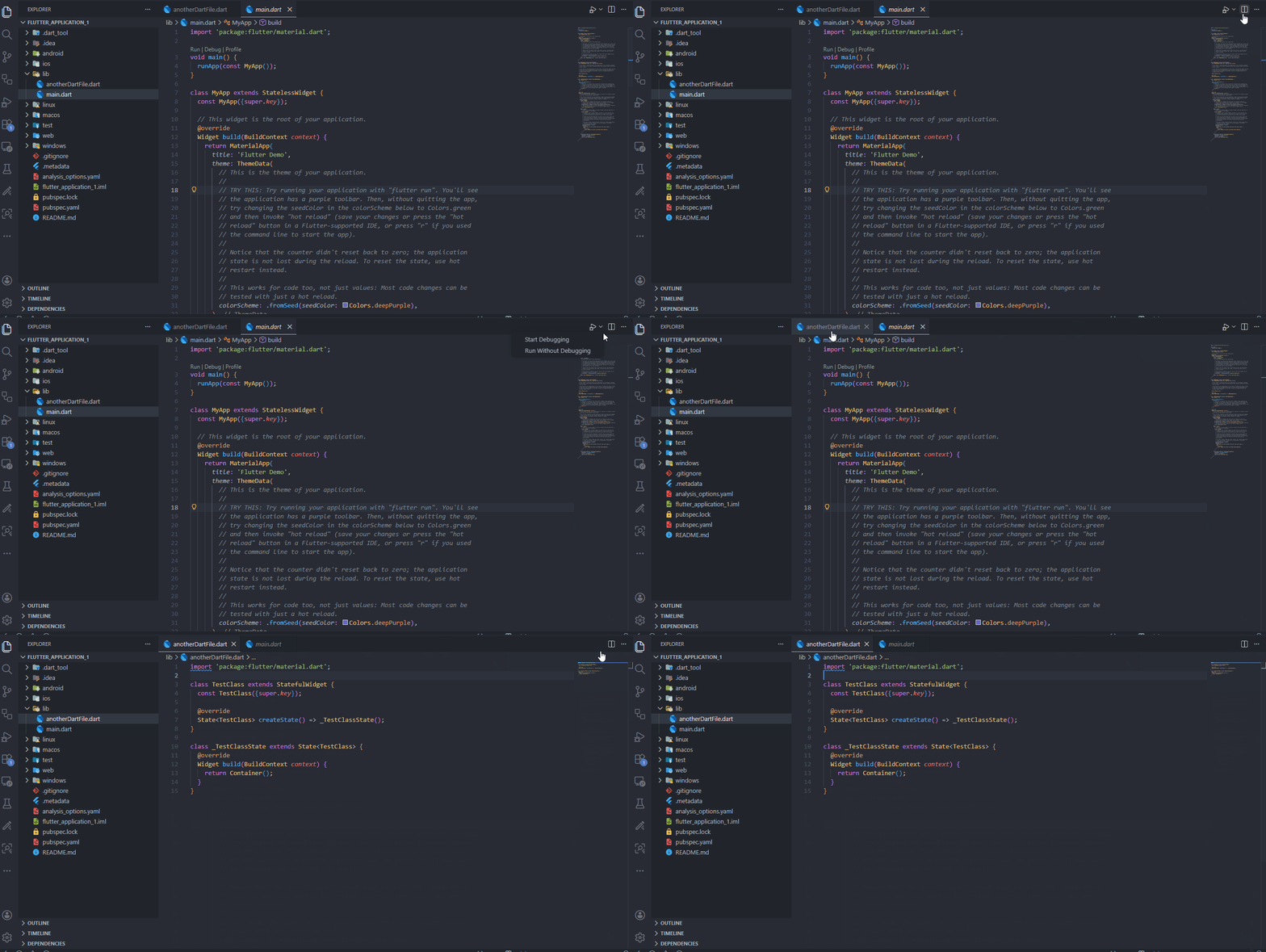
Without the extension — run button only works when the entry point file is open:
With Flutter Quick Runner — run from any file in your project:
Active Project Indicator
A status bar item shows the currently active Flutter project name. Click it to switch between multiple Flutter projects in a monorepo.
Hot-Reload Skip Warning
When a debug session is active and Dart files have errors, a warning appears in the status bar: ⚠ Hot reload skipped — fix errors first. Click it to open the Problems panel.
Pub Get on pubspec.yaml
When editing pubspec.yaml in a Flutter project, a $(package) button appears in the editor title bar to run pub get with one click.
Command Hub
Run "Flutter Quick Runner: Open Command Hub" to see a categorized QuickPick with all available commands:
| Category |
Commands |
| Packages |
Pub Get, Pub Get All, Pub Upgrade, Pub Upgrade (Major), Pub Outdated, Add Dependency, Add Dev Dependency |
| Build & Clean |
Flutter Clean, Flutter Clean All, Build Runner Build, Build Runner Watch, Generate L10n |
| Run Modes |
Run App, Debug App, Re-run Last, Profile Mode, Release Mode |
| Multi-Device |
Run on Multiple Devices, Stop All Devices, Edit Multi-Device Configuration |
| Diagnostics |
Flutter Doctor, Open DevTools |
| Custom |
Your custom commands (see below) |
Custom Commands
Create custom shell commands via the "Create Custom Command" wizard or the Settings webview. Each command supports:
- 4 output modes: Terminal, Panel (Output Channel with spinner), Notification (toast), Silent
- Variable substitution:
${projectRoot}, ${workspaceRoot}, ${activeFile}, ${activeFileDir}
- Concurrency guard: Panel-mode commands won't run twice simultaneously
- Categorization: Assign to a group for organization in the Command Hub
Multi-Device Runner
Launch Flutter on multiple devices simultaneously with a single command. Supports all run modes — Run, Debug, Profile, and Release.
- Mode picker — choose Run, Debug, Profile, or Release before launching
- Device picker — multi-select from all connected devices
- Remember configuration — save your device + mode selection per-project for one-click launches
- Edit saved configuration — re-open pickers with previously saved devices pre-checked
- Smart reconnection — if some saved devices are disconnected, choose to launch on available ones or edit the config
- Stop All Devices — terminate all running debug sessions at once
- Progress indicator — notification shown while fetching connected devices
- Available in the Command Hub under the "Multi-Device" group
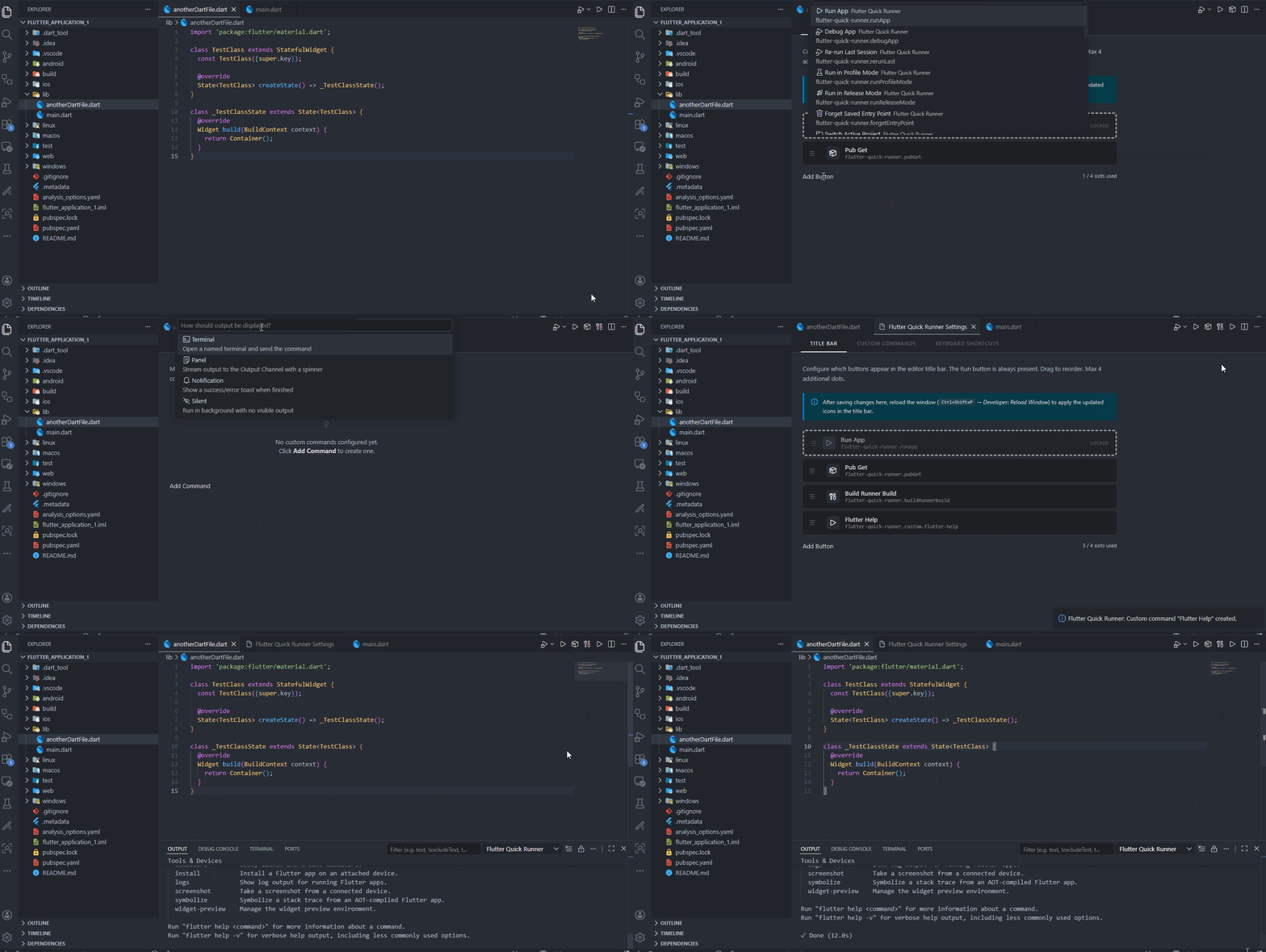
Add up to 4 extra buttons to the editor title bar alongside the Run button. Configure them in settings or the Settings webview. Any built-in or custom command can be assigned to a slot.
Custom commands and title bar buttons in action:
Settings Webview
Run "Flutter Quick Runner: Open Settings" for a visual settings editor with four tabs:
- Title Bar — Drag-and-drop builder for title bar buttons
- Custom Commands — Manage your custom commands
- Keyboard Shortcuts — View all commands and open the VS Code keybindings editor
- Multi-Device — View and manage saved multi-device run configurations
Commands
All commands are prefixed with "Flutter Quick Runner" — or just type "FQR" in the palette for quick access.
| Command |
Description |
Flutter Quick Runner: Run App |
Run without debugging |
Flutter Quick Runner: Debug App |
Start debugging |
Flutter Quick Runner: Re-run Last Debug Session |
Re-run previous session |
Flutter Quick Runner: Run in Profile Mode |
Profile mode (performance overlay) |
Flutter Quick Runner: Run in Release Mode |
Release mode (optimized build) |
Flutter Quick Runner: Forget Saved Entry Point |
Clear remembered entry point |
Flutter Quick Runner: Switch Active Project |
Switch project in monorepo |
Flutter Quick Runner: Pub Get |
Run flutter pub get in active project |
Flutter Quick Runner: Pub Get All |
Run pub get in all workspace projects |
Flutter Quick Runner: Pub Upgrade |
Run flutter pub upgrade |
Flutter Quick Runner: Pub Upgrade (Major) |
Upgrade with --major-versions |
Flutter Quick Runner: Pub Outdated |
Show outdated packages |
Flutter Quick Runner: Add Dependency |
Add a pub dependency interactively |
Flutter Quick Runner: Add Dev Dependency |
Add a dev dependency interactively |
Flutter Quick Runner: Flutter Clean |
Run flutter clean |
Flutter Quick Runner: Flutter Clean All |
Clean all workspace projects |
Flutter Quick Runner: Build Runner Build |
Run build_runner build |
Flutter Quick Runner: Build Runner Watch |
Run build_runner watch |
Flutter Quick Runner: Generate L10n |
Run flutter gen-l10n |
Flutter Quick Runner: Flutter Doctor |
Run flutter doctor |
Flutter Quick Runner: Open DevTools |
Open Flutter DevTools in browser |
Flutter Quick Runner: Run on Multiple Devices |
Launch on multiple devices simultaneously |
Flutter Quick Runner: Stop All Devices |
Stop all running debug sessions |
Flutter Quick Runner: Edit Multi-Device Configuration |
Edit saved device and mode selection |
Flutter Quick Runner: Open Command Hub |
Categorized command picker |
Flutter Quick Runner: Create Custom Command |
Step-by-step wizard |
Flutter Quick Runner: Open Settings |
Visual settings editor |
Settings
| Setting |
Type |
Default |
Description |
flutterQuickRunner.customCommands |
array |
[] |
Custom commands for the Command Hub |
flutterQuickRunner.titleBarButtons |
array |
[] |
Title bar button slots (max 4) |
flutterQuickRunner.outputPanelBehavior |
enum |
clearBeforeEach |
clearBeforeEach or appendAll |
Requirements
- VS Code
^1.80.0
- Dart extension (installed automatically if missing)
- Flutter SDK on PATH (for Flutter commands)
FAQ
Q: Does typing "FQR" work in the Command Palette?
A: Yes! VS Code uses fuzzy matching, so typing "FQR" matches Flutter Quick Runner and filters to all commands instantly.
Q: Does this work with monorepos / multiple Flutter projects?
A: Yes. The extension detects the active project from the open file. Use "Switch Active Project" to change the target project. Pub Get All and Flutter Clean All run across all projects.
Q: Can I run on Android and iOS at the same time?
A: Yes — use "Run on Multiple Devices" to select any combination of connected devices and launch simultaneously.
Q: Does this extension work with Dart-only (non-Flutter) projects?
A: The extension is designed for Flutter projects (it looks for the flutter: key in pubspec.yaml). Pure Dart projects are not supported.
Q: Where are saved configurations stored?
A: Entry points and multi-device configs are stored in VS Code's workspace state — no files are created in your project.
Privacy
This extension collects no telemetry and sends no data to any server.
Author & Publisher
Author: Chinmay Nagar — Industrial Embedded & Connected Systems Engineer
Publisher: ChipNexa — Intelligent Connected Systems. Production-grade software from firmware to cloud.
License
MIT

