
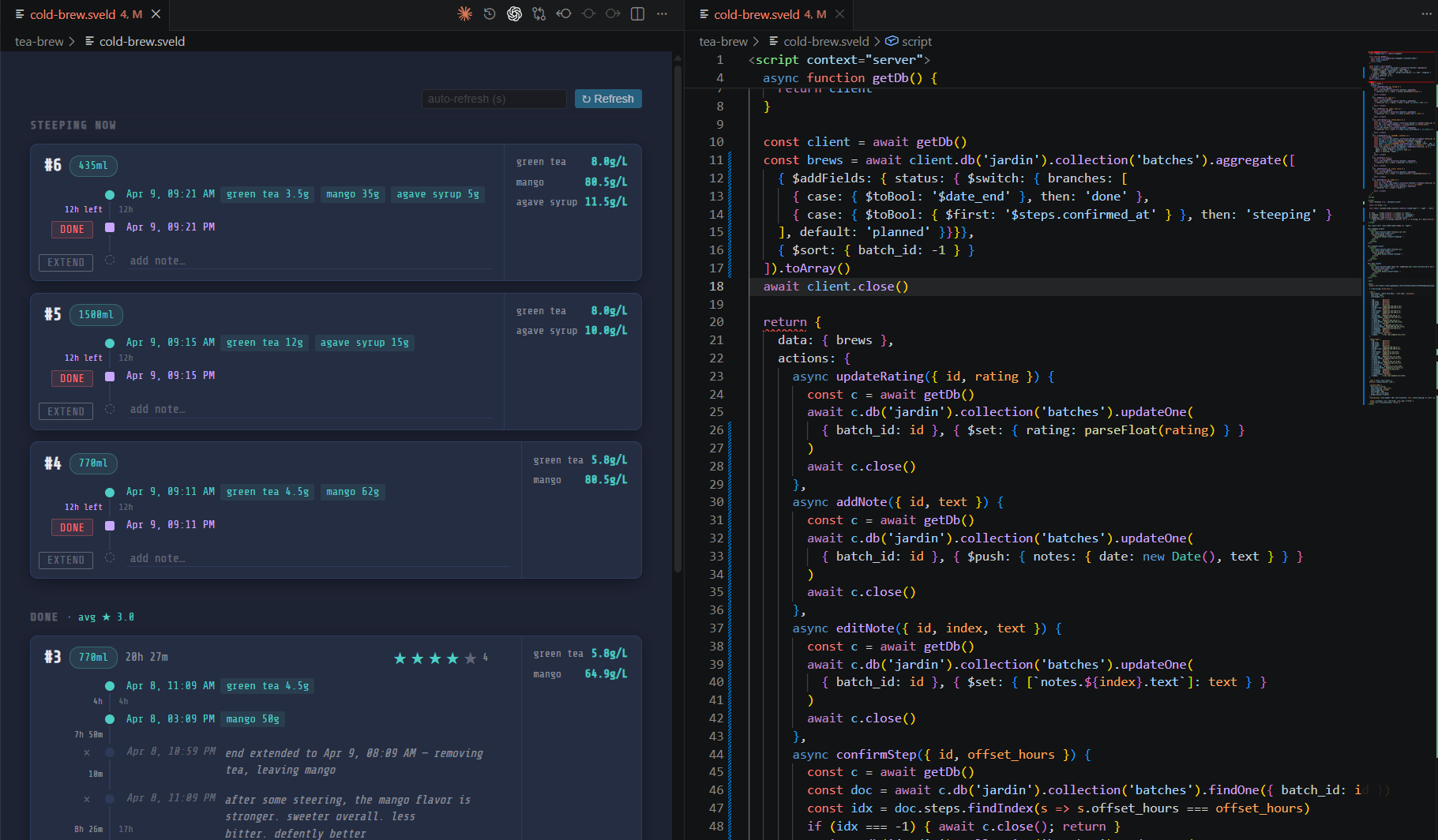
SveldRender .sveld files — Svelte components with live server-side data from MongoDB, REST APIs, files and more. Installation Launch VS Code Quick Open ( Ctrl+P), paste the following command, and press enter.Copied to clipboard |

SveldSveld is a VS Code extension that lets you write No web server. No build pipeline. Just open a
How it worksA FeaturesServer-side data blockThe ActionsThe server block can expose
Auto package installationAny package SCSS supportSvelte File watcherSveld tracks every file bundled into the component (Svelte files, imported JS, SCSS partials) using esbuild's metafile. Saving any of those files automatically re-renders the view — no manual refresh needed. Environment variables (
|
| File | Purpose |
|---|---|
~/.svd/.env |
Global secrets (shared across all .sveld files) |
.env next to the .sveld file |
Local overrides for that project |
Local values override global ones. Variables are available as process.env.MY_VAR in the server block.
# ~/.svd/.env
MONGO_URI=mongodb://localhost:27017
MONGO_DB=myapp
Multi-panel focus broadcast
When multiple .sveld files are open, the extension broadcasts which panel is currently active to all other panels. Each panel can use this to highlight the active tab in a shared navigation header.
onDidChangeViewStatefires when a panel gains or loses focus.- A
focusChangemessage (with the active filename) is posted to every open sveld panel. - When switching to a non-sveld editor, a 100ms debounce clears the highlight in all panels.
A typical use case is a shared Header.svelte component that highlights which panel is currently focused, even when viewed from another panel:
<!-- src/Header.svelte -->
<script>
  import { onMount } from 'svelte'

  const links = [
    { label: 'Home',  file: 'home.sveld' },
    { label: 'Stats', file: 'stats.sveld' },
  ];

  // __SVELD_FILE__ is injected by the extension — filename of the current panel (constant)
  const currentFile = typeof __SVELD_FILE__ !== 'undefined' ? __SVELD_FILE__ : '';
  // focusedFile updates via broadcast — may differ from currentFile
  let focusedFile = currentFile;

  onMount(() => {
    window.addEventListener('message', (e) => {
      if (e.data.type === 'focusChange') focusedFile = e.data.file;
    });
  });
</script>

<nav>
  {#each links as link}
    <button
      class:active={link.file === currentFile}
      class:focused={link.file === focusedFile}
      onclick={() => link.file !== currentFile && sveldOpen('./' + link.file)}
    >{link.label}</button>
  {/each}
</nav>

<style>
  .active  { color: #4ecdc4; }
  .focused { color: #ffb86c; } /* orange — visible in all panels, not just the focused one */
</style>
<!-- home.sveld -->
<script>
  import Header from './src/Header.svelte'
</script>

<Header />
Navigation between sveld files
Call sveldOpen('./path/to/other.sveld') (globally available in the webview) to open another .sveld file:
- If the target is already open in another column, it is focused there.
- Otherwise it opens beside the current panel.
Svelte component imports
Import regular .svelte components from the same directory. They are bundled by esbuild at render time and hot-reloaded when their source changes (tracked via the file watcher).
<script>
  import MyChart from './components/MyChart.svelte'
  export let data = []
</script>

<MyChart {data} />
Global webview functions
| Function | Description |
|---|---|
sveldAction(name, payload) |
Call a server-side action. Returns a Promise. |
sveldOpen(relativePath) |
Open another .sveld file in VS Code. |
sveldRefresh() |
Trigger a full re-render of the current panel. |
File format
<script context="server">
  // Node.js — runs in the extension host
  // Has access to require(), process.env, etc.
  // Packages are auto-installed from npm on first use
  // Must return { data: { ...props }, actions: { ...fns } }
</script>

<!-- Standard Svelte below -->
<script>
  export let myProp = []
</script>

<div>{myProp.length} items</div>

<style lang="scss">
  /* SCSS supported */
</style>
Installation
Install from the VS Code Marketplace, or via terminal:
code --install-extension CdricDessalles.sveld
Development
Build:
npm run build
Test the packaged extension locally (validates exactly what the marketplace ships):
npm run package              # builds + creates sveld-x.x.x.vsix
code --install-extension sveld-*.vsix
Reload VS Code after installing. This is the recommended way to validate before publishing.
Publish (requires VSCE_PAT env var, or use CI by pushing a version tag):
npx vsce publish -p $VSCE_PAT
Tech stack
| Component | Role |
|---|---|
| Svelte 5 | Component framework (Svelte 4 compat mode) |
| esbuild + esbuild-svelte | Compiles .sveld files on the fly |
| Dart Sass | SCSS preprocessing |
| VS Code Custom Editor API | Renders the webview on file open |
Node.js vm |
Sandboxed execution of the server block |
| esbuild metafile | Precise dependency tracking for the file watcher |
~/.svd/node_modules |
Shared npm package store, auto-populated |
Ideas & Roadmap
- Syntax highlighting — proper
.sveldlanguage grammar - Prop reactivity — update props in-place after actions instead of full re-render
- Export to HTML — standalone static snapshot of any view
License
MIT