CatalystOps — PySpark Optimizer
CatalystOps catches PySpark performance issues before they reach production. It runs 40+ anti-pattern checks instantly in the editor, validates schemas at edit time, analyzes Catalyst execution plans via Databricks dry run or SSH, inspects historical job runs from Spark event logs, and tracks Databricks spending in a built-in billing dashboard — without touching your data.
Install from the VS Code Marketplace
Features
Local Analysis — No Cluster Required
Runs instantly on every file open and save. Detects:
| Severity |
Examples |
| Critical |
collect(), crossJoin(), SQL injection via f-strings, for row in df.collect(), DLT CDC ordering bugs |
| Warning |
toPandas(), coalesce(1), global window functions, withColumn in loops, chained .withColumn() calls, streaming without watermark, UDFs in .filter(), .repartition(N) before write, repeated actions without .cache() |
| Info |
Schema inference, SELECT *, missing write mode, ZORDER (use Liquid Clustering), unnamed streaming queries, MERGE without Deletion Vectors |
Streaming, Delta, and DLT pipelines have dedicated rule sets. Add # noqa: catalystops to suppress a line.
Hover cards — every issue shows a one-sentence explanation and a quick-fix code snippet on hover.
Schema Validation — No Cluster Required
When a StructType or DDL schema is defined in the same file, CatalystOps validates column references and types at edit time:
- Unknown column names with "did you mean?" suggestions
- Type mismatches (numeric/string/date/array functions on wrong column types)
union(), intersect(), except() schema alignment — catches silent wrong-result bugs from column order mismatches- Join condition type mismatches
Schemas propagate through .filter(), .select(), .drop(), .withColumn(), .withColumnRenamed(). External sources (spark.table(), spark.read without .schema()) are skipped — no false positives.
Static Cost Estimation — No Cluster Required
Annotate your file to get an instant dollar estimate via CodeLens:
# @compute: nodes=4, cores=2, memory=16GB, rate=0.25

events = spark.read.parquet("s3://bucket/events")  # @size: 50GB
lookup = spark.read.csv("s3://bucket/lookup")       # @size: 200MB
Dry Run — Catalyst Plan Inspection
Submits a neutralized version of your script to a Databricks cluster, serverless compute, or SSH tunnel. All writes and actions are replaced with explain("formatted") captures — no data is modified.
Plan issues detected: broadcast vs sort-merge vs cartesian joins, shuffle exchanges, too-few partitions, repeated table scans (including cross-DataFrame), cache spill, missing partition filters, missing table statistics, SinglePartitionBottleneck, SortAggregate, GlobalWindow. Fully Photon-aware.
Execution modes:
| Mode |
How to enable |
| Interactive cluster |
Set catalystops.databricks.clusterId |
| Serverless |
Leave cluster ID blank; set executionMode: serverless |
| SSH tunnel |
Set connection.sshTunnel.enabled: true + connectionName |
Job Run Analysis — Historical Runs
Analyze a past run directly from the Jobs sidebar — no re-execution needed. CatalystOps reads the Spark event log from DBFS, extracts physical plans, and opens an interactive DAG view showing operator trees, filter conditions in plain English, issue badges, and a View Source button.
Prerequisites: Cluster log delivery to DBFS must be enabled on the cluster. Serverless runs are not supported (no DBFS event log).
The Clusters panel lists all interactive clusters with their current state. Click the SSH icon on any cluster to:
- Auto-start it if stopped (polls every 5 s)
- Run
databricks ssh setup automatically
- Fix access mode / upgrade Spark if needed (one-click modal)
- Open VS Code Remote SSH
Right-click a cluster for Stop Cluster and Reset SSH Host (clears cached alias).
Requirements: Databricks CLI ≥ 0.269, VS Code Remote SSH extension, DBR 17+.
Databricks Asset Bundle (DAB) Support
CatalystOps detects databricks.yml in your workspace and provides two features for bundle projects:
Bundle Tasks sidebar — a dedicated panel lists every spark_python_task and notebook_task found across databricks.yml and all include:-referenced resource files. Click any task to open its source file. Run the inline Analyze button to execute a dry-run plan analysis on that task's script.
YAML schema linting — 40+ validation rules fire inline as you edit bundle YAML files:
| Category |
Examples |
| Invalid keys |
Unknown top-level keys, unknown resource types |
| Enum values |
data_security_mode, runtime_engine, run_if, pause_status, periodic.unit, health metrics |
| Alert v2 schema |
condition → evaluation, wrong subscription nesting, cron_schedule → quartz_cron_schedule |
| Permission levels |
Jobs (CAN_VIEW, CAN_MANAGE_RUN, CAN_MANAGE) differ from dashboards/alerts (CAN_READ, CAN_RUN, CAN_EDIT); volumes use grants not permissions |
| Mutual exclusions |
schedule + continuous, job_cluster_key + existing_cluster_id |
| Required fields |
Missing task_key, job name, environment spec.client |
| Ranges |
num_workers, max_concurrent_runs, autotermination_minutes |
| File references |
python_file and local notebook_path existence checks |
| Deprecated fields |
photon: true → runtime_engine: PHOTON, jar_uri |
The Configure Databricks Connection wizard also shows a Use Bundle Target option when a databricks.yml is present, pre-filling the workspace host from your target definitions.
Billing Dashboard
Queries system.billing.usage via Databricks SQL and shows spend by user, job, and workload type. Supports Day / Week / Month / Custom ranges. Results are cached for 1 hour; click Refresh to force a live query.
Requirement: Unity Catalog System Tables must be enabled on your workspace.
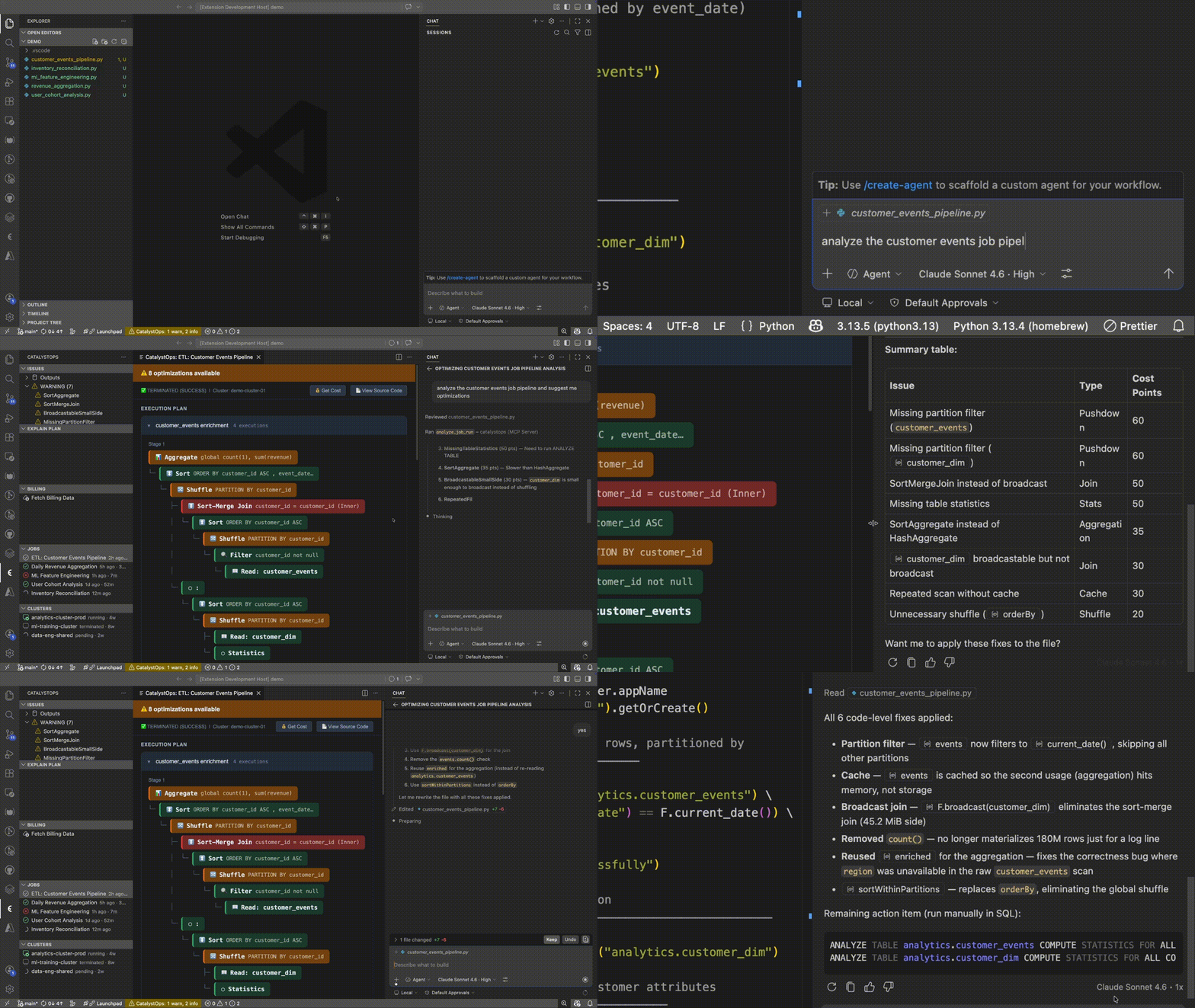
MCP Server — AI Assistant Integration
CatalystOps exposes live analysis data to Claude, GitHub Copilot (VS Code 1.99+), Cursor, and any MCP-compatible client via a Streamable HTTP server that starts automatically on a dynamic port.
Tools:
| Tool |
Description |
analyze_pyspark |
Static analysis on any code snippet |
get_active_file_issues |
Issues for the currently open file |
get_plan_analysis |
Plan issues from the last dry run |
run_dry_run |
Trigger a dry run and return results |
get_billing_summary |
Cached billing data (day/week/month) |
refresh_billing |
Force a live billing query |
list_clusters |
Workspace clusters with state and Spark version |
list_job_runs |
Jobs and their most recent run status |
get_job_run_plan |
Fetch plan issues from a historical run by ID |
get_last_job_run_analysis |
Plan issues from the last job analyzed in VS Code |
list_bundle_tasks |
DAB tasks (job name, task key, type, file path) from databricks.yml |
Resources: catalystops://issues/current, catalystops://plans/last, catalystops://billing/summary
Prompts: pyspark_code_review, optimize_spark_plan
VS Code Copilot discovers the server automatically. For other clients, add the URL shown in the CatalystOps Output panel:
{ "servers": { "catalystops": { "url": "http://127.0.0.1:<port>/mcp" } } }
Getting Started
1. Install — search for CatalystOps in the Extensions panel or:
ext install CatalystOps.catalystops
Local analysis works immediately — no configuration needed.
2. Connect to Databricks (for dry-run plan analysis) — run CatalystOps: Configure Databricks Connection from the Command Palette.
The wizard auto-detects available auth methods and shows only what applies to you:
| Method |
Requirement |
| Azure CLI |
Signed into az login — picks up workspaces automatically |
| GCP ADC |
Signed into gcloud auth application-default login |
| ~/.databrickscfg |
Databricks CLI already configured |
| OAuth / Browser Login |
Any workspace — log in via browser, no token needed |
| Personal Access Token |
Workspace URL + token |
Cluster ID is only prompted when running a dry-run — not during connection setup.
3. Analyze — open a .py file. Local checks run automatically. Press ⌘⇧K / Ctrl+Shift+K for a full dry-run plan analysis.
Commands
| Command |
Shortcut |
Description |
| Analyze Cost (Dry Run) |
⌘⇧K |
Run local + cluster/serverless/SSH analysis |
| Analyze Selected Code |
— |
Analyze only the highlighted selection |
| Configure Databricks Connection |
— |
Interactive setup wizard |
| Show Report |
— |
Open a shareable HTML report |
| Show Billing Dashboard |
— |
Open the billing dashboard |
| Refresh Billing Data |
— |
Force a fresh billing query |
| Refresh Jobs List |
— |
Reload the Jobs sidebar |
| Refresh Clusters |
— |
Reload the Clusters sidebar |
| Connect via SSH |
— |
One-click SSH into a cluster |
| Stop Cluster |
— |
Stop a running cluster |
| Reset SSH Host |
— |
Clear cached SSH alias for a cluster |
Settings Reference
| Setting |
Default |
Description |
catalystops.databricks.host |
"" |
Databricks workspace URL |
catalystops.databricks.token |
"" |
Personal access token |
catalystops.databricks.clusterId |
"" |
Interactive cluster ID (blank = serverless) |
catalystops.databricks.configPath |
~/.databrickscfg |
Databricks CLI config file |
catalystops.databricks.profile |
DEFAULT |
Config profile name |
catalystops.databricks.executionMode |
cluster |
cluster | serverless |
catalystops.connection.sshTunnel.enabled |
false |
Use SSH tunnel for script execution |
catalystops.connection.sshTunnel.connectionName |
"" |
SSH alias from databricks ssh setup |
catalystops.ssh.shutdownDelay |
30m |
Cluster idle time before SSH tunnel closes |
catalystops.jobs.enabled |
true |
Show the Jobs sidebar panel |
catalystops.analysis.enableLocalCodeAnalysis |
true |
Enable local anti-pattern detection |
catalystops.analysis.enableRepeatedScanDetection |
false |
Warn when a source DataFrame is reused without .cache() |
catalystops.analysis.autoAnalyzeOnSave |
false |
Auto-run dry run on save |
catalystops.cost.dbuRatePerHour |
0.4 |
DBU rate ($/hr) for cluster cost estimation |
catalystops.cost.serverlessRatePerHour |
0.7 |
Effective hourly cost for serverless estimation |
catalystops.cost.queryBillingUsage |
false |
Query system.billing.usage after each serverless run for actual cost |
catalystops.billing.warehouseId |
"" |
SQL warehouse ID for billing queries (auto-discovers if blank) |
catalystops.mcp.enabled |
true |
Enable the MCP server |
catalystops.mcp.port |
49152 |
Port for the MCP server (restart VS Code to apply) |
catalystops.debug |
false |
Log diagnostic details to the Output panel |
Development
Prerequisites: Node.js v16+, VS Code v1.85+
git clone https://github.com/lezwon/CatalystOps
cd CatalystOps
npm install
npm run build
npm run compile   # TypeScript compilation
npm run watch     # Rebuild on save
npm run build     # Production bundle (esbuild)
npm test          # Run test suite
Press F5 in VS Code to launch an Extension Development Host.
License
Elastic License 2.0 (ELv2) — source is publicly available; hosting or redistributing as a competing service is not permitted.