Code to HTML
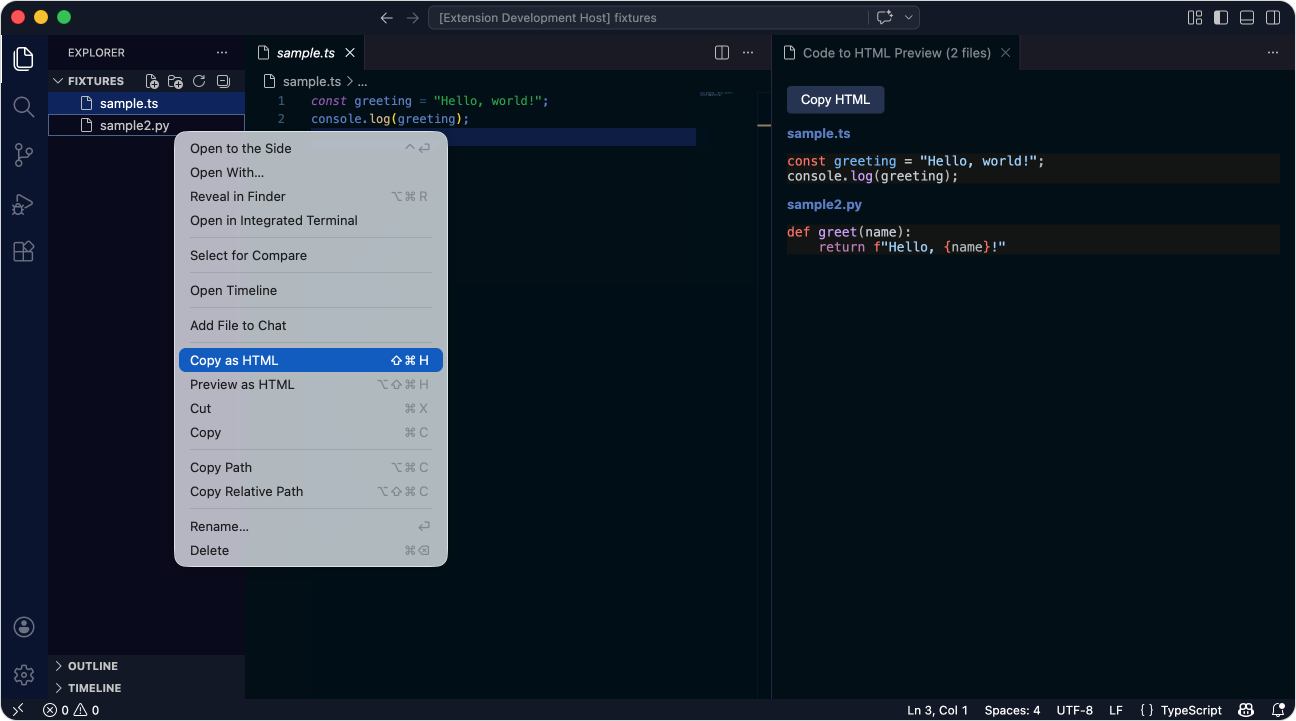
A VS Code extension that copies syntax-highlighted code as HTML. I built it for forum posts, but it works just as well for blog posts, emails, documentation, and anywhere else you need formatted code.
Installation
Install from the VS Code Marketplace or Open VSX, or search for BretCameron.vscode-code-to-html in the Extensions panel.
Features
- 🎨 Syntax highlighting via Shiki, the same engine VS Code itself uses
- 🌍 300+ languages, including TypeScript, Python, Rust, Go, C++, Ruby, Shell, and many more
- 🌈 54 colour themes, all built-in Shiki themes loaded on demand
- 📁 Multi-file support: select several files in the Explorer to copy them in one block
- 🔢 Optional line numbers with proper alignment and non-selectable styling
- 📍 Line number offset: selections preserve their original editor line numbers
- 📂 File path headers above each code block (filename, relative path, absolute path, or none)
- 🔧 Language override for cases where auto-detection gets it wrong
- 👀 Live preview in a webview before copying
Usage
Right-click a file in the Explorer or editor and select Copy as HTML. You can also use Cmd+Shift+H (Mac) or Ctrl+Shift+H (Windows/Linux), or find the commands via Cmd+Shift+P.
The command palette includes quick commands for Select Theme, Toggle Line Numbers, Toggle Border, Select File Path Display, and Select Language Override.
Binary files and files over 1 MB are skipped automatically.
Settings
| Setting |
Default |
Description |
codeToHtml.theme |
active |
Colour theme. active matches your current VS Code theme, or pick from 54 built-in Shiki themes |
codeToHtml.lineNumbers |
false |
Include line numbers in the output |
codeToHtml.border |
false |
Add a light grey border around code blocks |
codeToHtml.wordWrap |
true |
Wrap long lines instead of horizontal scrolling |
codeToHtml.showFilePath |
filename |
File path display above each code block: filename, relative, absolute, or none |
codeToHtml.languageOverride |
auto |
Override auto-detected language with a Shiki language ID, or leave as auto |
Supported languages
Supports every language Shiki does (300+), including TypeScript, Python, Rust, Go, C/C++, Java, Ruby, PHP, Swift, Kotlin, Shell, and SQL. Unrecognised file types are copied as plain text.
Licence
MIT

