Better Go To File







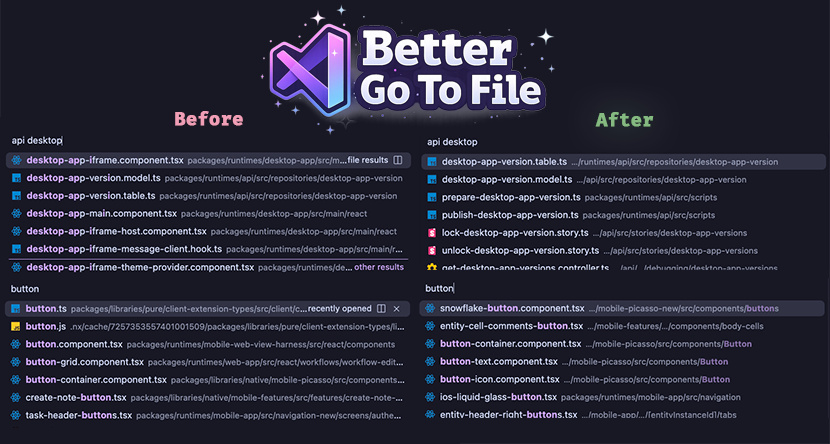
VSCode is great, but the Go to File (⌘ + P) menu's naive fuzzy search starts to become a friction point inside larger projects, especially monorepos where filenames can often be generic (e.g. routes.ts, button.tsx).
Better Go To File improves on this by using a more powerful scoring algorithm behind the scenes; one that considers frecency, Git file-tree insights that infer team-mates and their other touched files, and a few other heuristics. For short/empty queries, we use just the frecency score.
It also improves search item row itself by truncating paths from the left, but excluding the monorepo package name, and also truncating the file-name if it's too long.
After installing the extension and opening a project, it'll scan your workspace (persisting a cache for future boots). You can see the progress of this in the Status Bar; on hover you'll also see some extra information like the Contributor Relationships (an ordered list of the Git contributors we infer as your team-mates).
Keyboard Shortcuts
Open Preferences: Open Keyboard Shortcuts (JSON) and add the bindings you want to keybindings.json.
Replace the default Cmd+P picker with Better Go To File:
[
  {
    "key": "cmd+p",
    "command": "-workbench.action.quickOpen"
  },
  {
    "key": "cmd+p",
    "command": "betterGoToFile.open",
    "when": "!inQuickOpen"
  }
]
Add another shortcut such as Cmd+U without changing Cmd+P:
[
  {
    "key": "cmd+u",
    "command": "betterGoToFile.open",
    "when": "!inQuickOpen"
  }
]
If your keybindings.json already has entries, paste just the objects into the existing array.
Search Algorithm
Overview
- Build a candidate list from workspace files.
- Infer package roots from directories that contain
package.json or project.json.
- Normalize the query to lowercase tokens split on whitespace.
- Run a lexical pass. Every token must match each candidate somewhere, or the candidate is dropped.
- For empty input, rank on frecency alone. For non-empty input, add context scores from frecency, active file/package proximity, open tabs, and Git tracked state.
- Add Git priors from contributor history and current worktree activity, using scope-bounded ancestor propagation that is diluted by subtree size and contributor frequency.
- Sort by total score, then lexical score, then path/name tiebreakers.
flowchart TD
    A[Scan workspace files] --> B[Create candidates]
    B --> C[Infer package-root scopes]
    Q[Normalize query into tokens] --> D[Lexical pass]
    C --> D
    D --> E[Context pass]
    F[Frecency, active file, open tabs, tracked or ignored state] --> E
    D --> G[Git prior pass]
    H[Contributor history and worktree session overlay] --> I[Build scoped area vectors]
    J[Full in-scope ancestor chain with subtree dilution and rarity weighting] --> I
    I --> G
    D --> K[Combine scores]
    E --> K
    G --> K
    K --> L[Sort and return top matches]
Candidate Index
- Scan workspace folders using
betterGoToFile.workspaceIndex.fileGlob. The default is **/*.
- Respect
betterGoToFile.workspaceIndex.maxFileCount when it is set above 0.
- Exclude configured directory names such as
.git, node_modules, dist, out, .next, .nx, .turbo, and coverage.
- Prefer a Git-backed file listing when the workspace folder is inside a repository. Filesystem scans skip symbolic links, and Git-backed scans exclude tracked symbolic-link entries.
- Store each candidate as:
basenamerelativePathdirectorypackageRoot- lowercase search fields for basename and full path
- Resolve
packageRoot as the nearest ancestor directory containing package.json or project.json.
This means a file like packages/runtimes/mobile-app/src/button.tsx carries both its full path and the nearest package root packages/runtimes/mobile-app. That package root also acts as the Git area boundary: area propagation stays inside the package and never keeps walking up toward repo-wide ancestors.
Query Processing
- Trim the query.
- Lowercase it.
- Split on whitespace into tokens.
- Use AND semantics: every token must match the candidate somewhere.
- If the query is empty, skip the lexical pass and rank on frecency only.
- For queries shorter than 3 non-space characters, taper non-frecency reranking signals in linearly until they reach full strength.
Lexical Scoring
For each token, the scorer stops at the first matching category in this order:
| Order |
Match type |
Notes |
| 1 |
Basename exact |
button.tsx matches button.tsx |
| 2 |
Full path exact |
src/button.tsx matches the whole relative path |
| 3 |
Full path prefix |
Only used when the token contains a path separator |
| 4 |
Basename prefix |
button matches button-grid.component.tsx |
| 5 |
Basename boundary |
Match starts at a boundary such as -, _, ., /, or camelCase |
| 6 |
Basename substring |
Lower-value basename containment |
| 7 |
Package exact/prefix/boundary/substring |
Uses the basename of the nearest package root |
| 8 |
Full path boundary |
Boundary match anywhere in the path |
| 9 |
Full path substring |
Lower-value path containment |
| 10 |
Basename fuzzy |
Ordered character match on basename |
| 11 |
Package fuzzy |
Ordered character match on package basename |
| 12 |
Full path fuzzy |
Ordered character match on full path |
Important details:
- Boundary means start-of-string, after
/, \, -, _, ., space, or a camelCase transition.
- Package matching uses the package directory name, not the entire package path. For
packages/runtimes/mobile-app, the package match target is mobile-app.
- Exact and prefix categories start from large preset constants and subtract length or position penalties.
- Fuzzy matching rewards:
- each matched character
- matches near the start
- contiguous streaks
- boundary hits
- ending at the last character
- Fuzzy matching penalizes:
- skipped gaps between matched characters
- long target strings
After all tokens match:
- Add a query structure bonus when tokens land in multiple path segments and progress forward through the path.
- Add an extra structure bonus when one token matches the package and another matches the basename.
- Subtract a path length penalty of
0.08 * relativePath.length.
Context Scoring
After lexical filtering, the scorer adds context contributions:
- Frecency:
round(log2(1 + frecencyScore) * multiplier)- uses the browse multiplier at 0 characters
- ramps to the query multiplier over the first 3 non-space characters
- Git tracked state:
- tracked files get a boost
- ignored and untracked files get penalties
- these effects ramp from
0 to full strength over the first 3 non-space characters
- Open tabs:
- open files get a boost
- this ramps from
0 to full strength over the first 3 non-space characters
- Active file:
- the exact active file gets a boost
- this ramps from
0 to full strength over the first 3 non-space characters
- Same package:
- files in the same package as the active file get a boost
- this ramps from
0 to full strength over the first 3 non-space characters
- Directory proximity:
- same directory gets a strong boost
- otherwise shared leading directory segments get a smaller boost
- these boosts also ramp from
0 to full strength over the first 3 non-space characters
For an empty query, only the frecency contribution remains active.
The same-package boost is intentionally larger than a plain shared-prefix boost.
Frecency
Frecency is persisted to disk and decays over time.
- Default half-life comes from the active scoring preset. The balanced preset uses 10 days.
- Implicit visits are recorded after the editor stays on a file for the dwell threshold. The balanced preset uses:
editorDwellMs = 900implicitOpenWeight = 1
- Explicit picker opens record a larger visit:
- Duplicate visits inside the duplicate window are ignored:
duplicateVisitWindowMs = 15000
- The store flushes to disk after a short debounce:
- The persisted JSON keeps:
scorereferenceTimelastAccessedaccessCount
Only useful entries are kept when persisting. Very cold entries are dropped unless they were accessed recently enough.
Git Scoring
Git contributes in two different ways.
1. Git tracked state
Tracked, ignored, and untracked state feed into the context pass directly. This is per-file state, not ancestor propagation.
2. Git prior reranking
Git priors are a separate reranking term:
- Raw Git prior = contributor prior +
1.6 * session overlay prior
- Final Git score =
log1p(rawGitPrior) * 600 * ambiguity * queryStrength
- Ambiguity =
clamp(log1p(lexicalMatchCount) / log1p(500), 0, 1)
queryStrength = clamp(nonSpaceQueryLength / 3, 0, 1)
This means Git priors matter most when the lexical pass returns a broad ambiguous set.
Contributor prior
Contributor scoring mixes:
- exact file lineage weights
- teammate file lineage weights
- ownership share
- scoped area-prefix weights
The important area-propagation rules are:
- Git area propagation does not walk from the leaf file all the way to repo root.
- The scope root is:
- the nearest package root, if one exists
- otherwise the top-level directory
- Within that scope, the scorer keeps the full directory chain from the scope root to the file's parent directory.
- Each ancestor allocation is weighted by:
- distance from the leaf directory, using
0.5^distanceFromLeaf
- subtree breadth, using
1 / sqrt(subtreeFileCount(area))
- Those ancestor weights are normalized per file, so narrow feature directories get most of the mass and broad directories are heavily diluted.
- After aggregation across commits, contributor area vectors are transformed with
log1p(weight) * inverseContributorFrequency(area), where the inverse-contributor-frequency term is BM25-like and downweights areas touched by many contributors.
- Contributor relationship similarity is
0.7 * fast cosine + 0.3 * slow cosine, then scaled by recent activity and a soft broadness penalty of 1 / (1 + broadness).
Example:
- File:
packages/runtimes/web-app/src/react/workflows/editor/button.tsx
- Scope root:
packages/runtimes/web-app
- Area prefixes used for area scoring:
packages/runtimes/web-apppackages/runtimes/web-app/srcpackages/runtimes/web-app/src/reactpackages/runtimes/web-app/src/react/workflowspackages/runtimes/web-app/src/react/workflows/editor
The final normalized allocation leans hardest on .../editor, then .../workflows, while broad ancestors like packages/runtimes/web-app are kept but strongly diluted because they are both farther away and contain far more files.
flowchart LR
    A[button.tsx] --> B[editor]
    A --> C[workflows]
    A --> D[react]
    A --> E[src]
    A --> F[package root]
    B --> G[Highest weight<br>closest and smallest subtree]
    C --> H[Still meaningful]
    D --> I[More diluted]
    E --> J[Heavily diluted]
    F --> J
Session overlay prior
The live worktree overlay uses the same scoped full-chain dilution logic and the same subtree metadata, but its raw per-file weights come from current Git activity:
- branch-unique files:
0.85
- modified files:
1.1
- staged files:
1.3
- untracked files:
0.6
Those weights are summed per file and then allocated across the same scoped ancestor chain, so a broad directory only picks up a small share unless the worktree is concentrated there.
Gitignored Visibility
Ignored files are hidden by default unless the query looks specific.
In auto mode, ignored files are only shown for exact filename queries that include an extension, such as:
.env.localButton.swiftbutton.component.tsx
Broader queries such as button, mobile button, or src/button.tsx still keep ignored files hidden.
Commands
bun run score -- --help
Show all local scoring commands.
bun run score:search -- --repo /Users/braden/Development/Phoenix --limit 10 button
Rank the top matches for a query.
bun run score:search -- --repo /Users/braden/Development/Phoenix --debug button
Print score breakdowns with lexical, context, frecency, and Git-prior contributions.
bun run score:explain -- --repo /Users/braden/Development/Phoenix button path/to/file.tsx
Explain why one file ranked where it did and show nearby neighbors.
bun run score:search -- --repo /Users/braden/Development/Phoenix --frecencyFile /path/to/frecency.json --contributorEmail you@example.com --debug button
Override the frecency snapshot or contributor identity for a debugging run.
bun run score:search -- --repo /Users/braden/Development/Phoenix --noFrecency button
Disable persisted frecency to isolate lexical and Git effects.

