ELIG: Explain Like I'm Grug
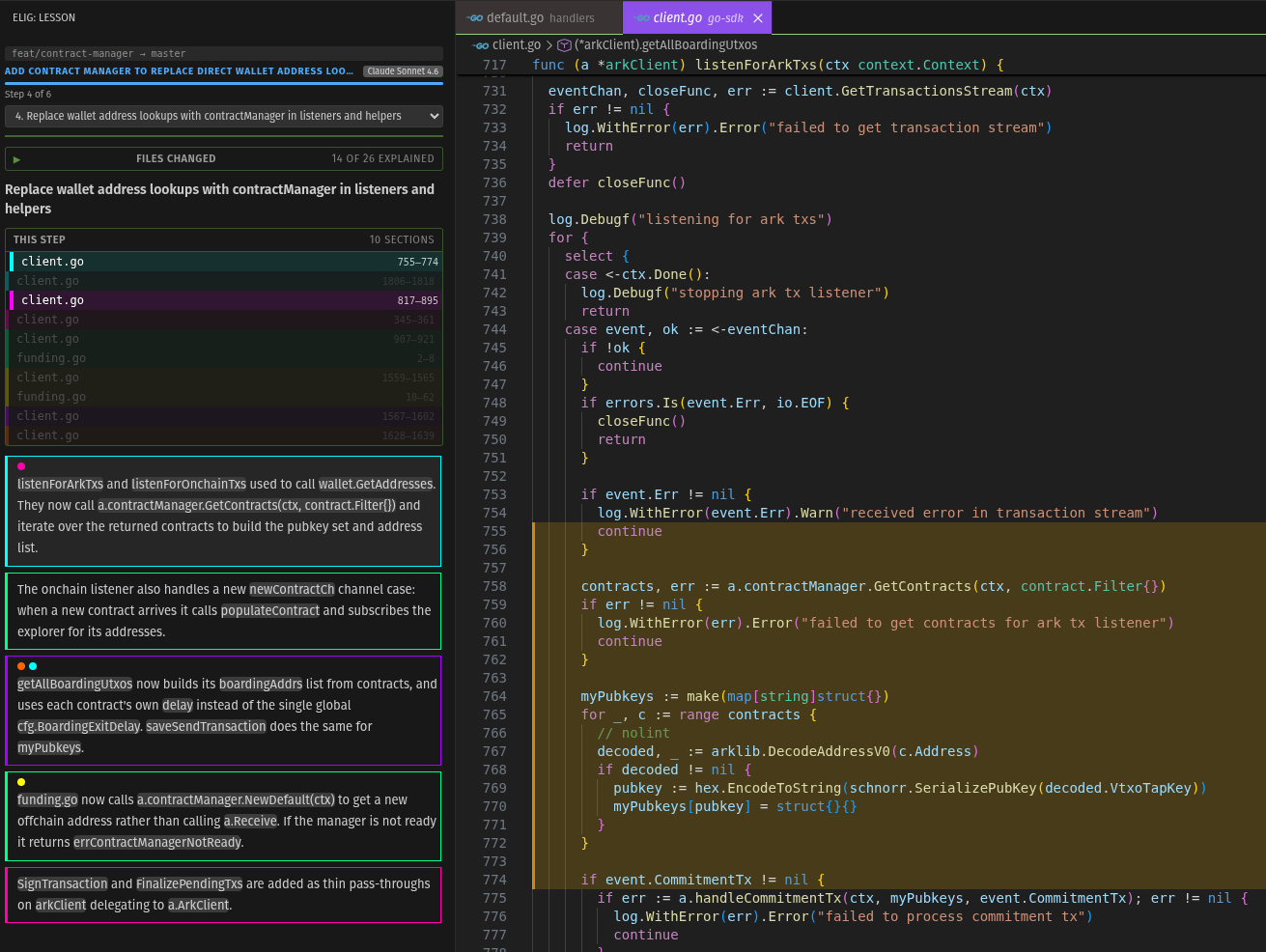
ELIG turns a PR or branch diff into an interactive, plain-English lesson inside VS Code. Step through your changes one concept at a time, with the relevant code highlighted in the editor as you go. Ask follow-up questions, request simpler explanations, generate a QA checklist, run a risk analysis, and more — all without leaving the panel.
Built for developers who want to actually understand a diff — not just skim it.
How it works
- Open a repo in VS Code
- Click the ELIG icon in the activity bar (the caveman)
- Hit Grug this Branch, Grug Local Changes, or Grug a PR
- ELIG analyzes the diff using whatever AI you have installed (GitHub Copilot, Claude, etc.) and generates a step-by-step lesson
- Walk through each step — the relevant file opens and the changed lines are highlighted automatically
On first launch, a short 3-panel walkthrough explains the basics.
Features
Diff sources
- Branch diff: analyzes everything between your current branch and the base branch
- Local changes: analyzes your uncommitted changes against HEAD
- PR diff: paste a GitHub PR URL or number to review any PR
Lesson overview (summary screen)
- PR title and context: large, centered PR title with file count and
+N/-N stats
- Branch names: shows the from/to branches in the summary header
- Clickable files: click any file to open a side-by-side diff for it directly; files show
A / D / R badges for added, deleted, and renamed
- File tree: when changes span multiple folders, files are grouped by top-level folder
- Step completion marks: steps you have navigated show a
✓; click any step to jump to it
- Hide completed steps: toggle to collapse steps you have already marked done, so only remaining work is visible
- Jump to any step: click a step in the summary or use the dropdown nav on any step screen
Step view
- Color-coded sections: each file section gets a neon color; explanation paragraphs have matching colored borders
- Breadcrumb: file chips above the step title; click one to jump to it in the editor
- File highlights: relevant lines highlighted in amber as you read
- Hover to highlight: hover over any explanation paragraph to pop the matching file sections
- Click to lock: click a paragraph to keep its sections highlighted; click again to release
- Jump chips: file+line chips on each paragraph; click to jump to that exact section in the editor
- Diff view: the
⊞ zone on each chip opens a VS Code diff scoped to that section
- More detail: expand any paragraph for a deeper dive on that specific part
- Copy button: hover any paragraph to reveal a
⎘ button that copies the text to clipboard
- Confidence indicator: a warning badge when the AI flags unclear intent or missing context
- Files changed panel: collapsible panel showing every changed file with status (current, explained, upcoming)
- Step notes: a text area at the bottom of each step for personal notes; notes are saved per-step and persist across sessions
- Font size:
A+ / A− controls in the step header scale the entire panel up or down; setting is remembered
- Scroll memory: returning to a step restores where you were in the explanation
Explanation modes
- Explain dumber: simpler explanation aimed at someone just learning to code
- Rephrase: a completely different take on the same concept
- What changed: reviewer lens — what changed, why, and trade-offs
- Explain code: learner lens — what the code conceptually does
- What could go wrong?: risk lens — edge cases, unchecked errors, race conditions, and fragile code for this specific step
Ask and compare
- Ask Grug: type any question about the current step and get a plain-English answer streamed into the panel; answers persist when you return to the step
- Compare steps: pick any other step from a dropdown and ask how the two relate to each other
- QA checklist: generates a manual testing checklist for the whole diff — specific to the actual functions and files changed, not generic advice; items are interactive checkboxes you can tick off
- What could go wrong?: full-diff risk analysis across all changes — edge cases, unchecked errors, security concerns, and fragile code; rendered as a collapsible list with risk items
- Both the checklist and risk analysis are saved in your session and reappear when you return to the summary or navigate between steps
Export, import, and sharing
- Export as .md: save the full lesson as a Markdown file, including any step notes you have added
- Import lesson: open any previously exported
.md to restore the lesson without re-running AI
- Post to GitHub: post the lesson as a comment on the GitHub PR; uses VS Code's built-in GitHub authentication (no PAT required); the comment includes a one-click link that opens the lesson directly in VS Code for any teammate who reads it
- Re-analyze: re-fetches the latest diff and regenerates the lesson from scratch
Keyboard shortcuts
| Key |
Action |
→ |
Next step |
← |
Back / summary |
/ |
Focus the Ask input |
Esc |
Dismiss input |
Press ? in the step view to show or hide the shortcut reference.
Reliability
- Session resume: close VS Code and reopen — ELIG remembers your last session, step position, notes, checklist, and risk analysis
- Restart session: hit
↺ at any time to discard the current session and start fresh
- Error retry: if an AI call fails, a retry button appears in place
- Progress indicators: streaming operations show a live progress indicator so the panel never looks frozen
AI
- Works with any language model available in VS Code via the Language Model API, so no separate API key is required
- Compatible with GitHub Copilot Chat, plus any other extension that registers as a
vscode.lm provider
Requirements
You need a language model provider extension installed in VS Code. The supported option today is:
- GitHub Copilot Chat. With a Copilot subscription you can pick Claude, GPT, or Gemini as the active model in Copilot's settings, and ELIG will use whichever one you select.
Using your own Anthropic key
VS Code 1.104+ supports Bring Your Own Key in Copilot Chat. Add an Anthropic API key to Copilot Chat's model picker and ELIG will use whichever Claude model you select. This bills against your Anthropic API account, which is separate from any Claude Pro or Max subscription.
Settings
| Setting |
Default |
Description |
elig.baseRef |
main |
Base branch to diff against for Grug this Branch |
elig.githubToken |
(empty) |
GitHub PAT for private repo PR diffs (optional — posting PR comments uses VS Code's built-in GitHub auth) |
Commands
All commands are also available as buttons in the ELIG sidebar panel.
| Command |
Description |
ELIG: Grug this Branch |
Analyze current branch vs base |
ELIG: Grug Local Changes |
Analyze uncommitted local changes |
ELIG: Grug a PR |
Analyze a GitHub PR by URL or number |
License
MIT. See LICENSE.
| |

