bigORM Modeling ToolORM modeling for various platforms Installation Launch VS Code Quick Open ( Ctrl+P), paste the following command, and press enter.Copied to clipboard |

bigORM Modeling Tool - VS Code Extension





bigORM is a tool used to model ORM structures in a generic way and later on generate framework specific ORM code for some of the most popular ORM frameworks, with the code resulting in an equal database structure for all supported frameworks. Currently supported frameworks are Hibernate for Java, SQLalchemy for Python and the .NET Entity Framework.
Main features:
📖 Table of Contents
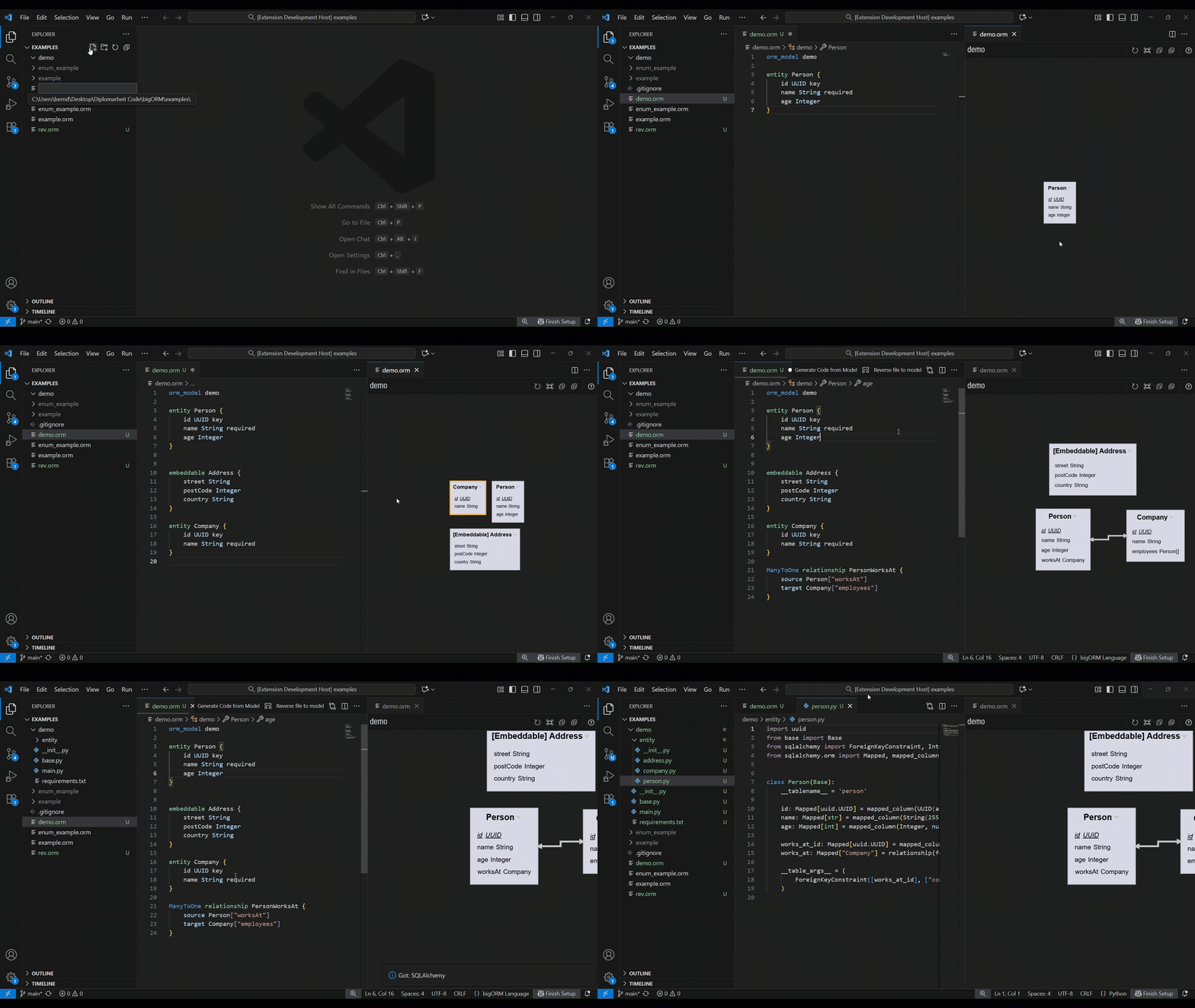
1. About the ProjectObject-relational mapping (ORM) is commonly used to bridge the gap between table-based persistency and object-oriented programming. Usually the mappings for ORM are directly defined in the codebase, requiring a defined technology stack from the beginning and reducing flexibility during the datastructure design process. The bigORM tool aims to provide an open-source and modern solution for modeling data-structures for ORM, independently of the programming language, by making use of the Language Server Protocol (LSP). The protocol is used for communicating textual language features to the VS Code client and is further extended to also support graphical editing, making it one of the first hybrid modeling tools based on the LSP. 2. Prerequisites3. InstallationbigORM can be installed directly from the Visual Studio Marketplace 4. User DocumentationThe following section describes the features the framework supports. 4.1. ORM ModelingThe main capability of bigORM is the modeling of the class structure that should be defined by ORM. bigORM is automatically loaded for VS Code for all files ending with Every model starts with the definition of the model name, defined as follows: Afterwards the different model elements can be defined, which can be devided into data elements and relationships, which are described in dedicated sub-sections. Additionally this section also explains supported data types and type modifiers. An example of an bigORM model using all currently supported features can be found on GitHub. 4.1.1. Data ElementsData elements are elements that represent data containers, for the targeted ORM frameworks they are mainly translated to classes. There are four different types of data elements: 4.1.1.1. EmbeddablesEmbeddables represent containers to display repeated standardized data structures. An example would be as follows: Embeddables can be used as 4.1.1.2. EnumsEnums are a custom datatype to represent a limited amount of fixed constants. They can be created as follows: Note: bigORM always maps enums to strings within the database. Custom types, which some databases might support, are not supported. 4.1.1.3. EntitiesAn Entity represents an object that is meant to be saved within the database. They need a key, additionally they support inheritance from other entities. See the following for an example on how entities could be defined: Notice how the annotation on the parent class defines how the child classes will inherit the class, especially how the later selected framework should translate this into the database. Options here include:
4.1.1.3.1. Join EntitiesJoin entities represent a special kind of entity within bigORM. Instead of defining their own primary key, they are defined to join two other entities and will get a composite primary key from the joined entities. The join entity automatically creates additional This is used to represent Note: Join entities do not support extending other classes or defining additional primary keys. 4.1.1.4. Mapped ClassesIn addition to entities and embeddables, bigORM also supports Mapped Classes, which can be used to define recurring patterns in entities, like standardized UUID structures. An example is provided in the following: 4.1.2. RelationshipsDefined entities can be connected using relationships, which can be defined as follows: The first keyword describes the relationship type. Options are:
Afterwards the Afterwards the Note: bigORM does not support Note: bigORM does not support additional attributes within relationships. Storing additional attributes always requires a dedicated table, for 4.1.3. Data typesSupported datatypes are:
4.1.4. Type modifiersCurrently supported modifiers are:
4.1.5. Attribute optionsAttribute options allow configuring metadata on attributes:
Example: 4.2. Model VisualizationWhen opening an 4.3. Code GenerationSame as with the diagram view, the toolbar also allows the export to a specific framework, by using the 4.3.1. Batch Code generationUsing the command 4.4. ORM Reverse engineering (!EXPERIMENTAL!)As an experimental feature, bigORM also supports to reverse engineer Hibernate models to |