
HuddleUpHuddle up your team's AI coding sessions — snapshot and resume work across AI tools Installation Launch VS Code Quick Open ( Ctrl+P), paste the following command, and press enter.Copied to clipboard |

HuddleUp for VS Code
Git stash for your AI coding sessions.
The problemWhen teams "vibe code" with AI, context is lost at every handoff:
The HuddleUp VS Code extension fixes this with two buttons in your sidebar. What it doesTwo buttons. That's the whole pitch.
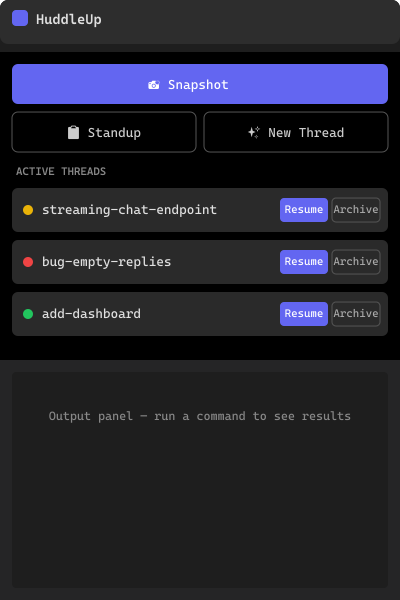
Add Standup and New Thread and you've covered the daily loop. ScreenshotsSidebar panel — Snapshot, Resume, Standup, threads at a glance
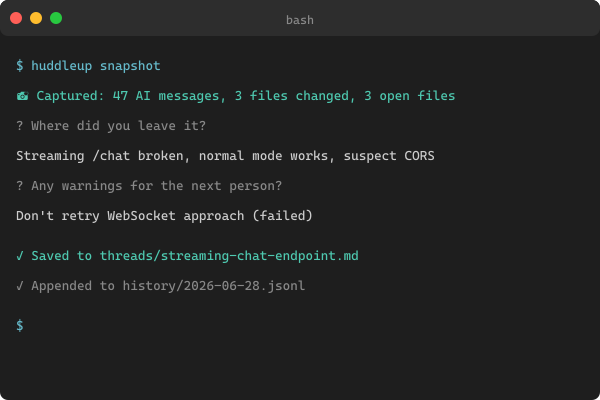
Snapshot flow — capture without leaving the editor
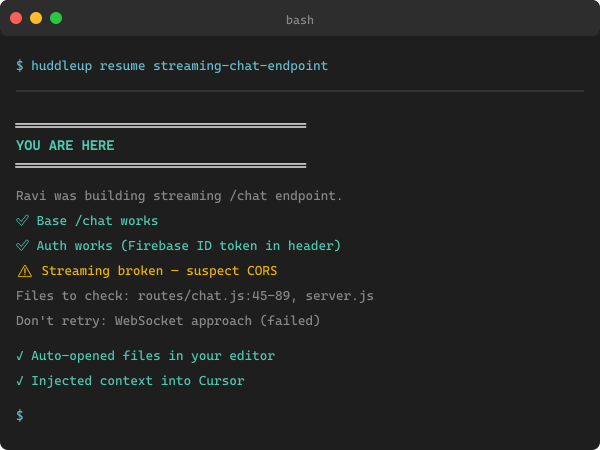
Resume briefing — every teammate gets the same picture
Why HuddleUp (vs. just CLAUDE.md or
|




Static rules files (CLAUDE.md / .cursor/rules/) |
HuddleUp | |
|---|---|---|
| Tells the AI your project conventions | ✅ | ✅ |
| Captures what you just tried and what failed | ❌ | ✅ |
| Works across Claude, Cursor, Copilot, Codex, Windsurf | ❌ (one per tool) | ✅ |
| Teammate picks up mid-task without a Slack message | ❌ | ✅ |
| The AI auto-saves before tokens run out | ❌ | ✅ (Token Exhaustion Protocol) |
HuddleUp isn't a replacement for CLAUDE.md — it generates CLAUDE.md, plus .cursor/rules/huddleup.mdc, AGENTS.md, and .windsurfrules from one source of truth, and adds the live snapshot/resume layer on top.
Quick start
1. Install the CLI (one-time, anywhere on your machine)
npm install -g huddleup
Or pin via npx huddleup@latest if you'd rather not install globally.
2. Install this extension
Search HuddleUp in the VS Code Extensions panel and click Install.
Cursor / VSCodium / Windsurf users — coming on Open VSX shortly.
3. Initialize your project
cd your-project
huddleup init
This creates:
.huddleup/charter.md— your project's single source of truth (stack, conventions)..huddleup/threads/— work threads..huddleup/history/— append-only event log.CLAUDE.md,.cursor/rules/huddleup.mdc,AGENTS.md,.windsurfrules— auto-generated config for every AI tool.
4. Use the sidebar
Open the HuddleUp activity-bar icon. Hit 📸 Snapshot before you walk away from your desk. Your teammate hits ▶ Resume and is exactly where you left off.
Commands
Every sidebar button has a command-palette twin (Ctrl/Cmd + Shift + P):
| Command | What it does |
|---|---|
HuddleUp: Snapshot current session |
Save current work state to a thread |
HuddleUp: Resume a thread |
Pick a thread; load briefing + open files + inject context |
HuddleUp: Show team standup |
Show all active threads + today's activity |
HuddleUp: Create new thread |
Start a new work item |
HuddleUp: List threads |
List every active thread |
HuddleUp: Refresh sidebar |
Refresh the HuddleUp panel |
Settings
| Setting | Default | Description |
|---|---|---|
huddleup.cliPath |
npx huddleup |
Command used to invoke the CLI. Change to an absolute path if npx is slow on first run, or to a project-local install. |
Token Exhaustion Protocol
The config files generated by huddleup init carry this instruction for the AI:
"When this session is near token exhaustion (~10% remaining), execute
huddleup snapshotto save the full session state before context is lost."
So even if you forget to snapshot, the AI will. Tested with Claude Code and Cursor; relies on the model honoring the instruction in its system prompt.
Requirements
- VS Code 1.85+ (also runs in Cursor / VSCodium once we ship to Open VSX).
- Node.js 20+ on your machine — needed by the CLI.
- Git in your project (snapshots include the diff).
- A project with
huddleup initalready run.
How the snapshot is built
You click 📸 Snapshot
        │
        ▼
┌─────────────────────────────────────────┐
│  CLI auto-captures:                     │
│  • git diff (staged + unstaged)         │
│  • currently open files                 │
│  • last N AI messages (auto-detected    │
│    from Claude / Cursor / Copilot /     │
│    Codex / Windsurf session files)      │
└─────────────────────────────────────────┘
        │
        ▼
┌─────────────────────────────────────────┐
│  CLI asks you 1 question (30 seconds):  │
│  "Where did you leave it?"              │
└─────────────────────────────────────────┘
        │
        ▼
┌─────────────────────────────────────────┐
│  Writes to .huddleup/threads/<name>.md  │
│  Appends to .huddleup/history/          │
└─────────────────────────────────────────┘
        │
        ▼
   Commit + push → teammate runs ▶ Resume
Full architecture in the main repo's CONTRIBUTING.md.
Building from source
git clone https://github.com/anandsundaramoorthysa/huddleup
cd huddleup/vscode-huddleup
npm install
npm run build
npm run package    # produces vscode-huddleup-<version>.vsix
Install the resulting .vsix via Extensions → ⋯ → Install from VSIX….
Changelog
See CHANGELOG.md.
Contributing
Pull requests welcome — see CONTRIBUTING.md. Bug reports and feature ideas go to GitHub Issues.
Security
Found a vulnerability? Please report it privately — see SECURITY.md.
Questions?
- 🐛 Bugs — github.com/anandsundaramoorthysa/huddleup/issues
- 💬 Discussion — github.com/anandsundaramoorthysa/huddleup/discussions
- 📧 Email — sanand03072005@gmail.com
HuddleUp is open source under AGPL-3.0. Built by @anandsundaramoorthysa.