CSS Selector Support
Visual Studio Marketplace Installs
A Visual Studio Code extension that provides HTML class name completion for CSS, Less, Sass, Stylus, and Vue files. It intelligently scans your workspace for class definitions in HTML, JSX, TSX, PHP, and Vue files and provides you with instant autocompletion.
Usage
- Install the extension from the Visual Studio Marketplace.
- Open a project with HTML, JSX, TSX, or Vue files.
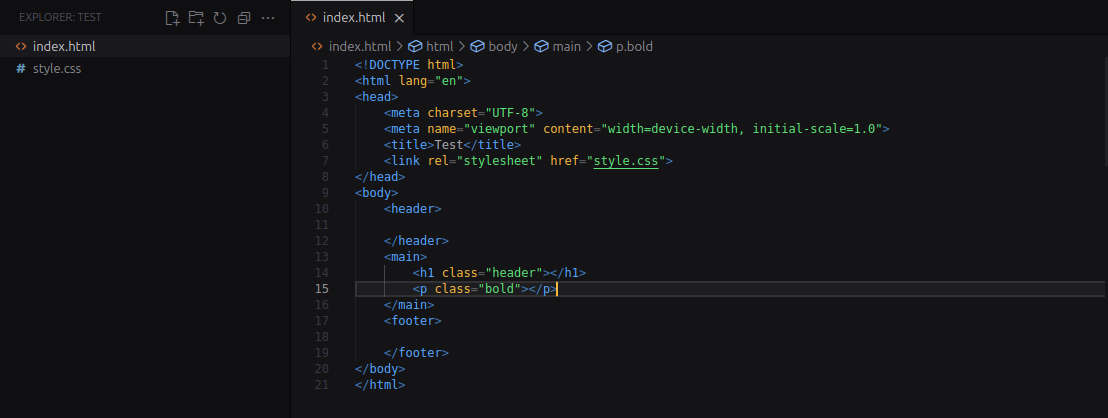
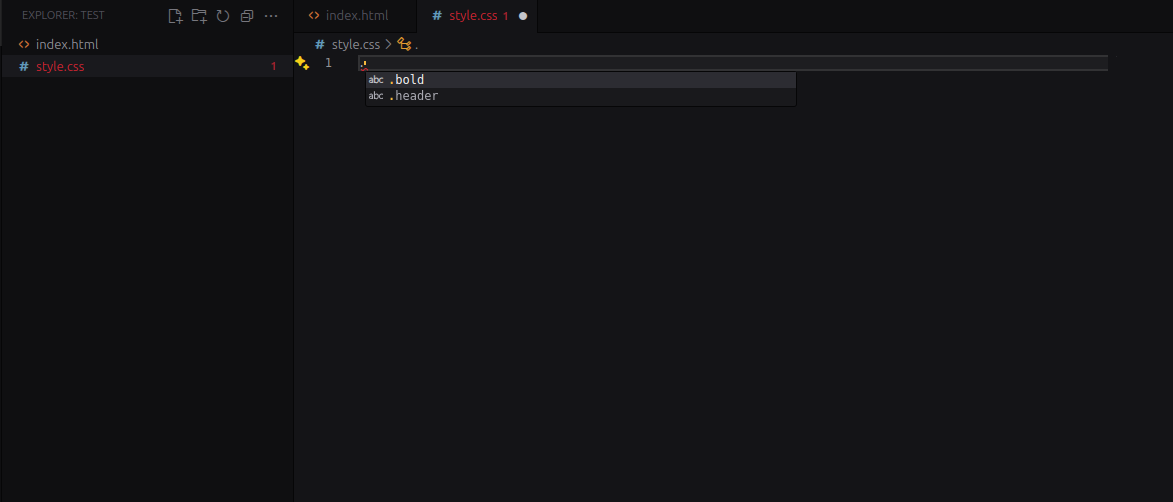
- Open a CSS, Less, Sass, Stylus, or Vue file.
- Type a
. and you will see a list of available class names.
Features
- Smart Autocompletion: Get instant autocompletion for your CSS class names in CSS, Less, Sass, Stylus, and Vue files.
- Go To Definition: Jump directly from a class/ID in HTML/JSX/PHP to its definition in your CSS/SCSS/Less files.
- Find All References: Find every usage of a CSS selector across your entire project's markup files.
- Rename Refactor: Safely rename a class or ID project-wide. Renaming in HTML updates all CSS definitions, and vice-versa, with built-in collision detection to prevent style merging.
- Style Preview (Hover): Hover over any class or ID in your markup to see its CSS rules directly in a tooltip, reducing context switching.
- Modern Framework Support: Fully supports Tailwind v4
@theme blocks, CSS Modules, and multi-root workspaces.
- Dynamic Class Support: Intelligently parses classes within template literals and
clsx() / classnames() calls in React and Vue.
- Caching for Performance: Class names are cached to provide you with instant autocompletion without any lag.
- Real-time Updates: The extension uses a file watcher to automatically update the cache when you create, delete, or modify your files.
- Configurable: You can customize the file extensions to be scanned, so you can tailor the extension to your project's needs.
Supported File Types
The extension will scan the following file types for class definitions:
- HTML (
.html, .htm)
- JSX (
.jsx)
- TSX (
.tsx)
- Vue (
.vue)
- PHP (
.php)
You can get autocompletion in the following file types:
- CSS (
.css)
- Less (
.less)
- Sass (
.scss, .sass)
- Stylus (
.styl, .stylus)
- Vue (
.vue)
User Configuration
You can configure the file extensions to be scanned by modifying the cssselectorsupport.include setting in your settings.json file.
"cssselectorsupport.include": [
  "html",
  "htm",
  "jsx",
  "tsx",
  "vue",
  "php"
]
By default, the extension will scan for files in the same directory as the stylesheet you are editing. To scan other files, you can use the cssselectorsupport.sourceFiles setting. This is useful if you want to limit the search to a specific directory or set of files.
"cssselectorsupport.sourceFiles": [
  "src/**/*.html",
  "components/**/*.jsx"
]
Contributing
Any type of contribution and discussion is welcome.
License
This project is licensed under the MIT License. See the LICENSE.md file for details.

