Checklist Bridge for Claude Code
When Claude Code needs you to do something by hand, like create an API key, run a command, click through a dashboard or test a page, it usually buries the steps in the chat. Checklist Bridge gives each Claude chat its own checklist in VS Code instead.
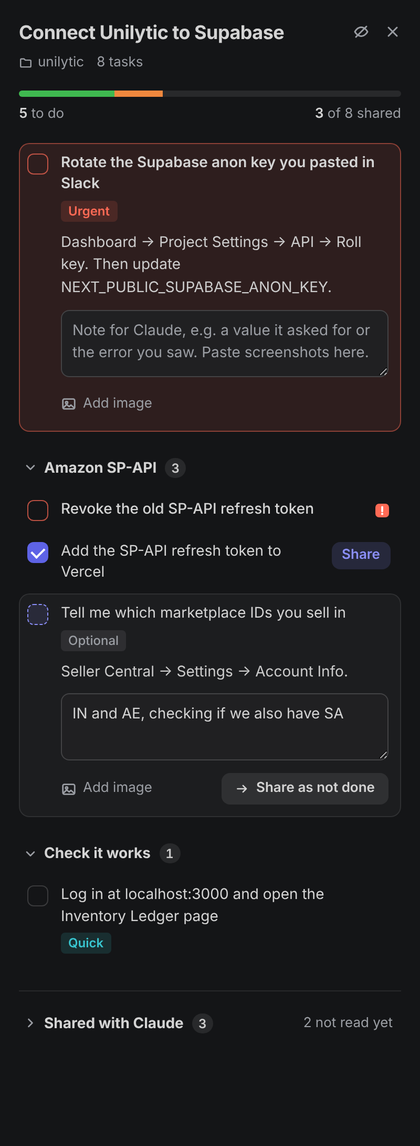
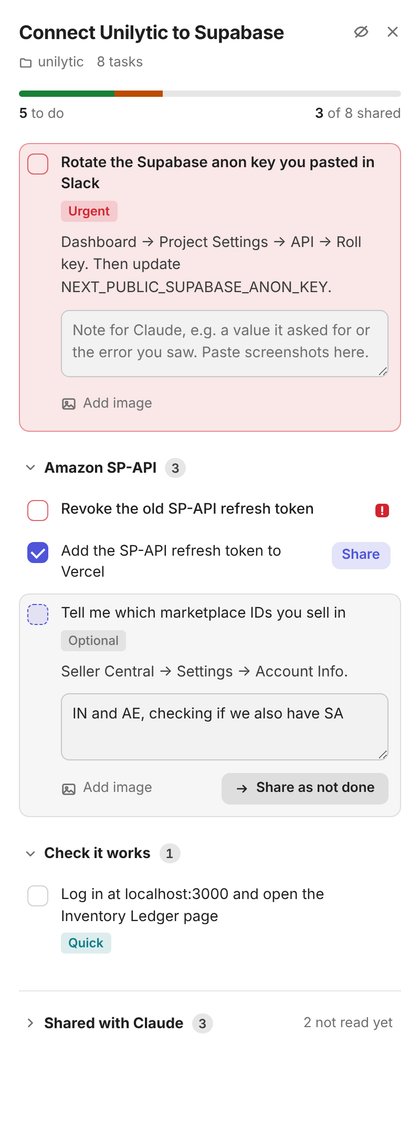
Claude adds tasks while you keep talking. You tick them off, write a note or paste a screenshot, and press Share when a task is ready. Claude can read only the tasks you've shared, so it never assumes you did something you haven't.
Install
- Install it from the VS Code Marketplace. In VS Code, open the Extensions view, search for Checklist Bridge and click Install. Or open the Marketplace page, or run:
code --install-extension Akshat270.checklist-bridge
No Marketplace access (for example in Cursor or VSCodium)? Download the .vsix, then in the Extensions view click … → Install from VSIX… and pick the file.
- Click Connect when VS Code asks, or run Checklist Bridge: Connect Claude Code from the command palette. A terminal opens with the command ready; press Enter.
- Start a new Claude chat. Run
/mcp to check that checklist is connected.
That's it. To try the panel without Claude, run Checklist Bridge: Open an example checklist.
Requirements: VS Code 1.85 or newer, and Claude Code, either in the terminal or the VS Code extension. Node.js is used if you have it; otherwise VS Code's built-in runtime runs the connector. Works on macOS, Windows and Linux.
Make every Claude chat use it automatically
After you connect, the extension offers to set this up for you. You can also run Checklist Bridge: Make every Claude Code chat use checklists any time. It makes two small changes that every Claude Code session on your computer picks up:
- A short instruction in
~/.claude/CLAUDE.md, inside clearly marked comments, telling Claude to put manual steps on your checklist and to read what you've shared.
"mcp__checklist" in permissions.allow in ~/.claude/settings.json, so Claude doesn't ask before each checklist call. The original file is backed up first, and a settings file with comments is never rewritten.
Checklist Bridge: Undo Claude Code setup removes both again.
Prefer to do it by hand?
Add this to ~/.claude/CLAUDE.md:
## Manual steps (Checklist Bridge)
Whenever I need to do something by hand, like create an account or API key, run a command, change a setting, click
through a dashboard, test something or tell you a value, add it to my checklist with the checklist_add_tasks tool
instead of writing the steps in your reply. While this chat's checklist has waiting tasks, call checklist_read at
the start of each reply. Only trust tasks I have shared. If the checklist tools aren't available, give the steps in
your reply as usual.
Then add "mcp__checklist" to permissions.allow in ~/.claude/settings.json.
How it works
- One checklist per chat. Each chat's checklist opens in the VS Code window where that chat is running. Two agents in the same window get two separate checklists.
- The next task comes first. It's pinned at the top and already open. Urgent tasks jump ahead and turn it red. Everything else is a one-line row you can click to open.
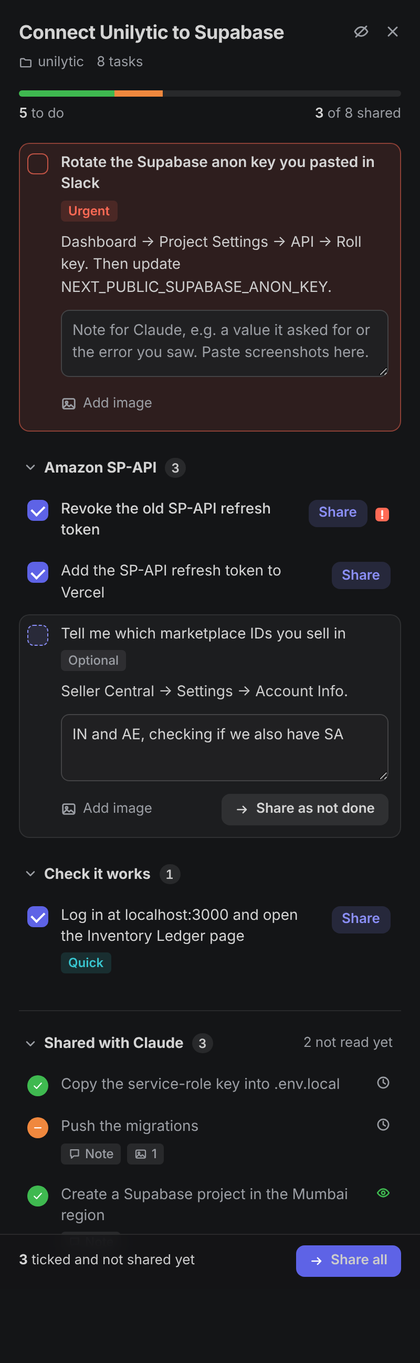
- Share tasks one at a time. Tick a task, optionally add a note or screenshots (paste, drag in, or Add image), and press Share. Tick several and Share all. You can also share a task as not done, with a note saying what went wrong.
- Claude only sees what you share. The progress bar counts shared tasks only. Shared tasks move to Shared with Claude, which shows whether Claude has read each one. Take back hides a task from Claude again so you can change it.
- Claude can organise the list. It can tag tasks (urgent, important, quick, optional, blocked), group them, reword them and remove ones that are no longer needed.
- Hide or close. Closing a tab only hides that checklist. The Claude checklists icon in the activity bar lists every checklist with show, hide and close. Closing a checklist for good tells Claude, and the next tasks it adds start a new checklist.
- Nothing is lost on reload. Checklists survive a window reload.
Claude gets three tools:
| Tool |
What it does |
checklist_add_tasks |
Adds tasks (with optional details, a command to copy, tags and a group) and opens the checklist. It doesn't wait; you work at your own pace. |
checklist_read |
Returns only the tasks you shared: done or not done, your notes, and your screenshots as images. Unshared tasks show as "waiting". |
checklist_edit |
Renames the checklist, rewords tasks, changes tags and groups, or removes tasks. |
Privacy
Everything stays on your computer. Checklists, notes and screenshots are stored in VS Code's own storage for the workspace. Claude Code talks to the extension over 127.0.0.1 only, with a random token. Screenshots reach Claude only when you share the task they're attached to.
The one network request the extension makes is the update check described below. You can switch it off.
Updates
If you installed from the Marketplace, VS Code updates it like any other extension. The extension also keeps itself up to date from this repo, which covers .vsix installs too. Shortly after VS Code starts, and every few hours after that, it reads latest.json. If there's a newer version, it downloads the .vsix, checks its SHA-256, installs it, and offers Reload window. Claude's connection is refreshed on reload too, so there's nothing to redo.
- Checklist Bridge: Check for updates runs a check right away.
checklistBridge.autoUpdate turns updates off.
Troubleshooting
/mcp shows checklist as failed. Run Checklist Bridge: Connect Claude Code again and start a new chat. If you have no Node.js, the command uses VS Code's runtime; make sure VS Code is installed in its usual place.- Claude says no VS Code window is running. Open VS Code with the extension installed, then ask Claude to try again.
- The checklist opened in the wrong window. See Output → Checklist Bridge for which window each chat picked and why. The connector picks a window in this order:
- The window the chat was started from.
- The window Claude Code's own VS Code integration is connected to.
- The window that has the chat's project folder open.
- The window you used most recently.
- Claude doesn't notice what you shared. Claude reads the checklist when it replies. Send any message, even "done".
Building from source
npm install
npm run build            # compiles src/ to dist/
python3 scripts/release.py "what changed"   # packages releases/*.vsix and updates latest.json
Without npm install, you can build against the bundled type stub with npx tsc -p tsconfig.offline.json.
Issues and pull requests are welcome.
Made by Akshat while building Unilytic, analytics for Amazon sellers in India. Not affiliated with or endorsed by Anthropic. Claude and Claude Code are trademarks of Anthropic. MIT licensed.

