TeXPilot



TeXPilot is a professional LaTeX workspace for students, researchers, and technical teams in Visual Studio Code.
Edit source, compile, inspect diagnostics/logs, and review PDF output in one focused environment.
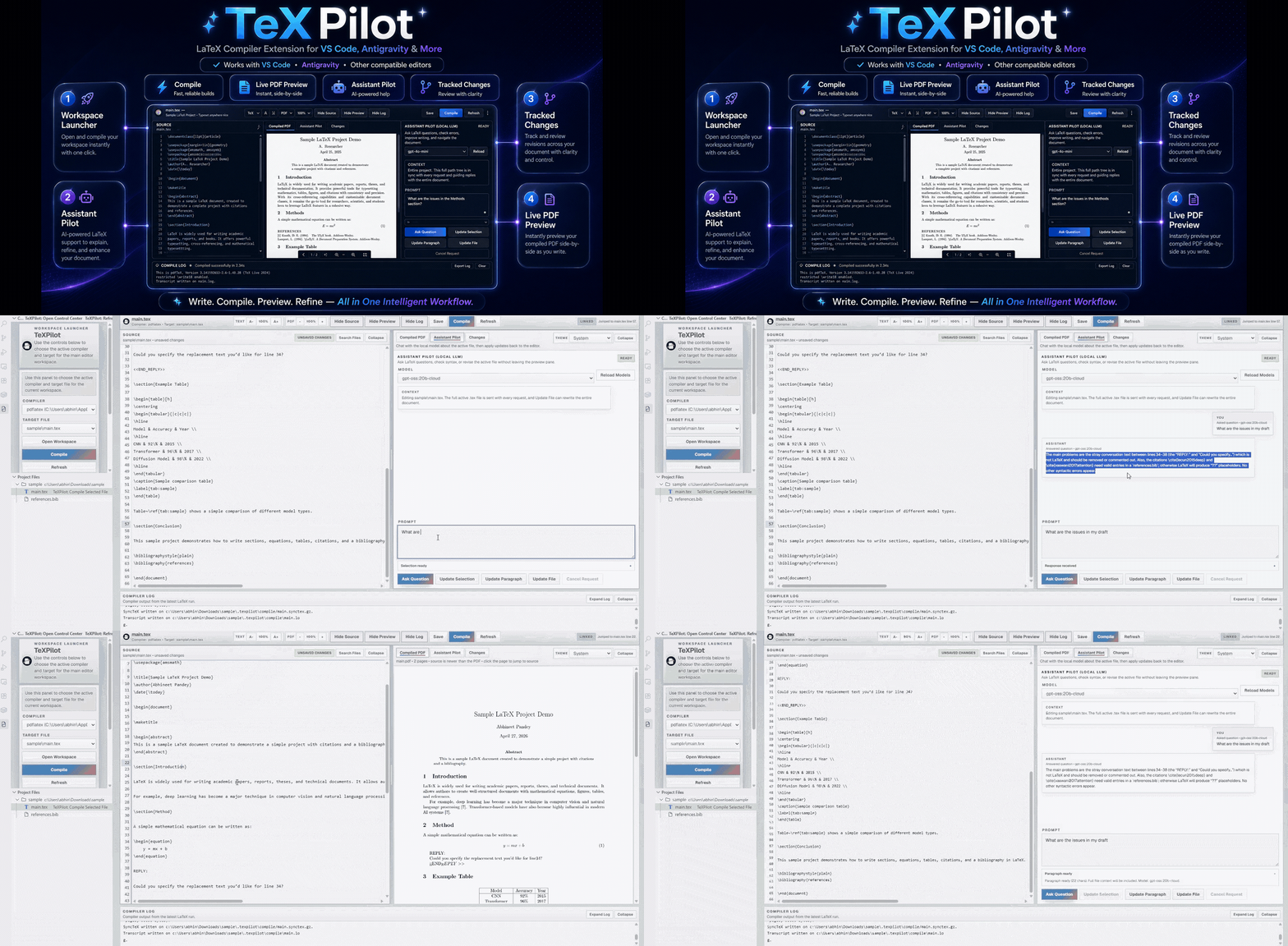
Why TeXPilot
- Productive LaTeX workflow without switching between multiple tools
- Project-scale editing with source, preview, diagnostics, and logs in one UI
- Optimized for real writing sessions with responsive editor and practical controls
- Local-first architecture with optional AI assistance through Ollama
Key Capabilities
Source Editing Experience
- In-app source editor with syntax highlighting modes:
Auto, LaTeX, BibTeX, Markdown, Plain Text
- Fast in-file search and replace with standard editor behavior:
- Find next/previous
- Replace / Replace All
- Case-sensitive toggle
- Keyboard-first editing:
Ctrl/Cmd+F FindCtrl/Cmd+R Replace modeCtrl/Cmd+S SaveCtrl/Cmd+Enter Compile
- Workspace search panel for cross-file lookup and jump-to-line
Project Files Management
- Dedicated
Project Files views in Activity Bar and Explorer
- Context-menu actions in Project Files to work in the clicked location:
New FileNew FolderAdd Existing Files/Folders (images/materials/assets)
- Smart behavior for file nodes (uses parent directory), directory nodes (uses that folder)
Compile, Diagnostics, and Logs
- Compiler support:
latexmk, pdflatex, xelatex, lualatex, tectonic
- Streamed compile output in an integrated Compiler Log pane
- Problems panel with line-mapped diagnostics for the active file
- Expand/collapse pane controls for Source, Preview, and Log layouts
PDF Preview and Export
- Built-in PDF preview powered by bundled
pdf.js
- Source-to-preview workflow in the same window
- Download icon action for compiled PDF export
- Download action stays disabled until a compiled PDF is available
- Optimized rendering path for large edits and smooth typing
- Reduced unnecessary re-highlighting and re-render cycles
- Lightweight updates for line numbers, decorations, and diagnostics
Revision Tracking and AI Assistant
- Tracked change history for saved manual and AI-assisted edits
- Optional local AI rewrite assistant via Ollama
- Request cancellation, model selection, and scoped rewrite actions
Desktop-Only: Multi-Agent Publication Review
- Full publication-readiness evaluation with 13 standard specialist agents plus a guardrailed orchestrator
- Single-agent runs, per-agent reruns, and reusable custom agents with user-defined jobs and instructions
- Dependency-aware review of the selected root
.tex, its included sources, bibliography, compiled PDF text, and targeted visual pages
- Dedicated checks for storyline, novelty, methodology, statistics, claims, reproducibility, references, related work, ethics, language, format, figures, tables, graphs, and equations
- OpenAlex and Crossref literature search, DOI verification, cached open-access papers, numeric-consistency screening, and lexical-overlap screening
- Generic, IEEE, ACM, Springer, and Nature-style venue profiles plus custom submission requirements
- Inspectable agent metadata, verified correction locations, source jump actions, revision comparison, cancellation, and report exports in JSON, Markdown, HTML, SARIF, and PDF
- Local Ollama and OpenAI-compatible local endpoints such as vLLM; remote endpoints require explicit manuscript-sharing confirmation
Desktop-Only: BibVault Reference Management
- SQLite-backed BibVault window for master entries, project collections, tags, notes, favorites, and editing
- Explicit import choices for manual entry, selected
.bib, pasted BibTeX, or multi-file .bib import
- Explicit BibVault projects with create/delete controls, add-entry-to-project action, and project-specific entry views; imported
.bib files also create source collections named from the file
- Duplicate/repetition warnings, missing field checks, cited-but-missing warnings, and a clear SQLite action for resetting BibVault
- Per-entry validation badges appear after import with the validation method used for valid, warning, error, critical, and unchecked states
- CrossRef and OpenAlex DOI metadata checks verify entries, cache provider responses, and fill missing local metadata when safe
- Export actions for master
.bib, project-only .bib, source .bib, source/master difference .bib, JSON, CSV, plus local database backup/restore
Install
- Visual Studio Marketplace: TeXPilot
- Open VSX: TeXPilot
- Naming note:
- VS Marketplace:
AbhineetPandey003.texpilot-vscode
- Open VSX:
abhineet-pandey.texpilot
Or install from command line:
code --install-extension AbhineetPandey003.texpilot-vscode
Desktop Builds
TeXPilot also ships as an Electron desktop app.
BibVault, its SQLite database, paper-reading AI, and multi-agent publication evaluation are desktop-only capabilities. The VS Code extension remains focused on editing, compiling, PDF preview, Git collaboration, and the general local LLM assistant.
npm run package:windows
npm run package:mac
npm run package:linux
The macOS build creates universal dmg and zip artifacts for both Intel and Apple Silicon Macs in release/mac.
The Linux build creates x64 AppImage and .deb artifacts for Ubuntu/Debian-style systems in release/linux.
Packaging clears the selected platform output first, launches the packaged renderer in smoke-test mode, and verifies artifact identity and updater metadata in CI.
Electron desktop packages should retain Electron and Chromium license materials generated by Electron/electron-builder. Public macOS distribution should use Apple Developer ID signing and notarization for a smooth install experience.
Stable Windows packages are Authenticode-signed, and macOS packages use the hardened runtime plus Apple notarization. Packaged desktop builds check GitHub release metadata for signed updates. Prerelease builds can be tested through Help > Include Prerelease Updates.
Publish
The extension version is managed in package.json. Before publishing, run the checks and package commands sequentially:
npm run lint
npm test
npm run test:vscode
npm run test:latex
npm run release:verify
npm run package:vsix
npm run package:openvsx:vsix
The complete release, signing, checksum, staged-rollout, and rollback procedure is documented in docs/release-runbook.md. Supported operating systems and external tool versions are listed in docs/support-matrix.md.
GitHub release automation creates a draft release first. Visual Studio Marketplace and Open VSX publication is protected by the reviewer-gated production-marketplaces environment, allowing staged desktop validation before extension deployment.
Publish to Visual Studio Marketplace:
export VSCE_PAT="your-vscode-marketplace-token"
npm run publish:vscode
Publish to Open VSX:
export OVSX_PAT="your-open-vsx-token"
npm run publish:openvsx
To publish both registries in one run:
export VSCE_PAT="your-vscode-marketplace-token"
export OVSX_PAT="your-open-vsx-token"
npm run publish:all
Marketplace identities:
- Visual Studio Marketplace:
AbhineetPandey003.texpilot-vscode
- Open VSX:
abhineet-pandey.texpilot
Quick Start
- Open a LaTeX project folder in VS Code.
- Open
TeXPilot from the Activity Bar.
- In
Control Center, choose compiler and compile target.
- Open or create files from
Project Files.
- Edit source, then save with
Ctrl/Cmd+S.
- Compile with
Ctrl/Cmd+Enter.
- Review Problems, Compiler Log, and PDF preview.
Commands
| Command |
Description |
TeXPilot: Open Control Center |
Open the TeXPilot control panel |
TeXPilot: Refresh Project Files |
Refresh project file tree |
TeXPilot: Open File |
Open selected file from project views |
TeXPilot: Compile Selected File |
Compile selected .tex target |
TeXPilot: New File |
Create a new file in selected project directory |
TeXPilot: New Folder |
Create a new folder in selected project directory |
TeXPilot: Add Existing Files/Folders |
Import files/folders into selected project directory |
Configuration
| Setting |
Type |
Default |
Description |
latexCompiler.executableSearchPaths |
string[] |
[] |
Additional directories for LaTeX/PDF/runtime binaries |
latexCompiler.compile.timeoutSeconds |
number |
300 |
Compile process timeout |
latexCompiler.preview.renderTimeoutSeconds |
number |
60 |
PDF preview render timeout |
latexCompiler.preview.syncTexTimeoutSeconds |
number |
15 |
SyncTeX lookup timeout |
latexCompiler.ollama.enabled |
boolean |
true |
Enable local AI tools in the editor workspace |
latexCompiler.ollama.baseUrl |
string |
http://127.0.0.1:11434 |
Ollama endpoint |
latexCompiler.ollama.model |
string |
"" |
Preferred local model |
Example:
{
  "latexCompiler.executableSearchPaths": [
    "/usr/local/bin",
    "/opt/homebrew/bin"
  ],
  "latexCompiler.compile.timeoutSeconds": 300,
  "latexCompiler.preview.renderTimeoutSeconds": 60,
  "latexCompiler.preview.syncTexTimeoutSeconds": 15,
  "latexCompiler.ollama.enabled": true,
  "latexCompiler.ollama.baseUrl": "http://127.0.0.1:11434",
  "latexCompiler.ollama.model": "llama3.1"
}
Requirements
- VS Code
^1.100.0
- Desktop: macOS 12+, Windows 10 version 1809+, or a compatible x64 Ubuntu 22.04+/Debian system
- A local LaTeX workspace folder
- A LaTeX distribution available on
PATH
- One supported compiler (
latexmk, pdflatex, xelatex, lualatex, or tectonic)
Optional:
- SyncTeX tools for enhanced source/PDF navigation
- Ollama + local model for AI-assisted editing
- Desktop only: a vision-capable local model for rendered-page inspection in Publication Review
- Desktop only:
pdftotext and pdftoppm for compiled-PDF evidence extraction and visual-page rendering
See docs/support-matrix.md for the complete platform and tool support policy.
Troubleshooting
- No compiler detected: install a supported compiler and/or configure
latexCompiler.executableSearchPaths.
- Wrong file compiling: re-select target in
Control Center.
- PDF preview unavailable: save and compile to generate output first.
- Download disabled: compile target once to produce the PDF.
- AI options unavailable: verify Ollama is running and at least one model is installed.
Privacy
See PRIVACY.md.
Summary:
- By default, AI requests target local Ollama at
http://127.0.0.1:11434.
- If
latexCompiler.ollama.baseUrl points to a remote host, selected document context may be sent to that host.
- TeXPilot stores generated artifacts under
.texpilot/ (compile outputs, metadata, logs, revision history, and collaboration comments).
- Desktop model-provider credentials are session-only by default; explicitly remembered keys are encrypted through the operating-system credential service.
Security
See SECURITY.md for supported versions and private vulnerability reporting.
Trademark Notice
TeXPilot is not affiliated with, endorsed by, or sponsored by Overleaf, the LaTeX Project, Microsoft, Visual Studio Code, GitHub, or any of their affiliates. All trademarks belong to their respective owners.
License
Apache License 2.0. See LICENSE.
| |

