



Track, limit & manage GitHub Copilot token usage across all your devices from one central dashboard.
Built by Abdul Rahman Azam · MIT Licensed
⚡ What is Token Tracker?
A centralized token management system that monitors every GitHub Copilot interaction across your VS Code instances, enforces monthly budgets per device, and provides a stunning real-time admin dashboard — all self-hosted.
Perfect for: Teams, labs, or individuals managing Copilot usage across multiple machines.
🖥️ Live Status Bar
The extension adds a real-time token counter to your VS Code status bar — always visible, always synced.

🎯 Key Features
| Feature |
Description |
| ⚡ Real-time Tracking |
Every Copilot chat, inline completion & command is tracked automatically |
| 🔒 Auto-Blocking |
Copilot gets disabled when a device reaches its monthly limit |
| 📊 Admin Dashboard |
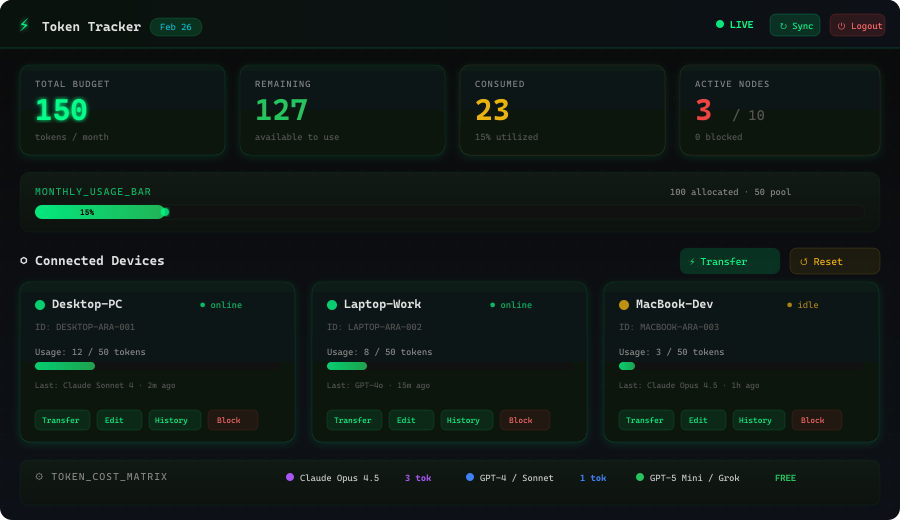
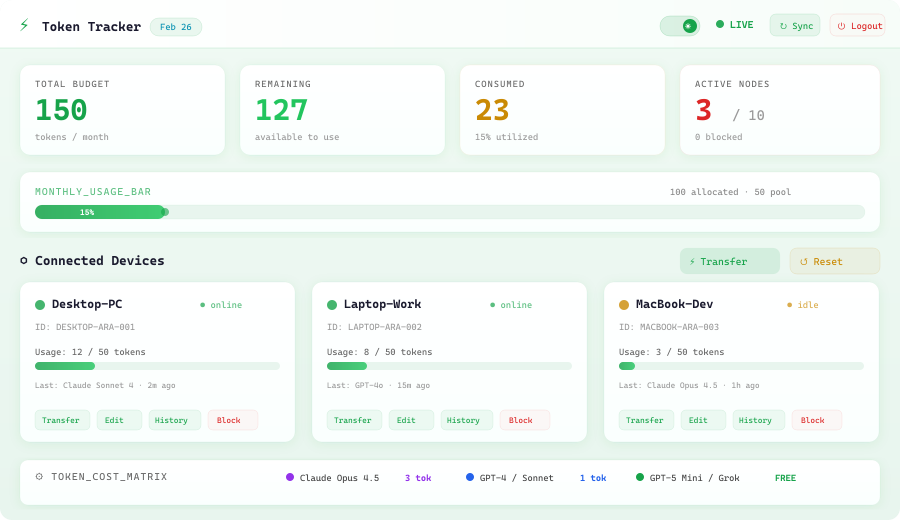
Beautiful React dashboard with dark & light themes |
| 🔄 Token Transfers |
Move unused tokens between devices instantly |
| 🏷️ Model-Aware Pricing |
Claude Opus 4.5 = 3 tokens, standard models = 1 token, free models = 0 |
| 📱 Multi-Device |
Track unlimited VS Code instances from one server |
| 💾 Offline Caching |
Usage is cached locally and synced when the server is reachable |
| 🎨 Dark + Light Themes |
Both modes in a professional green-accented design |
🌑 Dashboard — Dark Mode
🌕 Dashboard — Light Mode
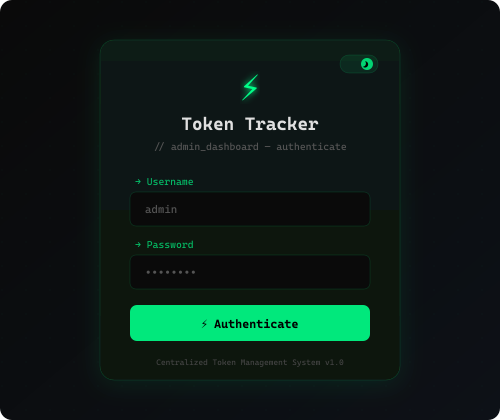
🔐 Secure Login
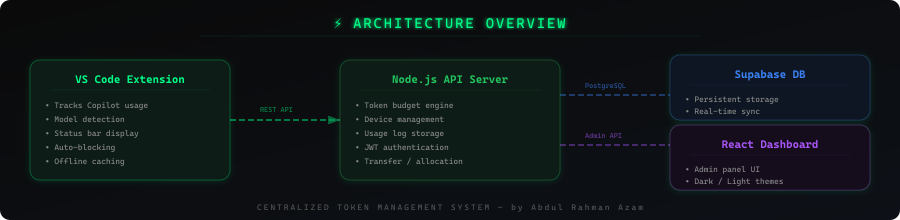
🏗️ Architecture
🚀 Quick Start
1. Install the Extension
- Search "Token Tracker" in VS Code Extensions
- Or install from the Marketplace
2. Set Up the Server
# Clone & install
cd backend
npm install

# Configure .env with your Supabase credentials
cp .env.example .env

# Start
node server.js
- Open Command Palette →
Token Tracker: Configure Server URL
- Enter your server URL (default:
http://192.168.100.6:3000)
4. Launch the Dashboard
cd dashboard
npm install && npm run dev
Open http://localhost:5173 → Login with admin credentials → Manage!
🔄 Changing Your Token Key
If you need to switch to a different token key (e.g., after regenerating keys on the dashboard):
- Open Command Palette (
Ctrl+Shift+P / Cmd+Shift+P)
- Run:
Token Tracker: Remove Token Key & Reset
- Confirm the deactivation
- Run:
Token Tracker: Enter Token Key
- Paste your new token key from the dashboard
Your extension will be reactivated with the new token and allocation.
⚙️ Extension Commands
| Command |
Description |
Token Tracker: Show Balance |
View current token usage & remaining balance |
Token Tracker: Sync with Server |
Force sync with the central server |
Token Tracker: Show Usage History |
View recent Copilot usage log |
Token Tracker: Configure Server URL |
Set the tracking server endpoint |
🏷️ Token Cost Matrix
| Model |
Cost |
| 🟣 Claude Opus 4.5 |
3 tokens |
| 🔵 GPT-4 / Claude Sonnet / Others |
1 token |
| 🟢 GPT-5 Mini / Grok Code Fast |
FREE |
🔧 Extension Settings
| Setting |
Default |
Description |
tokenTracker.serverUrl |
http://192.168.100.6:3000 |
Central server URL |
tokenTracker.enabled |
true |
Enable/disable tracking |
tokenTracker.showStatusBar |
true |
Show balance in status bar |
tokenTracker.blockOnLimitReached |
true |
Block Copilot at limit |
📦 Tech Stack
- Extension: TypeScript · VS Code API
- Server: Node.js · Express · JWT
- Database: Supabase (PostgreSQL)
- Dashboard: React 18 · Vite · Tailwind-inspired CSS
- Themes: CSS custom properties with dark/light toggle
👨💻 Publisher
Abdul Rahman Azam
Developed as a centralized solution for managing AI coding assistant costs across multiple development workstations.
Made with ⚡ by Abdul Rahman Azam
Token Tracker v2.1.1 · MIT License

