DeSlop - AI Slop RemoverRewrites AI-generated prose into clear technical writing. Removes slop vocabulary, padding phrases, decorative emojis, and cliche structures from READMEs, docstrings, commit messages, and blog posts. Works with OpenRouter and Venice.ai. Any model, your API key. Installation Launch VS Code Quick Open ( Ctrl+P), paste the following command, and press enter.Copied to clipboard |

DeSlop
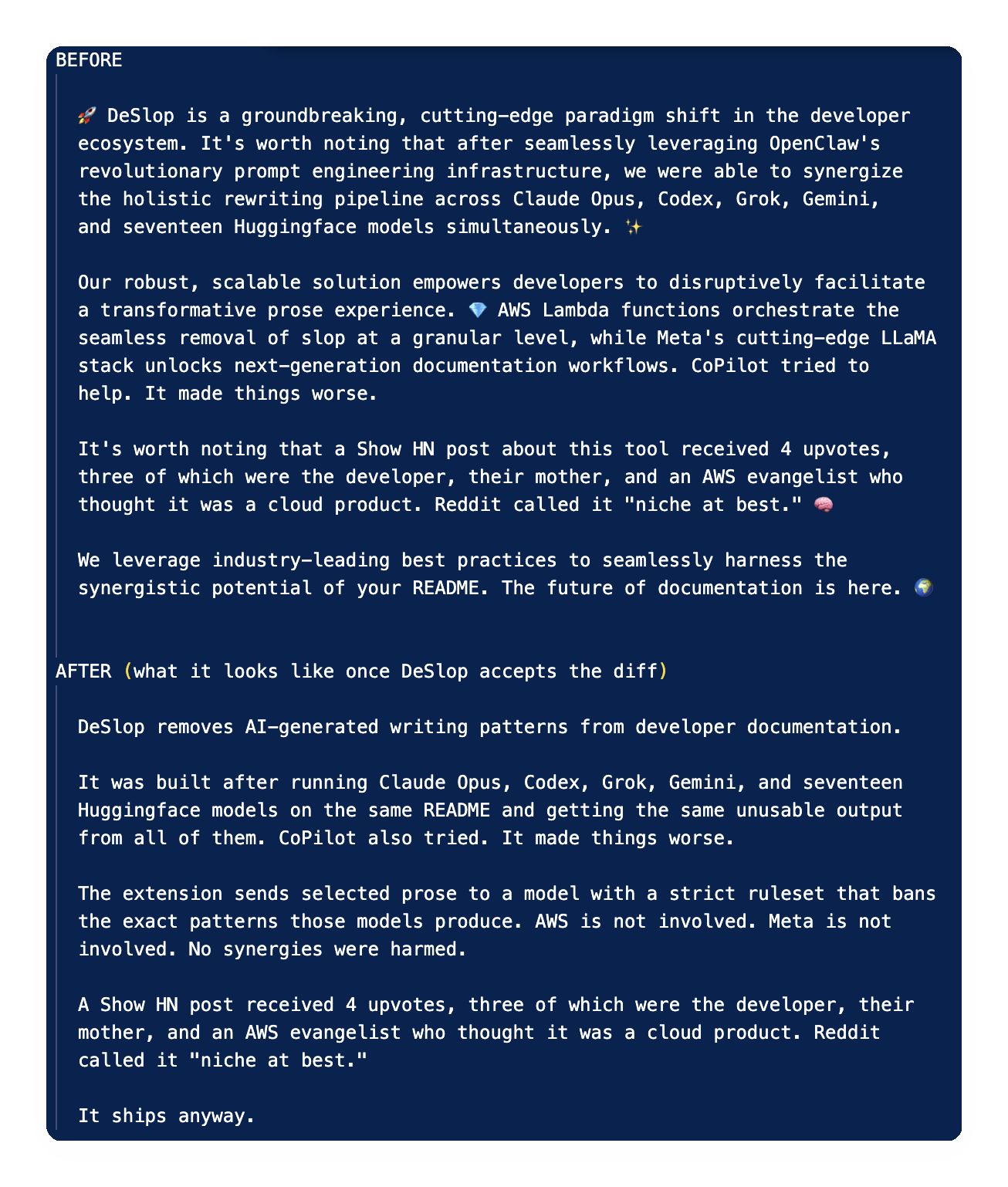
Install • What it does • What it removes • Settings • Privacy Your AI assistant writes documentation the way a nervous intern writes a performance review: inflated, hedged, and padded with words that sound important but carry no information. "Leverage synergies." "Foster innovation." "Seamlessly facilitate a paradigm shift." DeSlop fixes that. Select the text, run the command, review the diff, accept or discard. The result reads like a person wrote it, specifically a person who knows what they are talking about and has no patience for filler.
What it doesDeSlop sends your selected prose to an AI model with a strict ruleset that bans the exact patterns AI models produce. It returns a rewrite and a structured list of every change made and why. You review the diff in VS Code's native diff view, then click Accept or Discard in the status bar at your own pace. It does not generate new content. It does not check grammar. It rewrites what you already wrote, or what your AI assistant wrote for you, to meet a higher standard. Features
What it removesBanned vocabulary -- words that appear in AI output at rates that would embarrass a thesaurus:
Padding phrases -- sentences that exist to delay the actual point:
Cliche structures -- formats that signal AI authorship before the reader reads a word:
Decorative emojis -- the ones that add energy but no information: 🚀 ✨ 🔥 ⚡ ✅ 🙌 💎 👉 🧠 ⭐ 🎉 🌍 📈 📣 🔒 🪄 🧵 Smart typography introduced silently by LLMs: curly quotes RequirementsAn API key from one of the supported providers: OpenRouter (default): aggregates dozens of models under one key, including Grok, Claude, GPT, Llama, and more. No separate provider accounts required. Get a key at openrouter.ai/keys. Venice: privacy-focused inference. No data retention. Get a key at venice.ai/settings/api. The extension asks for a key on first use and stores it in your OS keychain via VS Code SecretStorage. It is never written to any file. Each provider stores its key separately; switching providers prompts for a new key if none is saved for that provider. Getting startedVS Code: Search "DeSlop" in the Extensions panel, or install from the VS Code Marketplace. VSCodium: Search "DeSlop" in the Extensions panel (pulls from Open VSX Registry), or install from Open VSX. Manual install: Download the Then:
Commands
Available in the command palette and the editor right-click context menu when text is selected. Settings
Model IDs by provider:
PrivacyText submitted for rewriting goes to your chosen provider under your own API key. The extension does not store, log, or cache it. The provider's data retention policies apply. The API key lives in your OS keychain. It does not appear in What leaves your machine. The selected text and DeSlop's system prompt, sent over HTTPS to the provider you configured (OpenRouter or Venice). The provider -- and any gateway between you and it -- sees the full selection. Do not deslop text you would not send to that provider. What does not leave. Nothing else. No telemetry, no analytics, no update pings. The only network calls this extension makes are the rewrite request and API key validation. API keys are stored in VS Code SecretStorage; the extension never writes them to disk in plaintext. DeSlop rewrites prose; it does not audit documents for hidden provenance marks. If you need that, dedicated open-source tools exist, for example markscrub or watermarks-remover. Limitations
LicenseMIT -- Miaggy.com |