OpenEdge ABL Developer PackA curated VS Code extension pack for Progress OpenEdge ABL / 4GL developers, with language support, snippets, tooling, and productivity extensions. Installation Launch VS Code Quick Open ( Ctrl+P), paste the following command, and press enter.Copied to clipboard |

OEDP – OpenEdge ABL Developer Pack
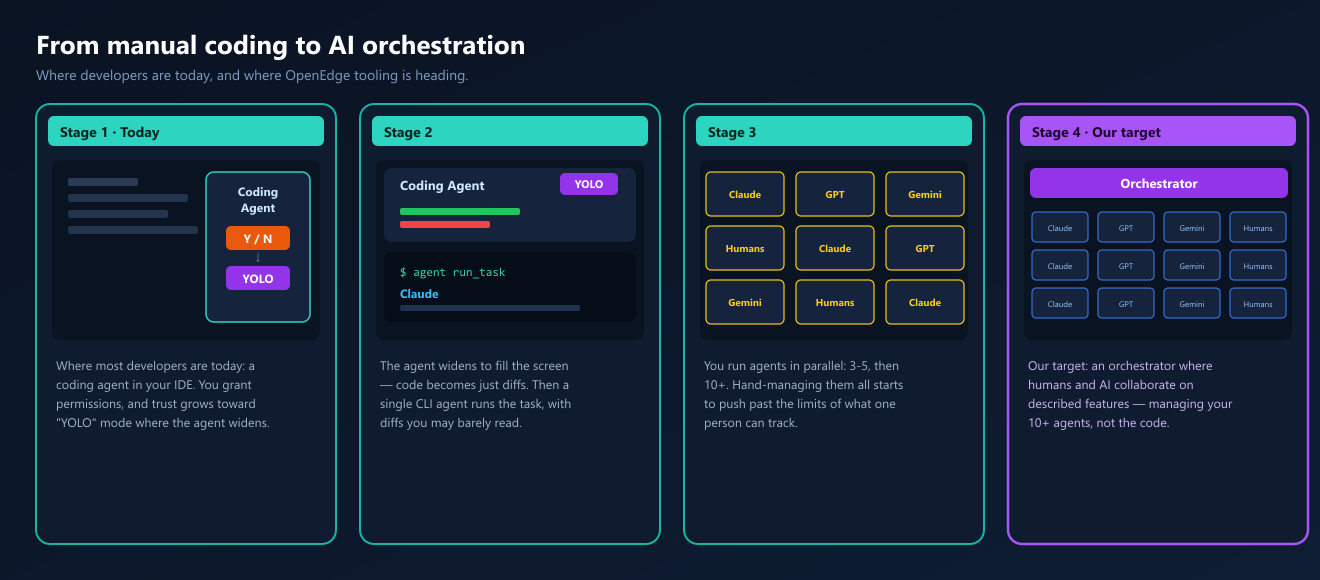
Why this pack existsIt's mid-2026. Almost everyone is writing software either by hand or side-by-side with AI — and the pace is accelerating fast. The teams at the front of the curve have already moved past "AI autocomplete." They're orchestrating their work: describing issues, and letting humans and agents drive them to done together.
In the OpenEdge world, the foundation for that next step is already in place. Progress has done the hard part: the OpenEdge ABL language server and the official OpenEdge MCP connector make ABL a first-class citizen in VS Code and across AI agents. What's missing is the operational tooling on top — database administration, PASOE management, health checks, UI design, and API generation.
That's where phase 1 starts: bringing that tooling into this environment.
Today, these tools live mainly in the UI, during development. The second stage brings them to developers working manually with AI agents inside VS Code and its forks, through the extensions in this pack. But that's not the destination. The goal is to move away from the code itself and toward a project-management foundation — where humans and AI collaborate on described features, not lines of code. To get there, the OpenEdge ecosystem still has gaps we need to close. By bringing this operational tooling to VS Code and its forks now — alongside the Progress language and MCP foundation — we make these capabilities available to agents. Together, the Progress foundation and the OEDP layer unlock stable, predictable, fully automated feature delivery for OpenEdge development.
What's insideProgress foundation
Operational tooling layer by AI4YOU
Extra developer tools
AI agent skillsThis repository contains Claude/agent skill definitions under:
The top-level Skill files are validated with Installation
CompatibilityWorks in VS Code AboutThe AI4YOU extensions in this pack are built and published by KH-IT BV.
OEDP is the short brand name. The Marketplace display name is OpenEdge ABL Developer Pack for discoverability. |