⚡ Overview
Stop creating messy monolithic commits like git commit -m "fix stuff and updates".
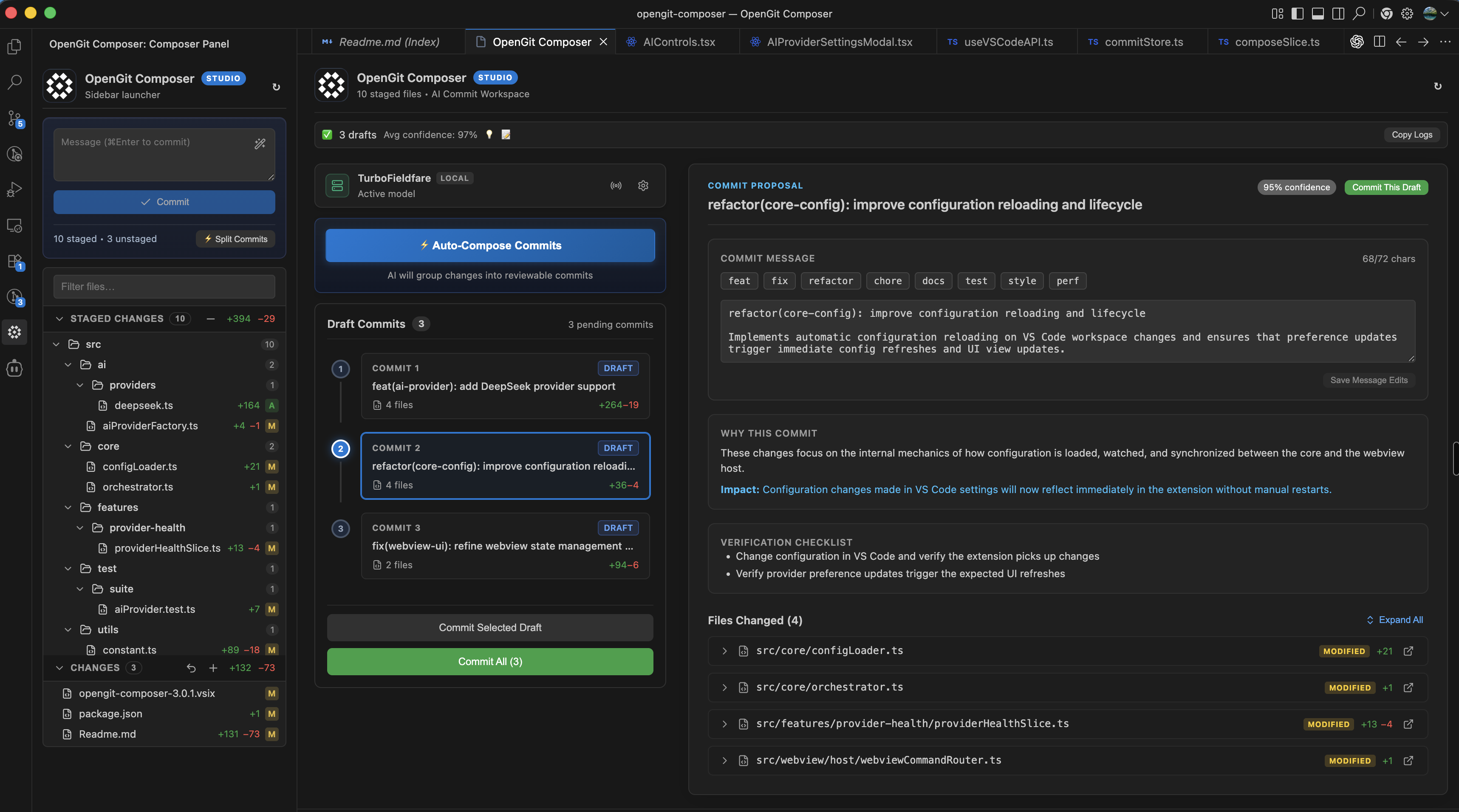
OpenGit Composer analyzes your staged changes, understands the intent across multi-file diffs, intelligently groups related changes into logical atomic commits, and drafts high-quality commit messages with rationale.
Bring your own API keys for leading cloud models (OpenAI, Anthropic Claude, Google Gemini, DeepSeek, Groq, Kimi), or run 100% offline & free using local models with Ollama, LM Studio, or TurboFieldfare.
🛠️ Universal IDE Compatibility
OpenGit Composer works out of the box with your favorite VS Code-compatible editors:
- Visual Studio Code (Desktop & Web)
- Cursor
- Windsurf
- Google AntiGravity IDE
- VSCodium
- Gitpod & GitHub Codespaces
Installable directly from the VS Code Marketplace or Open VSX Registry.
💡 The Problem vs The OpenGit Solution
| Traditional Chaotic Git Workflow ❌ |
With OpenGit Composer ⚡ |
| 15 modified files squashed into one massive, unreviewable commit |
Staged diffs automatically decomposed into isolated, atomic commits |
Vague messages (git commit -m "updates") that ruin git blame |
Clear, semantic messages (feat(auth): ..., fix(ui): ...) with reasoning |
Tedious manual staging (git add -p) hunk-by-hunk |
One-click auto-composition with full visual review and batch commit |
| Sending private credentials or API keys to the cloud unknowingly |
Pre-flight regex redaction and file exclusion globs protect your secrets |
| Locked into a single proprietary LLM subscription |
Complete freedom: OpenAI, Claude, Gemini, DeepSeek, Groq, Ollama, LM Studio |
| Recurring $100+/year paywalls for basic commit assistance |
100% Free & Open-Source (GPL-3.0) forever |
✨ Standout Features & Superpowers
🔒 1. First-Class 100% Offline Local Models (Air-Gapped Ready)
- Zero data leaves your machine: Connects directly to local model servers running on
localhost (LM Studio, Ollama, TurboFieldfare, vLLM, llama.cpp).
- Free compute: Run state-of-the-art open models like Qwen 2.5 Coder, DeepSeek-R1, Llama 3.3, and Mistral with zero API subscription costs.
- Enterprise compliance: Ideal for defense, finance, healthcare, and air-gapped corporate workstations with strict privacy policies.
🔄 2. Multi-API Key Pooling & Automatic Failover
- Bypass 429 rate limits: Save multiple API keys for any cloud provider (Google Gemini, OpenAI, Claude, etc.).
- Smart load balancing: Distributes requests across your key pool with round-robin scheduling.
- Instant failover: When an HTTP 429 rate-limit or quota error occurs, OpenGit Composer instantly rotates to the next available key so your workflow is never blocked.
🧠 3. Semantic Multi-Commit Decomposition
- Beyond single-message generators: Rather than summarizing 20 files into one giant commit, OpenGit Composer inspects diff semantics and separates them into logical, bite-sized commits.
- Context-aware clustering: Groups backend models, database migrations, frontend UI components, tests, and documentation into distinct atomic commits.
🖥️ 4. Interactive Visual Studio & Diff Viewer
- Integrated Monaco Diff Viewer: Inspect file changes side-by-side or inline directly within the VS Code workspace.
- Full control before committing: Edit generated commit titles, tweak explanations, drag-and-drop or reassign files, and reorder commit sequencing.
- Batch or selective execution: Commit individual drafts with a single click, or commit all planned drafts in sequential order.
🛡️ 5. Client-Side Secret Redaction & File Exclusions
- On-the-fly regex redaction: Automatically detects and strips API keys, JWT tokens, database connection strings, and passwords before diffs ever reach an LLM.
- Custom exclusion globs: Exclude
.env*, *.pem, proprietary internal files, or lockfiles from prompt payloads.
- Zero telemetry: No analytics, no tracking pixels, and no remote proxy servers. API keys are encrypted in OS-level SecretStorage.
📝 6. Standards-Compliant Commit Conventions
Format generated commits according to your project's exact guidelines:
- Conventional Commits (
feat(auth): ..., fix(api): ..., chore(deps): ...)
- Angular Convention
- Gitmoji (
✨ feat: ..., 🐛 fix: ..., ♻️ refactor: ..., 📝 docs: ...)
- Custom Patterns: Configure custom prefixes, maximum subject line lengths, and breaking change notations.
🤖 Supported Providers & Model Matrix
OpenGit Composer provides universal support for all leading cloud and local AI runtimes:
1. OpenAI
- Frontier & Next-Gen:
gpt-6-astra, gpt-5.4
- Coding & Reasoning:
gpt-5.3-codex, o3-mini
- Standard & Production:
gpt-4o, gpt-4o-mini
2. Anthropic Claude
- Frontier & Next-Gen:
claude-opus-5, claude-sonnet-4-6, claude-haiku-4-5
- Hybrid Reasoning & Production:
claude-3-7-sonnet, claude-3-5-haiku
3. Google Gemini
- Next-Gen Flash & Pro:
gemini-3.8-flash, gemini-3.6-flash, gemini-3.1-pro
- Current Pro & Flash:
gemini-2.5-pro, gemini-2.5-flash
- Legacy Compatibility:
gemini-1.5-pro, gemini-1.5-flash
4. Groq (Ultra-Fast Inference)
- Production & Instant:
llama-3.3-70b-versatile, llama-3.1-8b-instant
- OpenAI Open-Weight:
openai/gpt-oss-120b, openai/gpt-oss-20b
- Qwen & Reasoning Distills:
qwen/qwen3.8-27b, qwen/qwen3.6-27b, deepseek-r1-distill-llama-70b, qwen-qwq-32b
- Groq Compounds & MoE:
groq/compound, groq/compound-mini, mixtral-8x7b-32768
5. DeepSeek
- Direct Cloud API:
deepseek-flash (DeepSeek-V4.1-Flash), deepseek-v4-pro (DeepSeek-V4-Pro-0813, thinking & non-thinking)
6. Moonshot AI / Kimi
- Flagship & Thinking:
kimi-k2.5, kimi-k2-thinking, kimi-k2, moonshot-v1-8k
7. Local Offline Runtimes
- LM Studio:
http://localhost:1234/v1 (supports all loaded GGUF models)
- Ollama:
http://localhost:11434 (auto-detects models via ollama list)
- Custom Endpoints: TurboFieldfare, vLLM, llama.cpp, LocalAI
🚀 Quick Start
1. Installation
Via VS Code / Cursor / Windsurf Terminal:
code --install-extension 0xshikhar.opengit-composer
Via Extensions Marketplace:
Search for OpenGit Composer in the Extensions sidebar (Ctrl+Shift+X / Cmd+Shift+X).
Via Open VSX (for VSCodium, AntiGravity IDE, Gitpod):
Install directly from Open VSX.
2. Workflow in 4 Steps
- Stage your files in Git as usual (
git add . or using the VS Code Source Control panel).
- Open OpenGit Composer from the Activity Bar icon.
- Select your provider in Settings (⚙ icon):
- Choose Local Runtimes (LM Studio / Ollama) for 100% private, free offline inference.
- Choose Cloud Providers (OpenAI, Claude, Gemini, DeepSeek, Groq, Kimi) and paste your API key(s).
- Click ⚡ Auto-Compose Commits (or press
Cmd+Shift+P -> OpenGit Composer: Auto-Compose Semantic Commits).
- Review the proposed atomic drafts, fine-tune any messages if you like, and click Commit All!
⚙️ Configuration & Settings
Fine-tune OpenGit Composer via VS Code Settings (Cmd+, / Ctrl+, and search for commitComposer):
| Setting |
Default |
Description |
commitComposer.aiProvider |
"openai" |
AI provider (openai, anthropic, gemini, groq, deepseek, lmstudio, kimi, ollama) |
commitComposer.apiKey |
"" |
Primary API key for the selected cloud provider |
commitComposer.model |
"" |
Model identifier (leave empty for provider recommended default) |
commitComposer.ollamaHost |
"http://localhost:11434" |
Server URL for local Ollama daemon |
commitComposer.lmStudioHost |
"http://localhost:1234/v1" |
Server URL for local LM Studio / OpenAI-compatible endpoint |
commitComposer.customLocalEndpoints |
[] |
Array of custom endpoint profiles (TurboFieldfare, vLLM, etc.) |
commitComposer.commitFormat |
"conventional" |
Commit style: conventional, angular, gitmoji, or custom |
commitComposer.maxSubjectLength |
72 |
Max character length for commit subject lines |
commitComposer.splitThreshold |
3 |
File count threshold above which diffs are decomposed into multiple commits |
commitComposer.excludePatterns |
[] |
Glob patterns excluded from AI input (e.g. ["*.env*", "**/secrets/**"]) |
commitComposer.redactPatterns |
[] |
Regex patterns redacted from diff text before sending to LLM |
commitComposer.debugMode |
false |
Enables verbose diagnostic output in the Output channel |
⌨️ Command Palette Reference
Press Cmd+Shift+P (macOS) or Ctrl+Shift+P (Windows/Linux) to run:
OpenGit Composer: Auto-Compose Semantic Commits — Open composer and analyze staged changes.OpenGit Composer: Show Debug Logs — View diagnostics, request metadata, and latency logs.OpenGit Composer: Copy Sanitized Logs — Copy sanitized logs (keys stripped) for troubleshooting.
❓ Frequently Asked Questions
What can I do with OpenGit Composer, and how do I report bugs or share ideas?
OpenGit Composer gives you complete control over your git commit workflow: intelligent multi-file decomposition, conventional commit generation, 100% offline local inference (LM Studio & Ollama), and multi-key pooling.
Since OpenGit Composer is a community-driven open-source project, there may still be occasional bugs or edge cases here and there. Feel free to test out everything! If you have any feedback, feature ideas, or encounter bugs, you are warmly invited to:
We actively monitor issues and welcome all community contributions!
How does 100% local inference work with LM Studio and Ollama?
When you select LM Studio or Ollama, OpenGit Composer connects directly to your localhost server (e.g., http://localhost:1234/v1 or http://localhost:11434). Your source code diffs and commit messages never leave your machine, making it completely compliant for air-gapped workstations and strict corporate security policies.
How does the multi-key pool prevent 429 rate limits?
Cloud providers frequently enforce requests-per-minute (RPM) or tier limits. With OpenGit Composer, you can save multiple API keys for any provider. The extension automatically load-balances calls across your keys using round-robin rotation and instantly rotates to the next key upon encountering an HTTP 429 rate limit error.
Where are my API keys stored?
All API keys are encrypted and stored in your operating system's native keychain using VS Code's native SecretStorage API (macOS Keychain, Windows Credential Manager, or Linux Secret Service). They are never written to plain text config files or shared with any telemetry servers.
Crafted with care for developers who want clean, meaningful git history.
| |









