File IconsAdds icons for files that are not recognized by Solution Explorer |


File Icons for Visual Studio
Make files easier to recognize in Solution Explorer. File Icons adds distinctive icons for hundreds of file types that Visual Studio would otherwise display with a generic or misleading icon. It works automatically after installation and requires no configuration.
Highlights
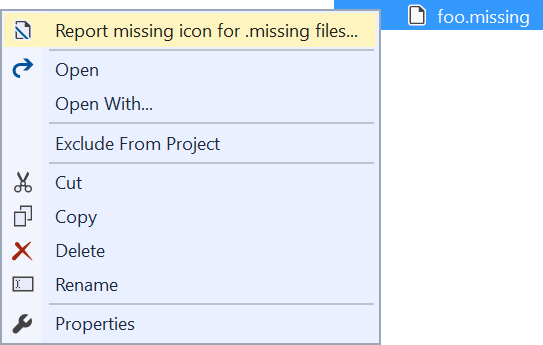
Browse the complete list of supported file extensions. InstallInstall File Icons from the Visual Studio Marketplace. Preview builds are also available from Open VSIX. Restart Visual Studio after installing or updating the extension so all icon associations are loaded. Request an iconRight-click an unrecognized file in Solution Explorer and select Report missing icon. The command appears only when the selected file type has no registered icon.
You can also submit an icon request on GitHub. Before opening a request:
ContributeIcon associations and artwork are defined in Read the contribution guidelines for artwork, licensing, and Visual Studio image catalog requirements. To build locally:
After changing The build verifies that generated files are current, monikers are valid, custom image IDs are unique, assets are referenced, and required source and license metadata is present. MaintenanceMaintainers can rank coverage gaps from an aggregate telemetry export without adding that export to the repository: Credits and licenseFile Icons is licensed under the Apache License 2.0. Some artwork originated in the vscode-icons project. See Third-Party Notices for attribution and license details. |