Sakura Nova
A cosmic cherry-blossom theme for Visual Studio Code.
Five hand-tuned variants — four dark, one light — built around a single sakura-pink accent,
with full semantic highlighting and a matching terminal palette.




Install · Variants · Preview · Palette · Settings · Contributing
Published on the Marketplace as Sakura Nova New — extension ID zsn-Rose.sakura-nova-new.
Contents
Highlights
- Five variants, one identity. Four dark (Dark, Dark Pro, Warm, Dark Red) and one light, all sharing the
#FF5DA2 sakura accent, so switching variants never changes the feel of the UI chrome.
- Semantic highlighting everywhere. Enabled in every variant, with per-variant
semanticTokenColors.
- Bracket pair colorization. Three nesting levels plus a dedicated unexpected-bracket color.
- A terminal that matches. A full 16-color ANSI palette for each variant.
- Tuned token rules for JavaScript, TypeScript, Python, Rust, Go and many more.
- Runs anywhere. A color theme is just data, so it works in Restricted Mode and in virtual workspaces such as vscode.dev and github.dev.
Install
From the Marketplace — open the Extensions view (Ctrl+Shift+X / Cmd+Shift+X), search for Sakura Nova New, and hit Install. A few similarly named sakura themes exist on the Marketplace, so if you want to be certain, the exact extension ID is zsn-Rose.sakura-nova-new.
From Quick Open — press Ctrl+P / Cmd+P, then run:
ext install zsn-Rose.sakura-nova-new
From the command line:
code --install-extension zsn-Rose.sakura-nova-new
From a .vsix file — build one yourself, then install it:
code --install-extension sakura-nova-new-<version>.vsix
Then pick a variant with Ctrl+K Ctrl+T / Cmd+K Cmd+T, or run Preferences: Color Theme from the Command Palette.
Requirements — VS Code 1.77.0 or later. Works out of the box in restricted/untrusted workspaces and virtual workspaces such as vscode.dev and github.dev, since a color theme is just data.
Variants
All five variants share the same accent; they differ in canvas, syntax emphasis, and contrast.
| Theme |
Base |
Editor background |
Best for |
| Sakura Nova Dark |
vs-dark |
#100E23 |
The default. Violet keywords, mint strings, deep midnight canvas. |
| Sakura Nova Dark Pro |
vs-dark |
#100E23 |
Higher-contrast take — pink keywords, cooler variables, extra UI polish. |
| Sakura Nova Warm |
vs-dark |
#231A2D |
Softer plum background that takes the blue edge off long sessions. |
| Sakura Nova Dark Red |
vs-dark |
#100E23 |
Rose-forward accents with italic variables. |
| Sakura Nova Light |
vs |
#F8F8F2 |
Daylight variant, tuned for contrast rather than washed-out pastels. |
Use the name from the first column as the value of workbench.colorTheme.
Preview
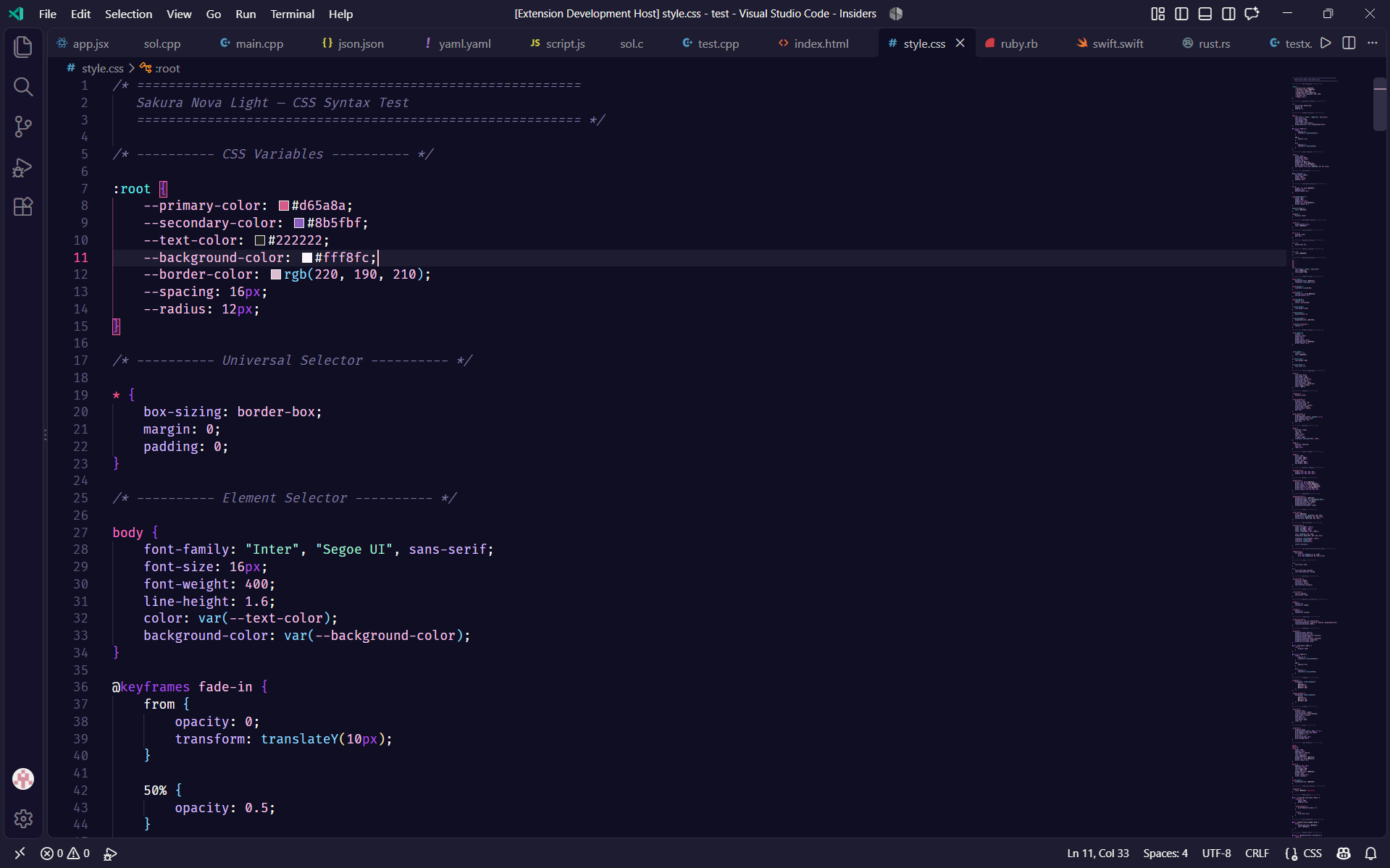
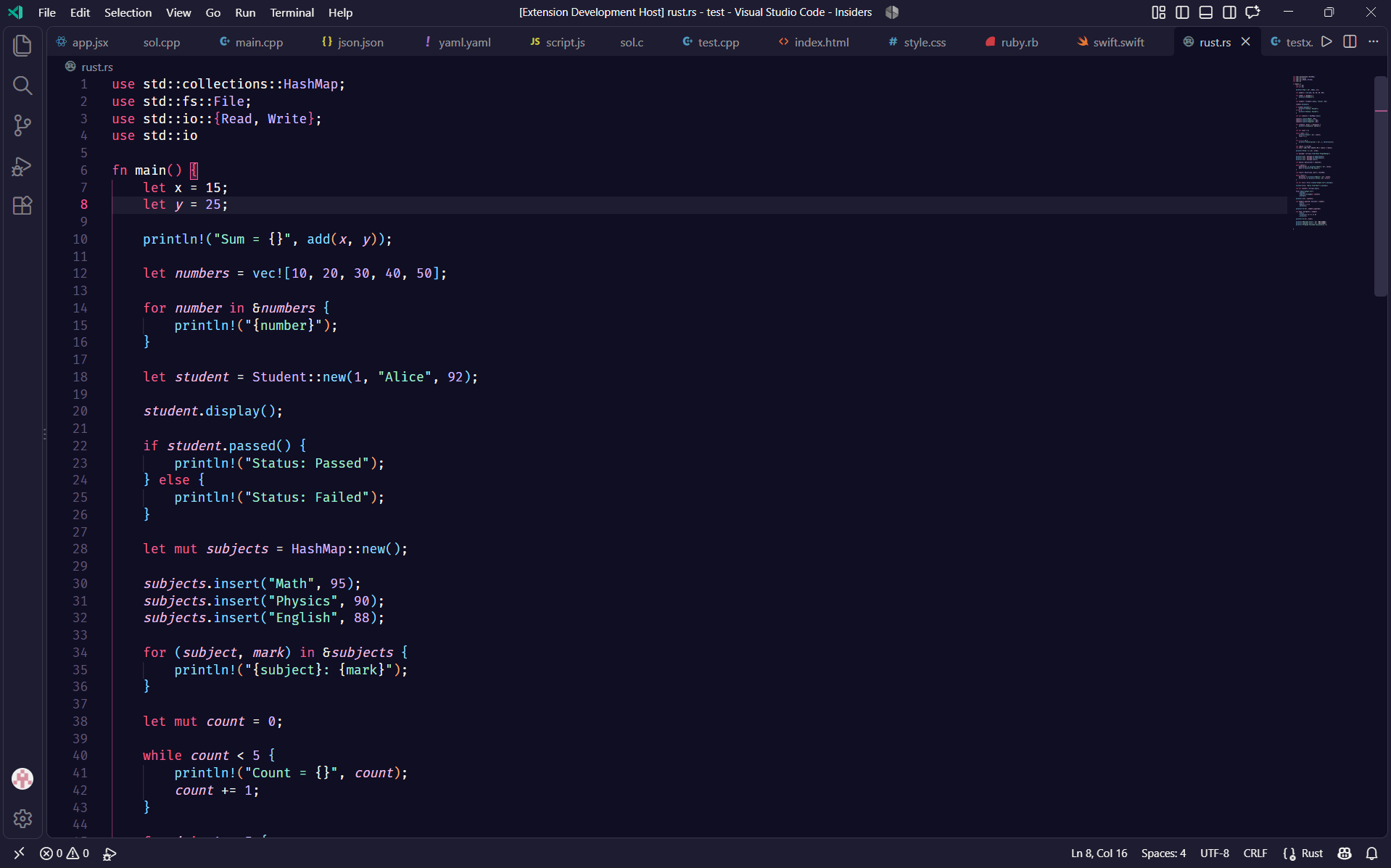
Sakura Nova Dark

#100E23 background · 
#AD50EC keyword · 
#A1EFD3 string · 
#FFC0CB cursor
Sakura Nova Dark Pro
#100E23 background · 
#FF75C3 keyword · 
#ADE292 string · #FFC0CB cursor
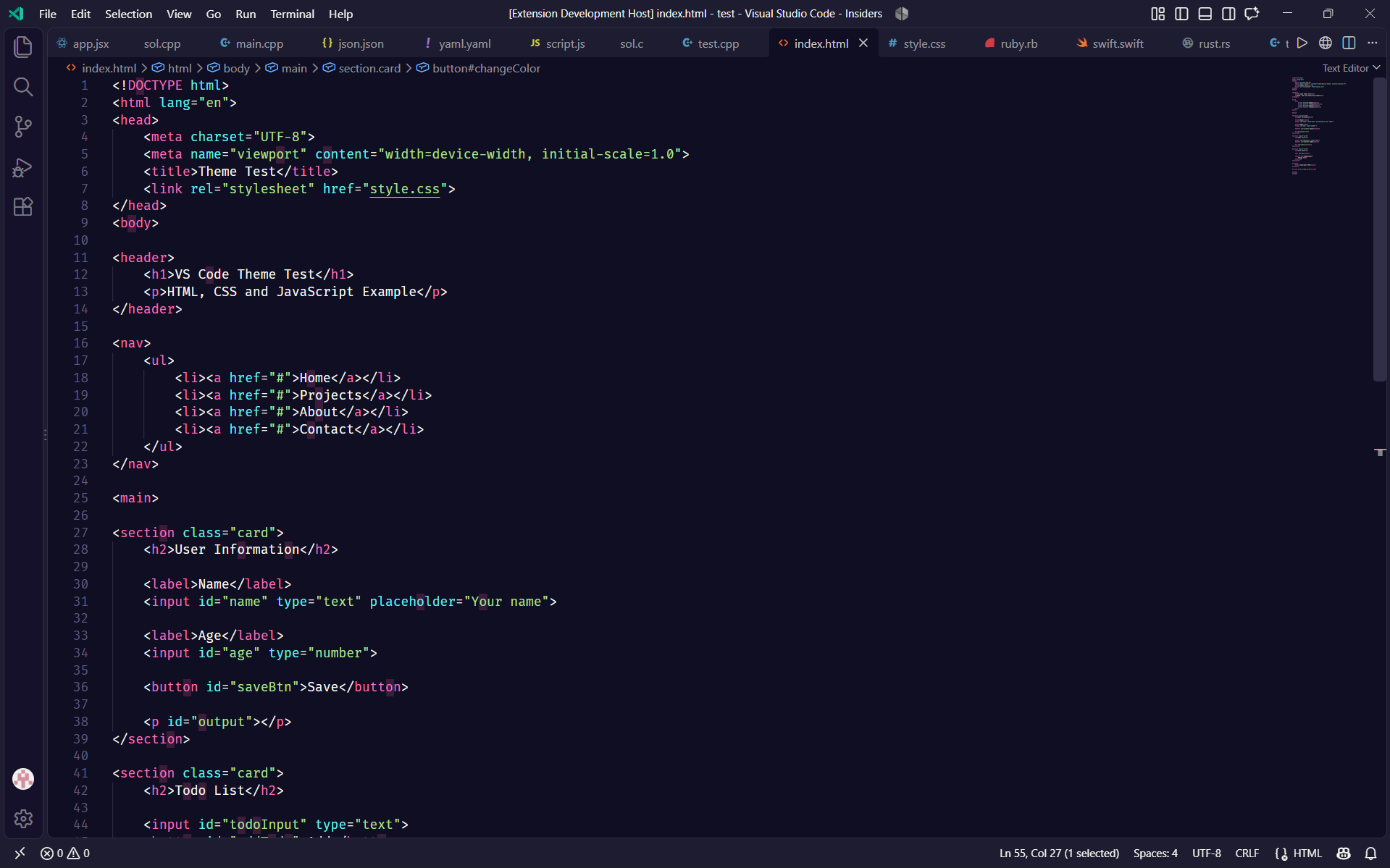
Sakura Nova Warm

#231A2D background · #FF75C3 keyword · #ADE292 string · #FFC0CB cursor
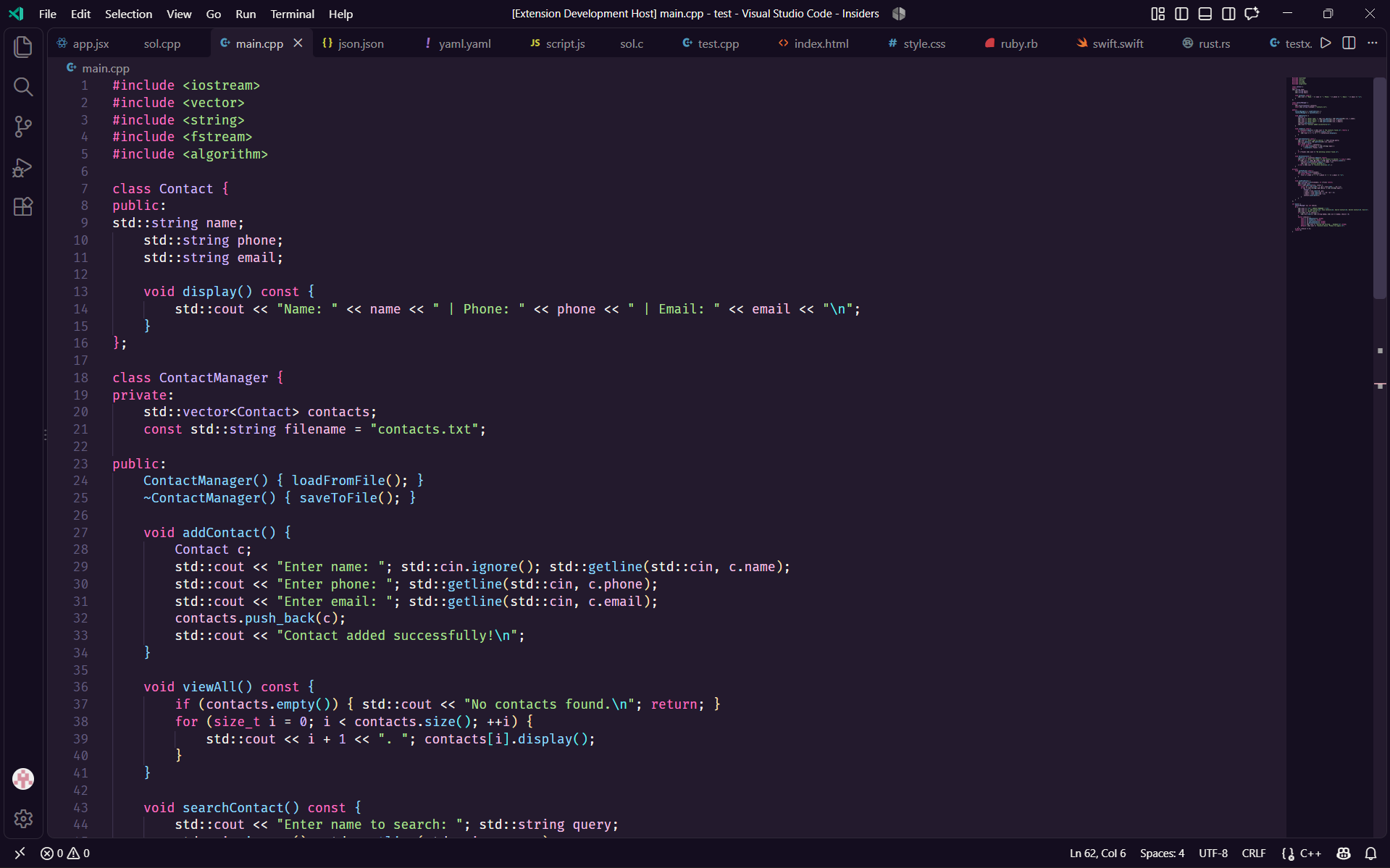
Sakura Nova Dark Red
#100E23 background · 
#F2608F keyword · #A1EFD3 string · 
#FF5DA2 cursor
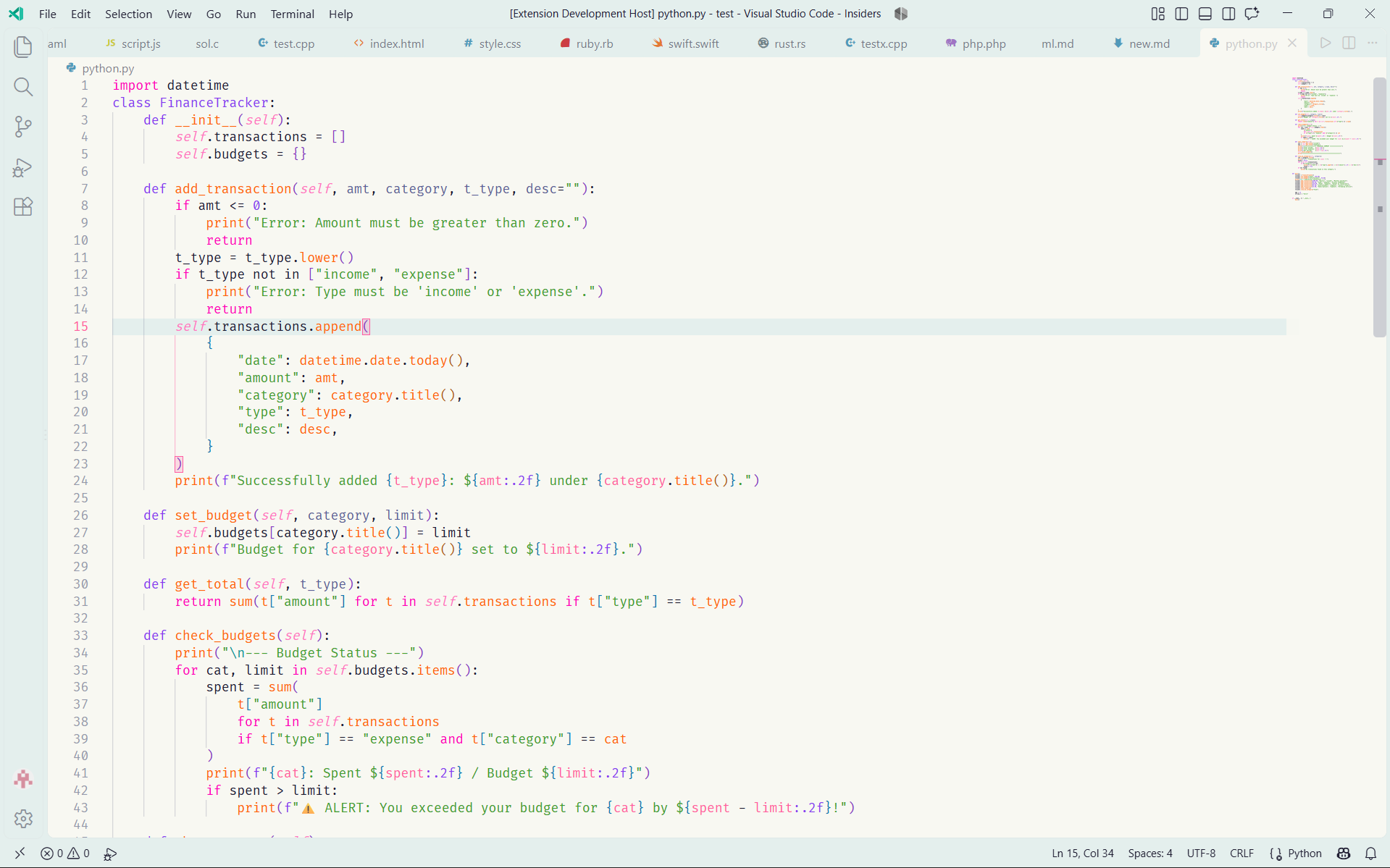
Sakura Nova Light

#F8F8F2 background · 
#FF00BB keyword · 
#40A02B string · #FF5DA2 cursor
Color palette
Every variant is built from the same underlying palette — only which UI role gets which color changes. The tables below mirror the values in the theme JSON files.
Brand core
The accent is shared across all five variants, so switching between them never changes the feel of the UI chrome.
|
Name |
Hex |
Role |
|
Blossom |
#FF75C3 |
Keywords & headings in Pro / Warm |
|
Sakura |
#FF5DA2 |
Focus border, badges, active line number, tab indicator |
 |
Rose |
#F02E6E |
Errors, deleted-file indicator & Warm's buttons |
 |
Nova Green |
#2CE592 |
Added-file indicator & terminal green (four dark variants) |
 |
Comet |
#1DA0E2 |
Modified-file indicator & terminal blue (four dark variants) |
|
Petal |
#FFC0CB |
Cursor in Dark, Dark Pro & Warm |
|
Nova Violet |
#AD50EC |
Keywords in Dark |
 |
Lavender |
#D4BFFF |
Numbers, constants, types |
 |
Nova Blue |
#91DDFF |
Functions |
 |
Aqua |
#63F2F1 |
Attributes |
|
Mint |
#A1EFD3 |
Strings |
 |
Amber |
#FFB378 |
Terminal yellow; bracket accents in some dark variants |
 |
Honey |
#FFE6B3 |
Warnings, conflicts & bright terminal yellow (four dark variants) |
 |
Dusk |
#7F789F |
Comments, line numbers, muted UI |
|
Moonlight |
#F8F8F2 |
Foreground |
|
Midnight |
#100E23 |
Editor background |
 |
Nebula |
#1E1C31 |
Elevated surfaces, line highlight |
Interface — editor, chrome, accent, cursor and selection per variant
| Theme |
Editor |
Chrome |
Foreground |
Accent |
Cursor |
Selection |
| Dark |
#100E23 |
#16112A |
#F8F8F2 |
#FF5DA2 |
#FFC0CB |
#FF5DA2 @ 32% |
| Dark Pro |
#100E23 |
#16112A |
#F8F8F2 |
#FF5DA2 |
#FFC0CB |
#FF5DA2 @ 32% |
| Warm |
#231A2D |
#140D1F |
#F8F8F2 |
#FF5DA2 |
#FFC0CB |
#FF5DA2 @ 32% |
| Dark Red |
#100E23 |
#1E1C31 |
#F8F8F2 |
#FF5DA2 |
#FF5DA2 |
#FF5DA2 @ 32% |
| Light |
#F8F8F2 |
#E4EFED |
#1E1C31 |
#FF5DA2 |
#FF5DA2 |
#FF5DA2 @ 32% |
Syntax — token colors per variant
| Token |
Dark |
Dark Pro |
Warm |
Dark Red |
Light |
| Comment (italic) |
#7F789F |
#7F789F |
#7F789F |
#7F789F |
#9A91A0 |
| Keyword |
#AD50EC |
#FF75C3 |
#FF75C3 |
#F2608F |
#FF00BB |
| String |
#A1EFD3 |
#ADE292 |
#ADE292 |
#A1EFD3 |
#40A02B |
| Number / constant |
#D4BFFF |
#D4BFFF |
#D4BFFF |
#D4BFFF |
#8839EF |
| Function |
#91DDFF |
#91DDFF |
#91DDFF |
#91DDFF |
#FE640B |
| Class / type |
#D4BFFF |
#D4BFFF |
#D4BFFF |
#D4BFFF |
#8839EF |
| Variable / property |
#F5C2E7 |
#CFEFFF |
#F5C2E7 |
#F5C2E7 (italic) |
#5B5F97 |
| Operator |
#F8F8F2 |
#F8F8F2 |
#F8F8F2 |
#F8F8F2 |
#1E1C31 |
| Tag |
#FF5F94 |
#FF5F94 |
#FF5F94 |
#FF5F94 |
#F02E6E |
| Attribute |
#63F2F1 |
#63F2F1 |
#63F2F1 |
#63F2F1 |
#1E66F5 |
| Bracket pair 1 / 2 / 3 |
#AD50EC #91DDFF #FFE6B3 |
#FF75C3 #91DDFF #F4D0D0 |
#FF75C3 #91DDFF #FFE6B3 |
#F2608F #91DDFF #FFB378 |
#8A38C4 #0E76B1 #B25A17 |
Terminal (ANSI) — 16-color palette per variant
Sakura Nova Dark
|
Black |
Red |
Green |
Yellow |
Blue |
Magenta |
Cyan |
White |
| Normal |
#383648 |
#FF5F94 |
#2CE592 |
#FFB378 |
#1DA0E2 |
#AD50EC |
#87DFEB |
#8D91A8 |
| Bright |
#7F789F |
#F2608F |
#A1EFD3 |
#FFE6B3 |
#91DDFF |
#FF5DA2 |
#63F2F1 |
#F8F8F2 |
Sakura Nova Dark Pro
|
Black |
Red |
Green |
Yellow |
Blue |
Magenta |
Cyan |
White |
| Normal |
#383648 |
#F02E6E |
#2CE592 |
#FFB378 |
#1DA0E2 |
#FF75C3 |
#87DFEB |
#8D91A8 |
| Bright |
#7F789F |
#F2608F |
#A1EFD3 |
#FFE6B3 |
#91DDFF |
#FF5DA2 |
#63F2F1 |
#F8F8F2 |
Sakura Nova Warm
|
Black |
Red |
Green |
Yellow |
Blue |
Magenta |
Cyan |
White |
| Normal |
#383648 |
#F02E6E |
#2CE592 |
#FFB378 |
#1DA0E2 |
#FF75C3 |
#87DFEB |
#8D91A8 |
| Bright |
#7F789F |
#F2608F |
#A1EFD3 |
#FFE6B3 |
#91DDFF |
#FF5DA2 |
#63F2F1 |
#F8F8F2 |
Sakura Nova Dark Red
|
Black |
Red |
Green |
Yellow |
Blue |
Magenta |
Cyan |
White |
| Normal |
#383648 |
#F02E6E |
#2CE592 |
#FFB378 |
#1DA0E2 |
#F2608F |
#87DFEB |
#8D91A8 |
| Bright |
#7F789F |
#F2608F |
#A1EFD3 |
#FFE6B3 |
#91DDFF |
#FF5DA2 |
#63F2F1 |
#F8F8F2 |
Sakura Nova Light
|
Black |
Red |
Green |
Yellow |
Blue |
Magenta |
Cyan |
White |
| Normal |
#1E1C31 |
#E01055 |
#40A02B |
#B25A17 |
#0E76B1 |
#8A38C4 |
#0B7E7E |
#807F88 |
| Bright |
#6B708D |
#F02E6E |
#1CA373 |
#C28200 |
#0096D8 |
#FF4393 |
#0D9F9E |
#1E1C31 |
Recommended settings
Sakura Nova ships semantic highlighting and bracket-pair colors, so both are worth leaving on. Drop this into your settings.json:
{
  "workbench.colorTheme": "Sakura Nova Dark",

  // Semantic tokens are defined for all five variants
  "editor.semanticHighlighting.enabled": true,

  // Bracket pair colors are theme-defined (3 levels + unexpected)
  "editor.bracketPairColorization.enabled": true,
  "editor.guides.bracketPairs": "active",

  // Pairs well with the theme's italics
  "editor.fontFamily": "'JetBrains Mono', 'Fira Code', 'Cascadia Code', monospace",
  "editor.fontLigatures": true,
  "editor.fontSize": 14,
  "editor.lineHeight": 1.6,

  "editor.cursorBlinking": "phase",
  "editor.cursorSmoothCaretAnimation": "on",
  "terminal.integrated.fontFamily": "'JetBrains Mono', monospace"
}
Follow your OS appearance — switch between a dark and the light variant automatically:
{
  "window.autoDetectColorScheme": true,
  "workbench.preferredDarkColorTheme": "Sakura Nova Dark",
  "workbench.preferredLightColorTheme": "Sakura Nova Light"
}
Note on italics — comments are italic in every variant. Dark Red goes further and italicizes variables and properties throughout; Dark Pro and Warm add a subtle italic to semantic parameters only, visible once editor.semanticHighlighting.enabled is on as recommended above. If your font has no true italic, pick one that does (JetBrains Mono, Cascadia Code, Fira Code, Victor Mono) or turn italics off in Customizing below.
Customizing
Scope your overrides to a single variant so they don't leak into other themes.
{
  "workbench.colorCustomizations": {
    "[Sakura Nova Dark]": {
      "editor.background": "#0B0A1A",
      "editorCursor.foreground": "#FF5DA2",
      "sideBar.background": "#0B0A1A"
    }
  },

  "editor.tokenColorCustomizations": {
    "[Sakura Nova Dark]": {
      // Turn off italic comments
      "comments": { "fontStyle": "" },
      "textMateRules": [
        {
          "scope": "keyword.control",
          "settings": { "foreground": "#FF5DA2" }
        }
      ]
    }
  },

  "editor.semanticTokenColorCustomizations": {
    "[Sakura Nova Dark Pro]": {
      "rules": {
        // Drop the subtle italic on semantic parameters
        "parameter": { "italic": false }
      }
    }
  }
}
To find the scope under your cursor, run Developer: Inspect Editor Tokens and Scopes from the Command Palette. It shows both the TextMate scopes and the semantic token type, so you know which of the two settings above to use.
Language coverage
Token rules are tuned and visually checked against:
JavaScript · TypeScript · JSX / TSX · HTML · CSS / SCSS · Python · C · C++ · Rust · Go · Java · Ruby · PHP · Swift · Markdown · JSON / JSONC · YAML · TOML · Shell
Anything not in that list still renders correctly through the base scopes and semantic tokens — open an issue if a language looks off and it'll get a dedicated pass.
FAQ
The theme doesn't show up in the picker.
Make sure you're on VS Code 1.77.0 or later, then run Developer: Reload Window. If it still isn't there, check that the installed extension ID is zsn-Rose.sakura-nova-new — several similarly named sakura themes exist.
My colors don't match the screenshots.
Sakura Nova relies on semantic highlighting and bracket pair colorization, so make sure both are on (see Recommended settings). Leftover workbench.colorCustomizations or editor.tokenColorCustomizations in your settings.json can also override the theme globally.
Italics look wrong, or aren't italic at all.
Your font probably has no true italic. Switch to one that does (JetBrains Mono, Cascadia Code, Fira Code, Victor Mono) or turn italics off as shown in Customizing.
Does it work on vscode.dev and github.dev?
Yes. A color theme is pure data, so it works in virtual workspaces and in Restricted Mode.
Can it follow my OS light/dark mode?
Yes — see the OS appearance snippet above.
Contributing
Bug reports, palette tweaks and language-specific token fixes are all welcome. Open an issue or a pull request — questions and feedback can also go to the Marketplace Q&A tab.
Local development
You'll need Node.js (current LTS recommended); the only dependencies are the packaging tools @vscode/vsce and ovsx.
git clone https://github.com/solzso/sakura-nova.git
cd sakura-nova
npm install
- Open the folder in VS Code and press
F5 (or run Extension: Preview Sakura Nova) to launch an Extension Development Host with your working copy loaded.
- Pick a variant with
Ctrl+K Ctrl+T / Cmd+K Cmd+T and edit the matching file in themes/. Reload the host window (Developer: Reload Window) to see changes.
- Run
npm run validate before you commit.
Guidelines
- Formatting follows the repo's
.editorconfig — 2-space indents, LF line endings, UTF-8, and a final newline. Markdown files are exempt from trailing-whitespace trimming, since a trailing double-space is a valid Markdown line break.
- Before opening a PR that touches a theme file, run
npm run validate. It's the same check the release workflow runs, so a label typo or a malformed theme file fails fast either way.
- Theme files are loaded with Node's
require during validation, so keep them strict JSON — no comments or trailing commas.
- New or adjusted token rules should be checked against the languages in Language coverage. If a language you use looks off, open an issue instead of guessing at a scope.
- Screenshots in Preview are taken from the same Extension: Preview Sakura Nova Extension Development Host — keep new ones at a similar window size and zoom level so the set stays consistent.
- Note user-visible changes under Unreleased in
CHANGELOG.md.
Project structure
sakura-nova/
├── .github/workflows/          # GitHub Actions, including the release workflow
├── .vscode/                    # Workspace config for local development
├── images/                     # Icon, logo and preview screenshots
├── themes/                     # One JSON file per variant
│   ├── sakura-nova-dark.json
│   ├── sakura-nova-dark-pro.json
│   ├── sakura-nova-warm.json
│   ├── sakura-nova-red.json    # Sakura Nova Dark Red
│   └── sakura-nova-light.json
├── .editorconfig
├── .gitignore
├── .vscodeignore               # Files excluded from the packaged .vsix
├── CHANGELOG.md
├── LICENSE
├── package.json                # Extension manifest and npm scripts
└── README.md
Packaging and publishing
| Command |
What it does |
npm run validate |
Loads every theme listed in package.json, checks that its name matches the registered label, and prints its color and token-rule counts. |
npm run package |
Builds a .vsix with vsce package. validate runs first via vscode:prepublish. |
npm run publish |
Publishes to the Visual Studio Marketplace with vsce publish. |
npm run publish:ovsx |
Publishes to Open VSX with ovsx publish. |
Always invoke these through npm run … — a bare npm publish targets the npm registry, not the Marketplace.
Changelog
All notable changes are recorded in CHANGELOG.md, which follows Keep a Changelog and Semantic Versioning.
License
MIT © 2026 zsn

