Skip to content
| Marketplace
Sign in
Visual Studio Code>Other>OpenCode Edits ReviewNew to Visual Studio Code? Get it now.
OpenCode Edits Review

OpenCode Edits Review

zimuyi

|
1 install
| (0) | Free
Review cumulative OpenCode edits in the native VS Code diff editor.
Installation
Launch VS Code Quick Open (Ctrl+P), paste the following command, and press enter.
Copied to clipboard
More Info

OpenCode Edits Review

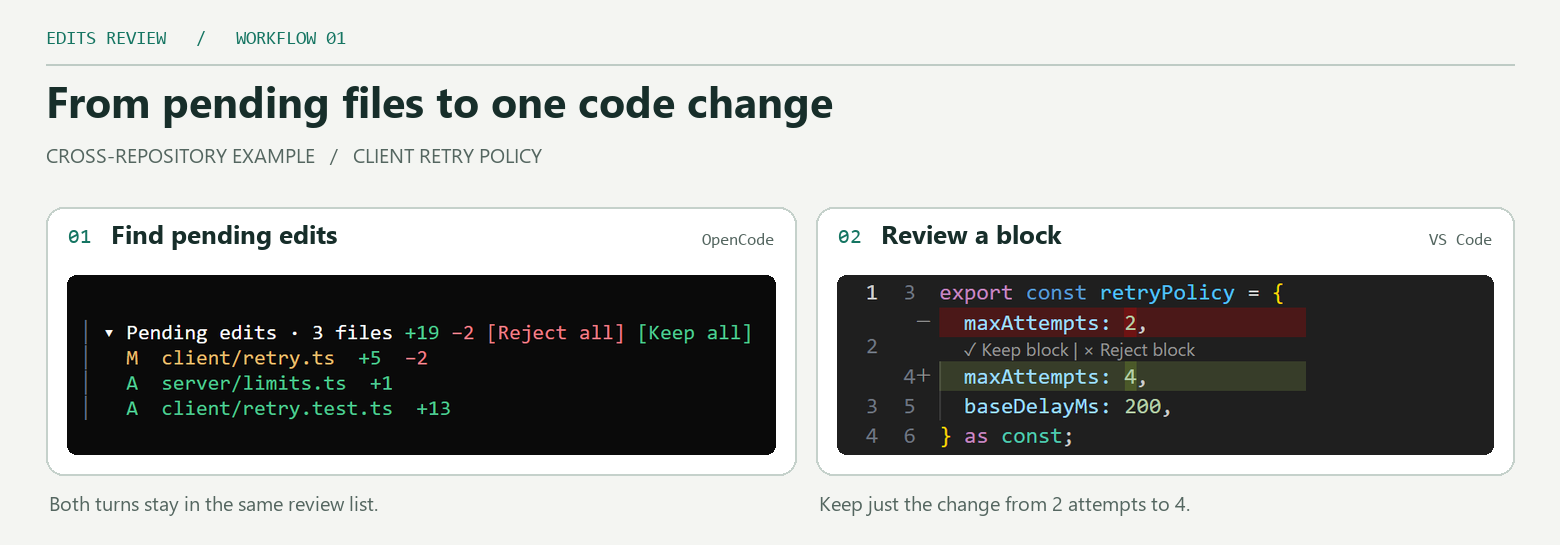
Review cumulative changes from an OpenCode session in VS Code's native diff editor. Keep or reject individual blocks, or edit the working side before deciding. Multiple repositories under a common folder work without making that folder a Git repository.

This extension is the editor companion. It needs the OpenCode capture plugin on the same machine and under the same OS account. By itself, the extension does not record edits.

Live workflow: find pending files in OpenCode and review individual blocks in VS Code

Get started

  1. Install the OpenCode capture plugin using the setup guide.
  2. Open the session's working folder in VS Code. If it contains several repositories, open their common parent.
  3. Click a pending file above the OpenCode prompt, or run Edits Review: Open pending edits in the Command Palette.

The left side is the review baseline; the right side is the actual working file. Keep updates the baseline without writing the file. Reject reverts only the selected block, and does not overwrite overlapping manual edits. Save any manual edits before using the review actions.

English and Simplified Chinese are supported. The current release targets local desktop workspaces; Remote SSH, containers, and file changes made indirectly through shell commands are outside its capture scope.

English documentation · 中文文档 · Report an issue

  • Contact us
  • Jobs
  • Privacy
  • Manage cookies
  • Terms of use
  • Trademarks
  • Your Privacy Choices
  • Consumer Health Privacy
© 2026 Microsoft