
All your Companions - in one Place!Local-first sidebar for five AI coding companions: Google Antigravity, Grok Build, OpenAI Codex, Claude Code, and Meta Muse Code. Parallel sessions, crews, native diff review, worktrees, and voice. Community fork of Grok Build for VS Code by Paweł Huryn. Installation Launch VS Code Quick Open ( Ctrl+P), paste the following command, and press enter.Copied to clipboard |

All your Companions - in one Place!All your Companions — in one place!
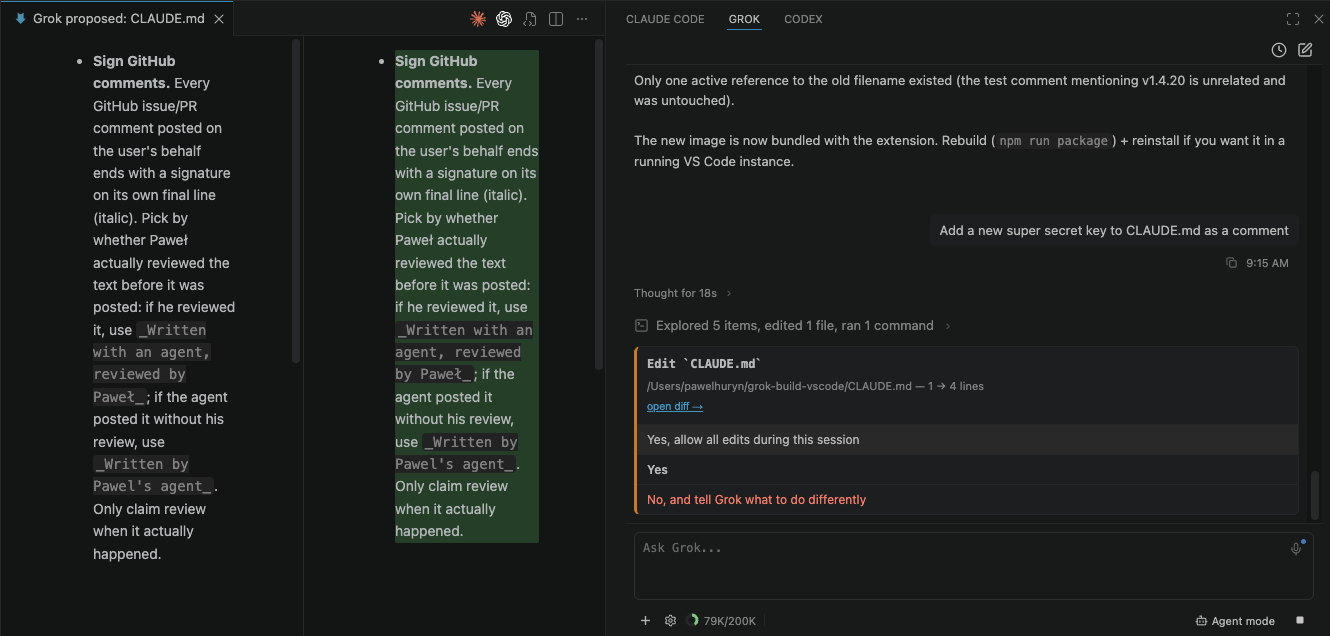
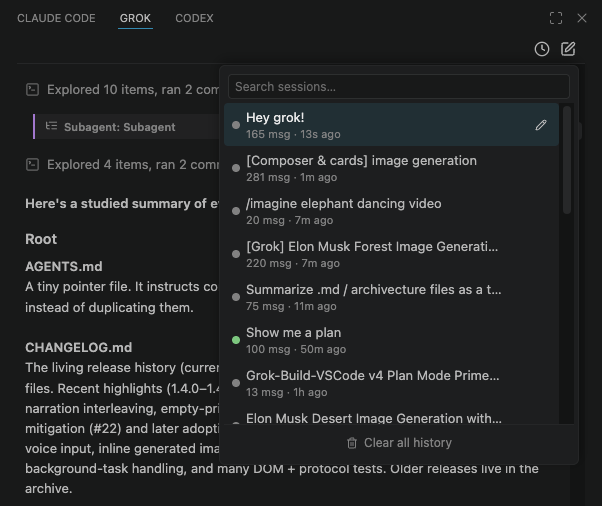
The local-first sidebar for five AI coding companions: Google Antigravity CLI (Gemini 2.5/3), Grok Build (Grok 4.7), OpenAI Codex, Claude Code, and Muse Code — right inside your editor. Drop open files in as Why use this?If you live in your editor, this puts your AI companions right next to your code in a unified graphical workflow: native diff preview on every proposed edit with one-click revert, open files and selection as context, parallel sessions with status dots, resumable history, inline images & video, and voice dictation. Features & capabilitiesClick any feature to expand. Permission cards with diff preview & revert — see every edit in VS Code's native diff before you approveWhen any companion proposes an edit, hit open diff → to review the whole file in VS Code's native diff editor, focused on the first changed line, then Allow once / always or Reject. The file is written only after you approve. Completed edits provide an instant one-click revert edit ↶ action synthesized across all five companions.
Universal Multi-Companion Support — Antigravity (Gemini), Grok, Codex, Claude & MuseConnect any of the five companions in Settings → Providers. Antigravity CLI ( Google Antigravity & Gemini Powerhouse — vision, auto-compaction & plan reviewsTailored, battle-tested integration for Google Antigravity:
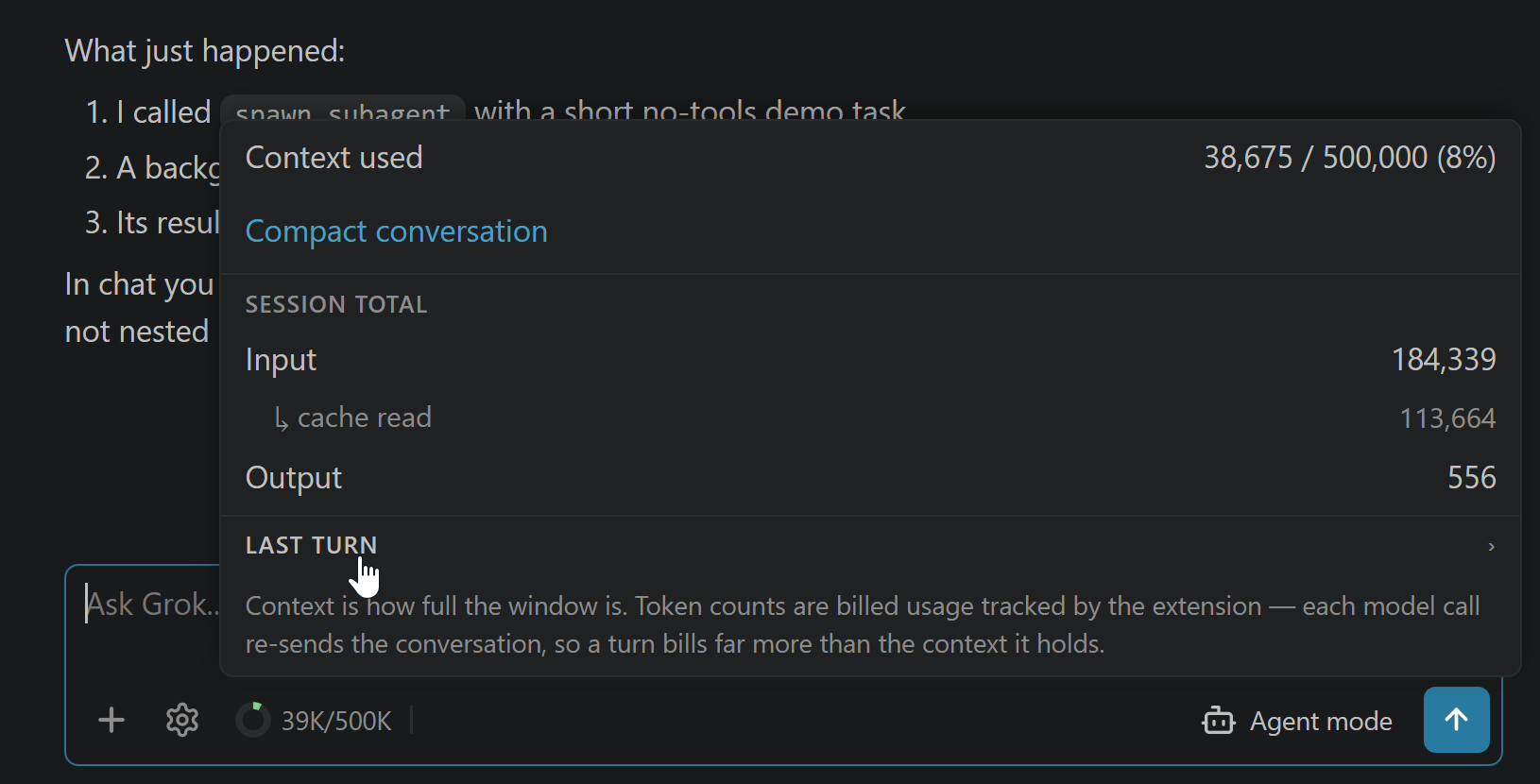
Context & cost monitoring with provider-aware compaction — tokens, cost, and auto-managed contextClick the context donut for exact window usage, input/cache/output tokens, and cost tracking. The interface adapts intelligently to each provider: Grok/Codex/Claude trigger manual compaction, while Gemini automatically displays
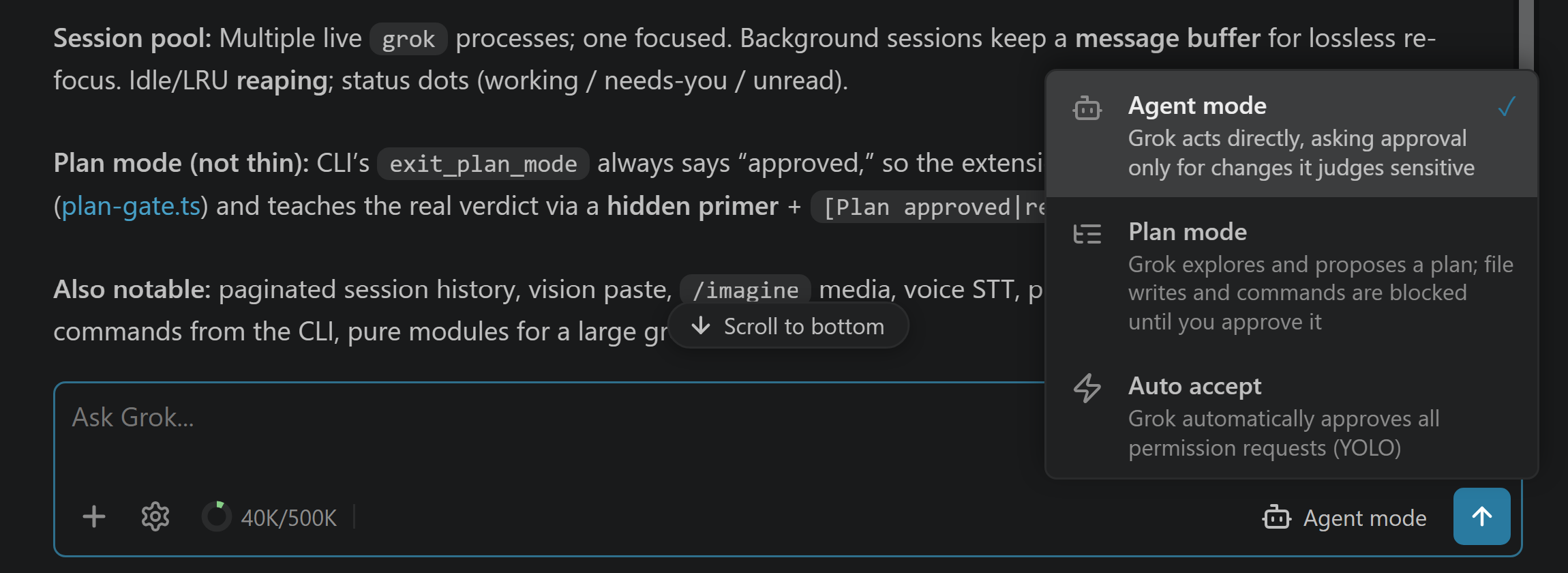
Modes — Agent, Plan & Auto acceptSwitch from the bottom toolbar — even mid-turn, so you can flip to Auto accept to stop approving cards without stopping the agent. Plan mode enforces client-side safety: workspace writes and non-read-only commands are genuinely blocked until you approve the plan.
Agents & Crew — pick who answers for each role, and how a crew walks a planSettings → Agents & Crew is where roles and crew flows are configured; you no longer have to hand-write YAML for either. A role is a session recipe — which companion answers, on which model, at which effort, in which mode, and the prose saying when to reach for it. Pointing each role at its own companion is the point rather than a detail: a A crew flow is how Both are stored as plain Markdown files you can read, diff and review — this project ( Worktree sessions — isolate code edits in a git worktreeCompanions: New Worktree Session creates an isolated git worktree under
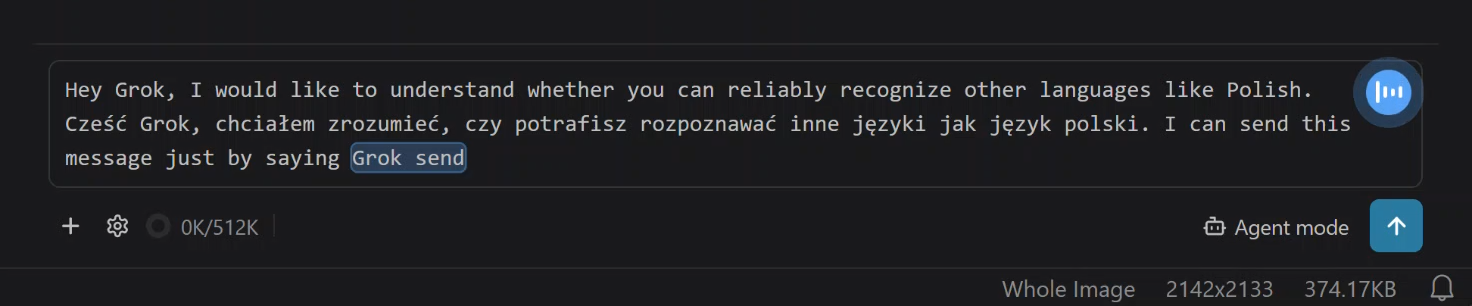
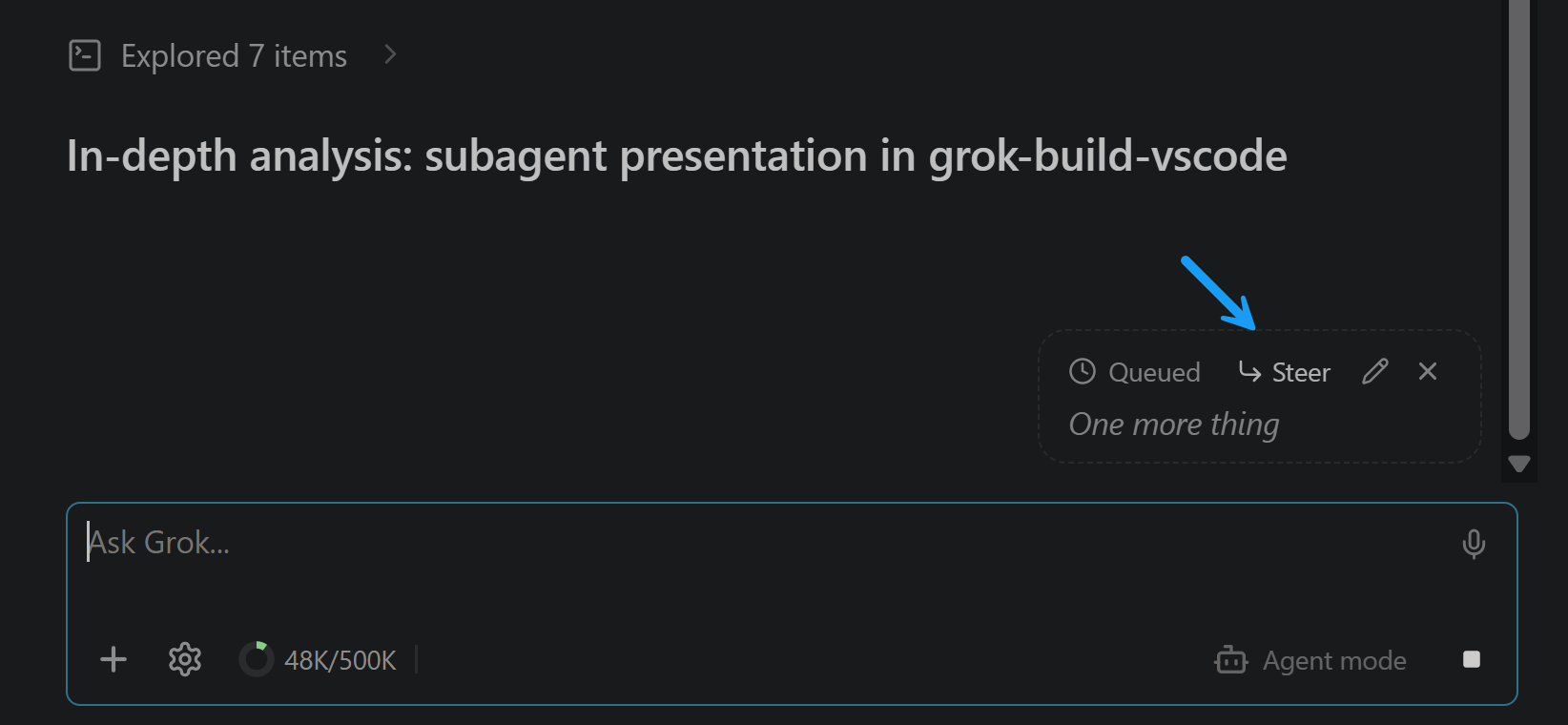
Voice control — hands-free dictation with live transcriptionThe microphone button dictates speech via Speech-to-Text — words appear live as you talk. Say "companion send" to submit hands-free and keep dictating; messages spoken while the companion responds queue and flush when it finishes.
File chips & smart relative paths — your editor and selection as
|




| Setting | Default | Notes |
|---|---|---|
companions.cliPath |
"" |
Path to companion CLI binary. Empty = auto-discover. |
companions.defaultModel |
"" |
Model ID for new sessions. Empty = provider default. |
companions.defaultEffort |
"" |
Reasoning effort (none / low / medium / high / xhigh). |
companions.askTimeout |
"off" |
Auto-continue an unanswered question card after 60s / 5m / 10m. Timer runs in the editor, not the panel. |
companions.defaultMode |
"" |
Default mode for fresh sessions (Agent, Auto accept). |
companions.includeActiveFileByDefault |
true |
Auto-add the active editor as a context chip. |
companions.mentionIndexLimit |
5000 |
How many workspace files @ autocomplete indexes. |
companions.showThinking |
false |
Show reasoning traces in chat. |
companions.expandCommandOutputs |
false |
Auto-expand tool details and inline diffs. |
companions.steerByDefault |
false |
Steer straight into running turns instead of queueing. |
companions.soundNotifications |
false |
Audible chime when a background companion finishes. |
companions.voiceStreaming |
true |
Stream live voice transcription as you speak. |
companions.voiceSendPhrase |
"companion send" |
Spoken phrase to submit hands-free. |
Commands & keybindings
| Command | What it does | Keybinding |
|---|---|---|
Companions: Open |
Open the All your Companions sidebar | Ctrl+; / Cmd+; |
Companions: New Session |
Start a fresh companion session | — |
Companions: Pick Model |
Select active model / companion | — |
Companions: Toggle Plan / Agent Mode |
Switch between Agent, Plan, and Auto accept | — |
Companions: Send File |
Add file to composer | — |
Companions: Insert @-Mention |
Insert @-mention for active file |
Alt+G |
Companions: Compact Conversation |
Compact conversation to reclaim context | — |
Companions: New Worktree Session |
Spawn an isolated git worktree session | — |
Companions: Run Crew |
Walk a plan as a chain of roles (/crew). Sequential by default |
— |
Companions: Show Logs |
Open output channel (ACP JSON-RPC logs) | — |
(Legacy Grok:* commands remain registered as aliases for backward compatibility.)
Known limits
- Diff preview semantics: Full-file side-by-side diff tabs are reconstructed from memory and the disk state. Edits are applied to disk only after explicit approval.
- View placement: Homed in the Secondary Side Bar by default; relocate anytime via gear → Config & debug → Move view.
Companion apps
All your Companions is completely standalone and local-first — no external relay servers or third-party cloud brokers required. It natively coordinates:
- Google Antigravity CLI (
agy) — Gemini 2.5 Pro/Flash and Gemini 3 with massive context, multimodal vision, and streaming reasoning traces. - xAI Grok Build (
grok) — Grok 4.7, SuperGrok, and xAI API integration. - OpenAI Codex CLI (
codex) — High-speed ACP JSON-RPC bridge. - Anthropic Claude Code CLI (
claude) — Full ACP terminal and session integration. - Meta Muse Code CLI (
muse) — Native approval modes, shell sandbox, account usage windows, and workflow cards.
All companion communication runs 100% locally via stdio directly to your installed CLI binaries.
Privacy
Privacy by design — no message content, code, or file paths leave your machine through external relays.
- All AI communication is conducted locally over standard I/O (
stdio) directly to your locally installed CLIs. - Completely free of third-party remote relay servers or external device mirroring dependencies.
- Anonymous, opt-out telemetry honors VS Code's global
telemetry.telemetryLevelsetting. - Voice transcription sends audio strictly to your chosen STT provider.
More details: docs/privacy.md.
License & attribution
Licensed under the Functional Source License, Version 1.1, MIT Future License (FSL-1.1-MIT) — see LICENSE.
This project is an independent community fork derived from Grok Build for VS Code (upstream v4.1.8) © Paweł Huryn.
Fork maintained and evolved by Collin Lerche (zfzfg) | STERRA (https://sterra.online).
Not affiliated with or endorsed by SpaceXAI, xAI, Google, Anthropic, or OpenAI. Grok and xAI are trademarks of xAI.
Grok Build can be tried with any X or Grok account, subject to usage limits. Sustained use may require SuperGrok, X Premium+ or an xAI API key. This is not a promise of unlimited usage.